IN WHAT WAYS DOES YOUR MEDIA PRODUCT USE, DEVELOP OR CHALLENGE
          FORMS AND CONVENTIONS OF MEDIA PRODUCTS?
                         SIMILARITIES

                    Masthead is bold and goes across the
                    width of the page to attract the reader
                    to magazine and it has a distinct font.

                          Puff to provide an offer as an
                          incentive for the reader to
                          purchase the magazine.


                    Main cover line to stand out
                    above the other cover lines to
                    provide an insight of what’s in the
                    magazine.

                    Cover image is well positioned with the
                    rule of thirds and mainly in the centre of
                    the page.
                                                              Cover line in a black box to create
                                                              an edge on the page and make the
                                                              sell line stand out more.
IN WHAT WAYS DOES YOUR MEDIA PRODUCT USE, DEVELOP OR CHALLENGE
          FORMS AND CONVENTIONS OF MEDIA PRODUCTS?
                         DIFFERENCES


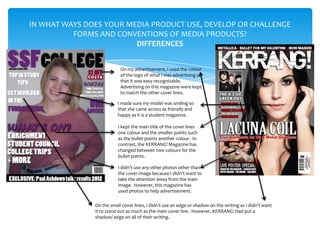
                           On my advertisement, I used the colour
                           of the logo of what I was advertising so
                           that it was easy recognisable.
                           Advertising on this magazine were kept
                           to match the other cover lines.

                          I made sure my model was smiling so
                          that she came across as friendly and
                          happy as it is a student magazine.

                          I kept the main title of the cover lines
                          one colour and the smaller points such
                          as the bullet points another colour. In
                          contrast, the KERRANG! Magazine has
                          changed between two colours for the
                          bullet points.

                          I didn’t use any other photos other than
                          the cover image because I didn’t want to
                          take the attention away from the main
                          image. However, this magazine has
                          used photos to help advertisement.

               On the small cover lines, I didn’t use an edge or shadow on the writing as I didn’t want
               it to stand out as much as the main cover line. However, KERRANG! Had put a
               shadow/ edge on all of their writing.
FEEDBACK OF FRONT COVER

My audience gave me the following feedback about my front cover:

•   The masthead was bold and stood out well.

•   My cover photo was well positioned and eye catching.

•   The cover lines were short and snappy to catch your attention.

•   The colours were appropriate and created a theme.

•   There was still some blank space that needed to be filled.
IN WHAT WAYS DOES YOUR MEDIA PRODUCT USE, DEVELOP OR
 CHALLENGE FORMS AND CONVENTIONS OF MEDIA PRODUCTS?
                    SIMILARITIES


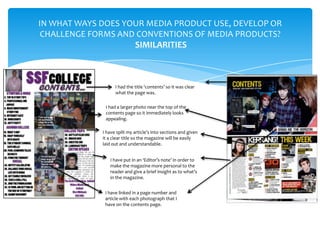
                   I had the title ‘contents’ so it was clear
                   what the page was.

              I had a larger photo near the top of the
              contents page so it immediately looks
              appealing.

             I have split my article’s into sections and given
             it a clear title so the magazine will be easily
             laid out and understandable.


                I have put in an ‘Editor’s note’ in order to
                make the magazine more personal to the
                reader and give a brief insight as to what’s
                in the magazine.


              I have linked in a page number and
              article with each photograph that I
              have on the contents page.
IN WHAT WAYS DOES YOUR MEDIA PRODUCT USE, DEVELOP OR
 CHALLENGE FORMS AND CONVENTIONS OF MEDIA PRODUCTS?
                    DIFFERENCES


                 I put my masthead onto my contents page to
                 carry on the design of my front cover and to
                 make it easily recognisable.


               KERRANG! Puts a box around the section titles
               to make it stand out more and it also eliminates
               blank space. I didn’t do this, instead I just had
               the title in a different colour.


               As it was a college magazine, I thought it was
               important to include the contact details of the college.
               However, in the KERRANG! Contents page, the contact
               details aren’t included.
                                                       They included more advertisement on their
                                                       contents page where as I just listed the
                                                       articles.
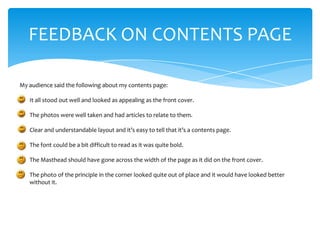
FEEDBACK ON CONTENTS PAGE

My audience said the following about my contents page:

•   It all stood out well and looked as appealing as the front cover.

•   The photos were well taken and had articles to relate to them.

•   Clear and understandable layout and it’s easy to tell that it’s a contents page.

•   The font could be a bit difficult to read as it was quite bold.

•   The Masthead should have gone across the width of the page as it did on the front cover.

•   The photo of the principle in the corner looked quite out of place and it would have looked better
    without it.
WHAT HAVE YOU LEARNT ABOUT TECHNOLOGIES FROM THE PROCESS OF
                   CONSTRUCTING THIS PRODUCT?


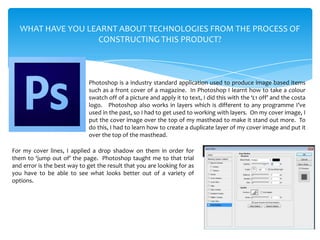
                             Photoshop is a industry standard application used to produce image based items
                             such as a front cover of a magazine. In Photoshop I learnt how to take a colour
                             swatch off of a picture and apply it to text, I did this with the ‘£1 off’ and the costa
                             logo. Photoshop also works in layers which is different to any programme I’ve
                             used in the past, so I had to get used to working with layers. On my cover image, I
                             put the cover image over the top of my masthead to make it stand out more. To
                             do this, I had to learn how to create a duplicate layer of my cover image and put it
                             over the top of the masthead.

For my cover lines, I applied a drop shadow on them in order for
them to ‘jump out of’ the page. Photoshop taught me to that trial
and error is the best way to get the result that you are looking for as
you have to be able to see what looks better out of a variety of
options.
WHAT HAVE YOU LEARNT ABOUT TECHNOLOGIES FROM THE PROCESS OF
                  CONSTRUCTING THIS PRODUCT?


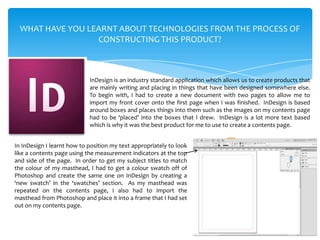
                            InDesign is an industry standard application which allows us to create products that
                            are mainly writing and placing in things that have been designed somewhere else.
                            To begin with, I had to create a new document with two pages to allow me to
                            import my front cover onto the first page when I was finished. InDesign is based
                            around boxes and places things into them such as the images on my contents page
                            had to be ‘placed’ into the boxes that I drew. InDesign is a lot more text based
                            which is why it was the best product for me to use to create a contents page.


In InDesign I learnt how to position my text appropriately to look
like a contents page using the measurement indicators at the top
and side of the page. In order to get my subject titles to match
the colour of my masthead, I had to get a colour swatch off of
Photoshop and create the same one on InDesign by creating a
‘new swatch’ in the ‘swatches’ section. As my masthead was
repeated on the contents page, I also had to import the
masthead from Photoshop and place it into a frame that I had set
out on my contents page.
WHAT HAVE YOU LEARNT ABOUT TECHNOLOGIES FROM THE PROCESS OF
                  CONSTRUCTING THIS PRODUCT?


                                                   In order to present the work I have undertaken, a
                                                   blog was set up on ‘Blogger’ to upload all of my
                                                   work in a clean and efficient manner. From using
                                                   blogger, I have learnt how to clearly set out a post
To take the images that I used on both my front    and upload images onto them. I have also had to
cover and contents page, I had to use a digital    learn how to export a PDF file into a JPEG file.
camera. When taking the images, I had to           When uploading my posts to my blog, I have added
remember the rule of thirds and make sure I        a label to them to clearly show it is my work if the
took images that were well proportioned and        blogs ever get mixed up.
that would match my theme and layout of my
contents and front cover. Therefore, I took my
cover image portrait and used a medium close
up which is from the waist upwards to
emphasise the body language. The images on
my front cover were a long shot – landscape,
two medium shots portrait and a close up
landscape that I then cropped to a square to fit
in my ‘Editor’s note’ section.

Evaluation

  • 2.
    IN WHAT WAYSDOES YOUR MEDIA PRODUCT USE, DEVELOP OR CHALLENGE FORMS AND CONVENTIONS OF MEDIA PRODUCTS? SIMILARITIES Masthead is bold and goes across the width of the page to attract the reader to magazine and it has a distinct font. Puff to provide an offer as an incentive for the reader to purchase the magazine. Main cover line to stand out above the other cover lines to provide an insight of what’s in the magazine. Cover image is well positioned with the rule of thirds and mainly in the centre of the page. Cover line in a black box to create an edge on the page and make the sell line stand out more.
  • 3.
    IN WHAT WAYSDOES YOUR MEDIA PRODUCT USE, DEVELOP OR CHALLENGE FORMS AND CONVENTIONS OF MEDIA PRODUCTS? DIFFERENCES On my advertisement, I used the colour of the logo of what I was advertising so that it was easy recognisable. Advertising on this magazine were kept to match the other cover lines. I made sure my model was smiling so that she came across as friendly and happy as it is a student magazine. I kept the main title of the cover lines one colour and the smaller points such as the bullet points another colour. In contrast, the KERRANG! Magazine has changed between two colours for the bullet points. I didn’t use any other photos other than the cover image because I didn’t want to take the attention away from the main image. However, this magazine has used photos to help advertisement. On the small cover lines, I didn’t use an edge or shadow on the writing as I didn’t want it to stand out as much as the main cover line. However, KERRANG! Had put a shadow/ edge on all of their writing.
  • 4.
    FEEDBACK OF FRONTCOVER My audience gave me the following feedback about my front cover: • The masthead was bold and stood out well. • My cover photo was well positioned and eye catching. • The cover lines were short and snappy to catch your attention. • The colours were appropriate and created a theme. • There was still some blank space that needed to be filled.
  • 5.
    IN WHAT WAYSDOES YOUR MEDIA PRODUCT USE, DEVELOP OR CHALLENGE FORMS AND CONVENTIONS OF MEDIA PRODUCTS? SIMILARITIES I had the title ‘contents’ so it was clear what the page was. I had a larger photo near the top of the contents page so it immediately looks appealing. I have split my article’s into sections and given it a clear title so the magazine will be easily laid out and understandable. I have put in an ‘Editor’s note’ in order to make the magazine more personal to the reader and give a brief insight as to what’s in the magazine. I have linked in a page number and article with each photograph that I have on the contents page.
  • 6.
    IN WHAT WAYSDOES YOUR MEDIA PRODUCT USE, DEVELOP OR CHALLENGE FORMS AND CONVENTIONS OF MEDIA PRODUCTS? DIFFERENCES I put my masthead onto my contents page to carry on the design of my front cover and to make it easily recognisable. KERRANG! Puts a box around the section titles to make it stand out more and it also eliminates blank space. I didn’t do this, instead I just had the title in a different colour. As it was a college magazine, I thought it was important to include the contact details of the college. However, in the KERRANG! Contents page, the contact details aren’t included. They included more advertisement on their contents page where as I just listed the articles.
  • 7.
    FEEDBACK ON CONTENTSPAGE My audience said the following about my contents page: • It all stood out well and looked as appealing as the front cover. • The photos were well taken and had articles to relate to them. • Clear and understandable layout and it’s easy to tell that it’s a contents page. • The font could be a bit difficult to read as it was quite bold. • The Masthead should have gone across the width of the page as it did on the front cover. • The photo of the principle in the corner looked quite out of place and it would have looked better without it.
  • 8.
    WHAT HAVE YOULEARNT ABOUT TECHNOLOGIES FROM THE PROCESS OF CONSTRUCTING THIS PRODUCT? Photoshop is a industry standard application used to produce image based items such as a front cover of a magazine. In Photoshop I learnt how to take a colour swatch off of a picture and apply it to text, I did this with the ‘£1 off’ and the costa logo. Photoshop also works in layers which is different to any programme I’ve used in the past, so I had to get used to working with layers. On my cover image, I put the cover image over the top of my masthead to make it stand out more. To do this, I had to learn how to create a duplicate layer of my cover image and put it over the top of the masthead. For my cover lines, I applied a drop shadow on them in order for them to ‘jump out of’ the page. Photoshop taught me to that trial and error is the best way to get the result that you are looking for as you have to be able to see what looks better out of a variety of options.
  • 9.
    WHAT HAVE YOULEARNT ABOUT TECHNOLOGIES FROM THE PROCESS OF CONSTRUCTING THIS PRODUCT? InDesign is an industry standard application which allows us to create products that are mainly writing and placing in things that have been designed somewhere else. To begin with, I had to create a new document with two pages to allow me to import my front cover onto the first page when I was finished. InDesign is based around boxes and places things into them such as the images on my contents page had to be ‘placed’ into the boxes that I drew. InDesign is a lot more text based which is why it was the best product for me to use to create a contents page. In InDesign I learnt how to position my text appropriately to look like a contents page using the measurement indicators at the top and side of the page. In order to get my subject titles to match the colour of my masthead, I had to get a colour swatch off of Photoshop and create the same one on InDesign by creating a ‘new swatch’ in the ‘swatches’ section. As my masthead was repeated on the contents page, I also had to import the masthead from Photoshop and place it into a frame that I had set out on my contents page.
  • 10.
    WHAT HAVE YOULEARNT ABOUT TECHNOLOGIES FROM THE PROCESS OF CONSTRUCTING THIS PRODUCT? In order to present the work I have undertaken, a blog was set up on ‘Blogger’ to upload all of my work in a clean and efficient manner. From using blogger, I have learnt how to clearly set out a post To take the images that I used on both my front and upload images onto them. I have also had to cover and contents page, I had to use a digital learn how to export a PDF file into a JPEG file. camera. When taking the images, I had to When uploading my posts to my blog, I have added remember the rule of thirds and make sure I a label to them to clearly show it is my work if the took images that were well proportioned and blogs ever get mixed up. that would match my theme and layout of my contents and front cover. Therefore, I took my cover image portrait and used a medium close up which is from the waist upwards to emphasise the body language. The images on my front cover were a long shot – landscape, two medium shots portrait and a close up landscape that I then cropped to a square to fit in my ‘Editor’s note’ section.