As Media Unit G321 – Neelam Mattu


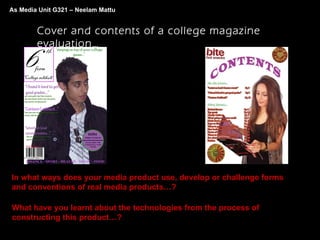
        Cover and contents of a college magazine
        evaluation…


In what ways does your media product use, develop or challenge forms
and conventions of real media products…?

What have you learnt about the technologies from the process of
constructing this product…?
In what ways does your media product use, develop or challenge forms
and conventions of real media products…?


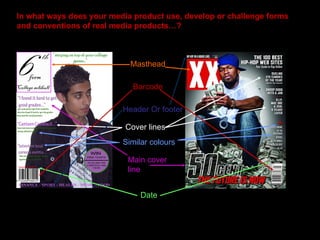
                            Masthead

                             Barcode

                          Header Or footer

                           Cover lines
                          Similar colours

                           Main cover
                           line


                               Date
In what ways does your media product use, develop or challenge forms
and conventions of real media products…?


               Differences between my cover and an actual
                            magazine cover…
                Colours – in my magazine I have used the college
                  colours to reflect the to the students that the
                magazine is relevant to their student lives, this will
                   also attract the audience to the magazine.


                 I have used the magic “C” idea to ensure if it was on
                   sale that the audience can see some of the cover
                   lines, this will entice the audience to want to read
                                            more.

                  Positioning and arrangements - in my magazine I
                 have not covered my masthead this will enable the
                 reader to know what they are reading. My barcode
                       and date is in the first third of the cover.

                 Uses a flash to advertise a free gift included within
                                   the magazine.

                    I have used an image with no background in it
                 (simple) make the person relatable to the audience.
In what ways does your media product use, develop or challenge forms
and conventions of real media products…?


              Differences between my contents page and an
                         actual contents page…
                 Colours – on my magazine contents page I have
                  used the college colours once again to show
                   students that the magazine relates to them.

                I have used bold writing on my contents, so that the
                audience can read it and see it clearly on the page.
                  This will make it easy for the reader to identify the
                               page they want to go to.

                 Positioning on the page - I have used 4 images on
                  the page and placed them so that the audience
                  does not feel that the page is empty or spacey.

                 I have used two separate lists for the contents so
                  that the reader can get to the cover page stories
                easily, this will make the reader feel that they are in
                                        control.
What have you learnt about the technologies from the process of
constructing this product…?


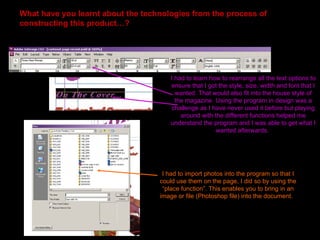
                                       I had to learn how to rearrange all the text options to
                                       ensure that I got the style, size, width and font that I
                                         wanted. That would also fit into the house style of
                                         the magazine. Using the program in design was a
                                        challenge as I have never used it before but playing
                                           around with the different functions helped me
                                       understand the program and I was able to get what I
                                                        wanted afterwards.


                                    I had to import photos into the program so that I
                                   could use them on the page, I did so by using the
                                    “place function”. This enables you to bring in an
                                   image or file (Photoshop file) into the document.
What have you learnt about the technologies from the process of
constructing this product…?


                               I had to change alot of the effects settings on the
                                text, this proved difficult as you have to use the
                                 stroke and swatch colours which is completely
                                      different to office word or Photoshop.
What have you learnt about the technologies from the process of
constructing this product…?


                                         I learnt that you are able to
                                         pick the same colour as u
                                         have used with the pipette
                                         tool and then relay this on
                                         another piece of text.
                                         For example I used the tool
                                         to select the colour form
                                         my flash and used this on
                                         my footer text so that they
                                         would match. This enable
                                         you to keep a similar
                                         theme throughout the
                                         pages.
What have you learnt about the technologies from the process of
constructing this product…?


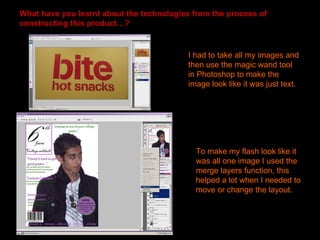
                                          I had to take all my images and
                                          then use the magic wand tool
                                          in Photoshop to make the
                                          image look like it was just text.


                                            To make my flash look like it
                                            was all one image I used the
                                            merge layers function, this
                                            helped a lot when I needed to
                                            move or change the layout.
What have you learnt about the technologies from the process of
constructing this product…?


         I also learnt that in Photoshop you are able to warp text to
        any shape or form you need, it took me a while to figure out
           how I would get the arched shape title I wanted (for my
               contents) but I used the transform tool to do so.
My original images…

Evaluation

  • 1.
    As Media UnitG321 – Neelam Mattu Cover and contents of a college magazine evaluation… In what ways does your media product use, develop or challenge forms and conventions of real media products…? What have you learnt about the technologies from the process of constructing this product…?
  • 2.
    In what waysdoes your media product use, develop or challenge forms and conventions of real media products…? Masthead Barcode Header Or footer Cover lines Similar colours Main cover line Date
  • 3.
    In what waysdoes your media product use, develop or challenge forms and conventions of real media products…? Differences between my cover and an actual magazine cover… Colours – in my magazine I have used the college colours to reflect the to the students that the magazine is relevant to their student lives, this will also attract the audience to the magazine. I have used the magic “C” idea to ensure if it was on sale that the audience can see some of the cover lines, this will entice the audience to want to read more. Positioning and arrangements - in my magazine I have not covered my masthead this will enable the reader to know what they are reading. My barcode and date is in the first third of the cover. Uses a flash to advertise a free gift included within the magazine. I have used an image with no background in it (simple) make the person relatable to the audience.
  • 4.
    In what waysdoes your media product use, develop or challenge forms and conventions of real media products…? Differences between my contents page and an actual contents page… Colours – on my magazine contents page I have used the college colours once again to show students that the magazine relates to them. I have used bold writing on my contents, so that the audience can read it and see it clearly on the page. This will make it easy for the reader to identify the page they want to go to. Positioning on the page - I have used 4 images on the page and placed them so that the audience does not feel that the page is empty or spacey. I have used two separate lists for the contents so that the reader can get to the cover page stories easily, this will make the reader feel that they are in control.
  • 5.
    What have youlearnt about the technologies from the process of constructing this product…? I had to learn how to rearrange all the text options to ensure that I got the style, size, width and font that I wanted. That would also fit into the house style of the magazine. Using the program in design was a challenge as I have never used it before but playing around with the different functions helped me understand the program and I was able to get what I wanted afterwards. I had to import photos into the program so that I could use them on the page, I did so by using the “place function”. This enables you to bring in an image or file (Photoshop file) into the document.
  • 6.
    What have youlearnt about the technologies from the process of constructing this product…? I had to change alot of the effects settings on the text, this proved difficult as you have to use the stroke and swatch colours which is completely different to office word or Photoshop.
  • 7.
    What have youlearnt about the technologies from the process of constructing this product…? I learnt that you are able to pick the same colour as u have used with the pipette tool and then relay this on another piece of text. For example I used the tool to select the colour form my flash and used this on my footer text so that they would match. This enable you to keep a similar theme throughout the pages.
  • 8.
    What have youlearnt about the technologies from the process of constructing this product…? I had to take all my images and then use the magic wand tool in Photoshop to make the image look like it was just text. To make my flash look like it was all one image I used the merge layers function, this helped a lot when I needed to move or change the layout.
  • 9.
    What have youlearnt about the technologies from the process of constructing this product…? I also learnt that in Photoshop you are able to warp text to any shape or form you need, it took me a while to figure out how I would get the arched shape title I wanted (for my contents) but I used the transform tool to do so.
  • 10.