
Evaluating Educational Mobile Apps
with Preservice Teachers
The PTC3 Framework
Evrim Baran, Ph.D.
Middle East Technical University
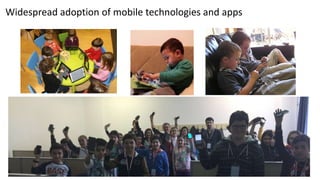
Widespread adoption of mobile technologies and apps
2
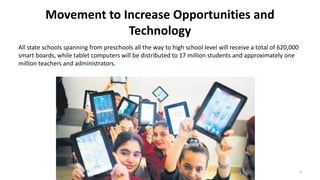
Movement to Increase Opportunities and
Technology
All state schools spanning from preschools all the way to high school level will receive a total of 620,000
smart boards, while tablet computers will be distributed to 17 million students and approximately one
million teachers and administrators.
3
–What capabilities of mobile devices and apps can
support learning and teaching?
–Given the large number of mobile apps available,
how do educators select which mobile apps to
integrate into their learning environments?
–How can teachers be supported with mobile app
integration into their teaching?
4
Pedagogical Questions
TeachEdMobile
Provide, through research and development, methodological and curricular support to
teacher educators so that they have research informed resources and curriculum for
the integration of mobile applications into their teacher education programs.
– To establish criterion-referenced assessments with preservice teachers that will help to judge
the educational value of mobile applications, provide a baseline for the teacher education
curriculum, and provide ideas for new mobile applications that could potentially help produce
usable applications.
– To develop resources for teacher educators to help preservice teachers learn about mobile
applications and apply it to instructional environments with learners.
– To develop and test research instruments that assess evidence of preservice teachers’ knowledge
of the effective integration of mobile applications into their teaching settings.
– To design and deliver a new “Going Mobile in Teacher Education” open course to develop
preservice teachers’ knowledge of effective integration of mobile applications and disseminate
the research-informed mobile application curriculum to the interested educators in Europe and
around the world.
– To perform Marie Curie outreach activities. 5
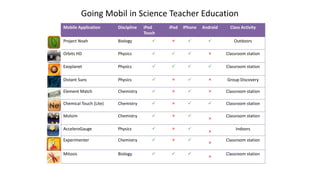
Going Mobil in Science Teacher Education
Mobile Application Discipline iPod
Touch
iPad iPhone Android Class Activity
Project Noah Biology     Outdoors
Orbits HD Physics     Classroom station
Exoplanet Physics     Classroom station
Distant Suns Physics     Group Discovery
Element Match Chemistry     Classroom station
Chemical Touch (Lite) Chemistry     Classroom station
Molsim Chemistry   

Classroom station
AcceleroGauge Physics   

Indoors
Experimenter Chemistry   

Classroom station
Mitosis Biology   

Classroom station
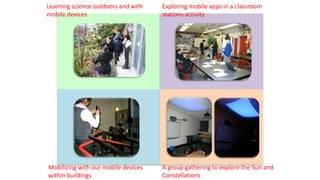
Learning science outdoors and with
mobile devices
Mobilizing with our mobile devices
within buildings
A group gathering to explore the Sun and
Constellations
Exploring mobile apps in a classroom
stations activity
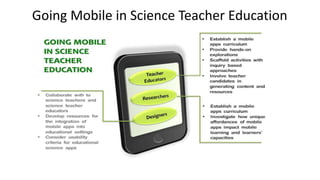
Going Mobile in Science Teacher Education
9
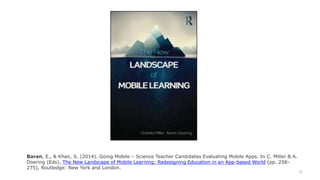
Baran, E., & Khan, S. (2014). Going Mobile – Science Teacher Candidates Evaluating Mobile Apps. In C. Miller & A.
Doering (Eds), The New Landscape of Mobile Learning: Redesigning Education in an App-based World (pp. 258–
275), Routledge: New York and London.
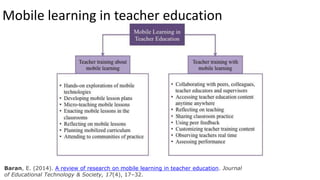
Mobile learning in teacher education
Baran, E. (2014). A review of research on mobile learning in teacher education. Journal
of Educational Technology & Society, 17(4), 17–32.
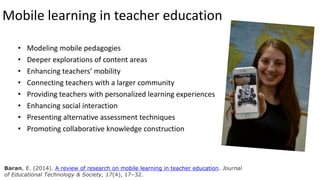
Mobile learning in teacher education
• Modeling mobile pedagogies
• Deeper explorations of content areas
• Enhancing teachers’ mobility
• Connecting teachers with a larger community
• Providing teachers with personalized learning experiences
• Enhancing social interaction
• Presenting alternative assessment techniques
• Promoting collaborative knowledge construction
Baran, E. (2014). A review of research on mobile learning in teacher education. Journal
of Educational Technology & Society, 17(4), 17–32.
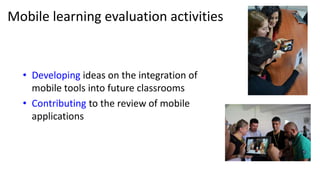
Mobile learning evaluation activities
• Developing ideas on the integration of
mobile tools into future classrooms
• Contributing to the review of mobile
applications
Development of mobile app selection tools
• Green et al.’s (2014) Mobile App
Selection for Science (MASS),
• Walker’s (2011) Evaluation
Rubric for Mobile Applications
(ERMA) and
• Schrocks’s (2013) checklist
• http://educationappreviews.co
m/
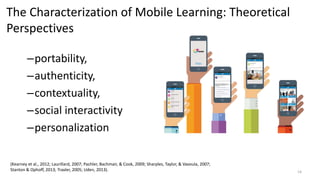
The Characterization of Mobile Learning: Theoretical
Perspectives
–portability,
–authenticity,
–contextuality,
–social interactivity
–personalization
14
(Kearney et al., 2012; Laurillard, 2007; Pachler, Bachmair, & Cook, 2009; Sharples, Taylor, & Vavoula, 2007;
Stanton & Ophoff, 2013; Traxler, 2005; Uden, 2013).
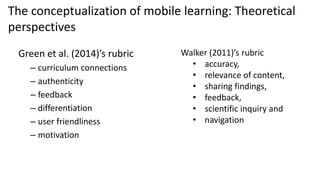
Green et al. (2014)’s rubric
– curriculum connections
– authenticity
– feedback
– differentiation
– user friendliness
– motivation
The conceptualization of mobile learning: Theoretical
perspectives
Walker (2011)’s rubric
• accuracy,
• relevance of content,
• sharing findings,
• feedback,
• scientific inquiry and
• navigation
Despite the emphasis on the importance of
usability, great number of mobile learning
environments is still designed without educational
concerns and usability problems.
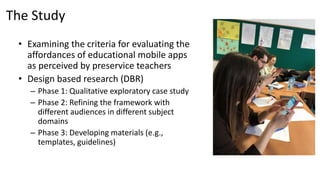
The Study
• Examining the criteria for evaluating the
affordances of educational mobile apps
as perceived by preservice teachers
• Design based research (DBR)
– Phase 1: Qualitative exploratory case study
– Phase 2: Refining the framework with
different audiences in different subject
domains
– Phase 3: Developing materials (e.g.,
templates, guidelines)
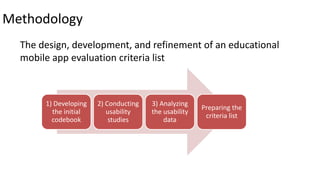
Methodology
The design, development, and refinement of an educational
mobile app evaluation criteria list
1) Developing
the initial
codebook
2) Conducting
usability
studies
3) Analyzing
the usability
data
Preparing the
criteria list
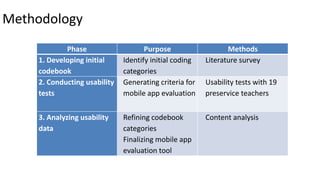
Methodology
Phase Purpose Methods
1. Developing initial
codebook
Identify initial coding
categories
Literature survey
2. Conducting usability
tests
Generating criteria for
mobile app evaluation
Usability tests with 19
preservice teachers
3. Analyzing usability
data
Refining codebook
categories
Finalizing mobile app
evaluation tool
Content analysis
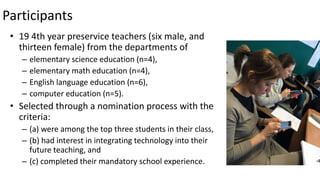
Participants
• 19 4th year preservice teachers (six male, and
thirteen female) from the departments of
– elementary science education (n=4),
– elementary math education (n=4),
– English language education (n=6),
– computer education (n=5).
• Selected through a nomination process with the
criteria:
– (a) were among the top three students in their class,
– (b) had interest in integrating technology into their
future teaching, and
– (c) completed their mandatory school experience.
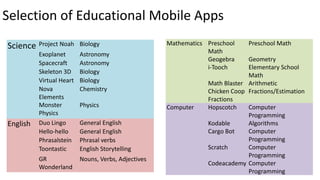
Selection of Educational Mobile Apps
• Search criteria
– free mobile apps that
– covered different content domains such
as science, mathematics, computer
education, and English as a foreign
language (EFL) education at the K12
level,
– received high ratings on the databases,
and
– allowed different interactions with the
content.
21
22
Science Project Noah Biology
Exoplanet Astronomy
Spacecraft Astronomy
Skeleton 3D Biology
Virtual Heart Biology
Nova
Elements
Chemistry
Monster
Physics
Physics
English Duo Lingo General English
Hello-hello General English
Phrasalstein Phrasal verbs
Toontastic English Storytelling
GR
Wonderland
Nouns, Verbs, Adjectives
Mathematics Preschool
Math
Preschool Math
Geogebra Geometry
i-Tooch Elementary School
Math
Math Blaster Arithmetic
Chicken Coop
Fractions
Fractions/Estimation
Computer Hopscotch Computer
Programming
Kodable Algorithms
Cargo Bot Computer
Programming
Scratch Computer
Programming
Codeacademy Computer
Programming
Selection of Educational Mobile Apps
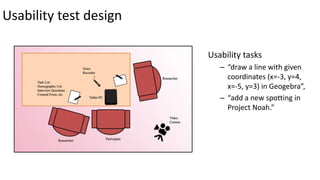
Usability test design
Usability tasks
– “draw a line with given
coordinates (x=-3, y=4,
x=-5, y=3) in Geogebra”,
– “add a new spotting in
Project Noah.”
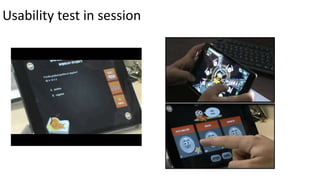
Usability test in session
Data Sources
–The recordings of usability test sessions
–The recordings of think aloud protocol during
usability sessions
–Debriefing interviews
All usability sessions and interview recordings (1168 minutes total, average 61
minutes per session) were transcribed for further analysis.
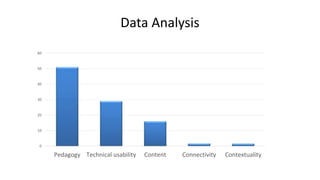
Data Analysis
0
10
20
30
40
50
60
Pedagogy Technical usability Content Connectivity Contextuality
27
28
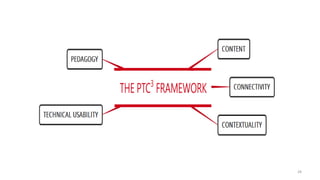
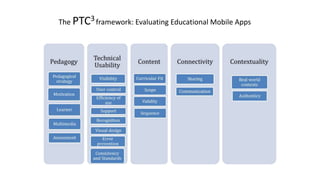
The PTC3framework: Evaluating Educational Mobile Apps
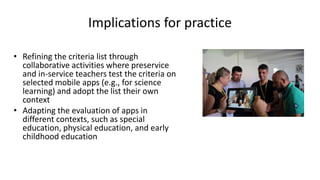
Implications for practice
• Refining the criteria list through
collaborative activities where preservice
and in-service teachers test the criteria on
selected mobile apps (e.g., for science
learning) and adopt the list their own
context
• Adapting the evaluation of apps in
different contexts, such as special
education, physical education, and early
childhood education
Recommendations for Future Research
• Future research on contextuality and connectivity aspects
• Emerging affordances of mobile apps
• Developing and testing research-based scales and rubrics with
teachers
• Using evaluation activities in pre-service and in-service teacher
education programs
http://latte.eds.metu.edu.tr/
Learning
Technologies and
Teacher
Education
http://teachedmobile.eds.metu.edu.tr/
TeachEDMobile
Integrating Mobile
Applications into
Teacher Education
Contact:
ebaran@metu.edu.tr
www.evrimbaran.com
www.twitter.com/evrimb
Teşekkürler

Evaluating Educational Mobile Apps with Preservice Teachers

  • 1.
    Evaluating Educational MobileApps with Preservice Teachers The PTC3 Framework Evrim Baran, Ph.D. Middle East Technical University
  • 2.
    Widespread adoption ofmobile technologies and apps 2
  • 3.
    Movement to IncreaseOpportunities and Technology All state schools spanning from preschools all the way to high school level will receive a total of 620,000 smart boards, while tablet computers will be distributed to 17 million students and approximately one million teachers and administrators. 3
  • 4.
    –What capabilities ofmobile devices and apps can support learning and teaching? –Given the large number of mobile apps available, how do educators select which mobile apps to integrate into their learning environments? –How can teachers be supported with mobile app integration into their teaching? 4 Pedagogical Questions
  • 5.
    TeachEdMobile Provide, through researchand development, methodological and curricular support to teacher educators so that they have research informed resources and curriculum for the integration of mobile applications into their teacher education programs. – To establish criterion-referenced assessments with preservice teachers that will help to judge the educational value of mobile applications, provide a baseline for the teacher education curriculum, and provide ideas for new mobile applications that could potentially help produce usable applications. – To develop resources for teacher educators to help preservice teachers learn about mobile applications and apply it to instructional environments with learners. – To develop and test research instruments that assess evidence of preservice teachers’ knowledge of the effective integration of mobile applications into their teaching settings. – To design and deliver a new “Going Mobile in Teacher Education” open course to develop preservice teachers’ knowledge of effective integration of mobile applications and disseminate the research-informed mobile application curriculum to the interested educators in Europe and around the world. – To perform Marie Curie outreach activities. 5
  • 6.
    Going Mobil inScience Teacher Education Mobile Application Discipline iPod Touch iPad iPhone Android Class Activity Project Noah Biology     Outdoors Orbits HD Physics     Classroom station Exoplanet Physics     Classroom station Distant Suns Physics     Group Discovery Element Match Chemistry     Classroom station Chemical Touch (Lite) Chemistry     Classroom station Molsim Chemistry     Classroom station AcceleroGauge Physics     Indoors Experimenter Chemistry     Classroom station Mitosis Biology     Classroom station
  • 7.
    Learning science outdoorsand with mobile devices Mobilizing with our mobile devices within buildings A group gathering to explore the Sun and Constellations Exploring mobile apps in a classroom stations activity
  • 8.
    Going Mobile inScience Teacher Education
  • 9.
    9 Baran, E., &Khan, S. (2014). Going Mobile – Science Teacher Candidates Evaluating Mobile Apps. In C. Miller & A. Doering (Eds), The New Landscape of Mobile Learning: Redesigning Education in an App-based World (pp. 258– 275), Routledge: New York and London.
  • 10.
    Mobile learning inteacher education Baran, E. (2014). A review of research on mobile learning in teacher education. Journal of Educational Technology & Society, 17(4), 17–32.
  • 11.
    Mobile learning inteacher education • Modeling mobile pedagogies • Deeper explorations of content areas • Enhancing teachers’ mobility • Connecting teachers with a larger community • Providing teachers with personalized learning experiences • Enhancing social interaction • Presenting alternative assessment techniques • Promoting collaborative knowledge construction Baran, E. (2014). A review of research on mobile learning in teacher education. Journal of Educational Technology & Society, 17(4), 17–32.
  • 12.
    Mobile learning evaluationactivities • Developing ideas on the integration of mobile tools into future classrooms • Contributing to the review of mobile applications
  • 13.
    Development of mobileapp selection tools • Green et al.’s (2014) Mobile App Selection for Science (MASS), • Walker’s (2011) Evaluation Rubric for Mobile Applications (ERMA) and • Schrocks’s (2013) checklist • http://educationappreviews.co m/
  • 14.
    The Characterization ofMobile Learning: Theoretical Perspectives –portability, –authenticity, –contextuality, –social interactivity –personalization 14 (Kearney et al., 2012; Laurillard, 2007; Pachler, Bachmair, & Cook, 2009; Sharples, Taylor, & Vavoula, 2007; Stanton & Ophoff, 2013; Traxler, 2005; Uden, 2013).
  • 15.
    Green et al.(2014)’s rubric – curriculum connections – authenticity – feedback – differentiation – user friendliness – motivation The conceptualization of mobile learning: Theoretical perspectives Walker (2011)’s rubric • accuracy, • relevance of content, • sharing findings, • feedback, • scientific inquiry and • navigation
  • 16.
    Despite the emphasison the importance of usability, great number of mobile learning environments is still designed without educational concerns and usability problems.
  • 17.
    The Study • Examiningthe criteria for evaluating the affordances of educational mobile apps as perceived by preservice teachers • Design based research (DBR) – Phase 1: Qualitative exploratory case study – Phase 2: Refining the framework with different audiences in different subject domains – Phase 3: Developing materials (e.g., templates, guidelines)
  • 18.
    Methodology The design, development,and refinement of an educational mobile app evaluation criteria list 1) Developing the initial codebook 2) Conducting usability studies 3) Analyzing the usability data Preparing the criteria list
  • 19.
    Methodology Phase Purpose Methods 1.Developing initial codebook Identify initial coding categories Literature survey 2. Conducting usability tests Generating criteria for mobile app evaluation Usability tests with 19 preservice teachers 3. Analyzing usability data Refining codebook categories Finalizing mobile app evaluation tool Content analysis
  • 20.
    Participants • 19 4thyear preservice teachers (six male, and thirteen female) from the departments of – elementary science education (n=4), – elementary math education (n=4), – English language education (n=6), – computer education (n=5). • Selected through a nomination process with the criteria: – (a) were among the top three students in their class, – (b) had interest in integrating technology into their future teaching, and – (c) completed their mandatory school experience.
  • 21.
    Selection of EducationalMobile Apps • Search criteria – free mobile apps that – covered different content domains such as science, mathematics, computer education, and English as a foreign language (EFL) education at the K12 level, – received high ratings on the databases, and – allowed different interactions with the content. 21
  • 22.
    22 Science Project NoahBiology Exoplanet Astronomy Spacecraft Astronomy Skeleton 3D Biology Virtual Heart Biology Nova Elements Chemistry Monster Physics Physics English Duo Lingo General English Hello-hello General English Phrasalstein Phrasal verbs Toontastic English Storytelling GR Wonderland Nouns, Verbs, Adjectives Mathematics Preschool Math Preschool Math Geogebra Geometry i-Tooch Elementary School Math Math Blaster Arithmetic Chicken Coop Fractions Fractions/Estimation Computer Hopscotch Computer Programming Kodable Algorithms Cargo Bot Computer Programming Scratch Computer Programming Codeacademy Computer Programming Selection of Educational Mobile Apps
  • 23.
    Usability test design Usabilitytasks – “draw a line with given coordinates (x=-3, y=4, x=-5, y=3) in Geogebra”, – “add a new spotting in Project Noah.”
  • 24.
  • 25.
    Data Sources –The recordingsof usability test sessions –The recordings of think aloud protocol during usability sessions –Debriefing interviews All usability sessions and interview recordings (1168 minutes total, average 61 minutes per session) were transcribed for further analysis.
  • 26.
    Data Analysis 0 10 20 30 40 50 60 Pedagogy Technicalusability Content Connectivity Contextuality
  • 27.
  • 28.
  • 29.
    The PTC3framework: EvaluatingEducational Mobile Apps
  • 30.
    Implications for practice •Refining the criteria list through collaborative activities where preservice and in-service teachers test the criteria on selected mobile apps (e.g., for science learning) and adopt the list their own context • Adapting the evaluation of apps in different contexts, such as special education, physical education, and early childhood education
  • 31.
    Recommendations for FutureResearch • Future research on contextuality and connectivity aspects • Emerging affordances of mobile apps • Developing and testing research-based scales and rubrics with teachers • Using evaluation activities in pre-service and in-service teacher education programs
  • 32.
  • 33.

Editor's Notes

  • #13  Yet, the literature still lacks research-informed resources and tools on the evaluation of mobile applications with preservice teachers who will be the potential users of these technologies in their future classrooms.
  • #26 Interview data included questions to gather preservice teachers’ thoughts about the pedagogical affordances, limitations, and educational uses of the apps they evaluated. Some guiding questions about the apps were “At which part or parts you faced difficulty while accomplishing tasks?”, “Would you use that app in your courses? Why or why not?”, “Thinking as whole, which components such as audio, video, feedback, and interface were powerful and not powerful in terms of teaching and learning?”, “What would you suggest to make this app educationally more powerful?”, “Could you provide scenarios for educational uses of this app?”. Other questions aimed to gather their suggestions about criteria for evaluating educational mobile apps and ways to develop their knowledge and skills about mobile learning integration in teacher education programs.