UbiTeach: methods for augmented teaching
Thomas Basilien
University of Oulu
Basilien.thomas@gmail.com
Tomasz Balcerzak
University of Oulu
tomasz.balcerzak@outlook.com
Giovanni Ferri
University of Oulu
giovanni.ferri2@studio.unibo.it
Roberto Medico
University of Oulu
roberto.medico@stud.unifi.it
Henri Rönkkö
University of Oulu
henri.ronkko@student.oulu.fi
ABSTRACT
The aim of this paper is to examine through a case study how
teaching and learning within a classroom can be affected by the
introduction of some technologic aid. The case study consists of a
multi-device ubiquitous application proposed and designed by the
authors to support and enhance the learning experience within a
classroom. The overall system, consisting of one main device for
the teacher and many personal devices for the students connected
together and synchronized through a web application, was
evaluated in-the-wild in a series of sessions with a real classroom.
Results show that the technology can be useful and viable within a
limited number of students, and can enhance and support
motivation and participation during lectures, providing an
additional means to stimulate interactions between students and
teacher.
Categories and Subject Descriptors
General Terms
Keywords
1. INTRODUCTION
The main scope of this paper is to examine how the introduction
of a technologic system within a classroom can affect the
dynamics and interactions between students and teacher and
support the teaching methods. Specifically, the project addresses
two main research questions:
- Can active participation and motivation be improved by
introducing individual human-computer interfaces and
real-time mechanism to provide feedback to the teacher?
- Which data collected through insights and statistics
about the classroom environment, using an automated
real-time system, can be useful for the teacher to assist
his/her job?
This introduction will offer an overview on the current state of the
art about topics involving technology-aided teaching systems and
their effectiveness. Section 2 will present the design details of the
system built by the authors and the evaluation carried out using it;
section 3 will then go through the results of such evaluation,
while section 4 will provide some discussion about the findings
and some implications for future research.
1.1 Literature review
Despite the worldwide and ubiquitous presence of technology
today, classroom still seems to be a hard field to integrate
technological devices into. Indeed, several experiments have been
carried out, mostly unsuccessfully (Cuban, 1986; Means, 1994).
Therefore it is important to understand and analyze why
historically the introduction of a new technology can be a failure:
as mentioned by Wang & Reeves (2003), it is important to set the
project bound and design it for a specific environment, by
addressing the question: “Why do teachers need to use technology
in their classrooms? How such technology can be useful to
them?”. If the reasons behind the project are not solid enough, it
is likely going to be useless and unused.
Even if it is so hard to design a technology suitable for
educational needs, there exists a trend that always makes people
think that new technologies can potentially be used for great
possible educational applications: for instance, in Wang & Reeves
(2003) the authors show the example of Thomas Edison,
according to whom motion pictures could have overcome the
standard textbooks. As we can see today, textbooks are still away
from being challenged, at least by motion pictures. That is
because the proposed technology was not suitable for the context,
it did not belong to it, and its introduction would have eventually
lead to harm both the technology (used in improper ways) and the
context (altered by this introduction). In fact, that vision depicts a
classroom where the students are shown a movie about the topic
of the day, with the teacher quietly sitting in a corner or in an even
worse case interrupting continuously the projection trying to add
information or fix technical problems.
As argued by Winn (1989), teacher-bashing (that is, pointing the
finger against a hostile-to-technology teacher) is a tremendous
mistake in the order to cover the failure of technology integration.
In order to move on from this perspective and way of thinking, it
is important to underline and study the historical background, the
growth and downfall of all the previous approaches, since
obviously it is no more an option to simply ignore technology and
its impact. In fact, there are eight main factors that should be
taken into account to successfully integrate technology into a
classroom (Bitner & Bitner, 2002): fear of change, training in
basic technology use, personal use, teaching models, learning-
based use, climate, motivation and support. Since adults are not
always prone to adapt their job, convincing teacher to adopt (and
learn how to use) a new technology can be a tough challenge. In
addition, even if they are willing to try out the technology, they
need to be trained beforehand (and even first to get familiar with
computers if they are not); for example, personal use of a PC (e.g.
for productivity purpose) is a good way to make them used to it.
In addition, the environment should make the teacher feel
completely at ease without the fear of making mistakes and
possibly lose authority or respect from the students.
Technology should provide tools to augment and assist the
teaching experience just when needed and without aiming to take
a typical human role, which is the educator (Abowd, 1999).
In other words, technology should not intend to replace the
traditional lecture-based pedagogy system (Abowd et al., 1997),
since it could lead to change an established fragile equilibrium,
trying to substitute the teaching role. To avoid this, the goal to
keep in mind when designing such a system is to preserve the
teacher and his educational role, trying to upgrade the learning
environment not according to the potentially unlimited
possibilities that new technologies can offer (Kertn & McGerney,
1999) but instead offering teachers tools to improve their
experience without introducing the risk of losing the intrinsic
student-teacher dynamics. The same effort should therefore be put
both in designing a technology that calmly integrates in the
existing environment and in directly involving the recipients of
the work (students and teachers), by analyzing the dynamics of the
learning process and the interactions happening within a
classroom.
A system intended to be used in a real classroom environment has
to focus on stimulating the motivation and active participation
from student and teachers. There has been a lot of research going
on about how the interactive systems inside classrooms could help
to motivate students and teachers and increase participation
between them.
These are very important features to take into consideration while
designing such systems.
In fact, current methods in teaching could lack in understanding
the overall classroom learning process day by day, since few
students usually answer questions proposed during lectures
(Buckland & Quigey, 2014).
Amount of active participation can be measured by calculating
how large percentage of students inside classroom is taking part
into the teaching event. As an example, “Personal Response
System”, a system that sends answers of the students
anonymously to the interactive whiteboard, increased the active
participation inside classroom environment compared to the
traditional teaching methods (Guthrie & Carlin, 2004). These
answers can afterwards be analyzed to provide instant feedback on
how class performed on certain tasks. Almost half of the students
felt that the anonymity of the answering process encouraged their
participation within the classroom since they were not being
judged by the rest of the class even when the answer was
incorrect. This kind of system could also help shy and introvert
students to participate more in the classroom environment.
However, the increase in amount of participation may not always
reflect to the quality of it. Using these interactive systems surely
increased the participation inside the classroom (Armstrong et al.,
2005) but verbal and physical interactions between teachers and
students were not so deep anymore (Smith, Higgins, Wall &
Miller, 2005).
Teachers with previous experience from interactive whiteboards
felt that they were more motivated than before since they were
easily able to use the data gathered during the class to further
analyze it afterwards or even during the class in real-time to
provide feedback to the students. Teachers without previous
experience or confidence were skeptical about how the interactive
system would differ from using laptop and data projector, but
after they became more familiar with the interactive possibilities
of the system their attitudes towards it changed positively
(Armstrong et al., 2005). Motivation of students tends to increase
when they are introduced to new technologies. Especially when
using interactive systems as educational tool made them more
concentrated and focused on the topic. Students who were
considered as ‘visual learners’ got the most out of the interactive
systems since the amount of visual resources available to the
students was so vast compared to the traditional teaching methods
(Ashfield & Wood, 2008).
Such technologies can help teachers too. Symonds (2004)
reported that teachers using data in school “discussed data more
with colleagues, visited colleagues’ classrooms more, and had
more general instances of collaboration”. The data and its analysis
are the main focus to develop a meaningful and real usable system
that meets real needs: one example can be found in Wayman
(2005), with the analysis of a cooperative view of data to address
the No Children Left Behind problem. It’s a central problem
(Wayman, Stringfield & Yakimowski, 2004; No Child Left
Behind Act, 2002) that has to be addressed since it is common
nowadays to see overpopulated multi-cultural classroom and it
could clearly be a possible problem for the teacher to investigate
each student level and decrease the gap in the learning curve.
In addition to that, as previously mentioned, motivation is the key
of the success of such a system: keeping the teachers involved
since the early stages of design and committed to the use of the
system, by providing constant and friendly support is one activity
definitely worth spending time on.
2. METHODOLOGY
The following sections will show how the system was designed,
implemented and eventually evaluated in the field.
2.1 Design Phase
The result of this phase is the design and development of a multi-
device interactive system to be used within a classroom. Such
system provides interfaces for both the teacher and the students.
Users interact with the system via specific devices.
2.1.1 Hardware configuration
The devices used are:
- an interactive touch-screen, to be used as the teacher’s
main terminal (whiteboard) during the lecture to
propose exercises and browse feedback;
- tablets for students to be used as the students’ terminal
to participate in the lecture, by answering the questions;
- Teacher personal device: it can be any device able to
surf the Internet; to be used by the teacher to add
questions, browse feedbacks etc.
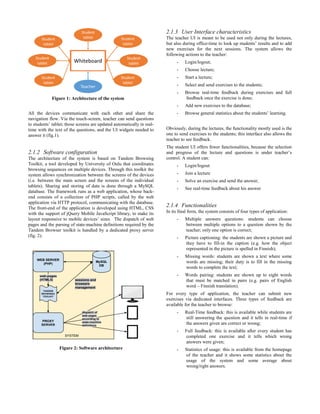
All the devices communicate with each other and share the
navigation flow. Via the touch-screen, teacher can send questions
to students’ tablet; those screens are updated automatically in real-
time with the text of the questions, and the UI widgets needed to
answer it (fig.1).
2.1.2 Software configuration
The architecture of the system is based on Tandem Browsing
Toolkit, a tool developed by University of Oulu that coordinates
browsing sequences on multiple devices. Through this toolkit the
system allows synchronization between the screens of the devices
(i.e. between the main screen and the screens of the individual
tablets). Sharing and storing of data is done through a MySQL
database. The framework runs as a web application, whose back-
end consists of a collection of PHP scripts, called by the web
application via HTTP protocol, communicating with the database.
The front-end of the application is developed using HTML, CSS
with the support of jQuery Mobile JavaScript library, to make its
layout responsive to mobile devices’ sizes. The dispatch of web
pages and the parsing of state-machine definitions required by the
Tandem Browser toolkit is handled by a dedicated proxy server
(fig. 2).
Figure 2: Software architecture
2.1.3 User Interface characteristics
The teacher UI is meant to be used not only during the lectures,
but also during office-time to look up students’ results and to add
new exercises for the next sessions. The system allows the
following actions to the teacher:
- Login/logout;
- Choose lecture;
- Start a lecture;
- Select and send exercises to the students;
- Browse real-time feedback during exercises and full
feedback once the exercise is done;
- Add new exercises to the database;
- Browse general statistics about the students’ learning.
Obviously, during the lectures, the functionality mostly used is the
one to send exercises to the students; this interface also allows the
teacher to see feedback.
The student UI offers fewer functionalities, because the selection
and progress of the lecture and questions is under teacher’s
control. A student can:
- Login/logout
- Join a lecture
- Solve an exercise and send the answer;
- See real-time feedback about his answer
2.1.4 Functionalities
In its final form, the system consists of four types of application:
- Multiple answers questions: students can choose
between multiple options to a question shown by the
teacher; only one option is correct;
- Picture captioning: the students are shown a picture and
they have to fill-in the caption (e.g. how the object
represented in the picture is spelled in Finnish);
- Missing words: students are shown a text where some
words are missing; their duty is to fill in the missing
words to complete the text;
- Words pairing: students are shown up to eight words
that must be matched in pairs (e.g. pairs of English
word – Finnish translation).
For every type of application, the teacher can submit new
exercises via dedicated interfaces. Three types of feedback are
available for the teacher to browse:
- Real-Time feedback: this is available while students are
still answering the question and it tells in real-time if
the answers given are correct or wrong;
- Full feedback: this is available after every student has
completed one exercise and it tells which wrong
answers were given;
- Statistics of usage: this is available from the homepage
of the teacher and it shows some statistics about the
usage of the system and some average about
wrong/right answers.
Figure 1: Architecture of the system
2.2 Evaluation
Several approaches were used to evaluate the system proposed
before, during and after the design process.
2.2.1 Pre-design interviews
Before design started and during the process, the research team
performed a series of face-to-face individual semi-structured
interview about the system and its possible introduction in a real
classroom.
These interviews were done with some students in the faculty of
Education and with the coordinator of the Education programme
in the University of Oulu, Tiina Kemppainen. The feedback
gained in these were used to adapt the original idea of design and
carry out some changes.
The main findings from the interviews belong in two main
categories: practical issues and pedagogical issues.
1. Practical feedback: in the order to avoid a lack of
Teacher-to-Students interaction, it should be possible
for the teacher to add questions on-the-fly in a fast way.
This need is taken into account in the User Interface
design since it is developed so that adding multiple-
choice questions is fast and straightforward. A
“preferential way” was given to multiple-choice type of
questions since those are the most versatile for the
teacher.
2. Pedagogical feedback: instead of a tool providing a
better understanding of the classroom to the teacher and
to help students’ interaction during lectures, the project
developed could be seen as an easy-grading way. This
could lead to an improper use of the proposed system
which will not be seen as a means to understand and
counteract students’ difficulties and classroom issues
but a way to lighten and automate teacher’s work. This
pedagogical issue could be an interesting long-term
product evaluation aspect in further studies.
2.2.2 Evaluation in the field
After the implementation was finished, evaluation went in-the-
wild and the system was tested within a real environment. The
methods used in this evaluation were supervised experiments in
the field, and data was gathered recording audio from face-to-face
structured interview with the teacher and through questionnaires
given to the students and a diary filled in by the teacher. Also, the
research team was always present during the field experiments to
observe and take note of key events and the overall feeling about
the technology. Photos of the interaction with the system were
also taken as qualitative data. All the data was gathered with the
approved consent of every participant through a signed
agreement. Triangulation of different methods allowed the team to
gain deeper insights on the system and obtain a wide range of
opinions and points of view about its utility.
The evaluation was carried out in the month of December within
the multi-cultural centre Villa Victor, situated in the city centre of
Oulu. The main referent belonging to the staff of the centre who
supported and carried out the evaluation was Professor Veli-
Pekka Pelkonen.
The evaluation was carried out through three sessions (Monday
1st, Monday the 8th and ). Every session consisted of a lecture of
about one hour with a limited number of volunteer international
students learning Finnish language. The researchers were present
all the time in the session to supervise, take notes and help if
needed with the usage of the system.
Before proceeding with the sessions, the Professor was taught
about the usage of the whole system and the hardware to use; also,
he was shown the privacy and agreement form to sign concerning
data collection and usage.
2.2.3 Initial working bias
During the development phase, the system was built to work as an
integrative tool for the teacher to explore and verify his students’
learning process during standard lectures.
The referent proposed the team to use the system in exercises-
based sessions instead. The proposal was quietly accepted for two
main reasons: research questions weren’t affected by this change
literature review done showed how the teacher should always be
in control of the classroom and of the technology used, not vice
versa, to avoid a premature abandoning of the technology.
2.2.4 Experiment set-up
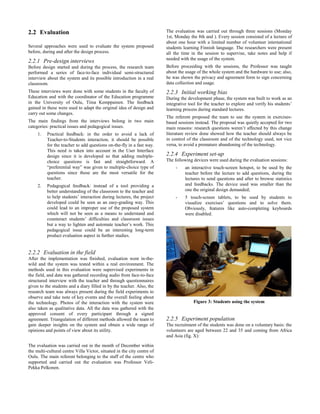
The following devices were used during the evaluation sessions:
- an interactive touch-screen hotspot, to be used by the
teacher before the lecture to add questions, during the
lectures to send questions and after to browse statistics
and feedbacks. The device used was smaller than the
one the original design demanded;
- 5 touch-screen tablets, to be used by students to
visualize exercises’ questions and to solve them.
Obviously, features like auto-completing keyboards
were disabled.
Figure 3: Students using the system
2.2.5 Experiment population
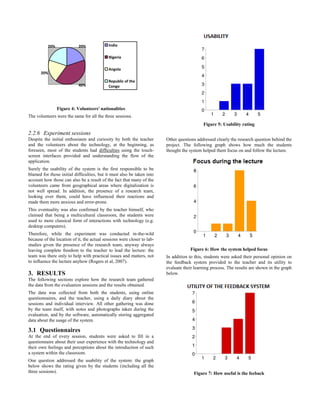
The recruitment of the students was done on a voluntary basis: the
volunteers are aged between 22 and 35 and coming from Africa
and Asia (fig. X):
20%
40%
20%
20% India
Nigeria
Angola
Republic of the
Congo
Figure 4: Volunteers' nationalities
The volunteers were the same for all the three sessions.
2.2.6 Experiment sessions
Despite the initial enthusiasm and curiosity by both the teacher
and the volunteers about the technology, at the beginning, as
foreseen, most of the students had difficulties using the touch-
screen interfaces provided and understanding the flow of the
application.
Surely the usability of the system is the first responsible to be
blamed for those initial difficulties, but it must also be taken into
account how those can also be a result of the fact that many of the
volunteers came from geographical areas where digitalization is
not well spread. In addition, the presence of a research team,
looking over them, could have influenced their reactions and
made them more anxious and error-prone.
This eventuality was also confirmed by the teacher himself, who
claimed that being a multicultural classroom, the students were
used to more classical form of interactions with technology (e.g.
desktop computers).
Therefore, while the experiment was conducted in-the-wild
because of the location of it, the actual sessions were closer to lab-
studies given the presence of the research team, anyway always
leaving complete freedom to the teacher to lead the lecture: the
team was there only to help with practical issues and matters, not
to influence the lecture anyhow (Rogers et al, 2007).
3. RESULTS
The following sections explore how the research team gathered
the data from the evaluation sessions and the results obtained.
The data was collected from both the students, using online
questionnaires, and the teacher, using a daily diary about the
sessions and individual interview. All other gathering was done
by the team itself, with notes and photographs taken during the
evaluation, and by the software, automatically storing aggregated
data about the usage of the system.
3.1 Questionnaires
At the end of every session, students were asked to fill in a
questionnaire about their user experience with the technology and
their own feelings and perceptions about the introduction of such
a system within the classroom.
One question addressed the usability of the system: the graph
below shows the rating given by the students (including all the
three sessions).
Figure 5: Usability rating
Other questions addressed clearly the research question behind the
project. The following graph shows how much the students
thought the system helped them focus on and follow the lecture.
Figure 6: How the system helped focus
In addition to this, students were asked their personal opinion on
the feedback system provided to the teacher and its utility to
evaluate their learning process. The results are shown in the graph
below.
Figure 7: How useful is the feeback
The final section of the questionnaire asked the students to
provide their opinion via open answers about the teacher role and
the way our technology could have possibly affected his teaching
methods. Among the answers, common comments depicted the
teacher as purely in control of the class and the technology as
helpful to both the teacher and the students.
3.2 Teacher diary and interview
The teacher’s opinions were gathered with an individual interview
and a daily diary to be filled in at the end of every session. From
this data, it seems clear how the tool is seen as an additional
contact means between teacher and students and an useful way to
understand the doubts and uncertainties of the students.
Using his own words taken from the diary, “[...] the system suits
well in contact teaching, with some developments and
improvements, as one method amongst the others for teaching
adult students”.
3.3 Expert observation
During observation classroom behaviour, the research team
present noticed some trends. The initial obstacles mentioned
before, due to the introduction of the technology, were found only
in the first session, and then volunteers became more at ease both
with the technology and with the presence of the research team.
Indeed, it has been observed that the classroom started to act
normally and to recreate typical situations, in other words to
“come to understand and appropriate technologies on their own
terms and for their own situated purposes” (Rogers, 2011).
Figure 8: Discussion between students and teacher
For instance, during the sessions students started to collaborate
and compare their answers. As far as the teacher is concerned, his
figure was not overcome by the technology at all, and the system’s
presence worked as an enhancing tool to provide cues on topics to
be studied in deep or revised (basing on the feedback given by the
system) on a real whiteboard next to the touch-screen.
4. DISCUSSION
From the final interview, it seems clear how the system proposed
can be useful and a viable option for teaching specifically within a
classroom made up of few students: the presence of too many
students in fact could result in the impossibility for the teacher to
check every single answer and so to focus on the whole
classroom.
4.1 Research questions
4.1.1 Student focus and participation
The results gathered during the evaluation sessions show how the
developed system was able to help the students focusing during
the lectures. This focus could also be seen as a result of the bias
introduced by the presence of the researchers, making the students
feel under surveillance. Also it is to be taken into account the
small-scale of the evaluation, that represents obviously a
limitation to the generalization of the results obtained.
4.1.2 Insights and feedback’s utility
The second research question proposed dealt with the potential of
the system to be a useful tool for the teacher to browse and gain
insights on the classroom learning process, via feedback and
statistics.
Specifically, the research was meant to find out which information
would be useful for the teacher to be recorded and displayed by
the system.
The designed system stores and provides the following
information:
- number of correct answers;
- total time spent per type of exercise;
The observation during the sessions made clear how almost every
interaction between students and teacher arose from the browsing
and analysis of the feedback and statistics about each exercise. In
these situations, showing the amount of correct or wrong answers
proved to be a valuable insight to stimulate discussion and an
opportunity to clear doubts.
On the other hand, as confirmed by the teacher, time spent to
answer the questions was not seen as a very meaningful insight.
This is because time spent can also be affected by students’
personality and self-confidence, not only by his knowledge.
The system collected automatically also data about its usage,
specifically:
- how many times every application was used;
- total time spent per type of application.
The gathering of such data was meant to give the research team
insights about what kind of application would have been useful
and to which extent was it likely to be used.
The data collected shows that the most used applications were
Multiple Answers and Missing Words, with a total time spent of
154 and 82 minutes; Picture Captioning was used for 11 minutes
while Word Pairing was never used. The lack of usage of these is
probably due to the lack of versatility and possibility to adapt to
the pre-existing exercises the teacher had.
As an example, during one session the Multiple Answers
application was used to test students’ knowledge after the vision
of a video in Finnish about the topic of the day.
4.2 Implications for design
Some practical implications for the design of such a system can be
derived from this research:
- Physical keyboards: if the system is meant to be used by
adults, it is still likely that they will have little
experience with touch-screen technology, and that can
be a limitation of the technology especially if the system
involves lots of writing; it can therefore be a good idea
to provide physical keyboards to ensure a faster writing
and better user experience;
- Heterogeneous and versatile applications: since the
teacher should use the system as he would use a
blackboard or a notebook, it is important for the system
to provide many functionalities and types of exercises as
versatile as possible. Some examples taken from this
experience are: the possibility to embed a video/audio
within the application to be able to propose questions
about it afterwards; the possibility of creating a Word
Pairing exercise where the pairs to match are formed by
a word and an image; the possibility to have more than
one correct answers in Multiple Answers exercises.
5. CONCLUSIONS
The research carried out has shown how a technology-aided
system could affect positively the learning process of students;
specifically within the context of a small-scale classroom (5-10
students), such a system can improve the motivation and the
participation during the lectures. The tool does not represent a
replacement to the teacher if it is designed in order to support him
and stimulate the discussion and interactions with the students. To
be fully effective, the introduction of such a technology should go
along training at least of the basics in interaction with computers
of both the teacher and the students involved. Another finding of
the research deals with the possibility of gathering data and
insights about the learning process of the students. The evaluation
carried out showed how this data can be a useful hint for the
teacher to better understand and evaluate the students, as well as a
cue to stimulate further studies and discussions. Future research
could focus on how to extend this concept to a larger classroom
without making the system an anonymous storage of data to faster
grade the students. Also, other interaction modes and interactive
devices could be explored to better meet the needs of both
students and teacher.
6. ACKNOWLEDGMENTS
The research team would like to thank professor Hannu Kukka
and TA Tommi Heikkinen for the help provided during the
course, Veli-Pekka Pelkonen and all Villa Victor’s staff for the
possibility to evaluate the system in their premises, Tiina
Kemppainen, coordinator of the Education Programme in the
University of Oulu and all the volunteers who took part in the
evaluation.
7. REFERENCES
[1] Abowd, G. D. (1999). Classroom 2000: An experiment with
the instrumentation of a living educational environment.
IBM systems journal, 38(4), 508-530.
[2] Abowd, G. D., Atkeson, C. G., Feinstein, A., Hmelo, C.,
Kooper, R., Long, S., ... & Tani, M. (1997, February).
Teaching and learning as multimedia authoring: the
classroom 2000 project. In Proceedings of the fourth ACM
international conference on Multimedia (pp. 187-198).
ACM.
[3] Armstrong, V., Barnes, S., Sutherland, R., Curran, S., Mills,
S., & Thompson, I. (2005). Collaborative research
methodology for investigating teaching and learning: the use
of interactive whiteboard technology. Educational Review,
57(4), 457-469.
[4] Bitner, N., & Bitner, J. (2002). Integrating technology into
the classroom: Eight keys to success. Journal of technology
and teacher education, 10(1), 95-100.
[5] Buckland, A., & Quigley, A. (2014, June). CSCT-Computer
Supported Cooperative Teaching. In Proceedings of The
International Symposium on Pervasive Displays (p. 188).
ACM.
[6] Cuban, L. (1986). Teachers and machines: The classroom
use of technology since 1920. Teachers College Press.
[7] Guthrie, R., & Carlin, A. (2004). Waking the dead: Using
interactive technology to engage passive listeners in the
classroom.
[8] Kent, T. W., & McNergney, R. F. (1999). Will Technology
Really Change Education? From Blackboard to Web. Corwin
Press, Inc., A Sage Publications Company, 2455 Teller
Road, Thousand Oaks, CA 91320.
[9] Means, B. (1994). Technology and education reform: The
reality behind the promise (pp. 1-21). San Francisco: Jossey-
Bass.
[10] Rogers, Y. (2011). Interaction design gone wild: striving for
wild theory. Interactions, 18(4), 58-62.
[11] Rogers, Y., Connelly, K., Tedesco, L., Hazlewood, W.,
Kurtz, A., Hall, B., Hursey, J., and Toscos, T. Why it’s worth
the hassle: The value of in-situ studies when designing
UbiComp. UbiComp 2007. J. Krumm et al., eds. LNCS
4717, Springer-Verlag, Berlin Heidelberg, 2007, 336–353
[12] Smith, H. J., Higgins, S., Wall, K., & Miller, J. (2005).
Interactive whiteboards: boon or bandwagon? A critical
review of the literature. Journal of Computer Assisted
Learning, 21(2), 91-101.
[13] Symonds, K. W. (2004). After the test: Closing the
achievement gaps with data. Naperville, IL: Learning Point
Associates. Retrieved January, 3, 2008.
[14] Wang, F., & Reeves, T. C. (2003). Why do teachers need to
use technology in their classrooms? Issues, problems, and
solutions. Computers in the Schools, 20(4), 49-65.
[15] Wayman, J. C. (2005). Involving teachers in data-driven
decision making: Using computer data systems to support
teacher inquiry and reflection. Journal of Education for
Students Placed at Risk, 10(3), 295-308.
[16] Wayman, J. C., Stringfield, S., & Yakimowski, M. (2004).
Software enabling school improvement through analysis of
student data.
[17] Winn, W. (1989). Toward a rationale and theoretical basis
for educational technology. Educational Technology
Research and Development, 37(1), 35-46.
[18] Wood, R., & Ashfield, J. (2008). The use of the interactive
whiteboard for creative teaching and learning in literacy and
mathematics: A case study. British Journal of Educational
Technology, 39(1), 84-96.
[19] Act, N. C. L. B. (2002). No Child Left Behind Act. US,
Department of Education.

UbiTeach: Methods for Augumented Teaching

  • 1.
    UbiTeach: methods foraugmented teaching Thomas Basilien University of Oulu Basilien.thomas@gmail.com Tomasz Balcerzak University of Oulu tomasz.balcerzak@outlook.com Giovanni Ferri University of Oulu giovanni.ferri2@studio.unibo.it Roberto Medico University of Oulu roberto.medico@stud.unifi.it Henri Rönkkö University of Oulu henri.ronkko@student.oulu.fi ABSTRACT The aim of this paper is to examine through a case study how teaching and learning within a classroom can be affected by the introduction of some technologic aid. The case study consists of a multi-device ubiquitous application proposed and designed by the authors to support and enhance the learning experience within a classroom. The overall system, consisting of one main device for the teacher and many personal devices for the students connected together and synchronized through a web application, was evaluated in-the-wild in a series of sessions with a real classroom. Results show that the technology can be useful and viable within a limited number of students, and can enhance and support motivation and participation during lectures, providing an additional means to stimulate interactions between students and teacher. Categories and Subject Descriptors General Terms Keywords 1. INTRODUCTION The main scope of this paper is to examine how the introduction of a technologic system within a classroom can affect the dynamics and interactions between students and teacher and support the teaching methods. Specifically, the project addresses two main research questions: - Can active participation and motivation be improved by introducing individual human-computer interfaces and real-time mechanism to provide feedback to the teacher? - Which data collected through insights and statistics about the classroom environment, using an automated real-time system, can be useful for the teacher to assist his/her job? This introduction will offer an overview on the current state of the art about topics involving technology-aided teaching systems and their effectiveness. Section 2 will present the design details of the system built by the authors and the evaluation carried out using it; section 3 will then go through the results of such evaluation, while section 4 will provide some discussion about the findings and some implications for future research. 1.1 Literature review Despite the worldwide and ubiquitous presence of technology today, classroom still seems to be a hard field to integrate technological devices into. Indeed, several experiments have been carried out, mostly unsuccessfully (Cuban, 1986; Means, 1994). Therefore it is important to understand and analyze why historically the introduction of a new technology can be a failure: as mentioned by Wang & Reeves (2003), it is important to set the project bound and design it for a specific environment, by addressing the question: “Why do teachers need to use technology in their classrooms? How such technology can be useful to them?”. If the reasons behind the project are not solid enough, it is likely going to be useless and unused. Even if it is so hard to design a technology suitable for educational needs, there exists a trend that always makes people think that new technologies can potentially be used for great possible educational applications: for instance, in Wang & Reeves (2003) the authors show the example of Thomas Edison, according to whom motion pictures could have overcome the standard textbooks. As we can see today, textbooks are still away from being challenged, at least by motion pictures. That is because the proposed technology was not suitable for the context, it did not belong to it, and its introduction would have eventually lead to harm both the technology (used in improper ways) and the context (altered by this introduction). In fact, that vision depicts a classroom where the students are shown a movie about the topic of the day, with the teacher quietly sitting in a corner or in an even worse case interrupting continuously the projection trying to add information or fix technical problems. As argued by Winn (1989), teacher-bashing (that is, pointing the finger against a hostile-to-technology teacher) is a tremendous mistake in the order to cover the failure of technology integration. In order to move on from this perspective and way of thinking, it is important to underline and study the historical background, the growth and downfall of all the previous approaches, since obviously it is no more an option to simply ignore technology and its impact. In fact, there are eight main factors that should be taken into account to successfully integrate technology into a classroom (Bitner & Bitner, 2002): fear of change, training in basic technology use, personal use, teaching models, learning- based use, climate, motivation and support. Since adults are not always prone to adapt their job, convincing teacher to adopt (and learn how to use) a new technology can be a tough challenge. In addition, even if they are willing to try out the technology, they need to be trained beforehand (and even first to get familiar with computers if they are not); for example, personal use of a PC (e.g.
  • 2.
    for productivity purpose)is a good way to make them used to it. In addition, the environment should make the teacher feel completely at ease without the fear of making mistakes and possibly lose authority or respect from the students. Technology should provide tools to augment and assist the teaching experience just when needed and without aiming to take a typical human role, which is the educator (Abowd, 1999). In other words, technology should not intend to replace the traditional lecture-based pedagogy system (Abowd et al., 1997), since it could lead to change an established fragile equilibrium, trying to substitute the teaching role. To avoid this, the goal to keep in mind when designing such a system is to preserve the teacher and his educational role, trying to upgrade the learning environment not according to the potentially unlimited possibilities that new technologies can offer (Kertn & McGerney, 1999) but instead offering teachers tools to improve their experience without introducing the risk of losing the intrinsic student-teacher dynamics. The same effort should therefore be put both in designing a technology that calmly integrates in the existing environment and in directly involving the recipients of the work (students and teachers), by analyzing the dynamics of the learning process and the interactions happening within a classroom. A system intended to be used in a real classroom environment has to focus on stimulating the motivation and active participation from student and teachers. There has been a lot of research going on about how the interactive systems inside classrooms could help to motivate students and teachers and increase participation between them. These are very important features to take into consideration while designing such systems. In fact, current methods in teaching could lack in understanding the overall classroom learning process day by day, since few students usually answer questions proposed during lectures (Buckland & Quigey, 2014). Amount of active participation can be measured by calculating how large percentage of students inside classroom is taking part into the teaching event. As an example, “Personal Response System”, a system that sends answers of the students anonymously to the interactive whiteboard, increased the active participation inside classroom environment compared to the traditional teaching methods (Guthrie & Carlin, 2004). These answers can afterwards be analyzed to provide instant feedback on how class performed on certain tasks. Almost half of the students felt that the anonymity of the answering process encouraged their participation within the classroom since they were not being judged by the rest of the class even when the answer was incorrect. This kind of system could also help shy and introvert students to participate more in the classroom environment. However, the increase in amount of participation may not always reflect to the quality of it. Using these interactive systems surely increased the participation inside the classroom (Armstrong et al., 2005) but verbal and physical interactions between teachers and students were not so deep anymore (Smith, Higgins, Wall & Miller, 2005). Teachers with previous experience from interactive whiteboards felt that they were more motivated than before since they were easily able to use the data gathered during the class to further analyze it afterwards or even during the class in real-time to provide feedback to the students. Teachers without previous experience or confidence were skeptical about how the interactive system would differ from using laptop and data projector, but after they became more familiar with the interactive possibilities of the system their attitudes towards it changed positively (Armstrong et al., 2005). Motivation of students tends to increase when they are introduced to new technologies. Especially when using interactive systems as educational tool made them more concentrated and focused on the topic. Students who were considered as ‘visual learners’ got the most out of the interactive systems since the amount of visual resources available to the students was so vast compared to the traditional teaching methods (Ashfield & Wood, 2008). Such technologies can help teachers too. Symonds (2004) reported that teachers using data in school “discussed data more with colleagues, visited colleagues’ classrooms more, and had more general instances of collaboration”. The data and its analysis are the main focus to develop a meaningful and real usable system that meets real needs: one example can be found in Wayman (2005), with the analysis of a cooperative view of data to address the No Children Left Behind problem. It’s a central problem (Wayman, Stringfield & Yakimowski, 2004; No Child Left Behind Act, 2002) that has to be addressed since it is common nowadays to see overpopulated multi-cultural classroom and it could clearly be a possible problem for the teacher to investigate each student level and decrease the gap in the learning curve. In addition to that, as previously mentioned, motivation is the key of the success of such a system: keeping the teachers involved since the early stages of design and committed to the use of the system, by providing constant and friendly support is one activity definitely worth spending time on. 2. METHODOLOGY The following sections will show how the system was designed, implemented and eventually evaluated in the field. 2.1 Design Phase The result of this phase is the design and development of a multi- device interactive system to be used within a classroom. Such system provides interfaces for both the teacher and the students. Users interact with the system via specific devices. 2.1.1 Hardware configuration The devices used are: - an interactive touch-screen, to be used as the teacher’s main terminal (whiteboard) during the lecture to propose exercises and browse feedback; - tablets for students to be used as the students’ terminal to participate in the lecture, by answering the questions; - Teacher personal device: it can be any device able to surf the Internet; to be used by the teacher to add questions, browse feedbacks etc.
  • 3.
    All the devicescommunicate with each other and share the navigation flow. Via the touch-screen, teacher can send questions to students’ tablet; those screens are updated automatically in real- time with the text of the questions, and the UI widgets needed to answer it (fig.1). 2.1.2 Software configuration The architecture of the system is based on Tandem Browsing Toolkit, a tool developed by University of Oulu that coordinates browsing sequences on multiple devices. Through this toolkit the system allows synchronization between the screens of the devices (i.e. between the main screen and the screens of the individual tablets). Sharing and storing of data is done through a MySQL database. The framework runs as a web application, whose back- end consists of a collection of PHP scripts, called by the web application via HTTP protocol, communicating with the database. The front-end of the application is developed using HTML, CSS with the support of jQuery Mobile JavaScript library, to make its layout responsive to mobile devices’ sizes. The dispatch of web pages and the parsing of state-machine definitions required by the Tandem Browser toolkit is handled by a dedicated proxy server (fig. 2). Figure 2: Software architecture 2.1.3 User Interface characteristics The teacher UI is meant to be used not only during the lectures, but also during office-time to look up students’ results and to add new exercises for the next sessions. The system allows the following actions to the teacher: - Login/logout; - Choose lecture; - Start a lecture; - Select and send exercises to the students; - Browse real-time feedback during exercises and full feedback once the exercise is done; - Add new exercises to the database; - Browse general statistics about the students’ learning. Obviously, during the lectures, the functionality mostly used is the one to send exercises to the students; this interface also allows the teacher to see feedback. The student UI offers fewer functionalities, because the selection and progress of the lecture and questions is under teacher’s control. A student can: - Login/logout - Join a lecture - Solve an exercise and send the answer; - See real-time feedback about his answer 2.1.4 Functionalities In its final form, the system consists of four types of application: - Multiple answers questions: students can choose between multiple options to a question shown by the teacher; only one option is correct; - Picture captioning: the students are shown a picture and they have to fill-in the caption (e.g. how the object represented in the picture is spelled in Finnish); - Missing words: students are shown a text where some words are missing; their duty is to fill in the missing words to complete the text; - Words pairing: students are shown up to eight words that must be matched in pairs (e.g. pairs of English word – Finnish translation). For every type of application, the teacher can submit new exercises via dedicated interfaces. Three types of feedback are available for the teacher to browse: - Real-Time feedback: this is available while students are still answering the question and it tells in real-time if the answers given are correct or wrong; - Full feedback: this is available after every student has completed one exercise and it tells which wrong answers were given; - Statistics of usage: this is available from the homepage of the teacher and it shows some statistics about the usage of the system and some average about wrong/right answers. Figure 1: Architecture of the system
  • 4.
    2.2 Evaluation Several approacheswere used to evaluate the system proposed before, during and after the design process. 2.2.1 Pre-design interviews Before design started and during the process, the research team performed a series of face-to-face individual semi-structured interview about the system and its possible introduction in a real classroom. These interviews were done with some students in the faculty of Education and with the coordinator of the Education programme in the University of Oulu, Tiina Kemppainen. The feedback gained in these were used to adapt the original idea of design and carry out some changes. The main findings from the interviews belong in two main categories: practical issues and pedagogical issues. 1. Practical feedback: in the order to avoid a lack of Teacher-to-Students interaction, it should be possible for the teacher to add questions on-the-fly in a fast way. This need is taken into account in the User Interface design since it is developed so that adding multiple- choice questions is fast and straightforward. A “preferential way” was given to multiple-choice type of questions since those are the most versatile for the teacher. 2. Pedagogical feedback: instead of a tool providing a better understanding of the classroom to the teacher and to help students’ interaction during lectures, the project developed could be seen as an easy-grading way. This could lead to an improper use of the proposed system which will not be seen as a means to understand and counteract students’ difficulties and classroom issues but a way to lighten and automate teacher’s work. This pedagogical issue could be an interesting long-term product evaluation aspect in further studies. 2.2.2 Evaluation in the field After the implementation was finished, evaluation went in-the- wild and the system was tested within a real environment. The methods used in this evaluation were supervised experiments in the field, and data was gathered recording audio from face-to-face structured interview with the teacher and through questionnaires given to the students and a diary filled in by the teacher. Also, the research team was always present during the field experiments to observe and take note of key events and the overall feeling about the technology. Photos of the interaction with the system were also taken as qualitative data. All the data was gathered with the approved consent of every participant through a signed agreement. Triangulation of different methods allowed the team to gain deeper insights on the system and obtain a wide range of opinions and points of view about its utility. The evaluation was carried out in the month of December within the multi-cultural centre Villa Victor, situated in the city centre of Oulu. The main referent belonging to the staff of the centre who supported and carried out the evaluation was Professor Veli- Pekka Pelkonen. The evaluation was carried out through three sessions (Monday 1st, Monday the 8th and ). Every session consisted of a lecture of about one hour with a limited number of volunteer international students learning Finnish language. The researchers were present all the time in the session to supervise, take notes and help if needed with the usage of the system. Before proceeding with the sessions, the Professor was taught about the usage of the whole system and the hardware to use; also, he was shown the privacy and agreement form to sign concerning data collection and usage. 2.2.3 Initial working bias During the development phase, the system was built to work as an integrative tool for the teacher to explore and verify his students’ learning process during standard lectures. The referent proposed the team to use the system in exercises- based sessions instead. The proposal was quietly accepted for two main reasons: research questions weren’t affected by this change literature review done showed how the teacher should always be in control of the classroom and of the technology used, not vice versa, to avoid a premature abandoning of the technology. 2.2.4 Experiment set-up The following devices were used during the evaluation sessions: - an interactive touch-screen hotspot, to be used by the teacher before the lecture to add questions, during the lectures to send questions and after to browse statistics and feedbacks. The device used was smaller than the one the original design demanded; - 5 touch-screen tablets, to be used by students to visualize exercises’ questions and to solve them. Obviously, features like auto-completing keyboards were disabled. Figure 3: Students using the system 2.2.5 Experiment population The recruitment of the students was done on a voluntary basis: the volunteers are aged between 22 and 35 and coming from Africa and Asia (fig. X):
  • 5.
    20% 40% 20% 20% India Nigeria Angola Republic ofthe Congo Figure 4: Volunteers' nationalities The volunteers were the same for all the three sessions. 2.2.6 Experiment sessions Despite the initial enthusiasm and curiosity by both the teacher and the volunteers about the technology, at the beginning, as foreseen, most of the students had difficulties using the touch- screen interfaces provided and understanding the flow of the application. Surely the usability of the system is the first responsible to be blamed for those initial difficulties, but it must also be taken into account how those can also be a result of the fact that many of the volunteers came from geographical areas where digitalization is not well spread. In addition, the presence of a research team, looking over them, could have influenced their reactions and made them more anxious and error-prone. This eventuality was also confirmed by the teacher himself, who claimed that being a multicultural classroom, the students were used to more classical form of interactions with technology (e.g. desktop computers). Therefore, while the experiment was conducted in-the-wild because of the location of it, the actual sessions were closer to lab- studies given the presence of the research team, anyway always leaving complete freedom to the teacher to lead the lecture: the team was there only to help with practical issues and matters, not to influence the lecture anyhow (Rogers et al, 2007). 3. RESULTS The following sections explore how the research team gathered the data from the evaluation sessions and the results obtained. The data was collected from both the students, using online questionnaires, and the teacher, using a daily diary about the sessions and individual interview. All other gathering was done by the team itself, with notes and photographs taken during the evaluation, and by the software, automatically storing aggregated data about the usage of the system. 3.1 Questionnaires At the end of every session, students were asked to fill in a questionnaire about their user experience with the technology and their own feelings and perceptions about the introduction of such a system within the classroom. One question addressed the usability of the system: the graph below shows the rating given by the students (including all the three sessions). Figure 5: Usability rating Other questions addressed clearly the research question behind the project. The following graph shows how much the students thought the system helped them focus on and follow the lecture. Figure 6: How the system helped focus In addition to this, students were asked their personal opinion on the feedback system provided to the teacher and its utility to evaluate their learning process. The results are shown in the graph below. Figure 7: How useful is the feeback
  • 6.
    The final sectionof the questionnaire asked the students to provide their opinion via open answers about the teacher role and the way our technology could have possibly affected his teaching methods. Among the answers, common comments depicted the teacher as purely in control of the class and the technology as helpful to both the teacher and the students. 3.2 Teacher diary and interview The teacher’s opinions were gathered with an individual interview and a daily diary to be filled in at the end of every session. From this data, it seems clear how the tool is seen as an additional contact means between teacher and students and an useful way to understand the doubts and uncertainties of the students. Using his own words taken from the diary, “[...] the system suits well in contact teaching, with some developments and improvements, as one method amongst the others for teaching adult students”. 3.3 Expert observation During observation classroom behaviour, the research team present noticed some trends. The initial obstacles mentioned before, due to the introduction of the technology, were found only in the first session, and then volunteers became more at ease both with the technology and with the presence of the research team. Indeed, it has been observed that the classroom started to act normally and to recreate typical situations, in other words to “come to understand and appropriate technologies on their own terms and for their own situated purposes” (Rogers, 2011). Figure 8: Discussion between students and teacher For instance, during the sessions students started to collaborate and compare their answers. As far as the teacher is concerned, his figure was not overcome by the technology at all, and the system’s presence worked as an enhancing tool to provide cues on topics to be studied in deep or revised (basing on the feedback given by the system) on a real whiteboard next to the touch-screen. 4. DISCUSSION From the final interview, it seems clear how the system proposed can be useful and a viable option for teaching specifically within a classroom made up of few students: the presence of too many students in fact could result in the impossibility for the teacher to check every single answer and so to focus on the whole classroom. 4.1 Research questions 4.1.1 Student focus and participation The results gathered during the evaluation sessions show how the developed system was able to help the students focusing during the lectures. This focus could also be seen as a result of the bias introduced by the presence of the researchers, making the students feel under surveillance. Also it is to be taken into account the small-scale of the evaluation, that represents obviously a limitation to the generalization of the results obtained. 4.1.2 Insights and feedback’s utility The second research question proposed dealt with the potential of the system to be a useful tool for the teacher to browse and gain insights on the classroom learning process, via feedback and statistics. Specifically, the research was meant to find out which information would be useful for the teacher to be recorded and displayed by the system. The designed system stores and provides the following information: - number of correct answers; - total time spent per type of exercise; The observation during the sessions made clear how almost every interaction between students and teacher arose from the browsing and analysis of the feedback and statistics about each exercise. In these situations, showing the amount of correct or wrong answers proved to be a valuable insight to stimulate discussion and an opportunity to clear doubts. On the other hand, as confirmed by the teacher, time spent to answer the questions was not seen as a very meaningful insight. This is because time spent can also be affected by students’ personality and self-confidence, not only by his knowledge. The system collected automatically also data about its usage, specifically: - how many times every application was used; - total time spent per type of application. The gathering of such data was meant to give the research team insights about what kind of application would have been useful and to which extent was it likely to be used. The data collected shows that the most used applications were Multiple Answers and Missing Words, with a total time spent of 154 and 82 minutes; Picture Captioning was used for 11 minutes while Word Pairing was never used. The lack of usage of these is probably due to the lack of versatility and possibility to adapt to the pre-existing exercises the teacher had. As an example, during one session the Multiple Answers application was used to test students’ knowledge after the vision of a video in Finnish about the topic of the day. 4.2 Implications for design Some practical implications for the design of such a system can be derived from this research: - Physical keyboards: if the system is meant to be used by adults, it is still likely that they will have little experience with touch-screen technology, and that can be a limitation of the technology especially if the system
  • 7.
    involves lots ofwriting; it can therefore be a good idea to provide physical keyboards to ensure a faster writing and better user experience; - Heterogeneous and versatile applications: since the teacher should use the system as he would use a blackboard or a notebook, it is important for the system to provide many functionalities and types of exercises as versatile as possible. Some examples taken from this experience are: the possibility to embed a video/audio within the application to be able to propose questions about it afterwards; the possibility of creating a Word Pairing exercise where the pairs to match are formed by a word and an image; the possibility to have more than one correct answers in Multiple Answers exercises. 5. CONCLUSIONS The research carried out has shown how a technology-aided system could affect positively the learning process of students; specifically within the context of a small-scale classroom (5-10 students), such a system can improve the motivation and the participation during the lectures. The tool does not represent a replacement to the teacher if it is designed in order to support him and stimulate the discussion and interactions with the students. To be fully effective, the introduction of such a technology should go along training at least of the basics in interaction with computers of both the teacher and the students involved. Another finding of the research deals with the possibility of gathering data and insights about the learning process of the students. The evaluation carried out showed how this data can be a useful hint for the teacher to better understand and evaluate the students, as well as a cue to stimulate further studies and discussions. Future research could focus on how to extend this concept to a larger classroom without making the system an anonymous storage of data to faster grade the students. Also, other interaction modes and interactive devices could be explored to better meet the needs of both students and teacher. 6. ACKNOWLEDGMENTS The research team would like to thank professor Hannu Kukka and TA Tommi Heikkinen for the help provided during the course, Veli-Pekka Pelkonen and all Villa Victor’s staff for the possibility to evaluate the system in their premises, Tiina Kemppainen, coordinator of the Education Programme in the University of Oulu and all the volunteers who took part in the evaluation. 7. REFERENCES [1] Abowd, G. D. (1999). Classroom 2000: An experiment with the instrumentation of a living educational environment. IBM systems journal, 38(4), 508-530. [2] Abowd, G. D., Atkeson, C. G., Feinstein, A., Hmelo, C., Kooper, R., Long, S., ... & Tani, M. (1997, February). Teaching and learning as multimedia authoring: the classroom 2000 project. In Proceedings of the fourth ACM international conference on Multimedia (pp. 187-198). ACM. [3] Armstrong, V., Barnes, S., Sutherland, R., Curran, S., Mills, S., & Thompson, I. (2005). Collaborative research methodology for investigating teaching and learning: the use of interactive whiteboard technology. Educational Review, 57(4), 457-469. [4] Bitner, N., & Bitner, J. (2002). Integrating technology into the classroom: Eight keys to success. Journal of technology and teacher education, 10(1), 95-100. [5] Buckland, A., & Quigley, A. (2014, June). CSCT-Computer Supported Cooperative Teaching. In Proceedings of The International Symposium on Pervasive Displays (p. 188). ACM. [6] Cuban, L. (1986). Teachers and machines: The classroom use of technology since 1920. Teachers College Press. [7] Guthrie, R., & Carlin, A. (2004). Waking the dead: Using interactive technology to engage passive listeners in the classroom. [8] Kent, T. W., & McNergney, R. F. (1999). Will Technology Really Change Education? From Blackboard to Web. Corwin Press, Inc., A Sage Publications Company, 2455 Teller Road, Thousand Oaks, CA 91320. [9] Means, B. (1994). Technology and education reform: The reality behind the promise (pp. 1-21). San Francisco: Jossey- Bass. [10] Rogers, Y. (2011). Interaction design gone wild: striving for wild theory. Interactions, 18(4), 58-62. [11] Rogers, Y., Connelly, K., Tedesco, L., Hazlewood, W., Kurtz, A., Hall, B., Hursey, J., and Toscos, T. Why it’s worth the hassle: The value of in-situ studies when designing UbiComp. UbiComp 2007. J. Krumm et al., eds. LNCS 4717, Springer-Verlag, Berlin Heidelberg, 2007, 336–353 [12] Smith, H. J., Higgins, S., Wall, K., & Miller, J. (2005). Interactive whiteboards: boon or bandwagon? A critical review of the literature. Journal of Computer Assisted Learning, 21(2), 91-101. [13] Symonds, K. W. (2004). After the test: Closing the achievement gaps with data. Naperville, IL: Learning Point Associates. Retrieved January, 3, 2008. [14] Wang, F., & Reeves, T. C. (2003). Why do teachers need to use technology in their classrooms? Issues, problems, and solutions. Computers in the Schools, 20(4), 49-65. [15] Wayman, J. C. (2005). Involving teachers in data-driven decision making: Using computer data systems to support teacher inquiry and reflection. Journal of Education for Students Placed at Risk, 10(3), 295-308. [16] Wayman, J. C., Stringfield, S., & Yakimowski, M. (2004). Software enabling school improvement through analysis of student data. [17] Winn, W. (1989). Toward a rationale and theoretical basis for educational technology. Educational Technology Research and Development, 37(1), 35-46. [18] Wood, R., & Ashfield, J. (2008). The use of the interactive whiteboard for creative teaching and learning in literacy and mathematics: A case study. British Journal of Educational Technology, 39(1), 84-96. [19] Act, N. C. L. B. (2002). No Child Left Behind Act. US, Department of Education.