Julie Evans, Project Tomorrow
Mary Ann Wolf, Friday Institute
June 29, 2014
Measuring teachers’ readiness
to leverage digital content:
are you ready?
1. Welcome and Introductions
2. Overview of the NSF Grant
3. Digital Readiness Spectrum
4. Interactive Simulations
5. Lessons Learned
6. Wrap Up
Today's session
ProjectTomorrow, a national
education nonprofit organization
Programs:
• Research & evaluation studies
• School and community programs
• Events for students
Mission: To ensure that today’s
students are prepared to become
tomorrow’s leaders, innovators and
engaged citizens of the world.
© 2013 Project Tomorrow
Annual national research project
 Online surveys + focus groups
 Open for all K-12 schools and schools of education
 Institutions receive free report with their own data
Collect ideas ↔ Stimulate conversations
 K-12 Students, Teachers, Parents, Administrators,
Community Members
 Pre-Service Teachers in Schools of Education
Inform policies & programs
 Analysis and reporting of findings and trends
 Consulting services to help transform teaching and learning
Speak Up National Research Project
+ 3.4 million surveys since 2003
© 2013 Project Tomorrow
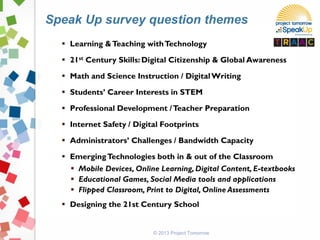
 Learning &Teaching withTechnology
 21st Century Skills: Digital Citizenship & Global Awareness
 Math and Science Instruction / DigitalWriting
 Students’ Career Interests in STEM
 Professional Development /Teacher Preparation
 Internet Safety / Digital Footprints
 Administrators’ Challenges / Bandwidth Capacity
 EmergingTechnologies both in & out of the Classroom
 Mobile Devices, Online Learning, Digital Content, E-textbooks
 Educational Games, Social Media tools and applications
 Flipped Classroom, Print to Digital, Online Assessments
 Designing the 21st Century School
Speak Up survey question themes
© 2013 Project Tomorrow
(c) Project Tomorrow 2014
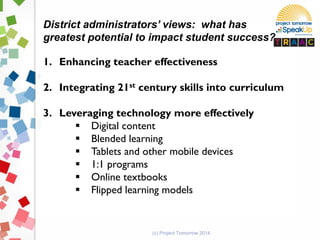
District administrators’ views: what has
greatest potential to impact student success?
1. Enhancing teacher effectiveness
2. Integrating 21st century skills into curriculum
3. Leveraging technology more effectively
 Digital content
 Blended learning
 Tablets and other mobile devices
 1:1 programs
 Online textbooks
 Flipped learning models
(c) Project Tomorrow 2014
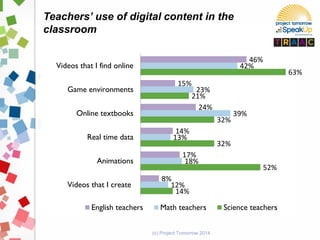
Teachers’ use of digital content in the
classroom
14%
52%
32%
32%
21%
63%
12%
18%
13%
39%
23%
42%
8%
17%
14%
24%
15%
46%
Videos that I create
Animations
Real time data
Online textbooks
Game environments
Videos that I find online
English teachers Math teachers Science teachers
(c) Project Tomorrow 2014
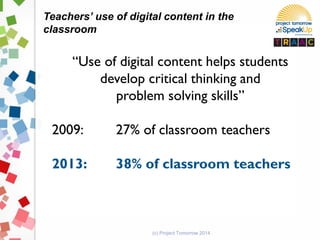
Teachers’ use of digital content in the
classroom
“Use of digital content helps students
develop critical thinking and
problem solving skills”
2009: 27% of classroom teachers
2013: 38% of classroom teachers
(c) Project Tomorrow 2014
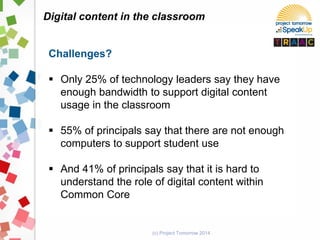
Digital content in the classroom
Challenges?
 Only 25% of technology leaders say they have
enough bandwidth to support digital content
usage in the classroom
 55% of principals say that there are not enough
computers to support student use
 And 41% of principals say that it is hard to
understand the role of digital content within
Common Core
(c) Project Tomorrow 2014
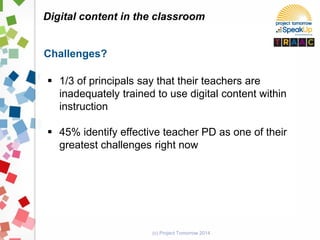
Digital content in the classroom
Challenges?
 1/3 of principals say that their teachers are
inadequately trained to use digital content within
instruction
 45% identify effective teacher PD as one of their
greatest challenges right now
(c) Project Tomorrow 2014
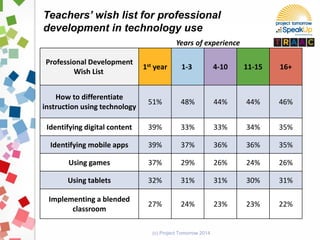
Professional Development
Wish List
1st year 1-3 4-10 11-15 16+
How to differentiate
instruction using technology
51% 48% 44% 44% 46%
Identifying digital content 39% 33% 33% 34% 35%
Identifying mobile apps 39% 37% 36% 36% 35%
Using games 37% 29% 26% 24% 26%
Using tablets 32% 31% 31% 30% 31%
Implementing a blended
classroom
27% 24% 23% 23% 22%
Teachers’ wish list for professional
development in technology use
Years of experience
National Science Foundation
3 Year Grant
Teachers' Readiness to Adopt
and Adapt Content
(TRAAC)
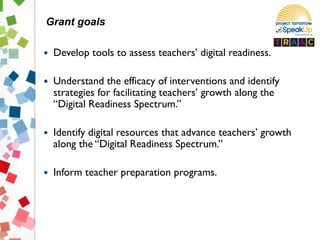
 Develop tools to assess teachers’ digital readiness.
 Understand the efficacy of interventions and identify
strategies for facilitating teachers’ growth along the
“Digital Readiness Spectrum.”
 Identify digital resources that advance teachers’ growth
along the “Digital Readiness Spectrum.”
 Inform teacher preparation programs.
Grant goals
Assumptions re: digital content
implementation and teacher professional
development
 “Build it and they will come” & “Promote it and they
will use it”
 “Good for one, good for all professional development
model”
 “Younger teachers who are digital natives are more
likely to use digital resources in their classroom”
© 2014 Project Tomorrow
 Despite investments in professional development, teachers’
abilities to use digital content has not changed significantly.
 Centralized control of the instructional process is usurping
the ability of teachers to personalize instruction with digital
content.
 Adoption of digital content for sporadic, lesson plan use is
not the desired outcome.
 Goal should be to build teachers’ capacity to
internalize the use of digital content and adapt the
resources appropriately within the classroom.
Reality in many classrooms
 Approximately 40 middle school math and science
teachers from a school district in rural North Carolina
 4 instructional technology coaches to support the
teachers
 Professional development interventions Spring 2012
through June 2014
 Data collection Spring 2012 through June 2014
 Comprehensive report to be published in August 2014
Methodology
© 2014 Project Tomorrow
 What is the spectrum of digital readiness for K-12 teachers?
What factors influence their adoption and adaptation of digital
content resources?
 What are the most effective interventions and support
mechanisms for moving teachers along the “Digital Readiness
Spectrum?”
 What are the characteristics or “key markers” along the “Digital
Readiness Spectrum?”
 How do we create “entry points” for teachers along the
spectrum?
 What can we learn that can inform teacher preparatory
programs, in-service training programs and other research
initiatives involving teachers and cyber-learning tools and
resources?
Original research questions
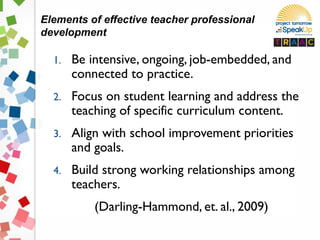
1. Be intensive, ongoing, job-embedded, and
connected to practice.
2. Focus on student learning and address the
teaching of specific curriculum content.
3. Align with school improvement priorities
and goals.
4. Build strong working relationships among
teachers.
(Darling-Hammond, et. al., 2009)
Elements of effective teacher professional
development
© 2014 Project Tomorrow
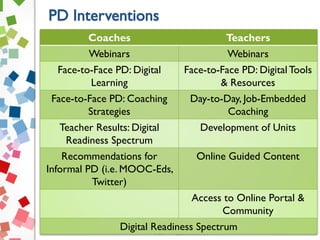
Coaches Teachers
Webinars Webinars
Face-to-Face PD: Digital
Learning
Face-to-Face PD: DigitalTools
& Resources
Face-to-Face PD: Coaching
Strategies
Day-to-Day, Job-Embedded
Coaching
Teacher Results: Digital
Readiness Spectrum
Development of Units
Recommendations for
Informal PD (i.e. MOOC-Eds,
Twitter)
Online Guided Content
Access to Online Portal &
Community
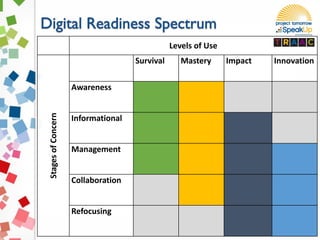
Digital Readiness Spectrum
© 2014 Project Tomorrow
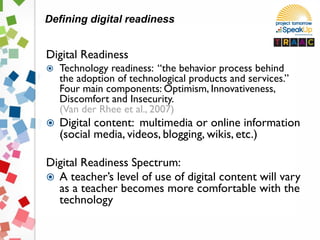
Digital Readiness
 Technology readiness: “the behavior process behind
the adoption of technological products and services.”
Four main components: Optimism, Innovativeness,
Discomfort and Insecurity.
(Van der Rhee et al., 2007)
 Digital content: multimedia or online information
(social media, videos, blogging, wikis, etc.)
Digital Readiness Spectrum:
 A teacher’s level of use of digital content will vary
as a teacher becomes more comfortable with the
technology
Defining digital readiness
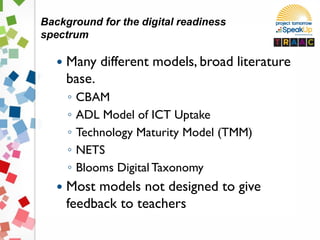
 Many different models, broad literature
base.
◦ CBAM
◦ ADL Model of ICT Uptake
◦ Technology Maturity Model (TMM)
◦ NETS
◦ Blooms Digital Taxonomy
 Most models not designed to give
feedback to teachers
Background for the digital readiness
spectrum
© 2014 Project Tomorrow
Levels of Use
StagesofConcern
Survival Mastery Impact Innovation
Awareness
Informational
Management
Collaboration
Refocusing
© 2014 Project Tomorrow
Digital readiness assessment
https://www.surveymonkey.co
m/s/ISTEsession
http://bit.ly/ISTEsurvey
 Coach
 Teacher
 Observer
© 2014 Project Tomorrow
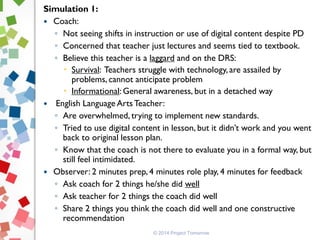
Simulation 1:
 Coach:
◦ Not seeing shifts in instruction or use of digital content despite PD
◦ Concerned that teacher just lectures and seems tied to textbook.
◦ Believe this teacher is a laggard and on the DRS:
 Survival: Teachers struggle with technology, are assailed by
problems, cannot anticipate problem
 Informational: General awareness, but in a detached way
 English Language Arts Teacher:
◦ Are overwhelmed, trying to implement new standards.
◦ Tried to use digital content in lesson, but it didn’t work and you went
back to original lesson plan.
◦ Know that the coach is not there to evaluate you in a formal way, but
still feel intimidated.
 Observer: 2 minutes prep, 4 minutes role play, 4 minutes for feedback
◦ Ask coach for 2 things he/she did well
◦ Ask teacher for 2 things the coach did well
◦ Share 2 things you think the coach did well and one constructive
recommendation
© 2014 Project Tomorrow
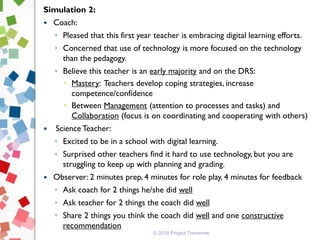
Simulation 2:
 Coach:
◦ Pleased that this first year teacher is embracing digital learning efforts.
◦ Concerned that use of technology is more focused on the technology
than the pedagogy.
◦ Believe this teacher is an early majority and on the DRS:
 Mastery: Teachers develop coping strategies, increase
competence/confidence
 Between Management (attention to processes and tasks) and
Collaboration (focus is on coordinating and cooperating with others)
 Science Teacher:
◦ Excited to be in a school with digital learning.
◦ Surprised other teachers find it hard to use technology, but you are
struggling to keep up with planning and grading.
 Observer: 2 minutes prep, 4 minutes for role play, 4 minutes for feedback
◦ Ask coach for 2 things he/she did well
◦ Ask teacher for 2 things the coach did well
◦ Share 2 things you think the coach did well and one constructive
recommendation
 Massive Online Open Course for Educators
(MOOC-Ed)
 Offered by the Friday Institute at NC State
University
 20 CEUs available for completion
 Free for all participants
 Begins September 15, 2014
Register at
https://courses.mooc-ed.org/cdl2
© 2014 Project Tomorrow
https://courses.mooc-ed.org/cdl2
mawolf@ncsu.edu
@maryannwolfed
© 2014 Project Tomorrow
Jenny Hostert
Project Tomorrow
JHostert@tomorrow.org
National Speak Up Findings and reports
Targeted and thematic reports
Online learning trends
Mobile learning & social media
Print to digital migration
Social learning
Intelligent adaptive software
Digital parent series
Presentations, podcasts and webinars
Services: consulting, workshops, evaluation and efficacy
studies
Speak Up 2014 opens on October 6
(c) Project Tomorrow 2014
More Speak Up? www.tomorrow.org
Thank you.
Let’s continue this conversation.
Julie Evans
Project Tomorrow
jevans@tomorrow.org
949-609-4660 x15
Twitter: JulieEvans_PT
SpeakUpEd
Copyright Project Tomorrow 2014
This work is the intellectual property of the author. Permission is granted
for this material to be shared for non-commercial, educational purposes,
provided that this copyright statement appears on the reproduced
materials and notice is given that the copying is by permission of the
author. To disseminate otherwise or to republish requires written
permission from the author.
(c) Project Tomorrow 2014

Measuring Teachers' Readiness

  • 1.
    Julie Evans, ProjectTomorrow Mary Ann Wolf, Friday Institute June 29, 2014 Measuring teachers’ readiness to leverage digital content: are you ready?
  • 2.
    1. Welcome andIntroductions 2. Overview of the NSF Grant 3. Digital Readiness Spectrum 4. Interactive Simulations 5. Lessons Learned 6. Wrap Up Today's session
  • 3.
    ProjectTomorrow, a national educationnonprofit organization Programs: • Research & evaluation studies • School and community programs • Events for students Mission: To ensure that today’s students are prepared to become tomorrow’s leaders, innovators and engaged citizens of the world. © 2013 Project Tomorrow
  • 4.
    Annual national researchproject  Online surveys + focus groups  Open for all K-12 schools and schools of education  Institutions receive free report with their own data Collect ideas ↔ Stimulate conversations  K-12 Students, Teachers, Parents, Administrators, Community Members  Pre-Service Teachers in Schools of Education Inform policies & programs  Analysis and reporting of findings and trends  Consulting services to help transform teaching and learning Speak Up National Research Project + 3.4 million surveys since 2003 © 2013 Project Tomorrow
  • 5.
     Learning &TeachingwithTechnology  21st Century Skills: Digital Citizenship & Global Awareness  Math and Science Instruction / DigitalWriting  Students’ Career Interests in STEM  Professional Development /Teacher Preparation  Internet Safety / Digital Footprints  Administrators’ Challenges / Bandwidth Capacity  EmergingTechnologies both in & out of the Classroom  Mobile Devices, Online Learning, Digital Content, E-textbooks  Educational Games, Social Media tools and applications  Flipped Classroom, Print to Digital, Online Assessments  Designing the 21st Century School Speak Up survey question themes © 2013 Project Tomorrow
  • 6.
    (c) Project Tomorrow2014 District administrators’ views: what has greatest potential to impact student success? 1. Enhancing teacher effectiveness 2. Integrating 21st century skills into curriculum 3. Leveraging technology more effectively  Digital content  Blended learning  Tablets and other mobile devices  1:1 programs  Online textbooks  Flipped learning models
  • 7.
    (c) Project Tomorrow2014 Teachers’ use of digital content in the classroom 14% 52% 32% 32% 21% 63% 12% 18% 13% 39% 23% 42% 8% 17% 14% 24% 15% 46% Videos that I create Animations Real time data Online textbooks Game environments Videos that I find online English teachers Math teachers Science teachers
  • 8.
    (c) Project Tomorrow2014 Teachers’ use of digital content in the classroom “Use of digital content helps students develop critical thinking and problem solving skills” 2009: 27% of classroom teachers 2013: 38% of classroom teachers
  • 9.
    (c) Project Tomorrow2014 Digital content in the classroom Challenges?  Only 25% of technology leaders say they have enough bandwidth to support digital content usage in the classroom  55% of principals say that there are not enough computers to support student use  And 41% of principals say that it is hard to understand the role of digital content within Common Core
  • 10.
    (c) Project Tomorrow2014 Digital content in the classroom Challenges?  1/3 of principals say that their teachers are inadequately trained to use digital content within instruction  45% identify effective teacher PD as one of their greatest challenges right now
  • 11.
    (c) Project Tomorrow2014 Professional Development Wish List 1st year 1-3 4-10 11-15 16+ How to differentiate instruction using technology 51% 48% 44% 44% 46% Identifying digital content 39% 33% 33% 34% 35% Identifying mobile apps 39% 37% 36% 36% 35% Using games 37% 29% 26% 24% 26% Using tablets 32% 31% 31% 30% 31% Implementing a blended classroom 27% 24% 23% 23% 22% Teachers’ wish list for professional development in technology use Years of experience
  • 12.
    National Science Foundation 3Year Grant Teachers' Readiness to Adopt and Adapt Content (TRAAC)
  • 13.
     Develop toolsto assess teachers’ digital readiness.  Understand the efficacy of interventions and identify strategies for facilitating teachers’ growth along the “Digital Readiness Spectrum.”  Identify digital resources that advance teachers’ growth along the “Digital Readiness Spectrum.”  Inform teacher preparation programs. Grant goals
  • 14.
    Assumptions re: digitalcontent implementation and teacher professional development  “Build it and they will come” & “Promote it and they will use it”  “Good for one, good for all professional development model”  “Younger teachers who are digital natives are more likely to use digital resources in their classroom”
  • 15.
    © 2014 ProjectTomorrow  Despite investments in professional development, teachers’ abilities to use digital content has not changed significantly.  Centralized control of the instructional process is usurping the ability of teachers to personalize instruction with digital content.  Adoption of digital content for sporadic, lesson plan use is not the desired outcome.  Goal should be to build teachers’ capacity to internalize the use of digital content and adapt the resources appropriately within the classroom. Reality in many classrooms
  • 16.
     Approximately 40middle school math and science teachers from a school district in rural North Carolina  4 instructional technology coaches to support the teachers  Professional development interventions Spring 2012 through June 2014  Data collection Spring 2012 through June 2014  Comprehensive report to be published in August 2014 Methodology
  • 17.
    © 2014 ProjectTomorrow  What is the spectrum of digital readiness for K-12 teachers? What factors influence their adoption and adaptation of digital content resources?  What are the most effective interventions and support mechanisms for moving teachers along the “Digital Readiness Spectrum?”  What are the characteristics or “key markers” along the “Digital Readiness Spectrum?”  How do we create “entry points” for teachers along the spectrum?  What can we learn that can inform teacher preparatory programs, in-service training programs and other research initiatives involving teachers and cyber-learning tools and resources? Original research questions
  • 18.
    1. Be intensive,ongoing, job-embedded, and connected to practice. 2. Focus on student learning and address the teaching of specific curriculum content. 3. Align with school improvement priorities and goals. 4. Build strong working relationships among teachers. (Darling-Hammond, et. al., 2009) Elements of effective teacher professional development
  • 19.
    © 2014 ProjectTomorrow Coaches Teachers Webinars Webinars Face-to-Face PD: Digital Learning Face-to-Face PD: DigitalTools & Resources Face-to-Face PD: Coaching Strategies Day-to-Day, Job-Embedded Coaching Teacher Results: Digital Readiness Spectrum Development of Units Recommendations for Informal PD (i.e. MOOC-Eds, Twitter) Online Guided Content Access to Online Portal & Community Digital Readiness Spectrum
  • 21.
  • 22.
    Digital Readiness  Technologyreadiness: “the behavior process behind the adoption of technological products and services.” Four main components: Optimism, Innovativeness, Discomfort and Insecurity. (Van der Rhee et al., 2007)  Digital content: multimedia or online information (social media, videos, blogging, wikis, etc.) Digital Readiness Spectrum:  A teacher’s level of use of digital content will vary as a teacher becomes more comfortable with the technology Defining digital readiness
  • 23.
     Many differentmodels, broad literature base. ◦ CBAM ◦ ADL Model of ICT Uptake ◦ Technology Maturity Model (TMM) ◦ NETS ◦ Blooms Digital Taxonomy  Most models not designed to give feedback to teachers Background for the digital readiness spectrum
  • 24.
    © 2014 ProjectTomorrow Levels of Use StagesofConcern Survival Mastery Impact Innovation Awareness Informational Management Collaboration Refocusing
  • 25.
    © 2014 ProjectTomorrow Digital readiness assessment https://www.surveymonkey.co m/s/ISTEsession http://bit.ly/ISTEsurvey
  • 26.
     Coach  Teacher Observer © 2014 Project Tomorrow
  • 27.
    © 2014 ProjectTomorrow Simulation 1:  Coach: ◦ Not seeing shifts in instruction or use of digital content despite PD ◦ Concerned that teacher just lectures and seems tied to textbook. ◦ Believe this teacher is a laggard and on the DRS:  Survival: Teachers struggle with technology, are assailed by problems, cannot anticipate problem  Informational: General awareness, but in a detached way  English Language Arts Teacher: ◦ Are overwhelmed, trying to implement new standards. ◦ Tried to use digital content in lesson, but it didn’t work and you went back to original lesson plan. ◦ Know that the coach is not there to evaluate you in a formal way, but still feel intimidated.  Observer: 2 minutes prep, 4 minutes role play, 4 minutes for feedback ◦ Ask coach for 2 things he/she did well ◦ Ask teacher for 2 things the coach did well ◦ Share 2 things you think the coach did well and one constructive recommendation
  • 28.
    © 2014 ProjectTomorrow Simulation 2:  Coach: ◦ Pleased that this first year teacher is embracing digital learning efforts. ◦ Concerned that use of technology is more focused on the technology than the pedagogy. ◦ Believe this teacher is an early majority and on the DRS:  Mastery: Teachers develop coping strategies, increase competence/confidence  Between Management (attention to processes and tasks) and Collaboration (focus is on coordinating and cooperating with others)  Science Teacher: ◦ Excited to be in a school with digital learning. ◦ Surprised other teachers find it hard to use technology, but you are struggling to keep up with planning and grading.  Observer: 2 minutes prep, 4 minutes for role play, 4 minutes for feedback ◦ Ask coach for 2 things he/she did well ◦ Ask teacher for 2 things the coach did well ◦ Share 2 things you think the coach did well and one constructive recommendation
  • 29.
     Massive OnlineOpen Course for Educators (MOOC-Ed)  Offered by the Friday Institute at NC State University  20 CEUs available for completion  Free for all participants  Begins September 15, 2014 Register at https://courses.mooc-ed.org/cdl2 © 2014 Project Tomorrow https://courses.mooc-ed.org/cdl2
  • 30.
  • 31.
    © 2014 ProjectTomorrow Jenny Hostert Project Tomorrow JHostert@tomorrow.org
  • 32.
    National Speak UpFindings and reports Targeted and thematic reports Online learning trends Mobile learning & social media Print to digital migration Social learning Intelligent adaptive software Digital parent series Presentations, podcasts and webinars Services: consulting, workshops, evaluation and efficacy studies Speak Up 2014 opens on October 6 (c) Project Tomorrow 2014 More Speak Up? www.tomorrow.org
  • 33.
    Thank you. Let’s continuethis conversation. Julie Evans Project Tomorrow jevans@tomorrow.org 949-609-4660 x15 Twitter: JulieEvans_PT SpeakUpEd Copyright Project Tomorrow 2014 This work is the intellectual property of the author. Permission is granted for this material to be shared for non-commercial, educational purposes, provided that this copyright statement appears on the reproduced materials and notice is given that the copying is by permission of the author. To disseminate otherwise or to republish requires written permission from the author. (c) Project Tomorrow 2014