Presented by-
Bhupendra sahu
BCA 2nd year
DSVV Haridwar
Error Control
• Error control includes both error detection and error
correction.
• It allows the receiver to inform the sender if a frame
is lost or damaged during transmission and
coordinates the retransmission of those frames by
the sender.
• Error control in the data link layer is based on
automatic repeat request (ARQ). Whenever an error
is detected, specified frames are retransmitted.
According to Behrouz A.Forouzan
 At the sending node, a frame in a data-link layer need to be
changed to bits, transformed to be electromagnetic signals,
and transmitted through the transmission media.
 At the receiving node, electromagnetic signals are received,
transformed to bits and put together to create a frame.
 Since electromagnetic signals are susceptible to error, and a
frame is susceptible to error.
 The error need first to be detected . After detection, it need
to be either corrected at the receiver node or discarded and
retransmitted by sending node.
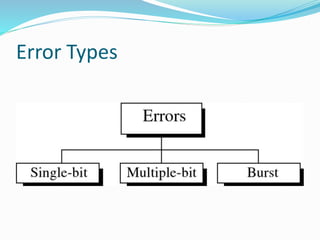
Error Types
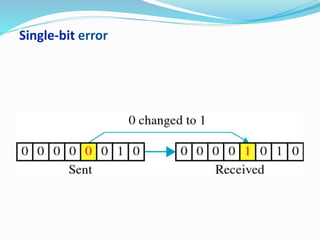
Single-bit error
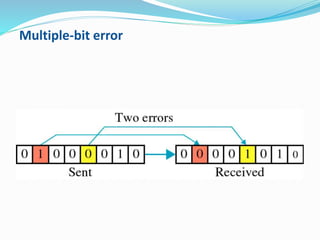
Multiple-bit error
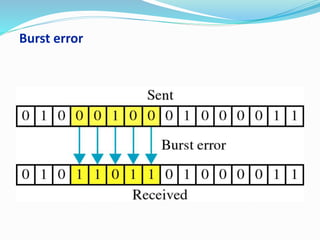
Burst error
How error occurs
 A burst error is more likely to occur than a single bit
error because the duration of the noise signal is
normally longer than the duration of 1 bit,which
means that when noise affect data, it affects a set of
bits.
 The number of bits affected depends on the data rates
and the duration of noise.
 Ex-if we sending data at 1 kbps, a noise of 1/100 second
can affect 10 bits, if we sending data at 1 mbps the
same noise can affect 10,000 bits.
Two Basic forms of Error control:-
 Stop-and-wait error control
 Sliding window error control
Stop-and-Wait Error Control
 Stop-and-wait is the simplest of the error control
protocols
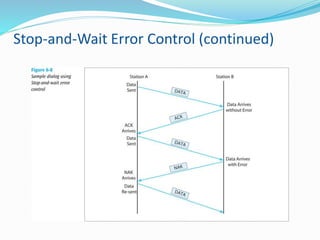
 A transmitter sends a frame then stops and waits for an
acknowledgment
 If a positive acknowledgment (ACK) is received, the next
frame is sent
 If a negative acknowledgment (NAK) is received, the
same frame is transmitted again
Stop-and-Wait Error Control (continued)
Sliding Window Error Control
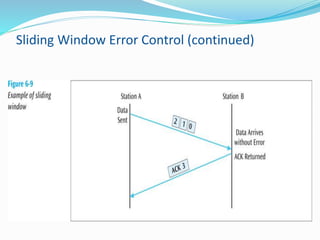
 These techniques assume that multiple frames are in
transmission at one time
 A sliding window protocol allows the transmitter to
send a number of data packets at one time before
receiving any acknowledgments
 Depends on window size
 When a receiver does acknowledge receipt, the
returned ACK contains the number of the frame
expected next
Sliding Window Error Control (continued)
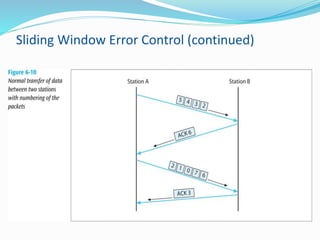
 Older sliding window protocols numbered each frame
or packet that was transmitted
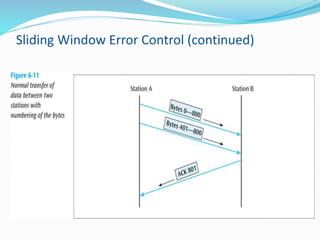
 More modern sliding window protocols number each
byte within a frame
 An example in which the packets are numbered,
followed by an example in which the bytes are
numbered:
Sliding Window Error Control (continued)
 Notice that an ACK is not always sent after each frame
is received
 It is more efficient to wait for a few received frames
before returning an ACK
 How long should you wait until you return an ACK?
Sliding Window Error Control (continued)
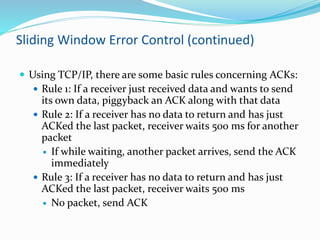
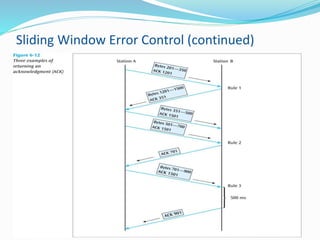
 Using TCP/IP, there are some basic rules concerning ACKs:
 Rule 1: If a receiver just received data and wants to send
its own data, piggyback an ACK along with that data
 Rule 2: If a receiver has no data to return and has just
ACKed the last packet, receiver waits 500 ms for another
packet
 If while waiting, another packet arrives, send the ACK
immediately
 Rule 3: If a receiver has no data to return and has just
ACKed the last packet, receiver waits 500 ms
 No packet, send ACK
Sliding Window Error Control (continued)
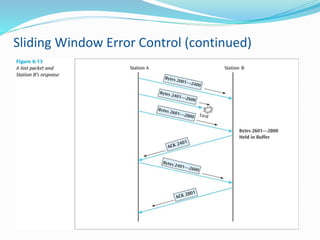
 What happens when a packet is lost?
 As shown in the next slide, if a frame is lost, the
following frame will be “out of sequence”
 The receiver will hold the out of sequence bytes in a
buffer and request the sender to retransmit the
missing frame
Sliding Window Error Control (continued)
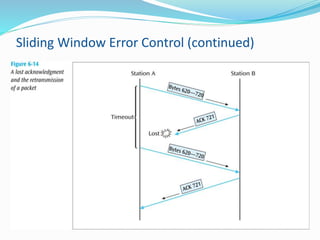
 What happens when an ACK is lost?
 As shown in the next slide, if an ACK is lost, the sender
will wait for the ACK to arrive and eventually time out
 When the time-out occurs, the sender will resend the
last frame
Sliding Window Error Control (continued)
Error control

Error control

  • 1.
    Presented by- Bhupendra sahu BCA2nd year DSVV Haridwar
  • 2.
    Error Control • Errorcontrol includes both error detection and error correction. • It allows the receiver to inform the sender if a frame is lost or damaged during transmission and coordinates the retransmission of those frames by the sender. • Error control in the data link layer is based on automatic repeat request (ARQ). Whenever an error is detected, specified frames are retransmitted.
  • 3.
    According to BehrouzA.Forouzan  At the sending node, a frame in a data-link layer need to be changed to bits, transformed to be electromagnetic signals, and transmitted through the transmission media.  At the receiving node, electromagnetic signals are received, transformed to bits and put together to create a frame.  Since electromagnetic signals are susceptible to error, and a frame is susceptible to error.  The error need first to be detected . After detection, it need to be either corrected at the receiver node or discarded and retransmitted by sending node.
  • 4.
  • 5.
  • 6.
  • 7.
  • 8.
    How error occurs A burst error is more likely to occur than a single bit error because the duration of the noise signal is normally longer than the duration of 1 bit,which means that when noise affect data, it affects a set of bits.  The number of bits affected depends on the data rates and the duration of noise.  Ex-if we sending data at 1 kbps, a noise of 1/100 second can affect 10 bits, if we sending data at 1 mbps the same noise can affect 10,000 bits.
  • 9.
    Two Basic formsof Error control:-  Stop-and-wait error control  Sliding window error control
  • 10.
    Stop-and-Wait Error Control Stop-and-wait is the simplest of the error control protocols  A transmitter sends a frame then stops and waits for an acknowledgment  If a positive acknowledgment (ACK) is received, the next frame is sent  If a negative acknowledgment (NAK) is received, the same frame is transmitted again
  • 11.
  • 12.
    Sliding Window ErrorControl  These techniques assume that multiple frames are in transmission at one time  A sliding window protocol allows the transmitter to send a number of data packets at one time before receiving any acknowledgments  Depends on window size  When a receiver does acknowledge receipt, the returned ACK contains the number of the frame expected next
  • 13.
    Sliding Window ErrorControl (continued)
  • 14.
    Sliding Window ErrorControl (continued)  Older sliding window protocols numbered each frame or packet that was transmitted  More modern sliding window protocols number each byte within a frame  An example in which the packets are numbered, followed by an example in which the bytes are numbered:
  • 15.
    Sliding Window ErrorControl (continued)
  • 16.
    Sliding Window ErrorControl (continued)
  • 17.
    Sliding Window ErrorControl (continued)  Notice that an ACK is not always sent after each frame is received  It is more efficient to wait for a few received frames before returning an ACK  How long should you wait until you return an ACK?
  • 18.
    Sliding Window ErrorControl (continued)  Using TCP/IP, there are some basic rules concerning ACKs:  Rule 1: If a receiver just received data and wants to send its own data, piggyback an ACK along with that data  Rule 2: If a receiver has no data to return and has just ACKed the last packet, receiver waits 500 ms for another packet  If while waiting, another packet arrives, send the ACK immediately  Rule 3: If a receiver has no data to return and has just ACKed the last packet, receiver waits 500 ms  No packet, send ACK
  • 19.
    Sliding Window ErrorControl (continued)
  • 20.
    Sliding Window ErrorControl (continued)  What happens when a packet is lost?  As shown in the next slide, if a frame is lost, the following frame will be “out of sequence”  The receiver will hold the out of sequence bytes in a buffer and request the sender to retransmit the missing frame
  • 21.
    Sliding Window ErrorControl (continued)
  • 22.
    Sliding Window ErrorControl (continued)  What happens when an ACK is lost?  As shown in the next slide, if an ACK is lost, the sender will wait for the ACK to arrive and eventually time out  When the time-out occurs, the sender will resend the last frame
  • 23.
    Sliding Window ErrorControl (continued)