Engineer-to-Order (ETO) – Quotation
Processing (232)
SAP Best Practices
© 2013 SAP AG. All rights reserved. ‹#›
Purpose, Benefits, and Key Process Steps
Purpose
 This scope item describes the quotation processing in a standard Engineer-to-Order (ETO) environment.
 SAP functionalities of Sales & Distribution (SD) and of Project System (PS) are used to control the complete
process, from customer inquiry to the handover to project assembly (described in the scope item 240, ETO
Project Assembly).
 In addition to the SAP reporting functionality also the special purchasing functionality “long lead time
procurement” is part of the process.
Benefits
 Deep integration to the project structuring and calculation allows for a consistent controlling of all steps and
values
 Copy functionalities – e.g. from inquiry to quotation – are facilitating compliance with the process rules
 All values and parameters for the subsequent process (ETO 240) are available as default parameters
 The option for the creation of project versions are allowing a continuous recording of all relevant values along
the controlling process and a later comparison of the several situations
 The long lead time procurement process is an important step to guarantee material availability on time
 Cost planning, budgeting and comprehensive reporting functionality allows for a detailed controlling of the
project
Key Process Steps
 Creation of inquiry with linkage to project
 Easy Cost Planning
 Creation of quotation with reference to the inquiry
 Integration to the project system including calculation and scheduling functionalities
 Controlling and reporting along the complete process
© 2013 SAP AG. All rights reserved. ‹#›
Required SAP Applications and Company Roles
Required
 SAP enhancement package 7 for SAP ERP 6.0
Company Roles
 Sales Administrator
 Project Manager
© 2013 SAP AG. All rights reserved. ‹#›
Detailed Process Description
Engineer-to-Order (ETO) – Quotation Processing
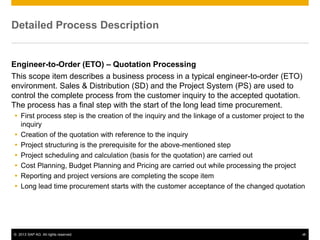
This scope item describes a business process in a typical engineer-to-order (ETO)
environment. Sales & Distribution (SD) and the Project System (PS) are used to
control the complete process from the customer inquiry to the accepted quotation.
The process has a final step with the start of the long lead time procurement.
 First process step is the creation of the inquiry and the linkage of a customer project to the
inquiry
 Creation of the quotation with reference to the inquiry
 Project structuring is the prerequisite for the above-mentioned step
 Project scheduling and calculation (basis for the quotation) are carried out
 Cost Planning, Budget Planning and Pricing are carried out while processing the project
 Reporting and project versions are completing the scope item
 Long lead time procurement starts with the customer acceptance of the changed quotation
© 2013 SAP AG. All rights reserved. ‹#›
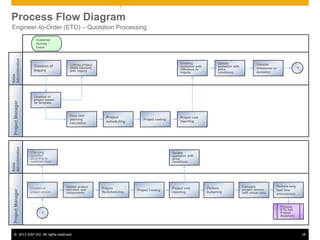
Engineer-to-Order (ETO) – Quotation Processing
Project
Manager
Sales
Administration
Linking project
(WBS-element)
with inquiry
Creation of
Inquiry
Creation of
project based
on template
Update
quotation with
price
conditions
Project
scheduling
Project cost
reporting
Customer
Activity /
Event
Creating
quotation with
reference to
inquiry
Project costing
Project
Manager
Sales
Administration
Creation of
project version
Changing
quotation
according to
customer need
Project
Re-Scheduling
Project Costing
1
Project cost
reporting
Process
ETO 240
Project
Assembly
Easy cost
planning
calculation
Transfer
milestones to
quotation
1
Update project
activities and
components
Perform
budgeting
Compare
project version
with actual data
Perform long
lead time
procurement
Update
quotation with
price
conditions
Process Flow Diagram
© 2013 SAP AG. All rights reserved. ‹#›
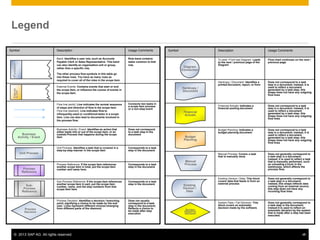
Legend
Symbol Description Usage Comments
To next / From last Diagram: Leads
to the next / previous page of the
Diagram
Flow chart continues on the next /
previous page
Hardcopy / Document: Identifies a
printed document, report, or form
Does not correspond to a task
step in a document; instead, it is
used to reflect a document
generated by a task step; this
shape does not have any outgoing
flow lines
Financial Actuals: Indicates a
financial posting document
Does not correspond to a task
step in a document; instead, it is
used to reflect a document
generated by a task step; this
shape does not have any outgoing
flow lines
Budget Planning: Indicates a
budget planning document
Does not correspond to a task
step in a document; instead, it is
used to reflect a document
generated by a task step; this
shape does not have any outgoing
flow lines
Manual Process: Covers a task
that is manually done
Does not generally correspond to
a task step in a document;
instead, it is used to reflect a task
that is manually performed, such
as unloading a truck in the
warehouse, which affects the
process flow.
Existing Version / Data: This block
covers data that feeds in from an
external process
Does not generally correspond to
a task step in a document;
instead, this shape reflects data
coming from an external source;
this step does not have any
incoming flow lines
System Pass / Fail Decision: This
block covers an automatic
decision made by the software
Does not generally correspond to
a task step in the document;
instead it is used to reflect an
automatic decision by the system
that is made after a step has been
executed.
External
to
SAP
Business
Activity / Event
Unit Process
Process
Reference
Sub-
Process
Reference
Process
Decision
Diagram
Connection
Hardcopy /
Document
Financial
Actuals
Budget
Planning
Manual
Process
Existing
Version /
Data
System
Pass/Fail
Decision
Symbol Description Usage Comments
Band: Identifies a user role, such as Accounts
Payable Clerk or Sales Representative. This band
can also identify an organization unit or group,
rather than a specific role.
The other process flow symbols in this table go
into these rows. You have as many rows as
required to cover all of the roles in the scope item.
Role band contains
tasks common to that
role.
External Events: Contains events that start or end
the scope item, or influence the course of events in
the scope item.
Flow line (solid): Line indicates the normal sequence
of steps and direction of flow in the scope item.
Flow line (dashed): Line indicates flow to
infrequently-used or conditional tasks in a scope
item. Line can also lead to documents involved in
the process flow.
Connects two tasks in
a scope item process
or a non-step event
Business Activity / Event: Identifies an action that
either leads into or out of the scope item, or an
outside Process that happens during the scope
item
Does not correspond
to a task step in the
document
Unit Process: Identifies a task that is covered in a
step-by-step manner in the scope item
Corresponds to a task
step in the document
Process Reference: If the scope item references
another scope item in total, put the scope item
number and name here.
Corresponds to a task
step in the document
Sub-Process Reference: If the scope item references
another scope item in part, put the scope item
number, name, and the step numbers from that
scope item here
Corresponds to a task
step in the document
Process Decision: Identifies a decision / branching
point, signifying a choice to be made by the end
user. Lines represent different choices emerging
from different parts of the diamond.
Does not usually
correspond to a task
step in the document;
Reflects a choice to
be made after step
execution
<Function>
© 2013 SAP AG. All rights reserved. ‹#›
© 2013 SAP AG. All rights reserved.
No part of this publication may be reproduced or transmitted in any form or for any purpose without the express permission of SAP AG.
The information contained herein may be changed without prior notice.
Some software products marketed by SAP AG and its distributors contain proprietary software components of other software vendors.
National product specifications may vary.
These materials are provided by SAP AG and its affiliated companies ("SAP Group") for informational purposes only, without representation or
warranty of any kind, and SAP Group shall not be liable for errors or omissions with respect to the materials. The only warranties for SAP Group
products and services are those that are set forth in the express warranty statements accompanying such products and services, if any. Nothing
herein should be construed as constituting an additional warranty.
SAP and other SAP products and services mentioned herein as well as their respective logos are trademarks or registered trademarks of SAP AG in
Germany and other countries.
Please see http://www.sap.com/corporate-en/legal/copyright/index.epx#trademark for additional trademark information and notices.

Engineer-to-Order (ETO) – Quotation Processing (232).ppt

  • 1.
    Engineer-to-Order (ETO) –Quotation Processing (232) SAP Best Practices
  • 2.
    © 2013 SAPAG. All rights reserved. ‹#› Purpose, Benefits, and Key Process Steps Purpose  This scope item describes the quotation processing in a standard Engineer-to-Order (ETO) environment.  SAP functionalities of Sales & Distribution (SD) and of Project System (PS) are used to control the complete process, from customer inquiry to the handover to project assembly (described in the scope item 240, ETO Project Assembly).  In addition to the SAP reporting functionality also the special purchasing functionality “long lead time procurement” is part of the process. Benefits  Deep integration to the project structuring and calculation allows for a consistent controlling of all steps and values  Copy functionalities – e.g. from inquiry to quotation – are facilitating compliance with the process rules  All values and parameters for the subsequent process (ETO 240) are available as default parameters  The option for the creation of project versions are allowing a continuous recording of all relevant values along the controlling process and a later comparison of the several situations  The long lead time procurement process is an important step to guarantee material availability on time  Cost planning, budgeting and comprehensive reporting functionality allows for a detailed controlling of the project Key Process Steps  Creation of inquiry with linkage to project  Easy Cost Planning  Creation of quotation with reference to the inquiry  Integration to the project system including calculation and scheduling functionalities  Controlling and reporting along the complete process
  • 3.
    © 2013 SAPAG. All rights reserved. ‹#› Required SAP Applications and Company Roles Required  SAP enhancement package 7 for SAP ERP 6.0 Company Roles  Sales Administrator  Project Manager
  • 4.
    © 2013 SAPAG. All rights reserved. ‹#› Detailed Process Description Engineer-to-Order (ETO) – Quotation Processing This scope item describes a business process in a typical engineer-to-order (ETO) environment. Sales & Distribution (SD) and the Project System (PS) are used to control the complete process from the customer inquiry to the accepted quotation. The process has a final step with the start of the long lead time procurement.  First process step is the creation of the inquiry and the linkage of a customer project to the inquiry  Creation of the quotation with reference to the inquiry  Project structuring is the prerequisite for the above-mentioned step  Project scheduling and calculation (basis for the quotation) are carried out  Cost Planning, Budget Planning and Pricing are carried out while processing the project  Reporting and project versions are completing the scope item  Long lead time procurement starts with the customer acceptance of the changed quotation
  • 5.
    © 2013 SAPAG. All rights reserved. ‹#› Engineer-to-Order (ETO) – Quotation Processing Project Manager Sales Administration Linking project (WBS-element) with inquiry Creation of Inquiry Creation of project based on template Update quotation with price conditions Project scheduling Project cost reporting Customer Activity / Event Creating quotation with reference to inquiry Project costing Project Manager Sales Administration Creation of project version Changing quotation according to customer need Project Re-Scheduling Project Costing 1 Project cost reporting Process ETO 240 Project Assembly Easy cost planning calculation Transfer milestones to quotation 1 Update project activities and components Perform budgeting Compare project version with actual data Perform long lead time procurement Update quotation with price conditions Process Flow Diagram
  • 6.
    © 2013 SAPAG. All rights reserved. ‹#› Legend Symbol Description Usage Comments To next / From last Diagram: Leads to the next / previous page of the Diagram Flow chart continues on the next / previous page Hardcopy / Document: Identifies a printed document, report, or form Does not correspond to a task step in a document; instead, it is used to reflect a document generated by a task step; this shape does not have any outgoing flow lines Financial Actuals: Indicates a financial posting document Does not correspond to a task step in a document; instead, it is used to reflect a document generated by a task step; this shape does not have any outgoing flow lines Budget Planning: Indicates a budget planning document Does not correspond to a task step in a document; instead, it is used to reflect a document generated by a task step; this shape does not have any outgoing flow lines Manual Process: Covers a task that is manually done Does not generally correspond to a task step in a document; instead, it is used to reflect a task that is manually performed, such as unloading a truck in the warehouse, which affects the process flow. Existing Version / Data: This block covers data that feeds in from an external process Does not generally correspond to a task step in a document; instead, this shape reflects data coming from an external source; this step does not have any incoming flow lines System Pass / Fail Decision: This block covers an automatic decision made by the software Does not generally correspond to a task step in the document; instead it is used to reflect an automatic decision by the system that is made after a step has been executed. External to SAP Business Activity / Event Unit Process Process Reference Sub- Process Reference Process Decision Diagram Connection Hardcopy / Document Financial Actuals Budget Planning Manual Process Existing Version / Data System Pass/Fail Decision Symbol Description Usage Comments Band: Identifies a user role, such as Accounts Payable Clerk or Sales Representative. This band can also identify an organization unit or group, rather than a specific role. The other process flow symbols in this table go into these rows. You have as many rows as required to cover all of the roles in the scope item. Role band contains tasks common to that role. External Events: Contains events that start or end the scope item, or influence the course of events in the scope item. Flow line (solid): Line indicates the normal sequence of steps and direction of flow in the scope item. Flow line (dashed): Line indicates flow to infrequently-used or conditional tasks in a scope item. Line can also lead to documents involved in the process flow. Connects two tasks in a scope item process or a non-step event Business Activity / Event: Identifies an action that either leads into or out of the scope item, or an outside Process that happens during the scope item Does not correspond to a task step in the document Unit Process: Identifies a task that is covered in a step-by-step manner in the scope item Corresponds to a task step in the document Process Reference: If the scope item references another scope item in total, put the scope item number and name here. Corresponds to a task step in the document Sub-Process Reference: If the scope item references another scope item in part, put the scope item number, name, and the step numbers from that scope item here Corresponds to a task step in the document Process Decision: Identifies a decision / branching point, signifying a choice to be made by the end user. Lines represent different choices emerging from different parts of the diamond. Does not usually correspond to a task step in the document; Reflects a choice to be made after step execution <Function>
  • 7.
    © 2013 SAPAG. All rights reserved. ‹#› © 2013 SAP AG. All rights reserved. No part of this publication may be reproduced or transmitted in any form or for any purpose without the express permission of SAP AG. The information contained herein may be changed without prior notice. Some software products marketed by SAP AG and its distributors contain proprietary software components of other software vendors. National product specifications may vary. These materials are provided by SAP AG and its affiliated companies ("SAP Group") for informational purposes only, without representation or warranty of any kind, and SAP Group shall not be liable for errors or omissions with respect to the materials. The only warranties for SAP Group products and services are those that are set forth in the express warranty statements accompanying such products and services, if any. Nothing herein should be construed as constituting an additional warranty. SAP and other SAP products and services mentioned herein as well as their respective logos are trademarks or registered trademarks of SAP AG in Germany and other countries. Please see http://www.sap.com/corporate-en/legal/copyright/index.epx#trademark for additional trademark information and notices.