Portfolio and Project
Management (PPM 5.0)
By
KMRSOFT
Email : info@kmrsoft.com

SAP Trainings by KMR Software Services Pvt Ltd.
Email : info@kmrsoft.com
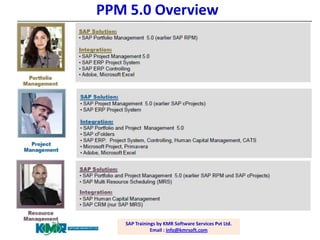
PPM 5.0 Overview

SAP Trainings by KMR Software Services Pvt Ltd.
Email : info@kmrsoft.com
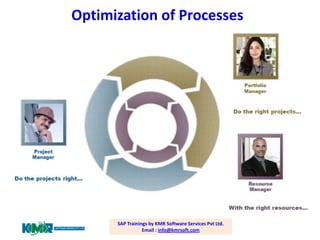
Optimization of Processes

SAP Trainings by KMR Software Services Pvt Ltd.
Email : info@kmrsoft.com
Business Scenarios

SAP Trainings by KMR Software Services Pvt Ltd.
Email : info@kmrsoft.com
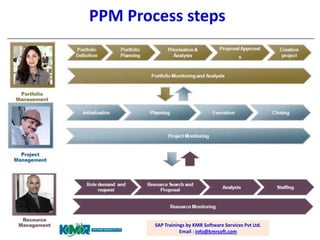
PPM Process steps

SAP Trainings by KMR Software Services Pvt Ltd.
Email : info@kmrsoft.com
PPM 5.0- Business Example

.

.

SAP Trainings by KMR Software Services Pvt Ltd.
Email : info@kmrsoft.com
Integration and Interface

SAP Trainings by KMR Software Services Pvt Ltd.
Email : info@kmrsoft.com
Course Content

SAP Trainings by KMR Software Services Pvt Ltd.
Email : info@kmrsoft.com
Course Content
•
•
•

•

•
•
•
•
•
•

Portfolio Management
1. Overview
– a. Overview and Concept of SAP PPM and System Landscape
2. Portfolio Structure
– a. Portfolio definition
– b. Portfolio buckets
– c. Classification Hierarchies
3. Portfolio Items
– a. Creating Portfolio items
– b. Status Management
c. Decision Points
4. Initiatives
– A. Overview of Initiatives
b. Configuration of Initiatives
5. Financial Planning
a. Overview of Financial Planning
b. Configuration of Financial Planning
Course Content
• 6. Capacity Planning
– a. Overview of Capacity Planning
– b. Configuration of Capacity Planning
• 7. Project Management and Link to Items
– a. Project Management overview
– b. Link Options
• 8. Resource Planning
– a. Roles and Resource planning
– b. Business Partners and role staffing
• 9. Integration Options
– a. Integration of SAP Project System
– b. FI/CO integration
• 10. Key Figures
– a. Questionnaires and Scoring Model
• 11. Reporting functions
– a. Dashboards
Course Content
• 12. Introduction to Project Management
– a. Introduction to Project Management

• 13. Project Structures
–
–
–
–

a. Creating Projects
b. Configuring Project Structures
c. Documents
d. Authorizations

• 14. Planning
– a. Dates
– b. Resources
– c. Cost Planning
Course Content
• 15. Execution
• a. Confirmation
• b. Approval
• 16. Evaluations
• a. Evaluations
• b. Threshold Values
• 17. Integration
• a. Object Links
• b. SAP Portfolio and Project Management
SAP Trainings by KMR Software Services Pvt Ltd.
Email : info@kmrsoft.com

SAP PPM 5.0 Trainings

  • 1.
    Portfolio and Project Management(PPM 5.0) By KMRSOFT Email : info@kmrsoft.com SAP Trainings by KMR Software Services Pvt Ltd. Email : info@kmrsoft.com
  • 2.
    PPM 5.0 Overview SAPTrainings by KMR Software Services Pvt Ltd. Email : info@kmrsoft.com
  • 3.
    Optimization of Processes SAPTrainings by KMR Software Services Pvt Ltd. Email : info@kmrsoft.com
  • 4.
    Business Scenarios SAP Trainingsby KMR Software Services Pvt Ltd. Email : info@kmrsoft.com
  • 5.
    PPM Process steps SAPTrainings by KMR Software Services Pvt Ltd. Email : info@kmrsoft.com
  • 6.
    PPM 5.0- BusinessExample . . SAP Trainings by KMR Software Services Pvt Ltd. Email : info@kmrsoft.com
  • 7.
    Integration and Interface SAPTrainings by KMR Software Services Pvt Ltd. Email : info@kmrsoft.com
  • 8.
    Course Content SAP Trainingsby KMR Software Services Pvt Ltd. Email : info@kmrsoft.com
  • 9.
    Course Content • • • • • • • • • • Portfolio Management 1.Overview – a. Overview and Concept of SAP PPM and System Landscape 2. Portfolio Structure – a. Portfolio definition – b. Portfolio buckets – c. Classification Hierarchies 3. Portfolio Items – a. Creating Portfolio items – b. Status Management c. Decision Points 4. Initiatives – A. Overview of Initiatives b. Configuration of Initiatives 5. Financial Planning a. Overview of Financial Planning b. Configuration of Financial Planning
  • 10.
    Course Content • 6.Capacity Planning – a. Overview of Capacity Planning – b. Configuration of Capacity Planning • 7. Project Management and Link to Items – a. Project Management overview – b. Link Options • 8. Resource Planning – a. Roles and Resource planning – b. Business Partners and role staffing • 9. Integration Options – a. Integration of SAP Project System – b. FI/CO integration • 10. Key Figures – a. Questionnaires and Scoring Model • 11. Reporting functions – a. Dashboards
  • 11.
    Course Content • 12.Introduction to Project Management – a. Introduction to Project Management • 13. Project Structures – – – – a. Creating Projects b. Configuring Project Structures c. Documents d. Authorizations • 14. Planning – a. Dates – b. Resources – c. Cost Planning
  • 12.
    Course Content • 15.Execution • a. Confirmation • b. Approval • 16. Evaluations • a. Evaluations • b. Threshold Values • 17. Integration • a. Object Links • b. SAP Portfolio and Project Management
  • 13.
    SAP Trainings byKMR Software Services Pvt Ltd. Email : info@kmrsoft.com