Asset Accounting
SAP Best Practices
© 2011 SAP AG. All rights reserved. 2
Purpose, Benefits, and Key Process Steps
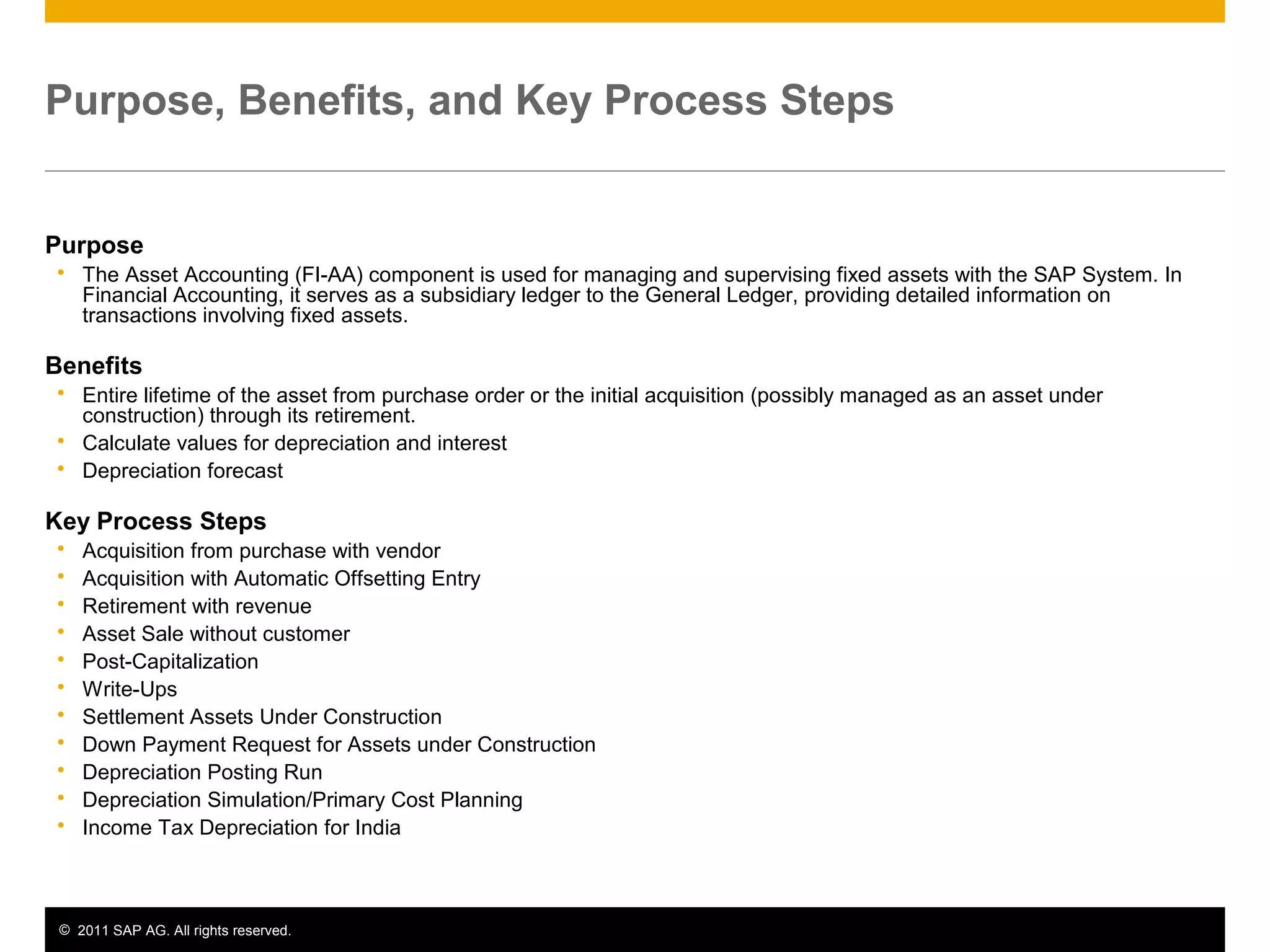
Purpose
 The Asset Accounting (FI-AA) component is used for managing and supervising fixed assets with the SAP System. In
Financial Accounting, it serves as a subsidiary ledger to the General Ledger, providing detailed information on
transactions involving fixed assets.
Benefits
 Entire lifetime of the asset from purchase order or the initial acquisition (possibly managed as an asset under
construction) through its retirement.
 Calculate values for depreciation and interest
 Depreciation forecast
Key Process Steps
 Acquisition from purchase with vendor
 Acquisition with Automatic Offsetting Entry
 Retirement with revenue
 Asset Sale without customer
 Post-Capitalization
 Write-Ups
 Settlement Assets Under Construction
 Down Payment Request for Assets under Construction
 Depreciation Posting Run
 Depreciation Simulation/Primary Cost Planning
 Income Tax Depreciation for India
© 2011 SAP AG. All rights reserved. 3
Required SAP Applications and Company Roles
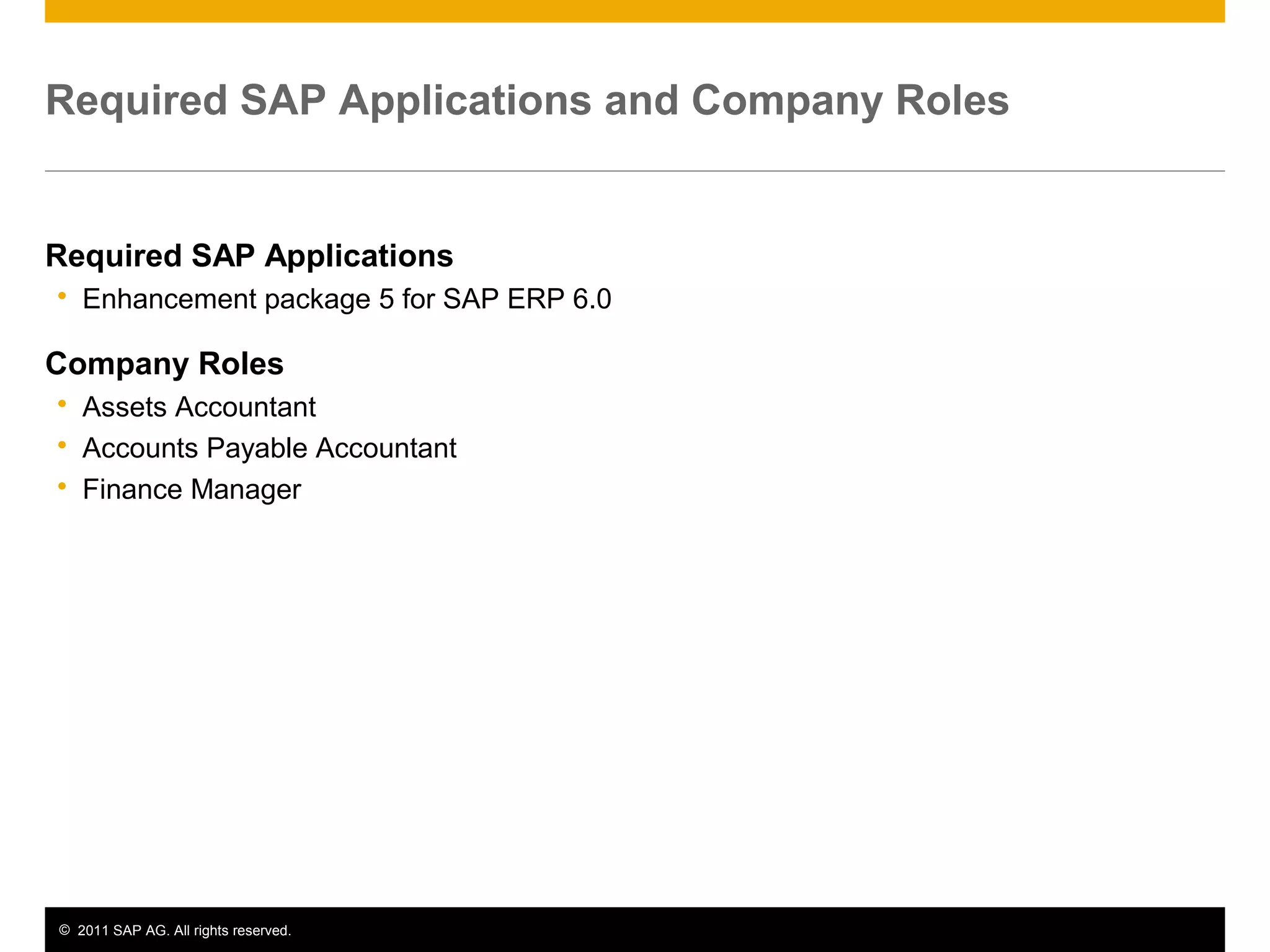
Required SAP Applications
 Enhancement package 5 for SAP ERP 6.0
Company Roles
 Assets Accountant
 Accounts Payable Accountant
 Finance Manager
© 2011 SAP AG. All rights reserved. 4
Detailed Process Description
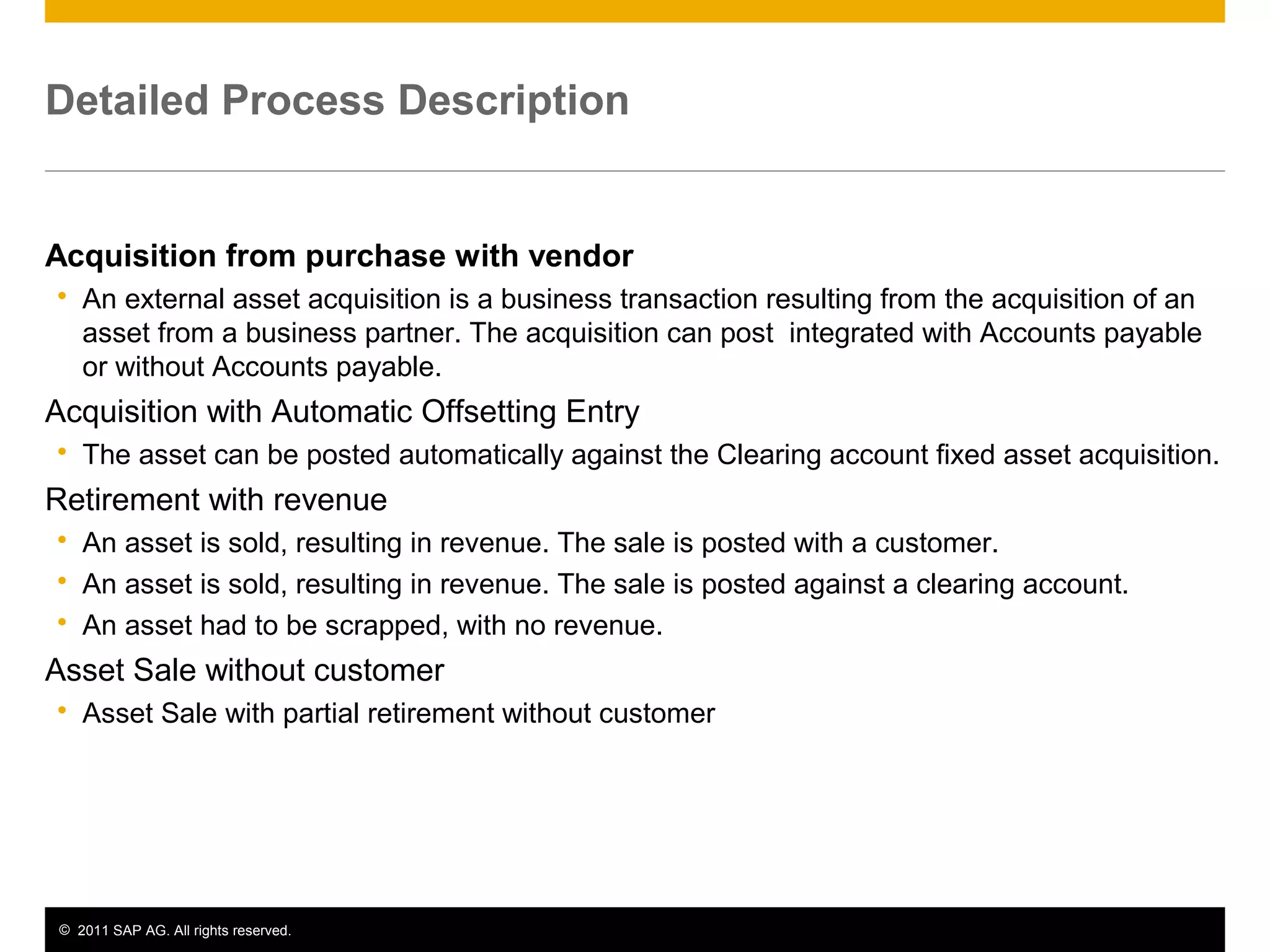
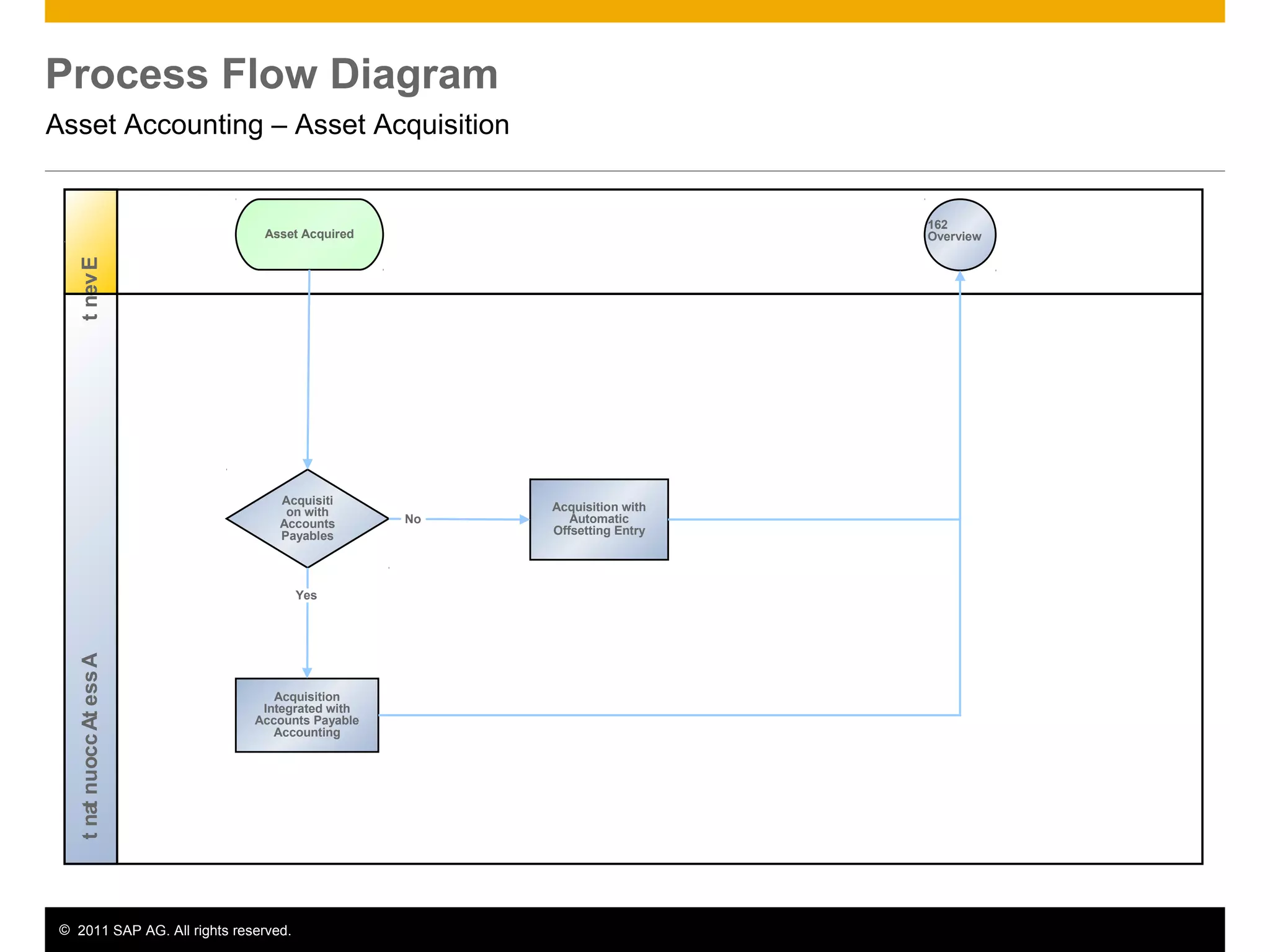
Acquisition from purchase with vendor
 An external asset acquisition is a business transaction resulting from the acquisition of an
asset from a business partner. The acquisition can post integrated with Accounts payable
or without Accounts payable.
Acquisition with Automatic Offsetting Entry
 The asset can be posted automatically against the Clearing account fixed asset acquisition.
Retirement with revenue
 An asset is sold, resulting in revenue. The sale is posted with a customer.
 An asset is sold, resulting in revenue. The sale is posted against a clearing account.
 An asset had to be scrapped, with no revenue.
Asset Sale without customer
 Asset Sale with partial retirement without customer
© 2011 SAP AG. All rights reserved. 5
Detailed Process Description
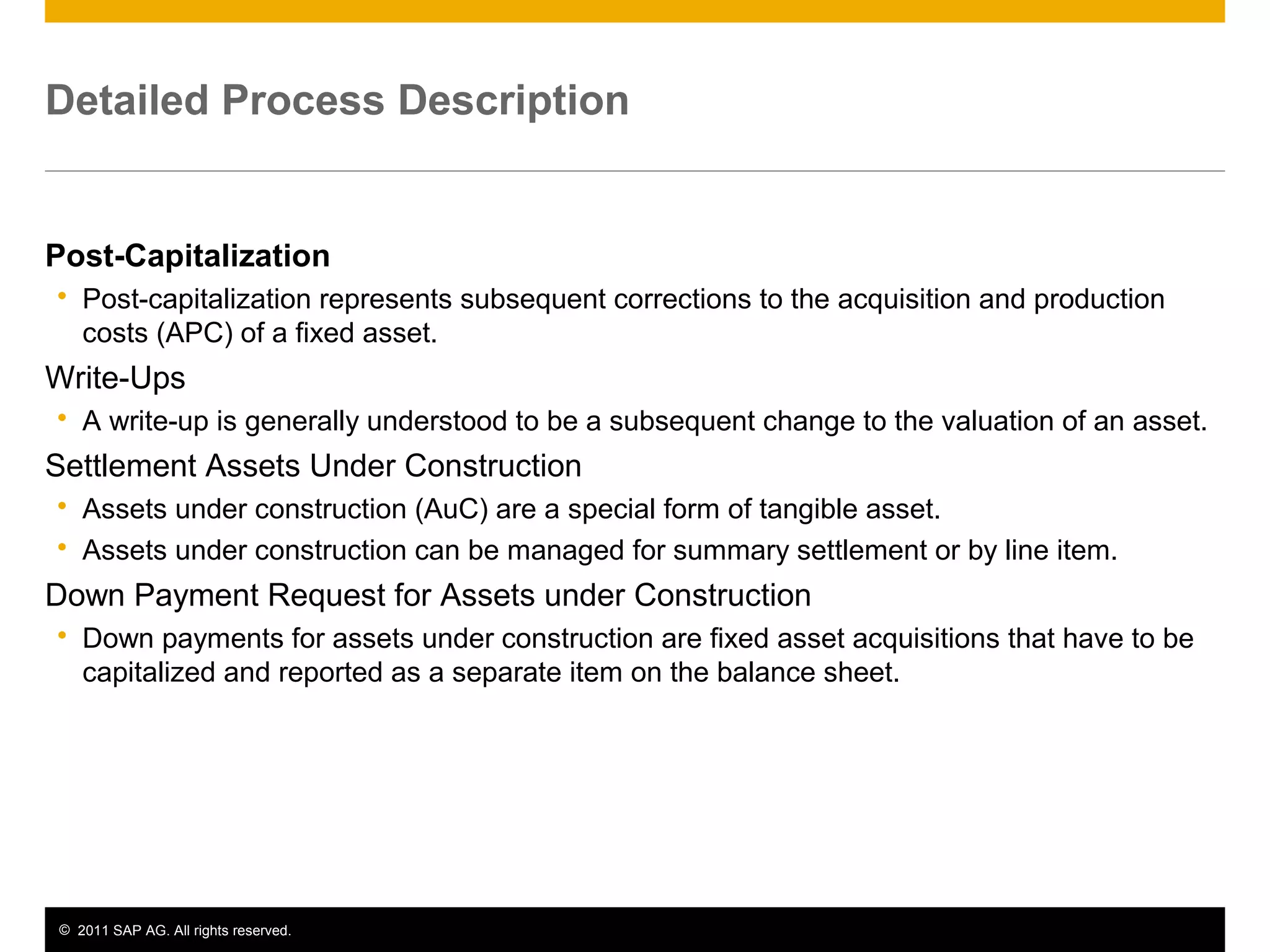
Post-Capitalization
 Post-capitalization represents subsequent corrections to the acquisition and production
costs (APC) of a fixed asset.
Write-Ups
 A write-up is generally understood to be a subsequent change to the valuation of an asset.
Settlement Assets Under Construction
 Assets under construction (AuC) are a special form of tangible asset.
 Assets under construction can be managed for summary settlement or by line item.
Down Payment Request for Assets under Construction
 Down payments for assets under construction are fixed asset acquisitions that have to be
capitalized and reported as a separate item on the balance sheet.
© 2011 SAP AG. All rights reserved. 6
Detailed Process Description
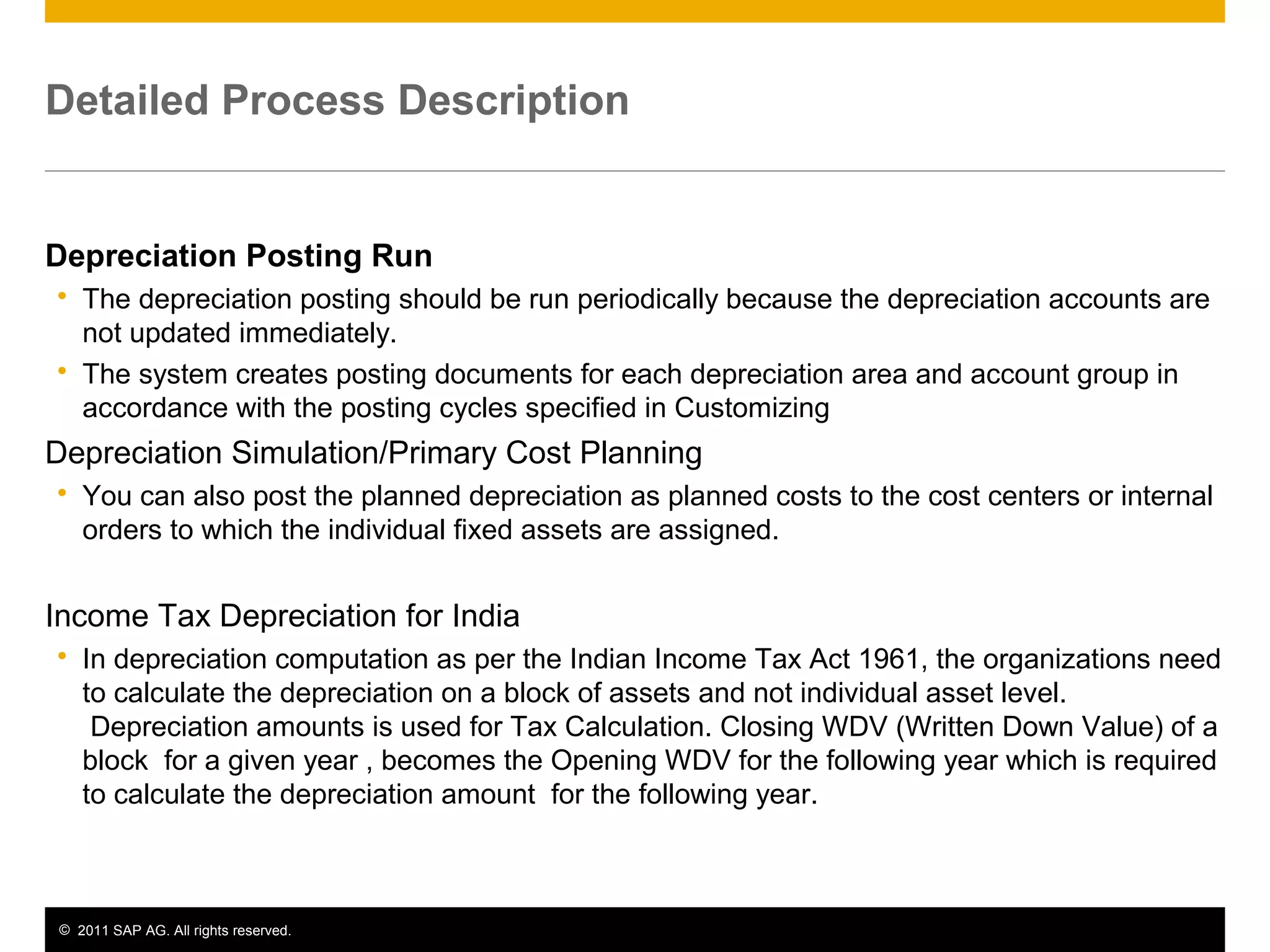
Depreciation Posting Run
 The depreciation posting should be run periodically because the depreciation accounts are
not updated immediately.
 The system creates posting documents for each depreciation area and account group in
accordance with the posting cycles specified in Customizing
Depreciation Simulation/Primary Cost Planning
 You can also post the planned depreciation as planned costs to the cost centers or internal
orders to which the individual fixed assets are assigned.
Income Tax Depreciation for India
 In depreciation computation as per the Indian Income Tax Act 1961, the organizations need
to calculate the depreciation on a block of assets and not individual asset level.
Depreciation amounts is used for Tax Calculation. Closing WDV (Written Down Value) of a
block for a given year , becomes the Opening WDV for the following year which is required
to calculate the depreciation amount for the following year.
© 2011 SAP AG. All rights reserved. 7
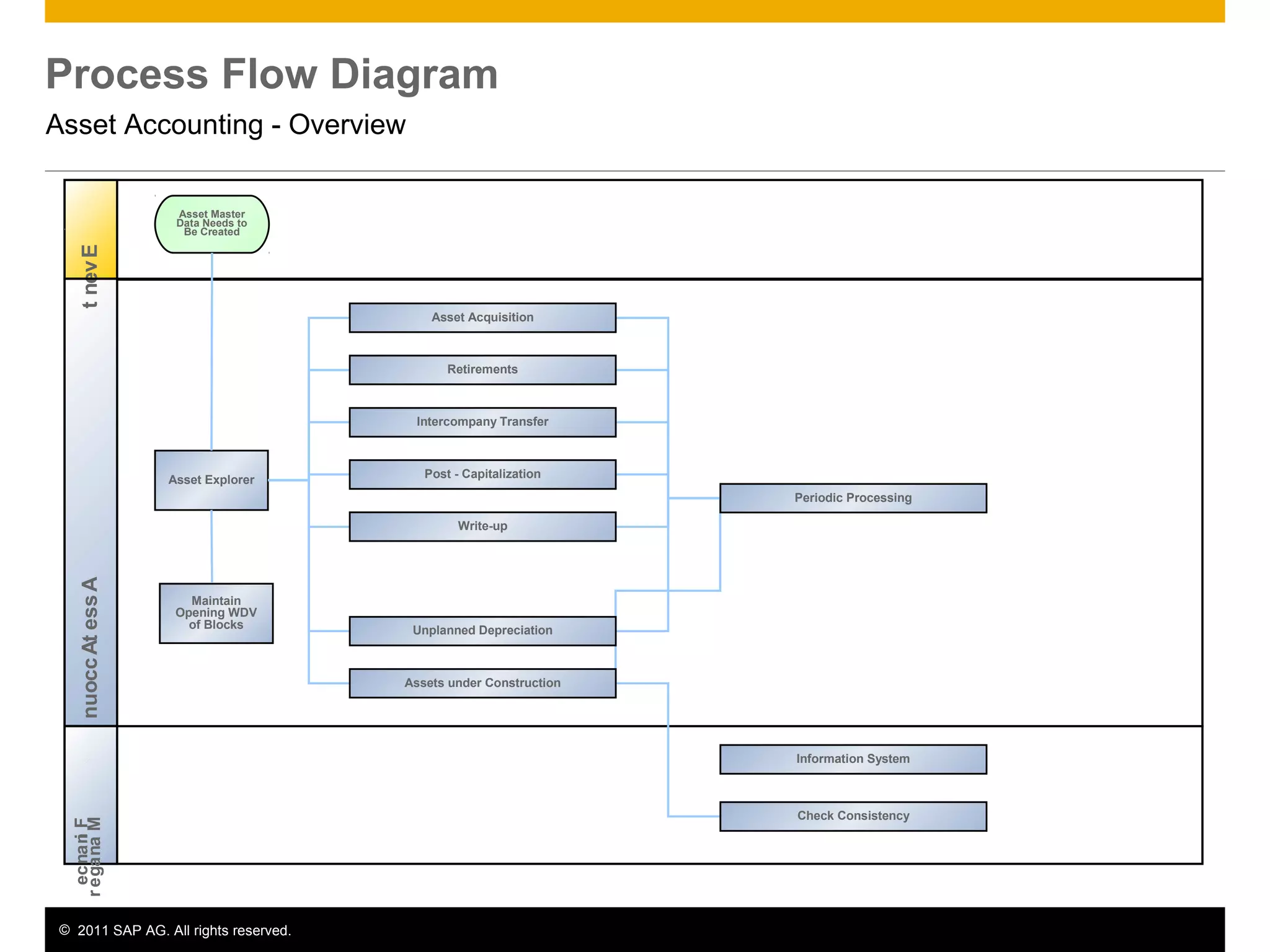
Process Flow Diagram
Asset Accounting - Overview
AssetAccountantEvent
Asset Explorer
Asset Master
Data Needs to
Be Created
Finance
Manager
Asset Acquisition
Retirements
Intercompany Transfer
Post - Capitalization
Write-up
Unplanned Depreciation
Assets under Construction
Periodic Processing
Information System
Check Consistency
Maintain
Opening WDV
of Blocks
© 2011 SAP AG. All rights reserved. 8
Process Flow Diagram
Asset Accounting – Asset Acquisition
AssetAccountantEvent
Acquisiti
on with
Accounts
Payables
Acquisition with
Automatic
Offsetting Entry
Asset Acquired
Acquisition
Integrated with
Accounts Payable
Accounting
162
Overview
Yes
No
© 2011 SAP AG. All rights reserved. 9
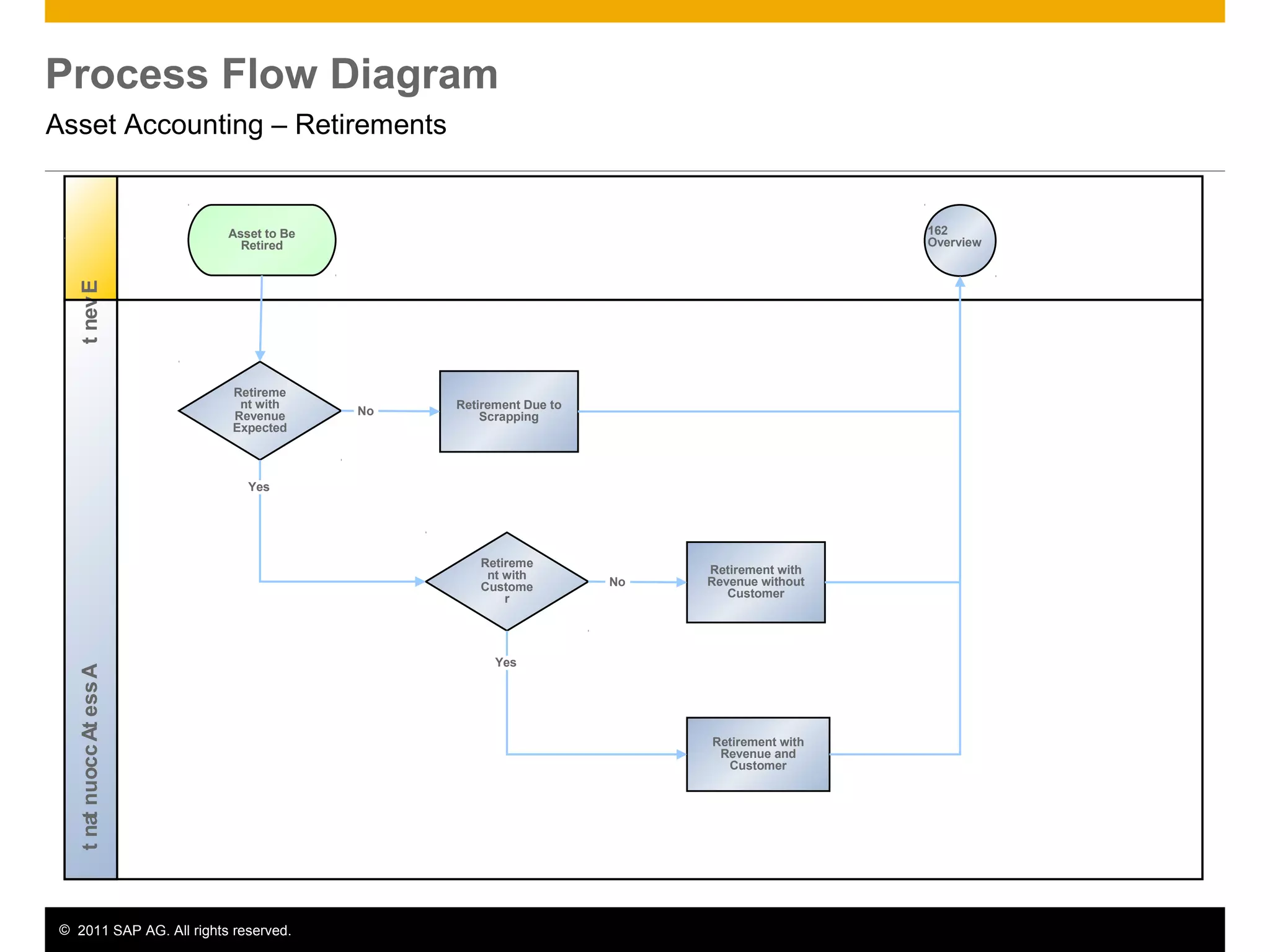
Process Flow Diagram
Asset Accounting – Retirements
AssetAccountantEvent
Retireme
nt with
Revenue
Expected
Retirement Due to
Scrapping
Asset to Be
Retired
Retirement with
Revenue and
Customer
162
Overview
No
Retireme
nt with
Custome
r
Retirement with
Revenue without
Customer
No
Yes
Yes
© 2011 SAP AG. All rights reserved. 10
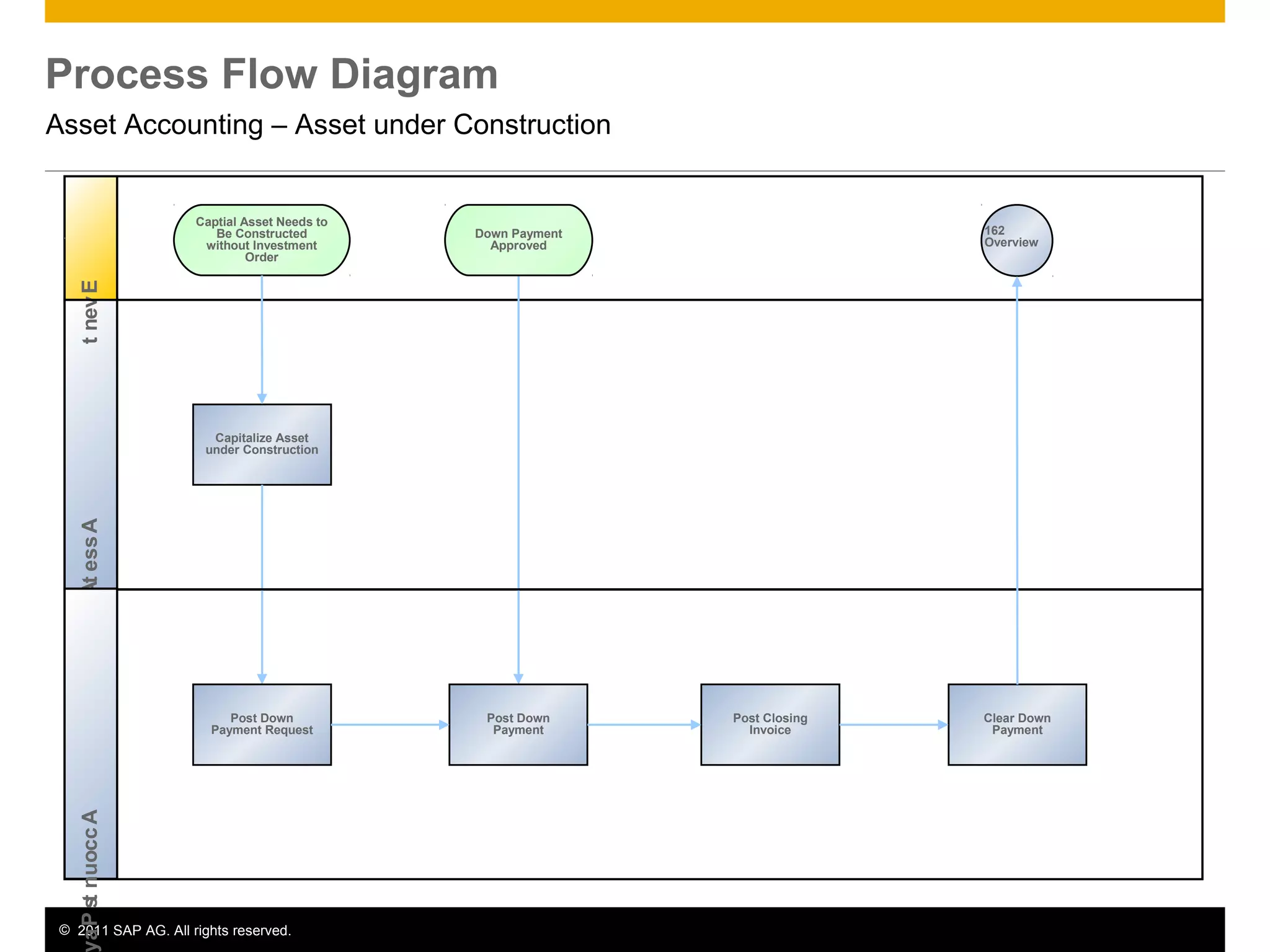
Process Flow Diagram
Asset Accounting – Asset under Construction
AssetAccountantEvent
Capitalize Asset
under Construction
Captial Asset Needs to
Be Constructed
without Investment
Order
162
Overview
AccountsPa
Post Down
Payment Request
Post Down
Payment
Down Payment
Approved
Post Closing
Invoice
Clear Down
Payment
© 2011 SAP AG. All rights reserved. 11
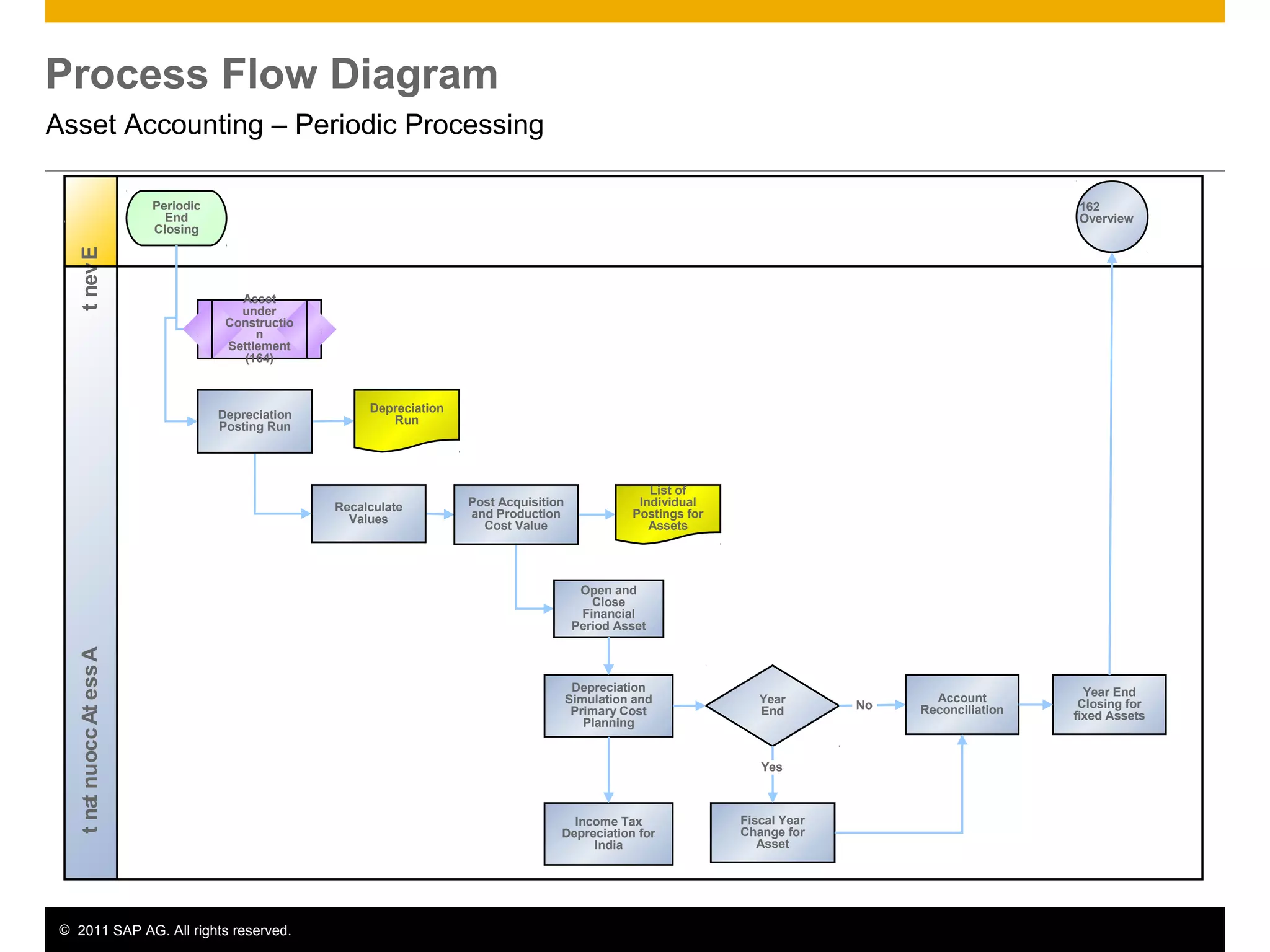
Process Flow Diagram
Asset Accounting – Periodic Processing
AssetAccountantEvent
Periodic
End
Closing
Recalculate
Values
162
Overview
Open and
Close
Financial
Period Asset
Depreciation
Posting Run
Post Acquisition
and Production
Cost Value
List of
Individual
Postings for
Assets
Depreciation
Simulation and
Primary Cost
Planning
Year
End
Fiscal Year
Change for
Asset
Account
Reconciliation
Year End
Closing for
fixed Assets
Asset
under
Constructio
n
Settlement
(164)
Yes
No
Depreciation
Run
Income Tax
Depreciation for
India
© 2011 SAP AG. All rights reserved. 12
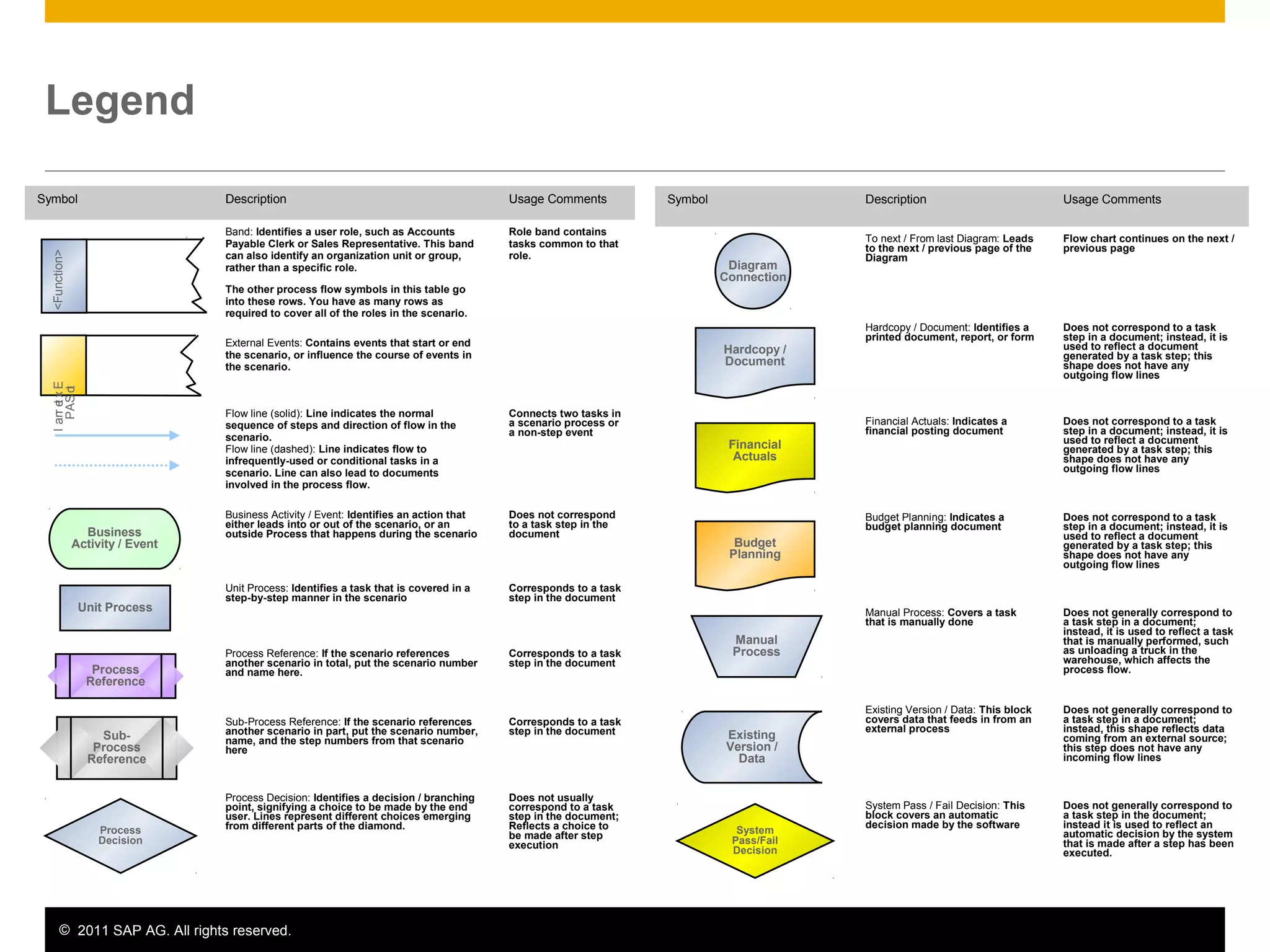
Legend
Symbol Description Usage Comments
To next / From last Diagram: Leads
to the next / previous page of the
Diagram
Flow chart continues on the next /
previous page
Hardcopy / Document: Identifies a
printed document, report, or form
Does not correspond to a task
step in a document; instead, it is
used to reflect a document
generated by a task step; this
shape does not have any
outgoing flow lines
Financial Actuals: Indicates a
financial posting document
Does not correspond to a task
step in a document; instead, it is
used to reflect a document
generated by a task step; this
shape does not have any
outgoing flow lines
Budget Planning: Indicates a
budget planning document
Does not correspond to a task
step in a document; instead, it is
used to reflect a document
generated by a task step; this
shape does not have any
outgoing flow lines
Manual Process: Covers a task
that is manually done
Does not generally correspond to
a task step in a document;
instead, it is used to reflect a task
that is manually performed, such
as unloading a truck in the
warehouse, which affects the
process flow.
Existing Version / Data: This block
covers data that feeds in from an
external process
Does not generally correspond to
a task step in a document;
instead, this shape reflects data
coming from an external source;
this step does not have any
incoming flow lines
System Pass / Fail Decision: This
block covers an automatic
decision made by the software
Does not generally correspond to
a task step in the document;
instead it is used to reflect an
automatic decision by the system
that is made after a step has been
executed.
External
toSAP
Business
Activity / Event
Unit Process
Process
Reference
Sub-
Process
Reference
Process
Decision
Diagram
Connection
Hardcopy /
Document
Financial
Actuals
Budget
Planning
Manual
Process
Existing
Version /
Data
System
Pass/Fail
Decision
Symbol Description Usage Comments
Band: Identifies a user role, such as Accounts
Payable Clerk or Sales Representative. This band
can also identify an organization unit or group,
rather than a specific role.
The other process flow symbols in this table go
into these rows. You have as many rows as
required to cover all of the roles in the scenario.
Role band contains
tasks common to that
role.
External Events: Contains events that start or end
the scenario, or influence the course of events in
the scenario.
Flow line (solid): Line indicates the normal
sequence of steps and direction of flow in the
scenario.
Flow line (dashed): Line indicates flow to
infrequently-used or conditional tasks in a
scenario. Line can also lead to documents
involved in the process flow.
Connects two tasks in
a scenario process or
a non-step event
Business Activity / Event: Identifies an action that
either leads into or out of the scenario, or an
outside Process that happens during the scenario
Does not correspond
to a task step in the
document
Unit Process: Identifies a task that is covered in a
step-by-step manner in the scenario
Corresponds to a task
step in the document
Process Reference: If the scenario references
another scenario in total, put the scenario number
and name here.
Corresponds to a task
step in the document
Sub-Process Reference: If the scenario references
another scenario in part, put the scenario number,
name, and the step numbers from that scenario
here
Corresponds to a task
step in the document
Process Decision: Identifies a decision / branching
point, signifying a choice to be made by the end
user. Lines represent different choices emerging
from different parts of the diamond.
Does not usually
correspond to a task
step in the document;
Reflects a choice to
be made after step
execution
<Function>
© 2011 SAP AG. All rights reserved. 13
No part of this publication may be reproduced or transmitted in any form or for any purpose
without the express permission of SAP AG. The information contained herein may be
changed without prior notice.
Some software products marketed by SAP AG and its distributors contain proprietary
software components of other software vendors.
Microsoft, Windows, Excel, Outlook, and PowerPoint are registered trademarks of Microsoft
Corporation.
IBM, DB2, DB2 Universal Database, System i, System i5, System p, System p5, System x,
System z, System z10, System z9, z10, z9, iSeries, pSeries, xSeries, zSeries, eServer,
z/VM, z/OS, i5/OS, S/390, OS/390, OS/400, AS/400, S/390 Parallel Enterprise Server,
PowerVM, Power Architecture, POWER6+, POWER6, POWER5+, POWER5, POWER,
OpenPower, PowerPC, BatchPipes, BladeCenter, System Storage, GPFS, HACMP,
RETAIN, DB2 Connect, RACF, Redbooks, OS/2, Parallel Sysplex, MVS/ESA, AIX,
Intelligent Miner, WebSphere, Netfinity, Tivoli and Informix are trademarks or registered
trademarks of IBM Corporation.
Linux is the registered trademark of Linus Torvalds in the U.S. and other countries.
Adobe, the Adobe logo, Acrobat, PostScript, and Reader are either trademarks or registered
trademarks of Adobe Systems Incorporated in the United States and/or other countries.
Oracle is a registered trademark of Oracle Corporation.
UNIX, X/Open, OSF/1, and Motif are registered trademarks of the Open Group.
Citrix, ICA, Program Neighborhood, MetaFrame, WinFrame, VideoFrame, and MultiWin are
trademarks or registered trademarks of Citrix Systems, Inc.
HTML, XML, XHTML and W3C are trademarks or registered trademarks of W3C®, World
Wide Web Consortium, Massachusetts Institute of Technology.
Java is a registered trademark of Sun Microsystems, Inc.
JavaScript is a registered trademark of Sun Microsystems, Inc., used under license for
technology invented and implemented by Netscape.
SAP, R/3, SAP NetWeaver, Duet, PartnerEdge, ByDesign, SAP BusinessObjects Explorer,
StreamWork, and other SAP products and services mentioned herein as well as their
respective logos are trademarks or registered trademarks of SAP AG in Germany and other
countries.
© 2011 SAP AG. All rights reserved
Business Objects and the Business Objects logo, BusinessObjects, Crystal Reports, Crystal
Decisions, Web Intelligence, Xcelsius, and other Business Objects products and services
mentioned herein as well as their respective logos are trademarks or registered trademarks
of Business Objects Software Ltd. Business Objects is an SAP company.
Sybase and Adaptive Server, iAnywhere, Sybase 365, SQL Anywhere, and other Sybase
products and services mentioned herein as well as their respective logos are trademarks or
registered trademarks of Sybase, Inc. Sybase is an SAP company.
All other product and service names mentioned are the trademarks of their respective
companies. Data contained in this document serves informational purposes only. National
product specifications may vary.
The information in this document is proprietary to SAP. No part of this document may be
reproduced, copied, or transmitted in any form or for any purpose without the express prior
written permission of SAP AG.
This document is a preliminary version and not subject to your license agreement or any
other agreement with SAP. This document contains only intended strategies, developments,
and functionalities of the SAP® product and is not intended to be binding upon SAP to any
particular course of business, product strategy, and/or development. Please note that this
document is subject to change and may be changed by SAP at any time without notice.
SAP assumes no responsibility for errors or omissions in this document. SAP does not
warrant the accuracy or completeness of the information, text, graphics, links, or other items
contained within this material. This document is provided without a warranty of any kind,
either express or implied, including but not limited to the implied warranties of
merchantability, fitness for a particular purpose, or non-infringement.
SAP shall have no liability for damages of any kind including without limitation direct,
special, indirect, or consequential damages that may result from the use of these materials.
This limitation shall not apply in cases of intent or gross negligence.
The statutory liability for personal injury and defective products is not affected. SAP has no
control over the information that you may access through the use of hot links contained in
these materials and does not endorse your use of third-party Web pages nor provide any
warranty whatsoever relating to third-party Web pages.

162 erp605 process_overview_en_in

  • 1.
  • 2.
    © 2011 SAPAG. All rights reserved. 2 Purpose, Benefits, and Key Process Steps Purpose  The Asset Accounting (FI-AA) component is used for managing and supervising fixed assets with the SAP System. In Financial Accounting, it serves as a subsidiary ledger to the General Ledger, providing detailed information on transactions involving fixed assets. Benefits  Entire lifetime of the asset from purchase order or the initial acquisition (possibly managed as an asset under construction) through its retirement.  Calculate values for depreciation and interest  Depreciation forecast Key Process Steps  Acquisition from purchase with vendor  Acquisition with Automatic Offsetting Entry  Retirement with revenue  Asset Sale without customer  Post-Capitalization  Write-Ups  Settlement Assets Under Construction  Down Payment Request for Assets under Construction  Depreciation Posting Run  Depreciation Simulation/Primary Cost Planning  Income Tax Depreciation for India
  • 3.
    © 2011 SAPAG. All rights reserved. 3 Required SAP Applications and Company Roles Required SAP Applications  Enhancement package 5 for SAP ERP 6.0 Company Roles  Assets Accountant  Accounts Payable Accountant  Finance Manager
  • 4.
    © 2011 SAPAG. All rights reserved. 4 Detailed Process Description Acquisition from purchase with vendor  An external asset acquisition is a business transaction resulting from the acquisition of an asset from a business partner. The acquisition can post integrated with Accounts payable or without Accounts payable. Acquisition with Automatic Offsetting Entry  The asset can be posted automatically against the Clearing account fixed asset acquisition. Retirement with revenue  An asset is sold, resulting in revenue. The sale is posted with a customer.  An asset is sold, resulting in revenue. The sale is posted against a clearing account.  An asset had to be scrapped, with no revenue. Asset Sale without customer  Asset Sale with partial retirement without customer
  • 5.
    © 2011 SAPAG. All rights reserved. 5 Detailed Process Description Post-Capitalization  Post-capitalization represents subsequent corrections to the acquisition and production costs (APC) of a fixed asset. Write-Ups  A write-up is generally understood to be a subsequent change to the valuation of an asset. Settlement Assets Under Construction  Assets under construction (AuC) are a special form of tangible asset.  Assets under construction can be managed for summary settlement or by line item. Down Payment Request for Assets under Construction  Down payments for assets under construction are fixed asset acquisitions that have to be capitalized and reported as a separate item on the balance sheet.
  • 6.
    © 2011 SAPAG. All rights reserved. 6 Detailed Process Description Depreciation Posting Run  The depreciation posting should be run periodically because the depreciation accounts are not updated immediately.  The system creates posting documents for each depreciation area and account group in accordance with the posting cycles specified in Customizing Depreciation Simulation/Primary Cost Planning  You can also post the planned depreciation as planned costs to the cost centers or internal orders to which the individual fixed assets are assigned. Income Tax Depreciation for India  In depreciation computation as per the Indian Income Tax Act 1961, the organizations need to calculate the depreciation on a block of assets and not individual asset level. Depreciation amounts is used for Tax Calculation. Closing WDV (Written Down Value) of a block for a given year , becomes the Opening WDV for the following year which is required to calculate the depreciation amount for the following year.
  • 7.
    © 2011 SAPAG. All rights reserved. 7 Process Flow Diagram Asset Accounting - Overview AssetAccountantEvent Asset Explorer Asset Master Data Needs to Be Created Finance Manager Asset Acquisition Retirements Intercompany Transfer Post - Capitalization Write-up Unplanned Depreciation Assets under Construction Periodic Processing Information System Check Consistency Maintain Opening WDV of Blocks
  • 8.
    © 2011 SAPAG. All rights reserved. 8 Process Flow Diagram Asset Accounting – Asset Acquisition AssetAccountantEvent Acquisiti on with Accounts Payables Acquisition with Automatic Offsetting Entry Asset Acquired Acquisition Integrated with Accounts Payable Accounting 162 Overview Yes No
  • 9.
    © 2011 SAPAG. All rights reserved. 9 Process Flow Diagram Asset Accounting – Retirements AssetAccountantEvent Retireme nt with Revenue Expected Retirement Due to Scrapping Asset to Be Retired Retirement with Revenue and Customer 162 Overview No Retireme nt with Custome r Retirement with Revenue without Customer No Yes Yes
  • 10.
    © 2011 SAPAG. All rights reserved. 10 Process Flow Diagram Asset Accounting – Asset under Construction AssetAccountantEvent Capitalize Asset under Construction Captial Asset Needs to Be Constructed without Investment Order 162 Overview AccountsPa Post Down Payment Request Post Down Payment Down Payment Approved Post Closing Invoice Clear Down Payment
  • 11.
    © 2011 SAPAG. All rights reserved. 11 Process Flow Diagram Asset Accounting – Periodic Processing AssetAccountantEvent Periodic End Closing Recalculate Values 162 Overview Open and Close Financial Period Asset Depreciation Posting Run Post Acquisition and Production Cost Value List of Individual Postings for Assets Depreciation Simulation and Primary Cost Planning Year End Fiscal Year Change for Asset Account Reconciliation Year End Closing for fixed Assets Asset under Constructio n Settlement (164) Yes No Depreciation Run Income Tax Depreciation for India
  • 12.
    © 2011 SAPAG. All rights reserved. 12 Legend Symbol Description Usage Comments To next / From last Diagram: Leads to the next / previous page of the Diagram Flow chart continues on the next / previous page Hardcopy / Document: Identifies a printed document, report, or form Does not correspond to a task step in a document; instead, it is used to reflect a document generated by a task step; this shape does not have any outgoing flow lines Financial Actuals: Indicates a financial posting document Does not correspond to a task step in a document; instead, it is used to reflect a document generated by a task step; this shape does not have any outgoing flow lines Budget Planning: Indicates a budget planning document Does not correspond to a task step in a document; instead, it is used to reflect a document generated by a task step; this shape does not have any outgoing flow lines Manual Process: Covers a task that is manually done Does not generally correspond to a task step in a document; instead, it is used to reflect a task that is manually performed, such as unloading a truck in the warehouse, which affects the process flow. Existing Version / Data: This block covers data that feeds in from an external process Does not generally correspond to a task step in a document; instead, this shape reflects data coming from an external source; this step does not have any incoming flow lines System Pass / Fail Decision: This block covers an automatic decision made by the software Does not generally correspond to a task step in the document; instead it is used to reflect an automatic decision by the system that is made after a step has been executed. External toSAP Business Activity / Event Unit Process Process Reference Sub- Process Reference Process Decision Diagram Connection Hardcopy / Document Financial Actuals Budget Planning Manual Process Existing Version / Data System Pass/Fail Decision Symbol Description Usage Comments Band: Identifies a user role, such as Accounts Payable Clerk or Sales Representative. This band can also identify an organization unit or group, rather than a specific role. The other process flow symbols in this table go into these rows. You have as many rows as required to cover all of the roles in the scenario. Role band contains tasks common to that role. External Events: Contains events that start or end the scenario, or influence the course of events in the scenario. Flow line (solid): Line indicates the normal sequence of steps and direction of flow in the scenario. Flow line (dashed): Line indicates flow to infrequently-used or conditional tasks in a scenario. Line can also lead to documents involved in the process flow. Connects two tasks in a scenario process or a non-step event Business Activity / Event: Identifies an action that either leads into or out of the scenario, or an outside Process that happens during the scenario Does not correspond to a task step in the document Unit Process: Identifies a task that is covered in a step-by-step manner in the scenario Corresponds to a task step in the document Process Reference: If the scenario references another scenario in total, put the scenario number and name here. Corresponds to a task step in the document Sub-Process Reference: If the scenario references another scenario in part, put the scenario number, name, and the step numbers from that scenario here Corresponds to a task step in the document Process Decision: Identifies a decision / branching point, signifying a choice to be made by the end user. Lines represent different choices emerging from different parts of the diamond. Does not usually correspond to a task step in the document; Reflects a choice to be made after step execution <Function>
  • 13.
    © 2011 SAPAG. All rights reserved. 13 No part of this publication may be reproduced or transmitted in any form or for any purpose without the express permission of SAP AG. The information contained herein may be changed without prior notice. Some software products marketed by SAP AG and its distributors contain proprietary software components of other software vendors. Microsoft, Windows, Excel, Outlook, and PowerPoint are registered trademarks of Microsoft Corporation. IBM, DB2, DB2 Universal Database, System i, System i5, System p, System p5, System x, System z, System z10, System z9, z10, z9, iSeries, pSeries, xSeries, zSeries, eServer, z/VM, z/OS, i5/OS, S/390, OS/390, OS/400, AS/400, S/390 Parallel Enterprise Server, PowerVM, Power Architecture, POWER6+, POWER6, POWER5+, POWER5, POWER, OpenPower, PowerPC, BatchPipes, BladeCenter, System Storage, GPFS, HACMP, RETAIN, DB2 Connect, RACF, Redbooks, OS/2, Parallel Sysplex, MVS/ESA, AIX, Intelligent Miner, WebSphere, Netfinity, Tivoli and Informix are trademarks or registered trademarks of IBM Corporation. Linux is the registered trademark of Linus Torvalds in the U.S. and other countries. Adobe, the Adobe logo, Acrobat, PostScript, and Reader are either trademarks or registered trademarks of Adobe Systems Incorporated in the United States and/or other countries. Oracle is a registered trademark of Oracle Corporation. UNIX, X/Open, OSF/1, and Motif are registered trademarks of the Open Group. Citrix, ICA, Program Neighborhood, MetaFrame, WinFrame, VideoFrame, and MultiWin are trademarks or registered trademarks of Citrix Systems, Inc. HTML, XML, XHTML and W3C are trademarks or registered trademarks of W3C®, World Wide Web Consortium, Massachusetts Institute of Technology. Java is a registered trademark of Sun Microsystems, Inc. JavaScript is a registered trademark of Sun Microsystems, Inc., used under license for technology invented and implemented by Netscape. SAP, R/3, SAP NetWeaver, Duet, PartnerEdge, ByDesign, SAP BusinessObjects Explorer, StreamWork, and other SAP products and services mentioned herein as well as their respective logos are trademarks or registered trademarks of SAP AG in Germany and other countries. © 2011 SAP AG. All rights reserved Business Objects and the Business Objects logo, BusinessObjects, Crystal Reports, Crystal Decisions, Web Intelligence, Xcelsius, and other Business Objects products and services mentioned herein as well as their respective logos are trademarks or registered trademarks of Business Objects Software Ltd. Business Objects is an SAP company. Sybase and Adaptive Server, iAnywhere, Sybase 365, SQL Anywhere, and other Sybase products and services mentioned herein as well as their respective logos are trademarks or registered trademarks of Sybase, Inc. Sybase is an SAP company. All other product and service names mentioned are the trademarks of their respective companies. Data contained in this document serves informational purposes only. National product specifications may vary. The information in this document is proprietary to SAP. No part of this document may be reproduced, copied, or transmitted in any form or for any purpose without the express prior written permission of SAP AG. This document is a preliminary version and not subject to your license agreement or any other agreement with SAP. This document contains only intended strategies, developments, and functionalities of the SAP® product and is not intended to be binding upon SAP to any particular course of business, product strategy, and/or development. Please note that this document is subject to change and may be changed by SAP at any time without notice. SAP assumes no responsibility for errors or omissions in this document. SAP does not warrant the accuracy or completeness of the information, text, graphics, links, or other items contained within this material. This document is provided without a warranty of any kind, either express or implied, including but not limited to the implied warranties of merchantability, fitness for a particular purpose, or non-infringement. SAP shall have no liability for damages of any kind including without limitation direct, special, indirect, or consequential damages that may result from the use of these materials. This limitation shall not apply in cases of intent or gross negligence. The statutory liability for personal injury and defective products is not affected. SAP has no control over the information that you may access through the use of hot links contained in these materials and does not endorse your use of third-party Web pages nor provide any warranty whatsoever relating to third-party Web pages.