Download free for 30 days
Sign in
Upload
Language (EN)
Support
Business
Mobile
Social Media
Marketing
Technology
Art & Photos
Career
Design
Education
Presentations & Public Speaking
Government & Nonprofit
Healthcare
Internet
Law
Leadership & Management
Automotive
Engineering
Software
Recruiting & HR
Retail
Sales
Services
Science
Small Business & Entrepreneurship
Food
Environment
Economy & Finance
Data & Analytics
Investor Relations
Sports
Spiritual
News & Politics
Travel
Self Improvement
Real Estate
Entertainment & Humor
Health & Medicine
Devices & Hardware
Lifestyle
Change Language
Language
English
Español
Português
Français
Deutsche
Cancel
Save
EN
Uploaded by
AliAbdallah85
PPT, PDF
24 views
Activate Document Splitt_2011-4-11 12-10-41125.PPT
Activate Document Splitt SAP Best Practices
Technology
◦
Read more
0
Save
Share
Embed
Embed presentation
Download
Download to read offline
1
/ 7
2
/ 7
3
/ 7
4
/ 7
5
/ 7
6
/ 7
7
/ 7
More Related Content
PPT
157 scen overview_en_in
by
Sopheaktra YONG
PPT
Accounts Receivable_2011-5-13 17-5-16117.PPT
by
AliAbdallah85
PDF
Receive payment flowe
by
Anil Kumar G
PPT
Cin overview
by
vilas khare
PPT
133 erp605 process_overview_en_xx
by
sayantan sen
PPT
133 erp605 process_overview_en_xx
by
sayantan sen
PPT
101 erp605 process_overview_en_in
by
satishkr14
PPT
101 erp605 process_overview_en_in
by
Sergio Bobadilha
157 scen overview_en_in
by
Sopheaktra YONG
Accounts Receivable_2011-5-13 17-5-16117.PPT
by
AliAbdallah85
Receive payment flowe
by
Anil Kumar G
Cin overview
by
vilas khare
133 erp605 process_overview_en_xx
by
sayantan sen
133 erp605 process_overview_en_xx
by
sayantan sen
101 erp605 process_overview_en_in
by
satishkr14
101 erp605 process_overview_en_in
by
Sergio Bobadilha
Similar to Activate Document Splitt_2011-4-11 12-10-41125.PPT
PPT
Detial process description inter company stock transfer
by
Muhammad Zafar Firoz
PDF
SAP HANA
by
SAP Latinoamérica
PDF
How to use abap cds for data provisioning in bw
by
Luc Vanrobays
PDF
Richard Neale | Enterprise Wide Business Intelligence
by
TomOwenHughes
PDF
Balancing Value And Vision
by
Richard Merrick
PDF
2011 BtoB Magazine Net Marketer Seminar "Digital branded experiences"
by
Kevin Cox
PPTX
SAP BI BO roadmap BO analytics editions
by
Juan Frias
PDF
2011 BtoB Magazine Net Marketer Seminar "Marketing innovation"
by
Kevin Cox
PDF
Adobe Flex Development and Backend Integration With BlazeDS
by
Abdulbasit Gulsen
PPT
Smau Roma 2010 Massimo Sala
by
SMAU
PPTX
CReatror_SPecial_5588778XXX55herebat.pptx
by
notionio83
PDF
Sap mobile apps_catalog
by
Dmitriy Slinkov
PDF
Radical Optimization: How the Internet of Things, 3D Printing and Innovative ...
by
Sustainable Brands
PDF
How to build an agentry based mobile app from scratch connecting to an sap ba...
by
Jaime Marchant Benavides
PDF
Testing SAP HANA applications with SAP LoadRunner by HP
by
SAP Solution Extensions
PPT
Bbp change impact analysis sample_2009_v07
by
Muhammad_Abdelgawad
PDF
Ryder SAP
by
CALSTART
PDF
Sap fundamentals overview_for_sap_minors
by
Cenk Ersoy
PDF
How to build an agentry based mobile app from scratch connecting to an sap ba...
by
Ganesh Kumar
PDF
El futuro de las finanzas
by
SAP Latinoamérica
Detial process description inter company stock transfer
by
Muhammad Zafar Firoz
SAP HANA
by
SAP Latinoamérica
How to use abap cds for data provisioning in bw
by
Luc Vanrobays
Richard Neale | Enterprise Wide Business Intelligence
by
TomOwenHughes
Balancing Value And Vision
by
Richard Merrick
2011 BtoB Magazine Net Marketer Seminar "Digital branded experiences"
by
Kevin Cox
SAP BI BO roadmap BO analytics editions
by
Juan Frias
2011 BtoB Magazine Net Marketer Seminar "Marketing innovation"
by
Kevin Cox
Adobe Flex Development and Backend Integration With BlazeDS
by
Abdulbasit Gulsen
Smau Roma 2010 Massimo Sala
by
SMAU
CReatror_SPecial_5588778XXX55herebat.pptx
by
notionio83
Sap mobile apps_catalog
by
Dmitriy Slinkov
Radical Optimization: How the Internet of Things, 3D Printing and Innovative ...
by
Sustainable Brands
How to build an agentry based mobile app from scratch connecting to an sap ba...
by
Jaime Marchant Benavides
Testing SAP HANA applications with SAP LoadRunner by HP
by
SAP Solution Extensions
Bbp change impact analysis sample_2009_v07
by
Muhammad_Abdelgawad
Ryder SAP
by
CALSTART
Sap fundamentals overview_for_sap_minors
by
Cenk Ersoy
How to build an agentry based mobile app from scratch connecting to an sap ba...
by
Ganesh Kumar
El futuro de las finanzas
by
SAP Latinoamérica
Recently uploaded
PDF
Mount File Systems using UUID and Label - RHCSA (RH134).pdf
by
LinuxCert Guru
PDF
Explaining the flow of purpose-specific BOM
by
akipii ogaoga
PDF
Self-Correction Failure Diagnostic: Detecting Drift in Complex Systems
by
Systems Research Group
PDF
GenerationAI Paris 2025 | City of Light (COL)
by
apidays
PDF
Poročilo odbora CIS (CH08873) za leto 2025 na letni skupščini IEEE Slovenija ...
by
University of Maribor
PDF
UiPath Automation Developer Associate Training Series 2026 - Session 2
by
DianaGray10
PPTX
Computer architecture, Computer architecture ,Computer architecture
by
waheedqazi123
PDF
Post Quantum Cryptography for Dummies.pdf
by
Ade Ismail Isnan
PPTX
Working Session — Build a Document Understanding Automation Using an OOTB ML ...
by
DianaGray10
PDF
Python Automation in Action: Real-World Use Cases and Practical Implementation
by
Denys Smirnov
PDF
BEP-20 Token on BNB Chain: From Concept to Deployment.pdf
by
imoliviabennett
PPTX
apidays Paris 2025 | Integration is Feminist: Building Peace in Distributed S...
by
apidays
PDF
Startup Formation Collapses While Acquisition Activity Hits New High!
by
Memoori
PPTX
Beyond the Algorithm: Designing Human-Centric Public Service with AI
by
Alan Dix
PDF
GenerationAI Paris 2025 | How Agentic AI is Reinventing Organizations
by
apidays
PDF
Why Many Smart Device Platforms Fail to Scale?
by
Promeraki Developments
PDF
Explaining specific examples of purpose-specific BOM
by
akipii ogaoga
PDF
Mesh WiFi Router: The Smart Solution for Fast, Seamless, Whole-Home Internet
by
AeroMesh Systems
PDF
final.pdf
by
omarbishtawi04
PDF
Advanced SELinux Management - RHCSA (RH134).pdf
by
LinuxCert Guru
Mount File Systems using UUID and Label - RHCSA (RH134).pdf
by
LinuxCert Guru
Explaining the flow of purpose-specific BOM
by
akipii ogaoga
Self-Correction Failure Diagnostic: Detecting Drift in Complex Systems
by
Systems Research Group
GenerationAI Paris 2025 | City of Light (COL)
by
apidays
Poročilo odbora CIS (CH08873) za leto 2025 na letni skupščini IEEE Slovenija ...
by
University of Maribor
UiPath Automation Developer Associate Training Series 2026 - Session 2
by
DianaGray10
Computer architecture, Computer architecture ,Computer architecture
by
waheedqazi123
Post Quantum Cryptography for Dummies.pdf
by
Ade Ismail Isnan
Working Session — Build a Document Understanding Automation Using an OOTB ML ...
by
DianaGray10
Python Automation in Action: Real-World Use Cases and Practical Implementation
by
Denys Smirnov
BEP-20 Token on BNB Chain: From Concept to Deployment.pdf
by
imoliviabennett
apidays Paris 2025 | Integration is Feminist: Building Peace in Distributed S...
by
apidays
Startup Formation Collapses While Acquisition Activity Hits New High!
by
Memoori
Beyond the Algorithm: Designing Human-Centric Public Service with AI
by
Alan Dix
GenerationAI Paris 2025 | How Agentic AI is Reinventing Organizations
by
apidays
Why Many Smart Device Platforms Fail to Scale?
by
Promeraki Developments
Explaining specific examples of purpose-specific BOM
by
akipii ogaoga
Mesh WiFi Router: The Smart Solution for Fast, Seamless, Whole-Home Internet
by
AeroMesh Systems
final.pdf
by
omarbishtawi04
Advanced SELinux Management - RHCSA (RH134).pdf
by
LinuxCert Guru
Activate Document Splitt_2011-4-11 12-10-41125.PPT
1.
Activate Document Splitting SAP
Best Practices
2.
© 2011 SAP
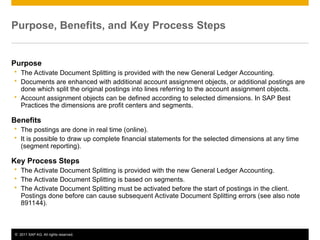
AG. All rights reserved. 2 Purpose, Benefits, and Key Process Steps Purpose The Activate Document Splitting is provided with the new General Ledger Accounting. Documents are enhanced with additional account assignment objects, or additional postings are done which split the original postings into lines referring to the account assignment objects. Account assignment objects can be defined according to selected dimensions. In SAP Best Practices the dimensions are profit centers and segments. Benefits The postings are done in real time (online). It is possible to draw up complete financial statements for the selected dimensions at any time (segment reporting). Key Process Steps The Activate Document Splitting is provided with the new General Ledger Accounting. The Activate Document Splitting is based on segments. The Activate Document Splitting must be activated before the start of postings in the client. Postings done before can cause subsequent Activate Document Splitting errors (see also note 891144).
3.
© 2011 SAP
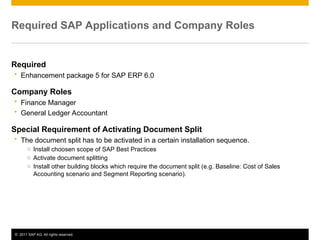
AG. All rights reserved. 3 Required SAP Applications and Company Roles Required Enhancement package 5 for SAP ERP 6.0 Company Roles Finance Manager General Ledger Accountant Special Requirement of Activating Document Split The document split has to be activated in a certain installation sequence. o Install choosen scope of SAP Best Practices o Activate document splitting o Install other building blocks which require the document split (e.g. Baseline: Cost of Sales Accounting scenario and Segment Reporting scenario).
4.
© 2011 SAP
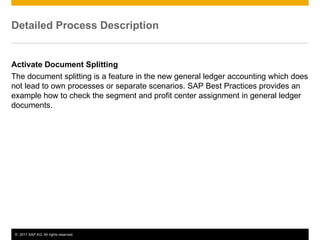
AG. All rights reserved. 4 Detailed Process Description Activate Document Splitting The document splitting is a feature in the new general ledger accounting which does not lead to own processes or separate scenarios. SAP Best Practices provides an example how to check the segment and profit center assignment in general ledger documents.
5.
© 2011 SAP
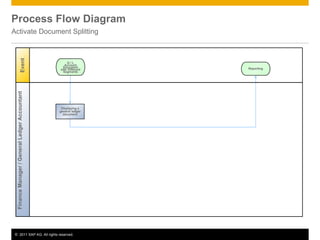
AG. All rights reserved. 5 Process Flow Diagram Activate Document Splitting Event G / L Account Document with Different Segments Finance Manager / General Ledger Accountant Displaying a general ledger document Reporting
6.
© 2011 SAP
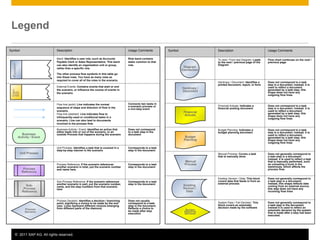
AG. All rights reserved. 6 Legend Symbol Description Usage Comments To next / From last Diagram: Leads to the next / previous page of the Diagram Flow chart continues on the next / previous page Hardcopy / Document: Identifies a printed document, report, or form Does not correspond to a task step in a document; instead, it is used to reflect a document generated by a task step; this shape does not have any outgoing flow lines Financial Actuals: Indicates a financial posting document Does not correspond to a task step in a document; instead, it is used to reflect a document generated by a task step; this shape does not have any outgoing flow lines Budget Planning: Indicates a budget planning document Does not correspond to a task step in a document; instead, it is used to reflect a document generated by a task step; this shape does not have any outgoing flow lines Manual Process: Covers a task that is manually done Does not generally correspond to a task step in a document; instead, it is used to reflect a task that is manually performed, such as unloading a truck in the warehouse, which affects the process flow. Existing Version / Data: This block covers data that feeds in from an external process Does not generally correspond to a task step in a document; instead, this shape reflects data coming from an external source; this step does not have any incoming flow lines System Pass / Fail Decision: This block covers an automatic decision made by the software Does not generally correspond to a task step in the document; instead it is used to reflect an automatic decision by the system that is made after a step has been executed. Extern al to SAP Business Activity / Event Unit Process Process Reference Sub- Process Reference Process Decision Diagram Connection Hardcopy / Document Financial Actuals Budget Planning Manual Process Existing Version / Data System Pass/Fail Decision Symbol Description Usage Comments Band: Identifies a user role, such as Accounts Payable Clerk or Sales Representative. This band can also identify an organization unit or group, rather than a specific role. The other process flow symbols in this table go into these rows. You have as many rows as required to cover all of the roles in the scenario. Role band contains tasks common to that role. External Events: Contains events that start or end the scenario, or influence the course of events in the scenario. Flow line (solid): Line indicates the normal sequence of steps and direction of flow in the scenario. Flow line (dashed): Line indicates flow to infrequently-used or conditional tasks in a scenario. Line can also lead to documents involved in the process flow. Connects two tasks in a scenario process or a non-step event Business Activity / Event: Identifies an action that either leads into or out of the scenario, or an outside Process that happens during the scenario Does not correspond to a task step in the document Unit Process: Identifies a task that is covered in a step-by-step manner in the scenario Corresponds to a task step in the document Process Reference: If the scenario references another scenario in total, put the scenario number and name here. Corresponds to a task step in the document Sub-Process Reference: If the scenario references another scenario in part, put the scenario number, name, and the step numbers from that scenario here Corresponds to a task step in the document Process Decision: Identifies a decision / branching point, signifying a choice to be made by the end user. Lines represent different choices emerging from different parts of the diamond. Does not usually correspond to a task step in the document; Reflects a choice to be made after step execution <Function>
7.
© 2011 SAP
AG. All rights reserved. 7 No part of this publication may be reproduced or transmitted in any form or for any purpose without the express permission of SAP AG. The information contained herein may be changed without prior notice. Some software products marketed by SAP AG and its distributors contain proprietary software components of other software vendors. Microsoft, Windows, Excel, Outlook, and PowerPoint are registered trademarks of Microsoft Corporation. IBM, DB2, DB2 Universal Database, System i, System i5, System p, System p5, System x, System z, System z10, System z9, z10, z9, iSeries, pSeries, xSeries, zSeries, eServer, z/VM, z/OS, i5/OS, S/390, OS/390, OS/400, AS/400, S/390 Parallel Enterprise Server, PowerVM, Power Architecture, POWER6+, POWER6, POWER5+, POWER5, POWER, OpenPower, PowerPC, BatchPipes, BladeCenter, System Storage, GPFS, HACMP, RETAIN, DB2 Connect, RACF, Redbooks, OS/2, Parallel Sysplex, MVS/ESA, AIX, Intelligent Miner, WebSphere, Netfinity, Tivoli and Informix are trademarks or registered trademarks of IBM Corporation. Linux is the registered trademark of Linus Torvalds in the U.S. and other countries. Adobe, the Adobe logo, Acrobat, PostScript, and Reader are either trademarks or registered trademarks of Adobe Systems Incorporated in the United States and/or other countries. Oracle is a registered trademark of Oracle Corporation. UNIX, X/Open, OSF/1, and Motif are registered trademarks of the Open Group. Citrix, ICA, Program Neighborhood, MetaFrame, WinFrame, VideoFrame, and MultiWin are trademarks or registered trademarks of Citrix Systems, Inc. HTML, XML, XHTML and W3C are trademarks or registered trademarks of W3C®, World Wide Web Consortium, Massachusetts Institute of Technology. Java is a registered trademark of Sun Microsystems, Inc. JavaScript is a registered trademark of Sun Microsystems, Inc., used under license for technology invented and implemented by Netscape. SAP, R/3, SAP NetWeaver, Duet, PartnerEdge, ByDesign, SAP BusinessObjects Explorer, StreamWork, and other SAP products and services mentioned herein as well as their respective logos are trademarks or registered trademarks of SAP AG in Germany and other countries. © 2011 SAP AG. All rights reserved Business Objects and the Business Objects logo, BusinessObjects, Crystal Reports, Crystal Decisions, Web Intelligence, Xcelsius, and other Business Objects products and services mentioned herein as well as their respective logos are trademarks or registered trademarks of Business Objects Software Ltd. Business Objects is an SAP company. Sybase and Adaptive Server, iAnywhere, Sybase 365, SQL Anywhere, and other Sybase products and services mentioned herein as well as their respective logos are trademarks or registered trademarks of Sybase, Inc. Sybase is an SAP company. All other product and service names mentioned are the trademarks of their respective companies. Data contained in this document serves informational purposes only. National product specifications may vary. The information in this document is proprietary to SAP. No part of this document may be reproduced, copied, or transmitted in any form or for any purpose without the express prior written permission of SAP AG. This document is a preliminary version and not subject to your license agreement or any other agreement with SAP. This document contains only intended strategies, developments, and functionalities of the SAP® product and is not intended to be binding upon SAP to any particular course of business, product strategy, and/or development. Please note that this document is subject to change and may be changed by SAP at any time without notice. SAP assumes no responsibility for errors or omissions in this document. SAP does not warrant the accuracy or completeness of the information, text, graphics, links, or other items contained within this material. This document is provided without a warranty of any kind, either express or implied, including but not limited to the implied warranties of merchantability, fitness for a particular purpose, or non-infringement. SAP shall have no liability for damages of any kind including without limitation direct, special, indirect, or consequential damages that may result from the use of these materials. This limitation shall not apply in cases of intent or gross negligence. The statutory liability for personal injury and defective products is not affected. SAP has no control over the information that you may access through the use of hot links contained in these materials and does not endorse your use of third-party Web pages nor provide any warranty whatsoever relating to third-party Web pages.
Download