







End-to-End Machine Learning Project
Eng Teong Cheah | Microsoft MVP for AI
Working with Real Data
Working with Real Data?
When you are learning about Machine Learning it is best to actually
experiment with real-world data, not just artificial datasets. Fortunately, there
are thousands of open datasets to choose from, ranging across all sorts of
domains. Here are a few places you can look to get data:
- Popular open data repositories:
- UC Irvine Machine Learning Repository
- Kaggle datasets
- Amazon’s AWS datasets
- Meta portals (they list open data repositories):
- http://dataportals.org/
- http://opendatamonitor.eu/
- http://quandl.com/
Working with Real Data?
- Other pages listing many popular open data repositories:
- Wikipedia’s list of Machine Learning datasets
- Quora.com question
- Datasets subreddit
Look at the Big Picture
The first task you are asked to perform is to build a model of housing prices in
California using the California census data. This data has metrics such as the
population, median income, median housing price, and so on for each block
group California. Block groups are the smallest geographical unit for which the
US Census Bureau publishes sample data ( a block group typically has a
population of 600 to 3,000 people). We will just call them “districts” for shot.
Your model should learn from this data and be able to predict the median
housing price in any district, given all the other metrics.
Frame the Problem
Question:
What exactly is the business objective; building a model is probably not the end
goal. How does the company expect to use and benefit form this model?
This is important because it will determine how you frame the problem, what
algorithms you will select, what performance measure you will use to evaluate
your model, and how much effort you should spend tweaking it.
Frame the Problem
Answer:
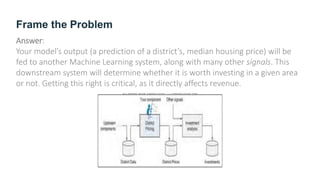
Your model’s output (a prediction of a district’s, median housing price) will be
fed to another Machine Learning system, along with many other signals. This
downstream system will determine whether it is worth investing in a given area
or not. Getting this right is critical, as it directly affects revenue.
Frame the Problem
Question:
What the current solution looks like (if any). It will often give you a reference
performance, as well as insights on how to solve the problem.
Frame the Problem
Answer:
The district housing prices are currently estimated manually by experts: a team
gathers up-to-data information about a district (excluding median housing
prices), and they use complex rules to come up with an estimate. This is costly
and time-consuming, and their estimates are not great; their typical error rate
is about 15%.
Frame the Problem
With all this information you are now ready to start designing your system.
First, you need to frame the problem:
Is it supervised, unsupervised, or Reinforcement Learning?
Is it a classification task, a regression task, or something else?
Should you use batch learning or online learning techniques?
It is clearly a typical supervised learning task since you are
given labeled training examples (each instance comes with the
expected output, i.e., the district’s median housing price).
Moreover, it is also a typical regression task, since you are
asked to predict the value. More specifically, this is a
multivariate regression problem since the system will use
multiple features to make a prediction (it will use the district’s
population, the median income, etc.)
You predicted life satisfaction based on just one feature, the
GDP per capita, so it was a univariate regression problem.
Finally, there is no continuous flow of data coming in the
system, there is no particular need to adjust to changing data
rapidly, and the data is small enough to fit in memory, so plain
batch learning should do just fine.
Select a Performance Measure
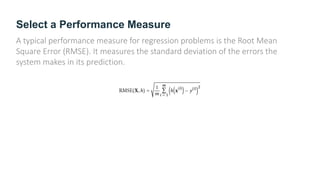
A typical performance measure for regression problems is the Root Mean
Square Error (RMSE). It measures the standard deviation of the errors the
system makes in its prediction.
Check the Assumptions
It is good practice to list and verify the assumptions that were made so far (by
you or others); this can catch serious issues early on.
For example, the district prices that your system, and we assume that these
prices are going to be used as such. But what if the downstream system
actually converts the prices into categories (e.g., “cheap”, “medium”, or
“expensive”) and then uses those categories instead of the prices themselves?
Check the Assumptions
In this case, getting the price perfectly right is not important at all; your system
just needs to get the category right. If that’s so, then the problem should have
been framed as a classification, not a regression task. You don’t want to find
this out after working on a regression system for a months.
Fortunately, after talking with the team in charge of the downstream system,
you are confident that they do indeed need the actual prices, not categories.
Get the Data
It’s time to get your hands dirty.
Don’t hesitate to pick up your laptop and walk through the following code
examples in a Jupyter notebook.
Create the Workspace
1. You need to have Python installed.
2. Create a workspace directory for your Machine Learning code and datasets.
You need a number of Python modules: Jupyter, NumPy, Pandas, Matplotlib
and Scikit-Learn.
Download the Data
In typical environments your data would be available in a relational database
(or some other common datastore) and spread across multiple
tables/documents/files.
To access it, you would first need to get your credentials and access
authorizations, and familiarize yourself with the data schema.
In this project, however, things are much simpler: you will download a single
compressed file, housing.tgz, which contains a comma-separated value (CSV)
file called housing.csv with all the data.
Download the Data
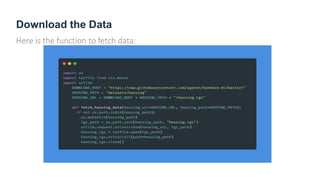
Here is the function to fetch data:
Take a Quick Look at the Data Structure
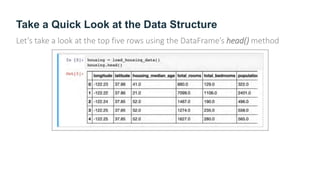
Let’s take a look at the top five rows using the DataFrame’s head() method
Take a Quick Look at the Data Structure
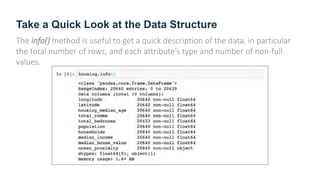
The info() method is useful to get a quick description of the data, in particular
the total number of rows, and each attribute’s type and number of non-full
values.
Take a Quick Look at the Data Structure
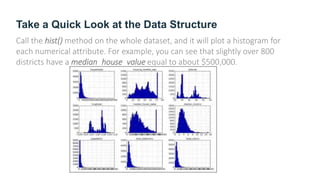
Call the hist() method on the whole dataset, and it will plot a histogram for
each numerical attribute. For example, you can see that slightly over 800
districts have a median_house_value equal to about $500,000.
Create a Test Set
It may sound strange to voluntarily set aside part of the data at this stage.
After all, you have only taken a quick glance at the data, and surely you should
learn a whole lot more about it before you decide what algorithms to use,
right?
This is true, but your brain is an amazing pattern detection system, which
means that it is highly prone to overfitting: if you look at the test set, you may
stumble upon some seemingly interesting pattern in the test data that leads
you to select a particular kind of Machine Learning model.
When you estimate the generalization error using the test set, you estimate will
be too optimistic and you will launch a system that will not perform as well as
expected. This is called data snooping bias.
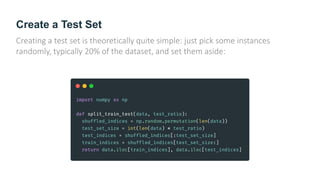
Create a Test Set
Creating a test set is theoretically quite simple: just pick some instances
randomly, typically 20% of the dataset, and set them aside:
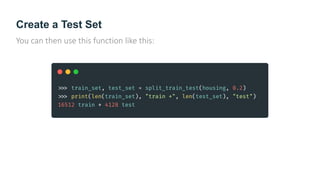
Create a Test Set
You can then use this function like this:
Discover and Visualize the Data to Gain Insights
First, make sure you have put the test set aside and you are only exploring the
training set. Also, if the training set is very large, you may want to sample an
exploration set, to make manipulations easy and fast. In our case, the set is
quite small so you can just work directly on the full set.
Visualizing Geographical Data
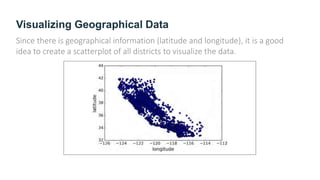
Since there is geographical information (latitude and longitude), it is a good
idea to create a scatterplot of all districts to visualize the data.
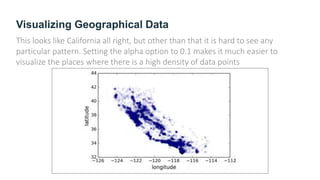
Visualizing Geographical Data
This looks like California all right, but other than that it is hard to see any
particular pattern. Setting the alpha option to 0.1 makes it much easier to
visualize the places where there is a high density of data points
Looking for Correlations
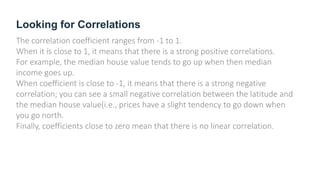
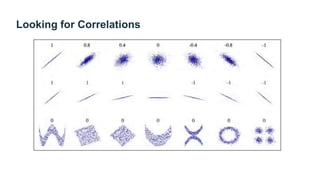
The correlation coefficient ranges from -1 to 1.
When it is close to 1, it means that there is a strong positive correlations.
For example, the median house value tends to go up when then median
income goes up.
When coefficient is close to -1, it means that there is a strong negative
correlation; you can see a small negative correlation between the latitude and
the median house value(i.e., prices have a slight tendency to go down when
you go north.
Finally, coefficients close to zero mean that there is no linear correlation.
Looking for Correlations
Experimenting with Attribute Combinations
One last thing you may want to do before actually preparing the data for
Machine Learning algorithms is to try out various attribute combinations.
For example, the total number of rooms in a district is not very useful if you
don’t know how many households there are.
What you really want is the number of rooms per household.
Similarly, the total number of bedrooms by itself is not very useful: you
probably want to compare it to the number of rooms. And the population per
household also seems like an interesting attribute combination to look at.
Prepare the Data for Machine Learning Algorithms
Instead of just doing this manually, you should write functions to do that, for
several good reasons:
1. This will allow you to reproduce these transformations easily on any dataset
(e.g., the next time you get the fresh datasets).
2. You will gradually build a library of transformation functions that you can
reuse in future projects.
3. You can use these functions in your live system to transform the new data
before feeding it to your algorithms.
4. This will make it possible for you to easily try various transformations and
see which combination of transformation works best.
Data Cleaning
Most of Machine Learning algorithms cannot work with missing features, so
let’s create a few functions to take care of them. You noticed earlier that the
total_bedrooms attribute has some missing values, so let’s fix this. You have
three options:
1. Get rid of the corresponding districts.
2. Get rid of the whole attribute.
3. Set the values to some value (zero, the mean, the median, etc.)
Handling Text and Categorical Attributes
Earlier we left out the categorical attribute ocean_proximity because it is a text
attribute so we cannot compute its median. Most Machine Learning algorithms
prefer to work with numbers anyway.
Custom Transformers
Although Scikit-Learn provides many useful transformers, you will need to write
your own for task such as custom cleanup operations or combining specific
attributes. You will want your transformer to work seamlessly with Scikit-Learn
functionalities(such as pipelines), and since Scikit-Learn relies on duck
typing(not inheritance), all you need is to create a class and implement 3
methods: fit() (returning self), transform(), and fit_transform().
Feature Scaling
One of the most important transformation you need to apply to your data is
feature scaling.
With few exceptions, Machine Learning algorithms don’t perform well when
the input numerical attributes have very different scales.
This is the case for the housing data: the total number of rooms ranges from
about 6 to 39,320, while the median incomes only range from 0 to 15. Note
that scaling the target values is generally not required.
There are two common ways to get all attributes to have the same scale:
min-max scaling and standardization.
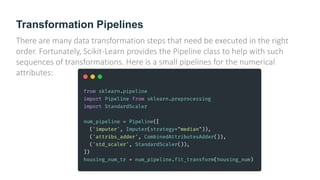
Transformation Pipelines
There are many data transformation steps that need be executed in the right
order. Fortunately, Scikit-Learn provides the Pipeline class to help with such
sequences of transformations. Here is a small pipelines for the numerical
attributes:
Select and Train a Model
At last! You framed the problem, you got the data and explored it, you sampled
a training set and a test set, and you wrote transformation pipelines to clean up
and prepare your data for Machine Learning algorithms automatically. You are
now ready to select and train a Machine Learning model.
Fine-Tune Your Model
Let’s assume that you now have a shortlist of promising models. You now need
to fine-tune them.
Grid Search
One way to do that would be to fiddle with the hyperparameters manually,
until you find a great combination of hyperparameter values. This would be
very tedious work, and you may not have time to explore many combinations.
Instead you should get Scikit-Learn’s GridSearchCV to search for you. All you
need to do is tell it which hyperparameters you want it to experiment with, and
what values to try out, and it will evaluate all the possible combinations of
hyperparameters values, using cross-validation.
Randomized Search
This approach has 2 main benefits:
- If you let the randomized search run for, say, 1,000 iterations, this approach
will explore, 1,000 different values for each hyperparameter(instead of just a
few values per hyperparameter with the grid search approach).
- You have more control over the computing budget you want to allocate to
hyper-parameter search, simply by setting the number of iterations.
Randomized Search
This approach has 2 main benefits:
- If you let the randomized search run for, say, 1,000 iterations, this approach
will explore, 1,000 different values for each hyperparameter(instead of just a
few values per hyperparameter with the grid search approach).
- You have more control over the computing budget you want to allocate to
hyper-parameter search, simply by setting the number of iterations.
Ensemble Methods
Another way to fine-tune your system is to try to combine the models that
perform best. The group (or “ensemble”) will often perform better than the
best individual model (just like Random Forests perform better than the
individual Decision Tree they rely on), especially if the individual models very
different types of errors.
Evaluate Your System on the Test Set
After tweaking your models for a while, you eventually have a system that
performs sufficiently well. Now is the time to evaluate the final model on the
test set. There is nothing special about this process; just get the predictors and
the labels from your test set, run your full_pipelines to transform the data (call
transform(), not fit_transform()!), and evaluate the final model on the test set.
Launch, Monitor and Maintain Your System
Finally, you will generally want to train your models on a regular basis using
fresh data. You should automate this process as much as possible.
If you don’t, you are very likely to refresh your model only every six months (at
best), and your system’s performance may fluctuate severely over time.
If your system is an online learning system, you should make sure you save
snapshots of its state at regular intervals so you can easily roll back to a
previously working state.
Thanks!
Does anyone have any questions?
Twitter: @walkercet
Blog: https://ceteongvanness.wordpress.com
Resources
Hands-On Machine Learning with Scikit-Learn and TensorFlow

End-to-End Machine Learning Project

  • 1.
    End-to-End Machine LearningProject Eng Teong Cheah | Microsoft MVP for AI
  • 2.
  • 3.
    Working with RealData? When you are learning about Machine Learning it is best to actually experiment with real-world data, not just artificial datasets. Fortunately, there are thousands of open datasets to choose from, ranging across all sorts of domains. Here are a few places you can look to get data: - Popular open data repositories: - UC Irvine Machine Learning Repository - Kaggle datasets - Amazon’s AWS datasets - Meta portals (they list open data repositories): - http://dataportals.org/ - http://opendatamonitor.eu/ - http://quandl.com/
  • 4.
    Working with RealData? - Other pages listing many popular open data repositories: - Wikipedia’s list of Machine Learning datasets - Quora.com question - Datasets subreddit
  • 5.
    Look at theBig Picture The first task you are asked to perform is to build a model of housing prices in California using the California census data. This data has metrics such as the population, median income, median housing price, and so on for each block group California. Block groups are the smallest geographical unit for which the US Census Bureau publishes sample data ( a block group typically has a population of 600 to 3,000 people). We will just call them “districts” for shot. Your model should learn from this data and be able to predict the median housing price in any district, given all the other metrics.
  • 6.
    Frame the Problem Question: Whatexactly is the business objective; building a model is probably not the end goal. How does the company expect to use and benefit form this model? This is important because it will determine how you frame the problem, what algorithms you will select, what performance measure you will use to evaluate your model, and how much effort you should spend tweaking it.
  • 7.
    Frame the Problem Answer: Yourmodel’s output (a prediction of a district’s, median housing price) will be fed to another Machine Learning system, along with many other signals. This downstream system will determine whether it is worth investing in a given area or not. Getting this right is critical, as it directly affects revenue.
  • 8.
    Frame the Problem Question: Whatthe current solution looks like (if any). It will often give you a reference performance, as well as insights on how to solve the problem.
  • 9.
    Frame the Problem Answer: Thedistrict housing prices are currently estimated manually by experts: a team gathers up-to-data information about a district (excluding median housing prices), and they use complex rules to come up with an estimate. This is costly and time-consuming, and their estimates are not great; their typical error rate is about 15%.
  • 10.
    Frame the Problem Withall this information you are now ready to start designing your system. First, you need to frame the problem: Is it supervised, unsupervised, or Reinforcement Learning? Is it a classification task, a regression task, or something else? Should you use batch learning or online learning techniques?
  • 11.
    It is clearlya typical supervised learning task since you are given labeled training examples (each instance comes with the expected output, i.e., the district’s median housing price). Moreover, it is also a typical regression task, since you are asked to predict the value. More specifically, this is a multivariate regression problem since the system will use multiple features to make a prediction (it will use the district’s population, the median income, etc.) You predicted life satisfaction based on just one feature, the GDP per capita, so it was a univariate regression problem. Finally, there is no continuous flow of data coming in the system, there is no particular need to adjust to changing data rapidly, and the data is small enough to fit in memory, so plain batch learning should do just fine.
  • 12.
    Select a PerformanceMeasure A typical performance measure for regression problems is the Root Mean Square Error (RMSE). It measures the standard deviation of the errors the system makes in its prediction.
  • 13.
    Check the Assumptions Itis good practice to list and verify the assumptions that were made so far (by you or others); this can catch serious issues early on. For example, the district prices that your system, and we assume that these prices are going to be used as such. But what if the downstream system actually converts the prices into categories (e.g., “cheap”, “medium”, or “expensive”) and then uses those categories instead of the prices themselves?
  • 14.
    Check the Assumptions Inthis case, getting the price perfectly right is not important at all; your system just needs to get the category right. If that’s so, then the problem should have been framed as a classification, not a regression task. You don’t want to find this out after working on a regression system for a months. Fortunately, after talking with the team in charge of the downstream system, you are confident that they do indeed need the actual prices, not categories.
  • 15.
    Get the Data It’stime to get your hands dirty. Don’t hesitate to pick up your laptop and walk through the following code examples in a Jupyter notebook.
  • 16.
    Create the Workspace 1.You need to have Python installed. 2. Create a workspace directory for your Machine Learning code and datasets. You need a number of Python modules: Jupyter, NumPy, Pandas, Matplotlib and Scikit-Learn.
  • 17.
    Download the Data Intypical environments your data would be available in a relational database (or some other common datastore) and spread across multiple tables/documents/files. To access it, you would first need to get your credentials and access authorizations, and familiarize yourself with the data schema. In this project, however, things are much simpler: you will download a single compressed file, housing.tgz, which contains a comma-separated value (CSV) file called housing.csv with all the data.
  • 18.
    Download the Data Hereis the function to fetch data:
  • 19.
    Take a QuickLook at the Data Structure Let’s take a look at the top five rows using the DataFrame’s head() method
  • 20.
    Take a QuickLook at the Data Structure The info() method is useful to get a quick description of the data, in particular the total number of rows, and each attribute’s type and number of non-full values.
  • 21.
    Take a QuickLook at the Data Structure Call the hist() method on the whole dataset, and it will plot a histogram for each numerical attribute. For example, you can see that slightly over 800 districts have a median_house_value equal to about $500,000.
  • 22.
    Create a TestSet It may sound strange to voluntarily set aside part of the data at this stage. After all, you have only taken a quick glance at the data, and surely you should learn a whole lot more about it before you decide what algorithms to use, right? This is true, but your brain is an amazing pattern detection system, which means that it is highly prone to overfitting: if you look at the test set, you may stumble upon some seemingly interesting pattern in the test data that leads you to select a particular kind of Machine Learning model. When you estimate the generalization error using the test set, you estimate will be too optimistic and you will launch a system that will not perform as well as expected. This is called data snooping bias.
  • 23.
    Create a TestSet Creating a test set is theoretically quite simple: just pick some instances randomly, typically 20% of the dataset, and set them aside:
  • 24.
    Create a TestSet You can then use this function like this:
  • 25.
    Discover and Visualizethe Data to Gain Insights First, make sure you have put the test set aside and you are only exploring the training set. Also, if the training set is very large, you may want to sample an exploration set, to make manipulations easy and fast. In our case, the set is quite small so you can just work directly on the full set.
  • 26.
    Visualizing Geographical Data Sincethere is geographical information (latitude and longitude), it is a good idea to create a scatterplot of all districts to visualize the data.
  • 27.
    Visualizing Geographical Data Thislooks like California all right, but other than that it is hard to see any particular pattern. Setting the alpha option to 0.1 makes it much easier to visualize the places where there is a high density of data points
  • 28.
    Looking for Correlations Thecorrelation coefficient ranges from -1 to 1. When it is close to 1, it means that there is a strong positive correlations. For example, the median house value tends to go up when then median income goes up. When coefficient is close to -1, it means that there is a strong negative correlation; you can see a small negative correlation between the latitude and the median house value(i.e., prices have a slight tendency to go down when you go north. Finally, coefficients close to zero mean that there is no linear correlation.
  • 29.
  • 30.
    Experimenting with AttributeCombinations One last thing you may want to do before actually preparing the data for Machine Learning algorithms is to try out various attribute combinations. For example, the total number of rooms in a district is not very useful if you don’t know how many households there are. What you really want is the number of rooms per household. Similarly, the total number of bedrooms by itself is not very useful: you probably want to compare it to the number of rooms. And the population per household also seems like an interesting attribute combination to look at.
  • 31.
    Prepare the Datafor Machine Learning Algorithms Instead of just doing this manually, you should write functions to do that, for several good reasons: 1. This will allow you to reproduce these transformations easily on any dataset (e.g., the next time you get the fresh datasets). 2. You will gradually build a library of transformation functions that you can reuse in future projects. 3. You can use these functions in your live system to transform the new data before feeding it to your algorithms. 4. This will make it possible for you to easily try various transformations and see which combination of transformation works best.
  • 32.
    Data Cleaning Most ofMachine Learning algorithms cannot work with missing features, so let’s create a few functions to take care of them. You noticed earlier that the total_bedrooms attribute has some missing values, so let’s fix this. You have three options: 1. Get rid of the corresponding districts. 2. Get rid of the whole attribute. 3. Set the values to some value (zero, the mean, the median, etc.)
  • 33.
    Handling Text andCategorical Attributes Earlier we left out the categorical attribute ocean_proximity because it is a text attribute so we cannot compute its median. Most Machine Learning algorithms prefer to work with numbers anyway.
  • 34.
    Custom Transformers Although Scikit-Learnprovides many useful transformers, you will need to write your own for task such as custom cleanup operations or combining specific attributes. You will want your transformer to work seamlessly with Scikit-Learn functionalities(such as pipelines), and since Scikit-Learn relies on duck typing(not inheritance), all you need is to create a class and implement 3 methods: fit() (returning self), transform(), and fit_transform().
  • 35.
    Feature Scaling One ofthe most important transformation you need to apply to your data is feature scaling. With few exceptions, Machine Learning algorithms don’t perform well when the input numerical attributes have very different scales. This is the case for the housing data: the total number of rooms ranges from about 6 to 39,320, while the median incomes only range from 0 to 15. Note that scaling the target values is generally not required. There are two common ways to get all attributes to have the same scale: min-max scaling and standardization.
  • 36.
    Transformation Pipelines There aremany data transformation steps that need be executed in the right order. Fortunately, Scikit-Learn provides the Pipeline class to help with such sequences of transformations. Here is a small pipelines for the numerical attributes:
  • 37.
    Select and Traina Model At last! You framed the problem, you got the data and explored it, you sampled a training set and a test set, and you wrote transformation pipelines to clean up and prepare your data for Machine Learning algorithms automatically. You are now ready to select and train a Machine Learning model.
  • 38.
    Fine-Tune Your Model Let’sassume that you now have a shortlist of promising models. You now need to fine-tune them.
  • 39.
    Grid Search One wayto do that would be to fiddle with the hyperparameters manually, until you find a great combination of hyperparameter values. This would be very tedious work, and you may not have time to explore many combinations. Instead you should get Scikit-Learn’s GridSearchCV to search for you. All you need to do is tell it which hyperparameters you want it to experiment with, and what values to try out, and it will evaluate all the possible combinations of hyperparameters values, using cross-validation.
  • 40.
    Randomized Search This approachhas 2 main benefits: - If you let the randomized search run for, say, 1,000 iterations, this approach will explore, 1,000 different values for each hyperparameter(instead of just a few values per hyperparameter with the grid search approach). - You have more control over the computing budget you want to allocate to hyper-parameter search, simply by setting the number of iterations.
  • 41.
    Randomized Search This approachhas 2 main benefits: - If you let the randomized search run for, say, 1,000 iterations, this approach will explore, 1,000 different values for each hyperparameter(instead of just a few values per hyperparameter with the grid search approach). - You have more control over the computing budget you want to allocate to hyper-parameter search, simply by setting the number of iterations.
  • 42.
    Ensemble Methods Another wayto fine-tune your system is to try to combine the models that perform best. The group (or “ensemble”) will often perform better than the best individual model (just like Random Forests perform better than the individual Decision Tree they rely on), especially if the individual models very different types of errors.
  • 43.
    Evaluate Your Systemon the Test Set After tweaking your models for a while, you eventually have a system that performs sufficiently well. Now is the time to evaluate the final model on the test set. There is nothing special about this process; just get the predictors and the labels from your test set, run your full_pipelines to transform the data (call transform(), not fit_transform()!), and evaluate the final model on the test set.
  • 44.
    Launch, Monitor andMaintain Your System Finally, you will generally want to train your models on a regular basis using fresh data. You should automate this process as much as possible. If you don’t, you are very likely to refresh your model only every six months (at best), and your system’s performance may fluctuate severely over time. If your system is an online learning system, you should make sure you save snapshots of its state at regular intervals so you can easily roll back to a previously working state.
  • 45.
    Thanks! Does anyone haveany questions? Twitter: @walkercet Blog: https://ceteongvanness.wordpress.com
  • 46.
    Resources Hands-On Machine Learningwith Scikit-Learn and TensorFlow