SECURITY UNCOVERED:
MANAGING YOUR MICROSOFT
365 VULNERABILITIES
Making better use of your existing Microsoft 365 Investment
Adriaan Bekker
Technical Director
Adriaan has over 20 years
experience in information security
management. Holding both
Computer Science and Business
degrees, he offers a valuable blend
of technical expertise and
commercial insight.
ABOUT SOFTWERX
We are the UK’s leading Microsoft cloud security specialist.
Based in Cambridge and London we are a leading Microsoft cloud
security practice with specialist knowledge around cyber security,
cloud infrastructure and compliance.
We have been helping forward-thinking companies modernise and
secure their businesses for nearly 20 years – the chances are we can
help you too.
WHAT WE’LL COVER
The advanced security features in Microsoft 365, Office 365 and the
EMS portfolio.
Understanding your current Microsoft security portfolio and better
leveraging the features you've already paid for.
Securing your Microsoft environment.
Critical considerations in securing your Microsoft cloud environment
and why there isn't a one size fit's all solution to securing your business.
A real world business case study.
The background and key priorities of this 200+ seat business, the
process of understanding what was already in place and developing a
clear roadmap to complete security.
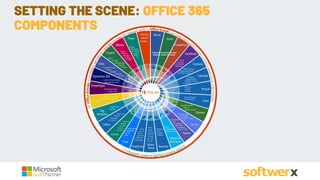
SETTING THE SCENE: OFFICE 365
COMPONENTS
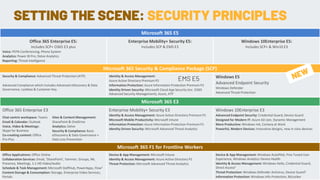
SETTING THE SCENE: SECURITY PRINCIPLES
Microsoft 365 E5
Office 365 Enterprise E5:
Includes SCP+ O365 E3 plus
Voice: PSTN Conferencing, Phone System
Analytics: Power BI Pro, Delve Analytics
Reporting: Threat Intelligence
Enterprise Mobility+ Security E5:
Includes SCP & EMS E3
Windows 10Enterprise E5:
Includes SCP+ & Win10 E3
Microsoft 365 Security & Compliance Package (SCP)
Security & Compliance: Advanced Threat Protection (ATP)
Advanced Compliance which includes Advanced eDiscovery & Data
Governance, Lockbox & Customer Key.
Identity & Access Management:
Azure Active Directory Premium P2
Information Protection: Azure Information Protection Premium P2
Identity Driven Security: Microsoft Cloud App Security (inc. O365
Advanced Security Management), Azure, ATP
Windows E5
Advanced Endpoint Security
Windows Defender
Advanced Threat Protection
Microsoft 365 E3
Office 365 Enterprise E3 Enterprise Mobility+ Security E3
Identity & Access Management: Azure Active Directory Premium P1
Microsoft Mobile Productivity: Microsoft Intune
Information Protection: Azure Information Protection Premium P1
Identity Driven Security: Microsoft Advanced Threat Analytics
Windows 10Enterprise E3
Advanced Endpoint Security: Credential Guard, Device Guard
Designed for Modern IT: Azure AD Join, Dynamic Management
More Productive: Windows Ink, Cortana at Work
Powerful, Modern Devices: Innovative designs, new in class devices
Chat-centric workspace: Teams
Email & Calendar: Outlook
Voice, Video & Meetings:
Skype for Business
Co-creating content: Office
Pro-Plus
Sites & Content Management:
SharePoint & OneDrive
Analytics: Delve
Security & Compliance: Basic
eDiscovery & Data Governance +
Data Loss Prevention
Microsoft 365 F1 for Frontline Workers
Office Applications: Office Online
Collaboration Services: Email, ‘SharePoint’, Yammer, Groups, IM,
Presence, Meetings, 1:1 HD Video/Audio
Schedule & Task Management: Microsoft StaffHub, PowerApps, Flow2
Content Storage & Consumption: Storage, Enterprise Video Services,
Portals
Device & App Management: Microsoft Intune
Identity & Access Management: Azure Active Directory P1
Threat Protection: Microsoft Advanced Threat Analytics
Device & App Management: Windows AutoPilot, Fine Tuned User
Experience, Windows Analytics Device Health
Identity & Access Management: Windows Hello, Credential Guard,
Direct Access3
Threat Protection: Windows Defender Antivirus, Device Guard3
Information Protection: Windows Info Protection, BitLocker
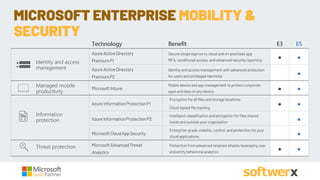
EMS E5
Technology Benefit E3 E5
AzureActiveDirectory
PremiumP1
Secure singlesign-on to cloudand on-premises app
MFA, conditional access, and advanced security reporting
● ●
AzureActiveDirectory
PremiumP2
Identity and access management with advanced protection
forusers and privileged identities
●
MicrosoftIntune
Mobiledeviceand app management to protect corporate
apps and data onany device
● ●
AzureInformationProtectionP1
Encryption forall filesand storage locations
Cloud-based filetracking
● ●
AzureInformationProtectionP2
Intelligent classification and encryption forfilesshared
insideand outsideyourorganization
●
MicrosoftCloudAppSecurity
Enterprise-grade visibility,control, and protection foryour
cloudapplications
●
MicrosoftAdvancedThreat
Analytics
Protection fromadvanced targeted attacks leveraging user
and entity behavioral analytics
● ●
Identity and access
management
Managed mobile
productivity
Information
protection
Threat protection
MICROSOFT ENTERPRISE MOBILITY &
SECURITY
Mobile device & app
management
Information
protection
Identity and access
management
Threat
protection
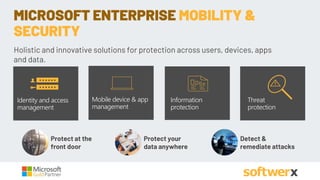
MICROSOFT ENTERPRISE MOBILITY &
SECURITY
Protect at the
front door
Detect &
remediate attacks
Protect your
data anywhere
Holistic and innovative solutions for protection across users, devices, apps
and data.
• Reduce threats with identity and access management
• Manage mobile device and apps
• Leverage conditional access
• Increase enterprise data protection
• Prevent data loss
• Enable secured collaboration
• Reduce malware exposure
IMPROVING YOUR SECURITY POSTURE
NCSC Warns of Rising Office 365 Account Compromises
What is happening?
NCSC recently published an advisory regarding several incidents involving compromise of Office 365 user accounts within the UK and using them
in targeted supply chain attacks.
To be clear, this is not a vulnerability in Office 365. NCSC are highlighting that O365 users are being increasingly targeted by attackers given its
widespread use and the tendency for users to authenticate with just username and password credentials only.
This advisory highlights that username and password credentials alone do not provide adequate protection against attackers who can obtain
credentials from victims via common methods such as Spear Phishing and password guessing.
OFFICE 365 COMPROMISED OFTEN
• Turn on MFA
• Stop users from changing passwords regularly
as per NCSC guidance.
PREVENT THE MOST COMMON TYPE OF
ACCESS BREACH TO OFFICE 365
Next:
• Differences between Office 365 MFA and Azure MFA
OFFICE 365 MFA
How Can I Authenticate?
• Azure Authenticator App
• Text Message
• Phone Call + PIN
Limitations
• Too many prompts
• No intelligence
• Conditional Access Scenario’s supported.
• Why prompt for MFA when a user is connecting from a corporate network and is
using a corporate device?
• Why prompt for MFA when a user is connecting to their apps the same way you
would if they were connecting to the corporate account line of business
application?
• Why MFA everyone all the time, can we target specific users when they are
accessing sensitive information?
AZURE MFA: EMS E3, MICROSOFT 365 E3
AND AZURE PLAN1
• Who’s managing your services?
• Dedicated Admin accounts.
IDENTITY AND ACCESS MANAGEMENT
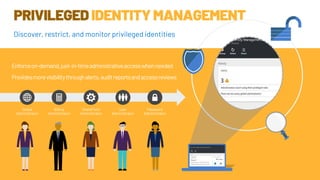
PRIVILEGEDIDENTITYMANAGEMENT
Enforceon-demand,just-in-timeadministrativeaccesswhenneeded
Providesmorevisibilitythroughalerts,auditreportsandaccessreviews
Global
Administrator
Billing
Administrator
SharePoint
Administrator
User
Administrator
Password
Administrator
Discover, restrict, and monitor privileged identities
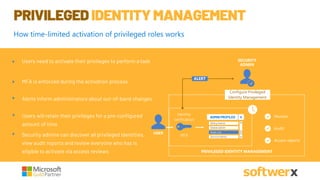
PRIVILEGEDIDENTITYMANAGEMENT
MFA is enforced during the activation process
Alerts inform administrators about out-of-band changes
Users need to activate their privileges to perform a task
Users will retain their privileges for a pre-configured
amount of time
Security admins can discover all privileged identities,
view audit reports and review everyone who has is
eligible to activate via access reviews
Audit
SECURITY
ADMIN
Configure Privileged
Identity Management
USER
PRIVILEGED IDENTITY MANAGEMENT
Identity
verification
Monitor
Access reports
MFA
ALERT
Read only
ADMIN PROFILES
Billing Admin
Global Admin
Service Admin
How time-limited activation of privileged roles works
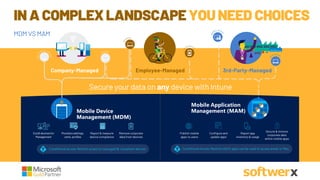
Mobile Device
Management (MDM)
Mobile Application
Management (MAM)
Conditional Access: Restrict access to managed & compliant devices Conditional Access: Restrict which apps can be used to access email or files
Secure your data on any device with Intune
r
Company-Managed Employee-Managed 3rd-Party-Managed
n
Enroll devicesfor
Management
Provisionsettings,
certs,profiles
Report & measure
device compliance
Remove corporate
data from devices
Publish mobile
apps to users
Configure and
update apps
Report app
inventory & usage
Secure & remove
corporate data
within mobile apps
IN A COMPLEXLANDSCAPEYOUNEED CHOICES
MDM VS MAM
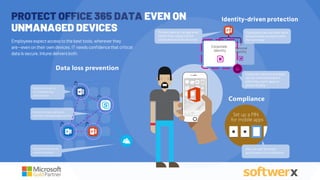
PROTECT OFFICE 365 DATA EVEN ON
UNMANAGED DEVICES
Compliance
Employeesexpectaccesstothe best tools,whereverthey
are—evenontheir owndevices.IT needs confidencethatcritical
datais secure.Intunedeliversboth.
Set up a PIN
for mobile apps
Data loss prevention
Require encryption
for managed app
local storage
Only allow Save As to
secure locations
Only allow copy and paste
between managed applications
Identity-driven protection
Protect data at the app level,
rather than requiring the
entire device to be secured.
Employees can use their work
and personal accounts with
the same app
Personal
Identity
Corporate
Identity
Corporate identity and data
can be removed without
affecting users’ apps or
personal data.
Natural user prompts
guide users to compliance
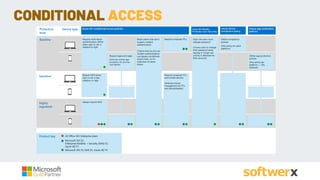
CONDITIONAL ACCESS
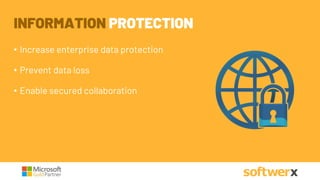
INFORMATION PROTECTION
• Increase enterprise data protection
• Prevent data loss
• Enable secured collaboration
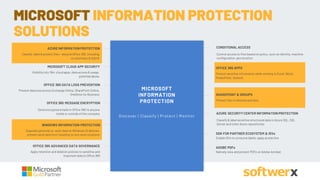
MICROSOFT CLOUD APP SECURITY
Visibility into 15k+ cloud apps, data access & usage,
potential abuse
AZURE SECURITY CENTER INFORMATION PROTECTION
Classify & label sensitive structured data in Azure SQL, SQL
Server and other Azure repositories
OFFICE 365 APPS
Protect sensitive information while working in Excel, Word,
PowerPoint, Outlook
AZURE INFORMATION PROTECTION
Classify, label & protect files – beyond Office 365, including
on-premises & hybrid
OFFICE 365 DATA LOSS PREVENTION
Prevent data loss across Exchange Online, SharePoint Online,
OneDrive for Business SHAREPOINT & GROUPS
Protect files in libraries and lists
OFFICE 365 ADVANCED DATA GOVERNANCE
Apply retention and deletion policies to sensitive and
important data in Office 365
ADOBE PDFs
Natively view and protect PDFs on Adobe Acrobat
WINDOWS INFORMATION PROTECTION
Separate personal vs. work data on Windows 10 devices,
prevent work data from traveling to non-work locations
OFFICE 365 MESSAGE ENCRYPTION
Send encrypted emails in Office 365 to anyone
inside or outside of the company
CONDITIONAL ACCESS
Control access to files based on policy, such as identity, machine
configuration, geo location
SDK FOR PARTNER ECOSYSTEM & ISVs
Enable ISVs to consume labels, apply protection
MICROSOFT
INFORMATION
PROTECTION
Discover | Classify | Protect | Monitor
MICROSOFT INFORMATION PROTECTION
SOLUTIONS
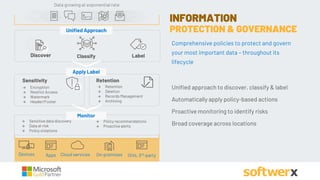
INFORMATION
PROTECTION & GOVERNANCE
Comprehensive policies to protect and govern
your most important data – throughout its
lifecycle
Unified approach to discover, classify & label
Automatically apply policy-based actions
Proactive monitoring to identify risks
Broad coverage across locations
Sensitivity Retention
 Encryption
 Restrict Access
 Watermark
 Header/Footer
 Retention
 Deletion
 Records Management
 Archiving
 Sensitive data discovery
 Data at risk
 Policy violations
 Policy recommendations
 Proactive alerts
Apply Label
Monitor
LabelDiscover Classify
Unified Approach
Data growing at exponential rate
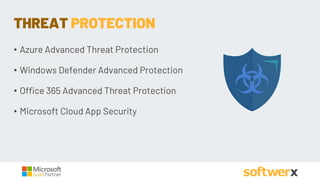
• Azure Advanced Threat Protection
• Windows Defender Advanced Protection
• Office 365 Advanced Threat Protection
• Microsoft Cloud App Security
THREAT PROTECTION
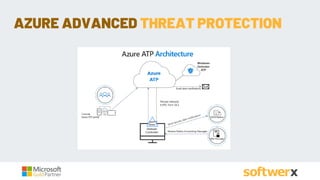
AZURE ADVANCED THREAT PROTECTION
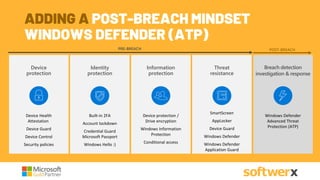
PRE-BREACH POST-BREACH
Device protection
Device Health
attestation
Device Guard
Device Control
Security policies
Device
protection
Device Health
Attestation
Device Guard
Device Control
Security policies
Information
protection
Device protection /
Drive encryption
Enterprise Data
Protection
Conditional access
Threat
resistance
Threat resistance
SmartScreen
AppLocker
Device Guard
Windows Defender
Network/Firewall
Identity
protection
Built-in 2FA
Account lockdown
Credential Guard
Microsoft Passport
Windows Hello :)
Built-in 2FA
Account lockdown
Credential Guard
Microsoft Passport
Windows Hello ;)
Identity
protection
Device protection /
Drive encryption
Windows Information
Protection
Conditional access
Information
protection
SmartScreen
AppLocker
Device Guard
Windows Defender
Windows Defender
Application Guard
Windows Defender ATP
Breach detection
investigation &
response
Breach detection
investigation & response
Windows Defender
Advanced Threat
Protection (ATP)
ADDING A POST-BREACH MINDSET
WINDOWS DEFENDER (ATP)
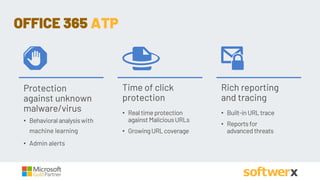
• Behavioral analysiswith
machine learning
• Admin alerts
• Realtimeprotection
againstMaliciousURLs
• GrowingURLcoverage
• Built-inURLtrace
• Reportsfor
advanced threats
Time of click
protection
Rich reporting
and tracing
OFFICE 365 ATP
Protection
against unknown
malware/virus
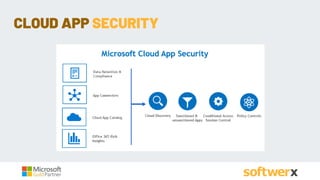
CLOUD APP SECURITY
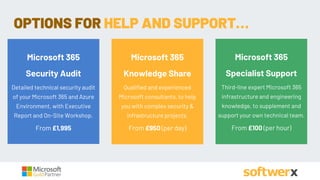
OPTIONS FOR HELP AND SUPPORT…
Microsoft 365
Security Audit
Detailed technical security audit
of your Microsoft 365 and Azure
Environment, with Executive
Report and On-Site Workshop.
From £1,995
Microsoft 365
Knowledge Share
Qualified and experienced
Microsoft consultants, to help
you with complex security &
infrastructure projects.
From £950 (per day)
Microsoft 365
Specialist Support
Third-line expert Microsoft 365
infrastructure and engineering
knowledge, to supplement and
support your own technical team.
From £100 (per hour)
ADRIAAN BEKKER
ADRIAAN.BEKKER@SOFTWERX.COM
+44 (0) 1223 834 333
WWW.SOFTWERX.COM
ANY QUESTIONS ?

Softwerx Microsoft 365 Security Webinar Presentation

  • 1.
    SECURITY UNCOVERED: MANAGING YOURMICROSOFT 365 VULNERABILITIES Making better use of your existing Microsoft 365 Investment
  • 2.
    Adriaan Bekker Technical Director Adriaanhas over 20 years experience in information security management. Holding both Computer Science and Business degrees, he offers a valuable blend of technical expertise and commercial insight. ABOUT SOFTWERX We are the UK’s leading Microsoft cloud security specialist. Based in Cambridge and London we are a leading Microsoft cloud security practice with specialist knowledge around cyber security, cloud infrastructure and compliance. We have been helping forward-thinking companies modernise and secure their businesses for nearly 20 years – the chances are we can help you too.
  • 3.
    WHAT WE’LL COVER Theadvanced security features in Microsoft 365, Office 365 and the EMS portfolio. Understanding your current Microsoft security portfolio and better leveraging the features you've already paid for. Securing your Microsoft environment. Critical considerations in securing your Microsoft cloud environment and why there isn't a one size fit's all solution to securing your business. A real world business case study. The background and key priorities of this 200+ seat business, the process of understanding what was already in place and developing a clear roadmap to complete security.
  • 4.
    SETTING THE SCENE:OFFICE 365 COMPONENTS
  • 5.
    SETTING THE SCENE:SECURITY PRINCIPLES Microsoft 365 E5 Office 365 Enterprise E5: Includes SCP+ O365 E3 plus Voice: PSTN Conferencing, Phone System Analytics: Power BI Pro, Delve Analytics Reporting: Threat Intelligence Enterprise Mobility+ Security E5: Includes SCP & EMS E3 Windows 10Enterprise E5: Includes SCP+ & Win10 E3 Microsoft 365 Security & Compliance Package (SCP) Security & Compliance: Advanced Threat Protection (ATP) Advanced Compliance which includes Advanced eDiscovery & Data Governance, Lockbox & Customer Key. Identity & Access Management: Azure Active Directory Premium P2 Information Protection: Azure Information Protection Premium P2 Identity Driven Security: Microsoft Cloud App Security (inc. O365 Advanced Security Management), Azure, ATP Windows E5 Advanced Endpoint Security Windows Defender Advanced Threat Protection Microsoft 365 E3 Office 365 Enterprise E3 Enterprise Mobility+ Security E3 Identity & Access Management: Azure Active Directory Premium P1 Microsoft Mobile Productivity: Microsoft Intune Information Protection: Azure Information Protection Premium P1 Identity Driven Security: Microsoft Advanced Threat Analytics Windows 10Enterprise E3 Advanced Endpoint Security: Credential Guard, Device Guard Designed for Modern IT: Azure AD Join, Dynamic Management More Productive: Windows Ink, Cortana at Work Powerful, Modern Devices: Innovative designs, new in class devices Chat-centric workspace: Teams Email & Calendar: Outlook Voice, Video & Meetings: Skype for Business Co-creating content: Office Pro-Plus Sites & Content Management: SharePoint & OneDrive Analytics: Delve Security & Compliance: Basic eDiscovery & Data Governance + Data Loss Prevention Microsoft 365 F1 for Frontline Workers Office Applications: Office Online Collaboration Services: Email, ‘SharePoint’, Yammer, Groups, IM, Presence, Meetings, 1:1 HD Video/Audio Schedule & Task Management: Microsoft StaffHub, PowerApps, Flow2 Content Storage & Consumption: Storage, Enterprise Video Services, Portals Device & App Management: Microsoft Intune Identity & Access Management: Azure Active Directory P1 Threat Protection: Microsoft Advanced Threat Analytics Device & App Management: Windows AutoPilot, Fine Tuned User Experience, Windows Analytics Device Health Identity & Access Management: Windows Hello, Credential Guard, Direct Access3 Threat Protection: Windows Defender Antivirus, Device Guard3 Information Protection: Windows Info Protection, BitLocker EMS E5
  • 6.
    Technology Benefit E3E5 AzureActiveDirectory PremiumP1 Secure singlesign-on to cloudand on-premises app MFA, conditional access, and advanced security reporting ● ● AzureActiveDirectory PremiumP2 Identity and access management with advanced protection forusers and privileged identities ● MicrosoftIntune Mobiledeviceand app management to protect corporate apps and data onany device ● ● AzureInformationProtectionP1 Encryption forall filesand storage locations Cloud-based filetracking ● ● AzureInformationProtectionP2 Intelligent classification and encryption forfilesshared insideand outsideyourorganization ● MicrosoftCloudAppSecurity Enterprise-grade visibility,control, and protection foryour cloudapplications ● MicrosoftAdvancedThreat Analytics Protection fromadvanced targeted attacks leveraging user and entity behavioral analytics ● ● Identity and access management Managed mobile productivity Information protection Threat protection MICROSOFT ENTERPRISE MOBILITY & SECURITY
  • 7.
    Mobile device &app management Information protection Identity and access management Threat protection MICROSOFT ENTERPRISE MOBILITY & SECURITY Protect at the front door Detect & remediate attacks Protect your data anywhere Holistic and innovative solutions for protection across users, devices, apps and data.
  • 8.
    • Reduce threatswith identity and access management • Manage mobile device and apps • Leverage conditional access • Increase enterprise data protection • Prevent data loss • Enable secured collaboration • Reduce malware exposure IMPROVING YOUR SECURITY POSTURE
  • 9.
    NCSC Warns ofRising Office 365 Account Compromises What is happening? NCSC recently published an advisory regarding several incidents involving compromise of Office 365 user accounts within the UK and using them in targeted supply chain attacks. To be clear, this is not a vulnerability in Office 365. NCSC are highlighting that O365 users are being increasingly targeted by attackers given its widespread use and the tendency for users to authenticate with just username and password credentials only. This advisory highlights that username and password credentials alone do not provide adequate protection against attackers who can obtain credentials from victims via common methods such as Spear Phishing and password guessing. OFFICE 365 COMPROMISED OFTEN
  • 10.
    • Turn onMFA • Stop users from changing passwords regularly as per NCSC guidance. PREVENT THE MOST COMMON TYPE OF ACCESS BREACH TO OFFICE 365 Next: • Differences between Office 365 MFA and Azure MFA
  • 11.
    OFFICE 365 MFA HowCan I Authenticate? • Azure Authenticator App • Text Message • Phone Call + PIN Limitations • Too many prompts • No intelligence
  • 12.
    • Conditional AccessScenario’s supported. • Why prompt for MFA when a user is connecting from a corporate network and is using a corporate device? • Why prompt for MFA when a user is connecting to their apps the same way you would if they were connecting to the corporate account line of business application? • Why MFA everyone all the time, can we target specific users when they are accessing sensitive information? AZURE MFA: EMS E3, MICROSOFT 365 E3 AND AZURE PLAN1
  • 13.
    • Who’s managingyour services? • Dedicated Admin accounts. IDENTITY AND ACCESS MANAGEMENT
  • 14.
  • 15.
    PRIVILEGEDIDENTITYMANAGEMENT MFA is enforcedduring the activation process Alerts inform administrators about out-of-band changes Users need to activate their privileges to perform a task Users will retain their privileges for a pre-configured amount of time Security admins can discover all privileged identities, view audit reports and review everyone who has is eligible to activate via access reviews Audit SECURITY ADMIN Configure Privileged Identity Management USER PRIVILEGED IDENTITY MANAGEMENT Identity verification Monitor Access reports MFA ALERT Read only ADMIN PROFILES Billing Admin Global Admin Service Admin How time-limited activation of privileged roles works
  • 16.
    Mobile Device Management (MDM) MobileApplication Management (MAM) Conditional Access: Restrict access to managed & compliant devices Conditional Access: Restrict which apps can be used to access email or files Secure your data on any device with Intune r Company-Managed Employee-Managed 3rd-Party-Managed n Enroll devicesfor Management Provisionsettings, certs,profiles Report & measure device compliance Remove corporate data from devices Publish mobile apps to users Configure and update apps Report app inventory & usage Secure & remove corporate data within mobile apps IN A COMPLEXLANDSCAPEYOUNEED CHOICES MDM VS MAM
  • 17.
    PROTECT OFFICE 365DATA EVEN ON UNMANAGED DEVICES Compliance Employeesexpectaccesstothe best tools,whereverthey are—evenontheir owndevices.IT needs confidencethatcritical datais secure.Intunedeliversboth. Set up a PIN for mobile apps Data loss prevention Require encryption for managed app local storage Only allow Save As to secure locations Only allow copy and paste between managed applications Identity-driven protection Protect data at the app level, rather than requiring the entire device to be secured. Employees can use their work and personal accounts with the same app Personal Identity Corporate Identity Corporate identity and data can be removed without affecting users’ apps or personal data. Natural user prompts guide users to compliance
  • 18.
  • 19.
    INFORMATION PROTECTION • Increaseenterprise data protection • Prevent data loss • Enable secured collaboration
  • 20.
    MICROSOFT CLOUD APPSECURITY Visibility into 15k+ cloud apps, data access & usage, potential abuse AZURE SECURITY CENTER INFORMATION PROTECTION Classify & label sensitive structured data in Azure SQL, SQL Server and other Azure repositories OFFICE 365 APPS Protect sensitive information while working in Excel, Word, PowerPoint, Outlook AZURE INFORMATION PROTECTION Classify, label & protect files – beyond Office 365, including on-premises & hybrid OFFICE 365 DATA LOSS PREVENTION Prevent data loss across Exchange Online, SharePoint Online, OneDrive for Business SHAREPOINT & GROUPS Protect files in libraries and lists OFFICE 365 ADVANCED DATA GOVERNANCE Apply retention and deletion policies to sensitive and important data in Office 365 ADOBE PDFs Natively view and protect PDFs on Adobe Acrobat WINDOWS INFORMATION PROTECTION Separate personal vs. work data on Windows 10 devices, prevent work data from traveling to non-work locations OFFICE 365 MESSAGE ENCRYPTION Send encrypted emails in Office 365 to anyone inside or outside of the company CONDITIONAL ACCESS Control access to files based on policy, such as identity, machine configuration, geo location SDK FOR PARTNER ECOSYSTEM & ISVs Enable ISVs to consume labels, apply protection MICROSOFT INFORMATION PROTECTION Discover | Classify | Protect | Monitor MICROSOFT INFORMATION PROTECTION SOLUTIONS
  • 21.
    INFORMATION PROTECTION & GOVERNANCE Comprehensivepolicies to protect and govern your most important data – throughout its lifecycle Unified approach to discover, classify & label Automatically apply policy-based actions Proactive monitoring to identify risks Broad coverage across locations Sensitivity Retention  Encryption  Restrict Access  Watermark  Header/Footer  Retention  Deletion  Records Management  Archiving  Sensitive data discovery  Data at risk  Policy violations  Policy recommendations  Proactive alerts Apply Label Monitor LabelDiscover Classify Unified Approach Data growing at exponential rate
  • 22.
    • Azure AdvancedThreat Protection • Windows Defender Advanced Protection • Office 365 Advanced Threat Protection • Microsoft Cloud App Security THREAT PROTECTION
  • 23.
  • 24.
    PRE-BREACH POST-BREACH Device protection DeviceHealth attestation Device Guard Device Control Security policies Device protection Device Health Attestation Device Guard Device Control Security policies Information protection Device protection / Drive encryption Enterprise Data Protection Conditional access Threat resistance Threat resistance SmartScreen AppLocker Device Guard Windows Defender Network/Firewall Identity protection Built-in 2FA Account lockdown Credential Guard Microsoft Passport Windows Hello :) Built-in 2FA Account lockdown Credential Guard Microsoft Passport Windows Hello ;) Identity protection Device protection / Drive encryption Windows Information Protection Conditional access Information protection SmartScreen AppLocker Device Guard Windows Defender Windows Defender Application Guard Windows Defender ATP Breach detection investigation & response Breach detection investigation & response Windows Defender Advanced Threat Protection (ATP) ADDING A POST-BREACH MINDSET WINDOWS DEFENDER (ATP)
  • 25.
    • Behavioral analysiswith machinelearning • Admin alerts • Realtimeprotection againstMaliciousURLs • GrowingURLcoverage • Built-inURLtrace • Reportsfor advanced threats Time of click protection Rich reporting and tracing OFFICE 365 ATP Protection against unknown malware/virus
  • 26.
  • 27.
    OPTIONS FOR HELPAND SUPPORT… Microsoft 365 Security Audit Detailed technical security audit of your Microsoft 365 and Azure Environment, with Executive Report and On-Site Workshop. From £1,995 Microsoft 365 Knowledge Share Qualified and experienced Microsoft consultants, to help you with complex security & infrastructure projects. From £950 (per day) Microsoft 365 Specialist Support Third-line expert Microsoft 365 infrastructure and engineering knowledge, to supplement and support your own technical team. From £100 (per hour)
  • 28.
    ADRIAAN BEKKER ADRIAAN.BEKKER@SOFTWERX.COM +44 (0)1223 834 333 WWW.SOFTWERX.COM ANY QUESTIONS ?