Announcing Azure
Enterprise Mobility Suite
for SMB including ATA
Presentedby:
David J.Rosenthal
CEO,Atidan
August5,2015
MicrosoftTechnology Center,NewYorkCity
Agenda
 What PAINS does EMS solve for?
 Overview and Key Points
 What’s new with EMS
 Technical Components of EMS
 Demo
 Getting Started
2
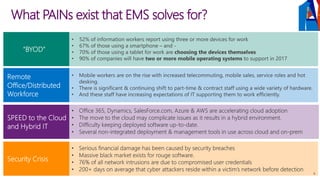
What PAINs exist that EMS solves for?
6
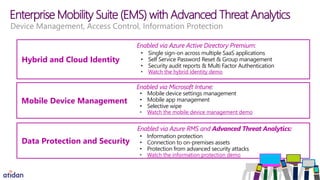
Enterprise Mobility Suite (EMS) with Advanced Threat Analytics
Hybrid and Cloud Identity
• Single sign-on across multiple SaaS applications
• Self Service Password Reset & Group management
• Security audit reports & Multi Factor Authentication
• Watch the hybrid identity demo
Enabled via Azure Active Directory Premium:
Mobile Device Management
• Mobile device settings management
• Mobile app management
• Selective wipe
• Watch the mobile device management demo
Enabled via Microsoft Intune
Data Protection and Security
• Information protection
• Connection to on-premises assets
• Protection from advanced security attacks
• Watch the information protection demo
Enabled via Azure RMS and Advanced Threat Analytics:
Device Management, Access Control, Information Protection
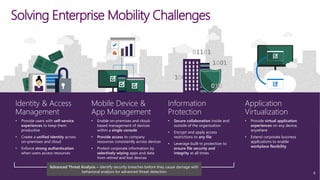
Solving Enterprise Mobility Challenges
Mobile Device &
App Management
• Enable on-premises and cloud-
based management of devices
within a single console
• Provide access to company
resources consistently across devices
• Protect corporate information by
selectively wiping apps and data
from retired and lost devices
Identity & Access
Management
• Provide users with self-service
experiences to keep them
productive
• Create a unified identity across
on-premises and cloud
• Enforce strong authentication
when users access resources
Information
Protection
• Secure collaboration inside and
outside of the organization
• Encrypt and apply access
restrictions to any file
• Leverage built-in protection to
ensure file security and
integrity at all times
Application
Virtualization
• Provide virtual application
experiences on any device,
anywhere
• Extend corporate business
applications to enable
workplace flexibility
Advanced Threat Analysis – identify security breaches before they cause damage with
behavioral analysis for advanced threat detection 8
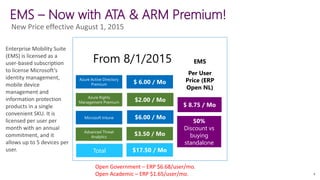
EMS – Now with ATA & ARM Premium!
From 8/1/2015
New Price effective August 1, 2015
Azure Active Directory
Premium $ 6.00 / Mo
Azure Rights
Management Premium $2.00 / Mo
Microsoft Intune $6.00 / Mo
Advanced Threat
Analytics
$3.50 / Mo
$ 8.75 / Mo
50%
Discount vs
buying
standalone
EMS
Per User
Price (ERP
Open NL)
Total $17.50 / Mo
9
Enterprise Mobility Suite
(EMS) is licensed as a
user-based subscription
to license Microsoft’s
identity management,
mobile device
management and
information protection
products in a single
convenient SKU. It is
licensed per user per
month with an annual
commitment, and it
allows up to 5 devices per
user.
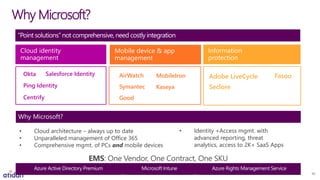
Cloud identity
management
Why Microsoft?
Mobile device & app
management
Information
protection
Azure Active Directory Premium Microsoft Intune Azure Rights Management Service
Ping Identity
Okta
Centrify
Salesforce Identity AirWatch MobileIron
Good
KaseyaSymantec Seclore
FasooAdobe LiveCycle
EMS: One Vendor, One Contract, One SKU
Why Microsoft?
“Point solutions”not comprehensive, need costly integration
• Cloud architecture – always up to date
• Unparalleled management of Office 365
• Comprehensive mgmt. of PCs and mobile devices
• Identity +Access mgmt. with
advanced reporting, threat
analytics, access to 2K+ SaaS Apps
10
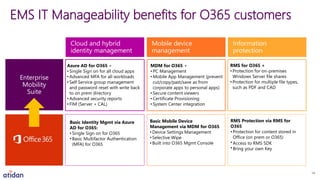
EMS IT Manageability benefits for O365 customers
Cloud and hybrid
identity management
Mobile device
management
Information
protection
Enterprise
Mobility
Suite
RMS Protection via RMS for
O365
• Protection for content stored in
Office (on prem or O365)
• Access to RMS SDK
• Bring your own Key
RMS for O365 +
• Protection for on-premises
Windows Server file shares
• Protection for multiple file types,
such as PDF and CAD
Basic Mobile Device
Management via MDM for O365
• Device Settings Management
• Selective Wipe
• Built into O365 Mgmt Console
MDM for O365 +
• PC Management
• Mobile App Management (prevent
cut/copy/past/save as from
corporate apps to personal apps)
• Secure content viewers
• Certificate Provisioning
• System Center integration
Basic Identity Mgmt via Azure
AD for O365:
• Single Sign on for O365
• Basic Multifactor Authentication
(MFA) for O365
Azure AD for O365 +
• Single Sign on for all cloud apps
• Advanced MFA for all workloads
• Self Service group management
and password reset with write back
to on prem directory
• Advanced security reports
• FIM (Server + CAL)
14
O365 has a lot of these features built in, why EMS?
EMS has Azure AD Premium
 Security audit reports & Multi Factor Authentication
 Get unlimited SaaS integrations (free version has a limit of 10)
 AD Password write-back
 Advanced administration
 Azure AD Premium has an SLA
EMS has full Microsoft Intune
 Sophisticated Mobile app management
 Desktop management, no infrastructure required
 Manage “Everything” not just Office 365
 Provision and manage certificates, Wi-Fi, VPN (device and app
specific), and email profiles automatically once a device is
enrolled
EMS has full Azure RMS
 Rights Protect your on-premises/external files as well
 Document Tracking with Azure RMS
Premium
EMS has Advanced Threat
Analytics
 Protection from advanced security attacks
 On-Premises solution to identify security attacks BEFORE they
cause damange
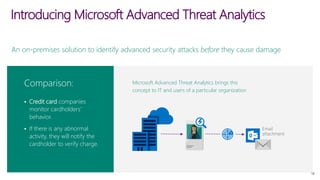
An on-premises solution to identify advanced security attacks before they cause damage
 Credit card companies
monitor cardholders’
behavior.
 If there is any abnormal
activity, they will notify the
cardholder to verify charge.
Microsoft Advanced Threat Analytics brings this
concept to IT and users of a particular organization
Comparison:
Introducing Microsoft Advanced Threat Analytics
18
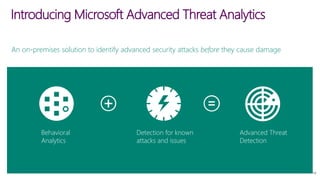
Behavioral
Analytics
Detection for known
attacks and issues
Advanced Threat
Detection
Introducing Microsoft Advanced Threat Analytics
An on-premises solution to identify advanced security attacks before they cause damage
19
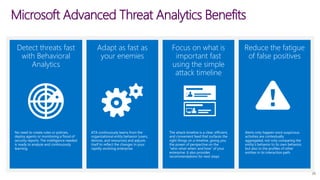
Microsoft Advanced Threat Analytics Benefits
Detect threats fast
with Behavioral
Analytics
Adapt as fast as
your enemies
Focus on what is
important fast
using the simple
attack timeline
Reduce the fatigue
of false positives
No need to create rules or policies,
deploy agents or monitoring a flood of
security reports. The intelligence needed
is ready to analyze and continuously
learning.
ATA continuously learns from the
organizational entity behavior (users,
devices, and resources) and adjusts
itself to reflect the changes in your
rapidly-evolving enterprise.
The attack timeline is a clear, efficient,
and convenient feed that surfaces the
right things on a timeline, giving you
the power of perspective on the
“who-what-when-and how” of your
enterprise. It also provides
recommendations for next steps
Alerts only happen once suspicious
activities are contextually
aggregated, not only comparing the
entity’s behavior to its own behavior,
but also to the profiles of other
entities in its interaction path.
20
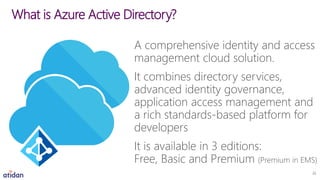
A comprehensive identity and access
management cloud solution.
It combines directory services,
advanced identity governance,
application access management and
a rich standards-based platform for
developers
It is available in 3 editions:
Free, Basic and Premium (Premium in EMS)
What is Azure Active Directory?
22
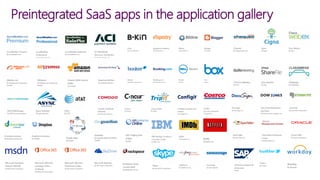
Preintegrated SaaS apps in the application gallery
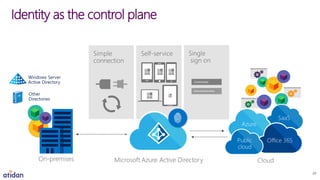
Identity as the control plane
24
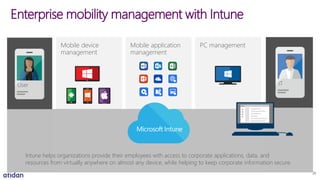
Mobile application
management
PC managementMobile device
management
Enterprise mobility management with Intune
Intune helps organizations provide their employees with access to corporate applications, data, and
resources from virtually anywhere on almost any device, while helping to keep corporate information secure.
User IT
26
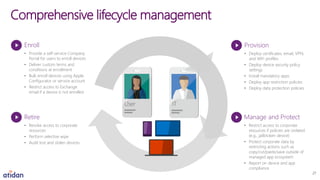
Comprehensive lifecycle management
Enroll
• Provide a self-service Company
Portal for users to enroll devices
• Deliver custom terms and
conditions at enrollment
• Bulk enroll devices using Apple
Configurator or service account
• Restrict access to Exchange
email if a device is not enrolled
Retire
• Revoke access to corporate
resources
• Perform selective wipe
• Audit lost and stolen devices
Provision
• Deploy certificates, email, VPN,
and WiFi profiles
• Deploy device security policy
settings
• Install mandatory apps
• Deploy app restriction policies
• Deploy data protection policies
Manage and Protect
• Restrict access to corporate
resources if policies are violated
(e.g., jailbroken device)
• Protect corporate data by
restricting actions such as
copy/cut/paste/save outside of
managed app ecosystem
• Report on device and app
compliance
User IT
27
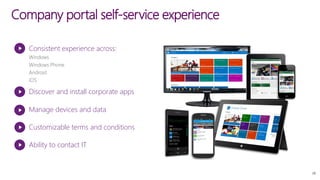
Company portal self-service experience
Consistent experience across:
Discover and install corporate apps
Manage devices and data
Ability to contact IT
Customizable terms and conditions
28
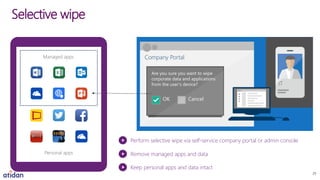
Personal apps
Selective wipe
Managed apps Company Portal
Are you sure you want to wipe
corporate data and applications
from the user’s device?
OK Cancel
Perform selective wipe via self-service company portal or admin console
Remove managed apps and data
Keep personal apps and data intact
ITIT
29
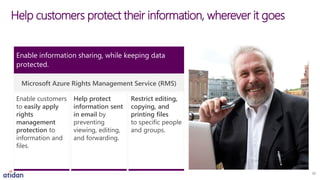
Help customers protect their information, wherever it goes
Enable information sharing, while keeping data
protected.
Help protect
information sent
in email by
preventing
viewing, editing,
and forwarding.
Restrict editing,
copying, and
printing files
to specific people
and groups.
Microsoft Azure Rights Management Service (RMS)
Enable customers
to easily apply
rights
management
protection to
information and
files.
32
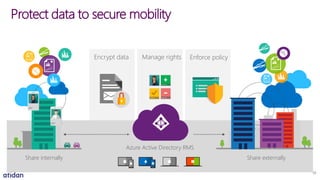
Manage rightsEncrypt data Enforce policy
Protect data to secure mobility
Azure Active Directory RMS
Share internally Share externally
33
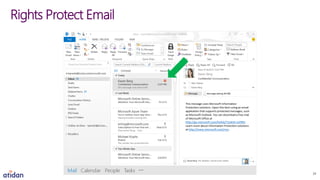
Rights Protect Email
34
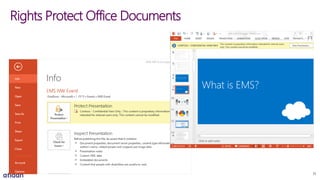
Rights Protect Office Documents
35
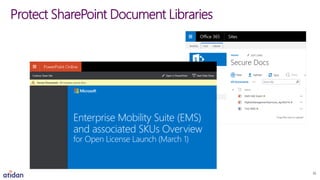
Protect SharePoint Document Libraries
36
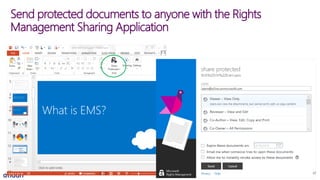
Send protected documents to anyone with the Rights
Management Sharing Application
37
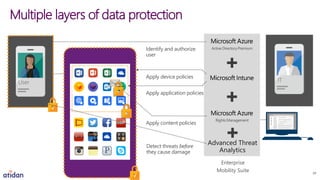
Multiple layers of data protection
ITUser
Enterprise
Mobility Suite
Identify and authorize
user
Apply device policies
Apply application policies
Apply content policies
Active DirectoryPremium
Rights Management
Advanced Threat
Analytics
Detect threats before
they cause damage
39
Demo
34
Demonstration Video Recording
Special offer from Atidan for implementation and support
office365@Atidan.com
1-215-825-5045 x5001
Review individual EMS solution demos
Watch the hybrid identity demo
Watch the mobile device management demo
Watch the information protection demo
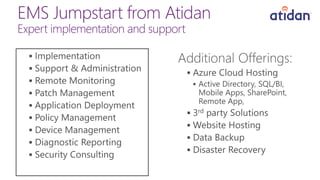
EMS Jumpstart from Atidan
Expert implementation and support















Microsoft Enterprise Mobility and Security Launch - August 5-2015 - Atidan

Microsoft Enterprise Mobility and Security Launch - August 5-2015 - Atidan

  • 1.
    Announcing Azure Enterprise MobilitySuite for SMB including ATA Presentedby: David J.Rosenthal CEO,Atidan August5,2015 MicrosoftTechnology Center,NewYorkCity
  • 2.
    Agenda  What PAINSdoes EMS solve for?  Overview and Key Points  What’s new with EMS  Technical Components of EMS  Demo  Getting Started 2
  • 3.
    What PAINs existthat EMS solves for? 6
  • 4.
    Enterprise Mobility Suite(EMS) with Advanced Threat Analytics Hybrid and Cloud Identity • Single sign-on across multiple SaaS applications • Self Service Password Reset & Group management • Security audit reports & Multi Factor Authentication • Watch the hybrid identity demo Enabled via Azure Active Directory Premium: Mobile Device Management • Mobile device settings management • Mobile app management • Selective wipe • Watch the mobile device management demo Enabled via Microsoft Intune Data Protection and Security • Information protection • Connection to on-premises assets • Protection from advanced security attacks • Watch the information protection demo Enabled via Azure RMS and Advanced Threat Analytics: Device Management, Access Control, Information Protection
  • 5.
    Solving Enterprise MobilityChallenges Mobile Device & App Management • Enable on-premises and cloud- based management of devices within a single console • Provide access to company resources consistently across devices • Protect corporate information by selectively wiping apps and data from retired and lost devices Identity & Access Management • Provide users with self-service experiences to keep them productive • Create a unified identity across on-premises and cloud • Enforce strong authentication when users access resources Information Protection • Secure collaboration inside and outside of the organization • Encrypt and apply access restrictions to any file • Leverage built-in protection to ensure file security and integrity at all times Application Virtualization • Provide virtual application experiences on any device, anywhere • Extend corporate business applications to enable workplace flexibility Advanced Threat Analysis – identify security breaches before they cause damage with behavioral analysis for advanced threat detection 8
  • 6.
    EMS – Nowwith ATA & ARM Premium! From 8/1/2015 New Price effective August 1, 2015 Azure Active Directory Premium $ 6.00 / Mo Azure Rights Management Premium $2.00 / Mo Microsoft Intune $6.00 / Mo Advanced Threat Analytics $3.50 / Mo $ 8.75 / Mo 50% Discount vs buying standalone EMS Per User Price (ERP Open NL) Total $17.50 / Mo 9 Enterprise Mobility Suite (EMS) is licensed as a user-based subscription to license Microsoft’s identity management, mobile device management and information protection products in a single convenient SKU. It is licensed per user per month with an annual commitment, and it allows up to 5 devices per user.
  • 7.
    Cloud identity management Why Microsoft? Mobiledevice & app management Information protection Azure Active Directory Premium Microsoft Intune Azure Rights Management Service Ping Identity Okta Centrify Salesforce Identity AirWatch MobileIron Good KaseyaSymantec Seclore FasooAdobe LiveCycle EMS: One Vendor, One Contract, One SKU Why Microsoft? “Point solutions”not comprehensive, need costly integration • Cloud architecture – always up to date • Unparalleled management of Office 365 • Comprehensive mgmt. of PCs and mobile devices • Identity +Access mgmt. with advanced reporting, threat analytics, access to 2K+ SaaS Apps 10
  • 8.
    EMS IT Manageabilitybenefits for O365 customers Cloud and hybrid identity management Mobile device management Information protection Enterprise Mobility Suite RMS Protection via RMS for O365 • Protection for content stored in Office (on prem or O365) • Access to RMS SDK • Bring your own Key RMS for O365 + • Protection for on-premises Windows Server file shares • Protection for multiple file types, such as PDF and CAD Basic Mobile Device Management via MDM for O365 • Device Settings Management • Selective Wipe • Built into O365 Mgmt Console MDM for O365 + • PC Management • Mobile App Management (prevent cut/copy/past/save as from corporate apps to personal apps) • Secure content viewers • Certificate Provisioning • System Center integration Basic Identity Mgmt via Azure AD for O365: • Single Sign on for O365 • Basic Multifactor Authentication (MFA) for O365 Azure AD for O365 + • Single Sign on for all cloud apps • Advanced MFA for all workloads • Self Service group management and password reset with write back to on prem directory • Advanced security reports • FIM (Server + CAL) 14
  • 9.
    O365 has alot of these features built in, why EMS? EMS has Azure AD Premium  Security audit reports & Multi Factor Authentication  Get unlimited SaaS integrations (free version has a limit of 10)  AD Password write-back  Advanced administration  Azure AD Premium has an SLA EMS has full Microsoft Intune  Sophisticated Mobile app management  Desktop management, no infrastructure required  Manage “Everything” not just Office 365  Provision and manage certificates, Wi-Fi, VPN (device and app specific), and email profiles automatically once a device is enrolled EMS has full Azure RMS  Rights Protect your on-premises/external files as well  Document Tracking with Azure RMS Premium EMS has Advanced Threat Analytics  Protection from advanced security attacks  On-Premises solution to identify security attacks BEFORE they cause damange
  • 11.
    An on-premises solutionto identify advanced security attacks before they cause damage  Credit card companies monitor cardholders’ behavior.  If there is any abnormal activity, they will notify the cardholder to verify charge. Microsoft Advanced Threat Analytics brings this concept to IT and users of a particular organization Comparison: Introducing Microsoft Advanced Threat Analytics 18
  • 12.
    Behavioral Analytics Detection for known attacksand issues Advanced Threat Detection Introducing Microsoft Advanced Threat Analytics An on-premises solution to identify advanced security attacks before they cause damage 19
  • 13.
    Microsoft Advanced ThreatAnalytics Benefits Detect threats fast with Behavioral Analytics Adapt as fast as your enemies Focus on what is important fast using the simple attack timeline Reduce the fatigue of false positives No need to create rules or policies, deploy agents or monitoring a flood of security reports. The intelligence needed is ready to analyze and continuously learning. ATA continuously learns from the organizational entity behavior (users, devices, and resources) and adjusts itself to reflect the changes in your rapidly-evolving enterprise. The attack timeline is a clear, efficient, and convenient feed that surfaces the right things on a timeline, giving you the power of perspective on the “who-what-when-and how” of your enterprise. It also provides recommendations for next steps Alerts only happen once suspicious activities are contextually aggregated, not only comparing the entity’s behavior to its own behavior, but also to the profiles of other entities in its interaction path. 20
  • 15.
    A comprehensive identityand access management cloud solution. It combines directory services, advanced identity governance, application access management and a rich standards-based platform for developers It is available in 3 editions: Free, Basic and Premium (Premium in EMS) What is Azure Active Directory? 22
  • 16.
    Preintegrated SaaS appsin the application gallery
  • 17.
    Identity as thecontrol plane 24
  • 19.
    Mobile application management PC managementMobiledevice management Enterprise mobility management with Intune Intune helps organizations provide their employees with access to corporate applications, data, and resources from virtually anywhere on almost any device, while helping to keep corporate information secure. User IT 26
  • 20.
    Comprehensive lifecycle management Enroll •Provide a self-service Company Portal for users to enroll devices • Deliver custom terms and conditions at enrollment • Bulk enroll devices using Apple Configurator or service account • Restrict access to Exchange email if a device is not enrolled Retire • Revoke access to corporate resources • Perform selective wipe • Audit lost and stolen devices Provision • Deploy certificates, email, VPN, and WiFi profiles • Deploy device security policy settings • Install mandatory apps • Deploy app restriction policies • Deploy data protection policies Manage and Protect • Restrict access to corporate resources if policies are violated (e.g., jailbroken device) • Protect corporate data by restricting actions such as copy/cut/paste/save outside of managed app ecosystem • Report on device and app compliance User IT 27
  • 21.
    Company portal self-serviceexperience Consistent experience across: Discover and install corporate apps Manage devices and data Ability to contact IT Customizable terms and conditions 28
  • 22.
    Personal apps Selective wipe Managedapps Company Portal Are you sure you want to wipe corporate data and applications from the user’s device? OK Cancel Perform selective wipe via self-service company portal or admin console Remove managed apps and data Keep personal apps and data intact ITIT 29
  • 24.
    Help customers protecttheir information, wherever it goes Enable information sharing, while keeping data protected. Help protect information sent in email by preventing viewing, editing, and forwarding. Restrict editing, copying, and printing files to specific people and groups. Microsoft Azure Rights Management Service (RMS) Enable customers to easily apply rights management protection to information and files. 32
  • 25.
    Manage rightsEncrypt dataEnforce policy Protect data to secure mobility Azure Active Directory RMS Share internally Share externally 33
  • 26.
  • 27.
  • 28.
  • 29.
    Send protected documentsto anyone with the Rights Management Sharing Application 37
  • 31.
    Multiple layers ofdata protection ITUser Enterprise Mobility Suite Identify and authorize user Apply device policies Apply application policies Apply content policies Active DirectoryPremium Rights Management Advanced Threat Analytics Detect threats before they cause damage 39
  • 32.
    Demo 34 Demonstration Video Recording Specialoffer from Atidan for implementation and support office365@Atidan.com 1-215-825-5045 x5001 Review individual EMS solution demos Watch the hybrid identity demo Watch the mobile device management demo Watch the information protection demo
  • 33.
    EMS Jumpstart fromAtidan Expert implementation and support               