JEEVANSH EDUCAITON ZONE
MANDHOLI KHURD
INTRODUCTION
Email or E-mail stand for electronic mail. It is a method for
transporting or exchanging our message to and from electronically.
A user sends an electronic message over a network; the message is
stored in the electronic mailbox of the receiver. The electronic
mailbox is usually a file on a server; the message and it can be
retrieved when the recipient is ready to receive them .
User can also edit, sort, save and classify message and forward them
to other individuals on the network. If two users are locked into the
network at the same time, they can converse through email.
DEFINITION
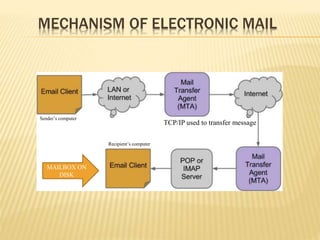
TCP/IP used to transfer message
Sender’s computer
Recipient’s computer
MECHANISM OF ELECTRONIC MAIL
MAILBOX ON
DISK
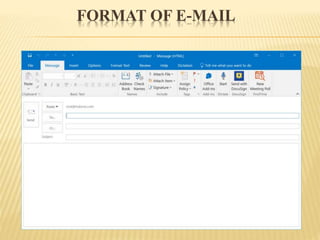
FORMAT OF E-MAIL
ANATOMY OF E-MAIL
Electronic mail message comprises the following elements:
 E-mail address
 Header
 Body
 Signature
 Attachments
WORKING WITH E-MAIL
These are the things that we will do most often while working with email:
Starting the mail program
Reading mail
Composing mail
Replying mail
Deleting mail
Exiting the program
STARTING THE E-MAIL
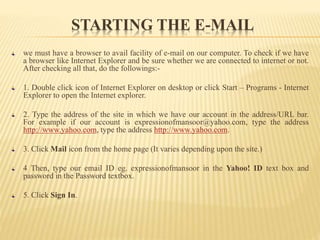
we must have a browser to avail facility of e-mail on our computer. To check if we have
a browser like Internet Explorer and be sure whether we are connected to internet or not.
After checking all that, do the followings:-
1. Double click icon of Internet Explorer on desktop or click Start – Programs - Internet
Explorer to open the Internet explorer.
2. Type the address of the site in which we have our account in the address/URL bar.
For example if our account is expressionofmansoor@yahoo.com, type the address
http://www.yahoo.com, type the address http://www.yahoo.com.
3. Click Mail icon from the home page (It varies depending upon the site.)
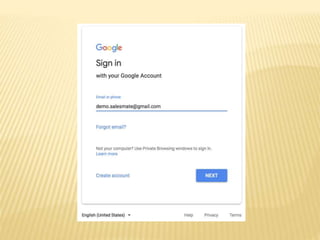
4 Then, type our email ID eg. expressionofmansoor in the Yahoo! ID text box and
password in the Password textbox.
5. Click Sign In.
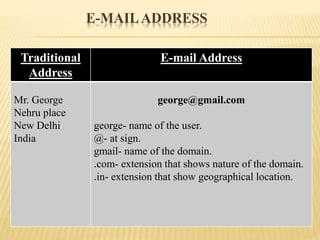
E-MAILADDRESS
Traditional
Address
E-mail Address
Mr. George
Nehru place
New Delhi
India
george@gmail.com
george- name of the user.
@- at sign.
gmail- name of the domain.
.com- extension that shows nature of the domain.
.in- extension that show geographical location.
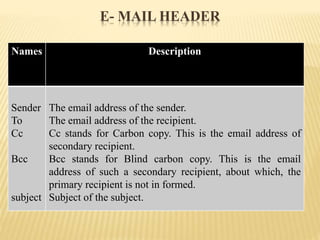
Names Description
Sender
To
Cc
Bcc
subject
The email address of the sender.
The email address of the recipient.
Cc stands for Carbon copy. This is the email address of
secondary recipient.
Bcc stands for Blind carbon copy. This is the email
address of such a secondary recipient, about which, the
primary recipient is not in formed.
Subject of the subject.
E- MAIL HEADER
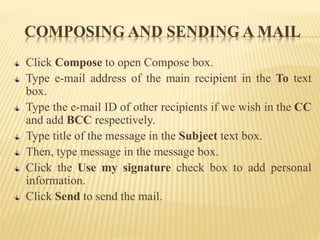
COMPOSING AND SENDING A MAIL
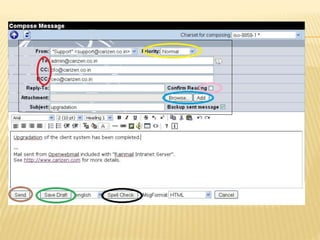
Click Compose to open Compose box.
Type e-mail address of the main recipient in the To text
box.
Type the e-mail ID of other recipients if we wish in the CC
and add BCC respectively.
Type title of the message in the Subject text box.
Then, type message in the message box.
Click the Use my signature check box to add personal
information.
Click Send to send the mail.
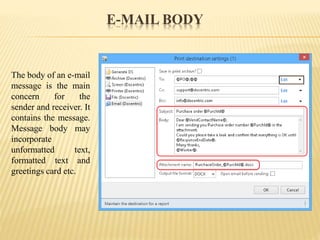
E-MAIL BODY
The body of an e-mail
message is the main
concern for the
sender and receiver. It
contains the message.
Message body may
incorporate
unformatted text,
formatted text and
greetings card etc.
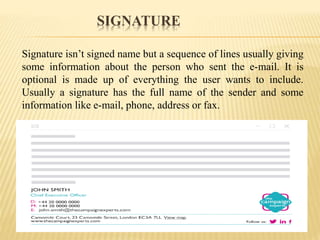
SIGNATURE
Signature isn’t signed name but a sequence of lines usually giving
some information about the person who sent the e-mail. It is
optional is made up of everything the user wants to include.
Usually a signature has the full name of the sender and some
information like e-mail, phone, address or fax.
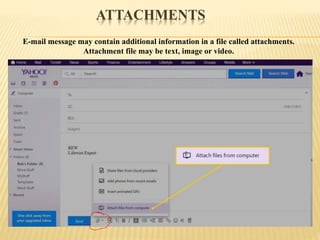
ATTACHMENTS
E-mail message may contain additional information in a file called attachments.
Attachment file may be text, image or video.
ATTACHING FILES
Attachment is a wonderful features by which we
can attach additional data stored in a file. To
attach a file, follow the instructions as mentioned
as follows:-
Click Attach Files to open Attach Files dialog
box.
Click Browse to locate a file on our computer.
Click again Attach Files to attach files.
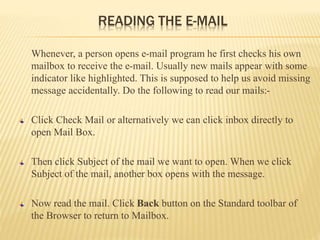
READING THE E-MAIL
Whenever, a person opens e-mail program he first checks his own
mailbox to receive the e-mail. Usually new mails appear with some
indicator like highlighted. This is supposed to help us avoid missing
message accidentally. Do the following to read our mails:-
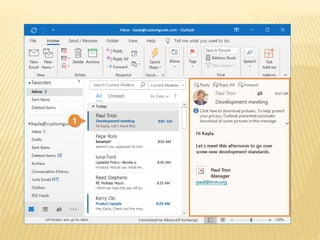
Click Check Mail or alternatively we can click inbox directly to
open Mail Box.
Then click Subject of the mail we want to open. When we click
Subject of the mail, another box opens with the message.
Now read the mail. Click Back button on the Standard toolbar of
the Browser to return to Mailbox.
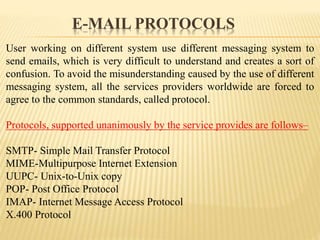
User working on different system use different messaging system to
send emails, which is very difficult to understand and creates a sort of
confusion. To avoid the misunderstanding caused by the use of different
messaging system, all the services providers worldwide are forced to
agree to the common standards, called protocol.
Protocols, supported unanimously by the service provides are follows–
SMTP- Simple Mail Transfer Protocol
MIME-Multipurpose Internet Extension
UUPC- Unix-to-Unix copy
POP- Post Office Protocol
IMAP- Internet Message Access Protocol
X.400 Protocol
E-MAIL PROTOCOLS
MERITS OF E-MAIL
Easy to use, Quick communication within minutes or seconds.
Low cost, Generally no limitation of size and distance.
Sending letters, notes, files, data, or reports using same techniques.
Anytime it can be send or read also. No prior appointment is
required.
Easy to reference sent and received message and attachments can be
stored safely and reliably.
LIMITATIONS OF E-MAIL
Information overload – too many people send too much
information.
Lacks the personal touch.
It’s possible to forge e-mail.
Email isn’t necessarily private.
Some emails have limitations of sending image, videos etc.
FREE E-MAIL SERVICES
There are so many sites which provide e-mail services for free.
The names of those include :-
 www.yahoo.com
 www.rediffmail.com
 www.netadress.com
 www.sify.com
 www.indiatimes.com
 www.go4.com
The companies which provide free mail services aim at creating a
database for commercial purposes.
CONCLUSION
Email is fast and effective method to exchange the message and
other data.
To interact through the e-mail one needs to have an email
account.
The messages are instantly delivered and it is not necessary for
the recipient to be present while the mail is delivered to his/her
mail box.
The e-mail system allows a very easy merging of a particular
message.
EMAIL INTRODUCTION (ALL FEATURES INCLUDED).pptx

EMAIL INTRODUCTION (ALL FEATURES INCLUDED).pptx

  • 1.
  • 2.
    INTRODUCTION Email or E-mailstand for electronic mail. It is a method for transporting or exchanging our message to and from electronically. A user sends an electronic message over a network; the message is stored in the electronic mailbox of the receiver. The electronic mailbox is usually a file on a server; the message and it can be retrieved when the recipient is ready to receive them . User can also edit, sort, save and classify message and forward them to other individuals on the network. If two users are locked into the network at the same time, they can converse through email.
  • 3.
  • 4.
    TCP/IP used totransfer message Sender’s computer Recipient’s computer MECHANISM OF ELECTRONIC MAIL MAILBOX ON DISK
  • 5.
  • 6.
    ANATOMY OF E-MAIL Electronicmail message comprises the following elements:  E-mail address  Header  Body  Signature  Attachments
  • 7.
    WORKING WITH E-MAIL Theseare the things that we will do most often while working with email: Starting the mail program Reading mail Composing mail Replying mail Deleting mail Exiting the program
  • 8.
    STARTING THE E-MAIL wemust have a browser to avail facility of e-mail on our computer. To check if we have a browser like Internet Explorer and be sure whether we are connected to internet or not. After checking all that, do the followings:- 1. Double click icon of Internet Explorer on desktop or click Start – Programs - Internet Explorer to open the Internet explorer. 2. Type the address of the site in which we have our account in the address/URL bar. For example if our account is expressionofmansoor@yahoo.com, type the address http://www.yahoo.com, type the address http://www.yahoo.com. 3. Click Mail icon from the home page (It varies depending upon the site.) 4 Then, type our email ID eg. expressionofmansoor in the Yahoo! ID text box and password in the Password textbox. 5. Click Sign In.
  • 10.
    E-MAILADDRESS Traditional Address E-mail Address Mr. George Nehruplace New Delhi India george@gmail.com george- name of the user. @- at sign. gmail- name of the domain. .com- extension that shows nature of the domain. .in- extension that show geographical location.
  • 11.
    Names Description Sender To Cc Bcc subject The emailaddress of the sender. The email address of the recipient. Cc stands for Carbon copy. This is the email address of secondary recipient. Bcc stands for Blind carbon copy. This is the email address of such a secondary recipient, about which, the primary recipient is not in formed. Subject of the subject. E- MAIL HEADER
  • 13.
    COMPOSING AND SENDINGA MAIL Click Compose to open Compose box. Type e-mail address of the main recipient in the To text box. Type the e-mail ID of other recipients if we wish in the CC and add BCC respectively. Type title of the message in the Subject text box. Then, type message in the message box. Click the Use my signature check box to add personal information. Click Send to send the mail.
  • 14.
    E-MAIL BODY The bodyof an e-mail message is the main concern for the sender and receiver. It contains the message. Message body may incorporate unformatted text, formatted text and greetings card etc.
  • 15.
    SIGNATURE Signature isn’t signedname but a sequence of lines usually giving some information about the person who sent the e-mail. It is optional is made up of everything the user wants to include. Usually a signature has the full name of the sender and some information like e-mail, phone, address or fax.
  • 16.
    ATTACHMENTS E-mail message maycontain additional information in a file called attachments. Attachment file may be text, image or video.
  • 17.
    ATTACHING FILES Attachment isa wonderful features by which we can attach additional data stored in a file. To attach a file, follow the instructions as mentioned as follows:- Click Attach Files to open Attach Files dialog box. Click Browse to locate a file on our computer. Click again Attach Files to attach files.
  • 18.
    READING THE E-MAIL Whenever,a person opens e-mail program he first checks his own mailbox to receive the e-mail. Usually new mails appear with some indicator like highlighted. This is supposed to help us avoid missing message accidentally. Do the following to read our mails:- Click Check Mail or alternatively we can click inbox directly to open Mail Box. Then click Subject of the mail we want to open. When we click Subject of the mail, another box opens with the message. Now read the mail. Click Back button on the Standard toolbar of the Browser to return to Mailbox.
  • 20.
    User working ondifferent system use different messaging system to send emails, which is very difficult to understand and creates a sort of confusion. To avoid the misunderstanding caused by the use of different messaging system, all the services providers worldwide are forced to agree to the common standards, called protocol. Protocols, supported unanimously by the service provides are follows– SMTP- Simple Mail Transfer Protocol MIME-Multipurpose Internet Extension UUPC- Unix-to-Unix copy POP- Post Office Protocol IMAP- Internet Message Access Protocol X.400 Protocol E-MAIL PROTOCOLS
  • 21.
    MERITS OF E-MAIL Easyto use, Quick communication within minutes or seconds. Low cost, Generally no limitation of size and distance. Sending letters, notes, files, data, or reports using same techniques. Anytime it can be send or read also. No prior appointment is required. Easy to reference sent and received message and attachments can be stored safely and reliably.
  • 22.
    LIMITATIONS OF E-MAIL Informationoverload – too many people send too much information. Lacks the personal touch. It’s possible to forge e-mail. Email isn’t necessarily private. Some emails have limitations of sending image, videos etc.
  • 23.
    FREE E-MAIL SERVICES Thereare so many sites which provide e-mail services for free. The names of those include :-  www.yahoo.com  www.rediffmail.com  www.netadress.com  www.sify.com  www.indiatimes.com  www.go4.com The companies which provide free mail services aim at creating a database for commercial purposes.
  • 24.
    CONCLUSION Email is fastand effective method to exchange the message and other data. To interact through the e-mail one needs to have an email account. The messages are instantly delivered and it is not necessary for the recipient to be present while the mail is delivered to his/her mail box. The e-mail system allows a very easy merging of a particular message.