MEETING 13
E-
MAIL
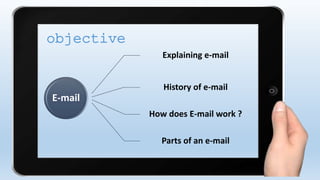
E-mail
Explaining e-mail
History of e-mail
How does E-mail work ?
Parts of an e-mail
objective
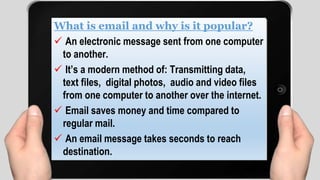
What is email and why is it popular?
 An electronic message sent from one computer
to another.
 It’s a modern method of: Transmitting data,
text files, digital photos, audio and video files
from one computer to another over the internet.
 Email saves money and time compared to
regular mail.
 An email message takes seconds to reach
destination.
Instead of using a pen to write a letter on paper, you are
using your keyboard to type an email message in an
email program on your computer. Electronic mail, often
abbreviated as email,E-mail, or eMail, is any method of
creating, transmitting, or Storing primarily text-based
human communications with digital communications
systems. Unlike conventional mail, email is much faster
(conventional mail is sometimes called "snail mail" by
email users).
Email has both similarities and differences with
more conventional postal services. First, messages
are posted electronically to individuals at specific
addresses much like conventional mail.
The address denotes the computer that the
individual employs as a mail server. A mail server is
like a local post office: it is a computer that sends
and receives electronic mail for a specific network.
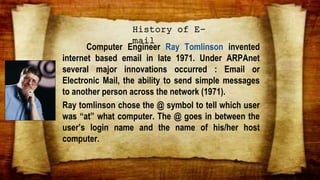
Computer Engineer Ray Tomlinson invented
internet based email in late 1971. Under ARPAnet
several major innovations occurred : Email or
Electronic Mail, the ability to send simple messages
to another person across the network (1971).
Ray tomlinson chose the @ symbol to tell which user
was “at” what computer. The @ goes in between the
user’s login name and the name of his/her host
computer.
History of E-
mail
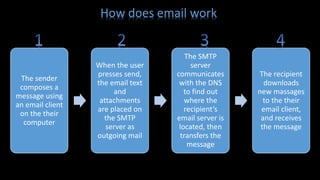
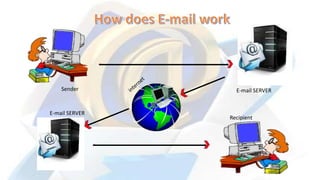
How does email work
The sender
composes a
message using
an email client
on the their
computer
When the user
presses send,
the email text
and
attachments
are placed on
the SMTP
server as
outgoing mail
The SMTP
server
communicates
with the DNS
to find out
where the
recipient’s
email server is
located, then
transfers the
message
The recipient
downloads
new massages
to the their
email client,
and receives
the message
Sender E-mail SERVER
E-mail SERVER
Recipient
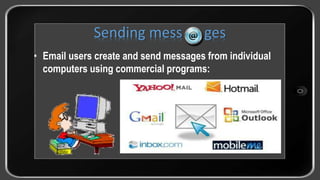
• Email users create and send messages from individual
computers using commercial programs:
Sending mess ges
aliffah.akg@bsi.ac.id
Domain Name
company/organization
providing the email service
“At”
sign
Unique User Name
chosen by the email
account owner
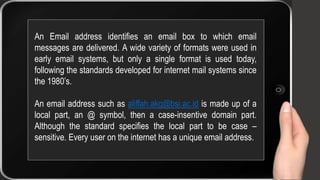
An Email address identifies an email box to which email
messages are delivered. A wide variety of formats were used in
early email systems, but only a single format is used today,
following the standards developed for internet mail systems since
the 1980’s.
An email address such as aliffah.akg@bsi.ac.id is made up of a
local part, an @ symbol, then a case-insentive domain part.
Although the standard specifies the local part to be case –
sensitive. Every user on the internet has a unique email address.
It contains information about the sender, the routing
and the time of the message. The header always
contains a subject line. This is a very important part of
the message and you should always include a subject
line. Some folks sort their messages by subject, so it is
rude to not include a subject! The subject line indicates
the purpose or content of the Message
Header
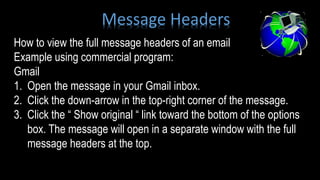
How to view the full message headers of an email
Example using commercial program:
Gmail
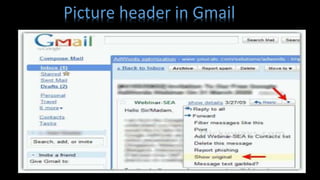
1. Open the message in your Gmail inbox.
2. Click the down-arrow in the top-right corner of the message.
3. Click the “ Show original “ link toward the bottom of the options
box. The message will open in a separate window with the full
message headers at the top.
Message Headers
Picture header in Gmail
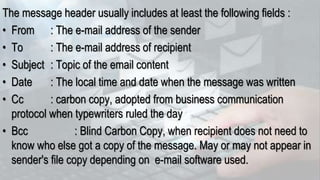
The message header usually includes at least the following fields :
• From : The e-mail address of the sender
• To : The e-mail address of recipient
• Subject : Topic of the email content
• Date : The local time and date when the message was written
• Cc : carbon copy, adopted from business communication
protocol when typewriters ruled the day
• Bcc : Blind Carbon Copy, when recipient does not need to
know who else got a copy of the message. May or may not appear in
sender's file copy depending on e-mail software used.
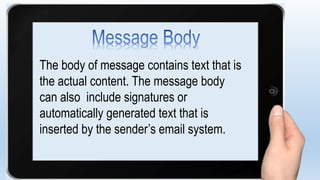
The body of message contains text that is
the actual content. The message body
can also include signatures or
automatically generated text that is
inserted by the sender’s email system.
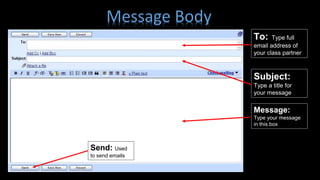
Message:
Type your message
in this box
Subject:
Type a title for
your message
To: Type full
email address of
your class partner
Send: Used
to send emails
Message Body
Thank you !
Presentasi Bahasa Inggris " Email "

Presentasi Bahasa Inggris " Email "

  • 1.
  • 3.
    E-mail Explaining e-mail History ofe-mail How does E-mail work ? Parts of an e-mail objective
  • 4.
    What is emailand why is it popular?  An electronic message sent from one computer to another.  It’s a modern method of: Transmitting data, text files, digital photos, audio and video files from one computer to another over the internet.  Email saves money and time compared to regular mail.  An email message takes seconds to reach destination.
  • 5.
    Instead of usinga pen to write a letter on paper, you are using your keyboard to type an email message in an email program on your computer. Electronic mail, often abbreviated as email,E-mail, or eMail, is any method of creating, transmitting, or Storing primarily text-based human communications with digital communications systems. Unlike conventional mail, email is much faster (conventional mail is sometimes called "snail mail" by email users).
  • 6.
    Email has bothsimilarities and differences with more conventional postal services. First, messages are posted electronically to individuals at specific addresses much like conventional mail. The address denotes the computer that the individual employs as a mail server. A mail server is like a local post office: it is a computer that sends and receives electronic mail for a specific network.
  • 7.
    Computer Engineer RayTomlinson invented internet based email in late 1971. Under ARPAnet several major innovations occurred : Email or Electronic Mail, the ability to send simple messages to another person across the network (1971). Ray tomlinson chose the @ symbol to tell which user was “at” what computer. The @ goes in between the user’s login name and the name of his/her host computer. History of E- mail
  • 8.
    How does emailwork The sender composes a message using an email client on the their computer When the user presses send, the email text and attachments are placed on the SMTP server as outgoing mail The SMTP server communicates with the DNS to find out where the recipient’s email server is located, then transfers the message The recipient downloads new massages to the their email client, and receives the message
  • 9.
  • 10.
    • Email userscreate and send messages from individual computers using commercial programs: Sending mess ges
  • 11.
    aliffah.akg@bsi.ac.id Domain Name company/organization providing theemail service “At” sign Unique User Name chosen by the email account owner
  • 12.
    An Email addressidentifies an email box to which email messages are delivered. A wide variety of formats were used in early email systems, but only a single format is used today, following the standards developed for internet mail systems since the 1980’s. An email address such as aliffah.akg@bsi.ac.id is made up of a local part, an @ symbol, then a case-insentive domain part. Although the standard specifies the local part to be case – sensitive. Every user on the internet has a unique email address.
  • 14.
    It contains informationabout the sender, the routing and the time of the message. The header always contains a subject line. This is a very important part of the message and you should always include a subject line. Some folks sort their messages by subject, so it is rude to not include a subject! The subject line indicates the purpose or content of the Message Header
  • 15.
    How to viewthe full message headers of an email Example using commercial program: Gmail 1. Open the message in your Gmail inbox. 2. Click the down-arrow in the top-right corner of the message. 3. Click the “ Show original “ link toward the bottom of the options box. The message will open in a separate window with the full message headers at the top. Message Headers
  • 16.
  • 17.
    The message headerusually includes at least the following fields : • From : The e-mail address of the sender • To : The e-mail address of recipient • Subject : Topic of the email content • Date : The local time and date when the message was written • Cc : carbon copy, adopted from business communication protocol when typewriters ruled the day • Bcc : Blind Carbon Copy, when recipient does not need to know who else got a copy of the message. May or may not appear in sender's file copy depending on e-mail software used.
  • 18.
    The body ofmessage contains text that is the actual content. The message body can also include signatures or automatically generated text that is inserted by the sender’s email system.
  • 19.
    Message: Type your message inthis box Subject: Type a title for your message To: Type full email address of your class partner Send: Used to send emails Message Body
  • 20.