#engageug
Fixing Server Sickness
Gabriella Davis
Technical Director
The Turtle Partnership
!1
#engageug
Fixing Your Server
• What causes server sickness
• Tools to spot sickness
• Getting Your Server Back to Full Health

!2
#engageug
Server Sickness
• The problem with Domino
• How does a server get sick?
• Vulnerabilities
• Aging Configurations
• Bad Habits
!3
#engageug
Server Sickness
• The problem with Domino
• How does a server get sick?
• Vulnerabilities
• Aging Configurations
• Bad Habits
• Developers Gone Wild
!4
#engageug
The Problem With Domino
• “My Server Is Running Fine”
• Server Stability
• Often despite our best efforts
• Tasks that just run
• even without being properly configured
!5
#engageug
Vulnerabilities
• Start with the OS
• patch levels
• unnecessary processes with exposed ports
• disk and data security

• Then the hardware
• It’s all about disk performance
• Using a SAN? Is the SAN configured for Domino?
• Transaction logs configured?

!6
#engageug
Vulnerabilities
• Security
• ACLs
• -Default- and Anonymous
• LocalDomainServers
• HTTP vs HTTPs
• LDAP
• DIIOP
• Sametime
!7
#engageug
Aging Configurations
• What can give you problems over time
• Database sizes
• More users
• More tasks and features
!8
#engageug
Bad Habits
• What are your users doing?
• what features are they using
• how are they using them
• are they creating repeating 10yr appointments for
instance
• are they copying themselves on emails
• Password quality for HTTP passwords
!9
#engageug
Giving Developers Power
• Allowing development to dictate replication and agent
scheduling
• The curse of not production tested XPages code
• Demands for “LDAP” or “DIIOP” for an application to work
!10
#engageug
Tools to Spot Sickness
• Understanding Priorities
• DDM Probes and Event Analysis
!11
#engageug
Tools to Spot Sickness
• Understanding Priorities
• DDM Probes and Event Analysis
• Statistics
• Catalog.nsf
• QoS - new with Domino 9
• Enhanced Fault Reporting - new with Domino 9
!12
#engageug
Understanding Priorities
• Server role
• What do you want from your server
• What are statistics telling you
• Warning Levels
• Is it safe to ignore ‘Warning (Low)’ and focus on ‘Fatal’ or
‘Failure’
!13
#engageug
Bringing Problems to You
• Event Handlers, Event Generators, Statistics, Fault Reports
and DDM Probes - where to start
• Setting Statistic Thresholds
• Choosing and configuring probes
• Reviewing Faults
• Setting up QoS behaviour
!14
#engageug
Bringing Problems To You
• Why we set up collection hierarchies for DDM
• and how
• Daily and Weekly DDM reviews
• What to look out for
!15
#engageug
Probes for Mail Servers
• Security - Weekly
• Directory Performance
• Critical mail routes
• Mail ‘Slack’
!16
#engageug
Probes for Application Servers
• Agent run times
• agent cpu usage
• Security and Web Configuration
!17
#engageug
Probes for Struggling Servers
• OS level
• disk performance (beware of reported SAN problems)
• memory
• network
!18
#engageug
What to look for
• Fatal problems
• Persistent Warnings
• Peak activity behaviour
• uptick in problems at 9am, 1pm etc
• Repetitive low level ‘annoyances’
!19
#engageug
Catalog.nsf
• Not every database is immediately visible but they are all
there (just hidden with selection formulae)
• It’s a good place to start looking for multiple replica
• It’s a good place to find ACL issues
• Replicates around your domain and updates overnight
!20
#engageug
QoS - Quality of Service
• Monitor server health and performance
• Monitors application behavior, stability and hangs
• Restarts Domino if it thinks there are memory issues or an
application is hung
• Shuts down Domino if a clean shutdown doesn’t happen and
the server hangs
• Controlled via notes.ini settings and dcontroller.ini
• Requires Domino to be running under the Java Controller
• nserver -jc
!21
#engageug
QoS Configuration
• Starting Domino under Java Controller should create a
dcontroller.ini file
• QOS_Enable=1
• In Notes.Ini
• QOS_ProbeInterval (defaults to 1 min)
• QOS_ProbeTimeout (defaults to 5 mins)
• QOS_ShutDown_Timeout
• QOS_Apps_Timeout
• QOS_Shutdown_Timeout
!22
#engageug
QOS - Potential Problems
• QOS doesn’t support passwords on server ids , the restart
will pause at the password entry screen
• QOS timeouts being too low
• Don’t enable QOS on servers without transaction logging
!23
#engageug
Enhanced Fault Reporting
• Fault Reporting Database -lndfr.nsf
• Expanded to include a by Disposition view
• all faults when analyzed have a disposition value that
categorises as
• Problem
• Possible Problem (possibly actionable )
• Possible Problem (likely NOT actionable )
• Informational
• Unknown (investigate)
!24
#engageug
Possible Problem - Actionable
• Out Of Memory: Represents a crash in which the Java virtual
machine (JVM) ran out of a memory resource such as heap
space.
• Launched Notes multiple times: Indicates that the user
quickly launched multiple instances of the Notes client
• Possible hang: Indicates that the Notes client was manually
terminated while it appeared to be doing useful work.
• User Kill: Indicates that the user manually terminated the
client while it appeared to be waiting for input or network
timeout
!25
#engageug
Back to Full Health
• Getting Control
• Mail , Databases and ECLs
• SMTP
• Agent Scheduling
• Directories
• Adminp
• LDAP
• Tasks and Internet Site Documents
• Domino Configuration Tuner
!26
#engageug
Back to Full Health
• Getting Control
• Mail , Databases and ECLs
• SMTP
• Agent Scheduling
• Directories
• Adminp
• LDAP
• Tasks and Internet Site Documents
• Domino Configuration Tuner
!27
#engageug
Getting Control - Mail and Databases
• Setting ACLs at directory level (Editor)
• Lock down ECLs via Policies
• Introducing quotas alongside server based archiving
• Consider archiving files to a dedicated server
• Upgrade to 8 and enable OOO router instead of agents
• Disable forwarding rules set up by users
• Use message tracking and mail rules very sparingly
• Disable on the fly searching of non indexed databases
!28
#engageug
Database Management Tools
• DBMT Server Command
• runs copy-style compact operations
• purges deletion stubs
• expires soft deleted entries
• updates views
• reorganizes folders
• merges full-text indexes
• updates unread lists
• ensures that critical views are created for failover
• Replaces Updall
• Load updall - nodbmt tells updall to run but not perform the
functions that DMBT already does
!29
#engageug
DBMT Parameters
• -compactThreads
• -updallThreads
• -ftiThreads
• -timeLimit refers to compact timeout for DBMT
• -range starttime stoptime
• compactNdays (run Compact every x days)
• ftiNdays (run FT Index every x days)
• force d (day Sunday =1) fixup if compact fails for
consecutive day
!30
#engageug
Getting Control - SMTP
• Restrict relaying to specific ip addresses not network ranges
• Beware of allowing authenticated relaying and opening up to
dictionary attacks
• Restrict rights to send to internal groups from internet
addresses
• Don’t accept mail for local part matches
• Configure your server for HTML mail not plain text
!31
#engageug
Getting Control - SMTP (more)
• Don’t allow all connecting hosts to deliver mail inbound, if
you use a service restrict to those hosts
• Use services / tools to spot attacks such as
• persistent attempts to mass deliver within a time period
• continual failures by a host to deliver to a correct address
• Move responsibility for that first line of defense away from
native Domino
!32
#engageug
Getting Control - Agent Scheduling
• When are agents set to run
• amgr_newmaileventdelay
• amgr_newmailagentmininterval
• If you’re using OOO agents how often are they scheduled
• Do users have private agents running
• Sh Agents [DBName]
• All shared and private agents in a database
• Who has rights to run agents
!33
#engageug
Getting Control - Directories
• Avoid adding additional views to the Domino Directory
• The risk of allowing local replicas with Author rights
• Directory Assistance
• Sh xdir
!34
#engageug
Getting Control - Adminp
• Purge old documents
• Requests awaiting approval
• Tell adminp process NEW not ALL
!35
#engageug
Getting Control - LDAP
• Allowing anonymous access to query LDAP
• Authenticating LDAP queries
• Extended Directory Catalog used by LDAP
• Relying on DNS
• Not configuring the LDAP task correctly to allow large
searches with no timeouts
• Maintaining schema.nsf
!36
#engageug
Getting Control - Tasks and Program
Documents
• Disable tasks you don’t need
• Schedule overnight tasks so they don’t overlap
• and don’t conflict with backups
• Use program documents so you can review and manage
easily
• sh config servertasksat*
• Keeping templates on every server
• Using compact -B
!37
#engageug
Getting Control - Internet Site Documents
• Web Configuration means TCPIP tasks are configured in the
server document and are server wide
• often enabled by default
• Internet site documents require you to opt in for TCPIP
services
• configured by hostname
!38
#engageug
Domino Configuration Tuner
• Domino Configuration Tuner is an analysis tool based on a
set of pre-configured best practice/worst practice rules
• The Rules are shipped by IBM with the Lotus installs and are
updated via a public update site
• Makes recommendations on configuration changes to
enhance performance and security and reduce TCO
!39
#engageug
How does it work?
• Run and installed via the Domino Configuration Tuner
database
• Updated by online template updates and rule updates
• DCT rules and results are held in a local database and will
require a restart of the client for changes to take effect
• Scans
• Server documents
• notes.ini settings
• advanced database properties
• Intended to scan servers in a single domain
!40
#engageug
How does it work?
• Creates reports on each scanned server based on the rules
you select
• Each report contains
• Issues
• recommendations for adjustments
• links to supporting documentation
!41
#engageug
Pre-requisites
• v8 Notes client (standard or basic) or administrator
• dct.nsf database and dct.ntf template
• servers 7.x or higher
!42
#engageug
Setup
• DCT.NSF
• StdDominoConfigTuner Template (dct.ntf)
• ID must have reader access to names.nsf
• ID must have ‘View Administrator’ rights
• Requires no server or domain changes
!43
#engageug
View Administrator Rights
• Server Document
• Security Tab
• View Administrator is a subset 

of ‘Administrator’ rights
• Think of it as ‘Show’ not ‘Tell’ rights
• Sh users - YES
• tell http refresh - NO
!44
#engageug
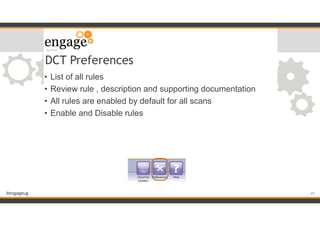
DCT Preferences
• List of all rules
• Review rule , description and supporting documentation
• All rules are enabled by default for all scans
• Enable and Disable rules
!45
#engageug
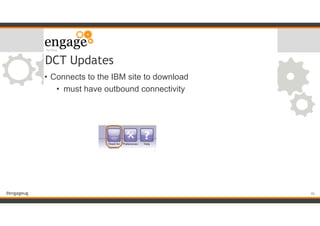
DCT Updates
• Connects to the IBM site to download
• must have outbound connectivity
!46
#engageug
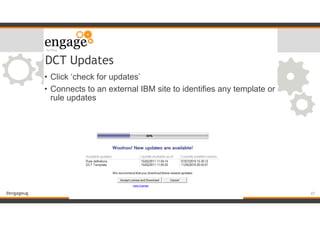
DCT Updates
• Click ‘check for updates’
• Connects to an external IBM site to identifies any template or
rule updates
!47
#engageug
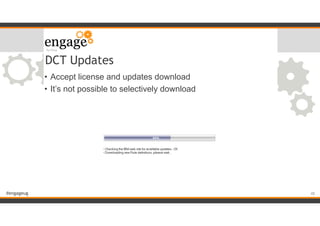
DCT Updates
• Accept license and updates download
• It’s not possible to selectively download
!48
#engageug
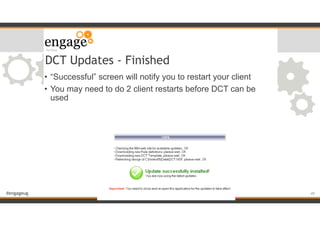
DCT Updates - Finished
• “Successful” screen will notify you to restart your client
• You may need to do 2 client restarts before DCT can be
used
!49
#engageug
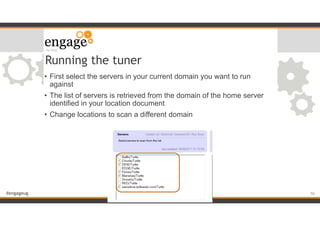
• First select the servers in your current domain you want to run
against
• The list of servers is retrieved from the domain of the home server
identified in your location document
• Change locations to scan a different domain
Running the tuner
!50
#engageug
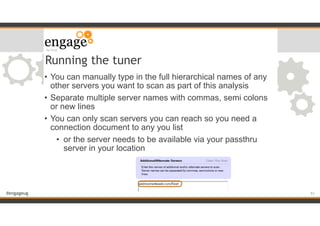
• You can manually type in the full hierarchical names of any
other servers you want to scan as part of this analysis
• Separate multiple server names with commas, semi colons
or new lines
• You can only scan servers you can reach so you need a
connection document to any you list
• or the server needs to be available via your passthru
server in your location
Running the tuner
!51
#engageug
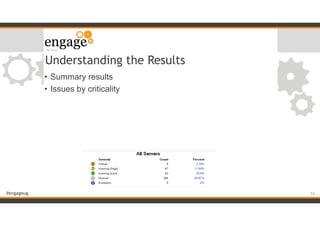
Understanding the Results
• Summary results
• Issues by criticality
!52
#engageug
Understanding the Results
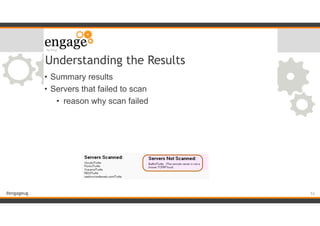
• Summary results
• Servers that failed to scan
• reason why scan failed
!53
#engageug
Understanding the Results
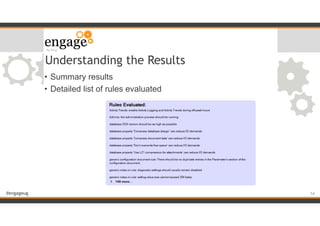
• Summary results
• Detailed list of rules evaluated
!54
#engageug
Understanding the Results
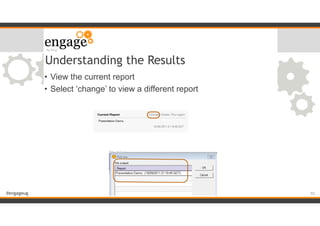
• View the current report
• Select ‘change’ to view a different report
!55
#engageug
Understanding the Results
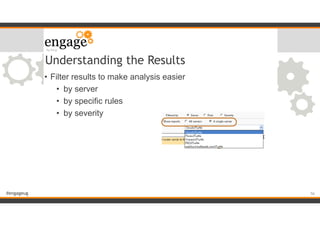
• Filter results to make analysis easier
• by server
• by specific rules
• by severity
!56
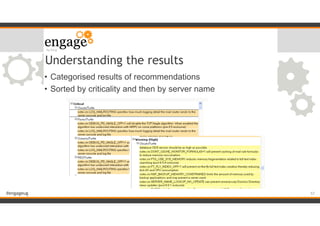
#engageug
Understanding the results
• Categorised results of recommendations
• Sorted by criticality and then by server name
!57
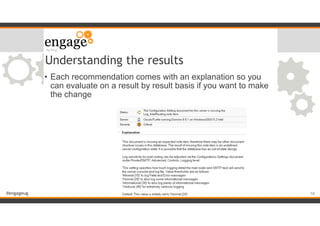
#engageug
Understanding the results
• Each recommendation comes with an explanation so you
can evaluate on a result by result basis if you want to make
the change
!58
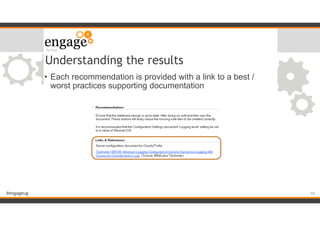
#engageug
• Each recommendation is provided with a link to a best /
worst practices supporting documentation
Understanding the results
!59
#engageug
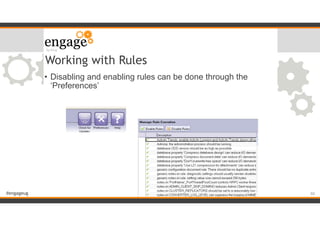
Working with Rules
• Disabling and enabling rules can be done through the
‘Preferences’
!60
#engageug
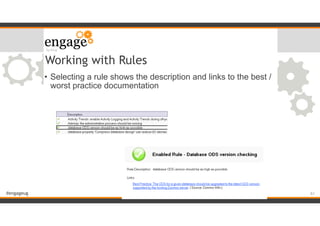
Working with Rules
• Selecting a rule shows the description and links to the best /
worst practice documentation
!61
#engageug
Making Changes
• Advanced Database Properties
• assigned en masse via Domino Admin
• notes.ini settings
• assigned via the command set config xxx = x
• shown via the command sh config xxx = x
• Many recommendations refer to ‘some databases’ but don’t
specify which ones - check which ones will be affected
!62
#engageug
Resources
• Domino Configuration Tuner blog
• http://www.bleedyellow.com/blogs/DCT/
• details and explanations of new rules published each
month
!63
#engageug
Summary
• No matter how well your servers are configured they will continue to degrade in
performance over time unless you pro-actively monitor and fix
• Many of the server performance issues will be seen first by your users before
they filter down to you
• Make reviewing your server configuration using DDM probes followed by a DCT
analysis part of every server upgrade
• Enable probes that are specific to the server role. Mail and Directory probes on
Mail servers and Agent probes on Application servers
• Use Security and Database probes configured in DDM to stay on top of any low
level warnings that could cause larger problems in the future
• Don’t over configure your servers to monitor everything or you’ll be looking for
a needle in a haystack. Ask your servers to tell you only what you need to be
aware of so immediately
• Use the built in tools, DCT, Statistics, DDM, Catalog, Activity Trends to monitor
your servers and gain a good understanding of what is their ‘normal’ behaviour
so you can more easily spot when something goes wrong.
!64
#engageug
Questions
!65
How to contact me:
Gabriella Davis
gabriella@turtlepartnership.com
Twitter: gabturtle

Fixing Domino Server Sickness

  • 1.
    #engageug Fixing Server Sickness GabriellaDavis Technical Director The Turtle Partnership !1
  • 2.
    #engageug Fixing Your Server •What causes server sickness • Tools to spot sickness • Getting Your Server Back to Full Health
 !2
  • 3.
    #engageug Server Sickness • Theproblem with Domino • How does a server get sick? • Vulnerabilities • Aging Configurations • Bad Habits !3
  • 4.
    #engageug Server Sickness • Theproblem with Domino • How does a server get sick? • Vulnerabilities • Aging Configurations • Bad Habits • Developers Gone Wild !4
  • 5.
    #engageug The Problem WithDomino • “My Server Is Running Fine” • Server Stability • Often despite our best efforts • Tasks that just run • even without being properly configured !5
  • 6.
    #engageug Vulnerabilities • Start withthe OS • patch levels • unnecessary processes with exposed ports • disk and data security
 • Then the hardware • It’s all about disk performance • Using a SAN? Is the SAN configured for Domino? • Transaction logs configured?
 !6
  • 7.
    #engageug Vulnerabilities • Security • ACLs •-Default- and Anonymous • LocalDomainServers • HTTP vs HTTPs • LDAP • DIIOP • Sametime !7
  • 8.
    #engageug Aging Configurations • Whatcan give you problems over time • Database sizes • More users • More tasks and features !8
  • 9.
    #engageug Bad Habits • Whatare your users doing? • what features are they using • how are they using them • are they creating repeating 10yr appointments for instance • are they copying themselves on emails • Password quality for HTTP passwords !9
  • 10.
    #engageug Giving Developers Power •Allowing development to dictate replication and agent scheduling • The curse of not production tested XPages code • Demands for “LDAP” or “DIIOP” for an application to work !10
  • 11.
    #engageug Tools to SpotSickness • Understanding Priorities • DDM Probes and Event Analysis !11
  • 12.
    #engageug Tools to SpotSickness • Understanding Priorities • DDM Probes and Event Analysis • Statistics • Catalog.nsf • QoS - new with Domino 9 • Enhanced Fault Reporting - new with Domino 9 !12
  • 13.
    #engageug Understanding Priorities • Serverrole • What do you want from your server • What are statistics telling you • Warning Levels • Is it safe to ignore ‘Warning (Low)’ and focus on ‘Fatal’ or ‘Failure’ !13
  • 14.
    #engageug Bringing Problems toYou • Event Handlers, Event Generators, Statistics, Fault Reports and DDM Probes - where to start • Setting Statistic Thresholds • Choosing and configuring probes • Reviewing Faults • Setting up QoS behaviour !14
  • 15.
    #engageug Bringing Problems ToYou • Why we set up collection hierarchies for DDM • and how • Daily and Weekly DDM reviews • What to look out for !15
  • 16.
    #engageug Probes for MailServers • Security - Weekly • Directory Performance • Critical mail routes • Mail ‘Slack’ !16
  • 17.
    #engageug Probes for ApplicationServers • Agent run times • agent cpu usage • Security and Web Configuration !17
  • 18.
    #engageug Probes for StrugglingServers • OS level • disk performance (beware of reported SAN problems) • memory • network !18
  • 19.
    #engageug What to lookfor • Fatal problems • Persistent Warnings • Peak activity behaviour • uptick in problems at 9am, 1pm etc • Repetitive low level ‘annoyances’ !19
  • 20.
    #engageug Catalog.nsf • Not everydatabase is immediately visible but they are all there (just hidden with selection formulae) • It’s a good place to start looking for multiple replica • It’s a good place to find ACL issues • Replicates around your domain and updates overnight !20
  • 21.
    #engageug QoS - Qualityof Service • Monitor server health and performance • Monitors application behavior, stability and hangs • Restarts Domino if it thinks there are memory issues or an application is hung • Shuts down Domino if a clean shutdown doesn’t happen and the server hangs • Controlled via notes.ini settings and dcontroller.ini • Requires Domino to be running under the Java Controller • nserver -jc !21
  • 22.
    #engageug QoS Configuration • StartingDomino under Java Controller should create a dcontroller.ini file • QOS_Enable=1 • In Notes.Ini • QOS_ProbeInterval (defaults to 1 min) • QOS_ProbeTimeout (defaults to 5 mins) • QOS_ShutDown_Timeout • QOS_Apps_Timeout • QOS_Shutdown_Timeout !22
  • 23.
    #engageug QOS - PotentialProblems • QOS doesn’t support passwords on server ids , the restart will pause at the password entry screen • QOS timeouts being too low • Don’t enable QOS on servers without transaction logging !23
  • 24.
    #engageug Enhanced Fault Reporting •Fault Reporting Database -lndfr.nsf • Expanded to include a by Disposition view • all faults when analyzed have a disposition value that categorises as • Problem • Possible Problem (possibly actionable ) • Possible Problem (likely NOT actionable ) • Informational • Unknown (investigate) !24
  • 25.
    #engageug Possible Problem -Actionable • Out Of Memory: Represents a crash in which the Java virtual machine (JVM) ran out of a memory resource such as heap space. • Launched Notes multiple times: Indicates that the user quickly launched multiple instances of the Notes client • Possible hang: Indicates that the Notes client was manually terminated while it appeared to be doing useful work. • User Kill: Indicates that the user manually terminated the client while it appeared to be waiting for input or network timeout !25
  • 26.
    #engageug Back to FullHealth • Getting Control • Mail , Databases and ECLs • SMTP • Agent Scheduling • Directories • Adminp • LDAP • Tasks and Internet Site Documents • Domino Configuration Tuner !26
  • 27.
    #engageug Back to FullHealth • Getting Control • Mail , Databases and ECLs • SMTP • Agent Scheduling • Directories • Adminp • LDAP • Tasks and Internet Site Documents • Domino Configuration Tuner !27
  • 28.
    #engageug Getting Control -Mail and Databases • Setting ACLs at directory level (Editor) • Lock down ECLs via Policies • Introducing quotas alongside server based archiving • Consider archiving files to a dedicated server • Upgrade to 8 and enable OOO router instead of agents • Disable forwarding rules set up by users • Use message tracking and mail rules very sparingly • Disable on the fly searching of non indexed databases !28
  • 29.
    #engageug Database Management Tools •DBMT Server Command • runs copy-style compact operations • purges deletion stubs • expires soft deleted entries • updates views • reorganizes folders • merges full-text indexes • updates unread lists • ensures that critical views are created for failover • Replaces Updall • Load updall - nodbmt tells updall to run but not perform the functions that DMBT already does !29
  • 30.
    #engageug DBMT Parameters • -compactThreads •-updallThreads • -ftiThreads • -timeLimit refers to compact timeout for DBMT • -range starttime stoptime • compactNdays (run Compact every x days) • ftiNdays (run FT Index every x days) • force d (day Sunday =1) fixup if compact fails for consecutive day !30
  • 31.
    #engageug Getting Control -SMTP • Restrict relaying to specific ip addresses not network ranges • Beware of allowing authenticated relaying and opening up to dictionary attacks • Restrict rights to send to internal groups from internet addresses • Don’t accept mail for local part matches • Configure your server for HTML mail not plain text !31
  • 32.
    #engageug Getting Control -SMTP (more) • Don’t allow all connecting hosts to deliver mail inbound, if you use a service restrict to those hosts • Use services / tools to spot attacks such as • persistent attempts to mass deliver within a time period • continual failures by a host to deliver to a correct address • Move responsibility for that first line of defense away from native Domino !32
  • 33.
    #engageug Getting Control -Agent Scheduling • When are agents set to run • amgr_newmaileventdelay • amgr_newmailagentmininterval • If you’re using OOO agents how often are they scheduled • Do users have private agents running • Sh Agents [DBName] • All shared and private agents in a database • Who has rights to run agents !33
  • 34.
    #engageug Getting Control -Directories • Avoid adding additional views to the Domino Directory • The risk of allowing local replicas with Author rights • Directory Assistance • Sh xdir !34
  • 35.
    #engageug Getting Control -Adminp • Purge old documents • Requests awaiting approval • Tell adminp process NEW not ALL !35
  • 36.
    #engageug Getting Control -LDAP • Allowing anonymous access to query LDAP • Authenticating LDAP queries • Extended Directory Catalog used by LDAP • Relying on DNS • Not configuring the LDAP task correctly to allow large searches with no timeouts • Maintaining schema.nsf !36
  • 37.
    #engageug Getting Control -Tasks and Program Documents • Disable tasks you don’t need • Schedule overnight tasks so they don’t overlap • and don’t conflict with backups • Use program documents so you can review and manage easily • sh config servertasksat* • Keeping templates on every server • Using compact -B !37
  • 38.
    #engageug Getting Control -Internet Site Documents • Web Configuration means TCPIP tasks are configured in the server document and are server wide • often enabled by default • Internet site documents require you to opt in for TCPIP services • configured by hostname !38
  • 39.
    #engageug Domino Configuration Tuner •Domino Configuration Tuner is an analysis tool based on a set of pre-configured best practice/worst practice rules • The Rules are shipped by IBM with the Lotus installs and are updated via a public update site • Makes recommendations on configuration changes to enhance performance and security and reduce TCO !39
  • 40.
    #engageug How does itwork? • Run and installed via the Domino Configuration Tuner database • Updated by online template updates and rule updates • DCT rules and results are held in a local database and will require a restart of the client for changes to take effect • Scans • Server documents • notes.ini settings • advanced database properties • Intended to scan servers in a single domain !40
  • 41.
    #engageug How does itwork? • Creates reports on each scanned server based on the rules you select • Each report contains • Issues • recommendations for adjustments • links to supporting documentation !41
  • 42.
    #engageug Pre-requisites • v8 Notesclient (standard or basic) or administrator • dct.nsf database and dct.ntf template • servers 7.x or higher !42
  • 43.
    #engageug Setup • DCT.NSF • StdDominoConfigTunerTemplate (dct.ntf) • ID must have reader access to names.nsf • ID must have ‘View Administrator’ rights • Requires no server or domain changes !43
  • 44.
    #engageug View Administrator Rights •Server Document • Security Tab • View Administrator is a subset 
 of ‘Administrator’ rights • Think of it as ‘Show’ not ‘Tell’ rights • Sh users - YES • tell http refresh - NO !44
  • 45.
    #engageug DCT Preferences • Listof all rules • Review rule , description and supporting documentation • All rules are enabled by default for all scans • Enable and Disable rules !45
  • 46.
    #engageug DCT Updates • Connectsto the IBM site to download • must have outbound connectivity !46
  • 47.
    #engageug DCT Updates • Click‘check for updates’ • Connects to an external IBM site to identifies any template or rule updates !47
  • 48.
    #engageug DCT Updates • Acceptlicense and updates download • It’s not possible to selectively download !48
  • 49.
    #engageug DCT Updates -Finished • “Successful” screen will notify you to restart your client • You may need to do 2 client restarts before DCT can be used !49
  • 50.
    #engageug • First selectthe servers in your current domain you want to run against • The list of servers is retrieved from the domain of the home server identified in your location document • Change locations to scan a different domain Running the tuner !50
  • 51.
    #engageug • You canmanually type in the full hierarchical names of any other servers you want to scan as part of this analysis • Separate multiple server names with commas, semi colons or new lines • You can only scan servers you can reach so you need a connection document to any you list • or the server needs to be available via your passthru server in your location Running the tuner !51
  • 52.
    #engageug Understanding the Results •Summary results • Issues by criticality !52
  • 53.
    #engageug Understanding the Results •Summary results • Servers that failed to scan • reason why scan failed !53
  • 54.
    #engageug Understanding the Results •Summary results • Detailed list of rules evaluated !54
  • 55.
    #engageug Understanding the Results •View the current report • Select ‘change’ to view a different report !55
  • 56.
    #engageug Understanding the Results •Filter results to make analysis easier • by server • by specific rules • by severity !56
  • 57.
    #engageug Understanding the results •Categorised results of recommendations • Sorted by criticality and then by server name !57
  • 58.
    #engageug Understanding the results •Each recommendation comes with an explanation so you can evaluate on a result by result basis if you want to make the change !58
  • 59.
    #engageug • Each recommendationis provided with a link to a best / worst practices supporting documentation Understanding the results !59
  • 60.
    #engageug Working with Rules •Disabling and enabling rules can be done through the ‘Preferences’ !60
  • 61.
    #engageug Working with Rules •Selecting a rule shows the description and links to the best / worst practice documentation !61
  • 62.
    #engageug Making Changes • AdvancedDatabase Properties • assigned en masse via Domino Admin • notes.ini settings • assigned via the command set config xxx = x • shown via the command sh config xxx = x • Many recommendations refer to ‘some databases’ but don’t specify which ones - check which ones will be affected !62
  • 63.
    #engageug Resources • Domino ConfigurationTuner blog • http://www.bleedyellow.com/blogs/DCT/ • details and explanations of new rules published each month !63
  • 64.
    #engageug Summary • No matterhow well your servers are configured they will continue to degrade in performance over time unless you pro-actively monitor and fix • Many of the server performance issues will be seen first by your users before they filter down to you • Make reviewing your server configuration using DDM probes followed by a DCT analysis part of every server upgrade • Enable probes that are specific to the server role. Mail and Directory probes on Mail servers and Agent probes on Application servers • Use Security and Database probes configured in DDM to stay on top of any low level warnings that could cause larger problems in the future • Don’t over configure your servers to monitor everything or you’ll be looking for a needle in a haystack. Ask your servers to tell you only what you need to be aware of so immediately • Use the built in tools, DCT, Statistics, DDM, Catalog, Activity Trends to monitor your servers and gain a good understanding of what is their ‘normal’ behaviour so you can more easily spot when something goes wrong. !64
  • 65.
    #engageug Questions !65 How to contactme: Gabriella Davis gabriella@turtlepartnership.com Twitter: gabturtle