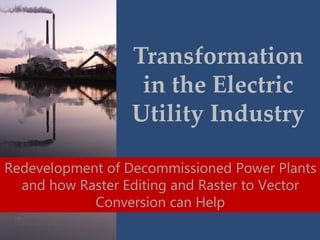
Transformation
in the Electric
Utility Industry
Redevelopment of Decommissioned Power Plants
and how Raster Editing and Raster to Vector
Conversion can Help
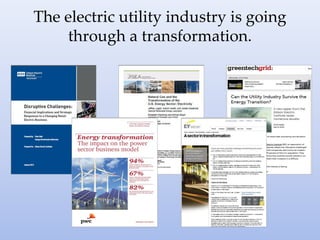
The electric utility industry is going
through a transformation.
…closure and obsolescence
of numerous power
generating facilities
a common thread…
“US utilities are focusing more and more on natural
gas. Coal plant owners have announced 54,742
MW of coal capacity will be shut down by 2025,” --
--FC Gas Intelligence
“US utilities are focusing more and more on natural
gas. Coal plant owners have announced 54,742
MW of coal capacity will be shut down by 2025,” --
--FC Gas Intelligence
“There are 7,000 power plants in the United States with an average
age of more than forty years…This convergence of economic,
environmental and regulatory challenges has led several
companies to announce the closure of obsolete coal and oil fired
power plants. Many more still are considering how to handle their
outdated sites.”
--TRC Companies
“US utilities are focusing more and more on natural
gas. Coal plant owners have announced 54,742
MW of coal capacity will be shut down by 2025,” --
--FC Gas Intelligence
“There are 7,000 power plants in the United States with an average
age of more than forty years…This convergence of economic,
environmental and regulatory challenges has led several
companies to announce the closure of obsolete coal and oil fired
power plants. Many more still are considering how to handle their
outdated sites.”
--TRC Companies
“The number of coal-fired plants being retired now
exceeds 180 units.”
--Burns & McDonnell
but where there is deconstruction,
there is opportunity for
reconstruction or redevelopment
According to
Paul Smokler
of AECOM, the
door is open
for American
manufacturing.
“At the same time, labor and other costs are growing in China. And
many products such as tissue and other paper products are just too
costly to ship over long distances.
These changing dynamics coupled with the real-world experience of the
hidden costs of doing business in less mature economies (lower
productivity, bureaucracy, intellectual property issues, longer lead times,
etc.) are drawing manufacturers back to the U.S. The United States has
once again become an attractive place to manufacture products.
While it may first seem that the decommissioning of these aging coal
plants is yet another example of U.S. job losses, these are actually
excellent opportunities for renewal and a revitalization of these sites
with industrial infrastructure and the economies of the communities in
which they are located.”
Burns & McDonnell agree…
key factors such as a “site's location near an urban
center, its historic architecture, existing
infrastructure and access to transportation
networks all shape the potential for repurposing a
complex.”
So How Can DocuFi
Help Utility Plant
Redevelopment?
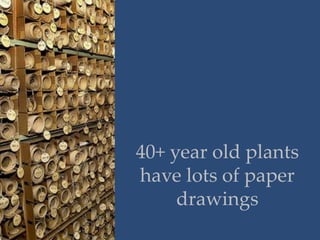
40+ year old plants
have lots of paper
drawings
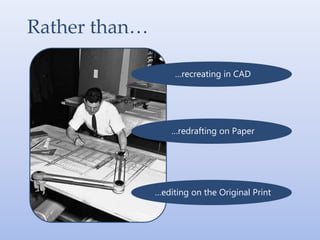
Rather than…
…recreating in CAD
…redrafting on Paper
…editing on the Original Print
Easily handle changes on your
paper drawings.
With Raster Editing, Hybrid Editing or
Raster-to-Vector Conversion Software
But, let’s side-step here for a
minute and look at what is
“raster” and “vector”
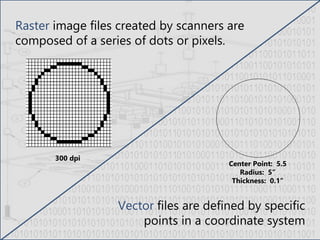
Center Point: 5.5
Radius: 5”
Thickness: 0.1”
300 dpi
Raster image files created by scanners are
composed of a series of dots or pixels.
Vector files are defined by specific
points in a coordinate system
Okay, back to it, let’s look at raster
editing first, then conversion.
It’s not your father’s raster editing anymore…
Okay, back to it, let’s look at raster
editing first, then conversion.
It’s not your father’s raster editing anymore…
Today’s raster editing is
sophisticated and highly
functional…allowing you to
edit raster with vector-like
tools and interface.
Okay, back to it, let’s look at raster
editing first, then conversion.
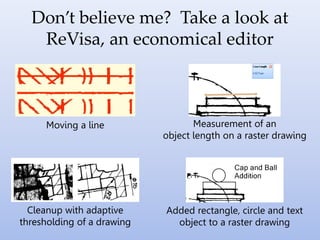
Don’t believe me? Take a look at
ReVisa, an economical editor
Moving a line Measurement of an
object length on a raster drawing
Cleanup with adaptive
thresholding of a drawing
Added rectangle, circle and text
object to a raster drawing
Let’s take a look at GTX raster editing,
powerful solutions for editing within
an AutoCAD environment.
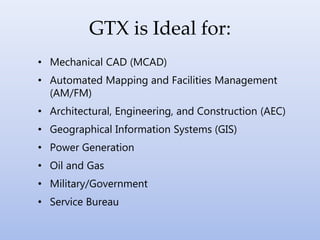
• Mechanical CAD (MCAD)
• Automated Mapping and Facilities Management
(AM/FM)
• Architectural, Engineering, and Construction (AEC)
• Geographical Information Systems (GIS)
• Power Generation
• Oil and Gas
• Military/Government
• Service Bureau
GTX is Ideal for:
The magic of
GTX starts
with
Intelligent
Object
Picking™
.
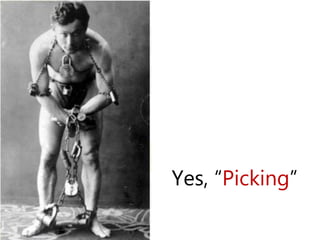
Yes, “Picking”
IOP
IOP
pick raster entities from the
drawing as if they were
intelligent CAD entities
IOP:
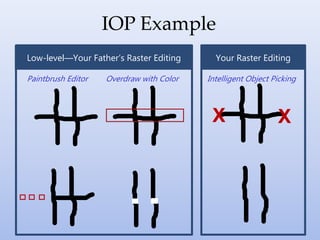
IOP Example
Paintbrush Editor
X X
Intelligent Object PickingOverdraw with Color
Low-level—Your Father’s Raster Editing Your Raster Editing
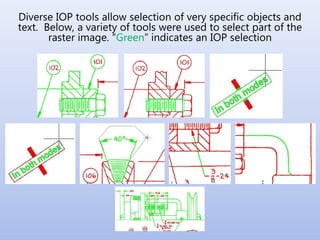
Diverse IOP tools allow selection of very specific objects and
text. Below, a variety of tools were used to select part of the
raster image. “Green” indicates an IOP selection
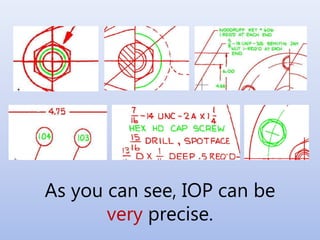
As you can see, IOP can be
very precise.
And, because the GTXRaster CAD Series is
integrated with AutoCAD’s Image Support
Module, all commands, menus and
toolbars are consistent with
AutoCAD 2014, lowering
your training costs.
Once raster has been selected with
IOP…
• Move
• Copy/Paste
• Resize
• Erase
• Rotate
• Snap to Grid
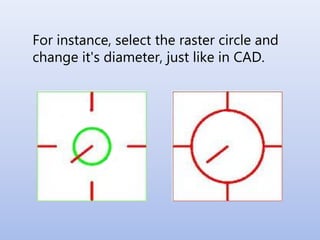
For instance, select the raster circle and
change it's diameter, just like in CAD.
Also, add or remove raster objects
• Circles
• Squares
• Lines
• Text
• Polygons
Oh wait, one more tangent…
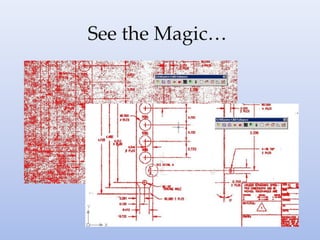
An important part of using your paper
drawings for raster editing is cleaning
the scanned image once the drawing
has been scanned.
This can be especially valuable if your
drawings are old or damaged.
Oh wait, one more tangent…
An important part of using your paper
drawings for raster editing is cleaning
the scanned image once the drawing
has been scanned.
This can be especially valuable if your
drawings are old or damaged.
GTXRaster CAD offers automatic or
manual deskewing and despeckling
and much more. This should be done
first, before raster editing.
See the Magic…
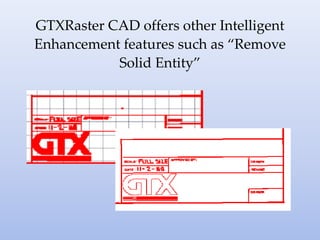
GTXRaster CAD offers other Intelligent
Enhancement features such as “Remove
Solid Entity”
Now if your drawing is:
• complex
• needs complex changes
• needs frequent changes
And
You have trained personnel and a
budget for CAD…
Consider Hybrid Editing or Raster-
to-Vector Conversion
Hybrid editing allows you to:
• only “vectorize” the area of the drawing you
are working on
• create and overlay vector elements on the
raster, taking advantage of vector tools
• make changes with raster editing tools
• save the file with both raster and vector
information or burn it back to raster
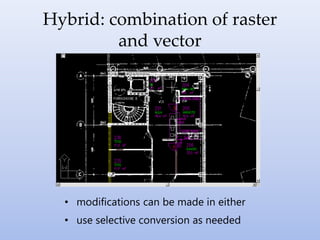
Hybrid: combination of raster
and vector
• modifications can be made in either
• use selective conversion as needed
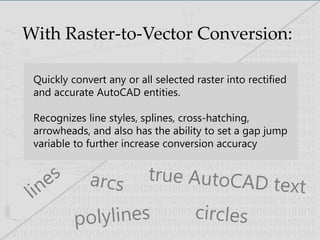
With Raster-to-Vector Conversion:
Quickly convert any or all selected raster into rectified
and accurate AutoCAD entities.
Recognizes line styles, splines, cross-hatching,
arrowheads, and also has the ability to set a gap jump
variable to further increase conversion accuracy
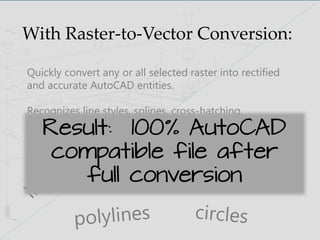
With Raster-to-Vector Conversion:
Quickly convert any or all selected raster into rectified
and accurate AutoCAD entities.
Recognizes line styles, splines, cross-hatching,
arrowheads, and also has the ability to set a gap jump
variable to further increase conversion accuracyResult: 100% AutoCAD
compatible file after
full conversion
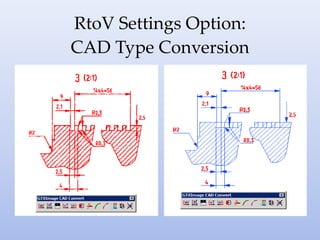
RtoV Settings Option:
CAD Type Conversion
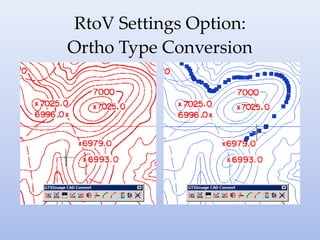
RtoV Settings Option:
Ortho Type Conversion
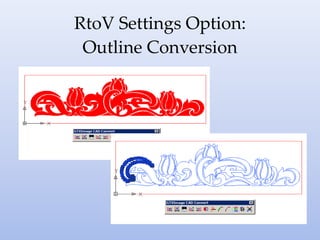
RtoV Settings Option:
Outline Conversion
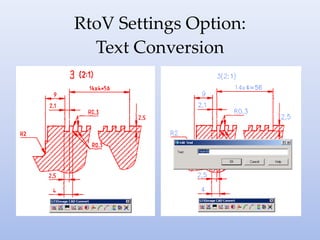
RtoV Settings Option:
Text Conversion
And let’s talk about Text
Conversion some more.
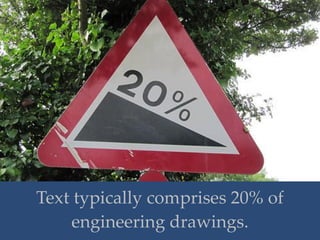
Text typically comprises 20% of
engineering drawings.
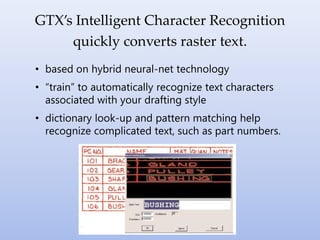
• based on hybrid neural-net technology
• “train” to automatically recognize text characters
associated with your drafting style
• dictionary look-up and pattern matching help
recognize complicated text, such as part numbers.
GTX’s Intelligent Character Recognition
quickly converts raster text.
After conversion, GTX Vector Cleanup
Commands aid in cleaning up drawings
after conversion from raster…
…extend endpoints to
intersections, make circles alike
in radius, and much more.
And we could go
on and on….
• Color tools: reduction, separation
• Stable, proven technology
• Minimal training required
• TIFF, CALS, PDF & other standard input
• Export to DWF, DXF, & many AutoCAD
versions
• GTXImage CAD includes an OEM
AutoCAD license
• Available in English, German & French
But it’s time to stop for now
DocuFi with Windham Document Systems, providing proven
solutions for raster editing, raster to vector conversion and
intelligent drawing and document capture solutions.
Brought to you by:
Partner and GTX Master Distriutor:
GTX, Raster Editing and Conversion
www.windhamsystems.com
sales@windhamsystems.com
Tel: (603) 458-2741
Makers of ReVisa, Raster Editing
ComPara, Drawing Comparison Tool and
ImageRamp, Drawing Capture
www.docufi.com
info@docufi.com
Tel: 603-685-4033
Contact us to learn more about
• Drawing archive,
• Convert drawings,
• Raster editing,
• Edit drawings,
• AutoCAD tool,
• Drawing library,
• Edit paper drawing,
• Edit scanned drawing,
• How to edit raster,
• How to convert drawing,GTX,
• Cleanup scanned drawings
• Convert PDF to CAD
• Scan to CAD
• TIF to CAD
• Manage old drawings
• Redrawing
• Hybrid drawings
• IOP
Our Thanks to:
GTX Corporation
US toll free: (800) 879-8284
info@gtx.com
www.gtx.com
GTX Europe, Ltd.
United Kingdom
+44 (0)1256.814444
info@gtx.co.uk
Acknowledgements
• Seattle Municipal Archives, “Engineering plans storage, 2001”,
http://bit.ly/1m6spOZ
• Seattle Municipal Archives, “Drafter working in Engineering Department,
1959”, http://bit.ly/1eNAbGX
• Dinesh Cyanam, “DSC04606.JPG”, http://bit.ly/1cmFYa0
• Auroramixer, “Aurora 224 Exploded Mechanical Drawing”,
http://bit.ly/1j8Y3u0
• Tmolini, “Houdini”, http://bit.ly/1fajzPN
• Rubbermaid products, Rubbermaid Reveal Spray Mop,
http://bit.ly/17xLoNe
• Alh84001, “Eagle Tip: drawing power supply connex”, http://bit.ly/1j8YzIu
• HowardLake,”20 percent sign”, http://bit.ly/1dIFxb2
• cwwycoff1, “The Long Road Home”, http://bit.ly/1eND4Yi
Upcycling power plants: Innovative uses for obsolete assets, February 2014, AECOM
Transforming Obsolete Power Plant Sites, May 2012, TRC Companies
Power Plant Decommissioning: A Noble Past, Many Possible Futures Changes to the U.S. Power Generation Fleet Are Being
Driven by Environmental, Economic and Market Factors, Burns & McDonnell
Natural Gas for Power Generation: The Generator’s Perspective, FC Gas Intelligence

Transformation in the Electric Utility Industry, Redevelopment of Decommissioned Power Plants and How Raster Editing and Raster to Vector Conversion Can Help

  • 1.
    Transformation in the Electric UtilityIndustry Redevelopment of Decommissioned Power Plants and how Raster Editing and Raster to Vector Conversion can Help
  • 2.
    The electric utilityindustry is going through a transformation.
  • 3.
    …closure and obsolescence ofnumerous power generating facilities a common thread…
  • 4.
    “US utilities arefocusing more and more on natural gas. Coal plant owners have announced 54,742 MW of coal capacity will be shut down by 2025,” -- --FC Gas Intelligence
  • 5.
    “US utilities arefocusing more and more on natural gas. Coal plant owners have announced 54,742 MW of coal capacity will be shut down by 2025,” -- --FC Gas Intelligence “There are 7,000 power plants in the United States with an average age of more than forty years…This convergence of economic, environmental and regulatory challenges has led several companies to announce the closure of obsolete coal and oil fired power plants. Many more still are considering how to handle their outdated sites.” --TRC Companies
  • 6.
    “US utilities arefocusing more and more on natural gas. Coal plant owners have announced 54,742 MW of coal capacity will be shut down by 2025,” -- --FC Gas Intelligence “There are 7,000 power plants in the United States with an average age of more than forty years…This convergence of economic, environmental and regulatory challenges has led several companies to announce the closure of obsolete coal and oil fired power plants. Many more still are considering how to handle their outdated sites.” --TRC Companies “The number of coal-fired plants being retired now exceeds 180 units.” --Burns & McDonnell
  • 7.
    but where thereis deconstruction, there is opportunity for reconstruction or redevelopment
  • 8.
    According to Paul Smokler ofAECOM, the door is open for American manufacturing.
  • 9.
    “At the sametime, labor and other costs are growing in China. And many products such as tissue and other paper products are just too costly to ship over long distances. These changing dynamics coupled with the real-world experience of the hidden costs of doing business in less mature economies (lower productivity, bureaucracy, intellectual property issues, longer lead times, etc.) are drawing manufacturers back to the U.S. The United States has once again become an attractive place to manufacture products. While it may first seem that the decommissioning of these aging coal plants is yet another example of U.S. job losses, these are actually excellent opportunities for renewal and a revitalization of these sites with industrial infrastructure and the economies of the communities in which they are located.”
  • 10.
    Burns & McDonnellagree… key factors such as a “site's location near an urban center, its historic architecture, existing infrastructure and access to transportation networks all shape the potential for repurposing a complex.”
  • 11.
    So How CanDocuFi Help Utility Plant Redevelopment?
  • 12.
    40+ year oldplants have lots of paper drawings
  • 13.
    Rather than… …recreating inCAD …redrafting on Paper …editing on the Original Print
  • 14.
    Easily handle changeson your paper drawings.
  • 15.
    With Raster Editing,Hybrid Editing or Raster-to-Vector Conversion Software
  • 16.
    But, let’s side-stephere for a minute and look at what is “raster” and “vector”
  • 17.
    Center Point: 5.5 Radius:5” Thickness: 0.1” 300 dpi Raster image files created by scanners are composed of a series of dots or pixels. Vector files are defined by specific points in a coordinate system
  • 18.
    Okay, back toit, let’s look at raster editing first, then conversion.
  • 19.
    It’s not yourfather’s raster editing anymore… Okay, back to it, let’s look at raster editing first, then conversion.
  • 20.
    It’s not yourfather’s raster editing anymore… Today’s raster editing is sophisticated and highly functional…allowing you to edit raster with vector-like tools and interface. Okay, back to it, let’s look at raster editing first, then conversion.
  • 21.
    Don’t believe me?Take a look at ReVisa, an economical editor Moving a line Measurement of an object length on a raster drawing Cleanup with adaptive thresholding of a drawing Added rectangle, circle and text object to a raster drawing
  • 22.
    Let’s take alook at GTX raster editing, powerful solutions for editing within an AutoCAD environment.
  • 23.
    • Mechanical CAD(MCAD) • Automated Mapping and Facilities Management (AM/FM) • Architectural, Engineering, and Construction (AEC) • Geographical Information Systems (GIS) • Power Generation • Oil and Gas • Military/Government • Service Bureau GTX is Ideal for:
  • 24.
    The magic of GTXstarts with Intelligent Object Picking™ .
  • 25.
  • 26.
    IOP IOP pick raster entitiesfrom the drawing as if they were intelligent CAD entities IOP:
  • 27.
    IOP Example Paintbrush Editor XX Intelligent Object PickingOverdraw with Color Low-level—Your Father’s Raster Editing Your Raster Editing
  • 28.
    Diverse IOP toolsallow selection of very specific objects and text. Below, a variety of tools were used to select part of the raster image. “Green” indicates an IOP selection
  • 29.
    As you cansee, IOP can be very precise.
  • 30.
    And, because theGTXRaster CAD Series is integrated with AutoCAD’s Image Support Module, all commands, menus and toolbars are consistent with AutoCAD 2014, lowering your training costs.
  • 31.
    Once raster hasbeen selected with IOP… • Move • Copy/Paste • Resize • Erase • Rotate • Snap to Grid
  • 32.
    For instance, selectthe raster circle and change it's diameter, just like in CAD.
  • 33.
    Also, add orremove raster objects • Circles • Squares • Lines • Text • Polygons
  • 34.
    Oh wait, onemore tangent… An important part of using your paper drawings for raster editing is cleaning the scanned image once the drawing has been scanned. This can be especially valuable if your drawings are old or damaged.
  • 35.
    Oh wait, onemore tangent… An important part of using your paper drawings for raster editing is cleaning the scanned image once the drawing has been scanned. This can be especially valuable if your drawings are old or damaged. GTXRaster CAD offers automatic or manual deskewing and despeckling and much more. This should be done first, before raster editing.
  • 36.
  • 37.
    GTXRaster CAD offersother Intelligent Enhancement features such as “Remove Solid Entity”
  • 38.
    Now if yourdrawing is: • complex • needs complex changes • needs frequent changes And You have trained personnel and a budget for CAD…
  • 39.
    Consider Hybrid Editingor Raster- to-Vector Conversion
  • 40.
    Hybrid editing allowsyou to: • only “vectorize” the area of the drawing you are working on • create and overlay vector elements on the raster, taking advantage of vector tools • make changes with raster editing tools • save the file with both raster and vector information or burn it back to raster
  • 41.
    Hybrid: combination ofraster and vector • modifications can be made in either • use selective conversion as needed
  • 42.
    With Raster-to-Vector Conversion: Quicklyconvert any or all selected raster into rectified and accurate AutoCAD entities. Recognizes line styles, splines, cross-hatching, arrowheads, and also has the ability to set a gap jump variable to further increase conversion accuracy
  • 43.
    With Raster-to-Vector Conversion: Quicklyconvert any or all selected raster into rectified and accurate AutoCAD entities. Recognizes line styles, splines, cross-hatching, arrowheads, and also has the ability to set a gap jump variable to further increase conversion accuracyResult: 100% AutoCAD compatible file after full conversion
  • 44.
  • 45.
  • 46.
  • 47.
  • 48.
    And let’s talkabout Text Conversion some more.
  • 49.
    Text typically comprises20% of engineering drawings.
  • 50.
    • based onhybrid neural-net technology • “train” to automatically recognize text characters associated with your drafting style • dictionary look-up and pattern matching help recognize complicated text, such as part numbers. GTX’s Intelligent Character Recognition quickly converts raster text.
  • 51.
    After conversion, GTXVector Cleanup Commands aid in cleaning up drawings after conversion from raster… …extend endpoints to intersections, make circles alike in radius, and much more.
  • 52.
    And we couldgo on and on…. • Color tools: reduction, separation • Stable, proven technology • Minimal training required • TIFF, CALS, PDF & other standard input • Export to DWF, DXF, & many AutoCAD versions • GTXImage CAD includes an OEM AutoCAD license • Available in English, German & French
  • 53.
    But it’s timeto stop for now DocuFi with Windham Document Systems, providing proven solutions for raster editing, raster to vector conversion and intelligent drawing and document capture solutions. Brought to you by: Partner and GTX Master Distriutor: GTX, Raster Editing and Conversion www.windhamsystems.com sales@windhamsystems.com Tel: (603) 458-2741 Makers of ReVisa, Raster Editing ComPara, Drawing Comparison Tool and ImageRamp, Drawing Capture www.docufi.com info@docufi.com Tel: 603-685-4033
  • 54.
    Contact us tolearn more about • Drawing archive, • Convert drawings, • Raster editing, • Edit drawings, • AutoCAD tool, • Drawing library, • Edit paper drawing, • Edit scanned drawing, • How to edit raster, • How to convert drawing,GTX, • Cleanup scanned drawings • Convert PDF to CAD • Scan to CAD • TIF to CAD • Manage old drawings • Redrawing • Hybrid drawings • IOP Our Thanks to: GTX Corporation US toll free: (800) 879-8284 info@gtx.com www.gtx.com GTX Europe, Ltd. United Kingdom +44 (0)1256.814444 info@gtx.co.uk
  • 55.
    Acknowledgements • Seattle MunicipalArchives, “Engineering plans storage, 2001”, http://bit.ly/1m6spOZ • Seattle Municipal Archives, “Drafter working in Engineering Department, 1959”, http://bit.ly/1eNAbGX • Dinesh Cyanam, “DSC04606.JPG”, http://bit.ly/1cmFYa0 • Auroramixer, “Aurora 224 Exploded Mechanical Drawing”, http://bit.ly/1j8Y3u0 • Tmolini, “Houdini”, http://bit.ly/1fajzPN • Rubbermaid products, Rubbermaid Reveal Spray Mop, http://bit.ly/17xLoNe • Alh84001, “Eagle Tip: drawing power supply connex”, http://bit.ly/1j8YzIu • HowardLake,”20 percent sign”, http://bit.ly/1dIFxb2 • cwwycoff1, “The Long Road Home”, http://bit.ly/1eND4Yi Upcycling power plants: Innovative uses for obsolete assets, February 2014, AECOM Transforming Obsolete Power Plant Sites, May 2012, TRC Companies Power Plant Decommissioning: A Noble Past, Many Possible Futures Changes to the U.S. Power Generation Fleet Are Being Driven by Environmental, Economic and Market Factors, Burns & McDonnell Natural Gas for Power Generation: The Generator’s Perspective, FC Gas Intelligence