ImageRampV6 Delivers
Intelligent Data Capture Solution
TOOLS-FEATURES-PERFORMANCE
©
DocuFi2014
We continue to improve our intelligent
data capture platform, ImageRamp.
Scan and processdirectly with ImageRamp
Desktopor ImageRamp for Fujitsu or scan
using any MFP device ordesktop scanner
to a folder and let ImageRamp Batch
handle your document conversion and
processing needs.
What’s new in
Version 6…
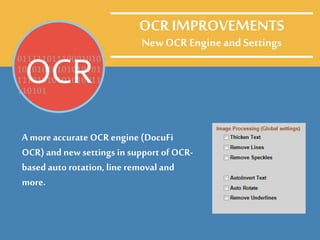
A moreaccurate OCR engine (DocuFi
OCR) and newsettings in support of OCR-
basedauto rotation, line removal and
more.
OCR IMPROVEMENTS
New OCR EngineandSettings
01111101110001010
10101010101010101
11101010101010011
110101
OCR
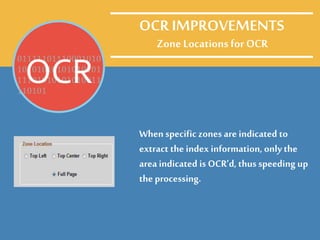
Zone Locations for OCR
When specific zonesare indicated to
extract the index information, onlythe
area indicated is OCR’d, thus speeding up
the processing.
01111101110001010
10101010101010101
11101010101010011
110101
OCR
OCR IMPROVEMENTS
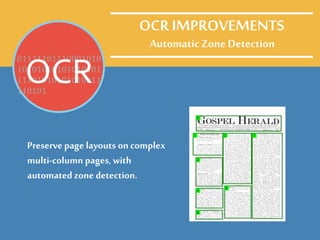
Automatic Zone Detection
Preserve page layouts on complex
multi-column pages, with
automated zone detection.
01111101110001010
10101010101010101
11101010101010011
110101
OCR
OCR IMPROVEMENTS
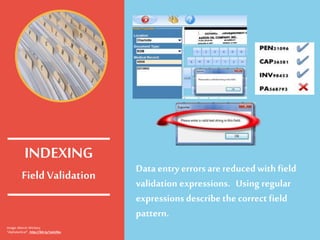
Field Validation
Data entry errorsarereducedwith field
validation expressions. Using regular
expressions describe the correct field
pattern.
INDEXING
Image: Marcin Wichary
“Alphabetical”, http://bit.ly/1aILOku
MultipleEntries
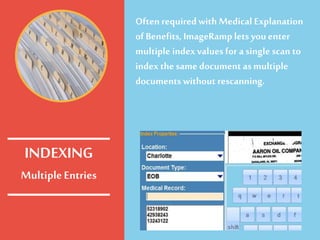
Often requiredwith Medical Explanation
of Benefits, ImageRamp lets youenter
multiple index values for a single scan to
index the same documentas multiple
documents without rescanning.
INDEXING
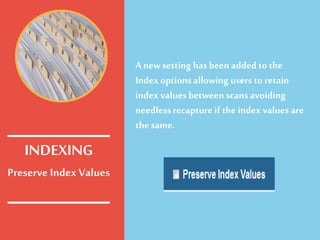
Preserve IndexValues
A newsetting has been added tothe
Index options allowing users to retain
index values between scans avoiding
needlessrecapture if the index values are
the same.
INDEXING
Date/Numeric Data
Types and Date Picker
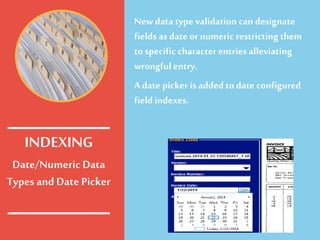
Newdata type validation can designate
fields as date or numeric restricting them
to specific character entries alleviating
wrongful entry.
A date picker is added to date configured
field indexes.
INDEXING
Multi-lineNotes
Indexing
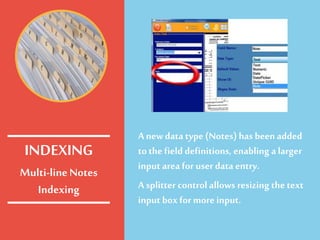
A newdata type (Notes) has beenadded
to the field definitions, enabling a larger
input area for user data entry.
A splitter controlallows resizing the text
input box for more input.
INDEXING
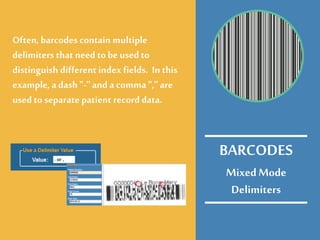
MixedMode
Delimiters
Often, barcodes contain multiple
delimiters that need tobe used to
distinguish different index fields. In this
example, a dash "-" and a comma "," are
used to separate patient recorddata.
BARCODES
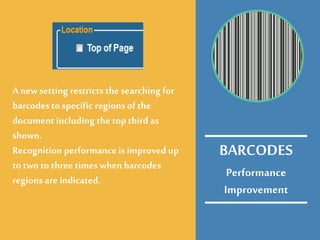
Performance
Improvement
A newsetting restricts the searching for
barcodesto specific regions of the
documentincluding the top third as
shown.
Recognition performanceis improved up
to two to three times when barcodes
regions are indicated.
BARCODES
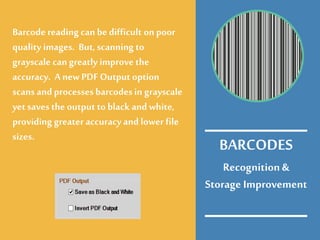
Recognition&
Storage Improvement
Barcode reading can be difficult on poor
quality images. But, scanning to
grayscale can greatly improve the
accuracy. Anew PDF Output option
scans and processesbarcodesin grayscale
yet savesthe output to black and white,
providing greater accuracy and lower file
sizes.
BARCODES
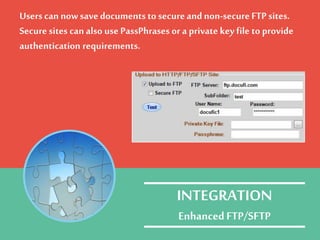
Users cannowsave documents to secureand non-secureFTP sites.
Securesites can also use PassPhrases or a private key file to provide
authentication requirements.
INTEGRATION
EnhancedFTP/SFTP
ImageRamp can nowdirectly
scan into the Dentrix Document
Center and is certified by
Dentrix under the Dentrix
DeveloperProgram
INTEGRATION
Henry Schein‘s Dentrix
ImageRamp can nowwrite
directly to FileMaker tables
using pull downs,drag-and-drop
OCR, or onscreenkeyboards for
indexing.
INTEGRATION
FileMakerPro
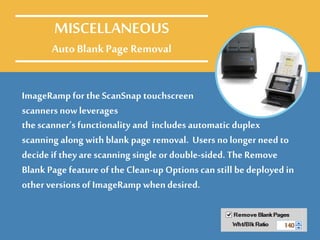
ImageRamp for the ScanSnap touchscreen
scanners now leverages
MISCELLANEOUS
Auto BlankPage Removal
the scanner’s functionality and includes automatic duplex
scanning along with blank page removal. Users no longer need to
decide if they are scanning single or double-sided. The Remove
Blank Page feature of the Clean-up Options can still be deployed in
other versionsof ImageRamp whendesired.
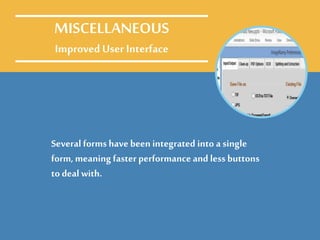
Several forms have been integrated into a single
form, meaning faster performance and less buttons
to deal with.
MISCELLANEOUS
Improved User Interface
Several forms have been integrated into a single
form, meaning faster performance and less buttons
to deal with.
MISCELLANEOUS
Improved User Interface
ImageRamp is available as three distinct products, eachwith
different levels offering you flexibility to meet your budgeting and
workflowneeds.
IMAGERAMP VERSIONS
ImageRamp is available as three distinct products, eachwith
different levels offering you flexibility to meet your budgeting and
workflowneeds.
IMAGERAMP VERSIONS
* Thenew featuresand functions outlined in this
presentation may not apply toall threeversionsof
ImageRamp given their different designs and functions.
Let us understand your processing needs and wecan quote the exact
product and product level needed for your workflow.
Contact us for a demotoday.
sales@docufi.com
603-685-4033
IMAGERAMP VERSIONS
Want to LearnMore?
For more on:
• How to batch scan documents
• How to batch process scans
• How to batch process documents
• Batch process barcodes
• Batch document scanning
• Batch scanning
• Batch indexing
• Batch Document Indexing,
• Intelligent data capture
• Data extraction
• Using regex to extract data
• Document scanning
• Extracting data
• Extract meta data,
• Scanner software,
• Barcode recognition,
• OCR software,
• Capture tutorial
• Pdf scanning,
• Scanning software
• Indexing
• Document indexing
• Automated capture
• Meta data
• Scan to index
• Batch Processing
• Bulk scanning
• Docufi
• Imageramp
• Data capture
• Migration to document management
30 years’ experiencein the DocumentImaging and
Capture market
sales@docufi.com
©
DocuFi2014
DOCUFI

Intelligent Data Capture Just Got Better, What's New in ImageRamp 6

  • 1.
    ImageRampV6 Delivers Intelligent DataCapture Solution TOOLS-FEATURES-PERFORMANCE © DocuFi2014
  • 2.
    We continue toimprove our intelligent data capture platform, ImageRamp.
  • 3.
    Scan and processdirectlywith ImageRamp Desktopor ImageRamp for Fujitsu or scan using any MFP device ordesktop scanner to a folder and let ImageRamp Batch handle your document conversion and processing needs.
  • 4.
  • 5.
    A moreaccurate OCRengine (DocuFi OCR) and newsettings in support of OCR- basedauto rotation, line removal and more. OCR IMPROVEMENTS New OCR EngineandSettings 01111101110001010 10101010101010101 11101010101010011 110101 OCR
  • 6.
    Zone Locations forOCR When specific zonesare indicated to extract the index information, onlythe area indicated is OCR’d, thus speeding up the processing. 01111101110001010 10101010101010101 11101010101010011 110101 OCR OCR IMPROVEMENTS
  • 7.
    Automatic Zone Detection Preservepage layouts on complex multi-column pages, with automated zone detection. 01111101110001010 10101010101010101 11101010101010011 110101 OCR OCR IMPROVEMENTS
  • 8.
    Field Validation Data entryerrorsarereducedwith field validation expressions. Using regular expressions describe the correct field pattern. INDEXING Image: Marcin Wichary “Alphabetical”, http://bit.ly/1aILOku
  • 9.
    MultipleEntries Often requiredwith MedicalExplanation of Benefits, ImageRamp lets youenter multiple index values for a single scan to index the same documentas multiple documents without rescanning. INDEXING
  • 10.
    Preserve IndexValues A newsettinghas been added tothe Index options allowing users to retain index values between scans avoiding needlessrecapture if the index values are the same. INDEXING
  • 11.
    Date/Numeric Data Types andDate Picker Newdata type validation can designate fields as date or numeric restricting them to specific character entries alleviating wrongful entry. A date picker is added to date configured field indexes. INDEXING
  • 12.
    Multi-lineNotes Indexing A newdata type(Notes) has beenadded to the field definitions, enabling a larger input area for user data entry. A splitter controlallows resizing the text input box for more input. INDEXING
  • 13.
    MixedMode Delimiters Often, barcodes containmultiple delimiters that need tobe used to distinguish different index fields. In this example, a dash "-" and a comma "," are used to separate patient recorddata. BARCODES
  • 14.
    Performance Improvement A newsetting restrictsthe searching for barcodesto specific regions of the documentincluding the top third as shown. Recognition performanceis improved up to two to three times when barcodes regions are indicated. BARCODES
  • 15.
    Recognition& Storage Improvement Barcode readingcan be difficult on poor quality images. But, scanning to grayscale can greatly improve the accuracy. Anew PDF Output option scans and processesbarcodesin grayscale yet savesthe output to black and white, providing greater accuracy and lower file sizes. BARCODES
  • 16.
    Users cannowsave documentsto secureand non-secureFTP sites. Securesites can also use PassPhrases or a private key file to provide authentication requirements. INTEGRATION EnhancedFTP/SFTP
  • 17.
    ImageRamp can nowdirectly scaninto the Dentrix Document Center and is certified by Dentrix under the Dentrix DeveloperProgram INTEGRATION Henry Schein‘s Dentrix
  • 18.
    ImageRamp can nowwrite directlyto FileMaker tables using pull downs,drag-and-drop OCR, or onscreenkeyboards for indexing. INTEGRATION FileMakerPro
  • 19.
    ImageRamp for theScanSnap touchscreen scanners now leverages MISCELLANEOUS Auto BlankPage Removal the scanner’s functionality and includes automatic duplex scanning along with blank page removal. Users no longer need to decide if they are scanning single or double-sided. The Remove Blank Page feature of the Clean-up Options can still be deployed in other versionsof ImageRamp whendesired.
  • 20.
    Several forms havebeen integrated into a single form, meaning faster performance and less buttons to deal with. MISCELLANEOUS Improved User Interface
  • 21.
    Several forms havebeen integrated into a single form, meaning faster performance and less buttons to deal with. MISCELLANEOUS Improved User Interface
  • 22.
    ImageRamp is availableas three distinct products, eachwith different levels offering you flexibility to meet your budgeting and workflowneeds. IMAGERAMP VERSIONS
  • 23.
    ImageRamp is availableas three distinct products, eachwith different levels offering you flexibility to meet your budgeting and workflowneeds. IMAGERAMP VERSIONS * Thenew featuresand functions outlined in this presentation may not apply toall threeversionsof ImageRamp given their different designs and functions.
  • 24.
    Let us understandyour processing needs and wecan quote the exact product and product level needed for your workflow. Contact us for a demotoday. sales@docufi.com 603-685-4033 IMAGERAMP VERSIONS
  • 25.
  • 26.
    For more on: •How to batch scan documents • How to batch process scans • How to batch process documents • Batch process barcodes • Batch document scanning • Batch scanning • Batch indexing • Batch Document Indexing, • Intelligent data capture • Data extraction • Using regex to extract data • Document scanning • Extracting data • Extract meta data, • Scanner software, • Barcode recognition, • OCR software, • Capture tutorial • Pdf scanning, • Scanning software • Indexing • Document indexing • Automated capture • Meta data • Scan to index • Batch Processing • Bulk scanning • Docufi • Imageramp • Data capture • Migration to document management 30 years’ experiencein the DocumentImaging and Capture market sales@docufi.com © DocuFi2014 DOCUFI