PILOT STUDY - EFFECT OF MIXED MEDIA
VISUALIZATION ON LEARNER PERCEPTIONS
AND OUTCOMES
Dr James Birt & Dr Dirk Hovorka
Bond University & The University of Sydney
Paper Download @ http://aut.researchgateway.ac.nz/handle/10292/8097
Study Overview
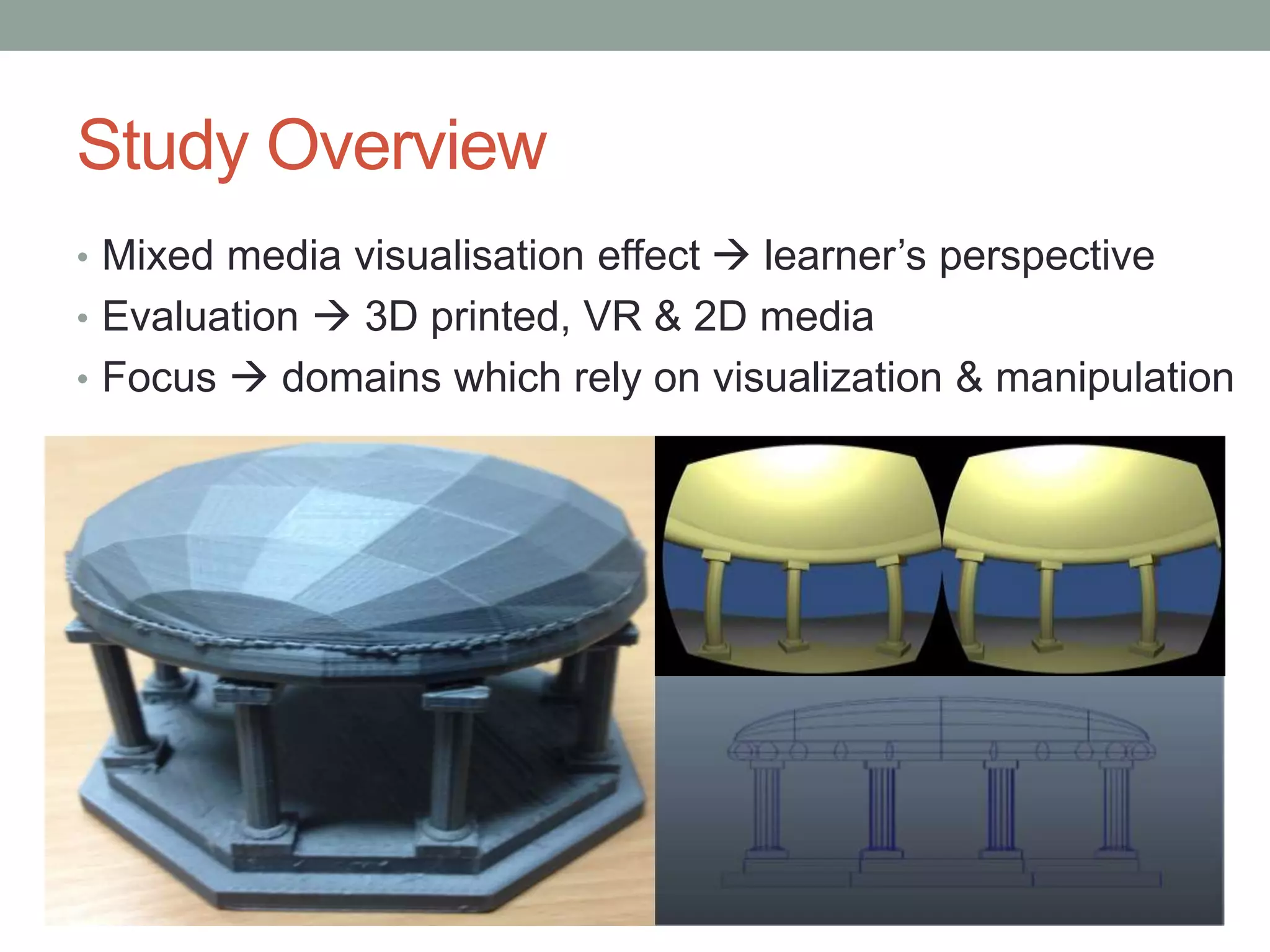
• Mixed media visualisation effect  learner’s perspective
• Evaluation  3D printed, VR & 2D media
• Focus  domains which rely on visualization & manipulation
Introduction & Rationale
• 3D Vis.  shape, rotation & 3D assembly (Sternberg 1990)
• Visualisation use  +’ve improvements learning outcomes
(Mayer 2005)
• Low & high spatial learners (Höffler 2010)
• No particular media/method necessary for learning (Kozma
1991;1994)
But
Both media/method incorporated in
curriculum  can influence learning
Literature Inconsistency
• Typical study  focus on single media (virtual)
representation as a silver bullet (Huk 2006)
But
Multi-modal instruction (Mayer 2005)
Design guidelines (Samaras et al. 2006)
Haptic feedback (Freitas & Neumann 2009)
Appropriate media affordance factors (Dalgarno &
Lee 2010)
…
Research Questions
“How do learners perceive the
comparative capabilities of
visualization media to support
learning?”
“Do learners preferences for
visualization technologies change with
task or over time?”
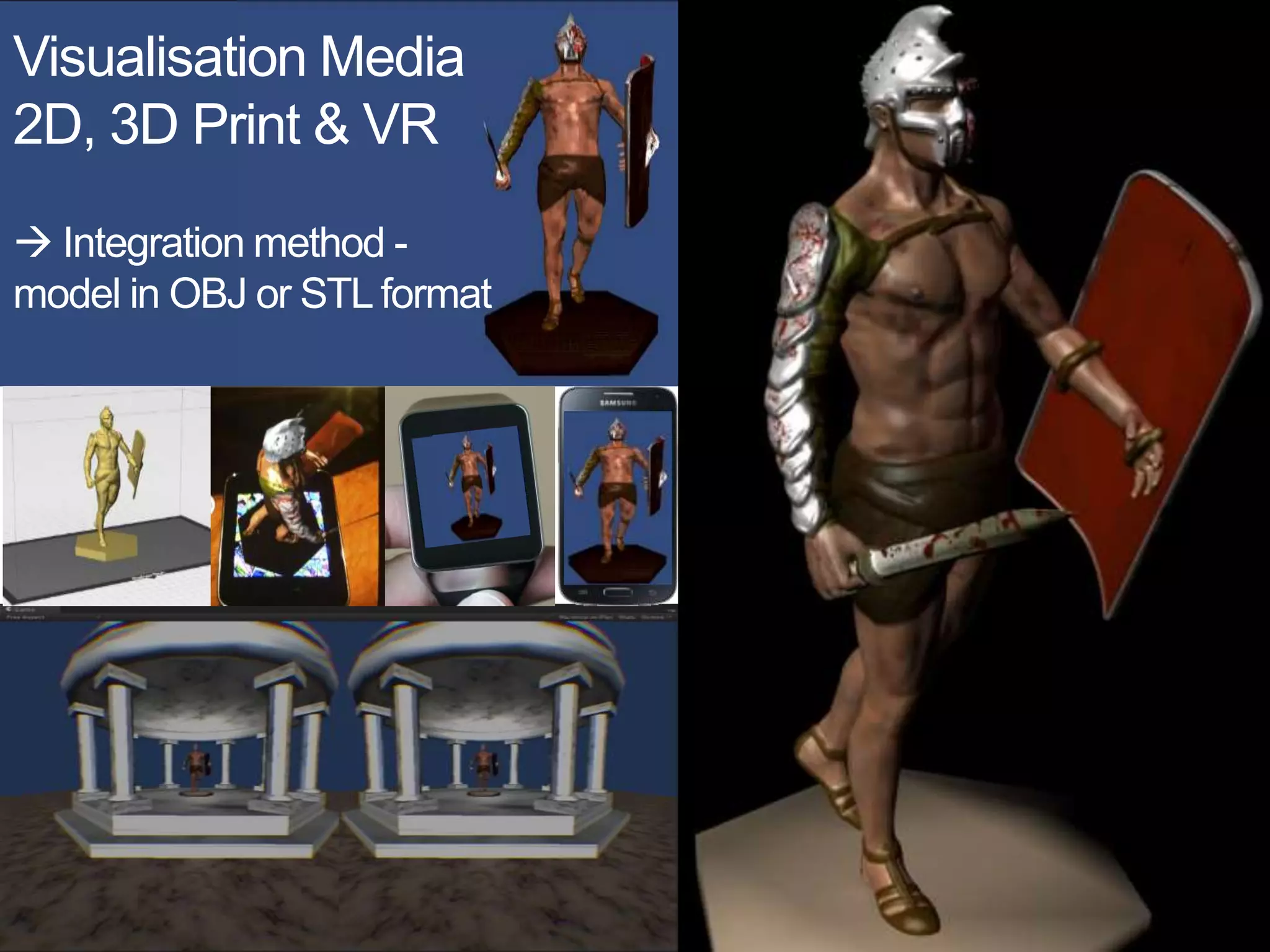
Visualisation Media
2D, 3D Print & VR
 Integration method -
model in OBJ or STL format
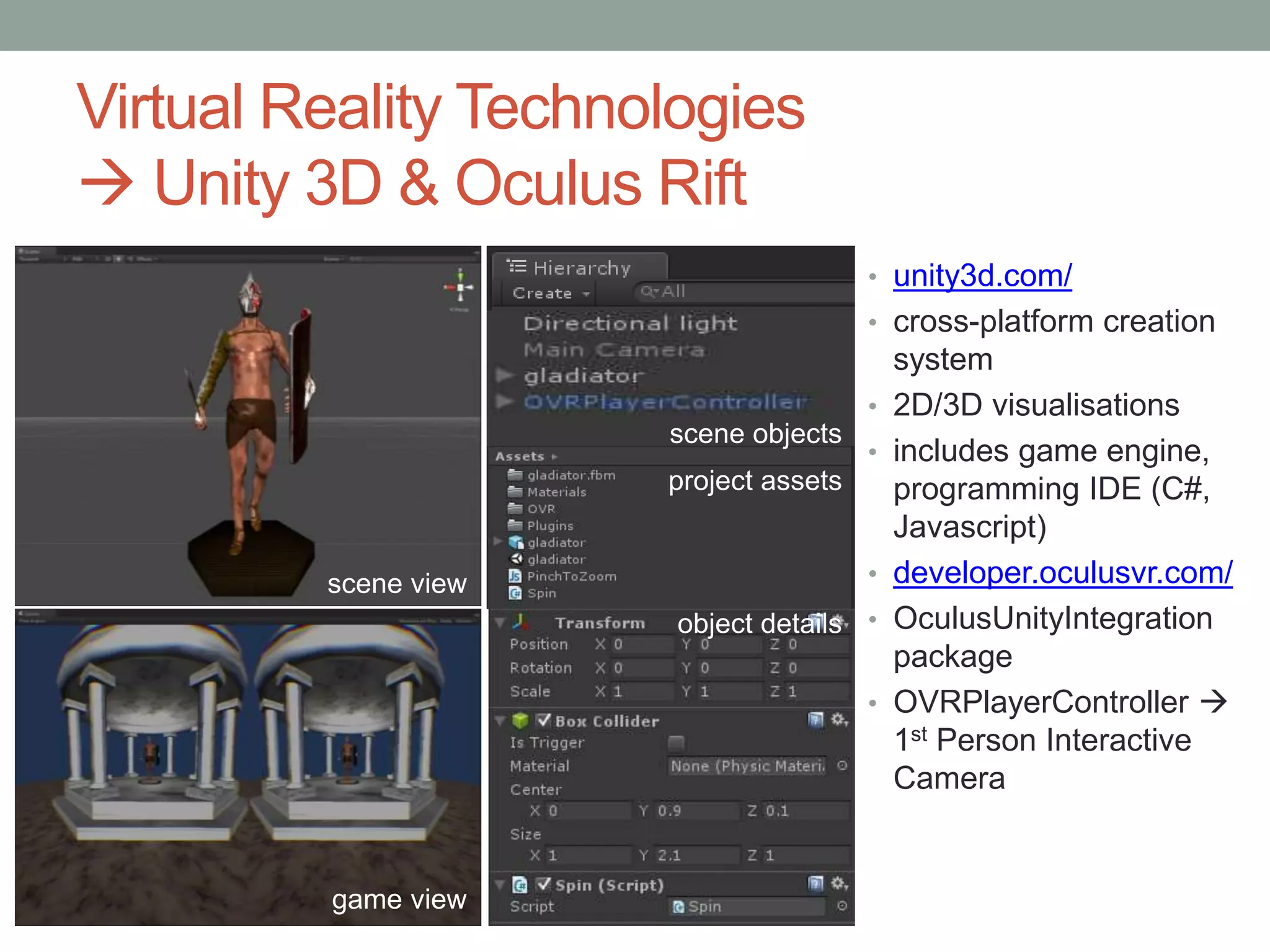
Virtual Reality Technologies
 Unity 3D & Oculus Rift
scene view
game view
project assets
object details
scene objects
• unity3d.com/
• cross-platform creation
system
• 2D/3D visualisations
• includes game engine,
programming IDE (C#,
Javascript)
• developer.oculusvr.com/
• OculusUnityIntegration
package
• OVRPlayerController 
1st Person Interactive
Camera
Study Design & Methodology
• Pilot Study  12 Week course
• 1st year undergraduate media and design course
• 6X dual coded media condition interventions
• Qualitative Research
• Learning journals & Stimuli Questions
• Students  Reflected on learning objectives & media
• NVIVO  Coding
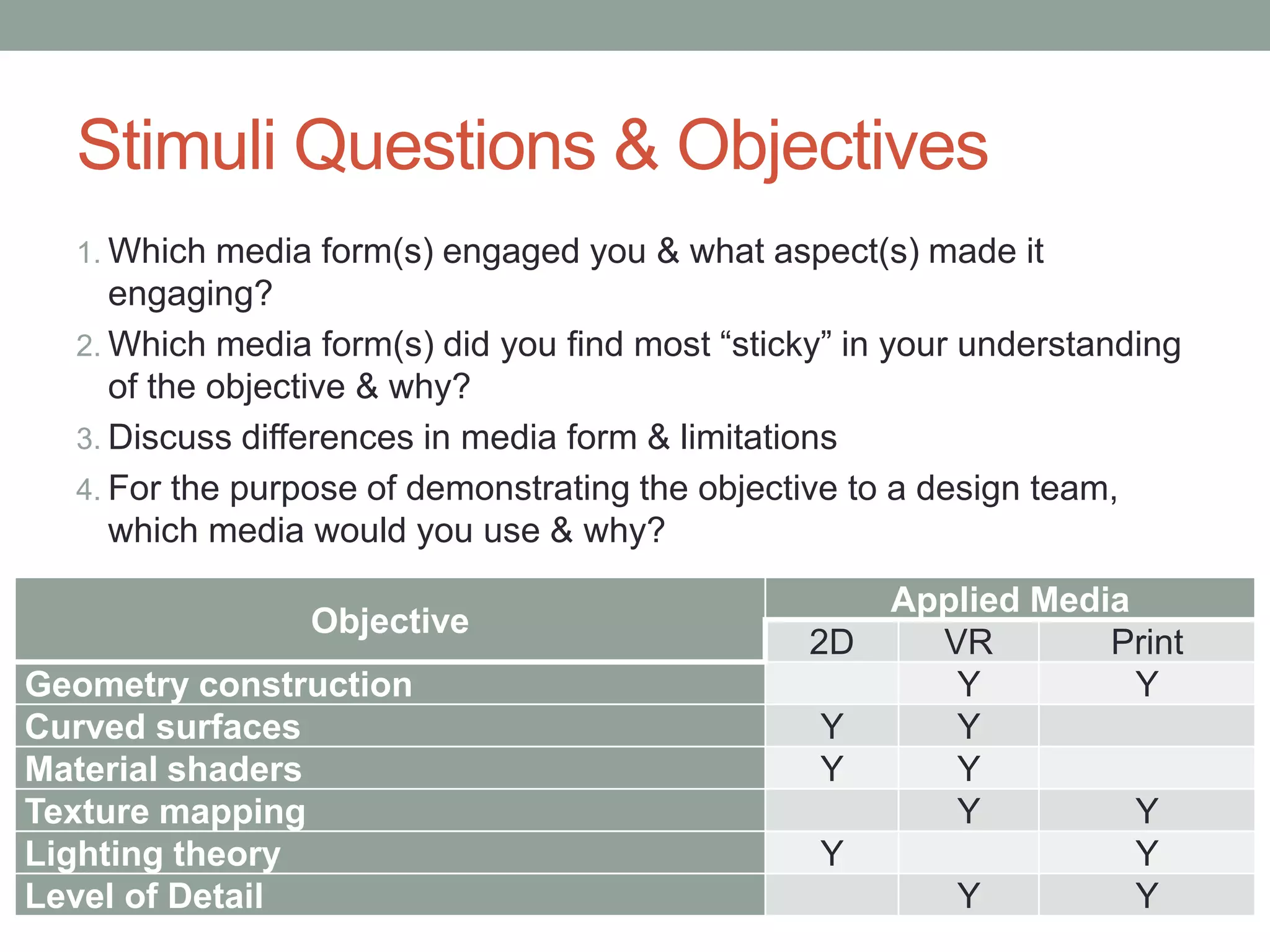
Stimuli Questions & Objectives
1. Which media form(s) engaged you & what aspect(s) made it
engaging?
2. Which media form(s) did you find most “sticky” in your understanding
of the objective & why?
3. Discuss differences in media form & limitations
4. For the purpose of demonstrating the objective to a design team,
which media would you use & why?
Objective
Applied Media
2D VR Print
Geometry construction Y Y
Curved surfaces Y Y
Material shaders Y Y
Texture mapping Y Y
Lighting theory Y Y
Level of Detail Y Y
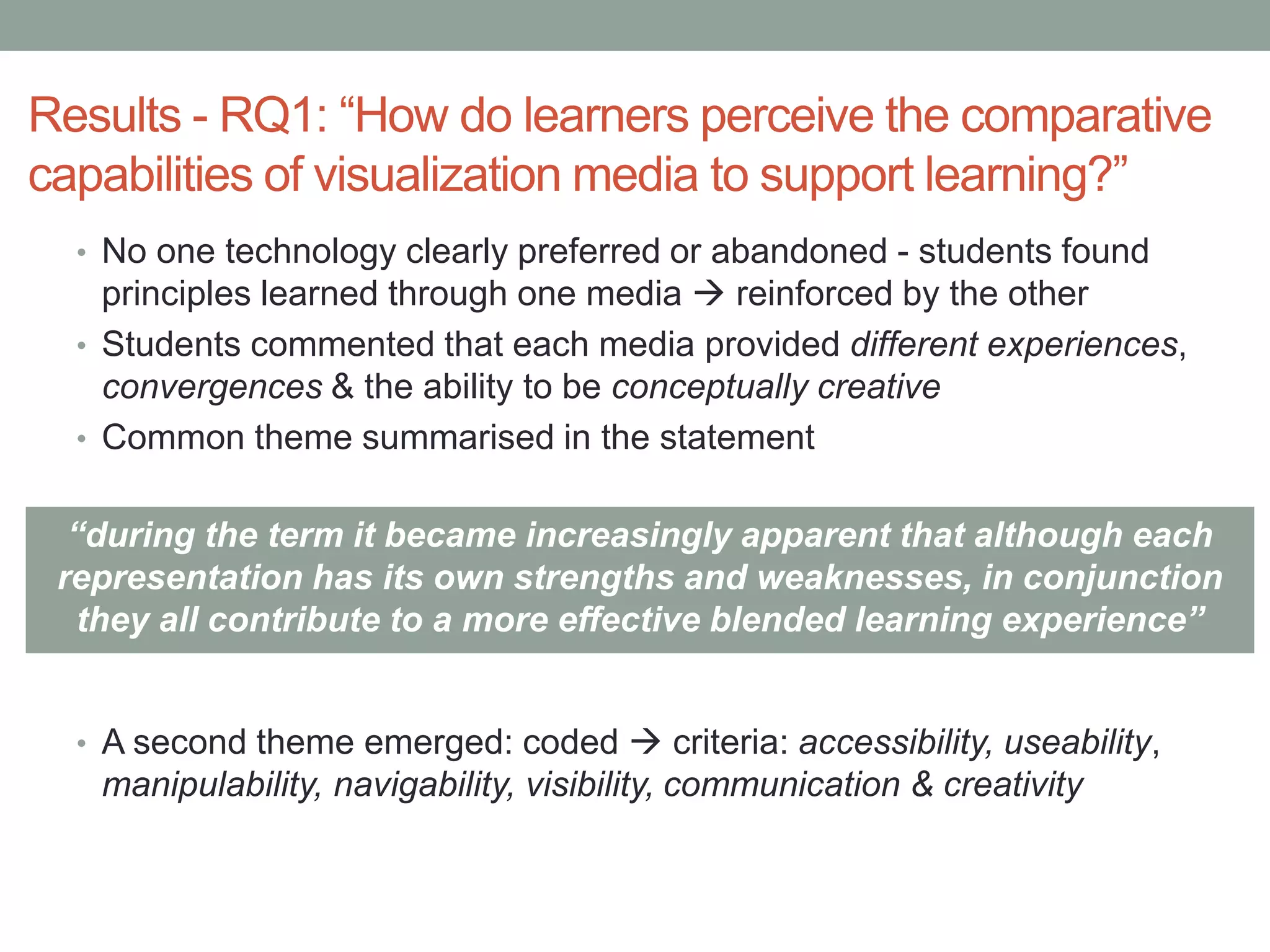
Results - RQ1: “How do learners perceive the comparative
capabilities of visualization media to support learning?”
• No one technology clearly preferred or abandoned - students found
principles learned through one media  reinforced by the other
• Students commented that each media provided different experiences,
convergences & the ability to be conceptually creative
• Common theme summarised in the statement
• A second theme emerged: coded  criteria: accessibility, useability,
manipulability, navigability, visibility, communication & creativity
“during the term it became increasingly apparent that although each
representation has its own strengths and weaknesses, in conjunction
they all contribute to a more effective blended learning experience”
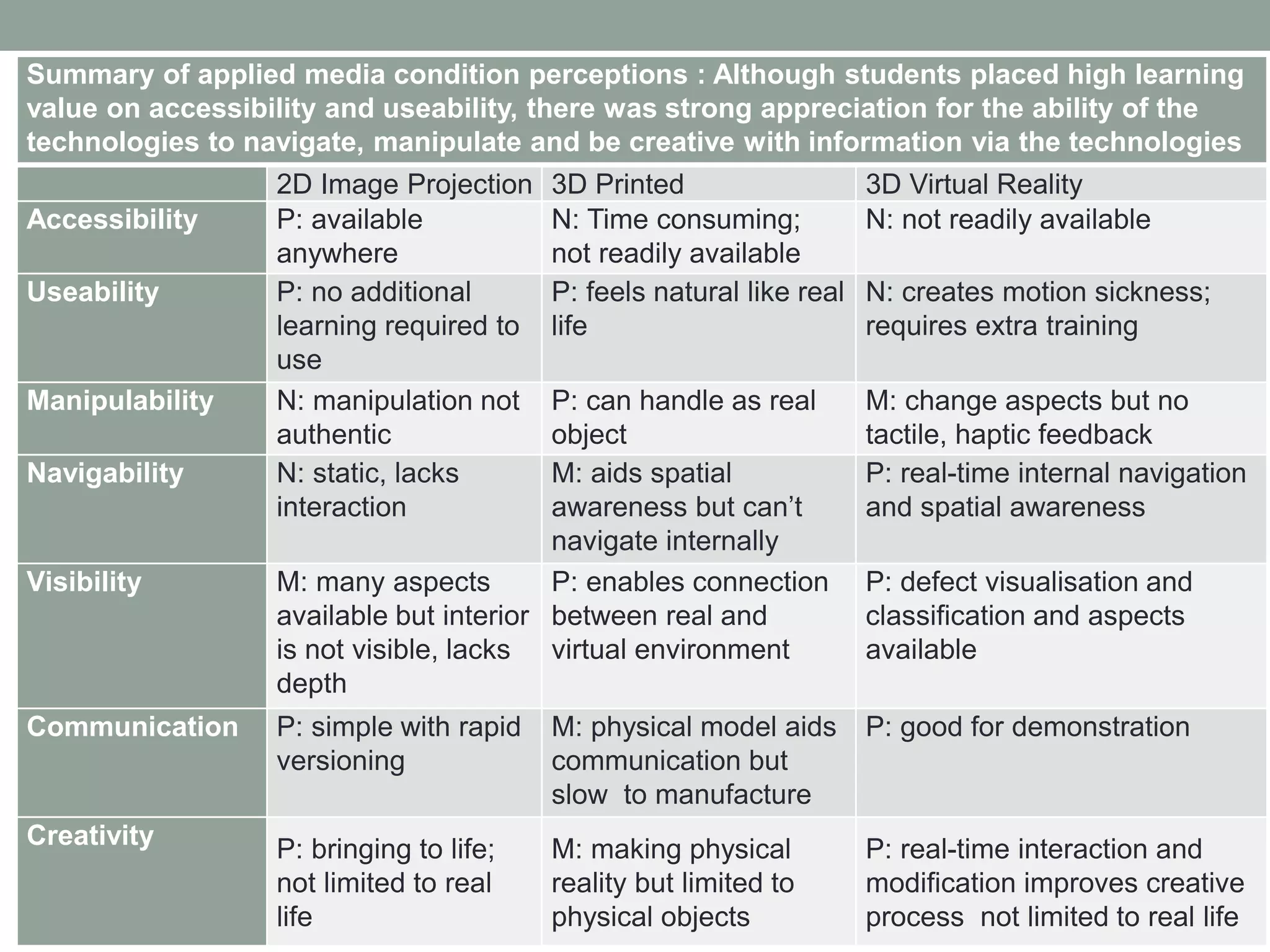
Summary of applied media condition perceptions : Although students placed high learning
value on accessibility and useability, there was strong appreciation for the ability of the
technologies to navigate, manipulate and be creative with information via the technologies
2D Image Projection 3D Printed 3D Virtual Reality
Accessibility P: available
anywhere
N: Time consuming;
not readily available
N: not readily available
Useability P: no additional
learning required to
use
P: feels natural like real
life
N: creates motion sickness;
requires extra training
Manipulability N: manipulation not
authentic
P: can handle as real
object
M: change aspects but no
tactile, haptic feedback
Navigability N: static, lacks
interaction
M: aids spatial
awareness but can’t
navigate internally
P: real-time internal navigation
and spatial awareness
Visibility M: many aspects
available but interior
is not visible, lacks
depth
P: enables connection
between real and
virtual environment
P: defect visualisation and
classification and aspects
available
Communication P: simple with rapid
versioning
M: physical model aids
communication but
slow to manufacture
P: good for demonstration
Creativity P: bringing to life;
not limited to real
life
M: making physical
reality but limited to
physical objects
P: real-time interaction and
modification improves creative
process not limited to real life
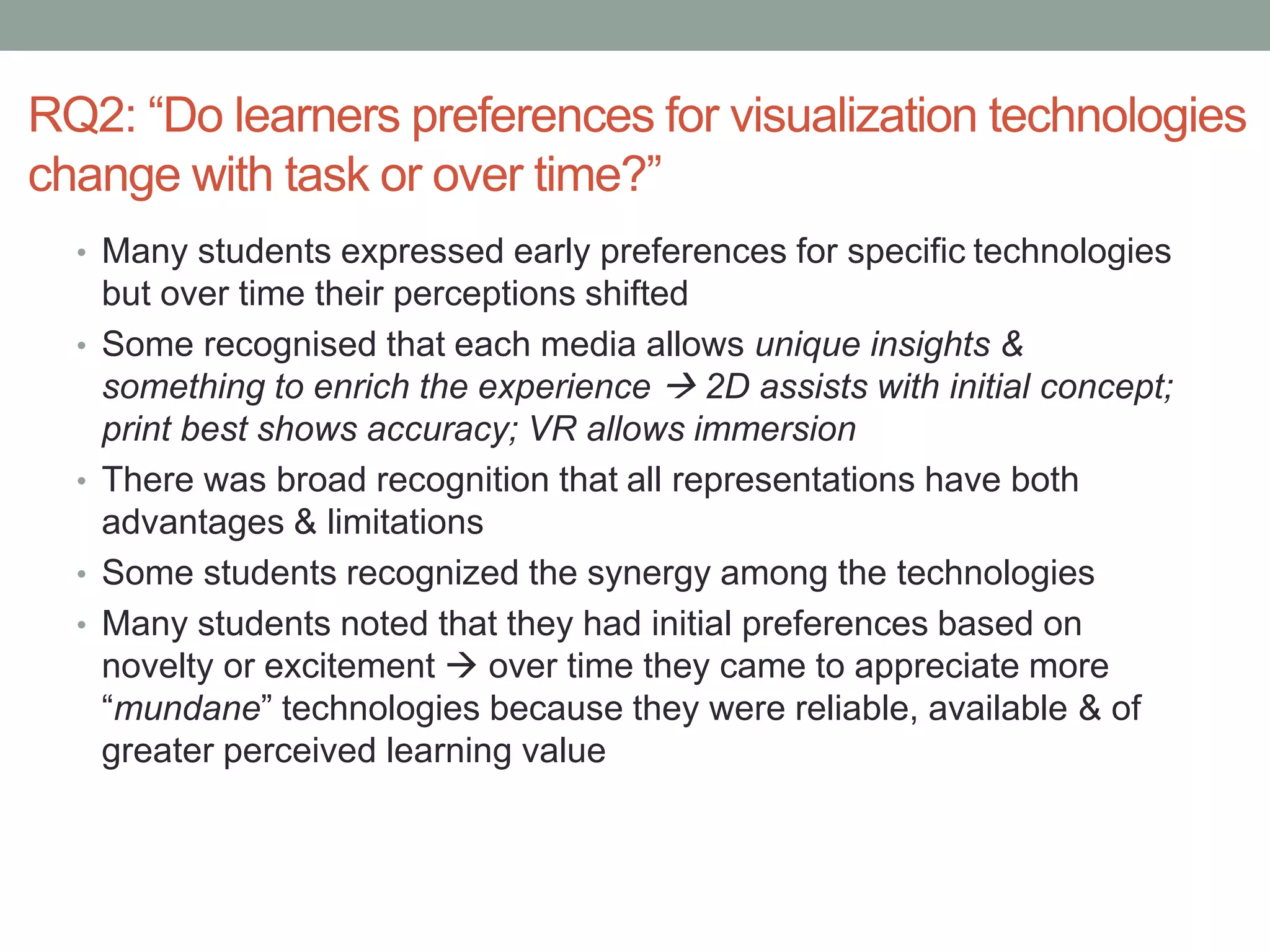
RQ2: “Do learners preferences for visualization technologies
change with task or over time?”
• Many students expressed early preferences for specific technologies
but over time their perceptions shifted
• Some recognised that each media allows unique insights &
something to enrich the experience  2D assists with initial concept;
print best shows accuracy; VR allows immersion
• There was broad recognition that all representations have both
advantages & limitations
• Some students recognized the synergy among the technologies
• Many students noted that they had initial preferences based on
novelty or excitement  over time they came to appreciate more
“mundane” technologies because they were reliable, available & of
greater perceived learning value
Study Limitations
• Exploratory research  based on convenience sample
• Examples  media selections were limited by the required subject
content & time required to prepare visualizations for the students to
experience
• 3D printed objects  limited to PLA plastic only in multiple colours
• VR  technical limitations - moving around & through the object - no
rotation, scale, moving of object (lack of manipulation) & low
resolution (OR Ver. 1)
• Not all students used VR system  experienced motion sickness
• Some learners confused 2D projection with the modelling tool &
spoke about 2D being interactive  required journal data to be
interpreted by the researchers
Conclusions & Future Work
• Exploratory work  discover technologies & lessons for comparative
presentation of material using mixed media
• Extend the study into a wider variety of disciplines
• Correlate student perceptions against student results
• Examine causative relationships  inform pedagogy
• Improve VR system  increase: manipulation & resolution
• Determine if the technology enables a community of inquiry
• Final Point  teaching & learning is NOT about the technology:
“… the real thing that helped me this week was not the visualisation of
the product through physical or virtual aids but the time in observing
them and chatting with others … [the educator] should possibly
consider ""chat"" as one of the options …”

Effect of mixed media visualization on learner perceptions and outcomes

  • 1.
    PILOT STUDY -EFFECT OF MIXED MEDIA VISUALIZATION ON LEARNER PERCEPTIONS AND OUTCOMES Dr James Birt & Dr Dirk Hovorka Bond University & The University of Sydney Paper Download @ http://aut.researchgateway.ac.nz/handle/10292/8097
  • 2.
    Study Overview • Mixedmedia visualisation effect  learner’s perspective • Evaluation  3D printed, VR & 2D media • Focus  domains which rely on visualization & manipulation
  • 3.
    Introduction & Rationale •3D Vis.  shape, rotation & 3D assembly (Sternberg 1990) • Visualisation use  +’ve improvements learning outcomes (Mayer 2005) • Low & high spatial learners (Höffler 2010) • No particular media/method necessary for learning (Kozma 1991;1994) But Both media/method incorporated in curriculum  can influence learning
  • 4.
    Literature Inconsistency • Typicalstudy  focus on single media (virtual) representation as a silver bullet (Huk 2006) But Multi-modal instruction (Mayer 2005) Design guidelines (Samaras et al. 2006) Haptic feedback (Freitas & Neumann 2009) Appropriate media affordance factors (Dalgarno & Lee 2010) …
  • 5.
    Research Questions “How dolearners perceive the comparative capabilities of visualization media to support learning?” “Do learners preferences for visualization technologies change with task or over time?”
  • 6.
    Visualisation Media 2D, 3DPrint & VR  Integration method - model in OBJ or STL format
  • 7.
    Virtual Reality Technologies Unity 3D & Oculus Rift scene view game view project assets object details scene objects • unity3d.com/ • cross-platform creation system • 2D/3D visualisations • includes game engine, programming IDE (C#, Javascript) • developer.oculusvr.com/ • OculusUnityIntegration package • OVRPlayerController  1st Person Interactive Camera
  • 8.
    Study Design &Methodology • Pilot Study  12 Week course • 1st year undergraduate media and design course • 6X dual coded media condition interventions • Qualitative Research • Learning journals & Stimuli Questions • Students  Reflected on learning objectives & media • NVIVO  Coding
  • 9.
    Stimuli Questions &Objectives 1. Which media form(s) engaged you & what aspect(s) made it engaging? 2. Which media form(s) did you find most “sticky” in your understanding of the objective & why? 3. Discuss differences in media form & limitations 4. For the purpose of demonstrating the objective to a design team, which media would you use & why? Objective Applied Media 2D VR Print Geometry construction Y Y Curved surfaces Y Y Material shaders Y Y Texture mapping Y Y Lighting theory Y Y Level of Detail Y Y
  • 10.
    Results - RQ1:“How do learners perceive the comparative capabilities of visualization media to support learning?” • No one technology clearly preferred or abandoned - students found principles learned through one media  reinforced by the other • Students commented that each media provided different experiences, convergences & the ability to be conceptually creative • Common theme summarised in the statement • A second theme emerged: coded  criteria: accessibility, useability, manipulability, navigability, visibility, communication & creativity “during the term it became increasingly apparent that although each representation has its own strengths and weaknesses, in conjunction they all contribute to a more effective blended learning experience”
  • 11.
    Summary of appliedmedia condition perceptions : Although students placed high learning value on accessibility and useability, there was strong appreciation for the ability of the technologies to navigate, manipulate and be creative with information via the technologies 2D Image Projection 3D Printed 3D Virtual Reality Accessibility P: available anywhere N: Time consuming; not readily available N: not readily available Useability P: no additional learning required to use P: feels natural like real life N: creates motion sickness; requires extra training Manipulability N: manipulation not authentic P: can handle as real object M: change aspects but no tactile, haptic feedback Navigability N: static, lacks interaction M: aids spatial awareness but can’t navigate internally P: real-time internal navigation and spatial awareness Visibility M: many aspects available but interior is not visible, lacks depth P: enables connection between real and virtual environment P: defect visualisation and classification and aspects available Communication P: simple with rapid versioning M: physical model aids communication but slow to manufacture P: good for demonstration Creativity P: bringing to life; not limited to real life M: making physical reality but limited to physical objects P: real-time interaction and modification improves creative process not limited to real life
  • 12.
    RQ2: “Do learnerspreferences for visualization technologies change with task or over time?” • Many students expressed early preferences for specific technologies but over time their perceptions shifted • Some recognised that each media allows unique insights & something to enrich the experience  2D assists with initial concept; print best shows accuracy; VR allows immersion • There was broad recognition that all representations have both advantages & limitations • Some students recognized the synergy among the technologies • Many students noted that they had initial preferences based on novelty or excitement  over time they came to appreciate more “mundane” technologies because they were reliable, available & of greater perceived learning value
  • 13.
    Study Limitations • Exploratoryresearch  based on convenience sample • Examples  media selections were limited by the required subject content & time required to prepare visualizations for the students to experience • 3D printed objects  limited to PLA plastic only in multiple colours • VR  technical limitations - moving around & through the object - no rotation, scale, moving of object (lack of manipulation) & low resolution (OR Ver. 1) • Not all students used VR system  experienced motion sickness • Some learners confused 2D projection with the modelling tool & spoke about 2D being interactive  required journal data to be interpreted by the researchers
  • 14.
    Conclusions & FutureWork • Exploratory work  discover technologies & lessons for comparative presentation of material using mixed media • Extend the study into a wider variety of disciplines • Correlate student perceptions against student results • Examine causative relationships  inform pedagogy • Improve VR system  increase: manipulation & resolution • Determine if the technology enables a community of inquiry • Final Point  teaching & learning is NOT about the technology: “… the real thing that helped me this week was not the visualisation of the product through physical or virtual aids but the time in observing them and chatting with others … [the educator] should possibly consider ""chat"" as one of the options …”