Intelligent User
Interfaces
ICS2208
Dr Vanessa Camiller
i

Department of AI,
 

University of Malta
Topic 7: Overview
• VR, AR & MR


• Overview of different realities


• Immersion & Reality tradeoffs


• Design guidelines


• Perceptual Models & Modalities


• IoT design for Mixed Realities
2
VR, AR & MR
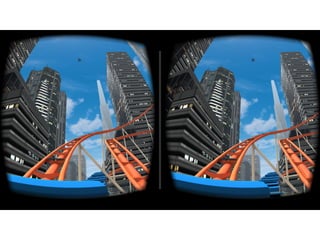
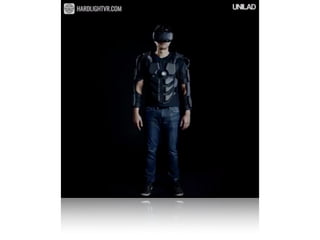
VR is “an artificial environment which is experienced
through sensory stimuli (as sights and sounds)
provided by a computer and in which one’s actions
partially determine what happens in the environment”
(Merriam-Webster, 2015)
• Consider Gorillaz’s new music video: http://
vrscout.com/news/watch-gorillaz-360-music-video-
vr-headset/


Watch using Google Cardboard
• Now try the Oscar nominated short film Pearl –
produced by Google Spotlight Stories


https://atap.google.com/spotlight-stories/


• Compare it with the Music Video by Gorillaz – can
you compare the two experiences based on the
definition of VR?
The VR experience
“the ultimate display would of course be a room
within which the computer can control the existence
of matter. A chair displayed in such a room would be
good enough to sit in. Handcuffs displayed in such a
room would be confining, and a bullet displayed in
such a room would be fatal.” - Ivan Sutherland, 1965
VR Communication
• The VR design has to focus on:


A. How the VW works;


B. How that world and its objects are controlled;


C. The relationship between the user and the content
(ideally users are focused on the experience not
on the technology);
Two types of Communication:


• Direct Communication


• Structural communication


• Visceral communication


• Indirect Communication
Realities
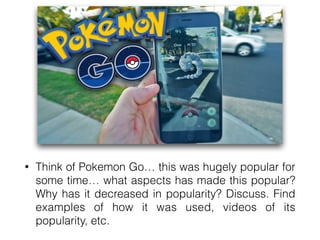
• Think of Pokemon Go… this was hugely popular for
some time… what aspects has made this popular?
Why has it decreased in popularity? Discuss. Find
examples of how it was used, videos of its
popularity, etc.
Realities
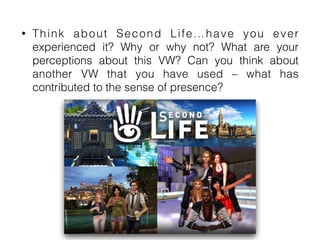
• Think about Second Life…have you ever
experienced it? Why or why not? What are your
perceptions about this VW? Can you think about
another VW that you have used – what has
contributed to the sense of presence?
VR Systems
• The screen is a window through which one sees a
virtual world. The challenge is to make that world
look real, act real, sound real, feel real.
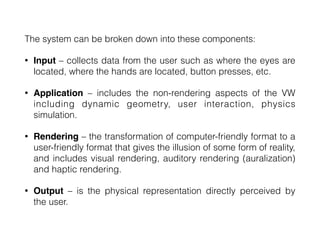
The system can be broken down into these components:


• Input – collects data from the user such as where the eyes are
located, where the hands are located, button presses, etc.


• Application – includes the non-rendering aspects of the VW
including dynamic geometry, user interaction, physics
simulation.


• Rendering – the transformation of computer-friendly format to a
user-friendly format that gives the illusion of some form of reality,
and includes visual rendering, auditory rendering (auralization)
and haptic rendering.


• Output – is the physical representation directly perceived by
the user.
Visual Displays
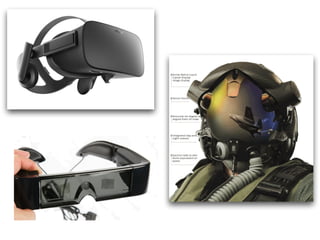
• Head mounted Displays; visual display that is more
or less rigidly attached to the head. Position and
orientation tracking of HMDs is essential for VR
because the display and ear phones move with the
head.


• Non-see-through: blocks real world out
completely


• Optical-see-through: ideal for an AR experience
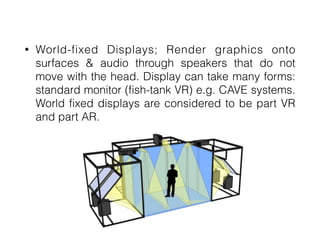
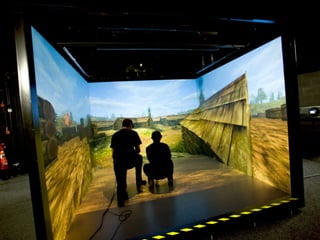
• World-fixed Displays; Render graphics onto
surfaces & audio through speakers that do not
move with the head. Display can take many forms:
standard monitor (fish-tank VR) e.g. CAVE systems.
World fixed displays are considered to be part VR
and part AR.
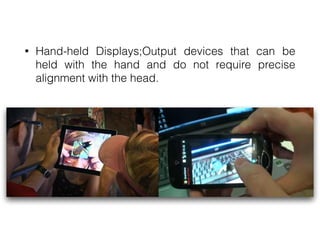
• Hand-held Displays;Output devices that can be
held with the hand and do not require precise
alignment with the head.
Audio
• Spatialized audio provide a sense of where sounds
are coming from. Headphones are preferred for a
fully immersive system as they block out more of
the real world.
Haptics
• Passive vs. Active


• Tactile vs. Proprioceptive


• Self-grounded vs. World-grounded
Motion Platforms
A hardware device that moves the entire body
resulting in a sense of physical motion and gravity.
These help convey a sense of orientation, vibration,
acceleration, and jerking. Common uses are for
racing games, flight simulation, location-based
entertainment. Motion platforms can be active
(controlled by the computer) or passive (controlled by
the user).
Immersion, Presence &
Reality Trade-offs
• Immersion is the objective degree to which a VR
system and application projects stimuli onto the
sensory receptors of users in a way that is
extensive, matching, surrounding, vivid, interactive
and plot informing.
Immersion, Presence &
Reality Trade-offs
• Presence is a sense of being there inside a space,
even when physically located in a different location.


• Whereas immersion is about the characteristics of
a technology, presence is about the internal
psychological and physiological state of the user.


• Immersion is capable of producing a sense of
presence but immersion does not always induce
presence.
Illusions of Presence
• Illusion of being in a stable spatial place;


• Illusion of self-embodiment;


• Illusion of physical interaction;


• Illusion of social communication
Reality Trade-offs
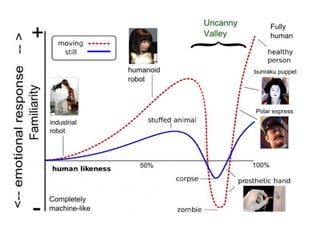
• When does reality in VR become too much?


• When do the characters, if they do, become too
creepy with their realism?


This is called the uncanny valley – one has to
attribute power to simplicity.
Design Guidelines
How to design for VR Communication:


• Focus on the user experience rather than the technology;


• Simplify and harmonise the communication between user
and technology


• Focus on making the technical intermediary between the
user and content transparent so users feel they have direct
access to the virtual world and its entities.


• Design for visceral communication to induce presence
and inspire awe in users
Design Guidelines
How to design for various Realities:


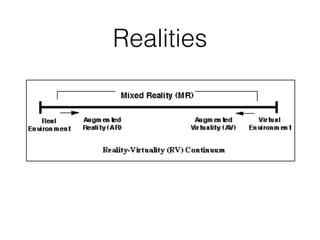
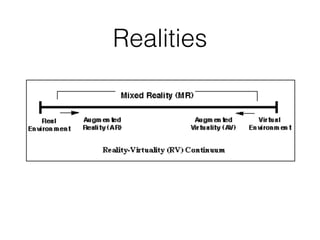
• Choose what form of reality you wish to create. Where
does it fall on the virtuality continuum?


• Choose what type of input and output hardware to use


• VR is more than just the hardware and technology.
Create a strong conceptual story, an interesting
design or layout of the environment and engaging
characters.
Design Guidelines
How to design for Immersion & Presence:


• Minimise break-in presence


• For maximum presence, focus first on world stability and
depth cues. Then consider adding physical user
interactions, cues of one’s own body and social
communication


• Avoid the uncanny valley by not trying to make characters
appear too close to the way real humans look


• Choose the level of fidelity you want to create.
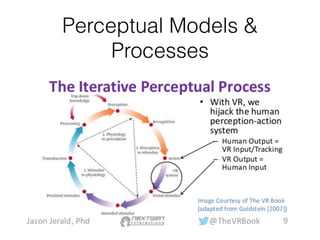
Perceptual Models &
Processes
• VR creators should use signifying cues, feedback
and constraints to help the user form quality mental
models and to make assumptions explicit.


• Learned helplessness is the decision that
something cannot be done due to a perceived
absence of control.


• It has been difficult for VR to gain wide adoption
most often due to poor interfaces. Bad interaction
design for VR can lead to learned helplessness.
IoT & Mixed Reality
• IoT design to connect people to smart devices


• Computer Interfaces changing to more immersive
and engaging


• AI & ML used to create engaging experiences


• BUT… deluge of information demand much attention


• SO… focus on displays that support changes in user
situational context and minimise attention costs
• Challenge: how to evoke a consistent user
experience across multiple devices


• Challenge: moving from a traditional dashboard to
a more immersive one with a contextually relevant
interface


• Challenge: learning from user behaviour


• Challenge: as personal spaces become more
embedded with technology, users need to visualise
the overall space
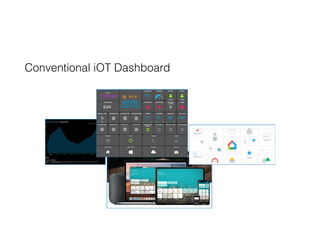
Conventional iOT Dashboard
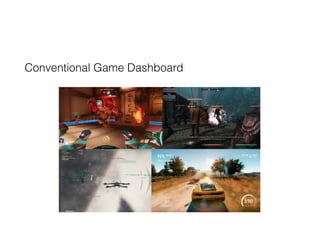
Conventional Game Dashboard
IoT & Mixed Reality
• Virtual Perspective


• Ambient Perspective


• Informational Context Perspective


• Practical applications: Debug & repair IoT devices,
smart city scenario, Games (which feature real time
data)

ICS2208 lecture7

  • 1.
    Intelligent User Interfaces ICS2208 Dr VanessaCamiller i Department of AI, University of Malta
  • 2.
    Topic 7: Overview •VR, AR & MR • Overview of different realities • Immersion & Reality tradeoffs • Design guidelines • Perceptual Models & Modalities • IoT design for Mixed Realities 2
  • 3.
    VR, AR &MR VR is “an artificial environment which is experienced through sensory stimuli (as sights and sounds) provided by a computer and in which one’s actions partially determine what happens in the environment” (Merriam-Webster, 2015)
  • 5.
    • Consider Gorillaz’snew music video: http:// vrscout.com/news/watch-gorillaz-360-music-video- vr-headset/ Watch using Google Cardboard
  • 6.
    • Now trythe Oscar nominated short film Pearl – produced by Google Spotlight Stories https://atap.google.com/spotlight-stories/ • Compare it with the Music Video by Gorillaz – can you compare the two experiences based on the definition of VR?
  • 7.
    The VR experience “theultimate display would of course be a room within which the computer can control the existence of matter. A chair displayed in such a room would be good enough to sit in. Handcuffs displayed in such a room would be confining, and a bullet displayed in such a room would be fatal.” - Ivan Sutherland, 1965
  • 9.
    VR Communication • TheVR design has to focus on: A. How the VW works; B. How that world and its objects are controlled; C. The relationship between the user and the content (ideally users are focused on the experience not on the technology);
  • 10.
    Two types ofCommunication: • Direct Communication • Structural communication • Visceral communication • Indirect Communication
  • 11.
  • 12.
    • Think ofPokemon Go… this was hugely popular for some time… what aspects has made this popular? Why has it decreased in popularity? Discuss. Find examples of how it was used, videos of its popularity, etc.
  • 13.
  • 14.
    • Think aboutSecond Life…have you ever experienced it? Why or why not? What are your perceptions about this VW? Can you think about another VW that you have used – what has contributed to the sense of presence?
  • 15.
    VR Systems • Thescreen is a window through which one sees a virtual world. The challenge is to make that world look real, act real, sound real, feel real.
  • 16.
    The system canbe broken down into these components: • Input – collects data from the user such as where the eyes are located, where the hands are located, button presses, etc. • Application – includes the non-rendering aspects of the VW including dynamic geometry, user interaction, physics simulation. • Rendering – the transformation of computer-friendly format to a user-friendly format that gives the illusion of some form of reality, and includes visual rendering, auditory rendering (auralization) and haptic rendering. • Output – is the physical representation directly perceived by the user.
  • 17.
    Visual Displays • Headmounted Displays; visual display that is more or less rigidly attached to the head. Position and orientation tracking of HMDs is essential for VR because the display and ear phones move with the head. • Non-see-through: blocks real world out completely • Optical-see-through: ideal for an AR experience
  • 19.
    • World-fixed Displays;Render graphics onto surfaces & audio through speakers that do not move with the head. Display can take many forms: standard monitor (fish-tank VR) e.g. CAVE systems. World fixed displays are considered to be part VR and part AR.
  • 22.
    • Hand-held Displays;Outputdevices that can be held with the hand and do not require precise alignment with the head.
  • 23.
    Audio • Spatialized audioprovide a sense of where sounds are coming from. Headphones are preferred for a fully immersive system as they block out more of the real world.
  • 24.
    Haptics • Passive vs.Active • Tactile vs. Proprioceptive • Self-grounded vs. World-grounded
  • 25.
    Motion Platforms A hardwaredevice that moves the entire body resulting in a sense of physical motion and gravity. These help convey a sense of orientation, vibration, acceleration, and jerking. Common uses are for racing games, flight simulation, location-based entertainment. Motion platforms can be active (controlled by the computer) or passive (controlled by the user).
  • 26.
    Immersion, Presence & RealityTrade-offs • Immersion is the objective degree to which a VR system and application projects stimuli onto the sensory receptors of users in a way that is extensive, matching, surrounding, vivid, interactive and plot informing.
  • 27.
    Immersion, Presence & RealityTrade-offs • Presence is a sense of being there inside a space, even when physically located in a different location. • Whereas immersion is about the characteristics of a technology, presence is about the internal psychological and physiological state of the user. • Immersion is capable of producing a sense of presence but immersion does not always induce presence.
  • 28.
    Illusions of Presence •Illusion of being in a stable spatial place; • Illusion of self-embodiment; • Illusion of physical interaction; • Illusion of social communication
  • 29.
    Reality Trade-offs • Whendoes reality in VR become too much? • When do the characters, if they do, become too creepy with their realism? This is called the uncanny valley – one has to attribute power to simplicity.
  • 31.
    Design Guidelines How todesign for VR Communication: • Focus on the user experience rather than the technology; • Simplify and harmonise the communication between user and technology • Focus on making the technical intermediary between the user and content transparent so users feel they have direct access to the virtual world and its entities. • Design for visceral communication to induce presence and inspire awe in users
  • 32.
    Design Guidelines How todesign for various Realities: • Choose what form of reality you wish to create. Where does it fall on the virtuality continuum? • Choose what type of input and output hardware to use • VR is more than just the hardware and technology. Create a strong conceptual story, an interesting design or layout of the environment and engaging characters.
  • 33.
    Design Guidelines How todesign for Immersion & Presence: • Minimise break-in presence • For maximum presence, focus first on world stability and depth cues. Then consider adding physical user interactions, cues of one’s own body and social communication • Avoid the uncanny valley by not trying to make characters appear too close to the way real humans look • Choose the level of fidelity you want to create.
  • 34.
  • 35.
    • VR creatorsshould use signifying cues, feedback and constraints to help the user form quality mental models and to make assumptions explicit. • Learned helplessness is the decision that something cannot be done due to a perceived absence of control. • It has been difficult for VR to gain wide adoption most often due to poor interfaces. Bad interaction design for VR can lead to learned helplessness.
  • 36.
    IoT & MixedReality • IoT design to connect people to smart devices • Computer Interfaces changing to more immersive and engaging • AI & ML used to create engaging experiences • BUT… deluge of information demand much attention • SO… focus on displays that support changes in user situational context and minimise attention costs
  • 37.
    • Challenge: howto evoke a consistent user experience across multiple devices • Challenge: moving from a traditional dashboard to a more immersive one with a contextually relevant interface • Challenge: learning from user behaviour • Challenge: as personal spaces become more embedded with technology, users need to visualise the overall space
  • 38.
  • 39.
  • 40.
    IoT & MixedReality • Virtual Perspective • Ambient Perspective • Informational Context Perspective • Practical applications: Debug & repair IoT devices, smart city scenario, Games (which feature real time data)