
Educational Technology
Integrating Educational Technology
into Teaching
K.SATHISH KUMAR
Department of Education
Alagappa University
Karaikudi
Chapter Objectives
 Definitions of educational technology
 Identifying the component parts of a
computer system
 Functions of a given systems device
 Classifying computer software
 Describing the contributions of
educational technologists
 Classifying educational technology
products
Technology in Education:
Concepts and Definitions
Educational Technology has no
agreed upon definition.
“Technology is commonly
thought of in terms of gadgets,
instrument, machines, and
devices….most (educators) will
defer to technology as
computers”
-- Muffoletto(1994)-p.5 Integrating Education
Technology into Teaching (IETIT)
“Only about a decade ago, a
history of technology in
education since 1920 placed the
emphasis on radio and
television, with computers as
an afterthought .”
--Cuban, 1986 (IETIT) p.5
However, Saettler (1990) urges
“The historical function of
educational technology is a
process rather than a product.”
Any useful definition of
educational technology, therefore,
must focus on the process of
applying tools for educational
purposes, and the materials used.
In education, the combination of
process and product merges
instructional procedures with
instructional tools.
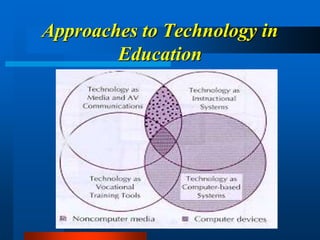
Technology in Education as
Media and Audiovisual
Communications
 Audiovisual movement: ways of
delivering information that could be
used as alternatives to lectures and
books.
 Audiovisual communications: the
“branch of educational theory and
practice concerned primarily with the
design and use of messages which
control the learning process.”
(Saettler, IETIE,p6)
 AECT- Association for Ed. Commo.
and Technology.
Technology in Education as
Instructional Systems
 1960s and 1970s
 Human and non-human resources
( teachers and media).
 Systematic approach to designing,
developing, and delivering
instruction matched to carefully
identified needs.
 International Society for Performance
Improvement.
 Validating and creating instruction.
Technology in Education as
Vocational Training Tools
 Technology in Education:
1. School learning prepares students
for the world of work.
2. Vocational training can be a
practical means of teaching.
 ITEA (International Technology
Education Association).
Technology in Education as
Computers and Computer-based
Systems
 Instructional and supportive
applications of computers.
 Computers began to be used in
classrooms in 1960s until 1990
and was known as educational
computing.
 By the mid-1990s, educational
computing became known as
educational technology.
 ISTE (International Society for
Technology in Education) holds the
following views:
Approaches to Technology in
Education
An emphasis on Computer
Systems
 Computers as media are becoming
more complex and more capable.
 Computer systems are subsuming
other forms of media.
 The perceived complexity of
computer-based systems has made it
more difficult for educators to
effectively integrate software and
computer media into classrooms.
Background on
Computer-based
Educational Technology
What’s a Computer??
 Hardware
Providing the Electronic Capability
 Software
Communicating with the Hardware
 Any electromechanical device that
accepts input, processes input and
produces output.
Software in a Computer System
 Systems Software ( Types of
Operating Systems)
 Applications Software (used for
Education, Entertainment, or
Edutainment)
Systems Software (Types of
Operating Systems)
 Unix
 Ms-DOS
 Apple Dos, ProDOS
 Macintosh DOS, System 7
 Windows 95
Applications Software for
Education
 Tool Software:
1. Word Processing
2. Spreadsheets
3. Database Management
4. Integrated Packages
5. Graphics Software
6. Communications Software
7. Other Tools
Applications Software for
Education( cont.)
 Programming Software:
1. BASIC
2. Logo
3. FORTRAN
4. COBOL, SNOBOL
5. C
6. Pascal
7. PL/1
Applications Software for
Education( cont.)
 Courseware:
1. Tutorial
2. Drill & Practice
3. Simulation
4. Instructional Games
5. Problem Solving
Hardware: Providing the
Electronic Capability
1. Input functions:
• Keyboard
• Mouse
• Joystick and game paddle
• Bar-code reader
• Scanner
• Touch screen and light pen
Hardware: Providing the
Electronic Capability (cont.)
2. Output Functions
• Printers
• Monitors
3. Input and Output Functions
• Disk drives
The CPU’s Steps
Step 1.
The controller gets an instruction
from the system’s internal memory
and puts it in a register.
Step 2.
The controller directs the ALU to do
necessary computations.
Step 3.
The controller gets the result from the
register and stores it once again in
internal memory.
CPU Central Processing Unit
 ALU : stands for Arithmetic/Logic
Unit
 Control Unit: directs the activities of
the whole system.
The Internal and External
Memory and Communication
Functions
 The internal memory functions:
A limited amount of space is
arranged inside the computer for
storage of instructions. For example:
RAM and ROM.
 The external memory functions:
External storage devices can store
larger quantities of information. For
Example: Hard Disks and CD-ROM.
The Internal and External
Memory and Communications
Functions
 The communications function is
optional, but it is vital for
communicating with other systems.
For example: Modem and Fax.
Software: Communicating with the
Hardware
Programming Languages:
 Low-Level languages (Machine and
Assembly).
 High-Level languages (Java, Cobol,
VC++ and Fortran ).
Types of Software
 Systems Software
Acts as a visible interface between
the machine and the user.
 Applications Software
Programs written to do tasks, such
as word processing or drawing
pictures.
Software Design
Step 1. Analyzing the problem
Step 2. Developing the algorithm
Step 3. Coding
Step 4. Testing
Step 5. Revising and Debugging
Types of Computer Systems
 Personal Computers
 Mini and Mainframe Computers
 Supercomputers
–Cost , the number of users that can be
supported, size, speed, and storage
capacity distinguish between these.
The Developments During the
Period before Microcomputer
 IBM 1500 system in universities and
 Stanford University and the CCC
 Control Data Corporation (CDC) and
the PLATO System
 Brigham Young University and the
TICCIT System
 Computerized instructional
management systems
The “Microcomputer
Revolution” in Education
 The Minnesota Educational
Computing Consortium (MECC) and
the software publishing movement.
 MicroSIFT, EPIE, and other
courseware evaluation efforts.
 Courseware authoring activities.
The “Microcomputer
Revolution” in Education (cont.)
 The Computer Literacy Movement
 Logo and Problem-Solving
 The emergence of integrated learning
systems.
What Have We learned from the
Past ?
 Direct technology resources to
specific problems and needs
 Anticipate and plan for change
 Separate fad from fact
Current Types of Educational
Technology Systems
Standalone Personal Computers
 Portable units (PDAs)
 Workstations
 Labs
Networked Stations: From LANs
to MANs
 “Networks are for sharing”(Kee
1994), and this sharing was designed
to make computing activities more
efficient and cost-effective.
 A network centralizes resources and
cuts down on handling of individual
disks.
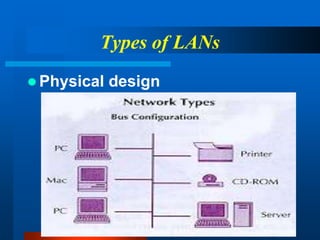
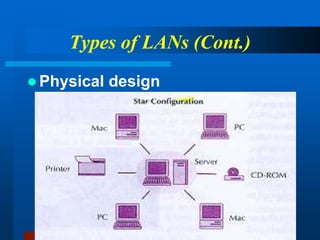
Types of LANs
 Physical design
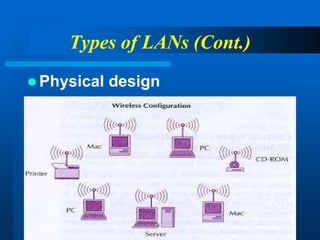
Types of LANs (Cont.)
 Physical design
Types of LANs (Cont.)
 Physical design
Types of LANs (Cont.)
 Function (transmission method or
protocol)
* Token ring method
* Ethernet method
Three kinds of cable for
connecting LANs
 Coaxial cable: Designed to transfer
signals with minimal interference.
 Twisted pair cable: An inexpensive
way of handling ARCnet, Ethernet,
and token ring connections.
 Fiber optic cable:Allow networks
to send large amounts of information
at high speeds.
Current Applications of
Educational Technology
Systems
--Instructional software
--Interactive video-based materials
--Courses through distance learning
– Productivity Tools:
--Prepare print instructional materials
--Keep records and analyze data
--Prepare and make instructional and
informative presentations
--Organize time and materials
Instructional Technology Applications:
–Tools for Students:
-- Writing assignments
-- Helping with research
-- Assisting with learning tasks in
various content areas
-- Developing products and
presentations.
-- The End --

Educational technology

  • 1.
    Educational Technology Integrating EducationalTechnology into Teaching K.SATHISH KUMAR Department of Education Alagappa University Karaikudi
  • 2.
    Chapter Objectives  Definitionsof educational technology  Identifying the component parts of a computer system  Functions of a given systems device  Classifying computer software  Describing the contributions of educational technologists  Classifying educational technology products
  • 3.
    Technology in Education: Conceptsand Definitions Educational Technology has no agreed upon definition.
  • 4.
    “Technology is commonly thoughtof in terms of gadgets, instrument, machines, and devices….most (educators) will defer to technology as computers” -- Muffoletto(1994)-p.5 Integrating Education Technology into Teaching (IETIT)
  • 5.
    “Only about adecade ago, a history of technology in education since 1920 placed the emphasis on radio and television, with computers as an afterthought .” --Cuban, 1986 (IETIT) p.5
  • 6.
    However, Saettler (1990)urges “The historical function of educational technology is a process rather than a product.”
  • 7.
    Any useful definitionof educational technology, therefore, must focus on the process of applying tools for educational purposes, and the materials used.
  • 8.
    In education, thecombination of process and product merges instructional procedures with instructional tools.
  • 9.
    Technology in Educationas Media and Audiovisual Communications
  • 10.
     Audiovisual movement:ways of delivering information that could be used as alternatives to lectures and books.  Audiovisual communications: the “branch of educational theory and practice concerned primarily with the design and use of messages which control the learning process.” (Saettler, IETIE,p6)  AECT- Association for Ed. Commo. and Technology.
  • 11.
    Technology in Educationas Instructional Systems
  • 12.
     1960s and1970s  Human and non-human resources ( teachers and media).  Systematic approach to designing, developing, and delivering instruction matched to carefully identified needs.  International Society for Performance Improvement.  Validating and creating instruction.
  • 13.
    Technology in Educationas Vocational Training Tools
  • 14.
     Technology inEducation: 1. School learning prepares students for the world of work. 2. Vocational training can be a practical means of teaching.  ITEA (International Technology Education Association).
  • 15.
    Technology in Educationas Computers and Computer-based Systems
  • 16.
     Instructional andsupportive applications of computers.  Computers began to be used in classrooms in 1960s until 1990 and was known as educational computing.  By the mid-1990s, educational computing became known as educational technology.  ISTE (International Society for Technology in Education) holds the following views:
  • 17.
  • 18.
    An emphasis onComputer Systems  Computers as media are becoming more complex and more capable.  Computer systems are subsuming other forms of media.  The perceived complexity of computer-based systems has made it more difficult for educators to effectively integrate software and computer media into classrooms.
  • 19.
  • 20.
    What’s a Computer?? Hardware Providing the Electronic Capability  Software Communicating with the Hardware  Any electromechanical device that accepts input, processes input and produces output.
  • 21.
    Software in aComputer System  Systems Software ( Types of Operating Systems)  Applications Software (used for Education, Entertainment, or Edutainment)
  • 22.
    Systems Software (Typesof Operating Systems)  Unix  Ms-DOS  Apple Dos, ProDOS  Macintosh DOS, System 7  Windows 95
  • 23.
    Applications Software for Education Tool Software: 1. Word Processing 2. Spreadsheets 3. Database Management 4. Integrated Packages 5. Graphics Software 6. Communications Software 7. Other Tools
  • 24.
    Applications Software for Education(cont.)  Programming Software: 1. BASIC 2. Logo 3. FORTRAN 4. COBOL, SNOBOL 5. C 6. Pascal 7. PL/1
  • 25.
    Applications Software for Education(cont.)  Courseware: 1. Tutorial 2. Drill & Practice 3. Simulation 4. Instructional Games 5. Problem Solving
  • 26.
    Hardware: Providing the ElectronicCapability 1. Input functions: • Keyboard • Mouse • Joystick and game paddle • Bar-code reader • Scanner • Touch screen and light pen
  • 27.
    Hardware: Providing the ElectronicCapability (cont.) 2. Output Functions • Printers • Monitors 3. Input and Output Functions • Disk drives
  • 28.
    The CPU’s Steps Step1. The controller gets an instruction from the system’s internal memory and puts it in a register. Step 2. The controller directs the ALU to do necessary computations. Step 3. The controller gets the result from the register and stores it once again in internal memory.
  • 29.
    CPU Central ProcessingUnit  ALU : stands for Arithmetic/Logic Unit  Control Unit: directs the activities of the whole system.
  • 30.
    The Internal andExternal Memory and Communication Functions  The internal memory functions: A limited amount of space is arranged inside the computer for storage of instructions. For example: RAM and ROM.  The external memory functions: External storage devices can store larger quantities of information. For Example: Hard Disks and CD-ROM.
  • 31.
    The Internal andExternal Memory and Communications Functions  The communications function is optional, but it is vital for communicating with other systems. For example: Modem and Fax.
  • 32.
    Software: Communicating withthe Hardware Programming Languages:  Low-Level languages (Machine and Assembly).  High-Level languages (Java, Cobol, VC++ and Fortran ).
  • 33.
    Types of Software Systems Software Acts as a visible interface between the machine and the user.  Applications Software Programs written to do tasks, such as word processing or drawing pictures.
  • 34.
    Software Design Step 1.Analyzing the problem Step 2. Developing the algorithm Step 3. Coding Step 4. Testing Step 5. Revising and Debugging
  • 35.
    Types of ComputerSystems  Personal Computers  Mini and Mainframe Computers  Supercomputers –Cost , the number of users that can be supported, size, speed, and storage capacity distinguish between these.
  • 36.
    The Developments Duringthe Period before Microcomputer  IBM 1500 system in universities and  Stanford University and the CCC  Control Data Corporation (CDC) and the PLATO System  Brigham Young University and the TICCIT System  Computerized instructional management systems
  • 37.
    The “Microcomputer Revolution” inEducation  The Minnesota Educational Computing Consortium (MECC) and the software publishing movement.  MicroSIFT, EPIE, and other courseware evaluation efforts.  Courseware authoring activities.
  • 38.
    The “Microcomputer Revolution” inEducation (cont.)  The Computer Literacy Movement  Logo and Problem-Solving  The emergence of integrated learning systems.
  • 39.
    What Have Welearned from the Past ?  Direct technology resources to specific problems and needs  Anticipate and plan for change  Separate fad from fact
  • 40.
    Current Types ofEducational Technology Systems
  • 41.
    Standalone Personal Computers Portable units (PDAs)  Workstations  Labs
  • 42.
    Networked Stations: FromLANs to MANs  “Networks are for sharing”(Kee 1994), and this sharing was designed to make computing activities more efficient and cost-effective.  A network centralizes resources and cuts down on handling of individual disks.
  • 43.
    Types of LANs Physical design
  • 44.
    Types of LANs(Cont.)  Physical design
  • 45.
    Types of LANs(Cont.)  Physical design
  • 46.
    Types of LANs(Cont.)  Function (transmission method or protocol) * Token ring method * Ethernet method
  • 47.
    Three kinds ofcable for connecting LANs  Coaxial cable: Designed to transfer signals with minimal interference.  Twisted pair cable: An inexpensive way of handling ARCnet, Ethernet, and token ring connections.  Fiber optic cable:Allow networks to send large amounts of information at high speeds.
  • 48.
  • 49.
    --Instructional software --Interactive video-basedmaterials --Courses through distance learning – Productivity Tools: --Prepare print instructional materials --Keep records and analyze data --Prepare and make instructional and informative presentations --Organize time and materials Instructional Technology Applications:
  • 50.
    –Tools for Students: --Writing assignments -- Helping with research -- Assisting with learning tasks in various content areas -- Developing products and presentations.
  • 51.