My Portfolio in
Educational Technology
The Student
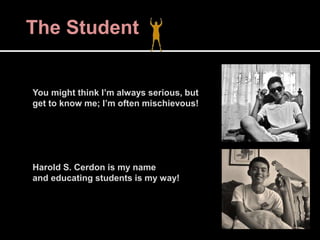
You might think I’m always serious, but
get to know me; I’m often mischievous!
Harold S. Cerdon is my name
and educating students is my way!
The Student
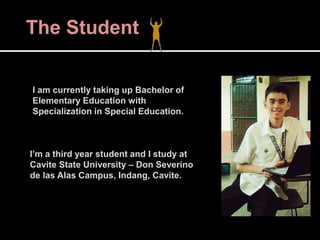
I am currently taking up Bachelor of
Elementary Education with
Specialization in Special Education.
I’m a third year student and I study at
Cavite State University – Don Severino
de las Alas Campus, Indang, Cavite.
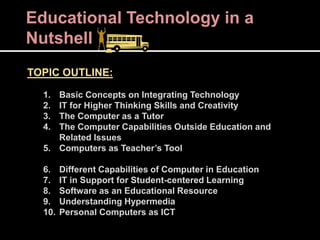
Educational Technology in a
Nutshell
TOPIC OUTLINE:
1. Basic Concepts on Integrating Technology
2. IT for Higher Thinking Skills and Creativity
3. The Computer as a Tutor
4. The Computer Capabilities Outside Education and
Related Issues
5. Computers as Teacher’s Tool
6. Different Capabilities of Computer in Education
7. IT in Support for Student-centered Learning
8. Software as an Educational Resource
9. Understanding Hypermedia
10. Personal Computers as ICT
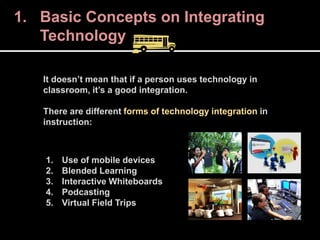
It doesn’t mean that if a person uses technology in
classroom, it’s a good integration.
There are different forms of technology integration in
instruction:
1. Use of mobile devices
2. Blended Learning
3. Interactive Whiteboards
4. Podcasting
5. Virtual Field Trips
1. Basic Concepts on Integrating
Technology
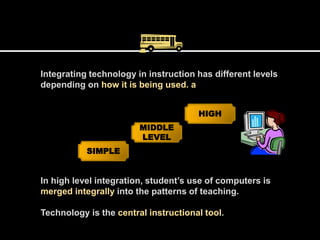
Integrating technology in instruction has different levels
depending on how it is being used. a
SIMPLE
HIGH
MIDDLE
LEVEL
In high level integration, student’s use of computers is
merged integrally into the patterns of teaching.
Technology is the central instructional tool.
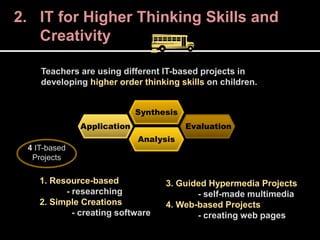
Teachers are using different IT-based projects in
developing higher order thinking skills on children.
Application
Analysis
Synthesis
Evaluation
1. Resource-based
- researching
2. Simple Creations
- creating software
3. Guided Hypermedia Projects
- self-made multimedia
4. Web-based Projects
- creating web pages
4 IT-based
Projects
2. IT for Higher Thinking Skills and
Creativity
3. Computer as a Tutor
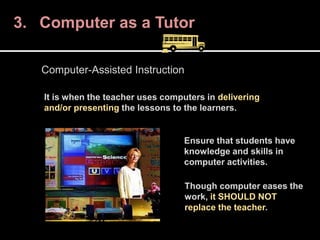
It is when the teacher uses computers in delivering
and/or presenting the lessons to the learners.
Computer-Assisted Instruction
Ensure that students have
knowledge and skills in
computer activities.
Though computer eases the
work, it SHOULD NOT
replace the teacher.
What can be done with computers aside from
instructing the learners? THERE’S A LOT!
Computer’s versatility gave rise to numerous ways on
how it can be used for good, but can also be rude.
4. Role of PCs Outside Education and
Related Issues
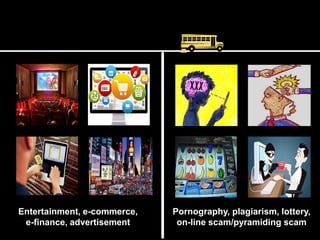
Entertainment, e-commerce,
e-finance, advertisement
Pornography, plagiarism, lottery,
on-line scam/pyramiding scam
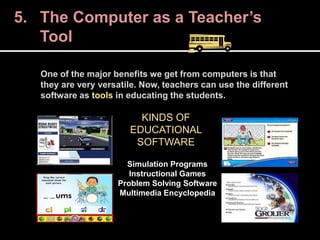
One of the major benefits we get from computers is that
they are very versatile. Now, teachers can use the different
software as tools in educating the students.
5. The Computer as a Teacher’s
Tool
KINDS OF
EDUCATIONAL
SOFTWARE
Simulation Programs
Instructional Games
Problem Solving Software
Multimedia Encyclopedia
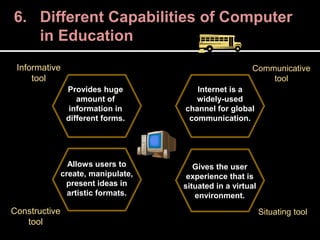
6. Different Capabilities of Computer
in Education
Provides huge
amount of
information in
different forms.
Internet is a
widely-used
channel for global
communication.
Allows users to
create, manipulate,
present ideas in
artistic formats.
Gives the user
experience that is
situated in a virtual
environment.
Informative
tool
Constructive
tool
Communicative
tool
Situating tool
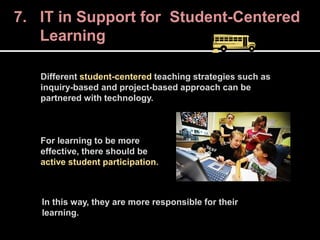
7. IT in Support for Student-Centered
Learning
Different student-centered teaching strategies such as
inquiry-based and project-based approach can be
partnered with technology.
For learning to be more
effective, there should be
active student participation.
In this way, they are more responsible for their
learning.
8. Software as an Educational
Resource
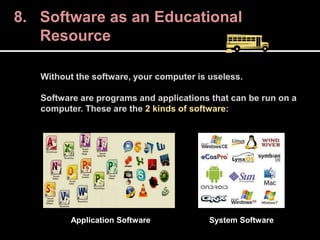
Without the software, your computer is useless.
Software are programs and applications that can be run on a
computer. These are the 2 kinds of software:
Application Software System Software
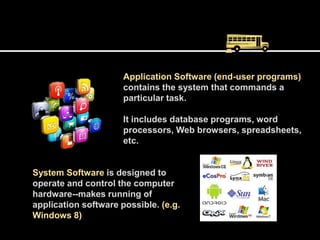
Application Software (end-user programs)
contains the system that commands a
particular task.
It includes database programs, word
processors, Web browsers, spreadsheets,
etc.
System Software is designed to
operate and control the computer
hardware--makes running of
application software possible. (e.g.
Windows 8)
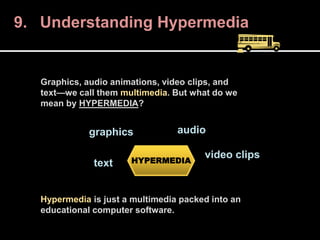
9. Understanding Hypermedia
Graphics, audio animations, video clips, and
text—we call them multimedia. But what do we
mean by HYPERMEDIA?
Hypermedia is just a multimedia packed into an
educational computer software.
HYPERMEDIA
graphics audio
video clips
text
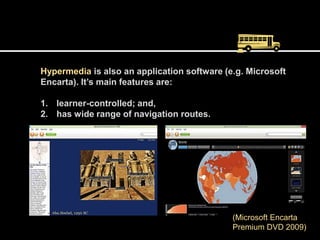
Hypermedia is also an application software (e.g. Microsoft
Encarta). It’s main features are:
1. learner-controlled; and,
2. has wide range of navigation routes.
(Microsoft Encarta
Premium DVD 2009)
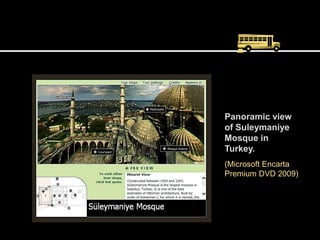
Panoramic view
of Suleymaniye
Mosque in
Turkey.
(Microsoft Encarta
Premium DVD 2009)
10. PCs as Information Communication
Technology
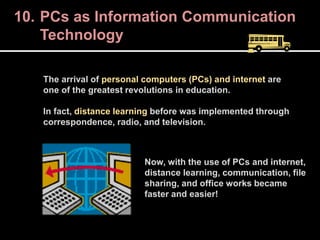
The arrival of personal computers (PCs) and internet are
one of the greatest revolutions in education.
In fact, distance learning before was implemented through
correspondence, radio, and television.
Now, with the use of PCs and internet,
distance learning, communication, file
sharing, and office works became
faster and easier!
Learning Through EdTech 1
and EdTech 2
During the preliminary part of EDTC 2, we briefly
discussed about EDTC 1’s previous topics.
What I learned in this previous subject is that,
TECHNOLOGY in its most advanced sense is NOT
ALWAYS GOOD, and NOT ALWAYS BAD.
That as teachers we should not always rely on
technology because of its trend and versatility.
Learning Through EdTech 1
and EdTech 2
That sometimes, we have to work with papers,
crayons, glue, and scissors despite the ease and
comfort offered by technology.
That learning occurs either by using traditional
instructional media or modern instructional
media. What matters is the effectiveness of the
one who use them.
Learning Through EdTech 1
and EdTech 2
EDTC 2 on the other hand, revolves around
the concept of integrating technology in the
teaching and learning process.
Computers, from being so huge decades ago,
became desktop, down to laptops, later on, gave
birth to iPads, tablet PCs, and android phones.
It becomes more handy and advanced as years
pass by.
Learning Through EdTech 1
and EdTech 2
Because of its handiness and versatility, no
wonder why teachers integrate technology in
education.
Mobile phones and computers with the wonder
power of internet, are used as INFORMATIVE,
CONSTRUCTIVE, COMMUNICATIVE, and
SITUATING tool by teachers and students.
Learning Through EdTech 1
and EdTech 2
This subject made me realize that technology integration is
not a mere using of technology in classroom.
To ease the work of the teacher is not the focus, but rather
the meaningful learning of both the student and the teacher
through the use of technology is the concern of technology
integration.
The Student After EdTech
Despite all these benefits from technology, I realized that people
would still be curious and explore the dark side of it. Like what’s
happening nowadays. Computer misuse and abuse.
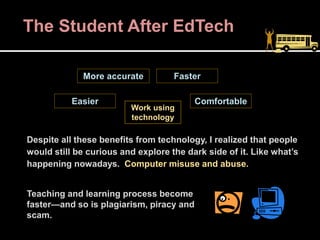
Teaching and learning process become
faster—and so is plagiarism, piracy and
scam.
Work using
technology
More accurate
Easier
Faster
Comfortable
The Student After EdTech
Learning EdTech does not only improve our skills and
knowledge in using technology in instruction.
It also gives us awareness about issues in the society that
are related to technology, esp. computers.
Preventing those issues to happen is the
best way to solve it; and we can only
prevent something once we are aware of it.
The Student After EdTech
Let us not remain stuck on the old belief
that technology is nothing but distraction
in child’s learning—it’s now part of the
curriculum.
With this subject, education students will be
equipped of skills for proper handling of not
just the digital natives, but the technology
itself as well.
Think out of the box.
“When you integrate technology in
instruction, you give the quietest
student a voice.”
–Jerry Blumengarten
Remember that modern technology is
integrated in education to supplement,
reinforce and extend skills—not to replace
teachers!

Portfolio in Educational Technology

  • 1.
  • 2.
    The Student You mightthink I’m always serious, but get to know me; I’m often mischievous! Harold S. Cerdon is my name and educating students is my way!
  • 3.
    The Student I amcurrently taking up Bachelor of Elementary Education with Specialization in Special Education. I’m a third year student and I study at Cavite State University – Don Severino de las Alas Campus, Indang, Cavite.
  • 4.
    Educational Technology ina Nutshell TOPIC OUTLINE: 1. Basic Concepts on Integrating Technology 2. IT for Higher Thinking Skills and Creativity 3. The Computer as a Tutor 4. The Computer Capabilities Outside Education and Related Issues 5. Computers as Teacher’s Tool 6. Different Capabilities of Computer in Education 7. IT in Support for Student-centered Learning 8. Software as an Educational Resource 9. Understanding Hypermedia 10. Personal Computers as ICT
  • 5.
    It doesn’t meanthat if a person uses technology in classroom, it’s a good integration. There are different forms of technology integration in instruction: 1. Use of mobile devices 2. Blended Learning 3. Interactive Whiteboards 4. Podcasting 5. Virtual Field Trips 1. Basic Concepts on Integrating Technology
  • 6.
    Integrating technology ininstruction has different levels depending on how it is being used. a SIMPLE HIGH MIDDLE LEVEL In high level integration, student’s use of computers is merged integrally into the patterns of teaching. Technology is the central instructional tool.
  • 7.
    Teachers are usingdifferent IT-based projects in developing higher order thinking skills on children. Application Analysis Synthesis Evaluation 1. Resource-based - researching 2. Simple Creations - creating software 3. Guided Hypermedia Projects - self-made multimedia 4. Web-based Projects - creating web pages 4 IT-based Projects 2. IT for Higher Thinking Skills and Creativity
  • 8.
    3. Computer asa Tutor It is when the teacher uses computers in delivering and/or presenting the lessons to the learners. Computer-Assisted Instruction Ensure that students have knowledge and skills in computer activities. Though computer eases the work, it SHOULD NOT replace the teacher.
  • 9.
    What can bedone with computers aside from instructing the learners? THERE’S A LOT! Computer’s versatility gave rise to numerous ways on how it can be used for good, but can also be rude. 4. Role of PCs Outside Education and Related Issues
  • 10.
    Entertainment, e-commerce, e-finance, advertisement Pornography,plagiarism, lottery, on-line scam/pyramiding scam
  • 11.
    One of themajor benefits we get from computers is that they are very versatile. Now, teachers can use the different software as tools in educating the students. 5. The Computer as a Teacher’s Tool KINDS OF EDUCATIONAL SOFTWARE Simulation Programs Instructional Games Problem Solving Software Multimedia Encyclopedia
  • 12.
    6. Different Capabilitiesof Computer in Education Provides huge amount of information in different forms. Internet is a widely-used channel for global communication. Allows users to create, manipulate, present ideas in artistic formats. Gives the user experience that is situated in a virtual environment. Informative tool Constructive tool Communicative tool Situating tool
  • 13.
    7. IT inSupport for Student-Centered Learning Different student-centered teaching strategies such as inquiry-based and project-based approach can be partnered with technology. For learning to be more effective, there should be active student participation. In this way, they are more responsible for their learning.
  • 14.
    8. Software asan Educational Resource Without the software, your computer is useless. Software are programs and applications that can be run on a computer. These are the 2 kinds of software: Application Software System Software
  • 15.
    Application Software (end-userprograms) contains the system that commands a particular task. It includes database programs, word processors, Web browsers, spreadsheets, etc. System Software is designed to operate and control the computer hardware--makes running of application software possible. (e.g. Windows 8)
  • 16.
    9. Understanding Hypermedia Graphics,audio animations, video clips, and text—we call them multimedia. But what do we mean by HYPERMEDIA? Hypermedia is just a multimedia packed into an educational computer software. HYPERMEDIA graphics audio video clips text
  • 17.
    Hypermedia is alsoan application software (e.g. Microsoft Encarta). It’s main features are: 1. learner-controlled; and, 2. has wide range of navigation routes. (Microsoft Encarta Premium DVD 2009)
  • 18.
    Panoramic view of Suleymaniye Mosquein Turkey. (Microsoft Encarta Premium DVD 2009)
  • 19.
    10. PCs asInformation Communication Technology The arrival of personal computers (PCs) and internet are one of the greatest revolutions in education. In fact, distance learning before was implemented through correspondence, radio, and television. Now, with the use of PCs and internet, distance learning, communication, file sharing, and office works became faster and easier!
  • 20.
    Learning Through EdTech1 and EdTech 2 During the preliminary part of EDTC 2, we briefly discussed about EDTC 1’s previous topics. What I learned in this previous subject is that, TECHNOLOGY in its most advanced sense is NOT ALWAYS GOOD, and NOT ALWAYS BAD. That as teachers we should not always rely on technology because of its trend and versatility.
  • 21.
    Learning Through EdTech1 and EdTech 2 That sometimes, we have to work with papers, crayons, glue, and scissors despite the ease and comfort offered by technology. That learning occurs either by using traditional instructional media or modern instructional media. What matters is the effectiveness of the one who use them.
  • 22.
    Learning Through EdTech1 and EdTech 2 EDTC 2 on the other hand, revolves around the concept of integrating technology in the teaching and learning process. Computers, from being so huge decades ago, became desktop, down to laptops, later on, gave birth to iPads, tablet PCs, and android phones. It becomes more handy and advanced as years pass by.
  • 23.
    Learning Through EdTech1 and EdTech 2 Because of its handiness and versatility, no wonder why teachers integrate technology in education. Mobile phones and computers with the wonder power of internet, are used as INFORMATIVE, CONSTRUCTIVE, COMMUNICATIVE, and SITUATING tool by teachers and students.
  • 24.
    Learning Through EdTech1 and EdTech 2 This subject made me realize that technology integration is not a mere using of technology in classroom. To ease the work of the teacher is not the focus, but rather the meaningful learning of both the student and the teacher through the use of technology is the concern of technology integration.
  • 25.
    The Student AfterEdTech Despite all these benefits from technology, I realized that people would still be curious and explore the dark side of it. Like what’s happening nowadays. Computer misuse and abuse. Teaching and learning process become faster—and so is plagiarism, piracy and scam. Work using technology More accurate Easier Faster Comfortable
  • 26.
    The Student AfterEdTech Learning EdTech does not only improve our skills and knowledge in using technology in instruction. It also gives us awareness about issues in the society that are related to technology, esp. computers. Preventing those issues to happen is the best way to solve it; and we can only prevent something once we are aware of it.
  • 27.
    The Student AfterEdTech Let us not remain stuck on the old belief that technology is nothing but distraction in child’s learning—it’s now part of the curriculum. With this subject, education students will be equipped of skills for proper handling of not just the digital natives, but the technology itself as well.
  • 28.
    Think out ofthe box. “When you integrate technology in instruction, you give the quietest student a voice.” –Jerry Blumengarten Remember that modern technology is integrated in education to supplement, reinforce and extend skills—not to replace teachers!