A Guide for Getting Started
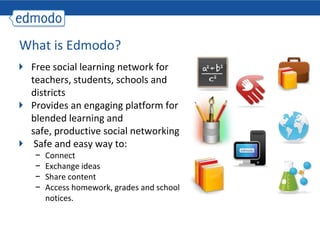
What is Edmodo?Free social learning network for teachers, students, schools and districtsProvides an engaging platform for blended learning and safe, productive social networking Safe and easy way to: Connect
Exchange ideas
Share content
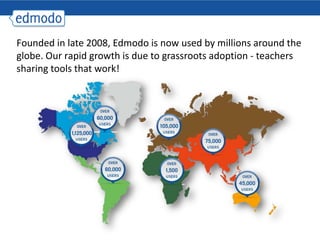
Access homework, grades and school notices.Founded in late 2008, Edmodo is now used by millions around the globe. Our rapid growth is due to grassroots adoption - teachers sharing tools that work!
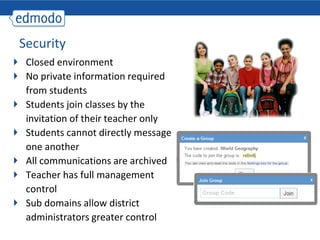
SecurityClosed environmentNo private information required from studentsStudents join classes by the invitation of their teacher onlyStudents cannot directly message one anotherAll communications are archivedTeacher has full management controlSub domains allow district administrators greater control
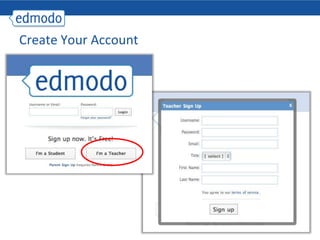
Create Your Account
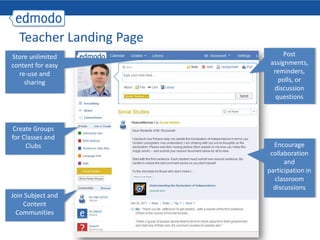
Teacher Landing PagePost assignments, reminders, polls, or discussion questionsStore unlimited content for easy re-use and sharingCreate Groups for Classes and ClubsEncourage collaboration and participation in classroom discussionsJoin Subject and Content Communities
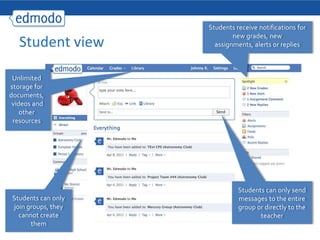
Student viewStudents receive notifications for new grades, new assignments, alerts or repliesUnlimited storage for documents, videos and other resourcesStudents can only send messages to the entire group or directly to the teacherStudents can only join groups, they cannot create them
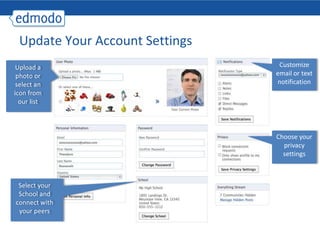
Update Your Account SettingsCustomize email or text notification Upload a photo or select an icon from our listChoose your privacy settingsSelect your School and connect with your peers
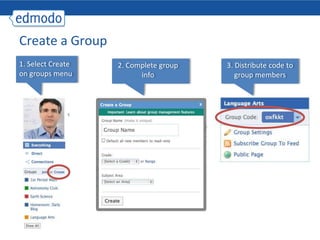
Create a Group1. Select Create on groups menu2. Complete group info3. Distribute code to group members
Student Sign-upStudent must have group code to registerStudents are NOT required to give email address
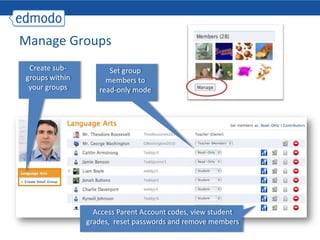
Manage GroupsCreate sub-groups within your groupsSet group members to read-only modeAccess Parent Account codes, view student grades,  reset passwords and remove members
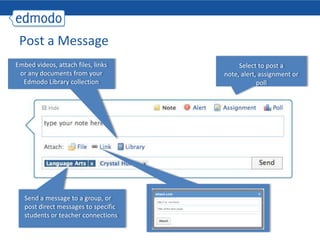
Post a MessageEmbed videos, attach files, links or any documents from your Edmodo Library collectionSelect to post a note, alert, assignment or pollSend a message to a group, or post direct messages to specific students or teacher connections
Upload, store and edit content to your personal library Edmodo LibraryOrganize  library into folders and share files and folders with groupsUnlimited Storage, accessible anywhere!
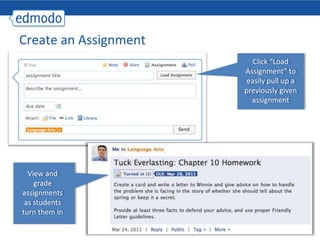
Create an AssignmentClick “Load Assignment” to easily pull up a previously given assignmentView and grade assignments as students turn them in
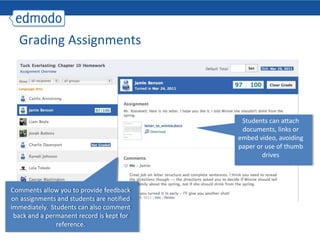
Grading AssignmentsStudents can attach documents, links or embed video, avoiding paper or use of thumb drivesComments allow you to provide feedback on assignments and students are notified immediately.  Students can also comment back and a permanent record is kept for reference.
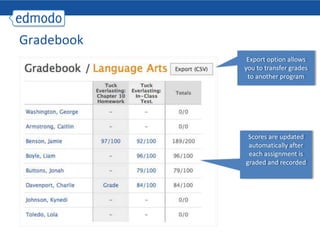
GradebookExport option allows you to transfer grades to another programScores are updated automatically after each assignment is graded and recorded
CalendarFilter by group or view allAdd class events, school events or view scheduled assignments
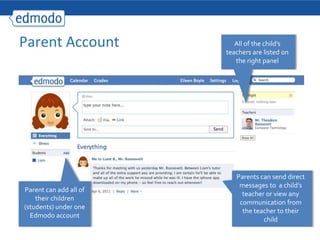
Parent Account All of the child’s teachers are listed on the right panelParents can send direct messages to  a child’s teacher or view any communication from the teacher to their childParent can add all of their children (students) under one Edmodo account
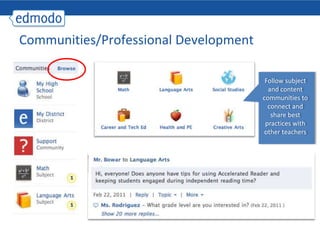
Communities/Professional DevelopmentFollow subject and content communities to connect and share best practices with other teachers
Mobile AccessGet updates and notifications on the go with our mobile app available for:iPhone
iPod
AndroidAccess Edmodo on any mobile browser at m.edmodo.com

Edmodo teacher training_presentation

  • 1.
    A Guide forGetting Started
  • 2.
    What is Edmodo?Freesocial learning network for teachers, students, schools and districtsProvides an engaging platform for blended learning and safe, productive social networking Safe and easy way to: Connect
  • 3.
  • 4.
  • 5.
    Access homework, gradesand school notices.Founded in late 2008, Edmodo is now used by millions around the globe. Our rapid growth is due to grassroots adoption - teachers sharing tools that work!
  • 6.
    SecurityClosed environmentNo privateinformation required from studentsStudents join classes by the invitation of their teacher onlyStudents cannot directly message one anotherAll communications are archivedTeacher has full management controlSub domains allow district administrators greater control
  • 7.
  • 8.
    Teacher Landing PagePostassignments, reminders, polls, or discussion questionsStore unlimited content for easy re-use and sharingCreate Groups for Classes and ClubsEncourage collaboration and participation in classroom discussionsJoin Subject and Content Communities
  • 9.
    Student viewStudents receivenotifications for new grades, new assignments, alerts or repliesUnlimited storage for documents, videos and other resourcesStudents can only send messages to the entire group or directly to the teacherStudents can only join groups, they cannot create them
  • 10.
    Update Your AccountSettingsCustomize email or text notification Upload a photo or select an icon from our listChoose your privacy settingsSelect your School and connect with your peers
  • 11.
    Create a Group1.Select Create on groups menu2. Complete group info3. Distribute code to group members
  • 12.
    Student Sign-upStudent musthave group code to registerStudents are NOT required to give email address
  • 13.
    Manage GroupsCreate sub-groupswithin your groupsSet group members to read-only modeAccess Parent Account codes, view student grades, reset passwords and remove members
  • 14.
    Post a MessageEmbedvideos, attach files, links or any documents from your Edmodo Library collectionSelect to post a note, alert, assignment or pollSend a message to a group, or post direct messages to specific students or teacher connections
  • 15.
    Upload, store andedit content to your personal library Edmodo LibraryOrganize library into folders and share files and folders with groupsUnlimited Storage, accessible anywhere!
  • 16.
    Create an AssignmentClick“Load Assignment” to easily pull up a previously given assignmentView and grade assignments as students turn them in
  • 17.
    Grading AssignmentsStudents canattach documents, links or embed video, avoiding paper or use of thumb drivesComments allow you to provide feedback on assignments and students are notified immediately. Students can also comment back and a permanent record is kept for reference.
  • 18.
    GradebookExport option allowsyou to transfer grades to another programScores are updated automatically after each assignment is graded and recorded
  • 19.
    CalendarFilter by groupor view allAdd class events, school events or view scheduled assignments
  • 20.
    Parent Account Allof the child’s teachers are listed on the right panelParents can send direct messages to a child’s teacher or view any communication from the teacher to their childParent can add all of their children (students) under one Edmodo account
  • 21.
    Communities/Professional DevelopmentFollow subjectand content communities to connect and share best practices with other teachers
  • 22.
    Mobile AccessGet updatesand notifications on the go with our mobile app available for:iPhone
  • 23.
  • 24.
    AndroidAccess Edmodo onany mobile browser at m.edmodo.com