*
WELCOME TO
EDMODO
THE NEW JUNIOR/INTERMEDIATE
(GRADES 4-8)
STUDENT/PARENT ONLINE
AGENDA
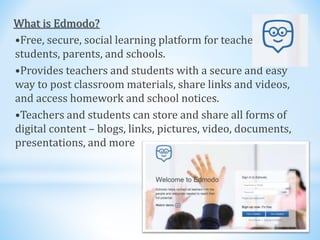
What is Edmodo?
•Free, secure, social learning platform for teachers,
students, parents, and schools.
•Provides teachers and students with a secure and easy
way to post classroom materials, share links and videos,
and access homework and school notices.
•Teachers and students can store and share all forms of
digital content – blogs, links, pictures, video, documents,
presentations, and more
Did you say, Social? Like Facebook?
Edmodo Facebook
Social: Connect! Social: Connect!
Simple Simple
Handles Events Handles Events
Teacher Controlled No Teacher Control
Private Public
Education Oriented Not Regulated
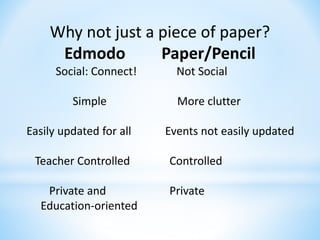
Why not just a piece of paper?
Edmodo Paper/Pencil
Social: Connect! Not Social
Simple More clutter
Easily updated for all Events not easily updated
Teacher Controlled Controlled
Private and Private
Education-oriented
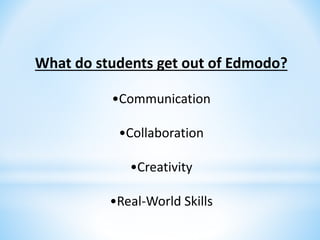
What do students get out of Edmodo?
•Communication
•Collaboration
•Creativity
•Real-World Skills
Learning about Edmodo
•https://www.edmodo.com/
*
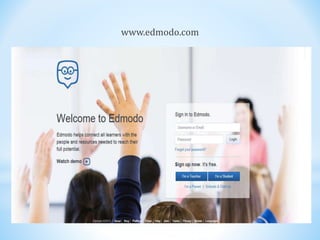
www.edmodo.com
Adding multiple children to same account
•Obtain the 6-digit Parent Codes from your children’s accounts (each
child will have a different Parent Code on his/her account).
•Log in to your previously created Parent Account (if you don't already
have an account, you must first create an account using one child’s Parent
Code before adding another child).
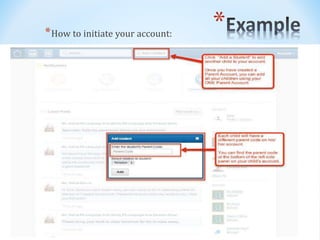
•Click “Add a Student” in the top toolbar.
•Type in the Parent Code to observe your other child’s account.
•Repeat for any other children you need to add to your account
*
*How to initiate your account:
*ALL WORTHWHILE LEARNING EXPERIENCES BEGIN WITH
CHALLENGE. WITH SUPPORT WE CAN ALL LEARN GREAT, NEW
THINGS.
*PLEASE FEEL FREE TO EXPLORE THE EMODO WEBSITE AND TO
ASK YOUR CLASSROOM TEACHERS QUESTIONS YOU MAY HAVE
ABOUT EMODO OR VISIT THE EMODO SUPPORT SITE FOR
PARENT FAQ’s (frequently asked questions).
https://support.edmodo.com/entries/22042110-Parent-FAQs

Edmodo powerpoint

  • 1.
    * WELCOME TO EDMODO THE NEWJUNIOR/INTERMEDIATE (GRADES 4-8) STUDENT/PARENT ONLINE AGENDA
  • 3.
    What is Edmodo? •Free,secure, social learning platform for teachers, students, parents, and schools. •Provides teachers and students with a secure and easy way to post classroom materials, share links and videos, and access homework and school notices. •Teachers and students can store and share all forms of digital content – blogs, links, pictures, video, documents, presentations, and more
  • 4.
    Did you say,Social? Like Facebook? Edmodo Facebook Social: Connect! Social: Connect! Simple Simple Handles Events Handles Events Teacher Controlled No Teacher Control Private Public Education Oriented Not Regulated
  • 5.
    Why not justa piece of paper? Edmodo Paper/Pencil Social: Connect! Not Social Simple More clutter Easily updated for all Events not easily updated Teacher Controlled Controlled Private and Private Education-oriented
  • 6.
    What do studentsget out of Edmodo? •Communication •Collaboration •Creativity •Real-World Skills
  • 7.
  • 8.
  • 9.
    Adding multiple childrento same account •Obtain the 6-digit Parent Codes from your children’s accounts (each child will have a different Parent Code on his/her account). •Log in to your previously created Parent Account (if you don't already have an account, you must first create an account using one child’s Parent Code before adding another child). •Click “Add a Student” in the top toolbar. •Type in the Parent Code to observe your other child’s account. •Repeat for any other children you need to add to your account
  • 10.
    * *How to initiateyour account:
  • 11.
    *ALL WORTHWHILE LEARNINGEXPERIENCES BEGIN WITH CHALLENGE. WITH SUPPORT WE CAN ALL LEARN GREAT, NEW THINGS. *PLEASE FEEL FREE TO EXPLORE THE EMODO WEBSITE AND TO ASK YOUR CLASSROOM TEACHERS QUESTIONS YOU MAY HAVE ABOUT EMODO OR VISIT THE EMODO SUPPORT SITE FOR PARENT FAQ’s (frequently asked questions). https://support.edmodo.com/entries/22042110-Parent-FAQs