EDMODO
Building an online community
outside of the classroom walls


                                 S
Why do a presentation on Edmodo?

     I have been using Edmodo for 2 years.
        The site is continually updating with
     new features. Edmodo has been a key
        part of developing the community of
      my classroom (inside and out). It also
      provides opportunities for my students
            to communicate in the target
       languages that they may not have at
                       home .
Course syllabus (outline) with Edmodo info for
                   parents
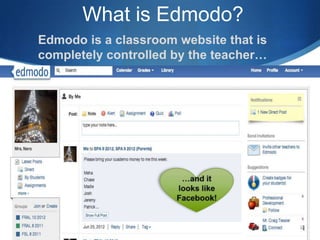
What is Edmodo?
Edmodo is a classroom website that is
completely controlled by the teacher…
What are the benefits of using
    a classroom website like
             Edmodo?
S Classroom management: for example, homework updates &
  communication about field trips

S Opportunity for students to communicate with you or the
  class about any questions they may have about an
  assignment

S Creating a community and links between yourself and the
  students in the class

S You can share links and YouTube videos

S Students who are away know that there is a website available
What are the benefits specific
             to Edmodo?
S Classroom management: Students S You can create online polls (ex.
  may post messages ONLY to the           which activity you prefer, what
  teacher or the entire class. Cyber-     game do you want to play in PE
  bullying (or online drama) is           next, how do you learn best?)
  reduced.
                                        S You can even create online
S You can post your assignment            quizzes: , multiple choice, true or
  criteria online (either to save paper   false, short answers and fill in the
  OR in case students lose the criteria   blank included
  it is available to you)
                                        S There is an app for that! Most
S Students can turn in assignments        cell or iTouch devices can
  online; better tracking of              download the app for free.
  assignments turned in on time (a                    and the best part…
  record).
Parents can sign up too!


S I have reduced the number of phone calls to parents by
  at least 60%

S If parents feel like they don’t know what their child's
  homework is, they can check Edmodo

S EACH CODE GIVEN TO A PARENT IS INDIVIDUAL TO
  THAT STUDENT; THEY CAN ONLY ACCESS THE
  INFORMATION YOU WANT THEM TO HAVE!
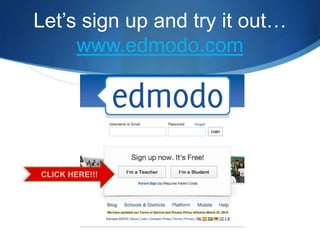
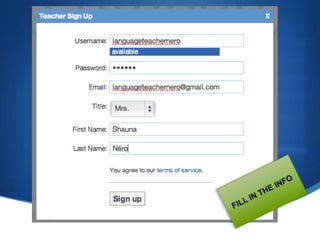
Let’s sign up and try it out…
     www.edmodo.com
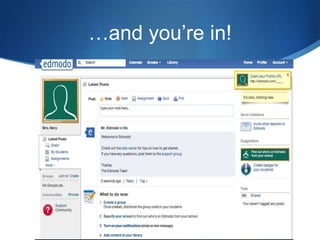
…and you’re in!
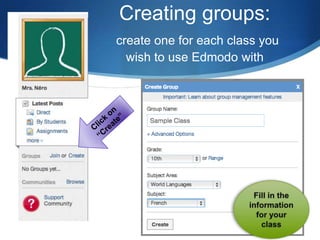
Creating groups:
create one for each class you
  wish to use Edmodo with
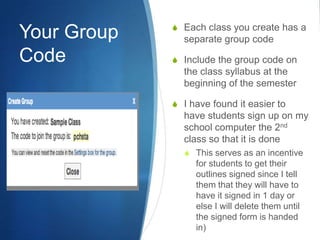
S Each class you create has a
Your Group     separate group code
Code         S Include the group code on
               the class syllabus at the
               beginning of the semester

             S I have found it easier to
               have students sign up on my
               school computer the 2nd
               class so that it is done
               S This serves as an incentive
                  for students to get their
                  outlines signed since I tell
                  them that they will have to
                  have it signed in 1 day or
                  else I will delete them until
                  the signed form is handed
                  in)
Managing
your account


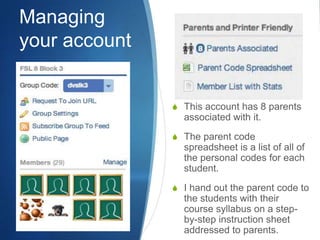
               S This account has 8 parents
                 associated with it.
               S The parent code
                 spreadsheet is a list of all of
                 the personal codes for each
                 student.
               S I hand out the parent code to
                 the students with their
                 course syllabus on a step-
                 by-step instruction sheet
                 addressed to parents.
Building
    Connections
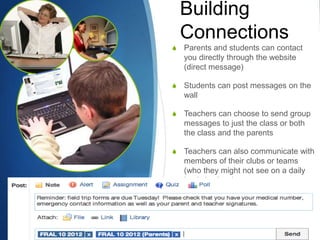
S   Parents and students can contact
    you directly through the website
    (direct message)

S   Students can post messages on the
    wall

S   Teachers can choose to send group
    messages to just the class or both
    the class and the parents

S   Teachers can also communicate with
    members of their clubs or teams
    (who they might not see on a daily
    basis in class)
Creating an assignment

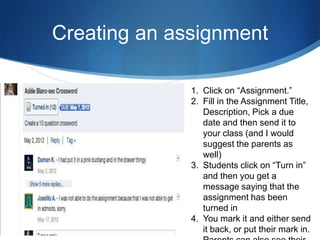
              1. Click on “Assignment.”
              2. Fill in the Assignment Title,
                 Description, Pick a due
                 date and then send it to
                 your class (and I would
                 suggest the parents as
                 well)
              3. Students click on “Turn in”
                 and then you get a
                 message saying that the
                 assignment has been
                 turned in
              4. You mark it and either send
                 it back, or put their mark in.
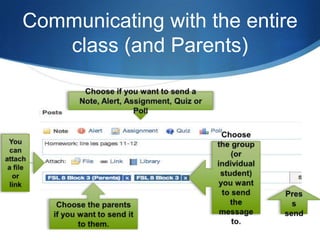
Communicating with the entire
   class (and Parents)
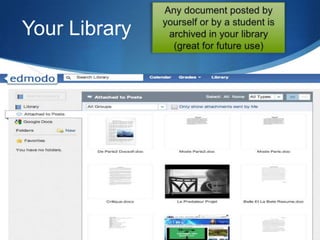
Your Library
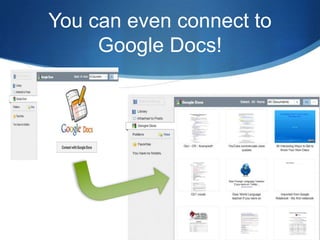
You can even connect to
     Google Docs!
Edmodo only works if students actively use it
                        :
          (learning from my mistakes)
 Engage students the first week
 of class by:
 S A poll to be used in class the
   next day
 S Video links that will engage
   students in the content of the
   course (engage in discussion
   the next day)
 S Homework update (ex.
   syllabus signature deadline)
 S Ask them to talk about what
   they learned about the
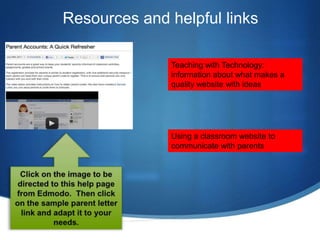
Resources and helpful links

              Teaching with Technology:
              information about what makes a
              quality website with ideas


              Using a classroom website to
              communicate with parents

Edmodo presentation

  • 1.
    EDMODO Building an onlinecommunity outside of the classroom walls S
  • 2.
    Why do apresentation on Edmodo? I have been using Edmodo for 2 years. The site is continually updating with new features. Edmodo has been a key part of developing the community of my classroom (inside and out). It also provides opportunities for my students to communicate in the target languages that they may not have at home . Course syllabus (outline) with Edmodo info for parents
  • 3.
    What is Edmodo? Edmodois a classroom website that is completely controlled by the teacher…
  • 4.
    What are thebenefits of using a classroom website like Edmodo? S Classroom management: for example, homework updates & communication about field trips S Opportunity for students to communicate with you or the class about any questions they may have about an assignment S Creating a community and links between yourself and the students in the class S You can share links and YouTube videos S Students who are away know that there is a website available
  • 5.
    What are thebenefits specific to Edmodo? S Classroom management: Students S You can create online polls (ex. may post messages ONLY to the which activity you prefer, what teacher or the entire class. Cyber- game do you want to play in PE bullying (or online drama) is next, how do you learn best?) reduced. S You can even create online S You can post your assignment quizzes: , multiple choice, true or criteria online (either to save paper false, short answers and fill in the OR in case students lose the criteria blank included it is available to you) S There is an app for that! Most S Students can turn in assignments cell or iTouch devices can online; better tracking of download the app for free. assignments turned in on time (a and the best part… record).
  • 6.
    Parents can signup too! S I have reduced the number of phone calls to parents by at least 60% S If parents feel like they don’t know what their child's homework is, they can check Edmodo S EACH CODE GIVEN TO A PARENT IS INDIVIDUAL TO THAT STUDENT; THEY CAN ONLY ACCESS THE INFORMATION YOU WANT THEM TO HAVE!
  • 7.
    Let’s sign upand try it out… www.edmodo.com
  • 9.
  • 10.
    Creating groups: create onefor each class you wish to use Edmodo with
  • 11.
    S Each classyou create has a Your Group separate group code Code S Include the group code on the class syllabus at the beginning of the semester S I have found it easier to have students sign up on my school computer the 2nd class so that it is done S This serves as an incentive for students to get their outlines signed since I tell them that they will have to have it signed in 1 day or else I will delete them until the signed form is handed in)
  • 12.
    Managing your account S This account has 8 parents associated with it. S The parent code spreadsheet is a list of all of the personal codes for each student. S I hand out the parent code to the students with their course syllabus on a step- by-step instruction sheet addressed to parents.
  • 13.
    Building Connections S Parents and students can contact you directly through the website (direct message) S Students can post messages on the wall S Teachers can choose to send group messages to just the class or both the class and the parents S Teachers can also communicate with members of their clubs or teams (who they might not see on a daily basis in class)
  • 14.
    Creating an assignment 1. Click on “Assignment.” 2. Fill in the Assignment Title, Description, Pick a due date and then send it to your class (and I would suggest the parents as well) 3. Students click on “Turn in” and then you get a message saying that the assignment has been turned in 4. You mark it and either send it back, or put their mark in.
  • 15.
    Communicating with theentire class (and Parents)
  • 16.
  • 17.
    You can evenconnect to Google Docs!
  • 18.
    Edmodo only worksif students actively use it : (learning from my mistakes) Engage students the first week of class by: S A poll to be used in class the next day S Video links that will engage students in the content of the course (engage in discussion the next day) S Homework update (ex. syllabus signature deadline) S Ask them to talk about what they learned about the
  • 19.
    Resources and helpfullinks Teaching with Technology: information about what makes a quality website with ideas Using a classroom website to communicate with parents