Edmodo’s mission is to connect all learners
with the people and resources they need to
reach their full potential
Edmodo is the largest social learning network
in the world
20,000,000+
TOTAL USERS AROUND THE WORLD
Why Edmodo?
(Edmodo is an added method of student:teacher:parent communication. Teachers will decide how to use
Edmodo in their own unique learning environments. It does not replace Infinite Campus Parent Portal)
Engage
Edmodo is designed to get
students excited about learning
as teachers easily create a
blended learning experience.
Connect
Teachers are at the center of a
powerful network that connects
them to students, parents,
administrators and publishers.
Personalize
Edmodo offers engaging, easy-to-
use apps that integrate
seamlessly and personalize
learning for every student.
Measure
Edmodo makes it simple to track
student progress. Teachers can
get the pulse of the class through
quizzes, discussion and more.
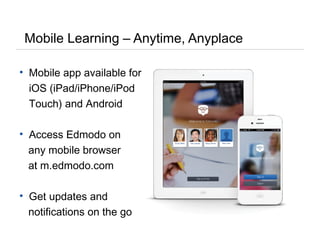
Mobile Learning – Anytime, Anyplace
• Mobile app available for
iOS (iPad/iPhone/iPod
Touch) and Android
• Access Edmodo on
any mobile browser
at m.edmodo.com
• Get updates and
notifications on the go
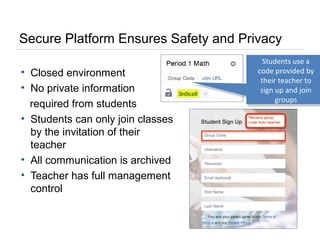
Secure Platform Ensures Safety and Privacy
• Closed environment
• No private information
required from students
• Students can only join classes
by the invitation of their
teacher
• All communication is archived
• Teacher has full management
control
Students use a
code provided by
their teacher to
sign up and join
groups
Student Interface
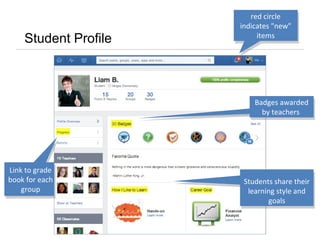
Student Profile
Badges awarded
by teachers
Link to grade
book for each
group
Students share their
learning style and
goals
red circle
indicates "new"
items
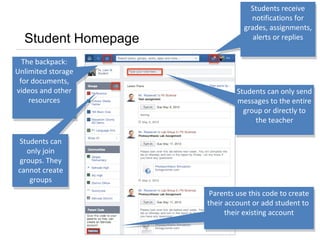
Student Homepage
The backpack:
Unlimited storage
for documents,
videos and other
resources
Students can
only join
groups. They
cannot create
groups
Students receive
notifications for
grades, assignments,
alerts or replies
Students receive
notifications for
grades, assignments,
alerts or replies
Students can only send
messages to the entire
group or directly to
the teacher
Students can only send
messages to the entire
group or directly to
the teacher
Parents use this code to create
their account or add student to
their existing account
Parents use this code to create
their account or add student to
their existing account
Parent Interface
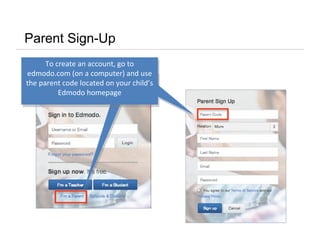
To create an account, go to
edmodo.com (on a computer) and use
the parent code located on your child’s
Edmodo homepage
Parent Sign-Up
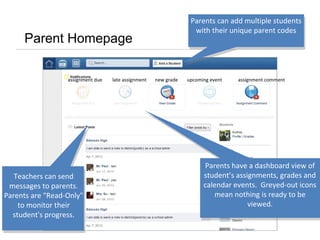
Parent Homepage
Parents can add multiple students
with their unique parent codes
Parents can add multiple students
with their unique parent codes
Teachers can send
messages to parents.
Parents are "Read-Only"
to monitor their
student's progress.
Parents have a dashboard view of
student’s assignments, grades and
calendar events. Greyed-out icons
mean nothing is ready to be
viewed.
late assignmentassignment due upcoming eventnew grade assignment comment
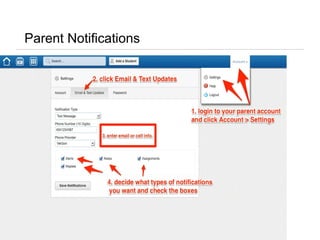
Parent Notifications
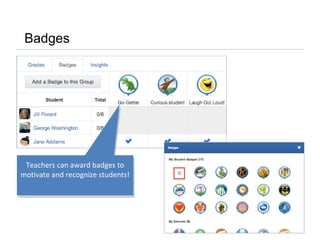
Badges
Teachers can award badges to
motivate and recognize students!
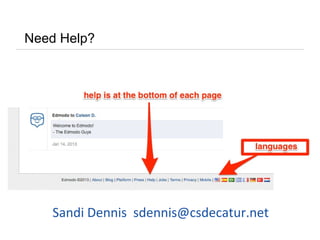
Need Help?
Sandi Dennis sdennis@csdecatur.net
Edmodo training power_point_new_ parents_2013

Edmodo training power_point_new_ parents_2013

  • 2.
    Edmodo’s mission isto connect all learners with the people and resources they need to reach their full potential
  • 3.
    Edmodo is thelargest social learning network in the world 20,000,000+ TOTAL USERS AROUND THE WORLD
  • 4.
    Why Edmodo? (Edmodo isan added method of student:teacher:parent communication. Teachers will decide how to use Edmodo in their own unique learning environments. It does not replace Infinite Campus Parent Portal) Engage Edmodo is designed to get students excited about learning as teachers easily create a blended learning experience. Connect Teachers are at the center of a powerful network that connects them to students, parents, administrators and publishers. Personalize Edmodo offers engaging, easy-to- use apps that integrate seamlessly and personalize learning for every student. Measure Edmodo makes it simple to track student progress. Teachers can get the pulse of the class through quizzes, discussion and more.
  • 5.
    Mobile Learning –Anytime, Anyplace • Mobile app available for iOS (iPad/iPhone/iPod Touch) and Android • Access Edmodo on any mobile browser at m.edmodo.com • Get updates and notifications on the go
  • 6.
    Secure Platform EnsuresSafety and Privacy • Closed environment • No private information required from students • Students can only join classes by the invitation of their teacher • All communication is archived • Teacher has full management control Students use a code provided by their teacher to sign up and join groups
  • 7.
  • 8.
    Student Profile Badges awarded byteachers Link to grade book for each group Students share their learning style and goals red circle indicates "new" items
  • 9.
    Student Homepage The backpack: Unlimitedstorage for documents, videos and other resources Students can only join groups. They cannot create groups Students receive notifications for grades, assignments, alerts or replies Students receive notifications for grades, assignments, alerts or replies Students can only send messages to the entire group or directly to the teacher Students can only send messages to the entire group or directly to the teacher Parents use this code to create their account or add student to their existing account Parents use this code to create their account or add student to their existing account
  • 10.
  • 11.
    To create anaccount, go to edmodo.com (on a computer) and use the parent code located on your child’s Edmodo homepage Parent Sign-Up
  • 12.
    Parent Homepage Parents canadd multiple students with their unique parent codes Parents can add multiple students with their unique parent codes Teachers can send messages to parents. Parents are "Read-Only" to monitor their student's progress. Parents have a dashboard view of student’s assignments, grades and calendar events. Greyed-out icons mean nothing is ready to be viewed. late assignmentassignment due upcoming eventnew grade assignment comment
  • 13.
  • 14.
    Badges Teachers can awardbadges to motivate and recognize students!
  • 15.
    Need Help? Sandi Dennissdennis@csdecatur.net