CCNA Exploration v5.0
Network fundamentals
TK 1073 – Jaringan Komputer
Semester Ganjil 2015 - 2016
CCNA Exploration v5.0
Network fundamentals
TK 1073 – Jaringan Komputer
Semester Ganjil 2015 - 2016
Cisco AcademyCisco Academy
Hanya dipergunakan untuk kepentingan pengajaran di lingkungan Telkom Applied Science School
Chapter 6:
Network Layer
Chapter 6: Objektif
Mahasiswa akan mampu:
 Menjelaskan bagaimana protokol layer network
dan layanan mendukung komunikasi melalui
jaringan – jaringan data.
 Menjelaskan bagaimana routers
menghubungkan koneksi end-to-end dalam
industri jaringan skala kecil ke menengah.
 Menentukan devais yang tepat untuk
merutekan trafik dalam industri jaringan
ukuran kecil ke menengah.
 Konfigurasi router di level dasar.
Chapter 6
– 6.1 Protokol Layer Network
– 6.2 Routing
– 6.3 Router
– 6.4 Mengkonfigurasi Router Cisco
– 6.5 Simpulan
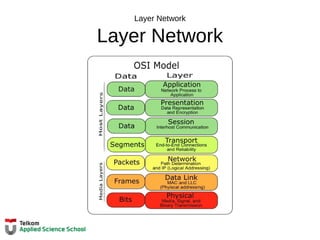
Layer Network
Layer Network
Protokol Layer Network
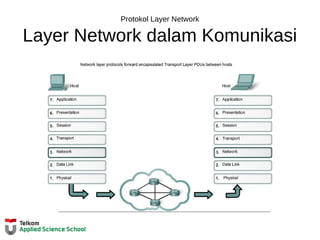
Layer Network dalam Komunikasi
Layer Network
End to End Transport processes
• Addressing end devices
• Encapsulation
• Routing
• De-encapsulating
Layer Network dalam Komunikasi
Protokol Layer Network
Protokol Layer Network yang Umum Dipakai:
• Internet Protocol version 4 (IPv4)
• Internet Protocol version 6 (IPv6)
Protokol Legacy Novell Network Layer
Internetwork Packet Exchange (IPX)
• AppleTalk
• Connectionless Network Service
(CLNS/DECNet)
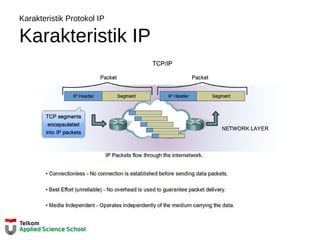
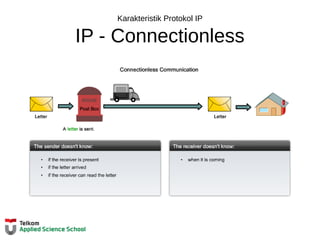
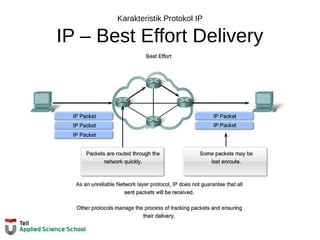
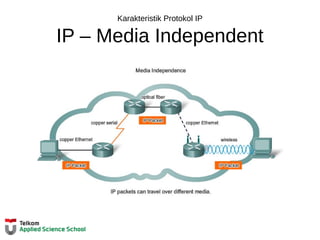
Karakteristik Protokol IP
Karakteristik IP
Karakteristik Protokol IP
IP - Connectionless
Karakteristik Protokol IP
IP – Best Effort Delivery
Karakteristik Protokol IP
IP – Media Independent
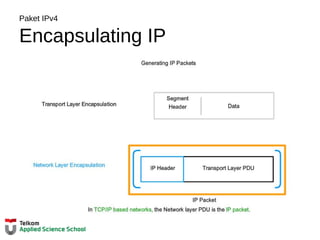
Paket IPv4
Encapsulating IP
Paket IPv4
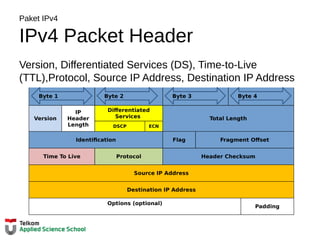
IPv4 Packet Header
Version, Differentiated Services (DS), Time-to-Live
(TTL),Protocol, Source IP Address, Destination IP Address
Version
IP
Header
Length
Differentiated
Services Total Length
DSCP ECN
Identification Flag Fragment Offset
Time To Live Protocol Header Checksum
Source IP Address
Destination IP Address
Options (optional)
Padding
Byte 1 Byte 2 Byte 3 Byte 4
Paket IPv4
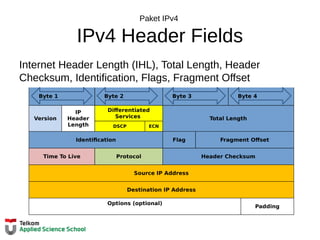
IPv4 Header Fields
Internet Header Length (IHL), Total Length, Header
Checksum, Identification, Flags, Fragment Offset
Version
IP
Header
Length
Differentiated
Services Total Length
DSCP ECN
Identification Flag Fragment Offset
Time To Live Protocol Header Checksum
Source IP Address
Destination IP Address
Options (optional)
Padding
Byte 1 Byte 2 Byte 3 Byte 4
Paket IPv4
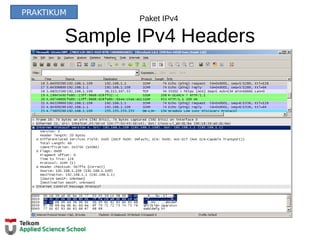
Sample IPv4 Headers
PRAKTIKUM
Layer Network dalam Komunikasi
Kekurangan IPv4
• IP Address bisa habis
• Perluasan tabel routing Internet
• Kurangnya konektivitas end-to-end
Layer Network dalam Komunikasi
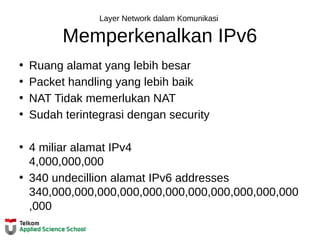
Memperkenalkan IPv6
• Ruang alamat yang lebih besar
• Packet handling yang lebih baik
• NAT Tidak memerlukan NAT
• Sudah terintegrasi dengan security
• 4 miliar alamat IPv4
4,000,000,000
• 340 undecillion alamat IPv6 addresses
340,000,000,000,000,000,000,000,000,000,000,000
,000
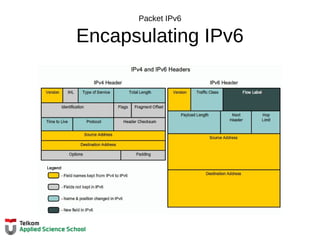
Packet IPv6
Encapsulating IPv6
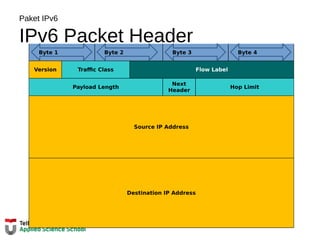
Paket IPv6
IPv6 Packet Header
Version Traffic Class Flow Label
Payload Length
Next
Header
Hop Limit
Source IP Address
Destination IP Address
Byte 1 Byte 2 Byte 3 Byte 4
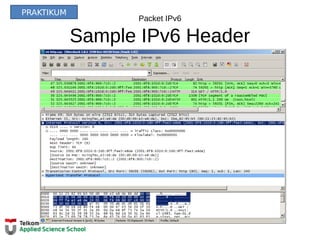
Packet IPv6
Sample IPv6 Header
PRAKTIKUM
Routing
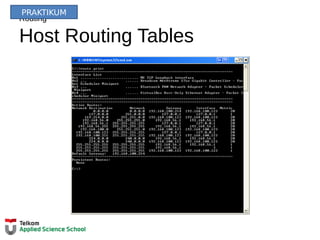
Host Routing Tables
PRAKTIKUM
Host Table Routing
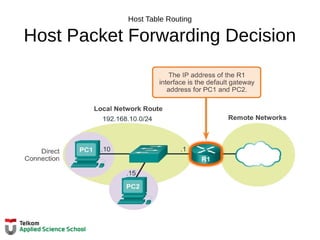
Host Packet Forwarding Decision
Host Tabel Routing
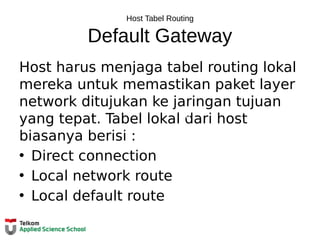
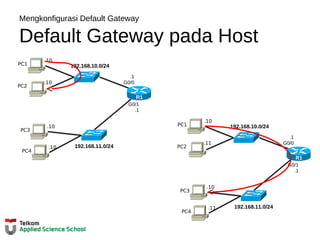
Default Gateway
Host harus menjaga tabel routing lokal
mereka untuk memastikan paket layer
network ditujukan ke jaringan tujuan
yang tepat. Tabel lokal dari host
biasanya berisi :
• Direct connection
• Local network route
• Local default route
R
Host Tabel Routing
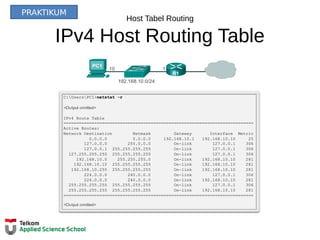
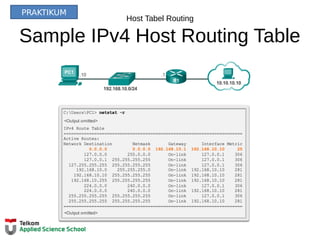
IPv4 Host Routing Table
PRAKTIKUM
Host Tabel Routing
Sample IPv4 Host Routing Table
PRAKTIKUM
Host Tabel Routing
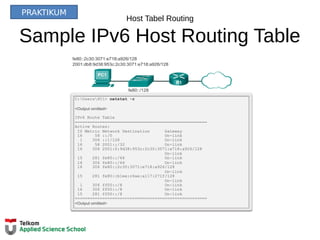
Sample IPv6 Host Routing Table
PRAKTIKUM
Tabel Routing Router
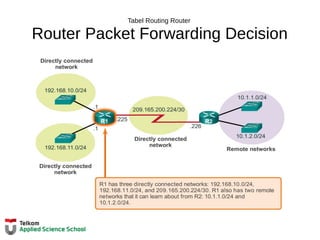
Router Packet Forwarding Decision
Tabel Routing Router
IPv4 Router Routing Table
R1#show ip route
Codes: L - local, C - connected, S - static, R - RIP, M - mobile, B - BGP
D - EIGRP, EX - EIGRP external, O - OSPF, IA - OSPF inter area
N1 - OSPF NSSA external type 1, N2 - OSPF NSSA external type 2
E1 - OSPF external type 1, E2 - OSPF external type 2, E - EGP
i - IS-IS, L1 - IS-IS level-1, L2 - IS-IS level-2, ia - IS-IS inter area
* - candidate default, U - per-user static route, o - ODR
P - periodic downloaded static route
Gateway of last resort is not set
10.0.0.0/8 is variably subnetted, 2 subnets, 2 masks
D 10.1.1.0/24 [90/2170112] via 209.165.200.226, 00:00:05, Serial0/0/0
D 10.1.2.0/24 [90/2170112] via 209.165.200.226, 00:00:05, Serial0/0/0
192.168.10.0/24 is variably subnetted, 2 subnets, 3 masks
C 192.168.10.0/24 is directly connected, GigabitEthernet0/0
L 192.168.10.1/32 is directly connected, GigabitEthernet0/0
192.168.11.0/24 is variably subnetted, 2 subnets, 3 masks
C 192.168.11.0/24 is directly connected, GigabitEthernet0/1
L 192.168.11.1/32 is directly connected, GigabitEthernet0/1
209.165.200.0/24 is variably subnetted, 2 subnets, 3 masks
C 209.165.200.224/30 is directly connected, Serial0/0/0
L 209.165.200.225/32 is directly connected, Serial0/0/0
R1#
192.168.10.0/24
R2
192.168.11.0/24
10.1.1.0/24
10.1.2.0/24
209.165.200.224 /30
.226
.10
.10
.10
.10
.1
.1.1
G0/1
.225
S0/0/0
G0/0
.1
R1
PC1
PC2
PRAKTIKUM
Tabel Routing Router
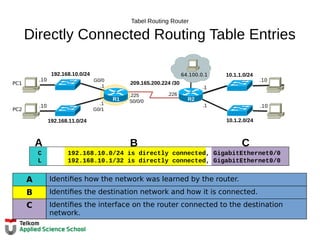
Directly Connected Routing Table Entries
C 192.168.10.0/24 is directly connected, GigabitEthernet0/0
L 192.168.10.1/32 is directly connected, GigabitEthernet0/0
A B C
A Identifies how the network was learned by the router.
B Identifies the destination network and how it is connected.
C Identifies the interface on the router connected to the destination
network.
192.168.10.0/24
R2
192.168.11.0/24
10.1.1.0/24
10.1.2.0/24
209.165.200.224 /30
.226
.10
.10
.10
.10
.1
.1
64.100.0.1
.1
G0/1
.225
S0/0/0
G0/0
.1
R1
PC1
PC2
Tabel Routing Router
Remote Network Routing Table Entries
D 10.1.1.0/24 [90/2170112] via 209.165.200.226, 00:00:05, Serial0/0/0
A Identifies how the network was learned by the router.
B Identifies the destination network.
C Identifies the administrative distance (trustworthiness) of the route
source.
D Identifies the metric to reach the remote network.
E Identifies the next hop IP address to reach the remote network.
F Identifies the amount of elapsed time since the network was
discovered.
G Identifies the outgoing interface on the router to reach the destination
192.168.10.0/24
R2
192.168.11.0/24
10.1.1.0/24
10.1.2.0/24
209.165.200.224 /30
.226
.10
.10
.10
.10
.1
.1
64.100.0.1
.1
G0/1
.225
S0/0/0
G0/0
.1
R1
PC1
PC2
Tabel Routing Router
Next-Hop Address
192.168.10.0/24
R2
192.168.11.0/24
10.1.1.0/24
10.1.2.0/24
209.165.200.224 /30
.226
.10
.10
.10
.10
.1
.1
64.100.0.1
.1
G0/1
.225
S0/0/0
G0/0
.1
R1
PC1
PC2
R1#show ip route
Codes: L - local, C - connected, S - static, R - RIP, M - mobile, B - BGP
D - EIGRP, EX - EIGRP external, O - OSPF, IA - OSPF inter area
N1 - OSPF NSSA external type 1, N2 - OSPF NSSA external type 2
E1 - OSPF external type 1, E2 - OSPF external type 2, E - EGP
i - IS-IS, L1 - IS-IS level-1, L2 - IS-IS level-2, ia - IS-IS inter area
* - candidate default, U - per-user static route, o - ODR
P - periodic downloaded static route
Gateway of last resort is not set
10.0.0.0/8 is variably subnetted, 2 subnets, 2 masks
D 10.1.1.0/24 [90/2170112] via 209.165.200.226, 00:00:05, Serial0/0/0
D 10.1.2.0/24 [90/2170112] via 209.165.200.226, 00:00:05, Serial0/0/0
192.168.10.0/24 is variably subnetted, 2 subnets, 3 masks
C 192.168.10.0/24 is directly connected, GigabitEthernet0/0
L 192.168.10.1/32 is directly connected, GigabitEthernet0/0
192.168.11.0/24 is variably subnetted, 2 subnets, 3 masks
C 192.168.11.0/24 is directly connected, GigabitEthernet0/1
L 192.168.11.1/32 is directly connected, GigabitEthernet0/1
209.165.200.0/24 is variably subnetted, 2 subnets, 3 masks
C 209.165.200.224/30 is directly connected, Serial0/0/0
L 209.165.200.225/32 is directly connected, Serial0/0/0
R1#
Router
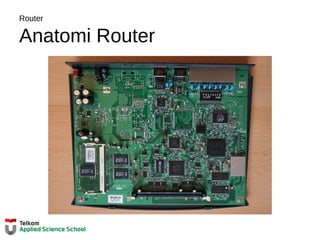
Anatomi Router
Router
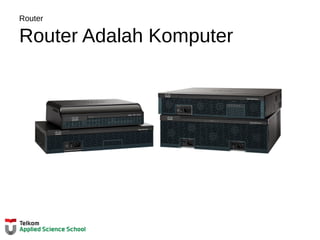
Router Adalah Komputer
Anatomi Router
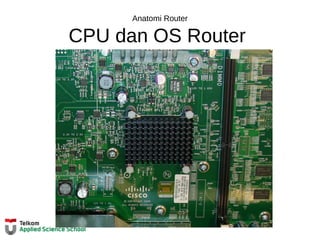
CPU dan OS Router
Anatomi Router
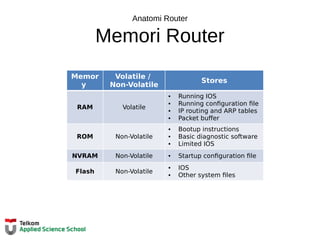
Memori Router
Memor
y
Volatile /
Non-Volatile
Stores
RAM Volatile
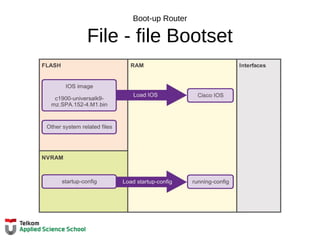
• Running IOS
• Running configuration file
• IP routing and ARP tables
• Packet buffer
ROM Non-Volatile
• Bootup instructions
• Basic diagnostic software
• Limited IOS
NVRAM Non-Volatile • Startup configuration file
Flash Non-Volatile
• IOS
• Other system files
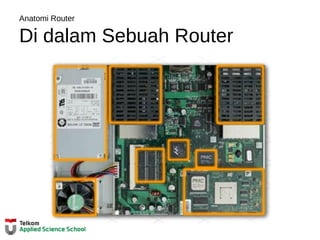
Anatomi Router
Di dalam Sebuah Router
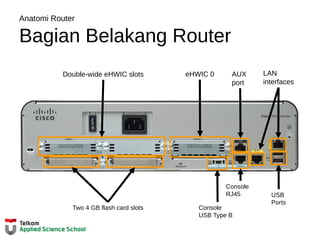
Anatomi Router
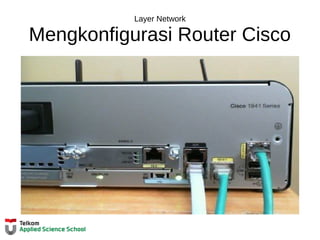
Bagian Belakang Router
Two 4 GB flash card slots
Double-wide eHWIC slots eHWIC 0 AUX
port
LAN
interfaces
USB
Ports
Console
USB Type B
Console
RJ45
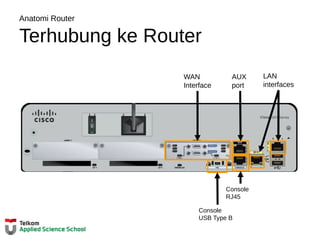
Anatomi Router
Terhubung ke Router
WAN
Interface
AUX
port
LAN
interfaces
Console
USB Type B
Console
RJ45
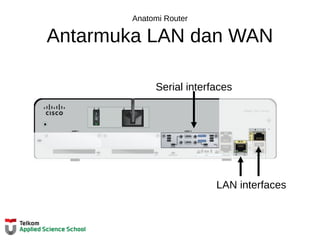
Anatomi Router
Antarmuka LAN dan WAN
Serial interfaces
LAN interfaces
Boot-up Router
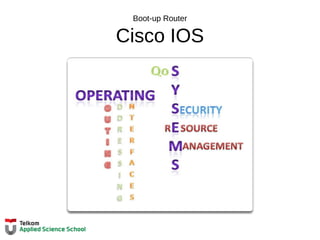
Cisco IOS
Boot-up Router
File - file Bootset
Boot-up Router
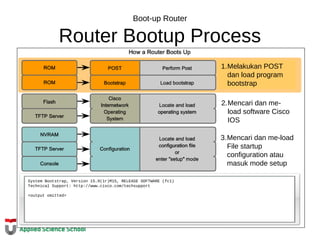
Router Bootup Process
System Bootstrap, Version 15.0(1r)M15, RELEASE SOFTWARE (fc1)
Technical Support: http://www.cisco.com/techsupport
<output omitted>
1.Melakukan POST
dan load program
bootstrap
2.Mencari dan me-
load software Cisco
IOS
3.Mencari dan me-load
File startup
configuration atau
masuk mode setup
Boot-up Router
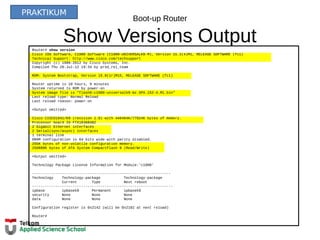
Show Versions OutputRouter# show version
Cisco IOS Software, C1900 Software (C1900-UNIVERSALK9-M), Version 15.2(4)M1, RELEASE SOFTWARE (fc1)
Technical Support: http://www.cisco.com/techsupport
Copyright (c) 1986-2012 by Cisco Systems, Inc.
Compiled Thu 26-Jul-12 19:34 by prod_rel_team
ROM: System Bootstrap, Version 15.0(1r)M15, RELEASE SOFTWARE (fc1)
Router uptime is 10 hours, 9 minutes
System returned to ROM by power-on
System image file is "flash0:c1900-universalk9-mz.SPA.152-4.M1.bin"
Last reload type: Normal Reload
Last reload reason: power-on
<Output omitted>
Cisco CISCO1941/K9 (revision 1.0) with 446464K/77824K bytes of memory.
Processor board ID FTX1636848Z
2 Gigabit Ethernet interfaces
2 Serial(sync/async) interfaces
1 terminal line
DRAM configuration is 64 bits wide with parity disabled.
255K bytes of non-volatile configuration memory.
250880K bytes of ATA System CompactFlash 0 (Read/Write)
<Output omitted>
Technology Package License Information for Module:'c1900'
-----------------------------------------------------------------
Technology Technology-package Technology-package
Current Type Next reboot
------------------------------------------------------------------
ipbase ipbasek9 Permanent ipbasek9
security None None None
data None None None
Configuration register is 0x2142 (will be 0x2102 at next reload)
Router#
PRAKTIKUM
Layer Network
Mengkonfigurasi Router Cisco
Configure Settingan Awal
Langkah – Langkah Mengkonfigurasi Router
Router> enable
Router# configure terminal
Enter configuration commands, one per line.
End with CNTL/Z.
Router(config)# hostname R1
R1(config)#
192.168.10.0/24
R2
192.168.11.0/24
10.1.1.0/24
10.1.2.0/24
209.165.200.224 /30
.226
.10
.10
.10
.10
.1
.1.1
G0/1
.225
S0/0/0
G0/0
.1
R1
PC1
PC2
Router> en
Router# conf t
Enter configuration commands, one per line.
End with CNTL/Z.
Router(config)# ho R1
R2(config)#
OR
R1(config)# enable secret class
R1(config)#
R1(config)# line console 0
R1(config-line)# password cisco
R1(config-line)# login
R1(config-line)# exit
R1(config)#
R1(config)# line vty 0 4
R1(config-line)# password cisco
R1(config-line)# login
R1(config-line)# exit
R1(config)#
R1(config)# service password-encryption
R1(config)#
R1(config)# banner motd #
Enter TEXT message. End with the character '#'.
***********************************************
WARNING: Unauthorized access is prohibited!
***********************************************
#
R1(config)#
R1# copy running-config startup-config
Destination filename [startup-config]?
Building configuration...
[OK]
R1#
PRAKTIKUM
Mengkonfigurasi Antarmuka
Mengkonfigurasi Antarmuka LAN
192.168.10.0/24
R2
192.168.11.0/24
10.1.1.0/24
10.1.2.0/24
209.165.200.224 /30
.226
.10
.10
.10
.10
.1
.1.1
G0/1
.225
S0/0/0
G0/0
.1
R1
PC1
PC2
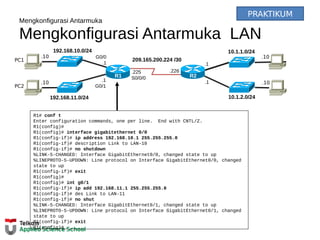
R1# conf t
Enter configuration commands, one per line. End with CNTL/Z.
R1(config)#
R1(config)# interface gigabitethernet 0/0
R1(config-if)# ip address 192.168.10.1 255.255.255.0
R1(config-if)# description Link to LAN-10
R1(config-if)# no shutdown
%LINK-5-CHANGED: Interface GigabitEthernet0/0, changed state to up
%LINEPROTO-5-UPDOWN: Line protocol on Interface GigabitEthernet0/0, changed
state to up
R1(config-if)# exit
R1(config)#
R1(config)# int g0/1
R1(config-if)# ip add 192.168.11.1 255.255.255.0
R1(config-if)# des Link to LAN-11
R1(config-if)# no shut
%LINK-5-CHANGED: Interface GigabitEthernet0/1, changed state to up
%LINEPROTO-5-UPDOWN: Line protocol on Interface GigabitEthernet0/1, changed
state to up
R1(config-if)# exit
R1(config)#
PRAKTIKUM
Mengkonfigurasi Antarmuka
Verifikasi Konfigurasi Antarmuka
192.168.10.0/24
R2
192.168.11.0/24
10.1.1.0/24
10.1.2.0/24
209.165.200.224 /30
.226
.10
.10
.10
.10
.1
.1.1
G0/1
.225
S0/0/0
G0/0
.1
R1
PC1
PC2
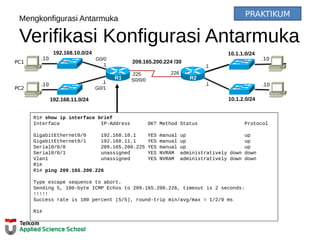
R1# show ip interface brief
Interface IP-Address OK? Method Status Protocol
GigabitEthernet0/0 192.168.10.1 YES manual up up
GigabitEthernet0/1 192.168.11.1 YES manual up up
Serial0/0/0 209.165.200.225 YES manual up up
Serial0/0/1 unassigned YES NVRAM administratively down down
Vlan1 unassigned YES NVRAM administratively down down
R1#
R1# ping 209.165.200.226
Type escape sequence to abort.
Sending 5, 100-byte ICMP Echos to 209.165.200.226, timeout is 2 seconds:
!!!!!
Success rate is 100 percent (5/5), round-trip min/avg/max = 1/2/9 ms
R1#
PRAKTIKUM
Mengkonfigurasi Router Cisco
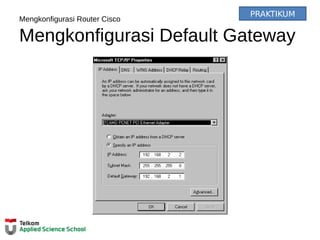
Mengkonfigurasi Default Gateway
PRAKTIKUM
Mengkonfigurasi Default Gateway
Default Gateway pada Host
192.168.10.0/24
192.168.11.0/24
G0/1
.1
.1
G0/0
R1
.10
PC1
.10
PC2
.10
PC4
.10
PC3
192.168.10.0/24
192.168.11.0/24
G0/1
.1
.1
G0/0
R1
.10
PC1
.11
PC2
.11
PC4
.10
PC3
Mengkonfigurasi Default Gateway
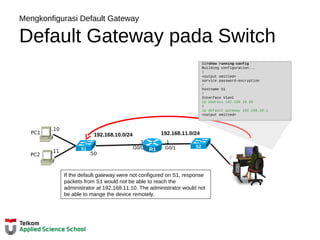
Default Gateway pada Switch
192.168.11.0/24
.1
G0/1
.1
G0/0 R1
192.168.10.0/24
.10
PC1
.11
PC2
S1#show running-config
Building configuration...
!
<output omitted>
service password-encryption
!
hostname S1
!
Interface Vlan1
ip address 192.168.10.50
!
ip default-gateway 192.168.10.1
<output omitted>
S1
S2
.50
If the default gateway were not configured on S1, response
packets from S1 would not be able to reach the
administrator at 192.168.11.10. The administrator would not
be able to mange the device remotely.
Layer Network
Simpulan
Pada Chapter ini, Anda belajar:
• Layer network, atau OSI Layer 3, menyediakan layanan agar
devais ujung dapat bertukar data melalui jaringan.
• Layer network menggunakan empat proses dasar : IP
addressing untuk devais ujung, enkapsulasi, peroutingan,
dan de-enkapsulasi.
• Sebagian besar Internet berbasis IPv4, yang masih
digunakan luas sebagai protokol layer network.
• Paket IPv4 mengandung header IP dan payload.
• Header IPv6 yang telah disederhanakan menawarkan
beberapa keunggulan dibanding IPv4, mencakup efisiensi
routing yang lebih baik, ekstensi header yang
tersederhanakan, dan kapabilitas untuk pemrosesan per-flow
Layer Network
Simpulan
Pada chapter ini, Anda belajar:
• Sebagai tambahan pada pengalamatan hirarkikal, layer
network juga bertanggungjawab untuk perutingan.
• Host membutuhkan tabel routing lokal untuk memastikan
paket telah diarahkan ke jaringan tujuan yang tepat.
• Route default lokal adalah route menuju default gateway.
• Default gateway adalah IP address dari antarmuka router
yang terhubung ke jaringan lokal.
• Ketika router, seperti default gateway, menerima packet,
akan melihat IP address tujuan untuk menentukan jaringan
tujuan.
Layer Network
Simpulan
Pada chapter ini, kamu belajar:
• Tabel routing dari sebuah router menyimpan informasi
tentang rute directly-connected dan route remote dari
jaringan IP. Jika router memiliki sebuah entri dalam routing
tabelnya untuk jaringan tujuan, router akan mem-forward
paket. Jika tidak ada entri, router akan mem-forward paket ke
router default route jika sudah terkonfigurasi, jika tidak maka
paket akan didrop.
• Entri dari tabel Routing dapat dikonfigurasi secara manual
pada tiap router untuk menyediakan routing static atau
router dapat bertukar data router dengan sesama router
secara dinamis menggunakan protokol routing.
• Agar router dapat dijangkau, antarmuka haruslah
dikonfigurasi terlebih dahulu.
06   tk 1073 network layer

06 tk 1073 network layer

  • 1.
    CCNA Exploration v5.0 Networkfundamentals TK 1073 – Jaringan Komputer Semester Ganjil 2015 - 2016 CCNA Exploration v5.0 Network fundamentals TK 1073 – Jaringan Komputer Semester Ganjil 2015 - 2016 Cisco AcademyCisco Academy Hanya dipergunakan untuk kepentingan pengajaran di lingkungan Telkom Applied Science School Chapter 6: Network Layer
  • 2.
    Chapter 6: Objektif Mahasiswaakan mampu:  Menjelaskan bagaimana protokol layer network dan layanan mendukung komunikasi melalui jaringan – jaringan data.  Menjelaskan bagaimana routers menghubungkan koneksi end-to-end dalam industri jaringan skala kecil ke menengah.  Menentukan devais yang tepat untuk merutekan trafik dalam industri jaringan ukuran kecil ke menengah.  Konfigurasi router di level dasar.
  • 3.
    Chapter 6 – 6.1Protokol Layer Network – 6.2 Routing – 6.3 Router – 6.4 Mengkonfigurasi Router Cisco – 6.5 Simpulan
  • 4.
  • 5.
    Protokol Layer Network LayerNetwork dalam Komunikasi
  • 6.
    Layer Network dalamKomunikasi Layer Network End to End Transport processes • Addressing end devices • Encapsulation • Routing • De-encapsulating
  • 7.
    Layer Network dalamKomunikasi Protokol Layer Network Protokol Layer Network yang Umum Dipakai: • Internet Protocol version 4 (IPv4) • Internet Protocol version 6 (IPv6) Protokol Legacy Novell Network Layer Internetwork Packet Exchange (IPX) • AppleTalk • Connectionless Network Service (CLNS/DECNet)
  • 8.
  • 9.
  • 10.
    Karakteristik Protokol IP IP– Best Effort Delivery
  • 11.
    Karakteristik Protokol IP IP– Media Independent
  • 12.
  • 13.
    Paket IPv4 IPv4 PacketHeader Version, Differentiated Services (DS), Time-to-Live (TTL),Protocol, Source IP Address, Destination IP Address Version IP Header Length Differentiated Services Total Length DSCP ECN Identification Flag Fragment Offset Time To Live Protocol Header Checksum Source IP Address Destination IP Address Options (optional) Padding Byte 1 Byte 2 Byte 3 Byte 4
  • 14.
    Paket IPv4 IPv4 HeaderFields Internet Header Length (IHL), Total Length, Header Checksum, Identification, Flags, Fragment Offset Version IP Header Length Differentiated Services Total Length DSCP ECN Identification Flag Fragment Offset Time To Live Protocol Header Checksum Source IP Address Destination IP Address Options (optional) Padding Byte 1 Byte 2 Byte 3 Byte 4
  • 15.
    Paket IPv4 Sample IPv4Headers PRAKTIKUM
  • 16.
    Layer Network dalamKomunikasi Kekurangan IPv4 • IP Address bisa habis • Perluasan tabel routing Internet • Kurangnya konektivitas end-to-end
  • 17.
    Layer Network dalamKomunikasi Memperkenalkan IPv6 • Ruang alamat yang lebih besar • Packet handling yang lebih baik • NAT Tidak memerlukan NAT • Sudah terintegrasi dengan security • 4 miliar alamat IPv4 4,000,000,000 • 340 undecillion alamat IPv6 addresses 340,000,000,000,000,000,000,000,000,000,000,000 ,000
  • 18.
  • 19.
    Paket IPv6 IPv6 PacketHeader Version Traffic Class Flow Label Payload Length Next Header Hop Limit Source IP Address Destination IP Address Byte 1 Byte 2 Byte 3 Byte 4
  • 20.
    Packet IPv6 Sample IPv6Header PRAKTIKUM
  • 21.
  • 22.
    Host Table Routing HostPacket Forwarding Decision
  • 23.
    Host Tabel Routing DefaultGateway Host harus menjaga tabel routing lokal mereka untuk memastikan paket layer network ditujukan ke jaringan tujuan yang tepat. Tabel lokal dari host biasanya berisi : • Direct connection • Local network route • Local default route R
  • 24.
    Host Tabel Routing IPv4Host Routing Table PRAKTIKUM
  • 25.
    Host Tabel Routing SampleIPv4 Host Routing Table PRAKTIKUM
  • 26.
    Host Tabel Routing SampleIPv6 Host Routing Table PRAKTIKUM
  • 27.
    Tabel Routing Router RouterPacket Forwarding Decision
  • 28.
    Tabel Routing Router IPv4Router Routing Table R1#show ip route Codes: L - local, C - connected, S - static, R - RIP, M - mobile, B - BGP D - EIGRP, EX - EIGRP external, O - OSPF, IA - OSPF inter area N1 - OSPF NSSA external type 1, N2 - OSPF NSSA external type 2 E1 - OSPF external type 1, E2 - OSPF external type 2, E - EGP i - IS-IS, L1 - IS-IS level-1, L2 - IS-IS level-2, ia - IS-IS inter area * - candidate default, U - per-user static route, o - ODR P - periodic downloaded static route Gateway of last resort is not set 10.0.0.0/8 is variably subnetted, 2 subnets, 2 masks D 10.1.1.0/24 [90/2170112] via 209.165.200.226, 00:00:05, Serial0/0/0 D 10.1.2.0/24 [90/2170112] via 209.165.200.226, 00:00:05, Serial0/0/0 192.168.10.0/24 is variably subnetted, 2 subnets, 3 masks C 192.168.10.0/24 is directly connected, GigabitEthernet0/0 L 192.168.10.1/32 is directly connected, GigabitEthernet0/0 192.168.11.0/24 is variably subnetted, 2 subnets, 3 masks C 192.168.11.0/24 is directly connected, GigabitEthernet0/1 L 192.168.11.1/32 is directly connected, GigabitEthernet0/1 209.165.200.0/24 is variably subnetted, 2 subnets, 3 masks C 209.165.200.224/30 is directly connected, Serial0/0/0 L 209.165.200.225/32 is directly connected, Serial0/0/0 R1# 192.168.10.0/24 R2 192.168.11.0/24 10.1.1.0/24 10.1.2.0/24 209.165.200.224 /30 .226 .10 .10 .10 .10 .1 .1.1 G0/1 .225 S0/0/0 G0/0 .1 R1 PC1 PC2 PRAKTIKUM
  • 29.
    Tabel Routing Router DirectlyConnected Routing Table Entries C 192.168.10.0/24 is directly connected, GigabitEthernet0/0 L 192.168.10.1/32 is directly connected, GigabitEthernet0/0 A B C A Identifies how the network was learned by the router. B Identifies the destination network and how it is connected. C Identifies the interface on the router connected to the destination network. 192.168.10.0/24 R2 192.168.11.0/24 10.1.1.0/24 10.1.2.0/24 209.165.200.224 /30 .226 .10 .10 .10 .10 .1 .1 64.100.0.1 .1 G0/1 .225 S0/0/0 G0/0 .1 R1 PC1 PC2
  • 30.
    Tabel Routing Router RemoteNetwork Routing Table Entries D 10.1.1.0/24 [90/2170112] via 209.165.200.226, 00:00:05, Serial0/0/0 A Identifies how the network was learned by the router. B Identifies the destination network. C Identifies the administrative distance (trustworthiness) of the route source. D Identifies the metric to reach the remote network. E Identifies the next hop IP address to reach the remote network. F Identifies the amount of elapsed time since the network was discovered. G Identifies the outgoing interface on the router to reach the destination 192.168.10.0/24 R2 192.168.11.0/24 10.1.1.0/24 10.1.2.0/24 209.165.200.224 /30 .226 .10 .10 .10 .10 .1 .1 64.100.0.1 .1 G0/1 .225 S0/0/0 G0/0 .1 R1 PC1 PC2
  • 31.
    Tabel Routing Router Next-HopAddress 192.168.10.0/24 R2 192.168.11.0/24 10.1.1.0/24 10.1.2.0/24 209.165.200.224 /30 .226 .10 .10 .10 .10 .1 .1 64.100.0.1 .1 G0/1 .225 S0/0/0 G0/0 .1 R1 PC1 PC2 R1#show ip route Codes: L - local, C - connected, S - static, R - RIP, M - mobile, B - BGP D - EIGRP, EX - EIGRP external, O - OSPF, IA - OSPF inter area N1 - OSPF NSSA external type 1, N2 - OSPF NSSA external type 2 E1 - OSPF external type 1, E2 - OSPF external type 2, E - EGP i - IS-IS, L1 - IS-IS level-1, L2 - IS-IS level-2, ia - IS-IS inter area * - candidate default, U - per-user static route, o - ODR P - periodic downloaded static route Gateway of last resort is not set 10.0.0.0/8 is variably subnetted, 2 subnets, 2 masks D 10.1.1.0/24 [90/2170112] via 209.165.200.226, 00:00:05, Serial0/0/0 D 10.1.2.0/24 [90/2170112] via 209.165.200.226, 00:00:05, Serial0/0/0 192.168.10.0/24 is variably subnetted, 2 subnets, 3 masks C 192.168.10.0/24 is directly connected, GigabitEthernet0/0 L 192.168.10.1/32 is directly connected, GigabitEthernet0/0 192.168.11.0/24 is variably subnetted, 2 subnets, 3 masks C 192.168.11.0/24 is directly connected, GigabitEthernet0/1 L 192.168.11.1/32 is directly connected, GigabitEthernet0/1 209.165.200.0/24 is variably subnetted, 2 subnets, 3 masks C 209.165.200.224/30 is directly connected, Serial0/0/0 L 209.165.200.225/32 is directly connected, Serial0/0/0 R1#
  • 32.
  • 33.
  • 34.
  • 35.
    Anatomi Router Memori Router Memor y Volatile/ Non-Volatile Stores RAM Volatile • Running IOS • Running configuration file • IP routing and ARP tables • Packet buffer ROM Non-Volatile • Bootup instructions • Basic diagnostic software • Limited IOS NVRAM Non-Volatile • Startup configuration file Flash Non-Volatile • IOS • Other system files
  • 36.
  • 37.
    Anatomi Router Bagian BelakangRouter Two 4 GB flash card slots Double-wide eHWIC slots eHWIC 0 AUX port LAN interfaces USB Ports Console USB Type B Console RJ45
  • 38.
    Anatomi Router Terhubung keRouter WAN Interface AUX port LAN interfaces Console USB Type B Console RJ45
  • 39.
    Anatomi Router Antarmuka LANdan WAN Serial interfaces LAN interfaces
  • 40.
  • 41.
  • 42.
    Boot-up Router Router BootupProcess System Bootstrap, Version 15.0(1r)M15, RELEASE SOFTWARE (fc1) Technical Support: http://www.cisco.com/techsupport <output omitted> 1.Melakukan POST dan load program bootstrap 2.Mencari dan me- load software Cisco IOS 3.Mencari dan me-load File startup configuration atau masuk mode setup
  • 43.
    Boot-up Router Show VersionsOutputRouter# show version Cisco IOS Software, C1900 Software (C1900-UNIVERSALK9-M), Version 15.2(4)M1, RELEASE SOFTWARE (fc1) Technical Support: http://www.cisco.com/techsupport Copyright (c) 1986-2012 by Cisco Systems, Inc. Compiled Thu 26-Jul-12 19:34 by prod_rel_team ROM: System Bootstrap, Version 15.0(1r)M15, RELEASE SOFTWARE (fc1) Router uptime is 10 hours, 9 minutes System returned to ROM by power-on System image file is "flash0:c1900-universalk9-mz.SPA.152-4.M1.bin" Last reload type: Normal Reload Last reload reason: power-on <Output omitted> Cisco CISCO1941/K9 (revision 1.0) with 446464K/77824K bytes of memory. Processor board ID FTX1636848Z 2 Gigabit Ethernet interfaces 2 Serial(sync/async) interfaces 1 terminal line DRAM configuration is 64 bits wide with parity disabled. 255K bytes of non-volatile configuration memory. 250880K bytes of ATA System CompactFlash 0 (Read/Write) <Output omitted> Technology Package License Information for Module:'c1900' ----------------------------------------------------------------- Technology Technology-package Technology-package Current Type Next reboot ------------------------------------------------------------------ ipbase ipbasek9 Permanent ipbasek9 security None None None data None None None Configuration register is 0x2142 (will be 0x2102 at next reload) Router# PRAKTIKUM
  • 44.
  • 45.
    Configure Settingan Awal Langkah– Langkah Mengkonfigurasi Router Router> enable Router# configure terminal Enter configuration commands, one per line. End with CNTL/Z. Router(config)# hostname R1 R1(config)# 192.168.10.0/24 R2 192.168.11.0/24 10.1.1.0/24 10.1.2.0/24 209.165.200.224 /30 .226 .10 .10 .10 .10 .1 .1.1 G0/1 .225 S0/0/0 G0/0 .1 R1 PC1 PC2 Router> en Router# conf t Enter configuration commands, one per line. End with CNTL/Z. Router(config)# ho R1 R2(config)# OR R1(config)# enable secret class R1(config)# R1(config)# line console 0 R1(config-line)# password cisco R1(config-line)# login R1(config-line)# exit R1(config)# R1(config)# line vty 0 4 R1(config-line)# password cisco R1(config-line)# login R1(config-line)# exit R1(config)# R1(config)# service password-encryption R1(config)# R1(config)# banner motd # Enter TEXT message. End with the character '#'. *********************************************** WARNING: Unauthorized access is prohibited! *********************************************** # R1(config)# R1# copy running-config startup-config Destination filename [startup-config]? Building configuration... [OK] R1# PRAKTIKUM
  • 46.
    Mengkonfigurasi Antarmuka Mengkonfigurasi AntarmukaLAN 192.168.10.0/24 R2 192.168.11.0/24 10.1.1.0/24 10.1.2.0/24 209.165.200.224 /30 .226 .10 .10 .10 .10 .1 .1.1 G0/1 .225 S0/0/0 G0/0 .1 R1 PC1 PC2 R1# conf t Enter configuration commands, one per line. End with CNTL/Z. R1(config)# R1(config)# interface gigabitethernet 0/0 R1(config-if)# ip address 192.168.10.1 255.255.255.0 R1(config-if)# description Link to LAN-10 R1(config-if)# no shutdown %LINK-5-CHANGED: Interface GigabitEthernet0/0, changed state to up %LINEPROTO-5-UPDOWN: Line protocol on Interface GigabitEthernet0/0, changed state to up R1(config-if)# exit R1(config)# R1(config)# int g0/1 R1(config-if)# ip add 192.168.11.1 255.255.255.0 R1(config-if)# des Link to LAN-11 R1(config-if)# no shut %LINK-5-CHANGED: Interface GigabitEthernet0/1, changed state to up %LINEPROTO-5-UPDOWN: Line protocol on Interface GigabitEthernet0/1, changed state to up R1(config-if)# exit R1(config)# PRAKTIKUM
  • 47.
    Mengkonfigurasi Antarmuka Verifikasi KonfigurasiAntarmuka 192.168.10.0/24 R2 192.168.11.0/24 10.1.1.0/24 10.1.2.0/24 209.165.200.224 /30 .226 .10 .10 .10 .10 .1 .1.1 G0/1 .225 S0/0/0 G0/0 .1 R1 PC1 PC2 R1# show ip interface brief Interface IP-Address OK? Method Status Protocol GigabitEthernet0/0 192.168.10.1 YES manual up up GigabitEthernet0/1 192.168.11.1 YES manual up up Serial0/0/0 209.165.200.225 YES manual up up Serial0/0/1 unassigned YES NVRAM administratively down down Vlan1 unassigned YES NVRAM administratively down down R1# R1# ping 209.165.200.226 Type escape sequence to abort. Sending 5, 100-byte ICMP Echos to 209.165.200.226, timeout is 2 seconds: !!!!! Success rate is 100 percent (5/5), round-trip min/avg/max = 1/2/9 ms R1# PRAKTIKUM
  • 48.
  • 49.
    Mengkonfigurasi Default Gateway DefaultGateway pada Host 192.168.10.0/24 192.168.11.0/24 G0/1 .1 .1 G0/0 R1 .10 PC1 .10 PC2 .10 PC4 .10 PC3 192.168.10.0/24 192.168.11.0/24 G0/1 .1 .1 G0/0 R1 .10 PC1 .11 PC2 .11 PC4 .10 PC3
  • 50.
    Mengkonfigurasi Default Gateway DefaultGateway pada Switch 192.168.11.0/24 .1 G0/1 .1 G0/0 R1 192.168.10.0/24 .10 PC1 .11 PC2 S1#show running-config Building configuration... ! <output omitted> service password-encryption ! hostname S1 ! Interface Vlan1 ip address 192.168.10.50 ! ip default-gateway 192.168.10.1 <output omitted> S1 S2 .50 If the default gateway were not configured on S1, response packets from S1 would not be able to reach the administrator at 192.168.11.10. The administrator would not be able to mange the device remotely.
  • 51.
    Layer Network Simpulan Pada Chapterini, Anda belajar: • Layer network, atau OSI Layer 3, menyediakan layanan agar devais ujung dapat bertukar data melalui jaringan. • Layer network menggunakan empat proses dasar : IP addressing untuk devais ujung, enkapsulasi, peroutingan, dan de-enkapsulasi. • Sebagian besar Internet berbasis IPv4, yang masih digunakan luas sebagai protokol layer network. • Paket IPv4 mengandung header IP dan payload. • Header IPv6 yang telah disederhanakan menawarkan beberapa keunggulan dibanding IPv4, mencakup efisiensi routing yang lebih baik, ekstensi header yang tersederhanakan, dan kapabilitas untuk pemrosesan per-flow
  • 52.
    Layer Network Simpulan Pada chapterini, Anda belajar: • Sebagai tambahan pada pengalamatan hirarkikal, layer network juga bertanggungjawab untuk perutingan. • Host membutuhkan tabel routing lokal untuk memastikan paket telah diarahkan ke jaringan tujuan yang tepat. • Route default lokal adalah route menuju default gateway. • Default gateway adalah IP address dari antarmuka router yang terhubung ke jaringan lokal. • Ketika router, seperti default gateway, menerima packet, akan melihat IP address tujuan untuk menentukan jaringan tujuan.
  • 53.
    Layer Network Simpulan Pada chapterini, kamu belajar: • Tabel routing dari sebuah router menyimpan informasi tentang rute directly-connected dan route remote dari jaringan IP. Jika router memiliki sebuah entri dalam routing tabelnya untuk jaringan tujuan, router akan mem-forward paket. Jika tidak ada entri, router akan mem-forward paket ke router default route jika sudah terkonfigurasi, jika tidak maka paket akan didrop. • Entri dari tabel Routing dapat dikonfigurasi secara manual pada tiap router untuk menyediakan routing static atau router dapat bertukar data router dengan sesama router secara dinamis menggunakan protokol routing. • Agar router dapat dijangkau, antarmuka haruslah dikonfigurasi terlebih dahulu.