
By: Daniel Bragais
   DHTML simply means dynamic
    HTML.


Dynamic = changes each time it is
  viewed, constantly changing. Like a
  flowing river. 
   It is not a language, in the
    sense HTML is a
    Language that creates
    Web pages or that
    JavaScript create codes
    that add interactivity to
    HTML documents.
   Instead, DHTML is a collection
    of technologies that supports
    HTML and extends the
    interactive capabilities of
    browsers.
   Remember that HTML is a Static
    and is mainly a language for
    Structuring and presenting Web
    page content. Web pages only
    acquire interactivity when
    JavaScript codes are introduced,
    for example
•    Some of the most
    commonly used
    technologies include

   JavaScript
    CSS
   Document Object Model(DOM)
   XHTML.
   Therefore, DHTML does the
    following:

   Works with JavaScript
   Works with Data Object Model
    (DOM)
   Works with CSS
   Combines HTML with JavaScript
Document Object Model
       Provides a
way to TREAT individual
       elements in

      HTML
       as objects.
   You can also think of DOM as a map
    of your HTML document, with each
    element acting as a marker. Once that
    marker is set into place, it becomes
    easy for JavaScript to work on this
    marker, communicate with it, and get
    feedback from it.
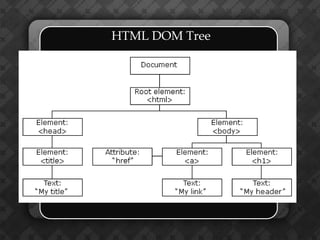
HTML DOM Tree
   Since HTML provides structures for
    element in your Webpage. DOM also
    recognizes the structure of an HTML
    document. As HTML elements may
    be placed within other elements,
    DOM reads the HTML structure as a
    map. It sees the map as composed of
    sections, and within each section are
    subsections and their elements.
How to Set Up a Document Object
Consider each element in your HTML as
  an Object. DOM reads each HTML
  element as a unique object and as a
  node within your structure. However,
  to set an element as a document you
  must give it its unique identity by
  using ID attribute. This can be done
  This Ways:
   IDs are mainly used in HTML for
    layout purposes and to identify the
    unique elements in your HTML code.
    Because it is a unique identifier, each
    ID can be used only once in the page
    in defining specific elements.

                 id
    Specifies a unique id for the element.
    Naming rules: Must contain at least
    one character

    Must not contain any space characters

    In HTML, all values are case-
    insensitive
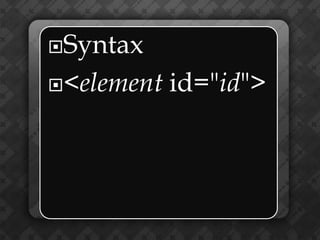
Syntax

<element   id="id">
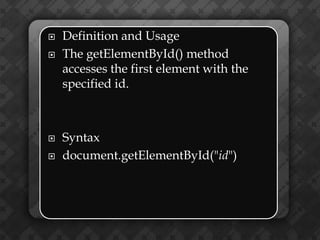
   Definition and Usage
   The getElementById() method
    accesses the first element with the
    specified id.


   Syntax
   document.getElementById("id")
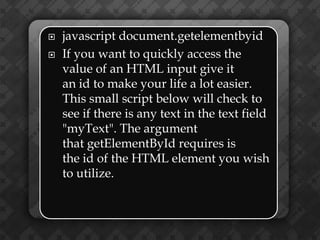
   javascript document.getelementbyid
   If you want to quickly access the
    value of an HTML input give it
    an id to make your life a lot easier.
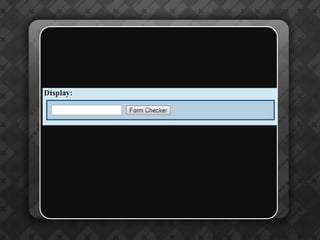
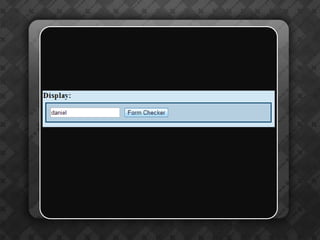
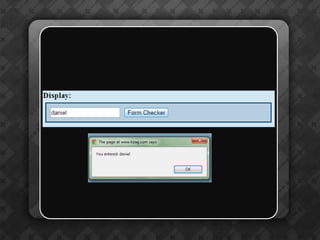
    This small script below will check to
    see if there is any text in the text field
    "myText". The argument
    that getElementById requires is
    the id of the HTML element you wish
    to utilize.
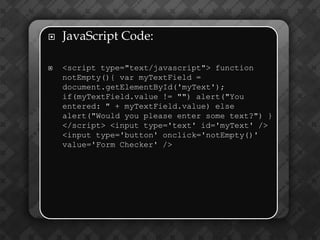
   JavaScript Code:

   <script type="text/javascript"> function
    notEmpty(){ var myTextField =
    document.getElementById('myText');
    if(myTextField.value != "") alert("You
    entered: " + myTextField.value) else
    alert("Would you please enter some text?") }
    </script> <input type='text' id='myText' />
    <input type='button' onclick='notEmpty()'
    value='Form Checker' />
   document.getElementById returned a
    reference to our HTML
    element myText. We stored this
    reference into a variable, myTextField,
    and then used the valueproperty that
    all input elements have to use to grab
    the value the user enters.
   There are other ways to accomplish
    what the above script does, but this is
    definitely a straight-forward and
    browser-compatible approach.
Thank
         you!!!
       dan_brgs87@yahoo.com

www.codecademy.com/groups/danlike
 dojo/invite/7e343de793e7752aabb734
             dc624eb319

Introduction to DOM

  • 1.
  • 2.
    DHTML simply means dynamic HTML. Dynamic = changes each time it is viewed, constantly changing. Like a flowing river. 
  • 3.
    It is not a language, in the sense HTML is a Language that creates Web pages or that JavaScript create codes that add interactivity to HTML documents.
  • 4.
    Instead, DHTML is a collection of technologies that supports HTML and extends the interactive capabilities of browsers.
  • 5.
    Remember that HTML is a Static and is mainly a language for Structuring and presenting Web page content. Web pages only acquire interactivity when JavaScript codes are introduced, for example
  • 6.
    Some of the most commonly used technologies include  JavaScript  CSS  Document Object Model(DOM)  XHTML.
  • 7.
    Therefore, DHTML does the following:  Works with JavaScript  Works with Data Object Model (DOM)  Works with CSS  Combines HTML with JavaScript
  • 8.
    Document Object Model Provides a way to TREAT individual elements in HTML as objects.
  • 9.
    You can also think of DOM as a map of your HTML document, with each element acting as a marker. Once that marker is set into place, it becomes easy for JavaScript to work on this marker, communicate with it, and get feedback from it.
  • 10.
  • 11.
    Since HTML provides structures for element in your Webpage. DOM also recognizes the structure of an HTML document. As HTML elements may be placed within other elements, DOM reads the HTML structure as a map. It sees the map as composed of sections, and within each section are subsections and their elements.
  • 12.
    How to SetUp a Document Object
  • 13.
    Consider each elementin your HTML as an Object. DOM reads each HTML element as a unique object and as a node within your structure. However, to set an element as a document you must give it its unique identity by using ID attribute. This can be done This Ways:
  • 14.
    IDs are mainly used in HTML for layout purposes and to identify the unique elements in your HTML code. Because it is a unique identifier, each ID can be used only once in the page in defining specific elements.
  • 15.
    id Specifies a unique id for the element. Naming rules: Must contain at least one character  Must not contain any space characters  In HTML, all values are case- insensitive
  • 16.
  • 17.
    Definition and Usage  The getElementById() method accesses the first element with the specified id.  Syntax  document.getElementById("id")
  • 18.
    javascript document.getelementbyid  If you want to quickly access the value of an HTML input give it an id to make your life a lot easier. This small script below will check to see if there is any text in the text field "myText". The argument that getElementById requires is the id of the HTML element you wish to utilize.
  • 19.
    JavaScript Code:  <script type="text/javascript"> function notEmpty(){ var myTextField = document.getElementById('myText'); if(myTextField.value != "") alert("You entered: " + myTextField.value) else alert("Would you please enter some text?") } </script> <input type='text' id='myText' /> <input type='button' onclick='notEmpty()' value='Form Checker' />
  • 23.
    document.getElementById returned a reference to our HTML element myText. We stored this reference into a variable, myTextField, and then used the valueproperty that all input elements have to use to grab the value the user enters.  There are other ways to accomplish what the above script does, but this is definitely a straight-forward and browser-compatible approach.
  • 24.
    Thank you!!! dan_brgs87@yahoo.com www.codecademy.com/groups/danlike dojo/invite/7e343de793e7752aabb734 dc624eb319