DHTML
What is it? 
• Dynamic HTML. 
• Not a standard unlike HTML or Java 
• It is a term applied by both Netscape and 
Microsoft to a collection of technologies 
that they are developing for making HTML 
documents more dynamic and interactive.
DHTML features 
• Style sheets 
• Content positioning 
• DOM
Style sheets 
• A web page has two component: 
a. Content 
b. Presentation 
• Style sheets are used to specify the presentation 
part of the web page. 
• They are collection of style information that are 
applied to plain text. Style information include 
special effects(bold, italics, underline), color 
and alignment. 
• CSS2 – W3C
Advantage 
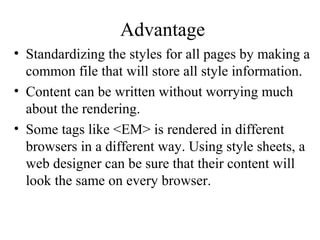
• Standardizing the styles for all pages by making a 
common file that will store all style information. 
• Content can be written without worrying much 
about the rendering. 
• Some tags like <EM> is rendered in different 
browsers in a different way. Using style sheets, a 
web designer can be sure that their content will 
look the same on every browser.
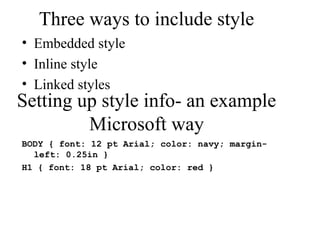
Three ways to include style 
• Embedded style 
• Inline style 
• Linked styles 
Setting up style info- an example 
Microsoft way 
BODY { font: 12 pt Arial; color: navy; margin-left: 
0.25in } 
H1 { font: 18 pt Arial; color: red }
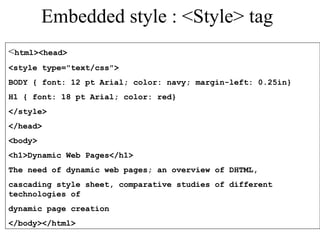
Embedded style : <Style> tag 
<html><head> 
<style type="text/css"> 
BODY { font: 12 pt Arial; color: navy; margin-left: 0.25in} 
H1 { font: 18 pt Arial; color: red} 
</style> 
</head> 
<body> 
<h1>Dynamic Web Pages</h1> 
The need of dynamic web pages; an overview of DHTML, 
cascading style sheet, comparative studies of different 
technologies of 
dynamic page creation 
</body></html>
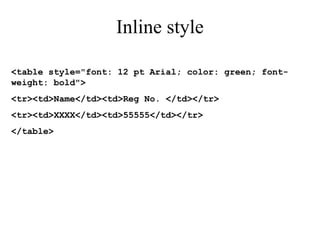
Inline style 
<table style="font: 12 pt Arial; color: green; font-weight: 
bold"> 
<tr><td>Name</td><td>Reg No. </td></tr> 
<tr><td>XXXX</td><td>55555</td></tr> 
</table>
Linked style 
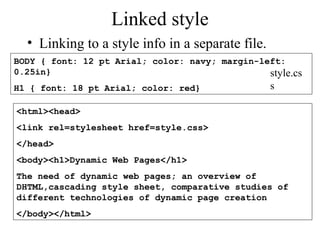
• Linking to a style info in a separate file. 
BODY { font: 12 pt Arial; color: navy; margin-left: 
0.25in} 
H1 { font: 18 pt Arial; color: red} 
style.cs 
s 
<html><head> 
<link rel=stylesheet href=style.css> 
</head> 
<body><h1>Dynamic Web Pages</h1> 
The need of dynamic web pages; an overview of 
DHTML,cascading style sheet, comparative studies of 
different technologies of dynamic page creation 
</body></html>
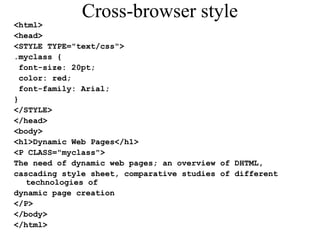
Cross-browser style 
<html> 
<head> 
<STYLE TYPE="text/css"> 
.myclass { 
font-size: 20pt; 
color: red; 
font-family: Arial; 
} 
</STYLE> 
</head> 
<body> 
<h1>Dynamic Web Pages</h1> 
<P CLASS="myclass"> 
The need of dynamic web pages; an overview of DHTML, 
cascading style sheet, comparative studies of different 
technologies of 
dynamic page creation 
</P> 
</body> 
</html>
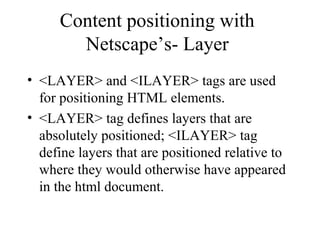
Content positioning with 
Netscape’s- Layer 
• <LAYER> and <ILAYER> tags are used 
for positioning HTML elements. 
• <LAYER> tag defines layers that are 
absolutely positioned; <ILAYER> tag 
define layers that are positioned relative to 
where they would otherwise have appeared 
in the html document.
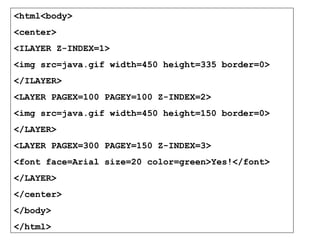
<html<body> 
<center> 
<ILAYER Z-INDEX=1> 
<img src=java.gif width=450 height=335 border=0> 
</ILAYER> 
<LAYER PAGEX=100 PAGEY=100 Z-INDEX=2> 
<img src=java.gif width=450 height=150 border=0> 
</LAYER> 
<LAYER PAGEX=300 PAGEY=150 Z-INDEX=3> 
<font face=Arial size=20 color=green>Yes!</font> 
</LAYER> 
</center> 
</body> 
</html>
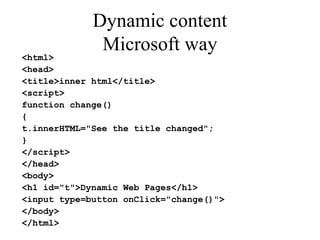
Dynamic content 
Microsoft way 
<html> 
<head> 
<title>inner html</title> 
<script> 
function change() 
{ 
t.innerHTML="See the title changed"; 
} 
</script> 
</head> 
<body> 
<h1 id="t">Dynamic Web Pages</h1> 
<input type=button onClick="change()"> 
</body> 
</html>

Dhtml

  • 1.
  • 2.
    What is it? • Dynamic HTML. • Not a standard unlike HTML or Java • It is a term applied by both Netscape and Microsoft to a collection of technologies that they are developing for making HTML documents more dynamic and interactive.
  • 3.
    DHTML features •Style sheets • Content positioning • DOM
  • 4.
    Style sheets •A web page has two component: a. Content b. Presentation • Style sheets are used to specify the presentation part of the web page. • They are collection of style information that are applied to plain text. Style information include special effects(bold, italics, underline), color and alignment. • CSS2 – W3C
  • 5.
    Advantage • Standardizingthe styles for all pages by making a common file that will store all style information. • Content can be written without worrying much about the rendering. • Some tags like <EM> is rendered in different browsers in a different way. Using style sheets, a web designer can be sure that their content will look the same on every browser.
  • 6.
    Three ways toinclude style • Embedded style • Inline style • Linked styles Setting up style info- an example Microsoft way BODY { font: 12 pt Arial; color: navy; margin-left: 0.25in } H1 { font: 18 pt Arial; color: red }
  • 7.
    Embedded style :<Style> tag <html><head> <style type="text/css"> BODY { font: 12 pt Arial; color: navy; margin-left: 0.25in} H1 { font: 18 pt Arial; color: red} </style> </head> <body> <h1>Dynamic Web Pages</h1> The need of dynamic web pages; an overview of DHTML, cascading style sheet, comparative studies of different technologies of dynamic page creation </body></html>
  • 8.
    Inline style <tablestyle="font: 12 pt Arial; color: green; font-weight: bold"> <tr><td>Name</td><td>Reg No. </td></tr> <tr><td>XXXX</td><td>55555</td></tr> </table>
  • 9.
    Linked style •Linking to a style info in a separate file. BODY { font: 12 pt Arial; color: navy; margin-left: 0.25in} H1 { font: 18 pt Arial; color: red} style.cs s <html><head> <link rel=stylesheet href=style.css> </head> <body><h1>Dynamic Web Pages</h1> The need of dynamic web pages; an overview of DHTML,cascading style sheet, comparative studies of different technologies of dynamic page creation </body></html>
  • 10.
    Cross-browser style <html> <head> <STYLE TYPE="text/css"> .myclass { font-size: 20pt; color: red; font-family: Arial; } </STYLE> </head> <body> <h1>Dynamic Web Pages</h1> <P CLASS="myclass"> The need of dynamic web pages; an overview of DHTML, cascading style sheet, comparative studies of different technologies of dynamic page creation </P> </body> </html>
  • 11.
    Content positioning with Netscape’s- Layer • <LAYER> and <ILAYER> tags are used for positioning HTML elements. • <LAYER> tag defines layers that are absolutely positioned; <ILAYER> tag define layers that are positioned relative to where they would otherwise have appeared in the html document.
  • 12.
    <html<body> <center> <ILAYERZ-INDEX=1> <img src=java.gif width=450 height=335 border=0> </ILAYER> <LAYER PAGEX=100 PAGEY=100 Z-INDEX=2> <img src=java.gif width=450 height=150 border=0> </LAYER> <LAYER PAGEX=300 PAGEY=150 Z-INDEX=3> <font face=Arial size=20 color=green>Yes!</font> </LAYER> </center> </body> </html>
  • 13.
    Dynamic content Microsoftway <html> <head> <title>inner html</title> <script> function change() { t.innerHTML="See the title changed"; } </script> </head> <body> <h1 id="t">Dynamic Web Pages</h1> <input type=button onClick="change()"> </body> </html>