











JavaScript, Third Edition 
Chapter 5 
Introduction to the Document 
Object Model (DOM)
Objectives 
• Learn about dynamic Web pages 
• Study the Document Object Model (DOM) 
• Work with the Image object 
• Create animation with the Image object 
• Learn how to cache images 
JavaScript, Third Edition 2
Introduction 
JavaScript, Third Edition 3 
• Businesses want: 
– Web sites to include Formatting and images that can 
be updated without the user having to reload a Web 
page from the server 
– Innovative ways to use animation and interactive Web 
pages to attract and retain visitors 
– To make their Web sites effective and easy to navigate
Introduction (Cont.) 
• These kinds of effects: 
– Cannot be created with standard Extensible Hypertext 
Markup Language (XHTML) 
– Needs the use of Dynamic HTML (DHTML) 
• One of the most important aspects of DHTML is the 
Document Object Model (DOM) 
JavaScript, Third Edition 4
Creating Dynamic Web Pages 
JavaScript, Third Edition 5 
• Dynamic: 
– Web pages that respond to user requests through 
buttons or other kinds of controls 
– Various kinds of effects, such as animation, that 
appear automatically in a Web browser
Creating Dynamic Web Pages 
(Cont.) 
• A dynamic Web page can allow a user to: 
– Change the document background color 
– Submit a form and process a query 
– Participate in an online game or quiz 
JavaScript, Third Edition 6
Creating Dynamic Web Pages 
(Cont.) 
• To make Web pages truly dynamic, you need more 
than just XHTML 
– Need Dynamic HTML or (DHTML) 
JavaScript, Third Edition 7
Creating Dynamic Web Pages 
(Cont.) 
• Dynamic HTML (DHTML): 
– Refers to a combination of technologies that make 
Web pages dynamic 
• The term DHTML is: 
– Combination of JavaScript, XHTML, CSS, and the 
Document Object Model 
JavaScript, Third Edition 8
The Document Object Model 
• Is at the core of DHTML 
• Represents the Web page displayed in a window 
• Each element on a Web page is represented in the 
DOM by its own object 
• This makes it possible for a JavaScript program to: 
– Access individual elements on a Web page 
– Change elements individually, without having to 
reload the page from the server 
JavaScript, Third Edition 9
Document Object Properties 
JavaScript, Third Edition 10
Document Object Methods 
JavaScript, Third Edition 11
Document Object Methods (Cont.) 
JavaScript, Third Edition 12 
• Open() method: 
– Could be used to create a new document in a window 
or frame 
– Use the write() and writeln() methods to add content to 
the new document
Document Object Methods (Cont.) 
• The close() method: 
– Notifies the Web browser that 
• You are finished writing to the window or frame 
• The document should be displayed 
JavaScript, Third Edition 13
The Image Object 
• Represents an image created using the <img> element 
• Use to dynamically change an image displayed on a 
Web page 
• Image objects for each <img> element: 
– Assigned to elements of images[] array in the order 
they appear on the Web page 
JavaScript, Third Edition 14
The Image Object (Cont.) 
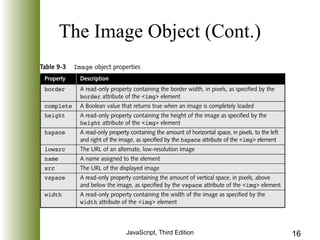
• An Image object contains various properties and 
events that you can use to manipulate your objects 
• The src property: 
– One of the most important parts of image object 
– Allows JavaScript to dynamically change an image 
– Changing assigned value also changes the src attribute 
associated with an <img> element 
• Dynamically changes an image displayed on a Web 
page 
JavaScript, Third Edition 15
The Image Object (Cont.) 
JavaScript, Third Edition 16
The Image Object (Cont.) 
JavaScript, Third Edition 17
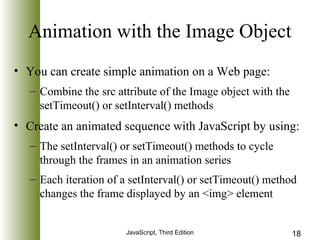
Animation with the Image Object 
• You can create simple animation on a Web page: 
– Combine the src attribute of the Image object with the 
setTimeout() or setInterval() methods 
• Create an animated sequence with JavaScript by using: 
– The setInterval() or setTimeout() methods to cycle 
through the frames in an animation series 
– Each iteration of a setInterval() or setTimeout() method 
changes the frame displayed by an <img> element 
JavaScript, Third Edition 18
Image Caching 
• Technique for eliminating multiple downloads of the 
same file 
• Temporarily stores image files in memory on a local 
computer 
• Allows JavaScript to store and retrieve an image from 
memory rather than download the image each time it is 
needed 
JavaScript, Third Edition 19
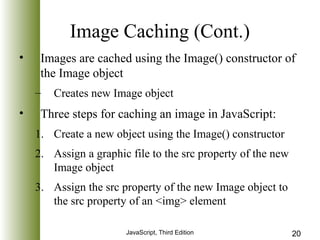
Image Caching (Cont.) 
• Images are cached using the Image() constructor of 
the Image object 
– Creates new Image object 
• Three steps for caching an image in JavaScript: 
1. Create a new object using the Image() constructor 
2. Assign a graphic file to the src property of the new 
JavaScript, Third Edition 20 
Image object 
3. Assign the src property of the new Image object to 
the src property of an <img> element
Chapter Summary 
• Dynamic HTML (DHTML): 
– Combination of technologies that make Web pages 
dynamic 
– DHTML is a combination of JavaScript, XHTML, 
CSS, and the Document Object Model 
• Document Object Model, or DOM: 
– At the core of DHTML 
– Represents the Web page displayed in a window 
JavaScript, Third Edition 21
Chapter Summary (cont.) 
• The open() method: 
– Creates a new document in a window or frame 
• The close() method: 
– Notifies Web browser that you are finished writing to 
the window or frame and that the document should be 
displayed 
• An Image object: 
– Represents an image created using the <img> element 
JavaScript, Third Edition 22
Chapter Summary (cont.) 
JavaScript, Third Edition 23 
• Src property: 
– One of the most important properties of the Image 
object 
– Allows JavaScript to change an image dynamically
Chapter Summary (cont.) 
JavaScript, Third Edition 24 
• Image caching: 
– Technique for eliminating multiple downloads of the 
same file 
– Temporarily stores image files in memory 
– Allows JavaScript to store and retrieve an image from 
memory rather than downloading the image each time 
it is needed
Chapter Summary (cont.) 
• Onload event handler of the Image: 
– Use it to be certain that all images are downloaded into 
a cache before commencing an animation sequence 
JavaScript, Third Edition 25

introduction to the document object model- Dom chapter5

  • 1.
    JavaScript, Third Edition Chapter 5 Introduction to the Document Object Model (DOM)
  • 2.
    Objectives • Learnabout dynamic Web pages • Study the Document Object Model (DOM) • Work with the Image object • Create animation with the Image object • Learn how to cache images JavaScript, Third Edition 2
  • 3.
    Introduction JavaScript, ThirdEdition 3 • Businesses want: – Web sites to include Formatting and images that can be updated without the user having to reload a Web page from the server – Innovative ways to use animation and interactive Web pages to attract and retain visitors – To make their Web sites effective and easy to navigate
  • 4.
    Introduction (Cont.) •These kinds of effects: – Cannot be created with standard Extensible Hypertext Markup Language (XHTML) – Needs the use of Dynamic HTML (DHTML) • One of the most important aspects of DHTML is the Document Object Model (DOM) JavaScript, Third Edition 4
  • 5.
    Creating Dynamic WebPages JavaScript, Third Edition 5 • Dynamic: – Web pages that respond to user requests through buttons or other kinds of controls – Various kinds of effects, such as animation, that appear automatically in a Web browser
  • 6.
    Creating Dynamic WebPages (Cont.) • A dynamic Web page can allow a user to: – Change the document background color – Submit a form and process a query – Participate in an online game or quiz JavaScript, Third Edition 6
  • 7.
    Creating Dynamic WebPages (Cont.) • To make Web pages truly dynamic, you need more than just XHTML – Need Dynamic HTML or (DHTML) JavaScript, Third Edition 7
  • 8.
    Creating Dynamic WebPages (Cont.) • Dynamic HTML (DHTML): – Refers to a combination of technologies that make Web pages dynamic • The term DHTML is: – Combination of JavaScript, XHTML, CSS, and the Document Object Model JavaScript, Third Edition 8
  • 9.
    The Document ObjectModel • Is at the core of DHTML • Represents the Web page displayed in a window • Each element on a Web page is represented in the DOM by its own object • This makes it possible for a JavaScript program to: – Access individual elements on a Web page – Change elements individually, without having to reload the page from the server JavaScript, Third Edition 9
  • 10.
    Document Object Properties JavaScript, Third Edition 10
  • 11.
    Document Object Methods JavaScript, Third Edition 11
  • 12.
    Document Object Methods(Cont.) JavaScript, Third Edition 12 • Open() method: – Could be used to create a new document in a window or frame – Use the write() and writeln() methods to add content to the new document
  • 13.
    Document Object Methods(Cont.) • The close() method: – Notifies the Web browser that • You are finished writing to the window or frame • The document should be displayed JavaScript, Third Edition 13
  • 14.
    The Image Object • Represents an image created using the <img> element • Use to dynamically change an image displayed on a Web page • Image objects for each <img> element: – Assigned to elements of images[] array in the order they appear on the Web page JavaScript, Third Edition 14
  • 15.
    The Image Object(Cont.) • An Image object contains various properties and events that you can use to manipulate your objects • The src property: – One of the most important parts of image object – Allows JavaScript to dynamically change an image – Changing assigned value also changes the src attribute associated with an <img> element • Dynamically changes an image displayed on a Web page JavaScript, Third Edition 15
  • 16.
    The Image Object(Cont.) JavaScript, Third Edition 16
  • 17.
    The Image Object(Cont.) JavaScript, Third Edition 17
  • 18.
    Animation with theImage Object • You can create simple animation on a Web page: – Combine the src attribute of the Image object with the setTimeout() or setInterval() methods • Create an animated sequence with JavaScript by using: – The setInterval() or setTimeout() methods to cycle through the frames in an animation series – Each iteration of a setInterval() or setTimeout() method changes the frame displayed by an <img> element JavaScript, Third Edition 18
  • 19.
    Image Caching •Technique for eliminating multiple downloads of the same file • Temporarily stores image files in memory on a local computer • Allows JavaScript to store and retrieve an image from memory rather than download the image each time it is needed JavaScript, Third Edition 19
  • 20.
    Image Caching (Cont.) • Images are cached using the Image() constructor of the Image object – Creates new Image object • Three steps for caching an image in JavaScript: 1. Create a new object using the Image() constructor 2. Assign a graphic file to the src property of the new JavaScript, Third Edition 20 Image object 3. Assign the src property of the new Image object to the src property of an <img> element
  • 21.
    Chapter Summary •Dynamic HTML (DHTML): – Combination of technologies that make Web pages dynamic – DHTML is a combination of JavaScript, XHTML, CSS, and the Document Object Model • Document Object Model, or DOM: – At the core of DHTML – Represents the Web page displayed in a window JavaScript, Third Edition 21
  • 22.
    Chapter Summary (cont.) • The open() method: – Creates a new document in a window or frame • The close() method: – Notifies Web browser that you are finished writing to the window or frame and that the document should be displayed • An Image object: – Represents an image created using the <img> element JavaScript, Third Edition 22
  • 23.
    Chapter Summary (cont.) JavaScript, Third Edition 23 • Src property: – One of the most important properties of the Image object – Allows JavaScript to change an image dynamically
  • 24.
    Chapter Summary (cont.) JavaScript, Third Edition 24 • Image caching: – Technique for eliminating multiple downloads of the same file – Temporarily stores image files in memory – Allows JavaScript to store and retrieve an image from memory rather than downloading the image each time it is needed
  • 25.
    Chapter Summary (cont.) • Onload event handler of the Image: – Use it to be certain that all images are downloaded into a cache before commencing an animation sequence JavaScript, Third Edition 25