SAP FI-CO Demo
Training Session 1
Dec 03, 2014
Trainer : K. Ram
Agenda
• Introduction to SAP R/3
• Modules in SAP R/3
• Integration of Modules
• Business Processes : what are they ?
• Financial Accounting basic settings
• Enterprise structure
• Key abbreviations and what they mean
• New GL
Introduction to SAP R/3
– Overview of the company
– What is ERP ?
– Evolution of ERP ?
– What does R/3 mean
Introduction to SAP
1972 1981 1991
1972
SAP formed by 5 ex
IBM Employees
Company called Systems Analysis and Program Development
1991
Company launches SAP R/3
3 Tier Architecture : Y2K Compliant
1981
Company product is an integrated
application software
Company name changed to Systems Applications and Products in Data Processing
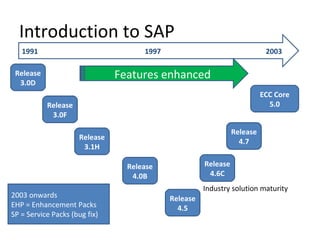
Introduction to SAP
1991 1997 2003
Release
3.0D
Release
3.0F
Release
3.1H
Release
4.0B
Release
4.5
Release
4.6C
2003 onwards
EHP = Enhancement Packs
SP = Service Packs (bug fix)
Release
4.7
ECC Core
5.0
Features enhanced
Industry solution maturity
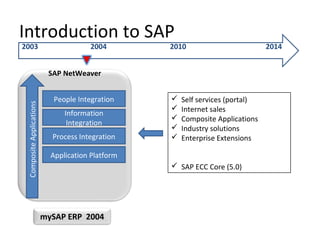
Introduction to SAP
2003 2004 2010 2014
SAP NetWeaver
mySAP ERP 2004
CompositeApplications
People Integration
Information
Integration
Process Integration
Application Platform
 Self services (portal)
 Internet sales
 Composite Applications
 Industry solutions
 Enterprise Extensions
 SAP ECC Core (5.0)
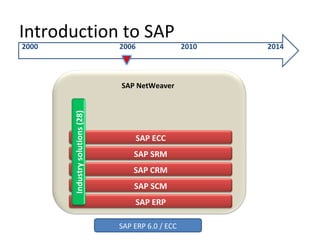
Introduction to SAP
2000 2006 2010 2014
SAP ERP 6.0 / ECC
SAP NetWeaver
SAP ERP
SAP SCM
SAP CRM
SAP SRM
SAP ECC
Industrysolutions(28)
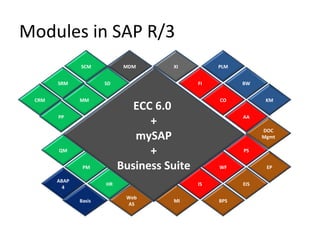
Modules in SAP R/3
XI
CO
AA
FI
DOC
Mgmt
BW
KM
PLM
IS
WF
PS
BPS
EIS
EP
MI
PM
HR
QM
Web
AS
ABAP
4
Basis
MDM
PP
MM
SD
ECC 6.0
+
mySAP
+
Business Suite
CRM
SRM
SCM
Modules in SAP R/3 : Biz Process
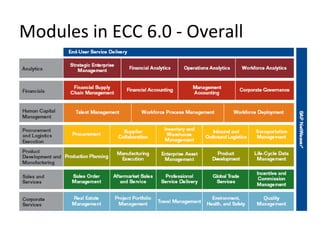
Modules in ECC 6.0 - Overall
FI-CO : Submodules (Upto ECC 5.0)
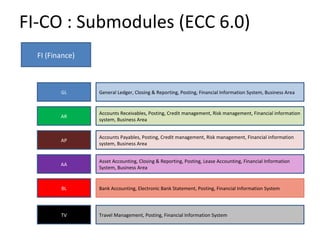
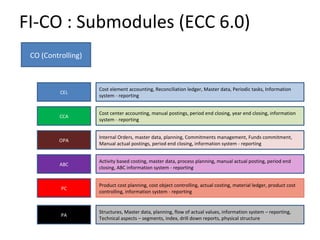
FI-CO : Submodules (ECC 6.0)
FI (Finance)
GL General Ledger, Closing & Reporting, Posting, Financial Information System, Business Area
AR
Accounts Receivables, Posting, Credit management, Risk management, Financial information
system, Business Area
AP
Accounts Payables, Posting, Credit management, Risk management, Financial information
system, Business Area
AA
Asset Accounting, Closing & Reporting, Posting, Lease Accounting, Financial Information
System, Business Area
BL Bank Accounting, Electronic Bank Statement, Posting, Financial Information System
TV Travel Management, Posting, Financial Information System
FI-CO : Submodules (ECC 6.0)
CO (Controlling)
CEL
Cost element accounting, Reconciliation ledger, Master data, Periodic tasks, Information
system - reporting
CCA
Cost center accounting, manual postings, period end closing, year end closing, information
system - reporting
OPA
Internal Orders, master data, planning, Commitments management, Funds commitment,
Manual actual postings, period end closing, information system - reporting
ABC
Activity based costing, master data, process planning, manual actual posting, period end
closing, ABC information system - reporting
PC
Product cost planning, cost object controlling, actual costing, material ledger, product cost
controlling, information system - reporting
PA
Structures, Master data, planning, flow of actual values, information system – reporting,
Technical aspects – segments, index, drill down reports, physical structure
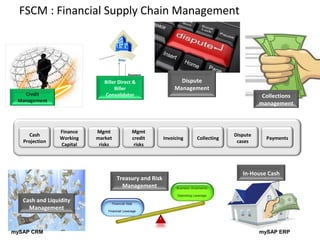
FSCM : Financial Supply Chain Management
Finance
Working
Capital
Cash
Projection
Mgmt
market
risks
Mgmt
credit
risks
Invoicing Collecting
Dispute
cases
Payments
Biller Direct &
Biller
Consolidator
Dispute
Management
Collections
management
Cash and Liquidity
Management
Treasury and Risk
Management
In-House Cash
mySAP ERPmySAP CRM
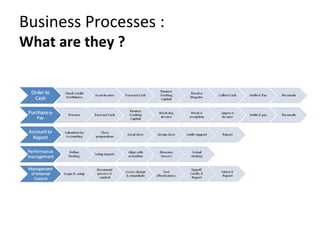
Business Processes :
What are they ?
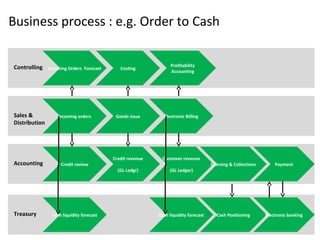
Business process : e.g. Order to Cash
Treasury Cash liquidity forecast Cash liquidity forecast Cash Positioning Electronic banking
Accounting Credit review
Customer revenue
(GL Ledger)
Dunning & Collections Payment
Credit revenue
(GL Ledgr)
Sales &
Distribution
Incoming orders Electronic BillingGoods issue
Controlling Incoming Orders Forecast
Profitability
Accounting
Costing
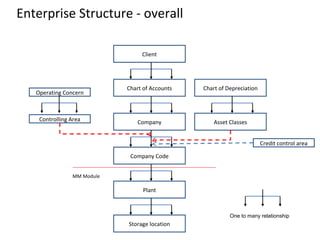
Enterprise Structure - overall
Client
Chart of Accounts
Company
Company Code
Plant
Storage location
MM Module
Chart of Depreciation
Asset Classes
Operating Concern
Controlling Area
Credit control area
One to many relationship
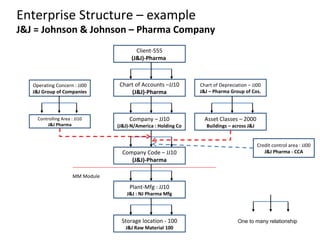
Enterprise Structure – example
J&J = Johnson & Johnson – Pharma Company
Client-555
(J&J)-Pharma
Chart of Accounts –JJ10
(J&J)-Pharma
Company – JJ10
(J&J)-N/America : Holding Co
Company Code – JJ10
(J&J)-Pharma
Plant-Mfg : JJ10
J&J : NJ Pharma Mfg
Storage location - 100
J&J Raw Material 100
MM Module
Chart of Depreciation – JJ00
J&J – Pharma Group of Cos.
Asset Classes – 2000
Buildings – across J&J
Operating Concern : JJ00
J&J Group of Companies
Controlling Area : JJ10
J&J Pharma
Credit control area : JJ00
J&J Pharma - CCA
One to many relationship
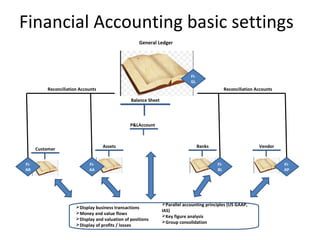
Financial Accounting basic settings
FI-
GL
P&LAccount
Balance Sheet
General Ledger
Customer
FI-
AR
Assets
FI-
AA
Banks
FI-
BL
Vendor
Reconciliation AccountsReconciliation Accounts
FI-
AP
Display business transactions
Money and value flows
Display and valuation of positions
Display of profits / losses
Parallel accounting principles (US GAAP,
IAS)
Key figure analysis
Group consolidation
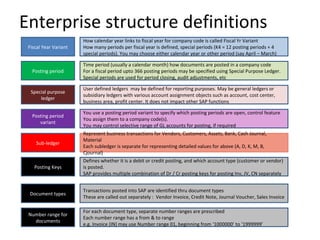
Enterprise structure definitions
Fiscal Year Variant
How calendar year links to fiscal year for company code is called Fiscal Yr Variant
How many periods per fiscal year is defined, special periods (K4 = 12 posting periods + 4
special periods). You may choose either calendar year or other period (say April – March)
Posting period
Time period (usually a calendar month) how documents are posted in a company code
For a fiscal period upto 366 posting periods may be specified using Special Purpose Ledger.
Special periods are used for period closing, audit adjustments, etc
Special purpose
ledger
User defined ledgers may be defined for reporting purposes. May be general ledgers or
subsidiary ledgers with various account assignment objects such as account, cost center,
business area, profit center. It does not impact other SAP functions
Posting period
variant
You use a posting period variant to specify which posting periods are open, control feature
You assign them to a company code(s).
You may control selective range of GL accounts for posting, if required
Sub-ledger
Represent business transactions for Vendors, Customers, Assets, Bank, Cash Journal,
Material
Each subledger is separate for representing detailed values for above (A, D, K, M, B,
Cjournal)
Posting Keys
Defines whether it is a debit or credit posting, and which account type (customer or vendor)
is posted.
SAP provides multiple combination of Dr / Cr posting keys for posting Inv, JV, CN separately
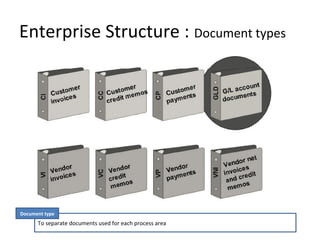
Document types
Transactions posted into SAP are identified thru document types
These are called out separately : Vendor Invoice, Credit Note, Journal Voucher, Sales Invoice
Number range for
documents
For each document type, separate number ranges are prescribed
Each number range has a from & to range
e.g. Invoice (IN) may use Number range 01, beginning from ‘1000000’ to ‘1999999’
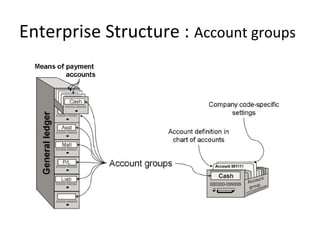
Enterprise Structure : Account groups
Enterprise Structure : Sub-ledgers
General Ledger link is thru separate Reconciliation Accounts in General Ledger
Sub-ledgers
A : Assets (AA)
D = Debtor (AR)
K = Kreditor (AP)
M = Material
Bank
Cash Journal
Sub-ledgers
Enterprise Structure : Document types
To separate documents used for each process area
Document type
Enterprise Structure : Posting keys
Denotes “Debit” or “Credit” indicator
Posting Key
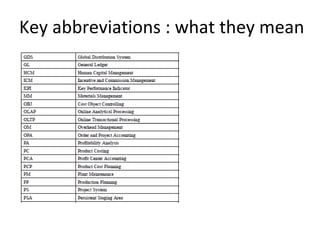
Key abbreviations : what they mean
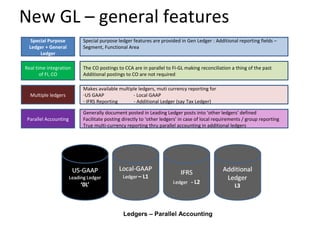
New GL – general features
Ledgers – Parallel Accounting
Special Purpose
Ledger + General
Ledger
Special purpose ledger features are provided in Gen Ledger : Additional reporting fields –
Segment, Functional Area
Real time integration
of FI, CO
The CO postings to CCA are in parallel to FI-GL making reconciliation a thing of the past
Additional postings to CO are not required
Multiple ledgers
Makes available multiple ledgers, muti currency reporting for
-US GAAP - Local GAAP
- IFRS Reporting - Additional Ledger (say Tax Ledger)
Parallel Accounting
Generally document posted in Leading Ledger posts into ‘other ledgers’ defined
Facilitate posting directly to ‘other ledgers’ in case of local requirements / group reporting
True multi-currency reporting thru parallel accounting in additional ledgers
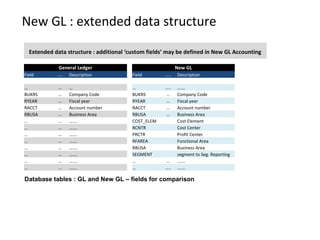
New GL : extended data structure
General Ledger New GL
Field ….. Description Field ….. Description
… … … … ….. …….
BUKRS … Company Code BUKRS … Company Code
RYEAR … Fiscal year RYEAR … Fiscal year
RACCT … Account number RACCT … Account number
RBUSA … Business Area RBUSA … Business Area
… … ……. COST_ELEM Cost Element
… … ……. RCNTR Cost Center
… … ……. PRCTR Profit Center
… … ……. RFAREA Functional Area
… … ……. RBUSA Business Area
… … ……. SEGMENT segment to Seg. Reporting
… … ……. … … …….
… … ……. … ….. …….
Database tables : GL and New GL – fields for comparison
Extended data structure : additional ‘custom fields’ may be defined in New GL Accounting
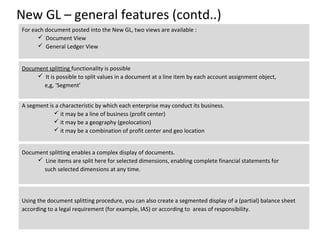
New GL – general features (contd..)
Using the document splitting procedure, you can also create a segmented display of a (partial) balance sheet
according to a legal requirement (for example, IAS) or according to areas of responsibility.
For each document posted into the New GL, two views are available :
 Document View
 General Ledger View
Document splitting functionality is possible
 It is possible to split values in a document at a line item by each account assignment object,
e,g, ‘Segment’
A segment is a characteristic by which each enterprise may conduct its business.
 it may be a line of business (profit center)
 it may be a geography (geolocation)
 it may be a combination of profit center and geo location
Document splitting enables a complex display of documents.
 Line items are split here for selected dimensions, enabling complete financial statements for
such selected dimensions at any time.
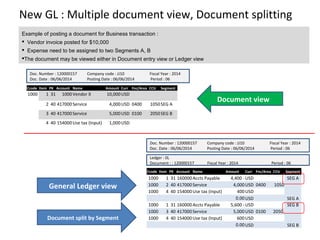
New GL : Multiple document view, Document splitting
Example of posting a document for Business transaction :
 Vendor invoice posted for $10,000
 Expense need to be assigned to two Segments A, B
The document may be viewed either in Document entry view or Ledger view
Ccode Item PK Account Name Amount Curr Fnc/Area CCtr Segment
1000 1 31 1000Vendor X 10,000USD
2 40 417000Service 4,000USD 0400 1050SEG A
3 40 417000Service 5,000USD 0100 2050SEG B
4 40 154000Use tax (Input) 1,000USD
Doc. Number : 120000157 Company code : JJ10 Fiscal Year : 2014
Doc. Date : 06/06/2014 Posting Date : 06/06/2014 Period : 06
Ccode Item PK Account Name Amount Curr Fnc/Area CCtr Segment
1000 1 31 160000Accts Payable 4,400 -USD SEG A
1000 2 40 417000Service 4,000USD 0400 1050
1000 4 40 154000Use tax (Input) 400USD
0.00USD SEG A
1000 1 31 160000Accts Payable 5,600 -USD SEG B
1000 3 40 417000Service 5,000USD 0100 2050
1000 4 40 154000Use tax (Input) 600USD
0.00USD SEG B
Doc. Number : 120000157 Company code : JJ10 Fiscal Year : 2014
Doc. Date : 06/06/2014 Posting Date : 06/06/2014 Period : 06
Ledger : 0L
Document : : 120000157 Fiscal Year : 2014 Period : 06
Document view
General Ledger view
Document split by Segment
01. sap fi co training

01. sap fi co training

  • 1.
    SAP FI-CO Demo TrainingSession 1 Dec 03, 2014 Trainer : K. Ram
  • 2.
    Agenda • Introduction toSAP R/3 • Modules in SAP R/3 • Integration of Modules • Business Processes : what are they ? • Financial Accounting basic settings • Enterprise structure • Key abbreviations and what they mean • New GL
  • 3.
    Introduction to SAPR/3 – Overview of the company – What is ERP ? – Evolution of ERP ? – What does R/3 mean
  • 4.
    Introduction to SAP 19721981 1991 1972 SAP formed by 5 ex IBM Employees Company called Systems Analysis and Program Development 1991 Company launches SAP R/3 3 Tier Architecture : Y2K Compliant 1981 Company product is an integrated application software Company name changed to Systems Applications and Products in Data Processing
  • 5.
    Introduction to SAP 19911997 2003 Release 3.0D Release 3.0F Release 3.1H Release 4.0B Release 4.5 Release 4.6C 2003 onwards EHP = Enhancement Packs SP = Service Packs (bug fix) Release 4.7 ECC Core 5.0 Features enhanced Industry solution maturity
  • 6.
    Introduction to SAP 20032004 2010 2014 SAP NetWeaver mySAP ERP 2004 CompositeApplications People Integration Information Integration Process Integration Application Platform  Self services (portal)  Internet sales  Composite Applications  Industry solutions  Enterprise Extensions  SAP ECC Core (5.0)
  • 7.
    Introduction to SAP 20002006 2010 2014 SAP ERP 6.0 / ECC SAP NetWeaver SAP ERP SAP SCM SAP CRM SAP SRM SAP ECC Industrysolutions(28)
  • 8.
    Modules in SAPR/3 XI CO AA FI DOC Mgmt BW KM PLM IS WF PS BPS EIS EP MI PM HR QM Web AS ABAP 4 Basis MDM PP MM SD ECC 6.0 + mySAP + Business Suite CRM SRM SCM
  • 9.
    Modules in SAPR/3 : Biz Process
  • 10.
    Modules in ECC6.0 - Overall
  • 11.
    FI-CO : Submodules(Upto ECC 5.0)
  • 12.
    FI-CO : Submodules(ECC 6.0) FI (Finance) GL General Ledger, Closing & Reporting, Posting, Financial Information System, Business Area AR Accounts Receivables, Posting, Credit management, Risk management, Financial information system, Business Area AP Accounts Payables, Posting, Credit management, Risk management, Financial information system, Business Area AA Asset Accounting, Closing & Reporting, Posting, Lease Accounting, Financial Information System, Business Area BL Bank Accounting, Electronic Bank Statement, Posting, Financial Information System TV Travel Management, Posting, Financial Information System
  • 13.
    FI-CO : Submodules(ECC 6.0) CO (Controlling) CEL Cost element accounting, Reconciliation ledger, Master data, Periodic tasks, Information system - reporting CCA Cost center accounting, manual postings, period end closing, year end closing, information system - reporting OPA Internal Orders, master data, planning, Commitments management, Funds commitment, Manual actual postings, period end closing, information system - reporting ABC Activity based costing, master data, process planning, manual actual posting, period end closing, ABC information system - reporting PC Product cost planning, cost object controlling, actual costing, material ledger, product cost controlling, information system - reporting PA Structures, Master data, planning, flow of actual values, information system – reporting, Technical aspects – segments, index, drill down reports, physical structure
  • 14.
    FSCM : FinancialSupply Chain Management Finance Working Capital Cash Projection Mgmt market risks Mgmt credit risks Invoicing Collecting Dispute cases Payments Biller Direct & Biller Consolidator Dispute Management Collections management Cash and Liquidity Management Treasury and Risk Management In-House Cash mySAP ERPmySAP CRM
  • 15.
  • 16.
    Business process :e.g. Order to Cash Treasury Cash liquidity forecast Cash liquidity forecast Cash Positioning Electronic banking Accounting Credit review Customer revenue (GL Ledger) Dunning & Collections Payment Credit revenue (GL Ledgr) Sales & Distribution Incoming orders Electronic BillingGoods issue Controlling Incoming Orders Forecast Profitability Accounting Costing
  • 17.
    Enterprise Structure -overall Client Chart of Accounts Company Company Code Plant Storage location MM Module Chart of Depreciation Asset Classes Operating Concern Controlling Area Credit control area One to many relationship
  • 18.
    Enterprise Structure –example J&J = Johnson & Johnson – Pharma Company Client-555 (J&J)-Pharma Chart of Accounts –JJ10 (J&J)-Pharma Company – JJ10 (J&J)-N/America : Holding Co Company Code – JJ10 (J&J)-Pharma Plant-Mfg : JJ10 J&J : NJ Pharma Mfg Storage location - 100 J&J Raw Material 100 MM Module Chart of Depreciation – JJ00 J&J – Pharma Group of Cos. Asset Classes – 2000 Buildings – across J&J Operating Concern : JJ00 J&J Group of Companies Controlling Area : JJ10 J&J Pharma Credit control area : JJ00 J&J Pharma - CCA One to many relationship
  • 19.
    Financial Accounting basicsettings FI- GL P&LAccount Balance Sheet General Ledger Customer FI- AR Assets FI- AA Banks FI- BL Vendor Reconciliation AccountsReconciliation Accounts FI- AP Display business transactions Money and value flows Display and valuation of positions Display of profits / losses Parallel accounting principles (US GAAP, IAS) Key figure analysis Group consolidation
  • 20.
    Enterprise structure definitions FiscalYear Variant How calendar year links to fiscal year for company code is called Fiscal Yr Variant How many periods per fiscal year is defined, special periods (K4 = 12 posting periods + 4 special periods). You may choose either calendar year or other period (say April – March) Posting period Time period (usually a calendar month) how documents are posted in a company code For a fiscal period upto 366 posting periods may be specified using Special Purpose Ledger. Special periods are used for period closing, audit adjustments, etc Special purpose ledger User defined ledgers may be defined for reporting purposes. May be general ledgers or subsidiary ledgers with various account assignment objects such as account, cost center, business area, profit center. It does not impact other SAP functions Posting period variant You use a posting period variant to specify which posting periods are open, control feature You assign them to a company code(s). You may control selective range of GL accounts for posting, if required Sub-ledger Represent business transactions for Vendors, Customers, Assets, Bank, Cash Journal, Material Each subledger is separate for representing detailed values for above (A, D, K, M, B, Cjournal) Posting Keys Defines whether it is a debit or credit posting, and which account type (customer or vendor) is posted. SAP provides multiple combination of Dr / Cr posting keys for posting Inv, JV, CN separately Document types Transactions posted into SAP are identified thru document types These are called out separately : Vendor Invoice, Credit Note, Journal Voucher, Sales Invoice Number range for documents For each document type, separate number ranges are prescribed Each number range has a from & to range e.g. Invoice (IN) may use Number range 01, beginning from ‘1000000’ to ‘1999999’
  • 21.
    Enterprise Structure :Account groups
  • 22.
    Enterprise Structure :Sub-ledgers General Ledger link is thru separate Reconciliation Accounts in General Ledger Sub-ledgers A : Assets (AA) D = Debtor (AR) K = Kreditor (AP) M = Material Bank Cash Journal Sub-ledgers
  • 23.
    Enterprise Structure :Document types To separate documents used for each process area Document type
  • 24.
    Enterprise Structure :Posting keys Denotes “Debit” or “Credit” indicator Posting Key
  • 25.
    Key abbreviations :what they mean
  • 26.
    Key abbreviations :what they mean
  • 27.
    Key abbreviations :what they mean
  • 28.
    New GL –general features Ledgers – Parallel Accounting Special Purpose Ledger + General Ledger Special purpose ledger features are provided in Gen Ledger : Additional reporting fields – Segment, Functional Area Real time integration of FI, CO The CO postings to CCA are in parallel to FI-GL making reconciliation a thing of the past Additional postings to CO are not required Multiple ledgers Makes available multiple ledgers, muti currency reporting for -US GAAP - Local GAAP - IFRS Reporting - Additional Ledger (say Tax Ledger) Parallel Accounting Generally document posted in Leading Ledger posts into ‘other ledgers’ defined Facilitate posting directly to ‘other ledgers’ in case of local requirements / group reporting True multi-currency reporting thru parallel accounting in additional ledgers
  • 29.
    New GL :extended data structure General Ledger New GL Field ….. Description Field ….. Description … … … … ….. ……. BUKRS … Company Code BUKRS … Company Code RYEAR … Fiscal year RYEAR … Fiscal year RACCT … Account number RACCT … Account number RBUSA … Business Area RBUSA … Business Area … … ……. COST_ELEM Cost Element … … ……. RCNTR Cost Center … … ……. PRCTR Profit Center … … ……. RFAREA Functional Area … … ……. RBUSA Business Area … … ……. SEGMENT segment to Seg. Reporting … … ……. … … ……. … … ……. … ….. ……. Database tables : GL and New GL – fields for comparison Extended data structure : additional ‘custom fields’ may be defined in New GL Accounting
  • 30.
    New GL –general features (contd..) Using the document splitting procedure, you can also create a segmented display of a (partial) balance sheet according to a legal requirement (for example, IAS) or according to areas of responsibility. For each document posted into the New GL, two views are available :  Document View  General Ledger View Document splitting functionality is possible  It is possible to split values in a document at a line item by each account assignment object, e,g, ‘Segment’ A segment is a characteristic by which each enterprise may conduct its business.  it may be a line of business (profit center)  it may be a geography (geolocation)  it may be a combination of profit center and geo location Document splitting enables a complex display of documents.  Line items are split here for selected dimensions, enabling complete financial statements for such selected dimensions at any time.
  • 31.
    New GL :Multiple document view, Document splitting Example of posting a document for Business transaction :  Vendor invoice posted for $10,000  Expense need to be assigned to two Segments A, B The document may be viewed either in Document entry view or Ledger view Ccode Item PK Account Name Amount Curr Fnc/Area CCtr Segment 1000 1 31 1000Vendor X 10,000USD 2 40 417000Service 4,000USD 0400 1050SEG A 3 40 417000Service 5,000USD 0100 2050SEG B 4 40 154000Use tax (Input) 1,000USD Doc. Number : 120000157 Company code : JJ10 Fiscal Year : 2014 Doc. Date : 06/06/2014 Posting Date : 06/06/2014 Period : 06 Ccode Item PK Account Name Amount Curr Fnc/Area CCtr Segment 1000 1 31 160000Accts Payable 4,400 -USD SEG A 1000 2 40 417000Service 4,000USD 0400 1050 1000 4 40 154000Use tax (Input) 400USD 0.00USD SEG A 1000 1 31 160000Accts Payable 5,600 -USD SEG B 1000 3 40 417000Service 5,000USD 0100 2050 1000 4 40 154000Use tax (Input) 600USD 0.00USD SEG B Doc. Number : 120000157 Company code : JJ10 Fiscal Year : 2014 Doc. Date : 06/06/2014 Posting Date : 06/06/2014 Period : 06 Ledger : 0L Document : : 120000157 Fiscal Year : 2014 Period : 06 Document view General Ledger view Document split by Segment