Docker Logging
Webinar
20% OFF 201509WNR20S 201509WNR20L
sematext.com/spm sematext.com/logsene
Housekeeping / Questions
Intro
Logsene: Centralized Log Management
Search and Big Data Consulting
Support for Solr and Elasticsearch
SPM: Performance monitoring,
Anomaly Detection and Alerting
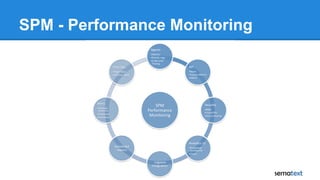
SPM - Performance Monitoring
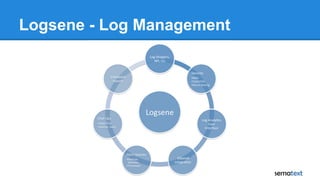
Logsene - Log Management
Agenda
● Centralized Log Management
● Docker - What is different?
○ Challenges
○ How to
■ Log Drivers
■ Logging Containers
■ Sematext Solutions
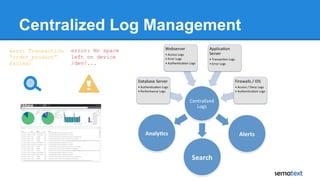
Centralized Log Management
error: No space
left on device
/dev/...
?
warn: Transaction
“order_product”
failed!
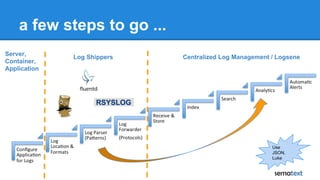
a few steps to go ...
Log Shippers Centralized Log Management / Logsene
Server,
Container,
Application
Use
JSON,
Luke
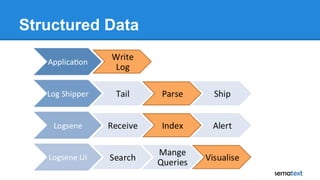
Structured Data
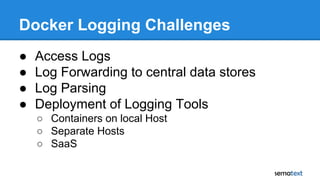
Docker Logging Challenges
● Access Logs
● Log Forwarding to central data stores
● Log Parsing
● Deployment of Logging Tools
○ Containers on local Host
○ Separate Hosts
○ SaaS
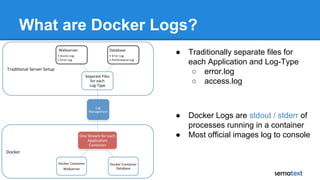
What are Docker Logs?
● Traditionally separate files for
each Application and Log-Type
○ error.log
○ access.log
● Docker Logs are stdout / stderr of
processes running in a container
● Most official images log to console
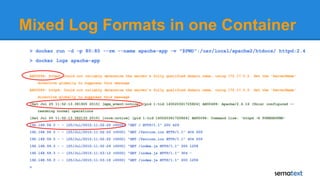
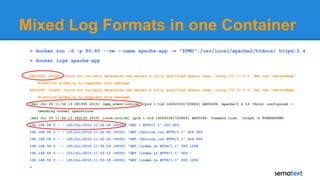
Mixed Log Formats in one Container
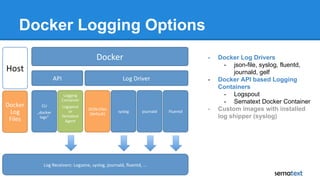
Docker Logging Options
- Docker Log Drivers
- json-file, syslog, fluentd,
journald, gelf
- Docker API based Logging
Containers
- Logspout
- Sematext Docker Container
- Custom images with installed
log shipper (syslog)
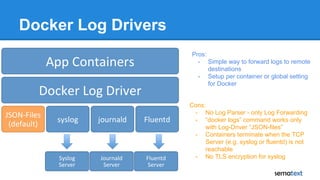
Docker Log Drivers
Cons:
- No Log Parser - only Log Forwarding
- “docker logs” command works only
with Log-Driver “JSON-files”
- Containers terminate when the TCP
Server (e.g. syslog or fluentd) is not
reachable
- No TLS encryption for syslog
Pros:
- Simple way to forward logs to remote
destinations
- Setup per container or global setting
for Docker
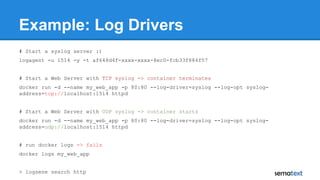
Example: Log Drivers
# Start a syslog server :)
logagent -u 1514 -y -t af648d4f-xxxx-xxxx-8ec0-fcb33f884f57
# Start a Web Server with TCP syslog -> container terminates
docker run -d --name my_web_app -p 80:80 --log-driver=syslog --log-opt syslog-
address=tcp://localhost:1514 httpd
# Start a Web Server with UDP syslog -> container starts
docker run -d --name my_web_app -p 80:80 --log-driver=syslog --log-opt syslog-
address=udp://localhost:1514 httpd
# run docker logs -> fails
docker logs my_web_app
> logsene search http
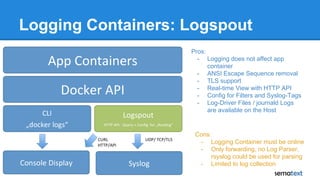
Logging Containers: Logspout
Pros:
- Logging does not affect app
container
- ANSI Escape Sequence removal
- TLS support
- Real-time View with HTTP API
- Config for Filters and Syslog-Tags
- Log-Driver Files / journald Logs
are available on the Host
Cons:
- Logging Container must be online
- Only forwarding, no Log Parser,
rsyslog could be used for parsing
- Limited to log collection
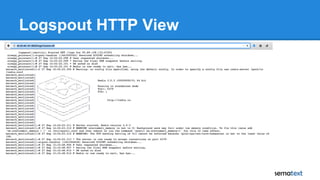
Logspout HTTP View
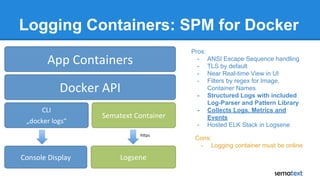
Logging Containers: SPM for Docker
Pros:
- ANSI Escape Sequence handling
- TLS by default
- Near Real-time View in UI
- Filters by regex for Image,
Container Names
- Structured Logs with included
Log-Parser and Pattern Library
- Collects Logs, Metrics and
Events
- Hosted ELK Stack in Logsene
Cons:
- Logging container must be online
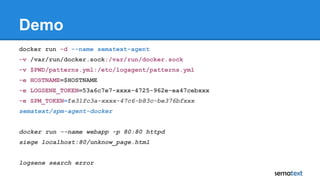
Demo
docker run -d --name sematext-agent
-v /var/run/docker.sock:/var/run/docker.sock
-v $PWD/patterns.yml:/etc/logagent/patterns.yml
-e HOSTNAME=$HOSTNAME
-e LOGSENE_TOKEN=53a6c7e7-xxxx-4725-962e-ea47cebxxx
-e SPM_TOKEN=fe31fc3a-xxxx-47c6-b83c-be376bfxxx
sematext/spm-agent-docker
docker run --name webapp -p 80:80 httpd
siege localhost:80/unknow_page.html
logsene search error
Logs
Logsene
Token
Metrics +
Events
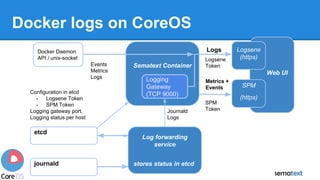
Docker logs on CoreOS
Web UI
Sematext Container
Logsene
(https)
SPM
(https)
Log forwarding
service
stores status in etcd
Logging
Gateway
(TCP 9000)
Docker Daemon
API / unix-socket
Events
Metrics
Logs
etcd
journald
Configuration in etcd
- Logsene Token
- SPM Token
Logging gateway port,
Logging status per host
Journald
Logs
SPM
Token
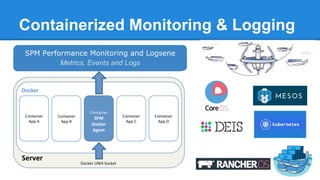
Containerized Monitoring & Logging
SPM Performance Monitoring and Logsene
Metrics, Events and Logs
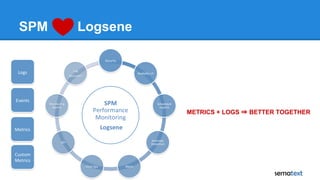
SPM Logsene
METRICS + LOGS ⇒ BETTER TOGETHER
Mixed Log Formats in one Container
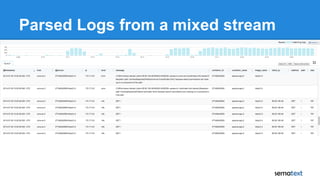
Parsed Logs from a mixed stream
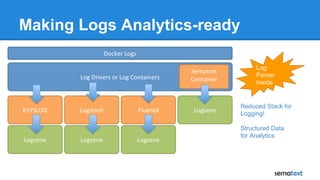
Making Logs Analytics-ready
Log
Parser
Inside
Reduced Stack for
Logging!
Structured Data
for Analytics
Summary
Stefan Thies
Twitter: @seti321
stefan.thies@sematext.com
info@sematext.com
blog.sematext.com
sematext.com/logsene
hub.docker.com/r/sematext/spm-agent-docker/
github.com/sematext/spm-agent-docker
Docker Logging
Webinar
20% OFF 201509WNR20S 201509WNR20L
sematext.com/spm sematext.com/logsene
Thank you for your attention

Docker Logging Webinar

  • 1.
    Docker Logging Webinar 20% OFF201509WNR20S 201509WNR20L sematext.com/spm sematext.com/logsene
  • 2.
  • 3.
    Intro Logsene: Centralized LogManagement Search and Big Data Consulting Support for Solr and Elasticsearch SPM: Performance monitoring, Anomaly Detection and Alerting
  • 4.
  • 5.
    Logsene - LogManagement
  • 6.
    Agenda ● Centralized LogManagement ● Docker - What is different? ○ Challenges ○ How to ■ Log Drivers ■ Logging Containers ■ Sematext Solutions
  • 7.
    Centralized Log Management error:No space left on device /dev/... ? warn: Transaction “order_product” failed!
  • 8.
    a few stepsto go ... Log Shippers Centralized Log Management / Logsene Server, Container, Application Use JSON, Luke
  • 9.
  • 10.
    Docker Logging Challenges ●Access Logs ● Log Forwarding to central data stores ● Log Parsing ● Deployment of Logging Tools ○ Containers on local Host ○ Separate Hosts ○ SaaS
  • 11.
    What are DockerLogs? ● Traditionally separate files for each Application and Log-Type ○ error.log ○ access.log ● Docker Logs are stdout / stderr of processes running in a container ● Most official images log to console
  • 12.
    Mixed Log Formatsin one Container
  • 13.
    Docker Logging Options -Docker Log Drivers - json-file, syslog, fluentd, journald, gelf - Docker API based Logging Containers - Logspout - Sematext Docker Container - Custom images with installed log shipper (syslog)
  • 14.
    Docker Log Drivers Cons: -No Log Parser - only Log Forwarding - “docker logs” command works only with Log-Driver “JSON-files” - Containers terminate when the TCP Server (e.g. syslog or fluentd) is not reachable - No TLS encryption for syslog Pros: - Simple way to forward logs to remote destinations - Setup per container or global setting for Docker
  • 15.
    Example: Log Drivers #Start a syslog server :) logagent -u 1514 -y -t af648d4f-xxxx-xxxx-8ec0-fcb33f884f57 # Start a Web Server with TCP syslog -> container terminates docker run -d --name my_web_app -p 80:80 --log-driver=syslog --log-opt syslog- address=tcp://localhost:1514 httpd # Start a Web Server with UDP syslog -> container starts docker run -d --name my_web_app -p 80:80 --log-driver=syslog --log-opt syslog- address=udp://localhost:1514 httpd # run docker logs -> fails docker logs my_web_app > logsene search http
  • 16.
    Logging Containers: Logspout Pros: -Logging does not affect app container - ANSI Escape Sequence removal - TLS support - Real-time View with HTTP API - Config for Filters and Syslog-Tags - Log-Driver Files / journald Logs are available on the Host Cons: - Logging Container must be online - Only forwarding, no Log Parser, rsyslog could be used for parsing - Limited to log collection
  • 17.
  • 18.
    Logging Containers: SPMfor Docker Pros: - ANSI Escape Sequence handling - TLS by default - Near Real-time View in UI - Filters by regex for Image, Container Names - Structured Logs with included Log-Parser and Pattern Library - Collects Logs, Metrics and Events - Hosted ELK Stack in Logsene Cons: - Logging container must be online
  • 19.
    Demo docker run -d--name sematext-agent -v /var/run/docker.sock:/var/run/docker.sock -v $PWD/patterns.yml:/etc/logagent/patterns.yml -e HOSTNAME=$HOSTNAME -e LOGSENE_TOKEN=53a6c7e7-xxxx-4725-962e-ea47cebxxx -e SPM_TOKEN=fe31fc3a-xxxx-47c6-b83c-be376bfxxx sematext/spm-agent-docker docker run --name webapp -p 80:80 httpd siege localhost:80/unknow_page.html logsene search error
  • 20.
    Logs Logsene Token Metrics + Events Docker logson CoreOS Web UI Sematext Container Logsene (https) SPM (https) Log forwarding service stores status in etcd Logging Gateway (TCP 9000) Docker Daemon API / unix-socket Events Metrics Logs etcd journald Configuration in etcd - Logsene Token - SPM Token Logging gateway port, Logging status per host Journald Logs SPM Token
  • 21.
    Containerized Monitoring &Logging SPM Performance Monitoring and Logsene Metrics, Events and Logs
  • 22.
    SPM Logsene METRICS +LOGS ⇒ BETTER TOGETHER
  • 23.
    Mixed Log Formatsin one Container
  • 24.
    Parsed Logs froma mixed stream
  • 25.
    Making Logs Analytics-ready Log Parser Inside ReducedStack for Logging! Structured Data for Analytics
  • 26.
  • 27.
    Docker Logging Webinar 20% OFF201509WNR20S 201509WNR20L sematext.com/spm sematext.com/logsene
  • 28.
    Thank you foryour attention