Learning Containerization
By Aditya Patawari
Consultant for Docker and
Devops
aditya@adityapatawari.com
What are
containers?
● A way to package your
application and environments.
● A way to ship your application
with ease.
● A way to isolate resources in a
shared system.
They have been around for
longer than you think.
What is Docker?
Docker containers wrap a piece of
software in a complete filesystem
that contains everything needed to
run: code, runtime, system tools,
system libraries – anything that can
be installed on a server. This
guarantees that the software will
always run the same, regardless of
its environment.
Package your application into a
standardized unit for software
development.
How Docker Works?
● Docker runs on host operating system.
● The kernel is shared among all the
containers but the resources are in
appropriate namespaces and cgroups.
● Typical container consists of operating
system libraries and the application code,
much of which is shared.
● No emulation of hardware.
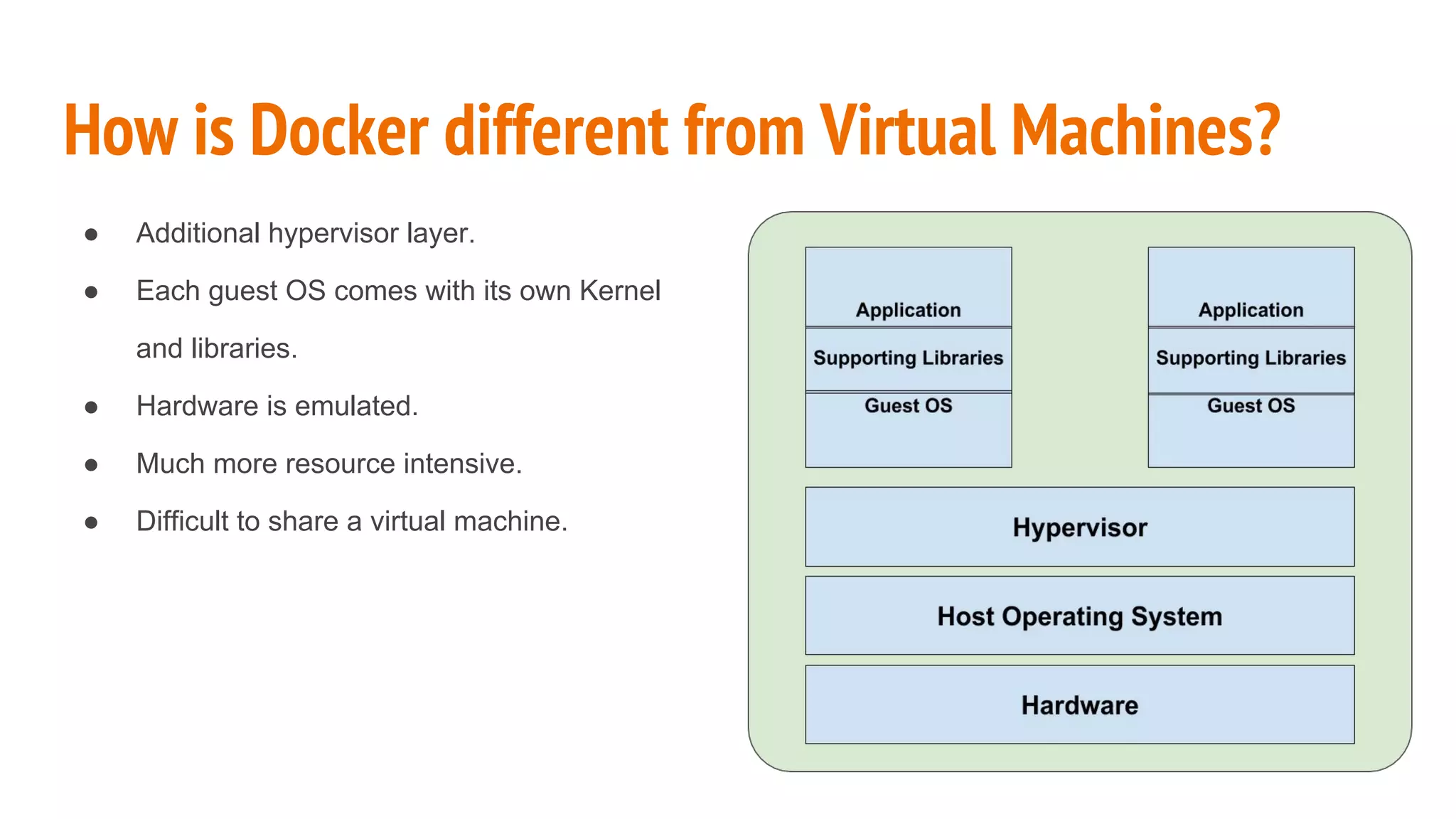
How is Docker different from Virtual Machines?
● Additional hypervisor layer.
● Each guest OS comes with its own Kernel
and libraries.
● Hardware is emulated.
● Much more resource intensive.
● Difficult to share a virtual machine.
Basic Components and Terminologies
● Docker Image
a. Read-only
b. May consist of bare OS libs or application
● Docker Container
a. Stateful instance of image
b. Image with a writable layer
● Docker Registry
a. Repository of Docker images
● Docker Hub
a. A public registry hosted by Docker Inc.
Docker Workflow
1. Docker client passes a command like
docker run to Docker Engine.
2. Docker Engine checks whether it needs
to pull any image from a Docker registry.
3. If required, the image is pulled.
4. If the image is present locally, the run
command is executed.
5. The container would run on Docker
Engine.
6. Docker Engine and Docker Client can be
on the same machine or they can be
separated on the network.
Installing Docker Engine
1. Install from default operating system repositories
a. Very convenient.
b. Can be an outdated version.
2. Install from Docker’s official repositories
a. Usually up-to-date.
b. Need to configure the repository.
3. Use binaries from Github
a. Download binaries from Github and put in a location on $PATH variable.
b. Makes auditing slightly difficult since it skips dpkg and rpm list commands.
Let us install Docker
docker run hello-world
$ sudo docker run hello-world
Unable to find image 'hello-world:latest' locally
latest: Pulling from library/hello-world
.
.
.
Common Commands: docker ps
$ sudo docker ps
CONTAINER ID IMAGE COMMAND CREATED STATUS PORTS
NAMES
$ sudo docker ps -a
CONTAINER ID IMAGE COMMAND CREATED STATUS PORTS
NAMES
33fd08c23918 hello-world "/hello" 5 minutes ago Exited (0) 5 minutes ago
tiny_stonebraker
Common Commands: docker images
$ sudo docker images
REPOSITORY TAG IMAGE ID CREATED SIZE
hello-world latest c54a2cc56cbb 6 weeks ago 1.848 kB
Common Commands: docker pull
$ sudo docker pull alpine
Using default tag: latest
latest: Pulling from library/alpine
e110a4a17941: Pull complete
Digest: sha256:3dcdb92d7432d56604d4545cbd324b14e647b313626d99b889d0626de158f73a
Status: Downloaded newer image for alpine:latest
$ sudo docker images
REPOSITORY TAG IMAGE ID CREATED SIZE
hello-world latest c54a2cc56cbb 6 weeks ago 1.848 kB
alpine latest 4e38e38c8ce0 7 weeks ago 4.795 MB
Common Commands: docker run
$ sudo docker run -i -t alpine /bin/sh
/ #
Common Commands: docker logs
$ sudo docker ps -a
CONTAINER ID IMAGE COMMAND CREATED STATUS PORTS
NAMES
8cc5470146f4 alpine "/bin/sh" About a minute ago Exited (0) 4 seconds ago
pensive_lumiere
$ sudo docker logs 8cc5470146f4
/ # ls /
bin dev etc home lib linuxrc media mnt proc root run sbin srv sys
tmp usr var
/ # echo hello
hello
/ # exit
Common Commands: docker stop
$ sudo docker ps
CONTAINER ID IMAGE COMMAND CREATED STATUS PORTS
NAMES
1ff3ca902cdf alpine "sleep 100" 11 seconds ago Up 2 seconds
pensive_mestorf
$ sudo docker stop 1ff3ca902cdf
1ff3ca902cdf
Common Commands: docker rm
$ sudo docker ps
CONTAINER ID IMAGE COMMAND CREATED STATUS PORTS
NAMES
1ff3ca902cdf alpine "sleep 100" 11 seconds ago Up 2 seconds
pensive_mestorf
$ sudo docker rm 1ff3ca902cdf
1ff3ca902cdf
Common Commands: docker rmi
$ sudo docker rmi hello-world
Untagged: hello-world:latest
Untagged:
hello-world@sha256:0256e8a36e2070f7bf2d0b0763dbabdd67798512411de4cdcf9431a1feb60fd9Del
eted: sha256:c54a2cc56cbb2f04003c1cd4507e118af7c0d340fe7e2720f70976c4b75237dc
Deleted: sha256:a02596fdd012f22b03af6ad7d11fa590c57507558357b079c3e8cebceb4262d7
Docker Images
● Docker images are the read-only templates
from which a container is created.
● An image consist of one or more read-only
layers.
● These layers are overlaid to form a single
coherent file system.
● Any change to an image forms a new layer
which is overlaid on the older layers.
● When an image is pulled or pushed, only the
differential layers travel over the network,
saving time and bandwidth.
Building Docker Images: Commit Method
1. Create and run a container from an existing Docker images.
2. Make required changes to the container.
3. Use docker commit to create the image out of the container.
$ sudo docker commit <container_id> <optional_tag>
Building Docker Images: Dockerfile Method
1. Choose a base image.
2. Define set of changes in a description file.
3. Use docker build to create an image.
$ sudo docker build -f <path_of_dockerfile> .
Building Docker Images: Example Dockerfile
FROM centos
MAINTAINER Aditya Patawari <aditya@adityapatawari.com>
RUN yum -y update && yum clean all
RUN yum -y install httpd
EXPOSE 80
CMD ["/usr/sbin/httpd", "-D", "FOREGROUND"]
Building Docker Images: Understanding Dockerfile
● Some common terminologies for Dockerfile used in previous example
a. FROM: This defines the base image for the image that would be created
b. MAINTAINER: This defines the name and contact of the person that has created the image.
c. RUN: This will run the command inside the container.
d. EXPOSE: This informs that the specified port is to be bind inside the container.
e. CMD: Command to be executed when the container starts.
● Each statement creates a new layer, which is why sometimes we club commands using “&&”.
● For a full set of supported statements, check out Dockerfile reference
https://docs.docker.com/engine/reference/builder/
Dockerfile vs Commit
Dockerfile
● Repeatable method
● Self documenting
● Easy to audit and validate
● Great for building CI pipelines
● Better and prefered method
Commit
● Easier
● Non-repeatable
● Difficult to audit
● Usually for one-off testing
● Avoid for production grade usage
Introduction to Docker Compose
● Docker Compose is a way to define specifications of a multi-container
application.
● It can consist of Dockerfiles, images, environment variables, volumes and
many other parameters which are required to run a container based
application
● The specification is written in YAML format
● A full reference can be obtained from
https://docs.docker.com/compose/compose-file/
Installing Docker Compose
● Docker Compose is distributed as a binary.
● Latest release of the same can be downloaded from Github.
# curl -L
https://github.com/docker/compose/releases/download/1.8.0/docker-compose
-`uname -s`-`uname -m` > /usr/local/bin/docker-compose
● After downloading Docker Compose, we need to set the correct
permissions to make is executable
# chmod +x /usr/local/bin/docker-compose
Basic Compose Spec
owncloud9:
image: adimania/owncloud9-centos7
ports:
- 80:80
links:
- mysql
mysql:
image: mysql
environment:
- MYSQL_ROOT_PASSWORD=my-secret-pw
- MYSQL_DATABASE=owncloud
# docker-compose -f docker-compose.yml up

Introduction to Docker - Learning containerization XP conference 2016

  • 1.
    Learning Containerization By AdityaPatawari Consultant for Docker and Devops aditya@adityapatawari.com
  • 2.
    What are containers? ● Away to package your application and environments. ● A way to ship your application with ease. ● A way to isolate resources in a shared system. They have been around for longer than you think.
  • 3.
    What is Docker? Dockercontainers wrap a piece of software in a complete filesystem that contains everything needed to run: code, runtime, system tools, system libraries – anything that can be installed on a server. This guarantees that the software will always run the same, regardless of its environment. Package your application into a standardized unit for software development.
  • 4.
    How Docker Works? ●Docker runs on host operating system. ● The kernel is shared among all the containers but the resources are in appropriate namespaces and cgroups. ● Typical container consists of operating system libraries and the application code, much of which is shared. ● No emulation of hardware.
  • 5.
    How is Dockerdifferent from Virtual Machines? ● Additional hypervisor layer. ● Each guest OS comes with its own Kernel and libraries. ● Hardware is emulated. ● Much more resource intensive. ● Difficult to share a virtual machine.
  • 6.
    Basic Components andTerminologies ● Docker Image a. Read-only b. May consist of bare OS libs or application ● Docker Container a. Stateful instance of image b. Image with a writable layer ● Docker Registry a. Repository of Docker images ● Docker Hub a. A public registry hosted by Docker Inc.
  • 7.
    Docker Workflow 1. Dockerclient passes a command like docker run to Docker Engine. 2. Docker Engine checks whether it needs to pull any image from a Docker registry. 3. If required, the image is pulled. 4. If the image is present locally, the run command is executed. 5. The container would run on Docker Engine. 6. Docker Engine and Docker Client can be on the same machine or they can be separated on the network.
  • 8.
    Installing Docker Engine 1.Install from default operating system repositories a. Very convenient. b. Can be an outdated version. 2. Install from Docker’s official repositories a. Usually up-to-date. b. Need to configure the repository. 3. Use binaries from Github a. Download binaries from Github and put in a location on $PATH variable. b. Makes auditing slightly difficult since it skips dpkg and rpm list commands. Let us install Docker
  • 9.
    docker run hello-world $sudo docker run hello-world Unable to find image 'hello-world:latest' locally latest: Pulling from library/hello-world . . .
  • 10.
    Common Commands: dockerps $ sudo docker ps CONTAINER ID IMAGE COMMAND CREATED STATUS PORTS NAMES $ sudo docker ps -a CONTAINER ID IMAGE COMMAND CREATED STATUS PORTS NAMES 33fd08c23918 hello-world "/hello" 5 minutes ago Exited (0) 5 minutes ago tiny_stonebraker
  • 11.
    Common Commands: dockerimages $ sudo docker images REPOSITORY TAG IMAGE ID CREATED SIZE hello-world latest c54a2cc56cbb 6 weeks ago 1.848 kB
  • 12.
    Common Commands: dockerpull $ sudo docker pull alpine Using default tag: latest latest: Pulling from library/alpine e110a4a17941: Pull complete Digest: sha256:3dcdb92d7432d56604d4545cbd324b14e647b313626d99b889d0626de158f73a Status: Downloaded newer image for alpine:latest $ sudo docker images REPOSITORY TAG IMAGE ID CREATED SIZE hello-world latest c54a2cc56cbb 6 weeks ago 1.848 kB alpine latest 4e38e38c8ce0 7 weeks ago 4.795 MB
  • 13.
    Common Commands: dockerrun $ sudo docker run -i -t alpine /bin/sh / #
  • 14.
    Common Commands: dockerlogs $ sudo docker ps -a CONTAINER ID IMAGE COMMAND CREATED STATUS PORTS NAMES 8cc5470146f4 alpine "/bin/sh" About a minute ago Exited (0) 4 seconds ago pensive_lumiere $ sudo docker logs 8cc5470146f4 / # ls / bin dev etc home lib linuxrc media mnt proc root run sbin srv sys tmp usr var / # echo hello hello / # exit
  • 15.
    Common Commands: dockerstop $ sudo docker ps CONTAINER ID IMAGE COMMAND CREATED STATUS PORTS NAMES 1ff3ca902cdf alpine "sleep 100" 11 seconds ago Up 2 seconds pensive_mestorf $ sudo docker stop 1ff3ca902cdf 1ff3ca902cdf
  • 16.
    Common Commands: dockerrm $ sudo docker ps CONTAINER ID IMAGE COMMAND CREATED STATUS PORTS NAMES 1ff3ca902cdf alpine "sleep 100" 11 seconds ago Up 2 seconds pensive_mestorf $ sudo docker rm 1ff3ca902cdf 1ff3ca902cdf
  • 17.
    Common Commands: dockerrmi $ sudo docker rmi hello-world Untagged: hello-world:latest Untagged: hello-world@sha256:0256e8a36e2070f7bf2d0b0763dbabdd67798512411de4cdcf9431a1feb60fd9Del eted: sha256:c54a2cc56cbb2f04003c1cd4507e118af7c0d340fe7e2720f70976c4b75237dc Deleted: sha256:a02596fdd012f22b03af6ad7d11fa590c57507558357b079c3e8cebceb4262d7
  • 18.
    Docker Images ● Dockerimages are the read-only templates from which a container is created. ● An image consist of one or more read-only layers. ● These layers are overlaid to form a single coherent file system. ● Any change to an image forms a new layer which is overlaid on the older layers. ● When an image is pulled or pushed, only the differential layers travel over the network, saving time and bandwidth.
  • 19.
    Building Docker Images:Commit Method 1. Create and run a container from an existing Docker images. 2. Make required changes to the container. 3. Use docker commit to create the image out of the container. $ sudo docker commit <container_id> <optional_tag>
  • 20.
    Building Docker Images:Dockerfile Method 1. Choose a base image. 2. Define set of changes in a description file. 3. Use docker build to create an image. $ sudo docker build -f <path_of_dockerfile> .
  • 21.
    Building Docker Images:Example Dockerfile FROM centos MAINTAINER Aditya Patawari <aditya@adityapatawari.com> RUN yum -y update && yum clean all RUN yum -y install httpd EXPOSE 80 CMD ["/usr/sbin/httpd", "-D", "FOREGROUND"]
  • 22.
    Building Docker Images:Understanding Dockerfile ● Some common terminologies for Dockerfile used in previous example a. FROM: This defines the base image for the image that would be created b. MAINTAINER: This defines the name and contact of the person that has created the image. c. RUN: This will run the command inside the container. d. EXPOSE: This informs that the specified port is to be bind inside the container. e. CMD: Command to be executed when the container starts. ● Each statement creates a new layer, which is why sometimes we club commands using “&&”. ● For a full set of supported statements, check out Dockerfile reference https://docs.docker.com/engine/reference/builder/
  • 23.
    Dockerfile vs Commit Dockerfile ●Repeatable method ● Self documenting ● Easy to audit and validate ● Great for building CI pipelines ● Better and prefered method Commit ● Easier ● Non-repeatable ● Difficult to audit ● Usually for one-off testing ● Avoid for production grade usage
  • 24.
    Introduction to DockerCompose ● Docker Compose is a way to define specifications of a multi-container application. ● It can consist of Dockerfiles, images, environment variables, volumes and many other parameters which are required to run a container based application ● The specification is written in YAML format ● A full reference can be obtained from https://docs.docker.com/compose/compose-file/
  • 25.
    Installing Docker Compose ●Docker Compose is distributed as a binary. ● Latest release of the same can be downloaded from Github. # curl -L https://github.com/docker/compose/releases/download/1.8.0/docker-compose -`uname -s`-`uname -m` > /usr/local/bin/docker-compose ● After downloading Docker Compose, we need to set the correct permissions to make is executable # chmod +x /usr/local/bin/docker-compose
  • 26.
    Basic Compose Spec owncloud9: image:adimania/owncloud9-centos7 ports: - 80:80 links: - mysql mysql: image: mysql environment: - MYSQL_ROOT_PASSWORD=my-secret-pw - MYSQL_DATABASE=owncloud # docker-compose -f docker-compose.yml up