Monitoring Containers
with the ELK Stack
Solomon Hykes, DockerCon
2016
Daniel Berman
• Product Evangelist @Logzio
• LAMPer
• Contributor on SitePoint and DZone
• TLV-PHP Meetup organizer
• @proudboffin, daniel@logz.io
2-Mins on
• End-to-end ELK as a service
• Auto-scaling, secure
• SOC-II compliant, ISO27001
• AWS-based
• Alerting, user-control, ELK Apps
Agenda
• Why logging?
• The logging challenge
• The Docker challenge
• Common logging solutions
• Introducing ELK
• Docker log collector
• Demo
• Questions?
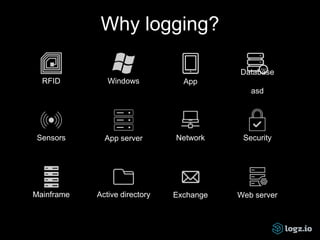
RFID Windows App
Database
asd
Sensors App server
Mainframe Active directory
Network Security
Exchange
Why logging?
Web server
State of logging
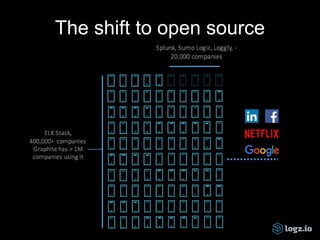
The shift to open source
The logging challenge
• No centralization
• No consistency
• No accessibility
* Puppet DevOps Survey
2016
The Docker challenge
Distribution and
diversification
2016-06-02T13:05:22.614090Z 0 [Note] InnoDB: 5.7.12 started; log sequence number 2522067
CONTAINER CPU % MEM USAGE / LIMIT MEM % NET I/O BLOCK I/O
3747bd397456 0.01% 3.641 MB / 2.1 GB 0.17% 3.366 kB / 648 B 0 B / 0 B
396e42ba0d15 0.11% 1.638 MB / 2.1 GB 0.08% 9.79 kB / 648 B 348.2 kB / 0 B
468bf755240a 3.19% 45.67 MB / 2.1 GB 2.17% 25.19 MB / 17.95 MB 774.1 kB / 0 B
5f16814a3c0e 0.01% 495.6 kB / 2.1 GB 0.02% 8.564 kB / 648 B 0 B / 0 B
74cdfa7b8a0c 0.04% 3.908 MB / 2.1 GB 0.19% 2.028 kB / 648 B 0 B / 0 B
99bafb7600fc 0.00% 32.95 MB / 2.1 GB 1.57% 0 B / 0 B 2.093 MB / 20.48 kB
a48f7ba0ace7 0.04% 390.4 MB / 2.1 GB 18.59% 4.704 kB / 648 B 31.29 MB / 306.5 MB
d7b60560e4d8 0.27% 220.9 MB / 2.1 GB 10.52% 7.338 kB / 648 B 94.21 kB / 114.7 kB
$ docker logs
$ docker stats
$ docker daemon
time="2016-06-05T12:03:49.716900785Z" level=debug msg="received containerd event: &types.Event{Type:"exit",
Id:"3747bd397456cd28058bb40799cd0642f431849b5c43ce56536ab7f55a98114f", Status:0x0,
Pid:"4120a7625a592f7c95eab4b1b442a45370f6dd95b63d284714dbb58f00d0a20d", Timestamp:0x57541525}"
Containers are transient
$ tail -f
is not enough
Common logging solutions
• Application logging (data volumes)
• Logspout
• Drivers - json-file (default), syslog, fluentd, gelf,
journald
• Monitoring/Logging tools - Datadog, Papertail,
Dynatrace, Sysdig
• World’s most popular open source log analysis platform
• 4.5M downloads a month!
• Centralized logging AND: search, BI, SEO, IoT, and more
Introducing ELK
Old school logging
$ grep ' 30[1234] ' /var/logs/apache2/access.log | grep -v
baidu | grep -v Googlebot
173.230.156.8 - - [04/Sep/2015:06:10:10 +0000] "GET /morpht HTTP/1.0" 301 26
"-" "Mozilla/5.0 (pc-x86_64-linux-gnu)"
192.3.83.5 - - [04/Sep/2015:06:10:22 +0000] "GET /?q=node/add HTTP/1.0" 301
26 "http://morpht.com/" "Mozilla/5.0 (Macintosh; Intel Mac OS X 10_10_1)
AppleWebKit/600.2.5 (KHTML, like Gecko) Version/8.0.2 Safari/600.2.5"
192.3.83.5 - - [04/Sep/2015:06:10:23 +0000] "GET /?q=user/register HTTP/1.0"
301 26 "http://morpht.com/node/add" "Mozilla/5.0 (Macintosh; Intel Mac OS X
10_10_1) AppleWebKit/600.2.5 (KHTML, like Gecko) Version/8.0.2 Safari/600.
2.5"
New school logging
type:apache AND website: "mysite" AND response: [500 TO *]
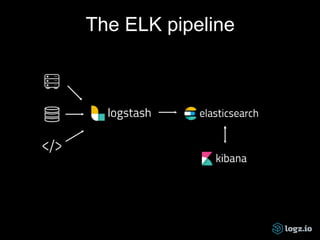
• A full-text search & analytics engine
• Open source, written in Java and based on Apache
Lucene
• Designed for speed, scalability and high availability
• Advanced querying using REST API
• Collects, processes, and forwards logs
• Over 200 input, filter and output plugins for
manipulating the data
• Open source visualization platform
• For querying and analyzing logs
• Visualizations and monitoring dashboards
The ELK pipeline
Docker —> ELK
Setup ELK: Install Elasticsearch, Logstash and Kibana
• Elasticsearch - https://hub.docker.com/_/elasticsearch/
• Logstash - https://hub.docker.com/_/logstash/
• Kibana - https://hub.docker.com/_/kibana/
• Full stack: https://hub.docker.com/r/sebp/elk/
Docker —> ELK
• Use syslog logging driver
logging:
driver: syslog
options:
syslog-address: "udp://$IP_LOGSTASH:5000"
syslog-tag: “nginx-with-syslog"
• Use logspout and Logstash module :
input {
udp {
port => 5000
codec => json
}
}
Docker Log Collector
• Dedicated container
• Unified logging layer, fetching:
• Docker logs from all the running containers per
Docker host
• Docker stats for all the containers
• Docker daemon events
How it works
• Based on docker-loghose and docker-stats
• POST /containers/{id}/attach, to fetch the logs
• GET /containers/{id}/stats, to fetch the stats of the
container
• GET /containers/json, to detect the containers that are
running when this module starts
• GET /events, to detect new containers that will start
after the module has started
Running it
$ docker pull logzio/logzio-docker
$ docker run -d --restart=always -v
/var/run/docker.sock:/var/run/docker.sock
logzio/logzio-docker -t
UfKqCazQjUYnBNcJqSryIRyDIjExjwIZ
Running options
-- no-stats, to not send stats
-- no-logs, to not send logs
-- no-dockerEvents, to not send daemon events
-i/-- statsinterval, to set the stats interval
-a, custom tag
-- matchByName / -skipByName, blacklist or whitelist
containers
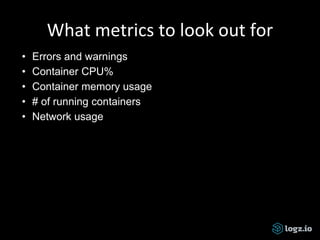
What metrics to look out for
• Errors and warnings
• Container CPU%
• Container memory usage
• # of running containers
• Network usage
Demo time!
Resources
• Logz.io blog: http://logz.io/blog/
• Elastic: https://www.elastic.co/learn
• Loggly blog:
https://www.loggly.com/blog/topic/general/
Thanks!
@proudboffin |
daniel@logz.io
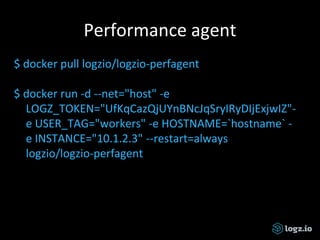
Performance agent
$ docker pull logzio/logzio-perfagent
$ docker run -d --net="host" -e
LOGZ_TOKEN="UfKqCazQjUYnBNcJqSryIRyDIjExjwIZ"-
e USER_TAG="workers" -e HOSTNAME=`hostname` -
e INSTANCE="10.1.2.3" --restart=always
logzio/logzio-perfagent

Monitoring Docker with ELK

  • 1.
  • 2.
  • 3.
    Daniel Berman • ProductEvangelist @Logzio • LAMPer • Contributor on SitePoint and DZone • TLV-PHP Meetup organizer • @proudboffin, daniel@logz.io
  • 5.
    2-Mins on • End-to-endELK as a service • Auto-scaling, secure • SOC-II compliant, ISO27001 • AWS-based • Alerting, user-control, ELK Apps
  • 6.
    Agenda • Why logging? •The logging challenge • The Docker challenge • Common logging solutions • Introducing ELK • Docker log collector • Demo • Questions?
  • 7.
    RFID Windows App Database asd SensorsApp server Mainframe Active directory Network Security Exchange Why logging? Web server
  • 8.
  • 9.
    The shift toopen source
  • 10.
  • 11.
    The logging challenge •No centralization • No consistency • No accessibility * Puppet DevOps Survey 2016
  • 12.
  • 13.
  • 14.
    2016-06-02T13:05:22.614090Z 0 [Note]InnoDB: 5.7.12 started; log sequence number 2522067 CONTAINER CPU % MEM USAGE / LIMIT MEM % NET I/O BLOCK I/O 3747bd397456 0.01% 3.641 MB / 2.1 GB 0.17% 3.366 kB / 648 B 0 B / 0 B 396e42ba0d15 0.11% 1.638 MB / 2.1 GB 0.08% 9.79 kB / 648 B 348.2 kB / 0 B 468bf755240a 3.19% 45.67 MB / 2.1 GB 2.17% 25.19 MB / 17.95 MB 774.1 kB / 0 B 5f16814a3c0e 0.01% 495.6 kB / 2.1 GB 0.02% 8.564 kB / 648 B 0 B / 0 B 74cdfa7b8a0c 0.04% 3.908 MB / 2.1 GB 0.19% 2.028 kB / 648 B 0 B / 0 B 99bafb7600fc 0.00% 32.95 MB / 2.1 GB 1.57% 0 B / 0 B 2.093 MB / 20.48 kB a48f7ba0ace7 0.04% 390.4 MB / 2.1 GB 18.59% 4.704 kB / 648 B 31.29 MB / 306.5 MB d7b60560e4d8 0.27% 220.9 MB / 2.1 GB 10.52% 7.338 kB / 648 B 94.21 kB / 114.7 kB $ docker logs $ docker stats $ docker daemon time="2016-06-05T12:03:49.716900785Z" level=debug msg="received containerd event: &types.Event{Type:"exit", Id:"3747bd397456cd28058bb40799cd0642f431849b5c43ce56536ab7f55a98114f", Status:0x0, Pid:"4120a7625a592f7c95eab4b1b442a45370f6dd95b63d284714dbb58f00d0a20d", Timestamp:0x57541525}"
  • 15.
  • 16.
    $ tail -f isnot enough
  • 17.
    Common logging solutions •Application logging (data volumes) • Logspout • Drivers - json-file (default), syslog, fluentd, gelf, journald • Monitoring/Logging tools - Datadog, Papertail, Dynatrace, Sysdig
  • 18.
    • World’s mostpopular open source log analysis platform • 4.5M downloads a month! • Centralized logging AND: search, BI, SEO, IoT, and more Introducing ELK
  • 19.
    Old school logging $grep ' 30[1234] ' /var/logs/apache2/access.log | grep -v baidu | grep -v Googlebot 173.230.156.8 - - [04/Sep/2015:06:10:10 +0000] "GET /morpht HTTP/1.0" 301 26 "-" "Mozilla/5.0 (pc-x86_64-linux-gnu)" 192.3.83.5 - - [04/Sep/2015:06:10:22 +0000] "GET /?q=node/add HTTP/1.0" 301 26 "http://morpht.com/" "Mozilla/5.0 (Macintosh; Intel Mac OS X 10_10_1) AppleWebKit/600.2.5 (KHTML, like Gecko) Version/8.0.2 Safari/600.2.5" 192.3.83.5 - - [04/Sep/2015:06:10:23 +0000] "GET /?q=user/register HTTP/1.0" 301 26 "http://morpht.com/node/add" "Mozilla/5.0 (Macintosh; Intel Mac OS X 10_10_1) AppleWebKit/600.2.5 (KHTML, like Gecko) Version/8.0.2 Safari/600. 2.5"
  • 20.
    New school logging type:apacheAND website: "mysite" AND response: [500 TO *]
  • 21.
    • A full-textsearch & analytics engine • Open source, written in Java and based on Apache Lucene • Designed for speed, scalability and high availability • Advanced querying using REST API
  • 22.
    • Collects, processes,and forwards logs • Over 200 input, filter and output plugins for manipulating the data
  • 23.
    • Open sourcevisualization platform • For querying and analyzing logs • Visualizations and monitoring dashboards
  • 24.
  • 25.
    Docker —> ELK SetupELK: Install Elasticsearch, Logstash and Kibana • Elasticsearch - https://hub.docker.com/_/elasticsearch/ • Logstash - https://hub.docker.com/_/logstash/ • Kibana - https://hub.docker.com/_/kibana/ • Full stack: https://hub.docker.com/r/sebp/elk/
  • 26.
    Docker —> ELK •Use syslog logging driver logging: driver: syslog options: syslog-address: "udp://$IP_LOGSTASH:5000" syslog-tag: “nginx-with-syslog" • Use logspout and Logstash module : input { udp { port => 5000 codec => json } }
  • 27.
    Docker Log Collector •Dedicated container • Unified logging layer, fetching: • Docker logs from all the running containers per Docker host • Docker stats for all the containers • Docker daemon events
  • 28.
    How it works •Based on docker-loghose and docker-stats • POST /containers/{id}/attach, to fetch the logs • GET /containers/{id}/stats, to fetch the stats of the container • GET /containers/json, to detect the containers that are running when this module starts • GET /events, to detect new containers that will start after the module has started
  • 29.
    Running it $ dockerpull logzio/logzio-docker $ docker run -d --restart=always -v /var/run/docker.sock:/var/run/docker.sock logzio/logzio-docker -t UfKqCazQjUYnBNcJqSryIRyDIjExjwIZ
  • 30.
    Running options -- no-stats,to not send stats -- no-logs, to not send logs -- no-dockerEvents, to not send daemon events -i/-- statsinterval, to set the stats interval -a, custom tag -- matchByName / -skipByName, blacklist or whitelist containers
  • 31.
    What metrics tolook out for • Errors and warnings • Container CPU% • Container memory usage • # of running containers • Network usage
  • 32.
  • 34.
    Resources • Logz.io blog:http://logz.io/blog/ • Elastic: https://www.elastic.co/learn • Loggly blog: https://www.loggly.com/blog/topic/general/
  • 35.
  • 36.
    Performance agent $ dockerpull logzio/logzio-perfagent $ docker run -d --net="host" -e LOGZ_TOKEN="UfKqCazQjUYnBNcJqSryIRyDIjExjwIZ"- e USER_TAG="workers" -e HOSTNAME=`hostname` - e INSTANCE="10.1.2.3" --restart=always logzio/logzio-perfagent

Editor's Notes

  • #3 Need to start looking at our Docker environment from a more high level view. This talk will also try and approach Docker from a more holistic point of view.
  • #5 One picture is worth 1000 words! Chaos
  • #8 Logging is hands down the best way to see how your application is behaving, and when utilized properly allows you to catch problems early and make key technical decisions. IT infrastructures on the cloud
  • #9 Multiple use cases across operations, security, BI and IoT
  • #10 Log analytics market - divided into two disproportionate parts Splunk invented the space, small section of the market. Majority of the market are using ELK. Open source sitting on the convergence of various log analytics software: Hadoop, Spark, Elasticsearch Hadoop, Spark, Graphite, Kafka…ELK!
  • #11  Log analysis is like automated testing. Everyone know they need to do it, but no one ever does do it.
  • #12 Logs are coming in from a huge amount of servers all over the place - they can be on the cloud, local or hybrid. Puppet survey. Logging is different for each app/system: PHP/node, apache/nginx Large production environments consist of hundreds of servers Large data volume, difficult to find - remote access, authentication SSHing + GREPing is simply not enough
  • #14 Multiple containers per host, each with its own env, dedicated process - monitoring logs for each container is not a viable option Number of processes running within the same container Logz.io: 60 hosts running at any given time, each with a number of containers
  • #15 Various types of data being outputted by each container
  • #16 Traditional logging and monitoring took metrics static servers with long uptime Containers come and go, constantly moving, dynamic - some Docker servers run hundreds of short-term containers s You can’t log to the container since the data will be lost
  • #17 Data is no longer persistent and accessible, in the container era - data is ephemeral and distributed, turning log analytics into an engineering art Log analytics has become black magic - not unprone to human mistakes and errors.
  • #18 Application logging using data volumes - app handles logging using a logging framework, drawbacks: requires setup in app, no stats/events Logspout - runs as a container per host, drawbacks: only for stdout/stderr, no stats/events, not meant for management so no retention. Extremely popular (Datadog research) Drivers - drawbacks: tough to troubleshoot and administrate, miss out on daemon events and stats, requires extra config SaaS - cost, focus on monitoring metrics
  • #19 Why so popular? Simple and beautiful! Easy to get started UI is awesome! Open Source and free! Fast, very fast!
  • #20 Website down scenario
  • #22 Distributed architecture (sharding, replication) allows for huge capacity, scaling up to hundreds of servers and storing petabytes of data On the same hardware, queries that would take more than 10 seconds using SQL will return results in under 10 milliseconds in Elasticsearch. The result of all this is: a fast, scalable and reliable data store that can power any data discovery application.
  • #23 The stack’s workhorse - can process data from any source Hundreds of output plugins: AWS S3, MongoDB, Redis, Riak and many more
  • #26 2225 Elasticsearch images Over 100K pulls, configures log rotation, certification keys for log shippers.
  • #27 In both cases, stdout and stderr output Downfalls: Per host Resource consumption No stats/events
  • #28 Dedicated container making logging a part of the architecture Simplified scaling - simply run a container Daemon events: attach, commit, copy, create, destroy, detach, die, etc. — for understanding the lifecycle of containers
  • #30 On GitHub, so you can customize it any way you want.
  • #32 Errors and warnings Container CPU% - will help you set CPU limits for containers Container memory usage - will help you set memory limits for containers # of running containers - handy during deployments and updates to check that everything is running like before Network usage
  • #34 No silver bullet! (Bela Lugosi, 1931) Docker is still not mature enough, does not mean that logging is not necessary! ELK - is scalable, adds visualization layer, easier centralized analysis
  • #37 Monitoring host performance (not just Docker) collectl Rsyslog