Collect distributed
application logging
using Fluentd (EFK stack)
Marco Pas
Philips Lighting
Software geek, hands on
Developer/Architect/DevOps Engineer
@marcopas
Some stuff about me...
● Mostly doing cloud related stuff
○ Java, Groovy, Scala, Spring Boot, IOT, AWS, Terraform, Infrastructure
● Enjoying the good things
● Chef leuke dingen doen == “trying out cool and new stuff”
● Currently involved in a big IOT project
● Wannabe chef, movie & Netflix addict
Agenda
● Logging
● Distributed Logging
● Fluentd Overview including demo’s:
○ Run Fluentd
○ Capture input from docker container
○ Capture HTTP access logs
○ Capture HTTP access logs and store in MongoDB
○ Capture HTTP access logs and store in EFK stack
○ Capture SpringBoot logs and store in EFK stack including in_tail
○ HA Setup
Logging
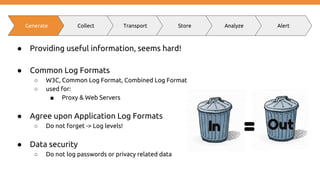
● Providing useful information, seems hard!
● Common Log Formats
○ W3C, Common Log Format, Combined Log Format
○ used for:
■ Proxy & Web Servers
● Agree upon Application Log Formats
○ Do not forget -> Log levels!
● Data security
○ Do not log passwords or privacy related data
Generate Collect Transport Store Analyze Alert
Some seriously useful log message :)
● “No need to log, we know what is happening”
● “Something happened not sure what”
● “Empty log message”
● “Lots of sh*t happing”
● “It works b****”
● “How did we end up here?”
● “Okay i am getting tired of this error message”
● “Does this work?”
● “We hit a bug, still figuring out what”
● “Call 911 we have a problem”
Logging considerations
● Logging means more code
● Logging is not free
● Consider feedback to the UI instead of logging
● The more you log, the less you can find
● Consider to log only the most evil scenarios (log exceptions)
● Agree on levels like FATAL, ERROR, WARN, DEBUG, INFO, TRACE …
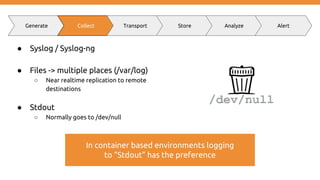
● Syslog / Syslog-ng
● Files -> multiple places (/var/log)
○ Near realtime replication to remote
destinations
● Stdout
○ Normally goes to /dev/null
Generate Collect Transport Store Analyze Alert
In container based environments logging
to “Stdout” has the preference
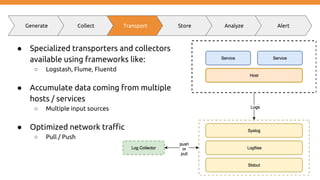
● Specialized transporters and collectors
available using frameworks like:
○ Logstash, Flume, Fluentd
● Accumulate data coming from multiple
hosts / services
○ Multiple input sources
● Optimized network traffic
○ Pull / Push
Generate Collect Transport Store Analyze Alert
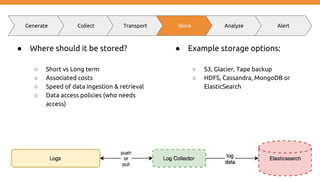
● Where should it be stored?
○ Short vs Long term
○ Associated costs
○ Speed of data ingestion & retrieval
○ Data access policies (who needs
access)
● Example storage options:
○ S3, Glacier, Tape backup
○ HDFS, Cassandra, MongoDB or
ElasticSearch
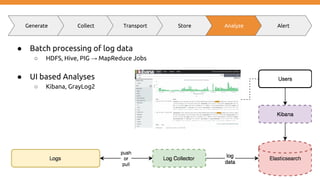
● Batch processing of log data
○ HDFS, Hive, PIG → MapReduce Jobs
● UI based Analyses
○ Kibana, GrayLog2
Generate Collect Transport Store Analyze Alert
● Based on patterns or “calculated” metrics → send out events
○ Trigger alert and send notifications
● Logging != Monitoring
○ Logging -> recording to diagnose a system
○ Monitoring -> observation, checking and recording
Generate Collect Transport Store Analyze Alert
http_requests_total{method="post",code="200"} 1027 1395066363000
127.0.0.1 - frank [10/Oct/2000:13:55:36 -0700] "GET /apache_pb.gif HTTP/1.0" 200 2326
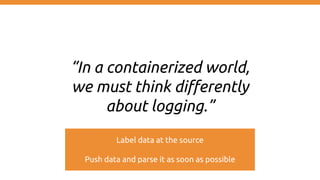
“In a containerized world,
we must think differently
about logging.”
Label data at the source
Push data and parse it as soon as possible
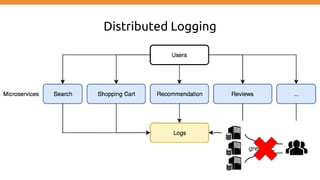
Distributed Logging
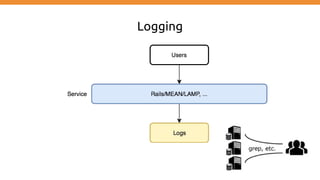
Logging
Distributed Logging
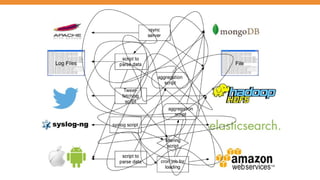
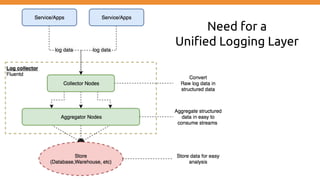
Need for a
Unified Logging Layer
Fluentd
Overview
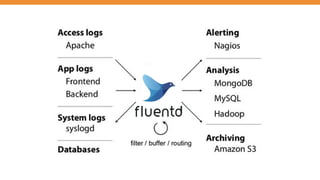
Fluentd
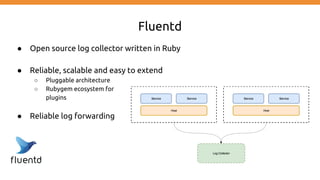
● Open source log collector written in Ruby
● Reliable, scalable and easy to extend
○ Pluggable architecture
○ Rubygem ecosystem for
plugins
● Reliable log forwarding
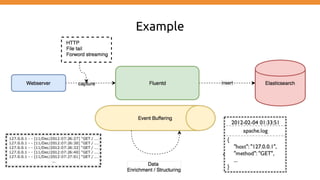
Example
Event structure
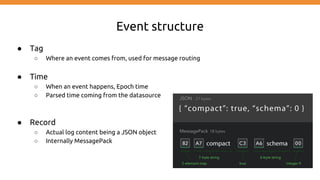
● Tag
○ Where an event comes from, used for message routing
● Time
○ When an event happens, Epoch time
○ Parsed time coming from the datasource
● Record
○ Actual log content being a JSON object
○ Internally MessagePack
Event example
192.168.0.1 - - [28/Feb/2013:12:00:00 +0900] "GET / HTTP/1.1" 200 777
tag:: apache.access # set by configuration
time: 1362020400 # 28/Feb/2013:12:00:00 +0900
record: {"user":"-","method":"GET","code":200,"size":777,"host":"192.168.0.1","path":"/"}
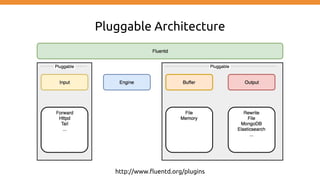
Pluggable Architecture
http://www.fluentd.org/plugins
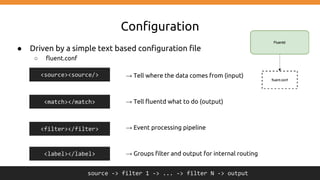
Configuration
● Driven by a simple text based configuration file
○ fluent.conf
→ Tell where the data comes from (input)
→ Tell fluentd what to do (output)
→ Event processing pipeline
→ Groups filter and output for internal routing
<source><source/>
<match></match>
<filter></filter>
source -> filter 1 -> ... -> filter N -> output
<label></label>
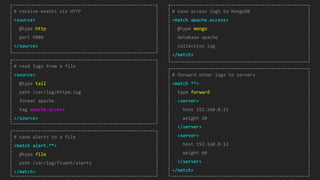
# receive events via HTTP
<source>
@type http
port 9880
</source>
# read logs from a file
<source>
@type tail
path /var/log/httpd.log
format apache
tag apache.access
</source>
# save alerts to a file
<match alert.**>
@type file
path /var/log/fluent/alerts
</match>
# save access logs to MongoDB
<match apache.access>
@type mongo
database apache
collection log
</match>
# forward other logs to servers
<match **>
type forward
<server>
host 192.168.0.11
weight 20
</server>
<server>
host 192.168.0.12
weight 60
</server>
</match>
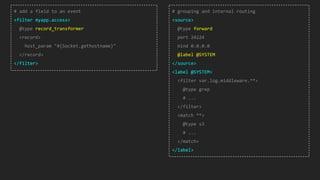
# add a field to an event
<filter myapp.access>
@type record_transformer
<record>
host_param "#{Socket.gethostname}"
</record>
</filter>
# grouping and internal routing
<source>
@type forward
port 24224
bind 0.0.0.0
@label @SYSTEM
</source>
<label @SYSTEM>
<filter var.log.middleware.**>
@type grep
# ...
</filter>
<match **>
@type s3
# ...
</match>
</label>
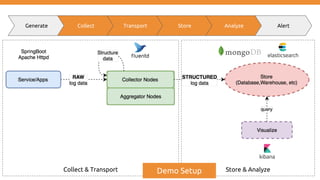
Generate Collect Transport Store Analyze Alert
Collect & Transport Store & AnalyzeDemo Setup
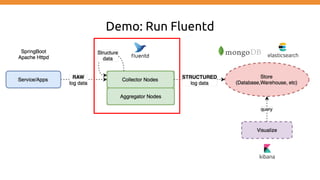
Demo: Run Fluentd
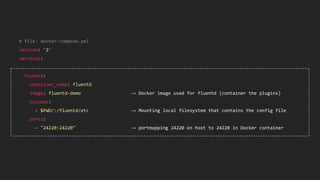
# file: docker-compose.yml
version: '2'
services:
fluentd:
container_name: fluentd
image: fluentd-demo → Docker image used for fluentd (container the plugins)
volumes:
- $PWD/:/fluentd/etc → Mounting local filesystem that contains the config file
ports:
- "24220:24220" → portmapping 24220 on host to 24220 in Docker container
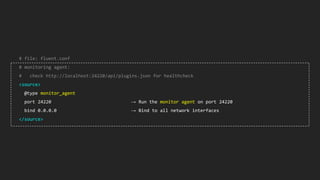
# file: fluent.conf
# monitoring agent:
# check http://localhost:24220/api/plugins.json for healthcheck
<source>
@type monitor_agent
port 24220 → Run the monitor agent on port 24220
bind 0.0.0.0 → Bind to all network interfaces
</source>
Demo
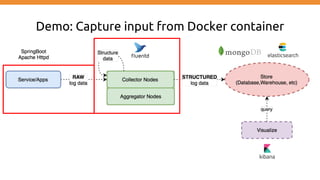
Demo: Capture input from Docker container
# file: docker-compose.yml
version: '2'
services:
fluentd:
container_name: fluentd
# code intentionally omitted
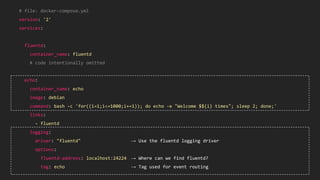
echo:
container_name: echo
image: debian
command: bash -c 'for((i=1;i<=1000;i+=1)); do echo -e "Welcome $${i} times"; sleep 2; done;'
links:
- fluentd
logging:
driver: "fluentd" → Use the fluentd logging driver
options:
fluentd-address: localhost:24224 → Where can we find fluentd?
tag: echo → Tag used for event routing
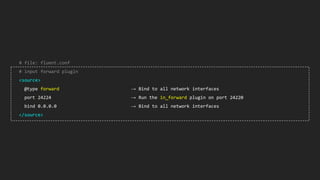
# file: fluent.conf
# input forward plugin
<source>
@type forward → Bind to all network interfaces
port 24224 → Run the in_forward plugin on port 24220
bind 0.0.0.0 → Bind to all network interfaces
</source>
Demo
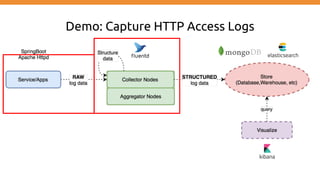
Demo: Capture HTTP Access Logs
# file: docker-compose.yml
version: '2'
services:
fluentd:
container_name: fluentd
# code intentionally omitted
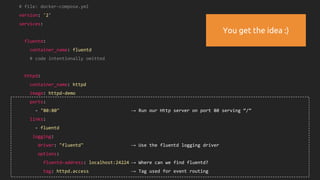
httpd:
container_name: httpd
image: httpd-demo
ports:
- "80:80" → Run our Http server on port 80 serving “/”
links:
- fluentd
logging:
driver: "fluentd" → Use the fluentd logging driver
options:
fluentd-address: localhost:24224 → Where can we find fluentd?
tag: httpd.access → Tag used for event routing
You get the idea :)
# file: fluent.conf
# input forward plugin
<source>
@type forward → Bind to all network interfaces
port 24224 → Run the in_forward plugin on port 24220
bind 0.0.0.0 → Bind to all network interfaces
</source>
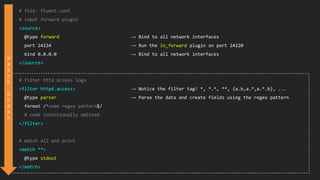
# filter httd access logs
<filter httpd.access> → Notice the filter tag! *, *.*, **, {a.b,a.*,a.*.b}, ...
@type parser → Parse the data and create fields using the regex pattern
format /^some regex pattern$/
# code intentionally omitted
</filter>
# match all and print
<match **>
@type stdout
</match>
m
a
t
c
h
o
r
d
e
r
Demo
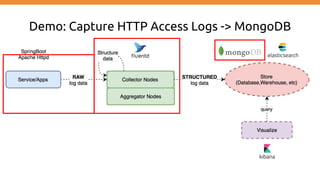
Demo: Capture HTTP Access Logs -> MongoDB
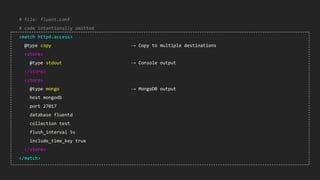
# file: fluent.conf
# code intentionally omitted
<match httpd.access>
@type copy → Copy to multiple destinations
<store>
@type stdout → Console output
</store>
<store>
@type mongo → MongoDB output
host mongodb
port 27017
database fluentd
collection test
flush_interval 5s
include_time_key true
</store>
</match>
Demo
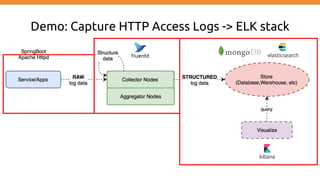
Demo: Capture HTTP Access Logs -> ELK stack
# file: fluent.conf
# code intentionally omitted
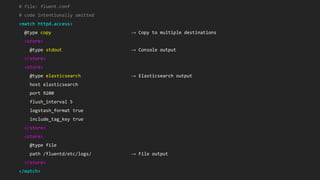
<match httpd.access>
@type copy → Copy to multiple destinations
<store>
@type stdout → Console output
</store>
<store>
@type elasticsearch → Elasticsearch output
host elasticsearch
port 9200
flush_interval 5
logstash_format true
include_tag_key true
</store>
<store>
@type file
path /fluentd/etc/logs/ → File output
</store>
</match>
Demo
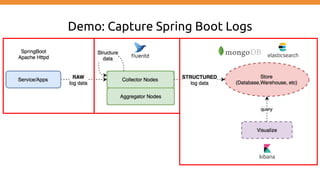
Demo: Capture Spring Boot Logs
# file: fluent.conf
# code intentionally omitted
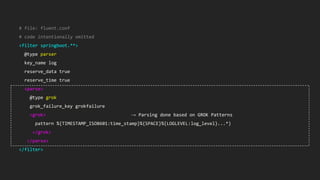
<filter springboot.**>
@type parser
key_name log
reserve_data true
reserve_time true
<parse>
@type grok
grok_failure_key grokfailure
<grok> → Parsing done based on GROK Patterns
pattern %{TIMESTAMP_ISO8601:time_stamp}%{SPACE}%{LOGLEVEL:log_level}...*)
</grok>
</parse>
</filter>
Demo
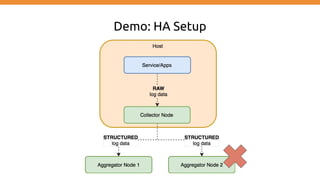
Demo: HA Setup
Demo
That’s a wrap!
Question?
https://github.com/mpas/collect-distributed-application-logging-using-fluentd-efk-stack
Marco Pas
Philips Lighting
Software geek, hands on
Developer/Architect/DevOps Engineer
@marcopas

Collect distributed application logging using fluentd (EFK stack)

  • 1.
    Collect distributed application logging usingFluentd (EFK stack) Marco Pas Philips Lighting Software geek, hands on Developer/Architect/DevOps Engineer @marcopas
  • 2.
    Some stuff aboutme... ● Mostly doing cloud related stuff ○ Java, Groovy, Scala, Spring Boot, IOT, AWS, Terraform, Infrastructure ● Enjoying the good things ● Chef leuke dingen doen == “trying out cool and new stuff” ● Currently involved in a big IOT project ● Wannabe chef, movie & Netflix addict
  • 3.
    Agenda ● Logging ● DistributedLogging ● Fluentd Overview including demo’s: ○ Run Fluentd ○ Capture input from docker container ○ Capture HTTP access logs ○ Capture HTTP access logs and store in MongoDB ○ Capture HTTP access logs and store in EFK stack ○ Capture SpringBoot logs and store in EFK stack including in_tail ○ HA Setup
  • 4.
  • 5.
    ● Providing usefulinformation, seems hard! ● Common Log Formats ○ W3C, Common Log Format, Combined Log Format ○ used for: ■ Proxy & Web Servers ● Agree upon Application Log Formats ○ Do not forget -> Log levels! ● Data security ○ Do not log passwords or privacy related data Generate Collect Transport Store Analyze Alert
  • 6.
    Some seriously usefullog message :) ● “No need to log, we know what is happening” ● “Something happened not sure what” ● “Empty log message” ● “Lots of sh*t happing” ● “It works b****” ● “How did we end up here?” ● “Okay i am getting tired of this error message” ● “Does this work?” ● “We hit a bug, still figuring out what” ● “Call 911 we have a problem”
  • 7.
    Logging considerations ● Loggingmeans more code ● Logging is not free ● Consider feedback to the UI instead of logging ● The more you log, the less you can find ● Consider to log only the most evil scenarios (log exceptions) ● Agree on levels like FATAL, ERROR, WARN, DEBUG, INFO, TRACE …
  • 8.
    ● Syslog /Syslog-ng ● Files -> multiple places (/var/log) ○ Near realtime replication to remote destinations ● Stdout ○ Normally goes to /dev/null Generate Collect Transport Store Analyze Alert In container based environments logging to “Stdout” has the preference
  • 9.
    ● Specialized transportersand collectors available using frameworks like: ○ Logstash, Flume, Fluentd ● Accumulate data coming from multiple hosts / services ○ Multiple input sources ● Optimized network traffic ○ Pull / Push Generate Collect Transport Store Analyze Alert
  • 10.
    Generate Collect TransportStore Analyze Alert ● Where should it be stored? ○ Short vs Long term ○ Associated costs ○ Speed of data ingestion & retrieval ○ Data access policies (who needs access) ● Example storage options: ○ S3, Glacier, Tape backup ○ HDFS, Cassandra, MongoDB or ElasticSearch
  • 11.
    ● Batch processingof log data ○ HDFS, Hive, PIG → MapReduce Jobs ● UI based Analyses ○ Kibana, GrayLog2 Generate Collect Transport Store Analyze Alert
  • 12.
    ● Based onpatterns or “calculated” metrics → send out events ○ Trigger alert and send notifications ● Logging != Monitoring ○ Logging -> recording to diagnose a system ○ Monitoring -> observation, checking and recording Generate Collect Transport Store Analyze Alert http_requests_total{method="post",code="200"} 1027 1395066363000 127.0.0.1 - frank [10/Oct/2000:13:55:36 -0700] "GET /apache_pb.gif HTTP/1.0" 200 2326
  • 13.
    “In a containerizedworld, we must think differently about logging.” Label data at the source Push data and parse it as soon as possible
  • 14.
  • 15.
  • 16.
  • 18.
    Need for a UnifiedLogging Layer
  • 19.
  • 21.
    Fluentd ● Open sourcelog collector written in Ruby ● Reliable, scalable and easy to extend ○ Pluggable architecture ○ Rubygem ecosystem for plugins ● Reliable log forwarding
  • 22.
  • 23.
    Event structure ● Tag ○Where an event comes from, used for message routing ● Time ○ When an event happens, Epoch time ○ Parsed time coming from the datasource ● Record ○ Actual log content being a JSON object ○ Internally MessagePack
  • 24.
    Event example 192.168.0.1 -- [28/Feb/2013:12:00:00 +0900] "GET / HTTP/1.1" 200 777 tag:: apache.access # set by configuration time: 1362020400 # 28/Feb/2013:12:00:00 +0900 record: {"user":"-","method":"GET","code":200,"size":777,"host":"192.168.0.1","path":"/"}
  • 25.
  • 26.
    Configuration ● Driven bya simple text based configuration file ○ fluent.conf → Tell where the data comes from (input) → Tell fluentd what to do (output) → Event processing pipeline → Groups filter and output for internal routing <source><source/> <match></match> <filter></filter> source -> filter 1 -> ... -> filter N -> output <label></label>
  • 27.
    # receive eventsvia HTTP <source> @type http port 9880 </source> # read logs from a file <source> @type tail path /var/log/httpd.log format apache tag apache.access </source> # save alerts to a file <match alert.**> @type file path /var/log/fluent/alerts </match> # save access logs to MongoDB <match apache.access> @type mongo database apache collection log </match> # forward other logs to servers <match **> type forward <server> host 192.168.0.11 weight 20 </server> <server> host 192.168.0.12 weight 60 </server> </match>
  • 28.
    # add afield to an event <filter myapp.access> @type record_transformer <record> host_param "#{Socket.gethostname}" </record> </filter> # grouping and internal routing <source> @type forward port 24224 bind 0.0.0.0 @label @SYSTEM </source> <label @SYSTEM> <filter var.log.middleware.**> @type grep # ... </filter> <match **> @type s3 # ... </match> </label>
  • 29.
    Generate Collect TransportStore Analyze Alert Collect & Transport Store & AnalyzeDemo Setup
  • 30.
  • 31.
    # file: docker-compose.yml version:'2' services: fluentd: container_name: fluentd image: fluentd-demo → Docker image used for fluentd (container the plugins) volumes: - $PWD/:/fluentd/etc → Mounting local filesystem that contains the config file ports: - "24220:24220" → portmapping 24220 on host to 24220 in Docker container
  • 32.
    # file: fluent.conf #monitoring agent: # check http://localhost:24220/api/plugins.json for healthcheck <source> @type monitor_agent port 24220 → Run the monitor agent on port 24220 bind 0.0.0.0 → Bind to all network interfaces </source>
  • 33.
  • 34.
    Demo: Capture inputfrom Docker container
  • 35.
    # file: docker-compose.yml version:'2' services: fluentd: container_name: fluentd # code intentionally omitted echo: container_name: echo image: debian command: bash -c 'for((i=1;i<=1000;i+=1)); do echo -e "Welcome $${i} times"; sleep 2; done;' links: - fluentd logging: driver: "fluentd" → Use the fluentd logging driver options: fluentd-address: localhost:24224 → Where can we find fluentd? tag: echo → Tag used for event routing
  • 36.
    # file: fluent.conf #input forward plugin <source> @type forward → Bind to all network interfaces port 24224 → Run the in_forward plugin on port 24220 bind 0.0.0.0 → Bind to all network interfaces </source>
  • 37.
  • 38.
    Demo: Capture HTTPAccess Logs
  • 39.
    # file: docker-compose.yml version:'2' services: fluentd: container_name: fluentd # code intentionally omitted httpd: container_name: httpd image: httpd-demo ports: - "80:80" → Run our Http server on port 80 serving “/” links: - fluentd logging: driver: "fluentd" → Use the fluentd logging driver options: fluentd-address: localhost:24224 → Where can we find fluentd? tag: httpd.access → Tag used for event routing You get the idea :)
  • 40.
    # file: fluent.conf #input forward plugin <source> @type forward → Bind to all network interfaces port 24224 → Run the in_forward plugin on port 24220 bind 0.0.0.0 → Bind to all network interfaces </source> # filter httd access logs <filter httpd.access> → Notice the filter tag! *, *.*, **, {a.b,a.*,a.*.b}, ... @type parser → Parse the data and create fields using the regex pattern format /^some regex pattern$/ # code intentionally omitted </filter> # match all and print <match **> @type stdout </match> m a t c h o r d e r
  • 41.
  • 42.
    Demo: Capture HTTPAccess Logs -> MongoDB
  • 43.
    # file: fluent.conf #code intentionally omitted <match httpd.access> @type copy → Copy to multiple destinations <store> @type stdout → Console output </store> <store> @type mongo → MongoDB output host mongodb port 27017 database fluentd collection test flush_interval 5s include_time_key true </store> </match>
  • 44.
  • 45.
    Demo: Capture HTTPAccess Logs -> ELK stack
  • 46.
    # file: fluent.conf #code intentionally omitted <match httpd.access> @type copy → Copy to multiple destinations <store> @type stdout → Console output </store> <store> @type elasticsearch → Elasticsearch output host elasticsearch port 9200 flush_interval 5 logstash_format true include_tag_key true </store> <store> @type file path /fluentd/etc/logs/ → File output </store> </match>
  • 47.
  • 48.
  • 49.
    # file: fluent.conf #code intentionally omitted <filter springboot.**> @type parser key_name log reserve_data true reserve_time true <parse> @type grok grok_failure_key grokfailure <grok> → Parsing done based on GROK Patterns pattern %{TIMESTAMP_ISO8601:time_stamp}%{SPACE}%{LOGLEVEL:log_level}...*) </grok> </parse> </filter>
  • 50.
  • 51.
  • 52.
  • 53.
    That’s a wrap! Question? https://github.com/mpas/collect-distributed-application-logging-using-fluentd-efk-stack MarcoPas Philips Lighting Software geek, hands on Developer/Architect/DevOps Engineer @marcopas