Docker for Developers
Chris	Tankersley	
@dragonmantank	
SunshinePHP	2016	
SunshinePHP	2016	 1
Who Am I
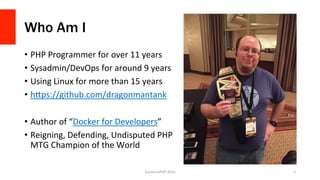
•  PHP	Programmer	for	over	11	years	
•  Sysadmin/DevOps	for	around	9	years	
•  Using	Linux	for	more	than	15	years	
•  hGps://github.com/dragonmantank	
•  Author	of	“Docker	for	Developers”	
•  Reigning,	Defending,	Undisputed	PHP	
MTG	Champion	of	the	World	
SunshinePHP	2016	 2
Docker
SunshinePHP	2016	 3
What Is Docker?
“Docker	is	an	open	plaUorm	for	developers	and	sysadmins	to	build,	
ship,	and	run	distributed	applicaVons.	ConsisVng	of	Docker	Engine,	a	
portable,	lightweight	runVme	and	packaging	tool,	and	Docker	Hub,	a	
cloud	service	for	sharing	applicaVons	and	automaVng	workflows,	
Docker	enables	apps	to	be	quickly	assembled	from	components	and	
eliminates	the	fricVon	between	development,	QA,	and	producVon	
environments.”	
SunshinePHP	2016	 4	
hGps://www.docker.com/whaVsdocker/
What is it from a technical standpoint?
•  Docker	is	a	wrapper	around	Containers	
•  Docker	Engine	is	the	packaging	porVon	that	builds	and	runs	the	
containers	
•  Docker	Hub	allows	you	to	publish	images	for	others	to	use	
•  Docker	Machine	is	a	bare-metal	provisioning	tool	
•  Docker	Swarm	is	an	load-balancing	deployment	tool	
•  Docker	Compose	is	a	mulV-container	build	system	
SunshinePHP	2016	 5
Containers
SunshinePHP	2016	 6
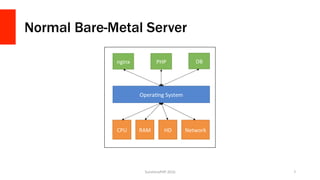
Normal Bare-Metal Server
SunshinePHP	2016	 7	
CPU	 RAM	 HD	 Network	
OperaVng	System	
nginx	 PHP	 DB
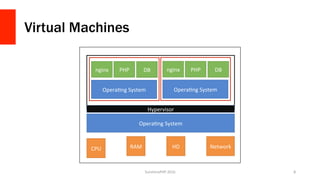
Virtual Machines
SunshinePHP	2016	 8	
CPU	 RAM	 HD	 Network	
OperaVng	System	
nginx	 PHP	 DB	
OperaVng	System	
nginx	 PHP	 DB	
OperaVng	System	
Hypervisor
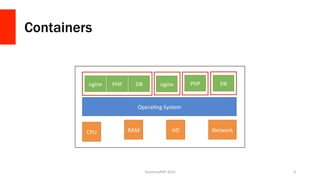
Containers
SunshinePHP	2016	 9	
CPU	 RAM	 HD	 Network	
OperaVng	System	
nginx	nginx	 PHP	 DB	 PHP	 DB
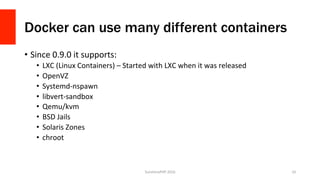
Docker can use many different containers
•  Since	0.9.0	it	supports:	
•  LXC	(Linux	Containers)	–	Started	with	LXC	when	it	was	released	
•  OpenVZ	
•  Systemd-nspawn	
•  libvert-sandbox	
•  Qemu/kvm	
•  BSD	Jails	
•  Solaris	Zones	
•  chroot	
SunshinePHP	2016	 10
Runs on *nix and Windows Hyper-V
•  No	naVve	container	drivers	for	OSX	
•  Amazon	has	ElasVc	Container	Service,	and	Microsoj	Azure	has	Azure	
Container	Service	
SunshinePHP	2016	 11
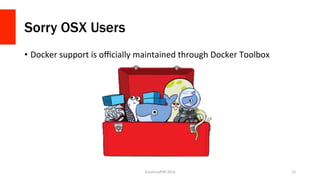
Sorry OSX Users
•  Docker	support	is	officially	maintained	through	Docker	Toolbox	
SunshinePHP	2016	 12
Docker Toolbox also is for Windows
SunshinePHP	2016	 13
Let’s use Docker
SunshinePHP	2016	 14
Assumptions
•  OSX	and	Windows	users	have	Docker	Toolbox	installed	
•  Linux	users	have	the	naVve	binaries	installed	
•  The	following	images	are	downloaded:	
•  php:7-fpm	
•  php:7-cli	
•  nginx	
•  mysql	
•  composer/composer	
SunshinePHP	2016	 15
Running a container
•  `docker	run`	will	run	a	container	
•  This	will	not	restart	an	exisVng	container,	just	create	a	new	one	
•  docker	run	[opVons]	IMAGE	[command]	[arguments]	
•  [opVons	]modify	the	docker	process	for	this	container	
•  IMAGE	is	the	image	to	use	
•  [command]	is	the	command	to	run	inside	the	container	
•  [arguments]	are	arguments	for	the	command	
SunshinePHP	2016	 16
Running a simple shell
SunshinePHP	2016	 17
Running Two Webservers
SunshinePHP	2016	 18
Some Notes
•  All	three	containers	are	100%	self	contained	
•  Docker	containers	share	common	ancestors,	but	keep	their	own	files	
•  `docker	run`	parameters:	
•  --rm	–	Destroy	a	container	once	it	exits	
•  -d	–	Run	in	the	background	(daemon	mode)	
•  -i	–	Run	in	interacVve	mode	
•  --name	–	Give	the	container	a	name	
•  -p	[local	port]:[container	port]	–	Forward	the	local	port	to	the	container	port	
SunshinePHP	2016	 19
Volumes
SunshinePHP	2016	 20
Modifying a running container
•  `docker	exec`	can	run	a	command	inside	of	an	exisVng	container	
•  Use	Volumes	to	share	data	
SunshinePHP	2016	 21
Persistent Data with Volumes
•  You	can	designate	a	volume	with	-v	
•  Volumes	can	be	shared	amongst	containers	
•  Volumes	can	mount	data	from	the	host	system	
SunshinePHP	2016	 22
Mounting from the host machine
SunshinePHP	2016	 23
Mounting from the host isn’t perfect
•  The	container	now	has	a	window	into	your	host	machine	
•  Permissions	can	get	screwy	if	you	are	modifying	in	the	container	
•  Most	things	it	creates	will	be	root	by	default,	and	you	probably	aren’t	root	on	
the	host	machine	
•  Host-mounted	volumes	are	not	portable	at	all	
•  Docker	Toolbox’s	VM	only	allows	mounVng	from	within	your	home	
directory	
SunshinePHP	2016	 24
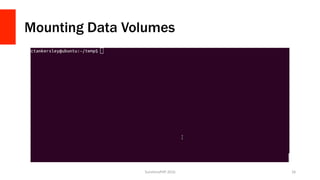
Container Data Volumes
•  Uses	a	small	container	that	does	nothing	but	stores	data	
•  Have	our	app	containers	use	the	data	volume	to	store	data	
•  Use	‘editor	containers’	to	go	in	and	modify	data	when	needed	
SunshinePHP	2016	 25
Mounting Data Volumes
SunshinePHP	2016	 26
Why not run SSH inside of the container?
•  Well,	you	can…	
•  Docker	is	designed	for	one	command	per	container	
•  If	you	need	to	modify	data,	then	you	need	to	change	your	setup	
•  If	you	have	to	run	SSH,	then	you	need	a	way	to	run	SSH	and	your	
command	
SunshinePHP	2016	 27
Why go through the hassle?
•  Data	volumes	are	portable	
•  Data	volumes	are	safer	
•  Separates	the	app	containers	from	data	
•  ProducVon	can	use	a	data	volume,	dev	can	use	a	host	volume	
•  Our	app	containers	stay	small	
SunshinePHP	2016	 28
Network Linking
SunshinePHP	2016	 29
Docker Links
•  Allows	containers	to	‘see’	each	other	over	the	network	
•  Each	container	thinks	the	other	one	is	just	another	machine	
•  Containers	all	have	an	internal	network	address,	so	we	don’t	need	to	
expose	everything	through	the	host	
•  Currently	only	works	if	all	the	containers	are	on	one	machine,	Docker	
1.10	should	fix	that	
SunshinePHP	2016	 30
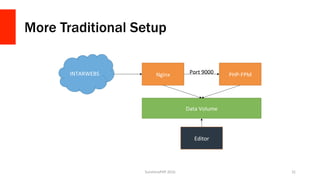
More Traditional Setup
SunshinePHP	2016	 31	
INTARWEBS	 Nginx		 PHP-FPM	
Data	Volume	
Port	9000	
Editor
Let’s Build It
SunshinePHP	2016	 32
More Notes!
•  We	can	now	rebuild	secVons	of	the	app	as	needed	
•  We	can	restart	nginx	without	impacVng	PHP	
•  We	can	extend	much	easier	
•  Linked	containers	will	not	update	if	they	are	stopped/started	
•  If	we	upgrade	PHP,	we	have	to	destroy/create	the	web_server	container	
again	
SunshinePHP	2016	 33
Creating your own Images
SunshinePHP	2016	 34
Dockerfile
•  Dockerfile	is	the	configuraVon	steps	for	an	image	
•  Can	be	created	from	scratch,	or	based	on	another	image	
•  Allows	you	to	add	files,	create	default	volumes,	ports,	etc	
•  Can	be	used	privately	or	pushed	to	Docker	Hub	
SunshinePHP	2016	 35
FROM	phusion/baseimage:0.9.10	
#	…	
CMD	["/sbin/my_init"]	
#	Nginx-PHP	Installation	
RUN	apt-get	update	
RUN	apt-get	install	-y	vim	git	curl	wget	build-essential	python-software-properties	
	 								php5-cli	php5-fpm	php5-mysql	php5-pgsql	php5-sqlite	php5-curl	
	 								php5-gd	php5-mcrypt	php5-intl	php5-imap	php5-tidy	mysql-client	
#	…	
RUN	mkdir											/var/www	
ADD	build/default			/etc/nginx/sites-available/default	
#	…	
EXPOSE	80	22	
VOLUME	/var/www	
VOLUME	/etc/nginx	
VOLUME	/etc/php/	
VOLUME	/var/log	
	
RUN	apt-get	clean	&&	rm	-rf	/var/lib/apt/lists/*	/tmp/*	/var/tmp/*	
SunshinePHP	2016	 36
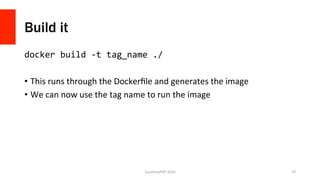
Build it
docker	build	-t	tag_name	./	
•  This	runs	through	the	Dockerfile	and	generates	the	image	
•  We	can	now	use	the	tag	name	to	run	the	image	
SunshinePHP	2016	 37
Other Helpful Commands
SunshinePHP	2016	 38
Inspect a container
docker	inspect	[opVons]	CONTAINER_NAME	
•  Returns	a	JSON	string	with	data	about	the	container	
•  Can	also	query	
•  docker	inspect	-f	“{{	.NetworkSezngs.IPAddres	}}”	web_server	
•  Really	handy	for	scripVng	out	things	like	reverse	proxies	
SunshinePHP	2016	 39
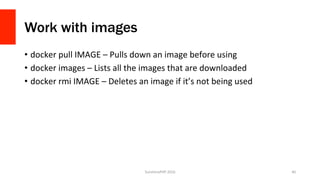
Work with images
•  docker	pull	IMAGE	–	Pulls	down	an	image	before	using	
•  docker	images	–	Lists	all	the	images	that	are	downloaded	
•  docker	rmi	IMAGE	–	Deletes	an	image	if	it’s	not	being	used	
SunshinePHP	2016	 40
Docker Machine
SunshinePHP	2016	 41
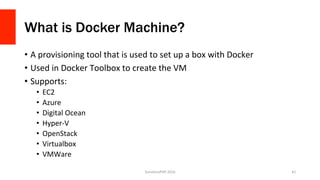
What is Docker Machine?
•  A	provisioning	tool	that	is	used	to	set	up	a	box	with	Docker	
•  Used	in	Docker	Toolbox	to	create	the	VM	
•  Supports:	
•  EC2	
•  Azure	
•  Digital	Ocean	
•  Hyper-V	
•  OpenStack	
•  Virtualbox	
•  VMWare	
SunshinePHP	2016	 42
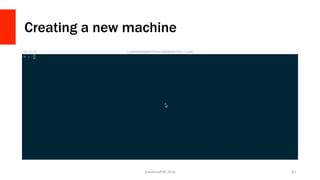
Creating a new machine
SunshinePHP	2016	 43
Why use it?
•  Makes	it	very	easy	to	spin	up	new	boxes	
•  Docker	Machine	handles	all	of	the	dirty	stuff	for	you	
•  Docker	Toolbox	users	are	already	using	it	
•  Integrates	with	Docker	Swarm	
•  It	is	not	necessarily	portable	
SunshinePHP	2016	 44
Docker Swarm
SunshinePHP	2016	 45
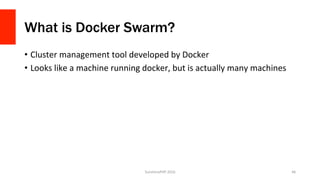
What is Docker Swarm?
•  Cluster	management	tool	developed	by	Docker	
•  Looks	like	a	machine	running	docker,	but	is	actually	many	machines	
SunshinePHP	2016	 46
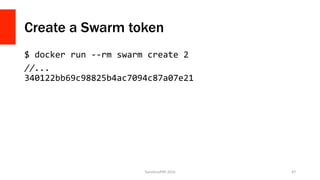
Create a Swarm token
$	docker	run	--rm	swarm	create	2		
//...	
340122bb69c98825b4ac7094c87a07e21		
	
SunshinePHP	2016	 47
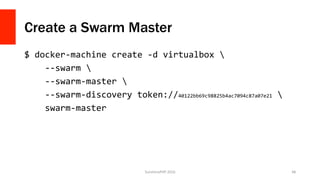
Create a Swarm Master
$	docker-machine	create	-d	virtualbox			
				--swarm			
				--swarm-master			
				--swarm-discovery	token://40122bb69c98825b4ac7094c87a07e21			
				swarm-master		
	
SunshinePHP	2016	 48
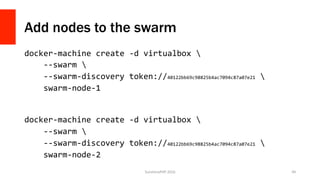
Add nodes to the swarm
docker-machine	create	-d	virtualbox			
				--swarm			
				--swarm-discovery	token://40122bb69c98825b4ac7094c87a07e21			
				swarm-node-1	
	
	
docker-machine	create	-d	virtualbox			
				--swarm			
				--swarm-discovery	token://40122bb69c98825b4ac7094c87a07e21			
				swarm-node-2	
	 SunshinePHP	2016	 49
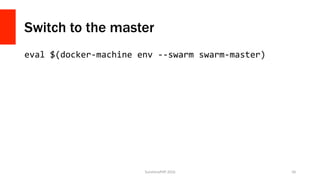
Switch to the master
eval	$(docker-machine	env	--swarm	swarm-master)		
	
SunshinePHP	2016	 50
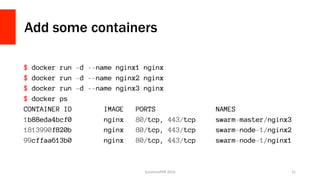
Add some containers
SunshinePHP	2016	 51
Docker Compose
SunshinePHP	2016	 52
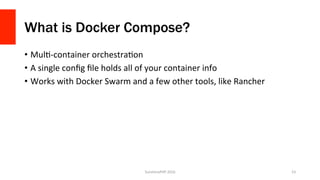
What is Docker Compose?
•  MulV-container	orchestraVon	
•  A	single	config	file	holds	all	of	your	container	info	
•  Works	with	Docker	Swarm	and	a	few	other	tools,	like	Rancher	
SunshinePHP	2016	 53
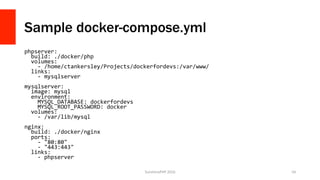
Sample docker-compose.yml
phpserver:	
		build:	./docker/php	
		volumes:	
				-	/home/ctankersley/Projects/dockerfordevs:/var/www/	
		links:	
				-	mysqlserver	
	
mysqlserver:	
		image:	mysql	
		environment:	
				MYSQL_DATABASE:	dockerfordevs	
				MYSQL_ROOT_PASSWORD:	docker	
		volumes:	
				-	/var/lib/mysql	
	
nginx:	
		build:	./docker/nginx	
		ports:	
				-	"80:80"	
				-	"443:443"	
		links:	
				-	phpserver	
SunshinePHP	2016	 54
Docker Compose in Action
SunshinePHP	2016	 55
Let’s build an application
SunshinePHP	2016	 56
The Goal
•  A	three	container	applicaVon	with	nginx,	php,	and	mysql	
•  ApplicaVon	will	read	and	write	to	the	database	
•  Can	deploy	to	a	producVon	machine	
SunshinePHP	2016	 57
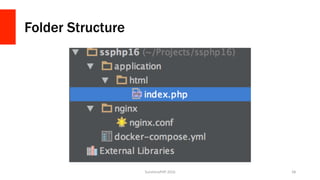
Folder Structure
SunshinePHP	2016	 58
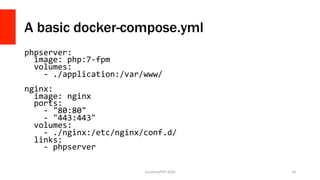
A basic docker-compose.yml
phpserver:	
		image:	php:7-fpm	
		volumes:	
				-	./application:/var/www/	
	
nginx:	
		image:	nginx	
		ports:	
				-	"80:80"	
				-	"443:443"	
		volumes:	
				-	./nginx:/etc/nginx/conf.d/	
		links:	
				-	phpserver	
SunshinePHP	2016	 59
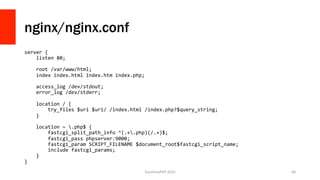
nginx/nginx.conf
server	{	
				listen	80;	
	
				root	/var/www/html;	
				index	index.html	index.htm	index.php;	
	
				access_log	/dev/stdout;	
				error_log	/dev/stderr;	
	
				location	/	{	
								try_files	$uri	$uri/	/index.html	/index.php?$query_string;	
				}	
	
				location	~	.php$	{	
								fastcgi_split_path_info	^(.+.php)(/.+)$;	
								fastcgi_pass	phpserver:9000;	
								fastcgi_param	SCRIPT_FILENAME	$document_root$fastcgi_script_name;	
								include	fastcgi_params;	
				}	
}	
SunshinePHP	2016	 60
Hello World
<?php	
	
echo	"Hello	World";	
SunshinePHP	2016	 61
Bringing it to life
SunshinePHP	2016	 62
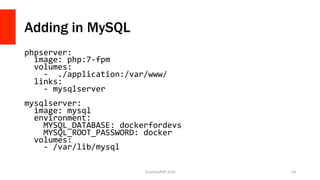
Adding in MySQL
phpserver:	
		image:	php:7-fpm	
		volumes:	
				-		./application:/var/www/	
		links:	
				-	mysqlserver	
	
mysqlserver:	
		image:	mysql	
		environment:	
				MYSQL_DATABASE:	dockerfordevs	
				MYSQL_ROOT_PASSWORD:	docker	
		volumes:	
				-	/var/lib/mysql	
SunshinePHP	2016	 63
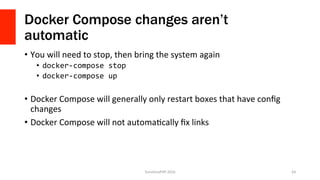
Docker Compose changes aren’t
automatic
•  You	will	need	to	stop,	then	bring	the	system	again	
•  docker-compose	stop	
•  docker-compose	up	
•  Docker	Compose	will	generally	only	restart	boxes	that	have	config	
changes	
•  Docker	Compose	will	not	automaVcally	fix	links	
SunshinePHP	2016	 64
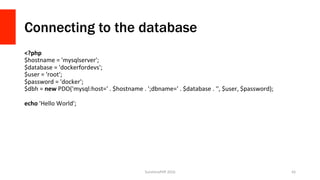
Connecting to the database
<?php	
$hostname	=	'mysqlserver';	
$database	=	'dockerfordevs';	
$user	=	'root';	
$password	=	'docker';	
$dbh	=	new	PDO('mysql:host='	.	$hostname	.	';dbname='	.	$database	.	'',	$user,	$password);	
	
echo	'Hello	World';	
SunshinePHP	2016	 65
Testing it
SunshinePHP	2016	 66
Why didn’t it work?
•  Default	PHP	images	ship	with	barely	any	extensions	enabled	by	
default	
•  We	will	need	a	custom	PHP	Image	
SunshinePHP	2016	 67
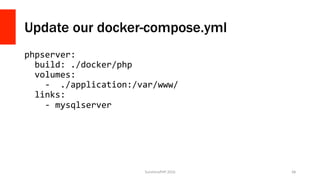
Update our docker-compose.yml
phpserver:	
		build:	./docker/php	
		volumes:	
				-		./application:/var/www/	
		links:	
				-	mysqlserver	
SunshinePHP	2016	 68
Custom Docker File
FROM	php:7-fpm	
#	Install	modules	
RUN	apt-get	update	&&	apt-get	install	-y		
								libmcrypt-dev		
				&&	docker-php-ext-install	pdo		
				&&	docker-php-ext-install	pdo_mysql	
CMD	["php-fpm"]	
SunshinePHP	2016	 69
Let’s try that again
SunshinePHP	2016	 70
Deploying
SunshinePHP	2016	 71
I can’t answer this for you
SunshinePHP	2016	 72
Questions?
SunshinePHP	2016	 73
Each situation is different
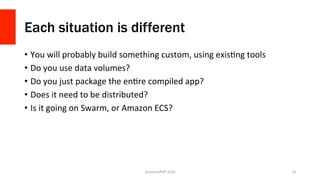
•  You	will	probably	build	something	custom,	using	exisVng	tools	
•  Do	you	use	data	volumes?	
•  Do	you	just	package	the	enVre	compiled	app?	
•  Does	it	need	to	be	distributed?	
•  Is	it	going	on	Swarm,	or	Amazon	ECS?	
SunshinePHP	2016	 74
Things to consider
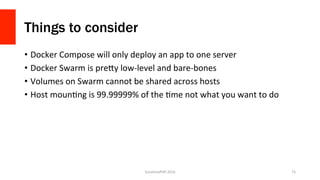
•  Docker	Compose	will	only	deploy	an	app	to	one	server	
•  Docker	Swarm	is	preGy	low-level	and	bare-bones	
•  Volumes	on	Swarm	cannot	be	shared	across	hosts	
•  Host	mounVng	is	99.99999%	of	the	Vme	not	what	you	want	to	do	
SunshinePHP	2016	 75
Rancher is a good start
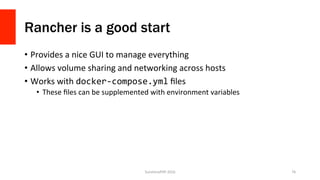
•  Provides	a	nice	GUI	to	manage	everything	
•  Allows	volume	sharing	and	networking	across	hosts	
•  Works	with	docker-compose.yml	files	
•  These	files	can	be	supplemented	with	environment	variables	
SunshinePHP	2016	 76
Rancher in action
SunshinePHP	2016	 77
Questions?
SunshinePHP	2016	 78
http://ctankersley.com
chris@ctankersley.com
@dragonmantank
https://joind.in/talk/c1ecb
SunshinePHP	2016	 79

Docker for developers