Dockerize the world!
Martin Damovský
My plan for today
• Introduction to Docker
• Some demos
• Docker in Cloud
• IoT and Docker
• News from DockerCon 2015 in SF and Barcelona
Who am I?
• Software engineer (java, DBs, continuous integrations, docker, etc.)
• Grew up in small city near Ostrava
• Tieto Czech s.r.o. Ostrava, Gemalto in Prague
• Now in Vendavo CZ in Prague
• Twitter @damovsky
Who knows Docker?
Who uses Docker in production?
What is ?
• Docker is virtualization technology
• With docker you can:
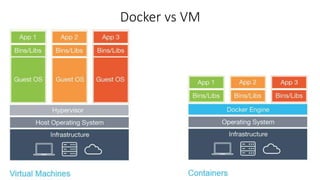
• virtualize only the app and not the whole OS
• Isolate each app
• Restrict CPU / memory / for each app
• Easily distribute your app
• Automate your development / test / production environment
What is ?
• Docker is a whole platform for using containers
• Includes tools for:
• container sharing
• orchestrations, clustering, etc.
What is ?
• Docker is for Linux only
• But…Microsoft works on Docker for Windows
• Apple (MacOS) = no native support planned 
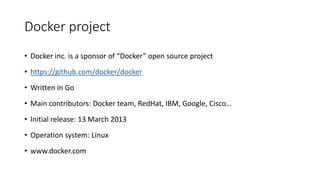
Docker project
• Docker inc. is a sponsor of “Docker” open source project
• https://github.com/docker/docker
• Written in Go
• Main contributors: Docker team, RedHat, IBM, Google, Cisco…
• Initial release: 13 March 2013
• Operation system: Linux
• www.docker.com
Docker vs VM
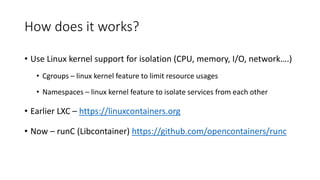
How does it works?
• Use Linux kernel support for isolation (CPU, memory, I/O, network….)
• Cgroups – linux kernel feature to limit resource usages
• Namespaces – linux kernel feature to isolate services from each other
• Earlier LXC – https://linuxcontainers.org
• Now – runC (Libcontainer) https://github.com/opencontainers/runc
Docker motto
Build – build container with your app
Ship - use docker registry to distribute your app
Run - wherever docker runs, your app will run as
well
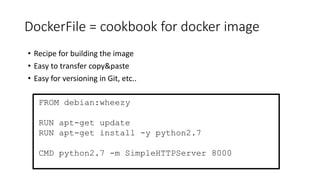
DockerFile = cookbook for docker image
• Recipe for building the image
• Easy to transfer copy&paste
• Easy for versioning in Git, etc..
FROM debian:wheezy
RUN apt-get update
RUN apt-get install -y python2.7
CMD python2.7 -m SimpleHTTPServer 8000
Docker “flow”
1. create docker file
2. build dockerfile
$ docker build -t myTagName .
3. run container
$ docker run -d myTagName
Dockerfile
• # Demo 01
• https://asciinema.org/a/7m72btfpczbshfkxh26smwgqv
Dockerfile commands
• FROM
• RUN
• CMD
• ADD
• USER
• ENV
• etc….see at http://docs.docker.com/reference/builder/
It’s all about the money!
LAYERS!
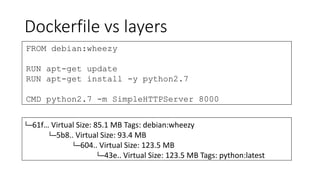
Dockerfile vs layers
FROM debian:wheezy
RUN apt-get update
RUN apt-get install -y python2.7
CMD python2.7 -m SimpleHTTPServer 8000
└─61f… Virtual Size: 85.1 MB Tags: debian:wheezy
└─5b8.. Virtual Size: 93.4 MB
└─604.. Virtual Size: 123.5 MB
└─43e.. Virtual Size: 123.5 MB Tags: python:latest
Dockerfile, build, run
• # Demo 02
• Python http server + Connect to container
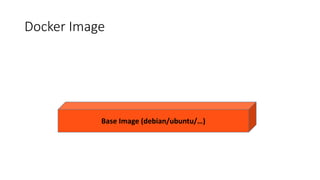
Docker Image
Base Image (debian/ubuntu/…)
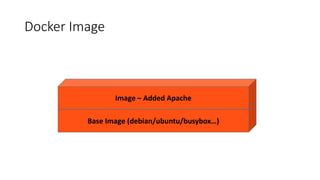
Docker Image
Base Image (debian/ubuntu/busybox…)
Image – Added Apache
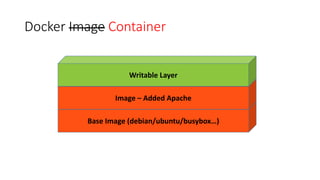
Docker Image Container
Base Image (debian/ubuntu/busybox…)
Image – Added Apache
Writable Layer
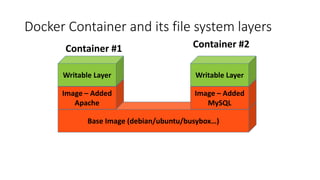
Docker Container and its file system layers
Base Image (debian/ubuntu/busybox…)
Image – Added
Apache
Writable Layer
Image – Added
MySQL
Writable Layer
Container #1 Container #2
Docker registry
• https://registry.hub.docker.com/
• Official repo (trusted builds)
• WordPress, MySQL, NgInx, Node, CentOS, Ubuntu, Postgress, mongo, rails, ruby,
java, python, golang, jenkins, php, tomcat, maven, httpd, …
• Public repo with thousands of images
• Integration with GitHub
• You push the Dockerfile to github
• Docker Registry builds the docker image for you
Docker requirements
• Technical:
• Linux kernel 3.10 +
• Knowledge:
• Linux, bash scripting, etc
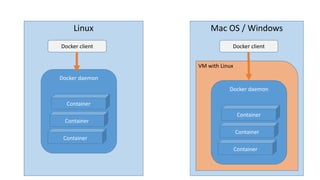
Docker on Windows / Mac OS
Linux
Docker daemon
Container
Container
Container
Docker client
Mac OS / Windows
VM with Linux
Docker daemon
Container
Container
Container
Docker client
Docker API
•http://docs.docker.com/engine/reference/api/d
ocker_remote_api_v1.21/
•REST API for everything
•Container management
•Image management
•Docker configuration, etc…
Docker itself is….like a java
Without tools and frameworks
it’s useless
Docker Toolbox
• Docker engine
• Kinematic – GUI, runs on MacOS + Windows
• Docker Machine – automates Docker environment preparation
• Docker Compose – define multi-container application in one file
• Demo 03
• Docker Swarm – clustering the containers
Where can Docker be helpful?
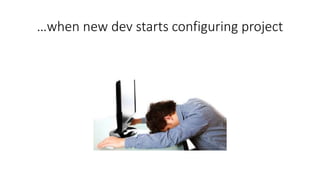
…when new dev starts configuring project
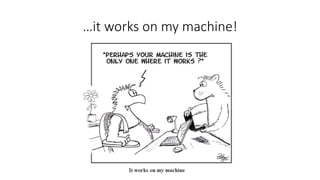
…it works on my machine!
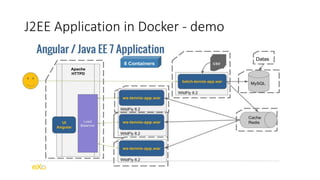
J2EE Application in Docker - demo
• https://github.com/mgreau/docker4dev-tennistour-app
• https://asciinema.org/a/2d6erl2tlu1j0b3rfvxwabnkv
• #Demo 04
Docker and IoT (Raspberry Pi)
• ARM vs x86/64 architecture
• Docker to plan official support ARM
• HypriotOS – linux distro for Raspberry
• Hypriot OS based images:
• https://hub.docker.com/u/hypriot/
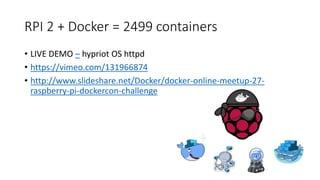
RPI 2 + Docker = 2499 containers
• LIVE DEMO – hypriot OS httpd
• https://vimeo.com/131966874
• http://www.slideshare.net/Docker/docker-online-meetup-27-
raspberry-pi-dockercon-challenge
Docker in Cloud
• Digital Ocean
• UI Tutum.co – worth to try!
• Amazon
• Microsoft Azure
• Google Cloud
$ Price $
• Digital Ocean: $5 / 512 MB, 1 core, 20 GB SSD, 1TB Transfer
• Amazon: it depends on many factors
• Microsoft Azure
• Google Cloud: free up to 5 nodes, 6+ nodes $0.15 HR/Cluster
• Alternative: VSPFree.cz 4GB RAM, 8 cores, 900 Kč /3 Months
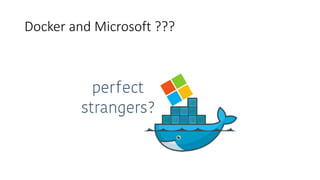
Docker and Microsoft ???
Docker and Microsoft ?
• Microsoft contributes to docker
• see pull request https://github.com/docker/docker/pull/9113
• Microsoft Azure supports docker
• Native Docker on Windows Server is coming…
Docker and PHP ?
• Piece of cake ;-)
• #Demo 05
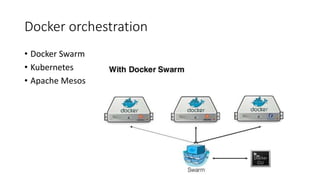
Docker orchestration
• Docker Swarm
• Kubernetes
• Apache Mesos
Run GUI in Docker?
• https://blog.jessfraz.com/post/docker-containers-on-the-desktop/
• #Demo 06
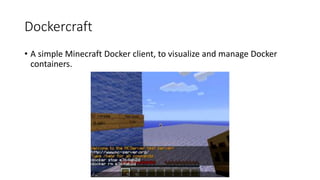
Dockercraft
• A simple Minecraft Docker client, to visualize and manage Docker
containers.
Live Migration!
• Migration of running container from one host to second
• https://blog.docker.com/2015/11/dockercon-eu-2015-container-
migration-tool/
What’s in Docker roadmap?
• Official ARM support
• Docker on Windows Server
• Docker on IBM systems, Solaris
Troubles you may face….
….with Docker
Docker Registry - Image Repository
• Public – no way for 99,9% apps
• Private
• Limitation – money & your internet connection speed
• Local repo - can require some management
• Authentication (users/passwords/roles, etc…)
• cleaning olds images
• disk space
• backup (!!!!)
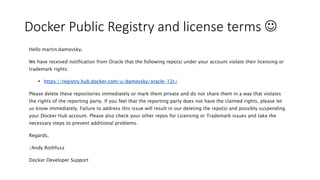
Docker Public Registry and license terms 
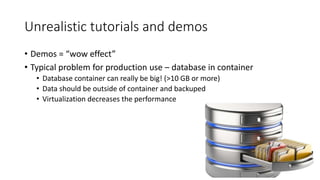
Unrealistic tutorials and demos
• Demos = “wow effect”
• Typical problem for production use – database in container
• Database container can really be big! (>10 GB or more)
• Data should be outside of container and backuped
• Virtualization decreases the performance
Docker containers and images
• Image is too big -> Squash layers
• Container has been stopped, but it blocks the port...
• Stopped != removed
• docker ps -a -q | xargs -n 1 -I {} docker rm {}
Run Docker on dedicated machine only
• You should use the latest Linux Kernel
• Some bug fixes may require you to update Linux Kernel
• Who can update Linux kernel in production?
• Which file system to use? BTRFS / AUFS / ?
• Which OS ?
• Core OS
• RancherOS
• Well known like a CentOS, Red Hat, Ubuntu ?
Links:
• My demos
• https://github.com/damovsky/jug-ostrava-docker
• Yowie – Open source project by @VitekTajzich
• https://github.com/vendavo/yowie

Dockerize the World - presentation from Hradec Kralove

  • 1.
  • 2.
    My plan fortoday • Introduction to Docker • Some demos • Docker in Cloud • IoT and Docker • News from DockerCon 2015 in SF and Barcelona
  • 3.
    Who am I? •Software engineer (java, DBs, continuous integrations, docker, etc.) • Grew up in small city near Ostrava • Tieto Czech s.r.o. Ostrava, Gemalto in Prague • Now in Vendavo CZ in Prague • Twitter @damovsky
  • 4.
  • 5.
    Who uses Dockerin production?
  • 6.
    What is ? •Docker is virtualization technology • With docker you can: • virtualize only the app and not the whole OS • Isolate each app • Restrict CPU / memory / for each app • Easily distribute your app • Automate your development / test / production environment
  • 7.
    What is ? •Docker is a whole platform for using containers • Includes tools for: • container sharing • orchestrations, clustering, etc.
  • 8.
    What is ? •Docker is for Linux only • But…Microsoft works on Docker for Windows • Apple (MacOS) = no native support planned 
  • 9.
    Docker project • Dockerinc. is a sponsor of “Docker” open source project • https://github.com/docker/docker • Written in Go • Main contributors: Docker team, RedHat, IBM, Google, Cisco… • Initial release: 13 March 2013 • Operation system: Linux • www.docker.com
  • 11.
  • 12.
    How does itworks? • Use Linux kernel support for isolation (CPU, memory, I/O, network….) • Cgroups – linux kernel feature to limit resource usages • Namespaces – linux kernel feature to isolate services from each other • Earlier LXC – https://linuxcontainers.org • Now – runC (Libcontainer) https://github.com/opencontainers/runc
  • 13.
    Docker motto Build –build container with your app Ship - use docker registry to distribute your app Run - wherever docker runs, your app will run as well
  • 14.
    DockerFile = cookbookfor docker image • Recipe for building the image • Easy to transfer copy&paste • Easy for versioning in Git, etc.. FROM debian:wheezy RUN apt-get update RUN apt-get install -y python2.7 CMD python2.7 -m SimpleHTTPServer 8000
  • 15.
    Docker “flow” 1. createdocker file 2. build dockerfile $ docker build -t myTagName . 3. run container $ docker run -d myTagName
  • 16.
    Dockerfile • # Demo01 • https://asciinema.org/a/7m72btfpczbshfkxh26smwgqv
  • 17.
    Dockerfile commands • FROM •RUN • CMD • ADD • USER • ENV • etc….see at http://docs.docker.com/reference/builder/
  • 18.
    It’s all aboutthe money! LAYERS!
  • 19.
    Dockerfile vs layers FROMdebian:wheezy RUN apt-get update RUN apt-get install -y python2.7 CMD python2.7 -m SimpleHTTPServer 8000 └─61f… Virtual Size: 85.1 MB Tags: debian:wheezy └─5b8.. Virtual Size: 93.4 MB └─604.. Virtual Size: 123.5 MB └─43e.. Virtual Size: 123.5 MB Tags: python:latest
  • 20.
    Dockerfile, build, run •# Demo 02 • Python http server + Connect to container
  • 21.
    Docker Image Base Image(debian/ubuntu/…)
  • 22.
    Docker Image Base Image(debian/ubuntu/busybox…) Image – Added Apache
  • 23.
    Docker Image Container BaseImage (debian/ubuntu/busybox…) Image – Added Apache Writable Layer
  • 24.
    Docker Container andits file system layers Base Image (debian/ubuntu/busybox…) Image – Added Apache Writable Layer Image – Added MySQL Writable Layer Container #1 Container #2
  • 25.
    Docker registry • https://registry.hub.docker.com/ •Official repo (trusted builds) • WordPress, MySQL, NgInx, Node, CentOS, Ubuntu, Postgress, mongo, rails, ruby, java, python, golang, jenkins, php, tomcat, maven, httpd, … • Public repo with thousands of images • Integration with GitHub • You push the Dockerfile to github • Docker Registry builds the docker image for you
  • 26.
    Docker requirements • Technical: •Linux kernel 3.10 + • Knowledge: • Linux, bash scripting, etc
  • 27.
  • 28.
    Linux Docker daemon Container Container Container Docker client MacOS / Windows VM with Linux Docker daemon Container Container Container Docker client
  • 29.
    Docker API •http://docs.docker.com/engine/reference/api/d ocker_remote_api_v1.21/ •REST APIfor everything •Container management •Image management •Docker configuration, etc…
  • 30.
    Docker itself is….likea java Without tools and frameworks it’s useless
  • 31.
    Docker Toolbox • Dockerengine • Kinematic – GUI, runs on MacOS + Windows • Docker Machine – automates Docker environment preparation • Docker Compose – define multi-container application in one file • Demo 03 • Docker Swarm – clustering the containers
  • 32.
    Where can Dockerbe helpful?
  • 33.
    …when new devstarts configuring project
  • 34.
    …it works onmy machine!
  • 35.
    J2EE Application inDocker - demo
  • 36.
    J2EE Application inDocker - demo • https://github.com/mgreau/docker4dev-tennistour-app • https://asciinema.org/a/2d6erl2tlu1j0b3rfvxwabnkv • #Demo 04
  • 38.
    Docker and IoT(Raspberry Pi) • ARM vs x86/64 architecture • Docker to plan official support ARM • HypriotOS – linux distro for Raspberry • Hypriot OS based images: • https://hub.docker.com/u/hypriot/
  • 39.
    RPI 2 +Docker = 2499 containers • LIVE DEMO – hypriot OS httpd • https://vimeo.com/131966874 • http://www.slideshare.net/Docker/docker-online-meetup-27- raspberry-pi-dockercon-challenge
  • 40.
    Docker in Cloud •Digital Ocean • UI Tutum.co – worth to try! • Amazon • Microsoft Azure • Google Cloud
  • 41.
    $ Price $ •Digital Ocean: $5 / 512 MB, 1 core, 20 GB SSD, 1TB Transfer • Amazon: it depends on many factors • Microsoft Azure • Google Cloud: free up to 5 nodes, 6+ nodes $0.15 HR/Cluster • Alternative: VSPFree.cz 4GB RAM, 8 cores, 900 Kč /3 Months
  • 42.
  • 43.
  • 44.
    Docker and Microsoft? • Microsoft contributes to docker • see pull request https://github.com/docker/docker/pull/9113 • Microsoft Azure supports docker • Native Docker on Windows Server is coming…
  • 45.
    Docker and PHP? • Piece of cake ;-) • #Demo 05
  • 46.
    Docker orchestration • DockerSwarm • Kubernetes • Apache Mesos
  • 47.
    Run GUI inDocker? • https://blog.jessfraz.com/post/docker-containers-on-the-desktop/ • #Demo 06
  • 49.
    Dockercraft • A simpleMinecraft Docker client, to visualize and manage Docker containers.
  • 50.
    Live Migration! • Migrationof running container from one host to second • https://blog.docker.com/2015/11/dockercon-eu-2015-container- migration-tool/
  • 51.
    What’s in Dockerroadmap? • Official ARM support • Docker on Windows Server • Docker on IBM systems, Solaris
  • 52.
    Troubles you mayface…. ….with Docker
  • 53.
    Docker Registry -Image Repository • Public – no way for 99,9% apps • Private • Limitation – money & your internet connection speed • Local repo - can require some management • Authentication (users/passwords/roles, etc…) • cleaning olds images • disk space • backup (!!!!)
  • 54.
    Docker Public Registryand license terms 
  • 55.
    Unrealistic tutorials anddemos • Demos = “wow effect” • Typical problem for production use – database in container • Database container can really be big! (>10 GB or more) • Data should be outside of container and backuped • Virtualization decreases the performance
  • 56.
    Docker containers andimages • Image is too big -> Squash layers • Container has been stopped, but it blocks the port... • Stopped != removed • docker ps -a -q | xargs -n 1 -I {} docker rm {}
  • 57.
    Run Docker ondedicated machine only • You should use the latest Linux Kernel • Some bug fixes may require you to update Linux Kernel • Who can update Linux kernel in production? • Which file system to use? BTRFS / AUFS / ? • Which OS ? • Core OS • RancherOS • Well known like a CentOS, Red Hat, Ubuntu ?
  • 58.
    Links: • My demos •https://github.com/damovsky/jug-ostrava-docker • Yowie – Open source project by @VitekTajzich • https://github.com/vendavo/yowie