techupskills.com | techskillstransformations.com
© 2021 Brent C. Laster &
@techupskills
2
Brent Laster
Containers in Depth: Understanding how containers
work to work better with containers
Tech Skills Transformations LLC
techupskills.com | techskillstransformations.com
© 2021 Brent C. Laster &
@techupskills
About me
• Founder, Tech Skills Transformations LLC
• R&D DevOps Director
• Global trainer – training (Git, Jenkins,
Gradle, CI/CD, pipelines, Kubernetes, Helm,
ArgoCD, operators)
• Author -
• OpenSource.com
• Professional Git book
• Jenkins 2 – Up and Running book
• Continuous Integration vs. Continuous
Delivery vs. Continuous Deployment
mini-book on Safari
• https://www.linkedin.com/in/brentlaster
• @BrentCLaster
• GitHub: brentlaster
© 2021 Brent C. Laster &
techupskills.com | techskillstransformations.com
© 2021 Brent C. Laster &
@techupskills
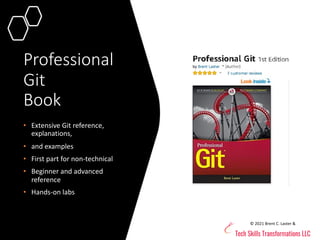
Professional
Git
Book
• Extensive Git reference,
explanations,
• and examples
• First part for non-technical
• Beginner and advanced
reference
• Hands-on labs
© 2021 Brent C. Laster &
techupskills.com | techskillstransformations.com
© 2021 Brent C. Laster &
@techupskills
© 2021 Brent C. Laster &
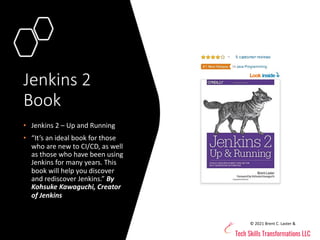
Jenkins 2
Book
• Jenkins 2 – Up and Running
• “It’s an ideal book for those
who are new to CI/CD, as well
as those who have been using
Jenkins for many years. This
book will help you discover
and rediscover Jenkins.” By
Kohsuke Kawaguchi, Creator
of Jenkins
techupskills.com | techskillstransformations.com
© 2021 Brent C. Laster &
@techupskills
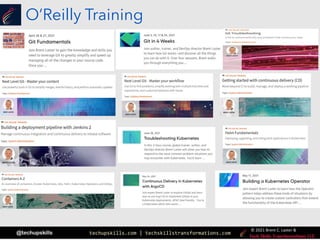
O’Reilly Training
techupskills.com | techskillstransformations.com
© 2021 Brent C. Laster &
@techupskills
8
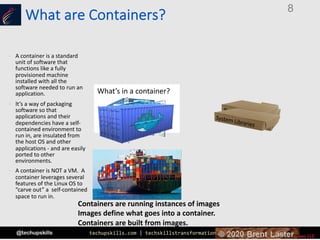
What’s in a container?
Settings
App
Runtime
Dependencies
System Tools
System Libraries
• A container is a standard
unit of software that
functions like a fully
provisioned machine
installed with all the
software needed to run an
application.
• It’s a way of packaging
software so that
applications and their
dependencies have a self-
contained environment to
run in, are insulated from
the host OS and other
applications - and are easily
ported to other
environments.
• A container is NOT a VM. A
container leverages several
features of the Linux OS to
“carve out” a self-contained
space to run in.
Containers are running instances of images.
Images define what goes into a container.
Containers are built from images.
What are Containers?
techupskills.com | techskillstransformations.com
© 2021 Brent C. Laster &
@techupskills
What is a container image?
• A container image is a read-only template used to create
a container.
• Container images are like a snapshot of a container.
• Images are stored in a “registry” – like repository for
images.
• Images are generally considered to be “immutable”. That
is, once they are created, the image should not be
changed. If a change is needed, a new image should be
created.
• Immutability does not imply that containers can’t be
changed by configuration or environment, etc.
• Container images are built up from layers.
• The docker “build” command is used to create images.
techupskills.com | techskillstransformations.com
© 2021 Brent C. Laster &
@techupskills
What is an image layer?
• A Docker image is built up from a series
of layers.
• Each layer results from an instruction
(modification) in the Dockerfile.
• Layers are “stacked” on top of ones
before.
• Each layer is only the set of differences
from the last one.
• Think of a base layer as being an OS
image.
• Each layer is R/O except for last one.
• Last/top layer is “container layer”.
• Container layer is thin R/W layer.
• All changes made to running container go
in that layer.
• From https://docs.docker.com/storage/storagedriver/
techupskills.com | techskillstransformations.com
© 2021 Brent C. Laster &
@techupskills
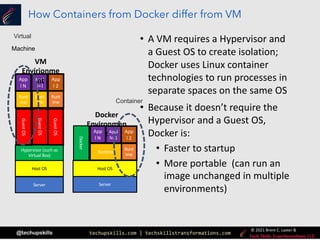
How Containers from Docker differ from VM
• A VM requires a Hypervisor and
a Guest OS to create isolation;
Docker uses Linux container
technologies to run processes in
separate spaces on the same OS
• Because it doesn’t require the
Hypervisor and a Guest OS,
Docker is:
• Faster to startup
• More portable (can run an
image unchanged in multiple
environments)
Server
Host OS
Docker
Runt
ime
Runtime
App
l N
Appl
N+1
App
l 2
App
l N
Appl
N+1
App
l 2
Server
Host OS
Hypervisor (such as
Virtual Box)
Guest
OS
Guest
OS
Guest
OS
Runt
ime
Runt
ime
Runt
ime
VM
Envirionme
nt
Docker
Environmen
t
Virtual
Machine
Container
techupskills.com | techskillstransformations.com
© 2021 Brent C. Laster &
@techupskills
Creating and tracking layers to images
3f00bed1e02a | COPY dir:6a0…
ba16edb35eb9 | mysql:5.5.45
24f4da862742 | ENTRYPOINT
["/ent……
19e729dca1ee | CMD ["mysqld"]
* ”<missing>” in history means layers are
built on a different system and not
available locally
techupskills.com | techskillstransformations.com
© 2021 Brent C. Laster &
@techupskills
How do layers & images intersect with the operating
system?
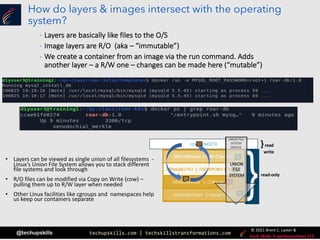
• Layers can be viewed as single union of all filesystems -
Linux’s Union File System allows you to stack different
file systems and look through
• R/O files can be modified via Copy on Write (cow) –
pulling them up to R/W layer when needed
• Other Linux facilities like cgroups and namespaces help
us keep our containers separate
ccae61fe0274
read-only
}read
write
UNION FILE
SYSTEM
SERVICE
UNION
FILE
SYSTEM
• Layers are basically like files to the O/S
• Image layers are R/O (aka – “immutable”)
• We create a container from an image via the run command. Adds
another layer – a R/W one – changes can be made here (“mutable”)
techupskills.com | techskillstransformations.com
© 2021 Brent C. Laster &
@techupskills
Managing Content Across Containers
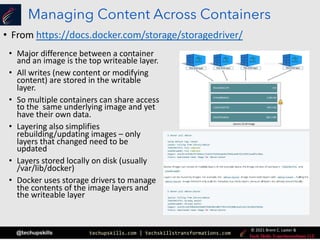
• Major difference between a container
and an image is the top writeable layer.
• All writes (new content or modifying
content) are stored in the writable
layer.
• So multiple containers can share access
to the same underlying image and yet
have their own data.
• Layering also simplifies
rebuilding/updating images – only
layers that changed need to be
updated
• Layers stored locally on disk (usually
/var/lib/docker)
• Docker uses storage drivers to manage
the contents of the image layers and
the writeable layer
• From https://docs.docker.com/storage/storagedriver/
techupskills.com | techskillstransformations.com
© 2021 Brent C. Laster &
@techupskills
What is Docker?
• (Marketing) From docker.com
An open platform for distributed applications for developers
and sysadmins.
Open source project to ship any app as a lightweight
container
• (Technical)
Thin wrapper around Linux Container technology
Leverages 3 functionalities from Linux to provide isolated
environment in the OS
• union filesystem - data
• namespaces - visibility (pid)
• cgroups - control groups (resources)
• Provides restful interface for service
• Provides description format for containers
• Provides API for orchestration
techupskills.com | techskillstransformations.com
© 2021 Brent C. Laster &
@techupskills
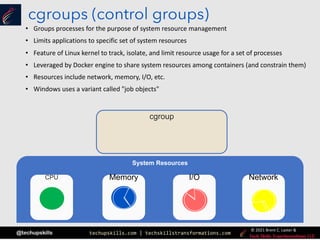
cgroup
cgroups (control groups)
• Groups processes for the purpose of system resource management
• Limits applications to specific set of system resources
• Feature of Linux kernel to track, isolate, and limit resource usage for a set of processes
• Leveraged by Docker engine to share system resources among containers (and constrain them)
• Resources include network, memory, I/O, etc.
• Windows uses a variant called "job objects"
System Resources
CPU Memory I/O Network
techupskills.com | techskillstransformations.com
© 2021 Brent C. Laster &
@techupskills
namespaces
(credit: https://access.redhat.com/documentation/en-
us/red_hat_enterprise_linux_atomic_host/7/html/overview_of_containers_in_red_hat_systems/introduction_to_linux_containers)
• Provides isolated instance of a global resource
• Appears as separate instance of resources within namespace
• Windows uses a variant called "silos"
PID
(process IDs)
process
identifiers,
lists of
processes
Namespace
A
Namespace
B
Network
network
interfaces
Namespace
A
Namespace
B
Mount
file system
mount
points (R/O,
etc.)
Namespace
A
Namespace
B
IPC
(inter-process
communication)
access to inter-
process
communication
Namespace
A
Namespace
B
User
Isolates
userids
Namespace
A
Namespace
B
UTS
(Unix
Timesharing
service)
kernel and
version
identifiers
Namespace
A
Namespace
B
Isolates the set of file system mount points seen by a group of processes so that
processes in different namespaces can have different views of the file system hierarchy.
For example, each containers can have its own /tmp or /var directory.
Isolates two system identifiers - nodename and domainname per calls to uname().
Allows each container to have its own hostname and NIS domain name.
Isolates certain interprocess communication (IPC) resources, such as System V IPC
objects and POSIX message queues. This means that two containers can create shared
memory segments and semaphores with the same name, but are not able to interact
with other containers memory segments or shared memory.
Allows processes in different containers to have the same PID. Each container has its own
PID1 process to manage initialization tasks as well as its own /proc directory.
Provides isolation of network controllers, system resources associated with networking,
firewall and routing tables. This allows container to use separate virtual network stack,
loopback device and process space.
Allows specifying a range of host UIDs dedicated to the container. Consequently, a
process can have full root privileges for operations inside the container, and at the same
time be unprivileged for operations outside the container.
techupskills.com | techskillstransformations.com
© 2021 Brent C. Laster &
@techupskills
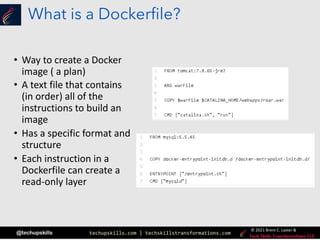
What is a Dockerfile?
• Way to create a Docker
image ( a plan)
• A text file that contains
(in order) all of the
instructions to build an
image
• Has a specific format and
structure
• Each instruction in a
Dockerfile can create a
read-only layer
techupskills.com | techskillstransformations.com
© 2021 Brent C. Laster &
@techupskills
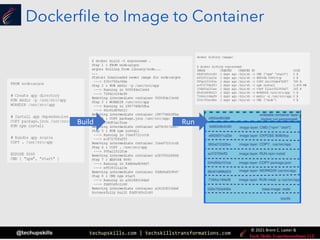
Dockerfile to Image to Container
Build Run
techupskills.com | techskillstransformations.com
© 2021 Brent C. Laster &
@techupskills
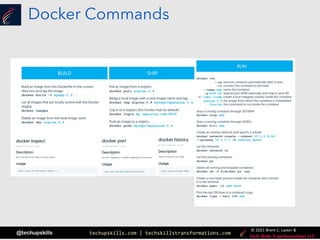
Docker Commands
techupskills.com | techskillstransformations.com
© 2021 Brent C. Laster &
@techupskills
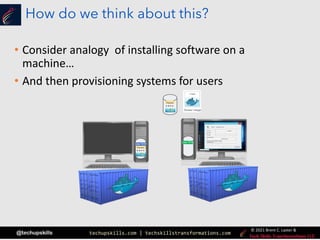
How do we think about this?
• Consider analogy of installing software on a
machine…
• And then provisioning systems for users
User R/W
User R/W
techupskills.com | techskillstransformations.com
© 2021 Brent C. Laster &
@techupskills
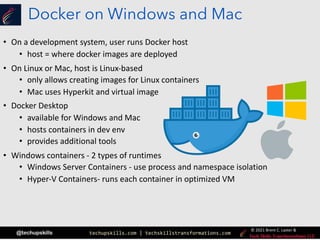
Docker on Windows and Mac
• On a development system, user runs Docker host
• host = where docker images are deployed
• On Linux or Mac, host is Linux-based
• only allows creating images for Linux containers
• Mac uses Hyperkit and virtual image
• Docker Desktop
• available for Windows and Mac
• hosts containers in dev env
• provides additional tools
• Windows containers - 2 types of runtimes
• Windows Server Containers - use process and namespace isolation
• Hyper-V Containers- runs each container in optimized VM
techupskills.com | techskillstransformations.com
© 2021 Brent C. Laster &
@techupskills
24
|
Diving Deeper into Layers- Defining the API
techupskills.com | techskillstransformations.com
© 2021 Brent C. Laster &
@techupskills
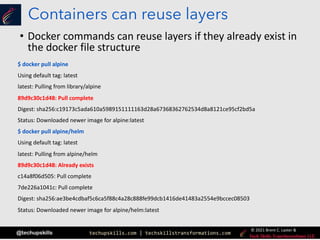
Containers can reuse layers
• Docker commands can reuse layers if they already exist in
the docker file structure
$ docker pull alpine
Using default tag: latest
latest: Pulling from library/alpine
89d9c30c1d48: Pull complete
Digest: sha256:c19173c5ada610a5989151111163d28a67368362762534d8a8121ce95cf2bd5a
Status: Downloaded newer image for alpine:latest
$ docker pull alpine/helm
Using default tag: latest
latest: Pulling from alpine/helm
89d9c30c1d48: Already exists
c14a8f06d505: Pull complete
7de226a1041c: Pull complete
Digest: sha256:ae3be4cdbaf5c6ca5f88c4a28c888fe99dcb1416de41483a2554e9bccec08503
Status: Downloaded newer image for alpine/helm:latest
techupskills.com | techskillstransformations.com
© 2021 Brent C. Laster &
@techupskills
Mapping layers to the file system (before 1.10)
(credit: winsock.io/explaining docker-image-ids/)
• Layer – alternative definition
• A layer is a delta or “diff” that results when commands are run during the
image build process that produce new or changed files/directories
• The new or changed files and directories are stored or ‘committed’ as a
new layer
• Prior to Docker 1.10, images and layers were synonymous
ID: fdf9d70e7ba7
Parent: dc89c90bfea
Name: alpine/helm:latest
ID: dc89c90bfea
Parent: ead53b4e9ff
Name: “ ”
ID: ead53b4e9ff
Parent: “ “
Name: “ ”
/var/lib/docker/aufs/diff
fdf9d70e7ba7 …
dc89c90bfea …
ead53b4e9ff …
Image
Layers
$ docker inspect alpine/helm:latest
[
{
“Id”: “fdf9d70e7ba72e3a74b
“Parent”: “dc89c90bfea235
…
…
}
]
Inspect
techupskills.com | techskillstransformations.com
© 2021 Brent C. Laster &
@techupskills
Mapping layers to the file system (1.10+)
• Layers equal to image had challenges
• Security – how to tell if image tampered with during
push/pull, etc.
• New approach – “Content Addressable IDs”
• Layers have no affiliation or notion of any image
• Just collections of directories and files
• Layers identified by digest of the form “algorithm:hex-value”
• Algorithm is method for computing hex value from
layer’s contents (hashing method)
• Hex-value is string computed from applying algorithm to
layer’s contents (hash)
• Example:
sha256:77cae8ab23bf486355d1b31912597053…
• Docker image has
• Configuration object – includes ordered list of layer
digests (used to assemble filesystem in container
instead of series of parent images)
• Image ID is digest – computed hash of configuration
object
$ docker inspect alpine/helm:latest
[
{
"Id": "sha256:fdf9d70e7ba76a6af25843 …
"Layers": [
"sha256:77cae8ab23bf486355d1b3
"sha256:fad447c6845e910b04e9391
"sha256:fcaa7782b133863c3ed0f68
]
…
}
]
Inspect
techupskills.com | techskillstransformations.com
© 2021 Brent C. Laster &
@techupskills
Storage Drivers (aka Graphdrivers)
• A local instance of a Docker engine has cache of image layers
(pieces put together to form an image)
• Layers come from docker pull, docker build, etc.
• Driver is required to manage the layers at runtime
• Specifically to mount the layers into a consolidated root
filesystem – creates the mount namespace of the container
• Creates a kind of “image graph” that is the relationship
between the various layers
techupskills.com | techskillstransformations.com
© 2021 Brent C. Laster &
@techupskills
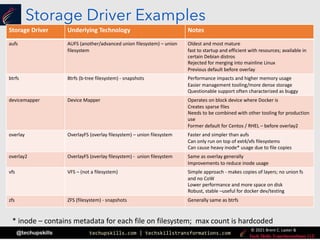
Storage Driver Examples
Storage Driver Underlying Technology Notes
aufs AUFS (another/advanced union filesystem) – union
filesystem
Oldest and most mature
fast to startup and efficient with resources; available in
certain Debian distros
Rejected for merging into mainline Linux
Previous default before overlay
btrfs Btrfs (b-tree filesystem) - snapshots Performance impacts and higher memory usage
Easier management tooling/more dense storage
Questionable support often characterized as buggy
devicemapper Device Mapper Operates on block device where Docker is
Creates sparse files
Needs to be combined with other tooling for production
use
Former default for Centos / RHEL – before overlay2
overlay OverlayFS (overlay filesystem) – union filesystem Faster and simpler than aufs
Can only run on top of ext4/xfs filesystems
Can cause heavy inode* usage due to file copies
overlay2 OverlayFS (overlay filesystem) - union filesystem Same as overlay generally
Improvements to reduce inode usage
vfs VFS – (not a filesystem) Simple approach - makes copies of layers; no union fs
and no CoW
Lower performance and more space on disk
Robust, stable –useful for docker dev/testing
zfs ZFS (filesystem) - snapshots Generally same as btrfs
* inode – contains metadata for each file on filesystem; max count is hardcoded
techupskills.com | techskillstransformations.com
© 2021 Brent C. Laster &
@techupskills
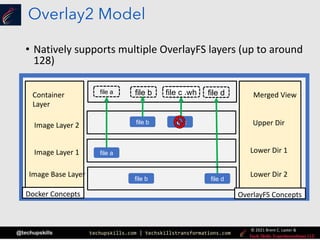
Overlay2 Model
• Natively supports multiple OverlayFS layers (up to around
128)
Docker Concepts OverlayFS Concepts
Container
Layer
Image Layer 2
Image Layer 1 Lower Dir 1
Upper Dir
Merged View
file a file b
file a
file b
file c
file d
file c file d
file b
Docker Concepts
Image Base Layer Lower Dir 2
OverlayFS Concepts
file c .wh
techupskills.com | techskillstransformations.com
© 2021 Brent C. Laster &
@techupskills
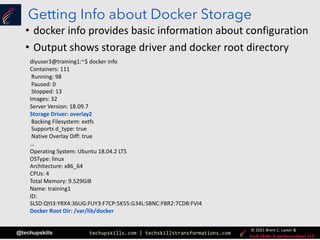
Getting Info about Docker Storage
• docker info provides basic information about configuration
• Output shows storage driver and docker root directory
diyuser3@training1:~$ docker info
Containers: 111
Running: 98
Paused: 0
Stopped: 13
Images: 32
Server Version: 18.09.7
Storage Driver: overlay2
Backing Filesystem: extfs
Supports d_type: true
Native Overlay Diff: true
…
Operating System: Ubuntu 18.04.2 LTS
OSType: linux
Architecture: x86_64
CPUs: 4
Total Memory: 9.529GiB
Name: training1
ID:
SLSD:QYJ3:YRX4:36UG:FUY3:F7CP:5K55:G34L:SBNC:FBR2:7CDB:FVI4
Docker Root Dir: /var/lib/docker
techupskills.com | techskillstransformations.com
© 2021 Brent C. Laster &
@techupskills
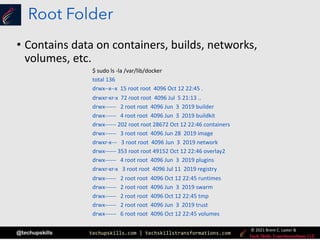
Root Folder
• Contains data on containers, builds, networks,
volumes, etc.
$ sudo ls -la /var/lib/docker
total 136
drwx--x--x 15 root root 4096 Oct 12 22:45 .
drwxr-xr-x 72 root root 4096 Jul 5 21:13 ..
drwx------ 2 root root 4096 Jun 3 2019 builder
drwx------ 4 root root 4096 Jun 3 2019 buildkit
drwx------ 202 root root 28672 Oct 12 22:46 containers
drwx------ 3 root root 4096 Jun 28 2019 image
drwxr-x--- 3 root root 4096 Jun 3 2019 network
drwx------ 353 root root 49152 Oct 12 22:46 overlay2
drwx------ 4 root root 4096 Jun 3 2019 plugins
drwxr-xr-x 3 root root 4096 Jul 11 2019 registry
drwx------ 2 root root 4096 Oct 12 22:45 runtimes
drwx------ 2 root root 4096 Jun 3 2019 swarm
drwx------ 2 root root 4096 Oct 12 22:45 tmp
drwx------ 2 root root 4096 Jun 3 2019 trust
drwx------ 6 root root 4096 Oct 12 22:45 volumes
techupskills.com | techskillstransformations.com
© 2021 Brent C. Laster &
@techupskills
33
|
Docker AlternativesthAPI
techupskills.com | techskillstransformations.com
© 2021 Brent C. Laster &
@techupskills
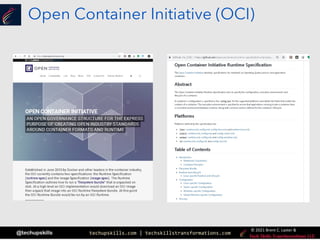
Open Container Initiative (OCI)
techupskills.com | techskillstransformations.com
© 2021 Brent C. Laster &
@techupskills
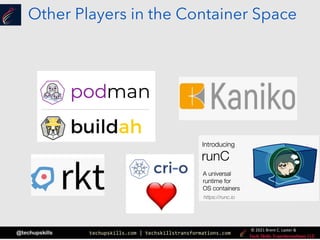
Other Players in the Container Space
techupskills.com | techskillstransformations.com
© 2021 Brent C. Laster &
@techupskills
Docker security
• Running containers (and apps) with Docker implies
running the Docker daemon
• daemon
• is responsible for state of containers and images
• facilitates interactions with external processes
• requires root privileges
• always runs as root user
• creates unix socket accessible by members of
docker group
• can be run as local or remote
• CLI maps commands to API calls for daemon
• Running local daemon risks that any process that
breaks out of the container would have same rights
as host OS
• rootless mode available (as of ver 19.03)
• has limitations and extra setup
From: https://docs.docker.com/get-started/overview/
techupskills.com | techskillstransformations.com
© 2021 Brent C. Laster &
@techupskills
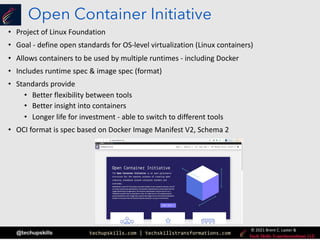
Open Container Initiative
• Project of Linux Foundation
• Goal - define open standards for OS-level virtualization (Linux containers)
• Allows containers to be used by multiple runtimes - including Docker
• Includes runtime spec & image spec (format)
• Standards provide
• Better flexibility between tools
• Better insight into containers
• Longer life for investment - able to switch to different tools
• OCI format is spec based on Docker Image Manifest V2, Schema 2
techupskills.com | techskillstransformations.com
© 2021 Brent C. Laster &
@techupskills
Buildah
• Alternative to Docker
• Similar commands to Docker
• Allows for building images w/o a Dockerfile
• command line provides support for all commands
• Provides CLI to build OCI or traditional Docker
images
techupskills.com | techskillstransformations.com
© 2021 Brent C. Laster &
@techupskills
Podman
• Specializes in managing entire container lifecycle
• Supports OCI standard (and others)
• Some commands similar to Docker, but not all
• Allows users to create "pods" to group containers
together
techupskills.com | techskillstransformations.com
© 2021 Brent C. Laster &
@techupskills
Kaniko
• Open-source tool used to build images w/o root
access
• Images built inside container or Kubernetes cluster
• Executes all commands in userspace
• Supported by Google
techupskills.com | techskillstransformations.com
© 2021 Brent C. Laster &
@techupskills
41
That’s all - thanks!
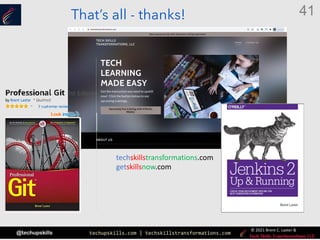
techskillstransformations.com
getskillsnow.com

Containers in depth – Understanding how containers work to better work with containers

  • 1.
    techupskills.com | techskillstransformations.com ©2021 Brent C. Laster & @techupskills 2 Brent Laster Containers in Depth: Understanding how containers work to work better with containers Tech Skills Transformations LLC
  • 2.
    techupskills.com | techskillstransformations.com ©2021 Brent C. Laster & @techupskills About me • Founder, Tech Skills Transformations LLC • R&D DevOps Director • Global trainer – training (Git, Jenkins, Gradle, CI/CD, pipelines, Kubernetes, Helm, ArgoCD, operators) • Author - • OpenSource.com • Professional Git book • Jenkins 2 – Up and Running book • Continuous Integration vs. Continuous Delivery vs. Continuous Deployment mini-book on Safari • https://www.linkedin.com/in/brentlaster • @BrentCLaster • GitHub: brentlaster © 2021 Brent C. Laster &
  • 3.
    techupskills.com | techskillstransformations.com ©2021 Brent C. Laster & @techupskills Professional Git Book • Extensive Git reference, explanations, • and examples • First part for non-technical • Beginner and advanced reference • Hands-on labs © 2021 Brent C. Laster &
  • 4.
    techupskills.com | techskillstransformations.com ©2021 Brent C. Laster & @techupskills © 2021 Brent C. Laster & Jenkins 2 Book • Jenkins 2 – Up and Running • “It’s an ideal book for those who are new to CI/CD, as well as those who have been using Jenkins for many years. This book will help you discover and rediscover Jenkins.” By Kohsuke Kawaguchi, Creator of Jenkins
  • 5.
    techupskills.com | techskillstransformations.com ©2021 Brent C. Laster & @techupskills O’Reilly Training
  • 6.
    techupskills.com | techskillstransformations.com ©2021 Brent C. Laster & @techupskills 8 What’s in a container? Settings App Runtime Dependencies System Tools System Libraries • A container is a standard unit of software that functions like a fully provisioned machine installed with all the software needed to run an application. • It’s a way of packaging software so that applications and their dependencies have a self- contained environment to run in, are insulated from the host OS and other applications - and are easily ported to other environments. • A container is NOT a VM. A container leverages several features of the Linux OS to “carve out” a self-contained space to run in. Containers are running instances of images. Images define what goes into a container. Containers are built from images. What are Containers?
  • 7.
    techupskills.com | techskillstransformations.com ©2021 Brent C. Laster & @techupskills What is a container image? • A container image is a read-only template used to create a container. • Container images are like a snapshot of a container. • Images are stored in a “registry” – like repository for images. • Images are generally considered to be “immutable”. That is, once they are created, the image should not be changed. If a change is needed, a new image should be created. • Immutability does not imply that containers can’t be changed by configuration or environment, etc. • Container images are built up from layers. • The docker “build” command is used to create images.
  • 8.
    techupskills.com | techskillstransformations.com ©2021 Brent C. Laster & @techupskills What is an image layer? • A Docker image is built up from a series of layers. • Each layer results from an instruction (modification) in the Dockerfile. • Layers are “stacked” on top of ones before. • Each layer is only the set of differences from the last one. • Think of a base layer as being an OS image. • Each layer is R/O except for last one. • Last/top layer is “container layer”. • Container layer is thin R/W layer. • All changes made to running container go in that layer. • From https://docs.docker.com/storage/storagedriver/
  • 9.
    techupskills.com | techskillstransformations.com ©2021 Brent C. Laster & @techupskills How Containers from Docker differ from VM • A VM requires a Hypervisor and a Guest OS to create isolation; Docker uses Linux container technologies to run processes in separate spaces on the same OS • Because it doesn’t require the Hypervisor and a Guest OS, Docker is: • Faster to startup • More portable (can run an image unchanged in multiple environments) Server Host OS Docker Runt ime Runtime App l N Appl N+1 App l 2 App l N Appl N+1 App l 2 Server Host OS Hypervisor (such as Virtual Box) Guest OS Guest OS Guest OS Runt ime Runt ime Runt ime VM Envirionme nt Docker Environmen t Virtual Machine Container
  • 10.
    techupskills.com | techskillstransformations.com ©2021 Brent C. Laster & @techupskills Creating and tracking layers to images 3f00bed1e02a | COPY dir:6a0… ba16edb35eb9 | mysql:5.5.45 24f4da862742 | ENTRYPOINT ["/ent…… 19e729dca1ee | CMD ["mysqld"] * ”<missing>” in history means layers are built on a different system and not available locally
  • 11.
    techupskills.com | techskillstransformations.com ©2021 Brent C. Laster & @techupskills How do layers & images intersect with the operating system? • Layers can be viewed as single union of all filesystems - Linux’s Union File System allows you to stack different file systems and look through • R/O files can be modified via Copy on Write (cow) – pulling them up to R/W layer when needed • Other Linux facilities like cgroups and namespaces help us keep our containers separate ccae61fe0274 read-only }read write UNION FILE SYSTEM SERVICE UNION FILE SYSTEM • Layers are basically like files to the O/S • Image layers are R/O (aka – “immutable”) • We create a container from an image via the run command. Adds another layer – a R/W one – changes can be made here (“mutable”)
  • 12.
    techupskills.com | techskillstransformations.com ©2021 Brent C. Laster & @techupskills Managing Content Across Containers • Major difference between a container and an image is the top writeable layer. • All writes (new content or modifying content) are stored in the writable layer. • So multiple containers can share access to the same underlying image and yet have their own data. • Layering also simplifies rebuilding/updating images – only layers that changed need to be updated • Layers stored locally on disk (usually /var/lib/docker) • Docker uses storage drivers to manage the contents of the image layers and the writeable layer • From https://docs.docker.com/storage/storagedriver/
  • 13.
    techupskills.com | techskillstransformations.com ©2021 Brent C. Laster & @techupskills What is Docker? • (Marketing) From docker.com An open platform for distributed applications for developers and sysadmins. Open source project to ship any app as a lightweight container • (Technical) Thin wrapper around Linux Container technology Leverages 3 functionalities from Linux to provide isolated environment in the OS • union filesystem - data • namespaces - visibility (pid) • cgroups - control groups (resources) • Provides restful interface for service • Provides description format for containers • Provides API for orchestration
  • 14.
    techupskills.com | techskillstransformations.com ©2021 Brent C. Laster & @techupskills cgroup cgroups (control groups) • Groups processes for the purpose of system resource management • Limits applications to specific set of system resources • Feature of Linux kernel to track, isolate, and limit resource usage for a set of processes • Leveraged by Docker engine to share system resources among containers (and constrain them) • Resources include network, memory, I/O, etc. • Windows uses a variant called "job objects" System Resources CPU Memory I/O Network
  • 15.
    techupskills.com | techskillstransformations.com ©2021 Brent C. Laster & @techupskills namespaces (credit: https://access.redhat.com/documentation/en- us/red_hat_enterprise_linux_atomic_host/7/html/overview_of_containers_in_red_hat_systems/introduction_to_linux_containers) • Provides isolated instance of a global resource • Appears as separate instance of resources within namespace • Windows uses a variant called "silos" PID (process IDs) process identifiers, lists of processes Namespace A Namespace B Network network interfaces Namespace A Namespace B Mount file system mount points (R/O, etc.) Namespace A Namespace B IPC (inter-process communication) access to inter- process communication Namespace A Namespace B User Isolates userids Namespace A Namespace B UTS (Unix Timesharing service) kernel and version identifiers Namespace A Namespace B Isolates the set of file system mount points seen by a group of processes so that processes in different namespaces can have different views of the file system hierarchy. For example, each containers can have its own /tmp or /var directory. Isolates two system identifiers - nodename and domainname per calls to uname(). Allows each container to have its own hostname and NIS domain name. Isolates certain interprocess communication (IPC) resources, such as System V IPC objects and POSIX message queues. This means that two containers can create shared memory segments and semaphores with the same name, but are not able to interact with other containers memory segments or shared memory. Allows processes in different containers to have the same PID. Each container has its own PID1 process to manage initialization tasks as well as its own /proc directory. Provides isolation of network controllers, system resources associated with networking, firewall and routing tables. This allows container to use separate virtual network stack, loopback device and process space. Allows specifying a range of host UIDs dedicated to the container. Consequently, a process can have full root privileges for operations inside the container, and at the same time be unprivileged for operations outside the container.
  • 16.
    techupskills.com | techskillstransformations.com ©2021 Brent C. Laster & @techupskills What is a Dockerfile? • Way to create a Docker image ( a plan) • A text file that contains (in order) all of the instructions to build an image • Has a specific format and structure • Each instruction in a Dockerfile can create a read-only layer
  • 17.
    techupskills.com | techskillstransformations.com ©2021 Brent C. Laster & @techupskills Dockerfile to Image to Container Build Run
  • 18.
    techupskills.com | techskillstransformations.com ©2021 Brent C. Laster & @techupskills Docker Commands
  • 19.
    techupskills.com | techskillstransformations.com ©2021 Brent C. Laster & @techupskills How do we think about this? • Consider analogy of installing software on a machine… • And then provisioning systems for users User R/W User R/W
  • 20.
    techupskills.com | techskillstransformations.com ©2021 Brent C. Laster & @techupskills Docker on Windows and Mac • On a development system, user runs Docker host • host = where docker images are deployed • On Linux or Mac, host is Linux-based • only allows creating images for Linux containers • Mac uses Hyperkit and virtual image • Docker Desktop • available for Windows and Mac • hosts containers in dev env • provides additional tools • Windows containers - 2 types of runtimes • Windows Server Containers - use process and namespace isolation • Hyper-V Containers- runs each container in optimized VM
  • 21.
    techupskills.com | techskillstransformations.com ©2021 Brent C. Laster & @techupskills 24 | Diving Deeper into Layers- Defining the API
  • 22.
    techupskills.com | techskillstransformations.com ©2021 Brent C. Laster & @techupskills Containers can reuse layers • Docker commands can reuse layers if they already exist in the docker file structure $ docker pull alpine Using default tag: latest latest: Pulling from library/alpine 89d9c30c1d48: Pull complete Digest: sha256:c19173c5ada610a5989151111163d28a67368362762534d8a8121ce95cf2bd5a Status: Downloaded newer image for alpine:latest $ docker pull alpine/helm Using default tag: latest latest: Pulling from alpine/helm 89d9c30c1d48: Already exists c14a8f06d505: Pull complete 7de226a1041c: Pull complete Digest: sha256:ae3be4cdbaf5c6ca5f88c4a28c888fe99dcb1416de41483a2554e9bccec08503 Status: Downloaded newer image for alpine/helm:latest
  • 23.
    techupskills.com | techskillstransformations.com ©2021 Brent C. Laster & @techupskills Mapping layers to the file system (before 1.10) (credit: winsock.io/explaining docker-image-ids/) • Layer – alternative definition • A layer is a delta or “diff” that results when commands are run during the image build process that produce new or changed files/directories • The new or changed files and directories are stored or ‘committed’ as a new layer • Prior to Docker 1.10, images and layers were synonymous ID: fdf9d70e7ba7 Parent: dc89c90bfea Name: alpine/helm:latest ID: dc89c90bfea Parent: ead53b4e9ff Name: “ ” ID: ead53b4e9ff Parent: “ “ Name: “ ” /var/lib/docker/aufs/diff fdf9d70e7ba7 … dc89c90bfea … ead53b4e9ff … Image Layers $ docker inspect alpine/helm:latest [ { “Id”: “fdf9d70e7ba72e3a74b “Parent”: “dc89c90bfea235 … … } ] Inspect
  • 24.
    techupskills.com | techskillstransformations.com ©2021 Brent C. Laster & @techupskills Mapping layers to the file system (1.10+) • Layers equal to image had challenges • Security – how to tell if image tampered with during push/pull, etc. • New approach – “Content Addressable IDs” • Layers have no affiliation or notion of any image • Just collections of directories and files • Layers identified by digest of the form “algorithm:hex-value” • Algorithm is method for computing hex value from layer’s contents (hashing method) • Hex-value is string computed from applying algorithm to layer’s contents (hash) • Example: sha256:77cae8ab23bf486355d1b31912597053… • Docker image has • Configuration object – includes ordered list of layer digests (used to assemble filesystem in container instead of series of parent images) • Image ID is digest – computed hash of configuration object $ docker inspect alpine/helm:latest [ { "Id": "sha256:fdf9d70e7ba76a6af25843 … "Layers": [ "sha256:77cae8ab23bf486355d1b3 "sha256:fad447c6845e910b04e9391 "sha256:fcaa7782b133863c3ed0f68 ] … } ] Inspect
  • 25.
    techupskills.com | techskillstransformations.com ©2021 Brent C. Laster & @techupskills Storage Drivers (aka Graphdrivers) • A local instance of a Docker engine has cache of image layers (pieces put together to form an image) • Layers come from docker pull, docker build, etc. • Driver is required to manage the layers at runtime • Specifically to mount the layers into a consolidated root filesystem – creates the mount namespace of the container • Creates a kind of “image graph” that is the relationship between the various layers
  • 26.
    techupskills.com | techskillstransformations.com ©2021 Brent C. Laster & @techupskills Storage Driver Examples Storage Driver Underlying Technology Notes aufs AUFS (another/advanced union filesystem) – union filesystem Oldest and most mature fast to startup and efficient with resources; available in certain Debian distros Rejected for merging into mainline Linux Previous default before overlay btrfs Btrfs (b-tree filesystem) - snapshots Performance impacts and higher memory usage Easier management tooling/more dense storage Questionable support often characterized as buggy devicemapper Device Mapper Operates on block device where Docker is Creates sparse files Needs to be combined with other tooling for production use Former default for Centos / RHEL – before overlay2 overlay OverlayFS (overlay filesystem) – union filesystem Faster and simpler than aufs Can only run on top of ext4/xfs filesystems Can cause heavy inode* usage due to file copies overlay2 OverlayFS (overlay filesystem) - union filesystem Same as overlay generally Improvements to reduce inode usage vfs VFS – (not a filesystem) Simple approach - makes copies of layers; no union fs and no CoW Lower performance and more space on disk Robust, stable –useful for docker dev/testing zfs ZFS (filesystem) - snapshots Generally same as btrfs * inode – contains metadata for each file on filesystem; max count is hardcoded
  • 27.
    techupskills.com | techskillstransformations.com ©2021 Brent C. Laster & @techupskills Overlay2 Model • Natively supports multiple OverlayFS layers (up to around 128) Docker Concepts OverlayFS Concepts Container Layer Image Layer 2 Image Layer 1 Lower Dir 1 Upper Dir Merged View file a file b file a file b file c file d file c file d file b Docker Concepts Image Base Layer Lower Dir 2 OverlayFS Concepts file c .wh
  • 28.
    techupskills.com | techskillstransformations.com ©2021 Brent C. Laster & @techupskills Getting Info about Docker Storage • docker info provides basic information about configuration • Output shows storage driver and docker root directory diyuser3@training1:~$ docker info Containers: 111 Running: 98 Paused: 0 Stopped: 13 Images: 32 Server Version: 18.09.7 Storage Driver: overlay2 Backing Filesystem: extfs Supports d_type: true Native Overlay Diff: true … Operating System: Ubuntu 18.04.2 LTS OSType: linux Architecture: x86_64 CPUs: 4 Total Memory: 9.529GiB Name: training1 ID: SLSD:QYJ3:YRX4:36UG:FUY3:F7CP:5K55:G34L:SBNC:FBR2:7CDB:FVI4 Docker Root Dir: /var/lib/docker
  • 29.
    techupskills.com | techskillstransformations.com ©2021 Brent C. Laster & @techupskills Root Folder • Contains data on containers, builds, networks, volumes, etc. $ sudo ls -la /var/lib/docker total 136 drwx--x--x 15 root root 4096 Oct 12 22:45 . drwxr-xr-x 72 root root 4096 Jul 5 21:13 .. drwx------ 2 root root 4096 Jun 3 2019 builder drwx------ 4 root root 4096 Jun 3 2019 buildkit drwx------ 202 root root 28672 Oct 12 22:46 containers drwx------ 3 root root 4096 Jun 28 2019 image drwxr-x--- 3 root root 4096 Jun 3 2019 network drwx------ 353 root root 49152 Oct 12 22:46 overlay2 drwx------ 4 root root 4096 Jun 3 2019 plugins drwxr-xr-x 3 root root 4096 Jul 11 2019 registry drwx------ 2 root root 4096 Oct 12 22:45 runtimes drwx------ 2 root root 4096 Jun 3 2019 swarm drwx------ 2 root root 4096 Oct 12 22:45 tmp drwx------ 2 root root 4096 Jun 3 2019 trust drwx------ 6 root root 4096 Oct 12 22:45 volumes
  • 30.
    techupskills.com | techskillstransformations.com ©2021 Brent C. Laster & @techupskills 33 | Docker AlternativesthAPI
  • 31.
    techupskills.com | techskillstransformations.com ©2021 Brent C. Laster & @techupskills Open Container Initiative (OCI)
  • 32.
    techupskills.com | techskillstransformations.com ©2021 Brent C. Laster & @techupskills Other Players in the Container Space
  • 33.
    techupskills.com | techskillstransformations.com ©2021 Brent C. Laster & @techupskills Docker security • Running containers (and apps) with Docker implies running the Docker daemon • daemon • is responsible for state of containers and images • facilitates interactions with external processes • requires root privileges • always runs as root user • creates unix socket accessible by members of docker group • can be run as local or remote • CLI maps commands to API calls for daemon • Running local daemon risks that any process that breaks out of the container would have same rights as host OS • rootless mode available (as of ver 19.03) • has limitations and extra setup From: https://docs.docker.com/get-started/overview/
  • 34.
    techupskills.com | techskillstransformations.com ©2021 Brent C. Laster & @techupskills Open Container Initiative • Project of Linux Foundation • Goal - define open standards for OS-level virtualization (Linux containers) • Allows containers to be used by multiple runtimes - including Docker • Includes runtime spec & image spec (format) • Standards provide • Better flexibility between tools • Better insight into containers • Longer life for investment - able to switch to different tools • OCI format is spec based on Docker Image Manifest V2, Schema 2
  • 35.
    techupskills.com | techskillstransformations.com ©2021 Brent C. Laster & @techupskills Buildah • Alternative to Docker • Similar commands to Docker • Allows for building images w/o a Dockerfile • command line provides support for all commands • Provides CLI to build OCI or traditional Docker images
  • 36.
    techupskills.com | techskillstransformations.com ©2021 Brent C. Laster & @techupskills Podman • Specializes in managing entire container lifecycle • Supports OCI standard (and others) • Some commands similar to Docker, but not all • Allows users to create "pods" to group containers together
  • 37.
    techupskills.com | techskillstransformations.com ©2021 Brent C. Laster & @techupskills Kaniko • Open-source tool used to build images w/o root access • Images built inside container or Kubernetes cluster • Executes all commands in userspace • Supported by Google
  • 38.
    techupskills.com | techskillstransformations.com ©2021 Brent C. Laster & @techupskills 41 That’s all - thanks! techskillstransformations.com getskillsnow.com