Extending wind meter to an IoT device
Architecting of IoT
CHM College - Internet of Things - Session 5
Compiled by - Deepak
malani.deepak@gmail.com
1
Learning Objectives of this session
1, Building a simple mechanical structure of propeller
2, Extend above to an electro-mechanical device
3, Understand electrical interface of sensors with mobile phones
4, Interpret electrical voltage values
5, Learn to solder electronic components
6, Learn calibration of electro-mechanical instrument
6, Build mobile application to display and transmit data
Disclaimer: Some of the images used here are downloaded from WWW for fair and educational purpose.
2
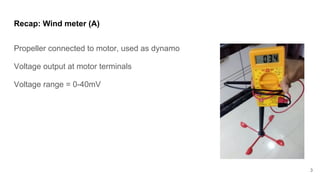
Recap: Wind meter (A)
Propeller connected to motor, used as dynamo
Voltage output at motor terminals
Voltage range = 0-40mV
3
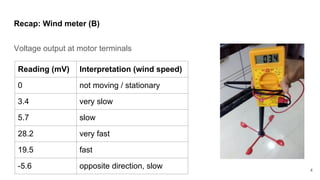
Recap: Wind meter (B)
Voltage output at motor terminals
Reading (mV) Interpretation (wind speed)
0 not moving / stationary
3.4 very slow
5.7 slow
28.2 very fast
19.5 fast
-5.6 opposite direction, slow 4
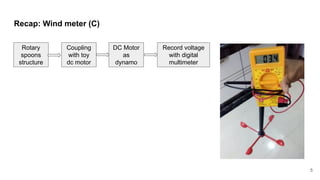
Recap: Wind meter (C)
5
Rotary
spoons
structure
Coupling
with toy
dc motor
DC Motor
as
dynamo
Record voltage
with digital
multimeter
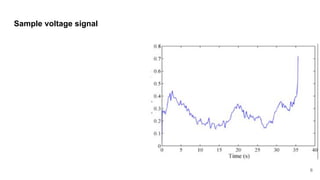
Sample voltage signal
6
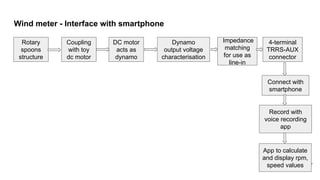
Wind meter - Interface with smartphone
7
Rotary
spoons
structure
Coupling
with toy
dc motor
DC motor
acts as
dynamo
Dynamo
output voltage
characterisation
Impedance
matching
for use as
line-in
4-terminal
TRRS-AUX
connector
Connect with
smartphone
Record with
voice recording
app
App to calculate
and display rpm,
speed values
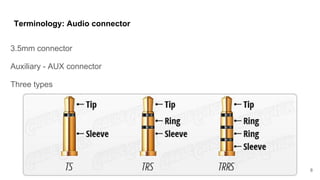
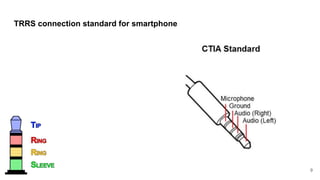
Terminology: Audio connector
3.5mm connector
Auxiliary - AUX connector
Three types
8
TRRS connection standard for smartphone
9
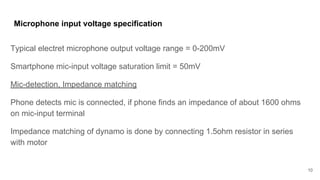
Microphone input voltage specification
Typical electret microphone output voltage range = 0-200mV
Smartphone mic-input voltage saturation limit = 50mV
Mic-detection, Impedance matching
Phone detects mic is connected, if phone finds an impedance of about 1600 ohms
on mic-input terminal
Impedance matching of dynamo is done by connecting 1.5ohm resistor in series
with motor
10
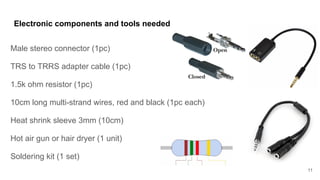
Electronic components and tools needed
Male stereo connector (1pc)
TRS to TRRS adapter cable (1pc)
1.5k ohm resistor (1pc)
10cm long multi-strand wires, red and black (1pc each)
Heat shrink sleeve 3mm (10cm)
Hot air gun or hair dryer (1 unit)
Soldering kit (1 set)
11
Electronic components and tools needed
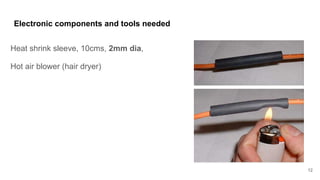
Heat shrink sleeve, 10cms, 2mm dia,
Hot air blower (hair dryer)
12
Electronic components and tools needed
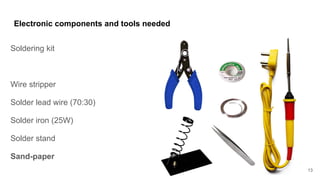
Soldering kit
Wire stripper
Solder lead wire (70:30)
Solder iron (25W)
Solder stand
Sand-paper
13
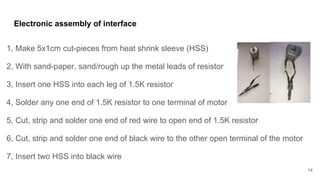
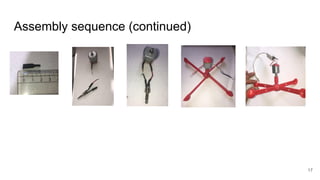
1, Make 5x1cm cut-pieces from heat shrink sleeve (HSS)
2, With sand-paper, sand/rough up the metal leads of resistor
3, Insert one HSS into each leg of 1.5K resistor
4, Solder any one end of 1.5K resistor to one terminal of motor
5, Cut, strip and solder one end of red wire to open end of 1.5K resistor
6, Cut, strip and solder one end of black wire to the other open terminal of the motor
7, Insert two HSS into black wire
Electronic assembly of interface
14
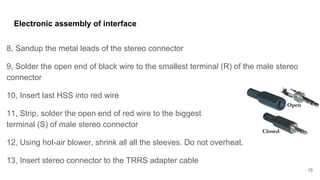
8, Sandup the metal leads of the stereo connector
9, Solder the open end of black wire to the smallest terminal (R) of the male stereo
connector
10, Insert last HSS into red wire
11, Strip, solder the open end of red wire to the biggest
terminal (S) of male stereo connector
12, Using hot-air blower, shrink all all the sleeves. Do not overheat.
13, Insert stereo connector to the TRRS adapter cable
Electronic assembly of interface
15
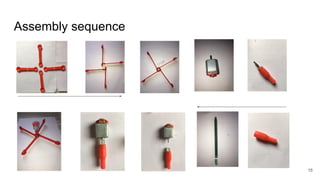
Assembly sequence
16
Assembly sequence (continued)
17
Testing with Voice recorder app
1, Connect the wind-meter with the audio jack of smartphone
2. Most android smartphones will show head-set icon in notificitaion area, as soon
as this device is connected
3, If Impedance matching is done, head-set icon is seen, else only head-phone
icon is seen (PS: iPhones don’t show any icon, but this device is tested on iPhone)
3, Use voice recorder app, record the voltage signal when the rotary structure is
moving
4, Playback voice recording to confirm the signal and change in speeds
18
Assignment 6
1, Build an android app to visualize and record wind-meter voltage signal
2, Convert the signal values into rpm (rotations per minute) and km/h and m/s by
calibrating wind-meter with a reference anemometer
19

DIY: Making a wind speed meter Part Two

  • 1.
    Extending wind meterto an IoT device Architecting of IoT CHM College - Internet of Things - Session 5 Compiled by - Deepak malani.deepak@gmail.com 1
  • 2.
    Learning Objectives ofthis session 1, Building a simple mechanical structure of propeller 2, Extend above to an electro-mechanical device 3, Understand electrical interface of sensors with mobile phones 4, Interpret electrical voltage values 5, Learn to solder electronic components 6, Learn calibration of electro-mechanical instrument 6, Build mobile application to display and transmit data Disclaimer: Some of the images used here are downloaded from WWW for fair and educational purpose. 2
  • 3.
    Recap: Wind meter(A) Propeller connected to motor, used as dynamo Voltage output at motor terminals Voltage range = 0-40mV 3
  • 4.
    Recap: Wind meter(B) Voltage output at motor terminals Reading (mV) Interpretation (wind speed) 0 not moving / stationary 3.4 very slow 5.7 slow 28.2 very fast 19.5 fast -5.6 opposite direction, slow 4
  • 5.
    Recap: Wind meter(C) 5 Rotary spoons structure Coupling with toy dc motor DC Motor as dynamo Record voltage with digital multimeter
  • 6.
  • 7.
    Wind meter -Interface with smartphone 7 Rotary spoons structure Coupling with toy dc motor DC motor acts as dynamo Dynamo output voltage characterisation Impedance matching for use as line-in 4-terminal TRRS-AUX connector Connect with smartphone Record with voice recording app App to calculate and display rpm, speed values
  • 8.
    Terminology: Audio connector 3.5mmconnector Auxiliary - AUX connector Three types 8
  • 9.
    TRRS connection standardfor smartphone 9
  • 10.
    Microphone input voltagespecification Typical electret microphone output voltage range = 0-200mV Smartphone mic-input voltage saturation limit = 50mV Mic-detection, Impedance matching Phone detects mic is connected, if phone finds an impedance of about 1600 ohms on mic-input terminal Impedance matching of dynamo is done by connecting 1.5ohm resistor in series with motor 10
  • 11.
    Electronic components andtools needed Male stereo connector (1pc) TRS to TRRS adapter cable (1pc) 1.5k ohm resistor (1pc) 10cm long multi-strand wires, red and black (1pc each) Heat shrink sleeve 3mm (10cm) Hot air gun or hair dryer (1 unit) Soldering kit (1 set) 11
  • 12.
    Electronic components andtools needed Heat shrink sleeve, 10cms, 2mm dia, Hot air blower (hair dryer) 12
  • 13.
    Electronic components andtools needed Soldering kit Wire stripper Solder lead wire (70:30) Solder iron (25W) Solder stand Sand-paper 13
  • 14.
    1, Make 5x1cmcut-pieces from heat shrink sleeve (HSS) 2, With sand-paper, sand/rough up the metal leads of resistor 3, Insert one HSS into each leg of 1.5K resistor 4, Solder any one end of 1.5K resistor to one terminal of motor 5, Cut, strip and solder one end of red wire to open end of 1.5K resistor 6, Cut, strip and solder one end of black wire to the other open terminal of the motor 7, Insert two HSS into black wire Electronic assembly of interface 14
  • 15.
    8, Sandup themetal leads of the stereo connector 9, Solder the open end of black wire to the smallest terminal (R) of the male stereo connector 10, Insert last HSS into red wire 11, Strip, solder the open end of red wire to the biggest terminal (S) of male stereo connector 12, Using hot-air blower, shrink all all the sleeves. Do not overheat. 13, Insert stereo connector to the TRRS adapter cable Electronic assembly of interface 15
  • 16.
  • 17.
  • 18.
    Testing with Voicerecorder app 1, Connect the wind-meter with the audio jack of smartphone 2. Most android smartphones will show head-set icon in notificitaion area, as soon as this device is connected 3, If Impedance matching is done, head-set icon is seen, else only head-phone icon is seen (PS: iPhones don’t show any icon, but this device is tested on iPhone) 3, Use voice recorder app, record the voltage signal when the rotary structure is moving 4, Playback voice recording to confirm the signal and change in speeds 18
  • 19.
    Assignment 6 1, Buildan android app to visualize and record wind-meter voltage signal 2, Convert the signal values into rpm (rotations per minute) and km/h and m/s by calibrating wind-meter with a reference anemometer 19