Low cost wireless laptop link to
              TV

             Anish Sane
            Deepak Malani

         Guided by : TVP, NVCR
         Sponsored by: Philips
User Scenario


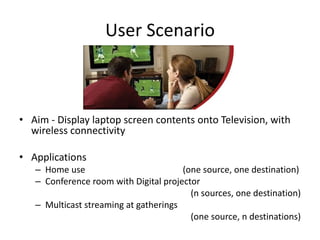
• Aim - Display laptop screen contents onto Television, with
  wireless connectivity

• Applications
   – Home use                          (one source, one destination)
   – Conference room with Digital projector
                                         (n sources, one destination)
   – Multicast streaming at gatherings
                                         (one source, n destinations)
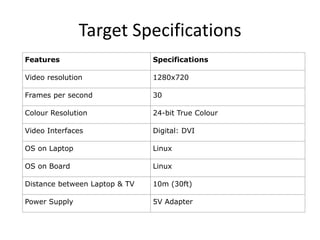
Target Specifications
Features                       Specifications

Video resolution               1280x720

Frames per second              30

Colour Resolution              24-bit True Colour

Video Interfaces               Digital: DVI

OS on Laptop                   Linux

OS on Board                    Linux

Distance between Laptop & TV   10m (30ft)

Power Supply                   5V Adapter
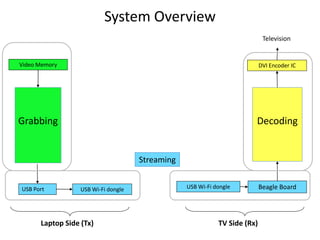
System Overview
                                                                            Television


Video Memory                                                               DVI Encoder IC


Grabbing                                                               Decoding


                                     Streaming


USB Port          USB Wi-Fi dongle               USB Wi-Fi dongle          Beagle Board


      Laptop Side (Tx)                                      TV Side (Rx)
Part I

Content Generation (Laptop side)
   Content Display (TV side)
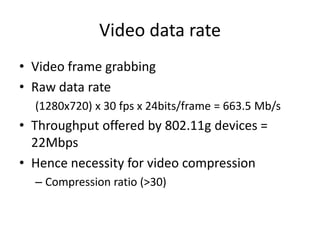
Video data rate
• Video frame grabbing
• Raw data rate
  (1280x720) x 30 fps x 24bits/frame = 663.5 Mb/s
• Throughput offered by 802.11g devices =
  22Mbps
• Hence necessity for video compression
  – Compression ratio (>30)
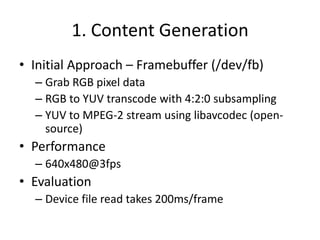
1. Content Generation
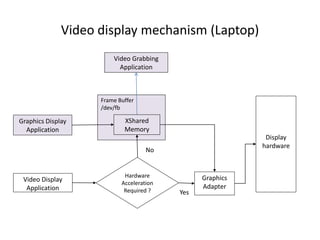
• Initial Approach – Framebuffer (/dev/fb)
  – Grab RGB pixel data
  – RGB to YUV transcode with 4:2:0 subsampling
  – YUV to MPEG-2 stream using libavcodec (open-
    source)
• Performance
  – 640x480@3fps
• Evaluation
  – Device file read takes 200ms/frame
Video display mechanism (Laptop)
                        Video Grabbing
                          Application


                    Frame Buffer
                    /dev/fb

Graphics Display            XShared
  Application               Memory
                                                            Display
                                                           hardware
                                    No


                            Hardware            Graphics
 Video Display             Acceleration
  Application                                   Adapter
                            Required ?    Yes
Content Generation
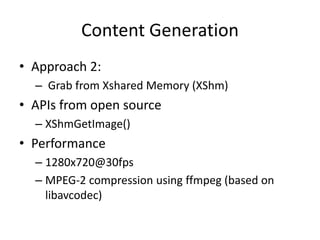
• Approach 2:
  – Grab from Xshared Memory (XShm)
• APIs from open source
  – XShmGetImage()
• Performance
  – 1280x720@30fps
  – MPEG-2 compression using ffmpeg (based on
    libavcodec)
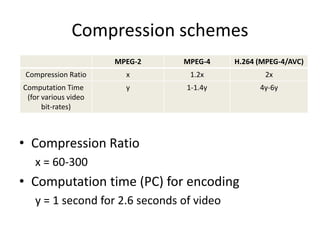
Compression schemes
                      MPEG-2    MPEG-4     H.264 (MPEG-4/AVC)
 Compression Ratio      x        1.2x              2x
Computation Time        y        1-1.4y          4y-6y
 (for various video
      bit-rates)


• Compression Ratio
   x = 60-300
• Computation time (PC) for encoding
   y = 1 second for 2.6 seconds of video
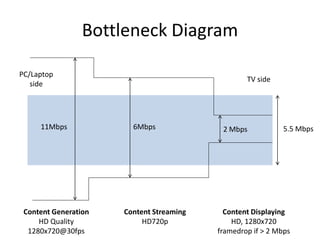
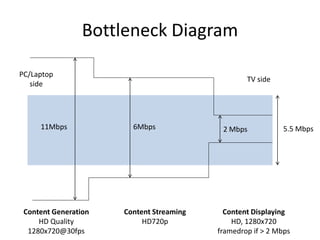
Bottleneck Diagram

PC/Laptop
                                                  TV side
   side


     11Mbps             6Mbps              2 Mbps            5.5 Mbps


 Content Generation   Content Streaming     Content Displaying
     HD Quality            HD720p             HD, 1280x720
  1280x720@30fps                          framedrop if > 2 Mbps
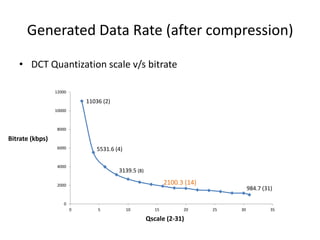
Generated Data Rate (after compression)

   • DCT Quantization scale v/s bitrate

                 12000

                             11036 (2)
                 10000


                 8000

Bitrate (kbps)
                 6000            5531.6 (4)

                 4000
                                         3139.5 (8)

                 2000                                         2100.3 (14)
                                                                                      984.7 (31)

                     0
                         0       5            10         15         20      25   30            35

                                                      Qscale (2-31)
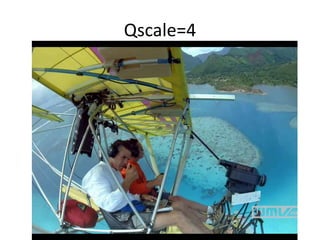
Qscale=4
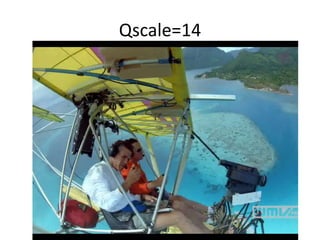
Qscale=14
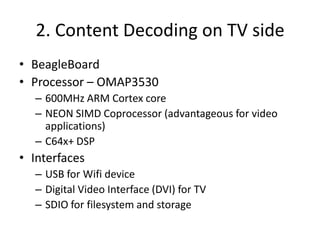
2. Content Decoding on TV side
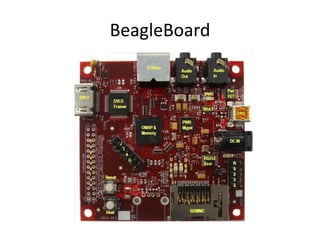
• BeagleBoard
• Processor – OMAP3530
  – 600MHz ARM Cortex core
  – NEON SIMD Coprocessor (advantageous for video
    applications)
  – C64x+ DSP
• Interfaces
  – USB for Wifi device
  – Digital Video Interface (DVI) for TV
  – SDIO for filesystem and storage
Software on Board
• 2.6.28 kernel
• Video Decoder
• Mplayer
  – Uses libavcodec
  – Uses NEON acceleration
DSP Acceleration
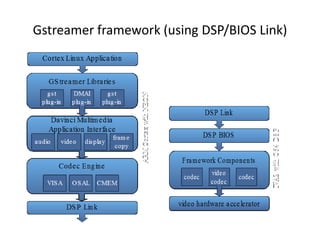
• Gstreamer multimedia framework which uses
  DSP/BIOS Link
• Pipeline based application
  – filesrc | demux | codec | sink
• Codec
  – ffdec_mpeg2video
  – TI evaluation codecs
  – No HD codecs for 720p yet for DSP
Video Decode Performance on Board
• Resolution: 1280x720
• Frame rate: 24 (streaming videos)
               30 (captured videos)
• Video fidelity: 2 Mbps
  – At higher bit rates, frame rate decreases
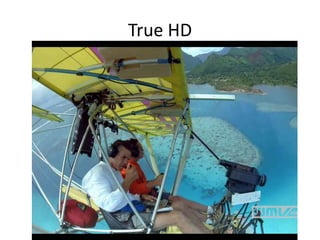
• Comparison of video fidelity (pictures)
• Power consumption=2W (0.4amp, 5VDC)
True HD
On OMAP
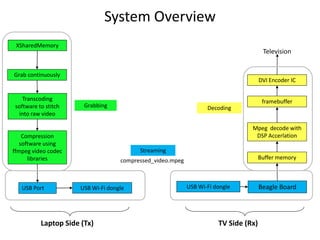
System Overview
 XSharedMemory
                                                                                       Television


Grab continuously
                                                                                      DVI Encoder IC

   Transcoding                                                                         framebuffer
software to stitch     Grabbing                                    Decoding
 into raw video

                                                                                 Mpeg decode with
    Compression                                                                   DSP Accerlation
   software using
ffmpeg video codec                        Streaming
      libraries                     compressed_video.mpeg                             Buffer memory


   USB Port           USB Wi-Fi dongle                      USB Wi-Fi dongle          Beagle Board


          Laptop Side (Tx)                                             TV Side (Rx)
Part II

Content Streaming
 and Automation
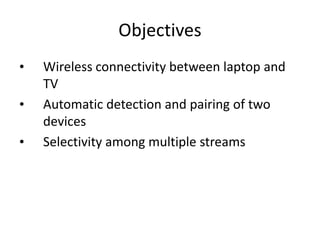
Objectives
•   Wireless connectivity between laptop and
    TV
•   Automatic detection and pairing of two
    devices
•   Selectivity among multiple streams
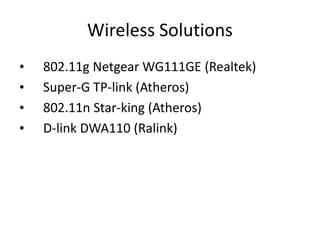
Wireless Solutions
•   802.11g Netgear WG111GE (Realtek)
•   Super-G TP-link (Atheros)
•   802.11n Star-king (Atheros)
•   D-link DWA110 (Ralink)
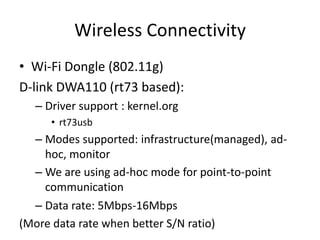
Wireless Connectivity
• Wi-Fi Dongle (802.11g)
D-link DWA110 (rt73 based):
  – Driver support : kernel.org
     • rt73usb
  – Modes supported: infrastructure(managed), ad-
    hoc, monitor
  – We are using ad-hoc mode for point-to-point
    communication
  – Data rate: 5Mbps-16Mbps
(More data rate when better S/N ratio)
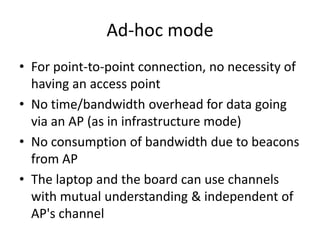
Ad-hoc mode
• For point-to-point connection, no necessity of
  having an access point
• No time/bandwidth overhead for data going
  via an AP (as in infrastructure mode)
• No consumption of bandwidth due to beacons
  from AP
• The laptop and the board can use channels
  with mutual understanding & independent of
  AP's channel
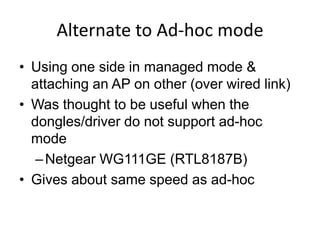
Alternate to Ad-hoc mode
• Using one side in managed mode &
  attaching an AP on other (over wired link)
• Was thought to be useful when the
  dongles/driver do not support ad-hoc
  mode
   – Netgear WG111GE (RTL8187B)
• Gives about same speed as ad-hoc
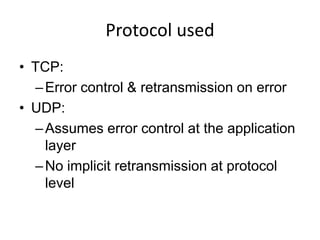
Protocol used
• TCP:
  – Error control & retransmission on error
• UDP:
  – Assumes error control at the application
    layer
  – No implicit retransmission at protocol
    level
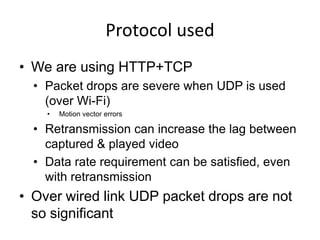
Protocol used
• We are using HTTP+TCP
  • Packet drops are severe when UDP is used
    (over Wi-Fi)
    •   Motion vector errors

  • Retransmission can increase the lag between
    captured & played video
  • Data rate requirement can be satisfied, even
    with retransmission
• Over wired link UDP packet drops are not
  so significant
Bottleneck Diagram

PC/Laptop
                                                  TV side
   side


     11Mbps             6Mbps              2 Mbps            5.5 Mbps


 Content Generation   Content Streaming     Content Displaying
     HD Quality            HD720p             HD, 1280x720
  1280x720@30fps                          framedrop if > 2 Mbps
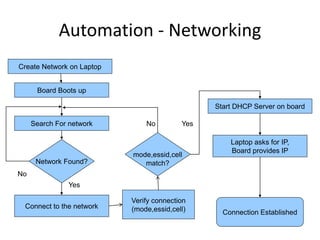
Automation - Networking
Create Network on Laptop


      Board Boots up

                                                 Start DHCP Server on board

     Search For network        No         Yes

                                                     Laptop asks for IP,
                                                     Board provides IP
                           mode,essid,cell
      Network Found?          match?
No
               Yes

                           Verify connectionNo
 Connect to the network    (mode,essid,cell)       Connection Established
Automation – Streaming
• Laptop side
Streaming server
Grabbing application (ffmpeg)
• Board side
   – Streaming client
   – Media Player (mplayer or gstreamer)
• Data transfer between applications
   – This is done using named pipes i.e. FIFOs
User interface
• Reconnect
  – If the network gets disconnected, the user can use
    this button to reconnect
• Select Stream
  – When there are multiple sources, this control can
    be used to switch between them
• Reset
  – If the device freezes completely
Demo Plan
• Real-time screen capture on laptop and
  stream to television, over Wi-Fi
• Video file streaming from laptop to TV on Wi-
  Fi
• Resolution: 1280x720
Appendix
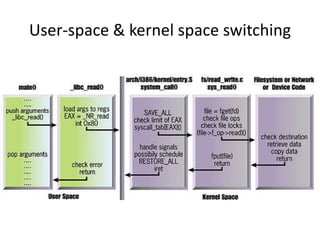
User-space & kernel space switching
Gstreamer framework (using DSP/BIOS Link)
BeagleBoard
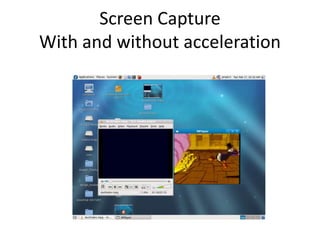
Screen Capture
With and without acceleration
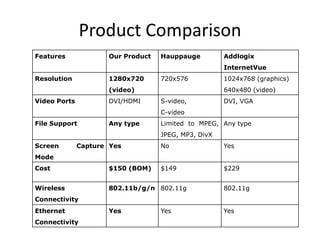
Product Comparison
Features             Our Product   Hauppauge         Addlogix
                                                     InternetVue
Resolution           1280x720      720x576           1024x768 (graphics)
                     (video)                         640x480 (video)
Video Ports          DVI/HDMI      S-video,          DVI, VGA
                                   C-video
File Support         Any type      Limited to MPEG, Any type
                                   JPEG, MP3, DivX
Screen        Capture Yes          No                Yes
Mode
Cost                 $150 (BOM)    $149              $229


Wireless             802.11b/g/n 802.11g             802.11g
Connectivity
Ethernet             Yes           Yes               Yes
Connectivity

Wireless PC2TV

  • 1.
    Low cost wirelesslaptop link to TV Anish Sane Deepak Malani Guided by : TVP, NVCR Sponsored by: Philips
  • 2.
    User Scenario • Aim- Display laptop screen contents onto Television, with wireless connectivity • Applications – Home use (one source, one destination) – Conference room with Digital projector (n sources, one destination) – Multicast streaming at gatherings (one source, n destinations)
  • 3.
    Target Specifications Features Specifications Video resolution 1280x720 Frames per second 30 Colour Resolution 24-bit True Colour Video Interfaces Digital: DVI OS on Laptop Linux OS on Board Linux Distance between Laptop & TV 10m (30ft) Power Supply 5V Adapter
  • 4.
    System Overview Television Video Memory DVI Encoder IC Grabbing Decoding Streaming USB Port USB Wi-Fi dongle USB Wi-Fi dongle Beagle Board Laptop Side (Tx) TV Side (Rx)
  • 5.
    Part I Content Generation(Laptop side) Content Display (TV side)
  • 6.
    Video data rate •Video frame grabbing • Raw data rate (1280x720) x 30 fps x 24bits/frame = 663.5 Mb/s • Throughput offered by 802.11g devices = 22Mbps • Hence necessity for video compression – Compression ratio (>30)
  • 7.
    1. Content Generation •Initial Approach – Framebuffer (/dev/fb) – Grab RGB pixel data – RGB to YUV transcode with 4:2:0 subsampling – YUV to MPEG-2 stream using libavcodec (open- source) • Performance – 640x480@3fps • Evaluation – Device file read takes 200ms/frame
  • 8.
    Video display mechanism(Laptop) Video Grabbing Application Frame Buffer /dev/fb Graphics Display XShared Application Memory Display hardware No Hardware Graphics Video Display Acceleration Application Adapter Required ? Yes
  • 9.
    Content Generation • Approach2: – Grab from Xshared Memory (XShm) • APIs from open source – XShmGetImage() • Performance – 1280x720@30fps – MPEG-2 compression using ffmpeg (based on libavcodec)
  • 10.
    Compression schemes MPEG-2 MPEG-4 H.264 (MPEG-4/AVC) Compression Ratio x 1.2x 2x Computation Time y 1-1.4y 4y-6y (for various video bit-rates) • Compression Ratio x = 60-300 • Computation time (PC) for encoding y = 1 second for 2.6 seconds of video
  • 11.
    Bottleneck Diagram PC/Laptop TV side side 11Mbps 6Mbps 2 Mbps 5.5 Mbps Content Generation Content Streaming Content Displaying HD Quality HD720p HD, 1280x720 1280x720@30fps framedrop if > 2 Mbps
  • 12.
    Generated Data Rate(after compression) • DCT Quantization scale v/s bitrate 12000 11036 (2) 10000 8000 Bitrate (kbps) 6000 5531.6 (4) 4000 3139.5 (8) 2000 2100.3 (14) 984.7 (31) 0 0 5 10 15 20 25 30 35 Qscale (2-31)
  • 13.
  • 14.
  • 15.
    2. Content Decodingon TV side • BeagleBoard • Processor – OMAP3530 – 600MHz ARM Cortex core – NEON SIMD Coprocessor (advantageous for video applications) – C64x+ DSP • Interfaces – USB for Wifi device – Digital Video Interface (DVI) for TV – SDIO for filesystem and storage
  • 16.
    Software on Board •2.6.28 kernel • Video Decoder • Mplayer – Uses libavcodec – Uses NEON acceleration
  • 17.
    DSP Acceleration • Gstreamermultimedia framework which uses DSP/BIOS Link • Pipeline based application – filesrc | demux | codec | sink • Codec – ffdec_mpeg2video – TI evaluation codecs – No HD codecs for 720p yet for DSP
  • 18.
    Video Decode Performanceon Board • Resolution: 1280x720 • Frame rate: 24 (streaming videos) 30 (captured videos) • Video fidelity: 2 Mbps – At higher bit rates, frame rate decreases • Comparison of video fidelity (pictures) • Power consumption=2W (0.4amp, 5VDC)
  • 19.
  • 20.
  • 21.
    System Overview XSharedMemory Television Grab continuously DVI Encoder IC Transcoding framebuffer software to stitch Grabbing Decoding into raw video Mpeg decode with Compression DSP Accerlation software using ffmpeg video codec Streaming libraries compressed_video.mpeg Buffer memory USB Port USB Wi-Fi dongle USB Wi-Fi dongle Beagle Board Laptop Side (Tx) TV Side (Rx)
  • 22.
  • 23.
    Objectives • Wireless connectivity between laptop and TV • Automatic detection and pairing of two devices • Selectivity among multiple streams
  • 24.
    Wireless Solutions • 802.11g Netgear WG111GE (Realtek) • Super-G TP-link (Atheros) • 802.11n Star-king (Atheros) • D-link DWA110 (Ralink)
  • 25.
    Wireless Connectivity • Wi-FiDongle (802.11g) D-link DWA110 (rt73 based): – Driver support : kernel.org • rt73usb – Modes supported: infrastructure(managed), ad- hoc, monitor – We are using ad-hoc mode for point-to-point communication – Data rate: 5Mbps-16Mbps (More data rate when better S/N ratio)
  • 26.
    Ad-hoc mode • Forpoint-to-point connection, no necessity of having an access point • No time/bandwidth overhead for data going via an AP (as in infrastructure mode) • No consumption of bandwidth due to beacons from AP • The laptop and the board can use channels with mutual understanding & independent of AP's channel
  • 27.
    Alternate to Ad-hocmode • Using one side in managed mode & attaching an AP on other (over wired link) • Was thought to be useful when the dongles/driver do not support ad-hoc mode – Netgear WG111GE (RTL8187B) • Gives about same speed as ad-hoc
  • 28.
    Protocol used • TCP: – Error control & retransmission on error • UDP: – Assumes error control at the application layer – No implicit retransmission at protocol level
  • 29.
    Protocol used • Weare using HTTP+TCP • Packet drops are severe when UDP is used (over Wi-Fi) • Motion vector errors • Retransmission can increase the lag between captured & played video • Data rate requirement can be satisfied, even with retransmission • Over wired link UDP packet drops are not so significant
  • 30.
    Bottleneck Diagram PC/Laptop TV side side 11Mbps 6Mbps 2 Mbps 5.5 Mbps Content Generation Content Streaming Content Displaying HD Quality HD720p HD, 1280x720 1280x720@30fps framedrop if > 2 Mbps
  • 31.
    Automation - Networking CreateNetwork on Laptop Board Boots up Start DHCP Server on board Search For network No Yes Laptop asks for IP, Board provides IP mode,essid,cell Network Found? match? No Yes Verify connectionNo Connect to the network (mode,essid,cell) Connection Established
  • 32.
    Automation – Streaming •Laptop side Streaming server Grabbing application (ffmpeg) • Board side – Streaming client – Media Player (mplayer or gstreamer) • Data transfer between applications – This is done using named pipes i.e. FIFOs
  • 33.
    User interface • Reconnect – If the network gets disconnected, the user can use this button to reconnect • Select Stream – When there are multiple sources, this control can be used to switch between them • Reset – If the device freezes completely
  • 34.
    Demo Plan • Real-timescreen capture on laptop and stream to television, over Wi-Fi • Video file streaming from laptop to TV on Wi- Fi • Resolution: 1280x720
  • 35.
  • 36.
    User-space & kernelspace switching
  • 37.
  • 38.
  • 39.
    Screen Capture With andwithout acceleration
  • 40.
    Product Comparison Features Our Product Hauppauge Addlogix InternetVue Resolution 1280x720 720x576 1024x768 (graphics) (video) 640x480 (video) Video Ports DVI/HDMI S-video, DVI, VGA C-video File Support Any type Limited to MPEG, Any type JPEG, MP3, DivX Screen Capture Yes No Yes Mode Cost $150 (BOM) $149 $229 Wireless 802.11b/g/n 802.11g 802.11g Connectivity Ethernet Yes Yes Yes Connectivity