Prepared by,
V.Santhi,
Assistant Professor,
Department of Computer Applications
Bon Secours College for Women,
Thanjavur
Fundamentals
What is Distributed System?
 Single processor, Communication advancement
interconnected multiple processors
 Interconnected multiple processors are basically two
types
1. Tightly Coupled Systems
2. Loosely Coupled Systems
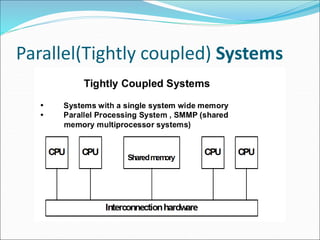
Parallel(Tightly coupled) Systems
Distributed Computing System
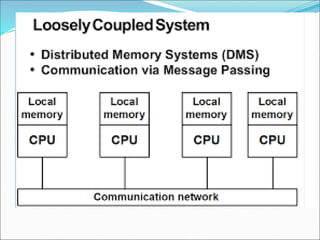
 A distributed system is a collection of processors
interconnected by a communication network in which
each processor has its own local memory and other
peripherals.
 Communication between any two processors of the
system take place by message passing over the
communication network.
 A distributed system is one in which components
located at networked computers communicate and
coordinate their actions only by passing messages
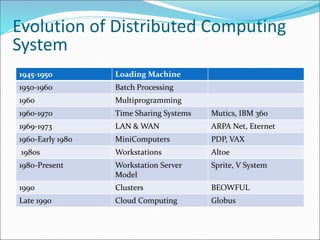
1945-1950 Loading Machine
1950-1960 Batch Processing
1960 Multiprogramming
1960-1970 Time Sharing Systems Mutics, IBM 360
1969-1973 LAN & WAN ARPA Net, Eternet
1960-Early 1980 MiniComputers PDP, VAX
1980s Workstations Altoe
1980-Present Workstation Server
Model
Sprite, V System
1990 Clusters BEOWFUL
Late 1990 Cloud Computing Globus
Evolution of Distributed Computing
System
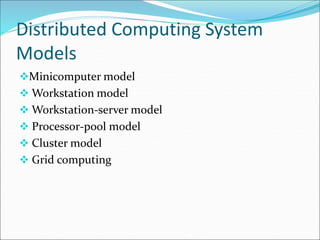
Distributed Computing System
Models
Minicomputer model
 Workstation model
 Workstation-server model
 Processor-pool model
 Cluster model
 Grid computing
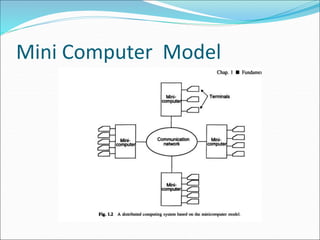
Mini Computer Model
 Extension Centralized Time sharing system
 Few minicomputers interconnected by a communication
network.
 Multiple users
1. User must log on his/her home minicomputer.
2. Thereafter, he/she can log on a remote machine by telnet.
 Resource sharing
1. Database
2. High-performance devices
Ex: ARPAnet
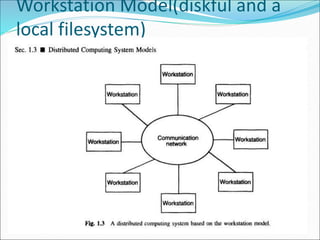
Workstation Model(diskful and a
local filesystem)
 anSeveral workstations connected by a communication
network
 Workstations equipped with own disk
 At any one time, other workstations idle, resulting in the
waste of CPU time.
 Workstations are interconnect with high speed LAN
 Process migration
 Users first log on his/her personal workstation.
 If there are idle remote workstations, a heavy job may
migrate to one of them
 Issues:
 How to find am idle workstation
 How to migrate a job
 What if a user logs onto a workstation which is running a
process of a remote machine (preemptive process migration
facility)

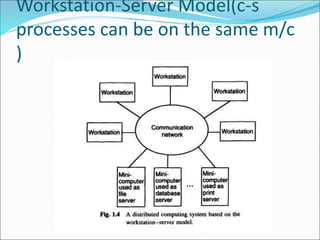
Workstation-Server Model(c-s
processes can be on the same m/c
)
 Client workstations
Diskless
Graphic/interactive applications processed in local
All file, print, http and even cycle computation
requests are sent to servers.
 Server minicomputers
 Each minicomputer is dedicated to one or more
different types of services.
 Client-Server model of communication
 RPC (Remote Procedure Call)
 RMI (Remote Method Invocation)
 A Client process calls a server process’
function.
 No process migration invoked so the
response time is guaranteed )
Example: NSF
Advantages
 (cost,maintenance,anywhere,upgradation)
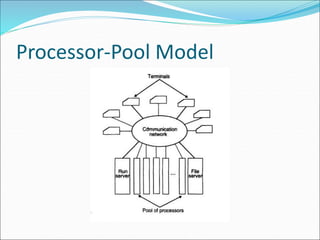
Processor-Pool Model
 Clients:
They log in one of terminals (diskless workstations or
X terminals)
All services are dispatched to servers.
 Servers:
Necessary number of processors are
allocated to each user from the pool.
Better utilization but less interactivity
 Pool of backend processors handle processing
–Run server manages the backend processors
–User does not log on to his home m/c ( like in other
models)
 –Better utilization of processing power
Hybrid Model
 Combine the advantages of both workstation-server
and the processor-pool model
 Guaranteed response time to interactive jobs
 More expensive to implement
Why are Distributed Computing
Systems Graining Popularity
 DOS more complex and difficult to build than
centralized system.
 Increased complexity
 Effectively using &n managing large no of distributed
resources.
 System software of DOS handle communication and
security problems very different than centralized
 Special software needed for loss of messages during
transmission
 Prevent Overloading of the network
Inherently Distributed
Applications
 Applications are inherently distributed in nature –
realization
 DOS for collecting, preprocessing and accessing the
data
Ex:
Airline reservation
Banking system
Information Sharing among
Distributed Users
 Efficient person – to – person communication facility
by sharing information over great distance
 Information generated by one user efficiently shared
by the users.

Distributed Operating System

  • 1.
    Prepared by, V.Santhi, Assistant Professor, Departmentof Computer Applications Bon Secours College for Women, Thanjavur
  • 2.
    Fundamentals What is DistributedSystem?  Single processor, Communication advancement interconnected multiple processors  Interconnected multiple processors are basically two types 1. Tightly Coupled Systems 2. Loosely Coupled Systems
  • 3.
  • 5.
    Distributed Computing System A distributed system is a collection of processors interconnected by a communication network in which each processor has its own local memory and other peripherals.  Communication between any two processors of the system take place by message passing over the communication network.  A distributed system is one in which components located at networked computers communicate and coordinate their actions only by passing messages
  • 6.
    1945-1950 Loading Machine 1950-1960Batch Processing 1960 Multiprogramming 1960-1970 Time Sharing Systems Mutics, IBM 360 1969-1973 LAN & WAN ARPA Net, Eternet 1960-Early 1980 MiniComputers PDP, VAX 1980s Workstations Altoe 1980-Present Workstation Server Model Sprite, V System 1990 Clusters BEOWFUL Late 1990 Cloud Computing Globus Evolution of Distributed Computing System
  • 7.
    Distributed Computing System Models Minicomputermodel  Workstation model  Workstation-server model  Processor-pool model  Cluster model  Grid computing
  • 8.
  • 9.
     Extension CentralizedTime sharing system  Few minicomputers interconnected by a communication network.  Multiple users 1. User must log on his/her home minicomputer. 2. Thereafter, he/she can log on a remote machine by telnet.  Resource sharing 1. Database 2. High-performance devices Ex: ARPAnet
  • 10.
    Workstation Model(diskful anda local filesystem)
  • 11.
     anSeveral workstationsconnected by a communication network  Workstations equipped with own disk  At any one time, other workstations idle, resulting in the waste of CPU time.  Workstations are interconnect with high speed LAN  Process migration  Users first log on his/her personal workstation.  If there are idle remote workstations, a heavy job may migrate to one of them
  • 12.
     Issues:  Howto find am idle workstation  How to migrate a job  What if a user logs onto a workstation which is running a process of a remote machine (preemptive process migration facility) 
  • 13.
  • 14.
     Client workstations Diskless Graphic/interactiveapplications processed in local All file, print, http and even cycle computation requests are sent to servers.
  • 15.
     Server minicomputers Each minicomputer is dedicated to one or more different types of services.  Client-Server model of communication  RPC (Remote Procedure Call)  RMI (Remote Method Invocation)
  • 16.
     A Clientprocess calls a server process’ function.  No process migration invoked so the response time is guaranteed ) Example: NSF Advantages  (cost,maintenance,anywhere,upgradation)
  • 17.
  • 18.
     Clients: They login one of terminals (diskless workstations or X terminals) All services are dispatched to servers.
  • 19.
     Servers: Necessary numberof processors are allocated to each user from the pool. Better utilization but less interactivity
  • 20.
     Pool ofbackend processors handle processing –Run server manages the backend processors –User does not log on to his home m/c ( like in other models)  –Better utilization of processing power
  • 21.
    Hybrid Model  Combinethe advantages of both workstation-server and the processor-pool model  Guaranteed response time to interactive jobs  More expensive to implement
  • 22.
    Why are DistributedComputing Systems Graining Popularity  DOS more complex and difficult to build than centralized system.  Increased complexity  Effectively using &n managing large no of distributed resources.  System software of DOS handle communication and security problems very different than centralized  Special software needed for loss of messages during transmission  Prevent Overloading of the network
  • 23.
    Inherently Distributed Applications  Applicationsare inherently distributed in nature – realization  DOS for collecting, preprocessing and accessing the data Ex: Airline reservation Banking system
  • 24.
    Information Sharing among DistributedUsers  Efficient person – to – person communication facility by sharing information over great distance  Information generated by one user efficiently shared by the users.