Digital learning prototype
Parental information evening
Carnoustie High School
Purpose
• To use digital learning to enhance the
learning experiences and attainment of
pupils.
• To use research based digital learning
methods to help inform the digital learning
strategy for Angus.
Who is involved?
• 54 pupils studying physics with Mr Bailey
– 17 pupils studying N4 or N5 Physics class 4PhyC1
– 18 pupils studying N5 (11) or Higher Physics (7) class
4/5PhyD1
– 19 pupils studying Higher Physics, class 5PhyE
How will the learning be different?
• The learning in the classes will use a
flipped learning approach.
Flipped learning
• Teacher prepares/selects materials for
pupils to access instruction on
concept/topic outside of class
• Pupils:
– Read information and make notes
– Watch digital videos and summarise
– Read instructions for practical work.
– Do the above then answer simple questions
using the examples provided.
Flipped learning
• More class time is devoted to active
learning, practical work, extension
activities and supporting individuals.
• Pupils receive support from teacher and
peers as needed when doing the more
challenging tasks.
• Teacher’s role is mainly to facilitate
student-led learning.
Impact on learner
• More time for:
– Practising and applying knowledge and skills
– Completing higher order tasks since simpler
tasks are completed at home.
– Questioning and higher level discussions
– Collaborative learning
– Independent and student-led learning
– Individualised support
Impact on learner
• Improved engagement in learning
• Increased knowledge and understanding
• Greater confidence
• Greater awareness of strengths and
weaknesses
• Increased independent learning skills
• Increased progress and attainment
Some challenges
• Access to technology
• Identifying appropriate online resources
• Pupils not doing homework
• Pupils not comfortable with independent
learning, lack of persistence
Access to technology
• Providing all pupils with a Surface device
means all pupils have a suitable resource
to use.
• Pupils are able to access the school library
(before school and at lunchtimes) to
complete their homework if they do not
have access to Wi-Fi at home.
Access to technology
• Most resources are contained in OneNote,
this keeps a copy of the resource on the
Surface so most learning can still be done
without Wi-Fi
• Pupils need to bring the device to school
for every physics lesson
appropriate digital resources
• Existing resources previous supplied on
paper can be adapted and reused digitally.
• Videos within Glow and some on YouTube
are also suitable .
• Videos and explanations can be made by
the teacher.
• Flipped learning is not all about videos
some tasks are reading, summarising in
own words and questions.
appropriate digital resources
Homework not done
• Not a new problem, existing school
procedures can be used.
• If not done they will:
– Be unable to complete the harder learning in
class.
– Find discussions difficult.
– Be unable to do the more complex tasks
– Will not know what to do
Homework not done
• Pupils will be asked to complete the work
in class and only carry out collaborative
learning and receive individual support
once the homework task has been
completed.
Independent Learning
• Carnoustie High School are already
working hard on improving pupils
persistence.
• We encourage pupils to have a growth
mindset and recognise that struggle is an
essential part of learning.
• The tasks set at home will be lower order
and more straightforward so completion
possible.
Independent Learning
• Difficulties and lack of understanding are a
starting point for the peer and teacher
discussion in class. Helping each other
understand has been shown to be an
excellent way to learn.
• The harder work in class will have support
of peers and the teacher.
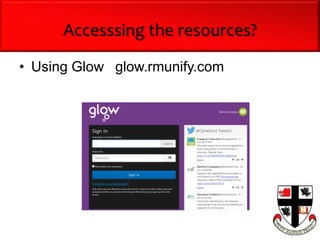
Accesssing the resources?
• Using Glow glow.rmunify.com
Prototype start
• Devices issued to parents/pupils who are
present tonight.
• Other devices will be issued tomorrow if
Acceptable use agreement and parental
permission returned.
• Protective cases are due to arrive in
school on Monday and will then be issued
to pupils.
demonstration
• A live demonstration to show Classroom
and OneNote.
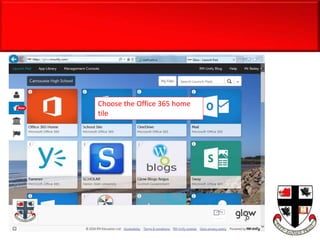
Choose the Office 365 home
tile
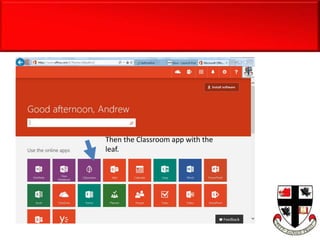
Then the Classroom app with the
leaf.
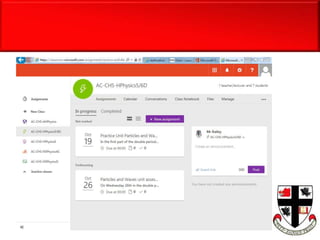
Classroom
• Shows assignments / homework
• Assignments may contain links to files to
read/do tasks.
• Assignment has access to the class
OneNote
• Assignments can be returned back to the
teacher for marking or review.
OneNote
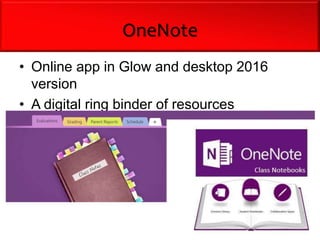
• Online app in Glow and desktop 2016
version
• A digital ring binder of resources
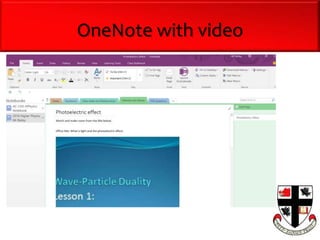
OneNote with video
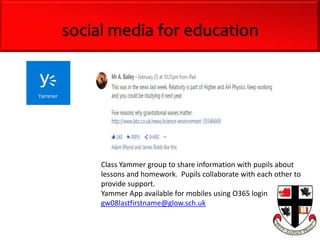
Class Yammer group to share information with pupils about
lessons and homework. Pupils collaborate with each other to
provide support.
Yammer App available for mobiles using O365 login
gw08lastfirstname@glow.sch.uk
social media for education
Any questions?
• We will be continually evaluating the
prototype, please get in touch with myself
or Mr McInally with any issues or
comments.

Digital prototype parents evening presentation

  • 1.
    Digital learning prototype Parentalinformation evening Carnoustie High School
  • 2.
    Purpose • To usedigital learning to enhance the learning experiences and attainment of pupils. • To use research based digital learning methods to help inform the digital learning strategy for Angus.
  • 3.
    Who is involved? •54 pupils studying physics with Mr Bailey – 17 pupils studying N4 or N5 Physics class 4PhyC1 – 18 pupils studying N5 (11) or Higher Physics (7) class 4/5PhyD1 – 19 pupils studying Higher Physics, class 5PhyE
  • 4.
    How will thelearning be different? • The learning in the classes will use a flipped learning approach.
  • 5.
    Flipped learning • Teacherprepares/selects materials for pupils to access instruction on concept/topic outside of class • Pupils: – Read information and make notes – Watch digital videos and summarise – Read instructions for practical work. – Do the above then answer simple questions using the examples provided.
  • 6.
    Flipped learning • Moreclass time is devoted to active learning, practical work, extension activities and supporting individuals. • Pupils receive support from teacher and peers as needed when doing the more challenging tasks. • Teacher’s role is mainly to facilitate student-led learning.
  • 7.
    Impact on learner •More time for: – Practising and applying knowledge and skills – Completing higher order tasks since simpler tasks are completed at home. – Questioning and higher level discussions – Collaborative learning – Independent and student-led learning – Individualised support
  • 8.
    Impact on learner •Improved engagement in learning • Increased knowledge and understanding • Greater confidence • Greater awareness of strengths and weaknesses • Increased independent learning skills • Increased progress and attainment
  • 9.
    Some challenges • Accessto technology • Identifying appropriate online resources • Pupils not doing homework • Pupils not comfortable with independent learning, lack of persistence
  • 10.
    Access to technology •Providing all pupils with a Surface device means all pupils have a suitable resource to use. • Pupils are able to access the school library (before school and at lunchtimes) to complete their homework if they do not have access to Wi-Fi at home.
  • 11.
    Access to technology •Most resources are contained in OneNote, this keeps a copy of the resource on the Surface so most learning can still be done without Wi-Fi • Pupils need to bring the device to school for every physics lesson
  • 12.
    appropriate digital resources •Existing resources previous supplied on paper can be adapted and reused digitally. • Videos within Glow and some on YouTube are also suitable .
  • 13.
    • Videos andexplanations can be made by the teacher. • Flipped learning is not all about videos some tasks are reading, summarising in own words and questions. appropriate digital resources
  • 14.
    Homework not done •Not a new problem, existing school procedures can be used. • If not done they will: – Be unable to complete the harder learning in class. – Find discussions difficult. – Be unable to do the more complex tasks – Will not know what to do
  • 15.
    Homework not done •Pupils will be asked to complete the work in class and only carry out collaborative learning and receive individual support once the homework task has been completed.
  • 16.
    Independent Learning • CarnoustieHigh School are already working hard on improving pupils persistence. • We encourage pupils to have a growth mindset and recognise that struggle is an essential part of learning. • The tasks set at home will be lower order and more straightforward so completion possible.
  • 17.
    Independent Learning • Difficultiesand lack of understanding are a starting point for the peer and teacher discussion in class. Helping each other understand has been shown to be an excellent way to learn. • The harder work in class will have support of peers and the teacher.
  • 18.
    Accesssing the resources? •Using Glow glow.rmunify.com
  • 19.
    Prototype start • Devicesissued to parents/pupils who are present tonight. • Other devices will be issued tomorrow if Acceptable use agreement and parental permission returned. • Protective cases are due to arrive in school on Monday and will then be issued to pupils.
  • 20.
    demonstration • A livedemonstration to show Classroom and OneNote.
  • 21.
    Choose the Office365 home tile
  • 22.
    Then the Classroomapp with the leaf.
  • 24.
    Classroom • Shows assignments/ homework • Assignments may contain links to files to read/do tasks. • Assignment has access to the class OneNote • Assignments can be returned back to the teacher for marking or review.
  • 25.
    OneNote • Online appin Glow and desktop 2016 version • A digital ring binder of resources
  • 26.
  • 27.
    Class Yammer groupto share information with pupils about lessons and homework. Pupils collaborate with each other to provide support. Yammer App available for mobiles using O365 login gw08lastfirstname@glow.sch.uk social media for education
  • 28.
    Any questions? • Wewill be continually evaluating the prototype, please get in touch with myself or Mr McInally with any issues or comments.