MOODLE
 Has your school got it? Do they want you to use it?
 What can you do with it?


Anne-Marie Tanahashi
Fukuoka JALT – 19 May 2012
Contents
• Moodle - what is it and how can it help?

• Moodle site PEW at Poole Gakuin University

• Sheltered content course on Britain

• Pronunciation course

• Narrow Listening

• Questions, comments - How can you use Moodle?
What is it?      How can it help?
• Moodle is a FREE open source course management
  system.

• It helps me by extending my classroom to the web.

• It helps students by making my handouts,
  assignments, announcements and sometimes
  quizzes, accessible even if they skip class.

• It may help you in ways you have yet to discover!
                         
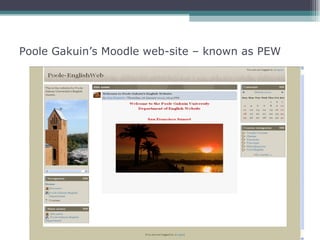
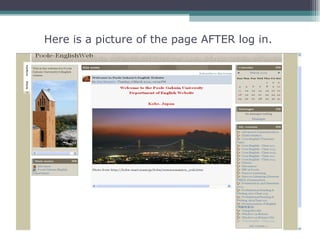
Poole Gakuin’s Moodle web-site – known as PEW
Here is a picture of the page AFTER log in.
Sheltered content course on Britain

• This class is offered to students from different departments
  so goes by two different names, depending on the
  department:


• Contemporary British Culture
• イギリス文化  C


• Aim:
  ▫ To provide students with an introduction to British life
    and culture
  ▫ Enhance English skills.
Why use blended learning?


Research shows benefits of combined face-to-face instruction
  and online learning, including:

      Potential of increase in learning outcomes
      Lowering attrition rates
      High satisfaction among majority of participants

Dziuban, C., Hartman, J., & Moskal, P. (Vol 2004, Issue 7 March
  30). Blended Learning. ECAR Research Bulletin.


Available online at   http://www.educause.edu/ecar
What specific reasons did I have for using
                blended learning?

• Students:                    Blended learning helped
                                 enhance learning
                                 opportunities to all students:
  From different departments
   English majors
                               • Providing unit related
   Non-English majors
                                 documents

  Large numbers                • Providing practice for quizzes

  Wide range of ability        • Distribution / collection /
   Textbook too difficult       marking of homework online
   Textbook too easy
   Listening comprehension    • Providing regular assessment
   Note-taking ability          and feedback
Let’s take a look at the course and the classes

Before classes start:
• Make sure that you hold your class in a room that has:
   Internet access
   A big screen
   Pre-register as many students as possible in your Moodle course.

  First class:
 Take the usual prints – syllabus, schedule etc.,           but also make sure that
  these are uploaded to your Moodle site so that you can demonstrate the site to
  students:
 Show them under (participants) you have registered
 Inform them of their password (student numbers work well)
 Ask them to try to log-in before the next class

   For students NOT in the system, provide a print asking for:
o name, student number and email address (NOT mobile ‘phone mail).

 Be sure to let these students know that you do not expect them to visit
  the site before the next class.
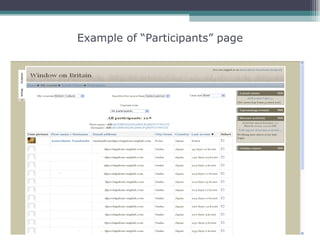
Example of “Participants” page
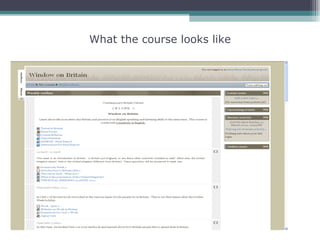
What the course looks like
On-line examples:
• Providing unit related documents

• Providing practice for quizzes

• Distribution / collection / marking of
  homework online

• Providing regular assessment and
  feedback
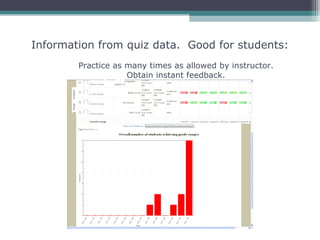
Information from quiz data. Good for students:
        Practice as many times as allowed by instructor.
                    Obtain instant feedback.
Some comments from students:


Positive:
• Liked this class. Absent can catch up with study on-line and
  watch DVD in library.
• I like class to be on internet too because it is easier.
• I was scared about English but could follow – practice,
  practice, practice.
• Teacher accepts small sentence okay.

Negative:
• Computer difficult.
• Don’t like journal homework every week – English not
  good.
• Don’t like quiz.
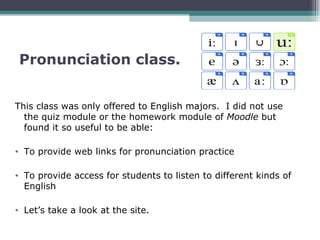
Pronunciation class.


This class was only offered to English majors. I did not use
  the quiz module or the homework module of Moodle but
  found it so useful to be able:

• To provide web links for pronunciation practice

• To provide access for students to listen to different kinds of
  English

• Let’s take a look at the site.
Narrow Listening
• Another way we have used our Moodle site at Poole is for a
  Narrow Listening Library.

• A Narrow Listening Library is a collection of listenings:


  ▫   On different topics
  ▫   By different speakers
  ▫   Usually on topics decided by students
  ▫   There are usually several listenings on one topic
  ▫   Speakers use natural English
Students are free to decide


• When they listen
• How many times they listen
• Which topics they listen to
Research findings: Dupuy (1999)
• Learners reported that narrow listening was
  helpful in improving their French:

 ▫ Listening comprehension, vocabulary and fluency

 • Learners made significant gains in listening
   comprehension

 • Comprehension increased with frequency of
   listening.
Evolution of Narrow Listening at Poole
• Narrow Listening was first offered as a
  supplementary activity to first year students in
  an elective class. They were motivated students.

• The students were asked to write 3 or 4
  questions on a topic that interested them.

• I wrote scripts for those topics, that answered
  the questions and sought the help of my
  colleagues in recording the scripts.
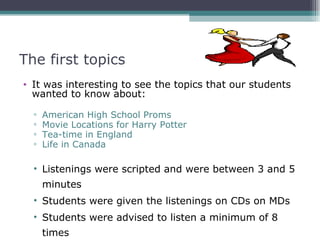
The first topics
• It was interesting to see the topics that our students
  wanted to know about:

  ▫   American High School Proms
  ▫   Movie Locations for Harry Potter
  ▫   Tea-time in England
  ▫   Life in Canada

  • Listenings were scripted and were between 3 and 5
      minutes
  • Students were given the listenings on CDs on MDs
  • Students were advised to listen a minimum of 8
      times
Team work
I am happy to say that my colleagues who helped with the
  recordings also became interested and so

• The listenings were expanded and moved to PEW, where
  they are accessible to all students.

• A variety of shorter listenings were made with:

  • Focus questions at the beginning
  • A quiz after listening which was created in Moodle
Finally – is Moodle for everyone?

• Not everyone loves Moodle: Some people think:

  • it’s not user friendly…..

  • it takes too much of a learning curve for
    both students and teachers…….
What about You and Moodle?
• Do you use it now – if so please share:
 ▫ What kind of classes?
 ▫ What are student reactions?


• Do you have any ideas how you may use
  it?

• What concerns do you have about using
  Moodle?
Any questions? Comments? Suggestions?


           Thank you for your
         participation & attention


         Anne-Marie Tanahashi
     annemarietanahashi@gmail.com

Moodle - Has your school got it? What can you do with it?

  • 1.
    MOODLE Has yourschool got it? Do they want you to use it? What can you do with it? Anne-Marie Tanahashi Fukuoka JALT – 19 May 2012
  • 2.
    Contents • Moodle -what is it and how can it help? • Moodle site PEW at Poole Gakuin University • Sheltered content course on Britain • Pronunciation course • Narrow Listening • Questions, comments - How can you use Moodle?
  • 3.
    What is it? How can it help? • Moodle is a FREE open source course management system. • It helps me by extending my classroom to the web. • It helps students by making my handouts, assignments, announcements and sometimes quizzes, accessible even if they skip class. • It may help you in ways you have yet to discover! 
  • 4.
    Poole Gakuin’s Moodleweb-site – known as PEW
  • 5.
    Here is apicture of the page AFTER log in.
  • 6.
    Sheltered content courseon Britain • This class is offered to students from different departments so goes by two different names, depending on the department: • Contemporary British Culture • イギリス文化  C • Aim: ▫ To provide students with an introduction to British life and culture ▫ Enhance English skills.
  • 7.
    Why use blendedlearning? Research shows benefits of combined face-to-face instruction and online learning, including:  Potential of increase in learning outcomes  Lowering attrition rates  High satisfaction among majority of participants Dziuban, C., Hartman, J., & Moskal, P. (Vol 2004, Issue 7 March 30). Blended Learning. ECAR Research Bulletin. Available online at http://www.educause.edu/ecar
  • 8.
    What specific reasonsdid I have for using blended learning? • Students: Blended learning helped enhance learning opportunities to all students: From different departments  English majors • Providing unit related  Non-English majors documents Large numbers • Providing practice for quizzes Wide range of ability • Distribution / collection /  Textbook too difficult marking of homework online  Textbook too easy  Listening comprehension • Providing regular assessment  Note-taking ability and feedback
  • 9.
    Let’s take alook at the course and the classes Before classes start: • Make sure that you hold your class in a room that has:  Internet access  A big screen  Pre-register as many students as possible in your Moodle course. First class:  Take the usual prints – syllabus, schedule etc., but also make sure that these are uploaded to your Moodle site so that you can demonstrate the site to students:  Show them under (participants) you have registered  Inform them of their password (student numbers work well)  Ask them to try to log-in before the next class  For students NOT in the system, provide a print asking for: o name, student number and email address (NOT mobile ‘phone mail).  Be sure to let these students know that you do not expect them to visit the site before the next class.
  • 10.
  • 11.
    What the courselooks like
  • 12.
    On-line examples: • Providingunit related documents • Providing practice for quizzes • Distribution / collection / marking of homework online • Providing regular assessment and feedback
  • 13.
    Information from quizdata. Good for students: Practice as many times as allowed by instructor. Obtain instant feedback.
  • 14.
    Some comments fromstudents: Positive: • Liked this class. Absent can catch up with study on-line and watch DVD in library. • I like class to be on internet too because it is easier. • I was scared about English but could follow – practice, practice, practice. • Teacher accepts small sentence okay. Negative: • Computer difficult. • Don’t like journal homework every week – English not good. • Don’t like quiz.
  • 15.
    Pronunciation class. This classwas only offered to English majors. I did not use the quiz module or the homework module of Moodle but found it so useful to be able: • To provide web links for pronunciation practice • To provide access for students to listen to different kinds of English • Let’s take a look at the site.
  • 16.
    Narrow Listening • Anotherway we have used our Moodle site at Poole is for a Narrow Listening Library. • A Narrow Listening Library is a collection of listenings: ▫ On different topics ▫ By different speakers ▫ Usually on topics decided by students ▫ There are usually several listenings on one topic ▫ Speakers use natural English
  • 17.
    Students are freeto decide • When they listen • How many times they listen • Which topics they listen to
  • 18.
    Research findings: Dupuy(1999) • Learners reported that narrow listening was helpful in improving their French: ▫ Listening comprehension, vocabulary and fluency • Learners made significant gains in listening comprehension • Comprehension increased with frequency of listening.
  • 19.
    Evolution of NarrowListening at Poole • Narrow Listening was first offered as a supplementary activity to first year students in an elective class. They were motivated students. • The students were asked to write 3 or 4 questions on a topic that interested them. • I wrote scripts for those topics, that answered the questions and sought the help of my colleagues in recording the scripts.
  • 20.
    The first topics •It was interesting to see the topics that our students wanted to know about: ▫ American High School Proms ▫ Movie Locations for Harry Potter ▫ Tea-time in England ▫ Life in Canada • Listenings were scripted and were between 3 and 5 minutes • Students were given the listenings on CDs on MDs • Students were advised to listen a minimum of 8 times
  • 21.
    Team work I amhappy to say that my colleagues who helped with the recordings also became interested and so • The listenings were expanded and moved to PEW, where they are accessible to all students. • A variety of shorter listenings were made with: • Focus questions at the beginning • A quiz after listening which was created in Moodle
  • 22.
    Finally – isMoodle for everyone? • Not everyone loves Moodle: Some people think: • it’s not user friendly….. • it takes too much of a learning curve for both students and teachers…….
  • 23.
    What about Youand Moodle? • Do you use it now – if so please share: ▫ What kind of classes? ▫ What are student reactions? • Do you have any ideas how you may use it? • What concerns do you have about using Moodle?
  • 24.
    Any questions? Comments?Suggestions? Thank you for your participation & attention Anne-Marie Tanahashi annemarietanahashi@gmail.com

Editor's Notes

  • #2 Hello, today I am going to talk to you about Moodle and how I have used it in some of my classes. Before I start I would just like to ask – how many of you already use Moodle – how many of you work at places that would like you to use it?
  • #5 This is the first page you see when you go to PEW. The main picture changes but here you can see a picture of the tower at Poole and a few cherry blossoms. The login button is up on the right hand side of the page. Much easier if you are putting your course up on Moodle and you are NOT in a computer lab that you register your students first and make their passwords something like their student numbers.
  • #6 On the right side you can see all the courses I am either involved in, or am teaching. This also applies to the students. Whatever course they are enrolled in will pop up on their screen.
  • #7 The first course I ever put up on Moodle is a sheltered content course on Britain. I used a textbook plus a DVD and also this site. This class did NOT take place in a computer lab, but I did have my computer and a large screen in the classroom so students were taken to this site during the class – it isn’t just something assigned for homework.
  • #8 Which teacher wouldn’t want to achieve the above? In my case this second one, lowering of attrition rates, was very important when I first started teaching the class as sometimes I had 90 to 100 students in the class, many of whom had a lot of difficulty in understanding English.
  • #9 For students who found the textbook relatively easy I was able to provide more information either in document form or by leading them to extra stuff on the net. I did give short quizzes each week – more to take attendance and make sure students were coming, than for the quiz itself, but so that students could practice these quizzes I put them up on the web-site. Last week’s class, had a quiz this week and then in class at the end of the new topic – there was a quick quiz on last week’s lessons plus one question about what they thought about today’s topic. This way there was no excuse for anyone to flunk the course – they could practice the quiz even though they hadn’t attended the class.
  • #10 Go to PEW. If students are already in the system the pre-registration is easy. However if they are not in the system you will need to obtain email addresses for them during the first class.
  • #12 Used a weekly schedule for the course. During the first week show the participants list – make sure students are put into the system as soon as possible. Show them where they can find things, syllabus, course schedule etc. If you decide to start everything on the first week – make sure you allow plenty of time for the first lots of homework.
  • #14 As an instructor we can also really get a feel for how much time and effort students are putting into their work with the data that is collected by Moodle.
  • #16 Again it is set up on a weekly schedule, making it easy for students who were absent, to see what was covered in class. Talk about the Mp 3 players and the recordings.
  • #22 Let’s take a look at the site.
  • #23 I think as teachers we must be prepared to be flexible in our use of Moodle as not all students will be able to log on, some will have more difficulty than others……… We must also be willing to train students and staff in it’s use by offering workshops etc.