
DIT
Dar es Salaam institute of Technology (DIT)
ETU 08102
Digital Networks
Ally, J
jumannea@gmail.com
Wireless Local Area Wireless (WLAN)
DIT
DIT
1980’s ~
1990’s ~
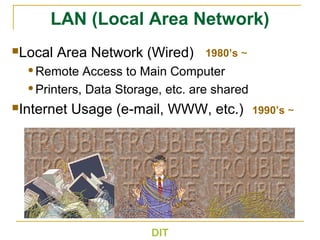
LAN (Local Area Network)
Local Area Network (Wired)
Remote Access to Main Computer
Printers, Data Storage, etc. are shared
Internet Usage (e-mail, WWW, etc.)
WiFi
 Almost all wireless LAN now are 802.11
based
 Competing technologies, e.g. HiperLAN can’t
compete on volume and cost
 802.11 is also known as WiFi = Wireless
Fidelity
 Fidelity = Compatibility between wireless
equipment from different manufacturers
 WiFi Alliance is a non-profit organization that
does the compatibility testing (WiFi.org)
DIT
What is WLAN
 A Wireless Local Area Network (WLAN)
network design uses the idea of an access
point and clients.
 The access point or router is the equivalent of
a base station in a cellular network.
 It acts as a bridge between the wired
backbone and the wireless client traffic.
 Examples of client devices include desktops,
laptops, smart phones, game consoles and
printers.
DIT
WLAN Architecture
 Stations is all components that can connect into a
wireless medium in a network.
 Basic Service Set (BSS) is a set of all stations that can
communicate with each other.
 Extended Service Set (ESS) is a set of connected BSSs.
Access points in an ESS are connected by
distribution system
 Distribution System (DS) connects access points in an
extended service set.
DS can be wired or wireless. Current wireless
distribution systems are mostly based on MESH
protocols.
DIT
Types of Wireless LANs
 WLAN can be configured into different
architectures, depending requirements on the
system.
 These physical architecture include the
following:
 Ad Hoc
 Infrastructure
 Mesh
DIT
DIT
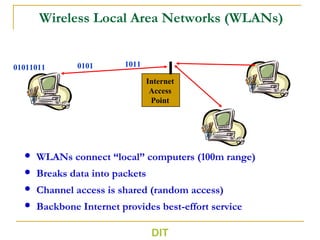
Wireless Local Area Networks (WLANs)
 WLANs connect “local” computers (100m range)
 Breaks data into packets
 Channel access is shared (random access)
 Backbone Internet provides best-effort service
01011011
Internet
Access
Point
0101 1011
DIT
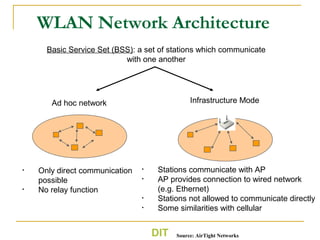
WLAN Network Architecture
Basic Service Set (BSS): a set of stations which communicate
with one another
Ad hoc network
• Only direct communication
possible
• No relay function
Infrastructure Mode
• Stations communicate with AP
• AP provides connection to wired network
(e.g. Ethernet)
• Stations not allowed to communicate directly
• Some similarities with cellular
Source: AirTight Networks
DIT
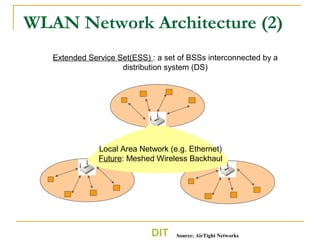
WLAN Network Architecture (2)
Extended Service Set(ESS) : a set of BSSs interconnected by a
distribution system (DS)
Local Area Network (e.g. Ethernet)
Future: Meshed Wireless Backhaul
Source: AirTight Networks
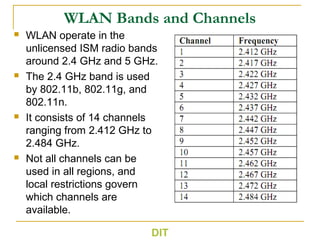
WLAN Bands and Channels
 WLAN operate in the
unlicensed ISM radio bands
around 2.4 GHz and 5 GHz.
 The 2.4 GHz band is used
by 802.11b, 802.11g, and
802.11n.
 It consists of 14 channels
ranging from 2.412 GHz to
2.484 GHz.
 Not all channels can be
used in all regions, and
local restrictions govern
which channels are
available.
DIT
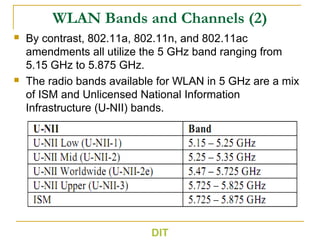
WLAN Bands and Channels (2)
 By contrast, 802.11a, 802.11n, and 802.11ac
amendments all utilize the 5 GHz band ranging from
5.15 GHz to 5.875 GHz.
 The radio bands available for WLAN in 5 GHz are a mix
of ISM and Unlicensed National Information
Infrastructure (U-NII) bands.
DIT
802.11 Channels and Channel Wide
 Starting at the center frequency of 2.412 MHz,
IEEE 802.11 gives every 5 MHz a new channel
number.
 The channel wide is 20 MHz and 40 MHz for
channel bounding (introduced in the 802.11n
amendment).
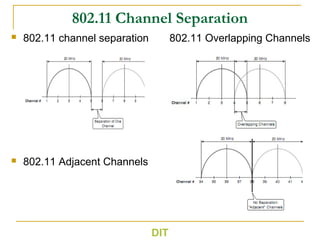
 If there are different/parallel WLAN setups, it is
crucial not to run them in the same frequency
range.
 Separation of at least one channel is
mandatory to avoid co-channel interference.
DIT
802.11 Channel Separation
 802.11 channel separation 802.11 Overlapping Channels
 802.11 Adjacent Channels
DIT
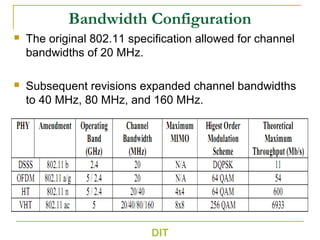
Bandwidth Configuration
 The original 802.11 specification allowed for channel
bandwidths of 20 MHz.
 Subsequent revisions expanded channel bandwidths
to 40 MHz, 80 MHz, and 160 MHz.
DIT
Bandwidth Configuration for 802.11n and
802.11ac
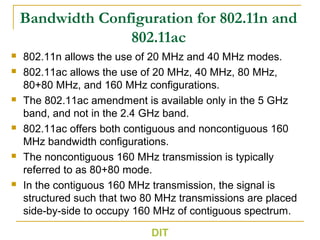
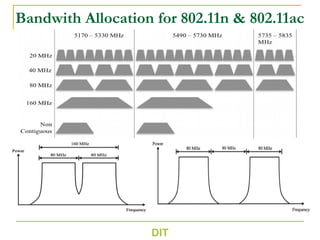
 802.11n allows the use of 20 MHz and 40 MHz modes.
 802.11ac allows the use of 20 MHz, 40 MHz, 80 MHz,
80+80 MHz, and 160 MHz configurations.
 The 802.11ac amendment is available only in the 5 GHz
band, and not in the 2.4 GHz band.
 802.11ac offers both contiguous and noncontiguous 160
MHz bandwidth configurations.
 The noncontiguous 160 MHz transmission is typically
referred to as 80+80 mode.
 In the contiguous 160 MHz transmission, the signal is
structured such that two 80 MHz transmissions are placed
side-by-side to occupy 160 MHz of contiguous spectrum.
DIT
Bandwith Allocation for 802.11n & 802.11ac
DIT
Key WLAN Enabling Technologies
 The 802.11 specifications use a range of key
technologies that enable them to robustly achieve
high data rates with reasonable spectrum
utilization.
 For example, DSSS offers greater resilience to
interference in the 2.4 GHz spectrum, which is also
utilized by other wireless technologies.
 The 802.11a standard was one of the first
commercial wireless standards to utilize OFDM.
 The 802.11n amendment was also one of the first
commercial standards allowing for up to 4x4 MIMO.
DIT
Direct Spread Sequence Spectrum (DSSS)
 The IEEE 802.11 committee adopted the use of DSSS
technology to protect against interference.
 In DSSS transmissions, the modulated signal is multiplied
by a pseudorandom spreading code and the receiver is
only able to demodulate the signal by applying the same
spreading code in its tracking of the signal.
 An 11-bit Barker sequence was used as spreading code
for 1 Mb/s and 2 Mb/s data rates.
 The 5.5 Mb/s and 11 Mb/s data rates use complementary
code keying (CCK), which uses an 8-bit spreading code.
 Today, the 802.11b standard is referred to as DSSS
HR/DSSS. HR refers to high rate, which corresponds to
the 5.5 Mb/s and 11 Mb/s data rates in 802.11b.
DIT
Orthogonal Frequency Division Multiplexing
(OFDM)
 OFDM was first adopted as part of the 802.11a specification,
and then 802.11g specification.
 All major revisions of the 802.11 standard, including
802.11n, and 802.11ac are based on OFDM technology.
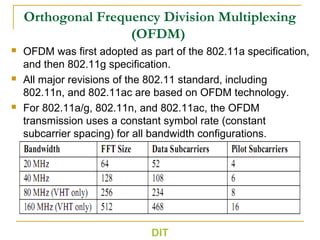
 For 802.11a/g, 802.11n, and 802.11ac, the OFDM
transmission uses a constant symbol rate (constant
subcarrier spacing) for all bandwidth configurations.
DIT
Multiple Input Multiple Output (MIMO)
 MIMO technology, involves multiple antennas at the
transmitter and receiver, is an important technology
featured in the WLAN standard.
 MIMO improve the reliability and the throughput of
communication over wireless channels.
 MIMO was first adopted in WLAN as part of the 802.11n
standard, and later expanded in 802.11ac.
 802.11n supports antenna configurations ranging from
single input, single output (SISO) to 4x4 MIMO, with
802.11ac extending the capability to 8x8 MIMO.
 MIMO deployments, such as 4x4 or 8x8, are typically used
in access points.
 Due to complexity most end devices uses single antenna.
DIT
Benefits of using MIMO
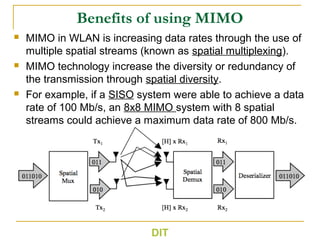
 MIMO in WLAN is increasing data rates through the use of
multiple spatial streams (known as spatial multiplexing).
 MIMO technology increase the diversity or redundancy of
the transmission through spatial diversity.
 For example, if a SISO system were able to achieve a data
rate of 100 Mb/s, an 8x8 MIMO system with 8 spatial
streams could achieve a maximum data rate of 800 Mb/s.
DIT
Theoretical Data Rate Calculation
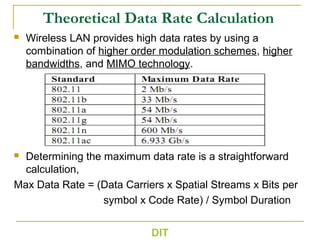
 Wireless LAN provides high data rates by using a
combination of higher order modulation schemes, higher
bandwidths, and MIMO technology.
 Determining the maximum data rate is a straightforward
calculation,
Max Data Rate = (Data Carriers x Spatial Streams x Bits per
symbol x Code Rate) / Symbol Duration
DIT
802.11a/g Data Rate Calculations
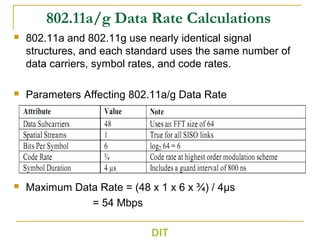
 802.11a and 802.11g use nearly identical signal
structures, and each standard uses the same number of
data carriers, symbol rates, and code rates.
 Parameters Affecting 802.11a/g Data Rate
 Maximum Data Rate = (48 x 1 x 6 x ¾) / 4µs
= 54 Mbps
DIT
802.11n Data Rate Calculation
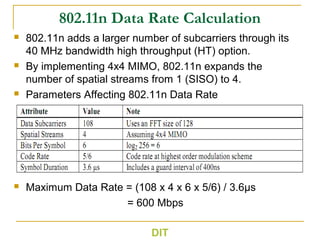
 802.11n adds a larger number of subcarriers through its
40 MHz bandwidth high throughput (HT) option.
 By implementing 4x4 MIMO, 802.11n expands the
number of spatial streams from 1 (SISO) to 4.
 Parameters Affecting 802.11n Data Rate
 Maximum Data Rate = (108 x 4 x 6 x 5/6) / 3.6µs
= 600 Mbps
DIT
802.11ac Data Rate Calculation
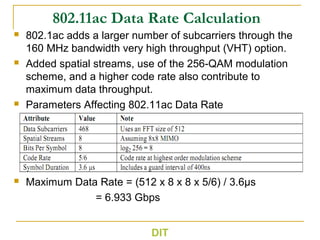
 802.1ac adds a larger number of subcarriers through the
160 MHz bandwidth very high throughput (VHT) option.
 Added spatial streams, use of the 256-QAM modulation
scheme, and a higher code rate also contribute to
maximum data throughput.
 Parameters Affecting 802.11ac Data Rate
 Maximum Data Rate = (512 x 8 x 8 x 5/6) / 3.6µs
= 6.933 Gbps
DIT
DIT

Digital network lecturer8

  • 1.
    DIT Dar es Salaaminstitute of Technology (DIT) ETU 08102 Digital Networks Ally, J jumannea@gmail.com
  • 2.
    Wireless Local AreaWireless (WLAN) DIT
  • 3.
    DIT 1980’s ~ 1990’s ~ LAN(Local Area Network) Local Area Network (Wired) Remote Access to Main Computer Printers, Data Storage, etc. are shared Internet Usage (e-mail, WWW, etc.)
  • 4.
    WiFi  Almost allwireless LAN now are 802.11 based  Competing technologies, e.g. HiperLAN can’t compete on volume and cost  802.11 is also known as WiFi = Wireless Fidelity  Fidelity = Compatibility between wireless equipment from different manufacturers  WiFi Alliance is a non-profit organization that does the compatibility testing (WiFi.org) DIT
  • 5.
    What is WLAN A Wireless Local Area Network (WLAN) network design uses the idea of an access point and clients.  The access point or router is the equivalent of a base station in a cellular network.  It acts as a bridge between the wired backbone and the wireless client traffic.  Examples of client devices include desktops, laptops, smart phones, game consoles and printers. DIT
  • 6.
    WLAN Architecture  Stationsis all components that can connect into a wireless medium in a network.  Basic Service Set (BSS) is a set of all stations that can communicate with each other.  Extended Service Set (ESS) is a set of connected BSSs. Access points in an ESS are connected by distribution system  Distribution System (DS) connects access points in an extended service set. DS can be wired or wireless. Current wireless distribution systems are mostly based on MESH protocols. DIT
  • 7.
    Types of WirelessLANs  WLAN can be configured into different architectures, depending requirements on the system.  These physical architecture include the following:  Ad Hoc  Infrastructure  Mesh DIT
  • 8.
    DIT Wireless Local AreaNetworks (WLANs)  WLANs connect “local” computers (100m range)  Breaks data into packets  Channel access is shared (random access)  Backbone Internet provides best-effort service 01011011 Internet Access Point 0101 1011
  • 9.
    DIT WLAN Network Architecture BasicService Set (BSS): a set of stations which communicate with one another Ad hoc network • Only direct communication possible • No relay function Infrastructure Mode • Stations communicate with AP • AP provides connection to wired network (e.g. Ethernet) • Stations not allowed to communicate directly • Some similarities with cellular Source: AirTight Networks
  • 10.
    DIT WLAN Network Architecture(2) Extended Service Set(ESS) : a set of BSSs interconnected by a distribution system (DS) Local Area Network (e.g. Ethernet) Future: Meshed Wireless Backhaul Source: AirTight Networks
  • 11.
    WLAN Bands andChannels  WLAN operate in the unlicensed ISM radio bands around 2.4 GHz and 5 GHz.  The 2.4 GHz band is used by 802.11b, 802.11g, and 802.11n.  It consists of 14 channels ranging from 2.412 GHz to 2.484 GHz.  Not all channels can be used in all regions, and local restrictions govern which channels are available. DIT
  • 12.
    WLAN Bands andChannels (2)  By contrast, 802.11a, 802.11n, and 802.11ac amendments all utilize the 5 GHz band ranging from 5.15 GHz to 5.875 GHz.  The radio bands available for WLAN in 5 GHz are a mix of ISM and Unlicensed National Information Infrastructure (U-NII) bands. DIT
  • 13.
    802.11 Channels andChannel Wide  Starting at the center frequency of 2.412 MHz, IEEE 802.11 gives every 5 MHz a new channel number.  The channel wide is 20 MHz and 40 MHz for channel bounding (introduced in the 802.11n amendment).  If there are different/parallel WLAN setups, it is crucial not to run them in the same frequency range.  Separation of at least one channel is mandatory to avoid co-channel interference. DIT
  • 14.
    802.11 Channel Separation 802.11 channel separation 802.11 Overlapping Channels  802.11 Adjacent Channels DIT
  • 15.
    Bandwidth Configuration  Theoriginal 802.11 specification allowed for channel bandwidths of 20 MHz.  Subsequent revisions expanded channel bandwidths to 40 MHz, 80 MHz, and 160 MHz. DIT
  • 16.
    Bandwidth Configuration for802.11n and 802.11ac  802.11n allows the use of 20 MHz and 40 MHz modes.  802.11ac allows the use of 20 MHz, 40 MHz, 80 MHz, 80+80 MHz, and 160 MHz configurations.  The 802.11ac amendment is available only in the 5 GHz band, and not in the 2.4 GHz band.  802.11ac offers both contiguous and noncontiguous 160 MHz bandwidth configurations.  The noncontiguous 160 MHz transmission is typically referred to as 80+80 mode.  In the contiguous 160 MHz transmission, the signal is structured such that two 80 MHz transmissions are placed side-by-side to occupy 160 MHz of contiguous spectrum. DIT
  • 17.
    Bandwith Allocation for802.11n & 802.11ac DIT
  • 18.
    Key WLAN EnablingTechnologies  The 802.11 specifications use a range of key technologies that enable them to robustly achieve high data rates with reasonable spectrum utilization.  For example, DSSS offers greater resilience to interference in the 2.4 GHz spectrum, which is also utilized by other wireless technologies.  The 802.11a standard was one of the first commercial wireless standards to utilize OFDM.  The 802.11n amendment was also one of the first commercial standards allowing for up to 4x4 MIMO. DIT
  • 19.
    Direct Spread SequenceSpectrum (DSSS)  The IEEE 802.11 committee adopted the use of DSSS technology to protect against interference.  In DSSS transmissions, the modulated signal is multiplied by a pseudorandom spreading code and the receiver is only able to demodulate the signal by applying the same spreading code in its tracking of the signal.  An 11-bit Barker sequence was used as spreading code for 1 Mb/s and 2 Mb/s data rates.  The 5.5 Mb/s and 11 Mb/s data rates use complementary code keying (CCK), which uses an 8-bit spreading code.  Today, the 802.11b standard is referred to as DSSS HR/DSSS. HR refers to high rate, which corresponds to the 5.5 Mb/s and 11 Mb/s data rates in 802.11b. DIT
  • 20.
    Orthogonal Frequency DivisionMultiplexing (OFDM)  OFDM was first adopted as part of the 802.11a specification, and then 802.11g specification.  All major revisions of the 802.11 standard, including 802.11n, and 802.11ac are based on OFDM technology.  For 802.11a/g, 802.11n, and 802.11ac, the OFDM transmission uses a constant symbol rate (constant subcarrier spacing) for all bandwidth configurations. DIT
  • 21.
    Multiple Input MultipleOutput (MIMO)  MIMO technology, involves multiple antennas at the transmitter and receiver, is an important technology featured in the WLAN standard.  MIMO improve the reliability and the throughput of communication over wireless channels.  MIMO was first adopted in WLAN as part of the 802.11n standard, and later expanded in 802.11ac.  802.11n supports antenna configurations ranging from single input, single output (SISO) to 4x4 MIMO, with 802.11ac extending the capability to 8x8 MIMO.  MIMO deployments, such as 4x4 or 8x8, are typically used in access points.  Due to complexity most end devices uses single antenna. DIT
  • 22.
    Benefits of usingMIMO  MIMO in WLAN is increasing data rates through the use of multiple spatial streams (known as spatial multiplexing).  MIMO technology increase the diversity or redundancy of the transmission through spatial diversity.  For example, if a SISO system were able to achieve a data rate of 100 Mb/s, an 8x8 MIMO system with 8 spatial streams could achieve a maximum data rate of 800 Mb/s. DIT
  • 23.
    Theoretical Data RateCalculation  Wireless LAN provides high data rates by using a combination of higher order modulation schemes, higher bandwidths, and MIMO technology.  Determining the maximum data rate is a straightforward calculation, Max Data Rate = (Data Carriers x Spatial Streams x Bits per symbol x Code Rate) / Symbol Duration DIT
  • 24.
    802.11a/g Data RateCalculations  802.11a and 802.11g use nearly identical signal structures, and each standard uses the same number of data carriers, symbol rates, and code rates.  Parameters Affecting 802.11a/g Data Rate  Maximum Data Rate = (48 x 1 x 6 x ¾) / 4µs = 54 Mbps DIT
  • 25.
    802.11n Data RateCalculation  802.11n adds a larger number of subcarriers through its 40 MHz bandwidth high throughput (HT) option.  By implementing 4x4 MIMO, 802.11n expands the number of spatial streams from 1 (SISO) to 4.  Parameters Affecting 802.11n Data Rate  Maximum Data Rate = (108 x 4 x 6 x 5/6) / 3.6µs = 600 Mbps DIT
  • 26.
    802.11ac Data RateCalculation  802.1ac adds a larger number of subcarriers through the 160 MHz bandwidth very high throughput (VHT) option.  Added spatial streams, use of the 256-QAM modulation scheme, and a higher code rate also contribute to maximum data throughput.  Parameters Affecting 802.11ac Data Rate  Maximum Data Rate = (512 x 8 x 8 x 5/6) / 3.6µs = 6.933 Gbps DIT
  • 27.

Editor's Notes

  • #4 著作権フリー素材を使用 Local Area Network has been widely used since 1980’s or 90’s in offices To share printers, data storage, to exchange messages, or to access main computers remotely