TOPIC: Representation of binary numbers
and
Binary Codes
Department of Electronics and Communication Engineering
Chitkara University, Punjab, India
Basic Electronics (22EC001) 1
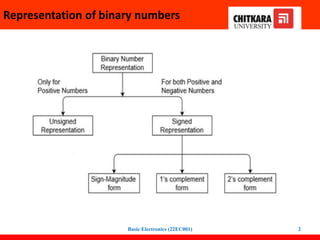
Representation of binary numbers
Basic Electronics (22EC001) 2
Unsigned Numbers
• don’t have any sign
• contain only magnitude of the number.
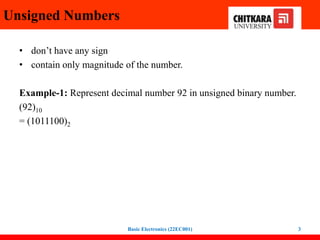
Example-1: Represent decimal number 92 in unsigned binary number.
(92)10
= (1011100)2
Basic Electronics (22EC001) 3
Unsigned Numbers
Example-2: Find range of 6 bit unsigned binary
numbers. Also, find minimum and maximum value in
this range.
Sol: Since, range of unsigned binary number is from 0
to (2n-1). Therefore, range of 6 bit unsigned binary
number is from 0 to (26-1) which is equal from
minimum value 0 (i.e., 000000) to maximum value 63
(i.e., 111111).
Basic Electronics (22EC001) 4
Signed Numbers
• Unsigned representation can be used for positive integers
• How about negative integers?
– Everything must be represented in binary numbers
– Computers cannot use – or + signs
Signed numbers:
• contain sign flag
• contains both sign bit and magnitude of a number
• this representation distinguish positive and negative numbers
• For negative numbers the sign bit is always 1, and for positive numbers it
is 0 in these three systems
Basic Electronics (22EC001) 5
Representation of signed numbers
There are two ways of representing negative binary numbers:
1. Sign Magnitude form
2. Complement Method
- 1’s Complement form
- 2’s Complement form
• Advantage of using complement method for subtraction is
reduction in hardware.
• Instead of having separate circuits for addition and
subtraction, only addition circuits are needed.
Basic Electronics (22EC001) 6
Sign-Magnitude form
• For n bit binary number, 1 bit is reserved for sign symbol
• The leftmost bit is the sign bit (0 is + and 1 is - ) and the
remaining bits hold the absolute magnitude of the number
• For 8 bits, we can represent the signed integers –127 to +127
• How about for N bits? -(2n-1-1)to +(2n-1 -1)
• Examples
• -47 = 1 0 1 0 1 1 1 1
• 47 = 0 0 1 0 1 1 1 1
Basic Electronics (22EC001) 7
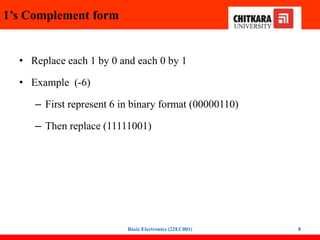
1’s Complement form
• Replace each 1 by 0 and each 0 by 1
• Example (-6)
– First represent 6 in binary format (00000110)
– Then replace (11111001)
Basic Electronics (22EC001) 8
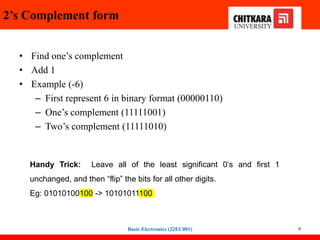
2’s Complement form
• Find one’s complement
• Add 1
• Example (-6)
– First represent 6 in binary format (00000110)
– One’s complement (11111001)
– Two’s complement (11111010)
Basic Electronics (22EC001) 9
Handy Trick: Leave all of the least significant 0’s and first 1
unchanged, and then “flip” the bits for all other digits.
Eg: 01010100100 -> 10101011100
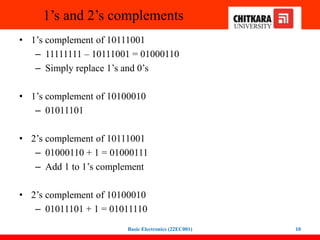
1’s and 2’s complements
• 1’s complement of 10111001
– 11111111 – 10111001 = 01000110
– Simply replace 1’s and 0’s
• 1’s complement of 10100010
– 01011101
• 2’s complement of 10111001
– 01000110 + 1 = 01000111
– Add 1 to 1’s complement
• 2’s complement of 10100010
– 01011101 + 1 = 01011110
Basic Electronics (22EC001) 10
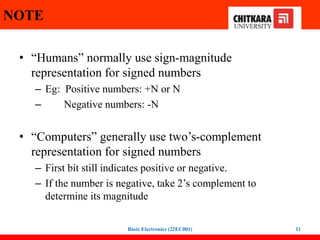
NOTE
• “Humans” normally use sign-magnitude
representation for signed numbers
– Eg: Positive numbers: +N or N
– Negative numbers: -N
• “Computers” generally use two’s-complement
representation for signed numbers
– First bit still indicates positive or negative.
– If the number is negative, take 2’s complement to
determine its magnitude
Basic Electronics (22EC001) 11
BINARY CODES
Classification of Binary Codes:
• BCD code
• Excess three code
• Gray code
Basic Electronics (22EC001) 12
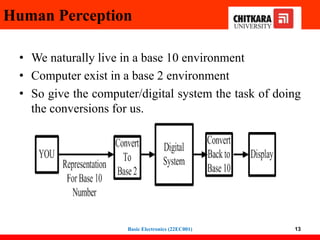
Human Perception
• We naturally live in a base 10 environment
• Computer exist in a base 2 environment
• So give the computer/digital system the task of doing
the conversions for us.
13
Basic Electronics (22EC001)
Binary Codes
14
 A binary code represents text, computer processor
instructions, or any other data using a two-symbol
system.
The two-symbol system used is often "0" and "1"
from the binary number system.
 The binary code assigns a pattern of binary digits,
also known as bits, to each character, instruction, etc.
Basic Electronics (22EC001)
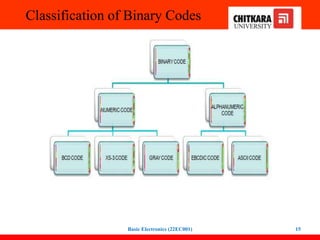
Classification of Binary Codes
Basic Electronics (22EC001) 15
Defination of BCD..Binary Coded
Decimal
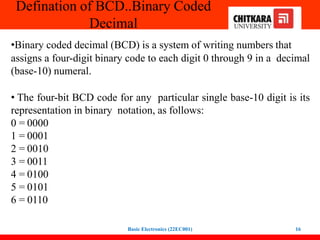
•Binary coded decimal (BCD) is a system of writing numbers that
assigns a four-digit binary code to each digit 0 through 9 in a decimal
(base-10) numeral.
• The four-bit BCD code for any particular single base-10 digit is its
representation in binary notation, as follows:
0 = 0000
1 = 0001
2 = 0010
3 = 0011
4 = 0100
5 = 0101
6 = 0110
Basic Electronics (22EC001) 16
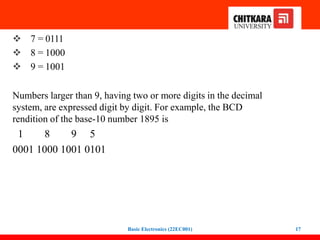
 7 = 0111
 8 = 1000
 9 = 1001
Numbers larger than 9, having two or more digits in the decimal
system, are expressed digit by digit. For example, the BCD
rendition of the base-10 number 1895 is
1 8 9 5
0001 1000 1001 0101
Basic Electronics (22EC001) 17
Why BCD is Used...
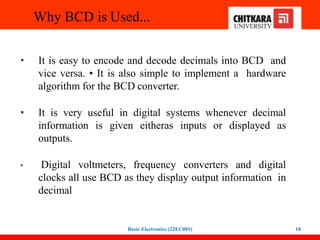
• It is easy to encode and decode decimals into BCD and
vice versa. • It is also simple to implement a hardware
algorithm for the BCD converter.
• It is very useful in digital systems whenever decimal
information is given eitheras inputs or displayed as
outputs.
• Digital voltmeters, frequency converters and digital
clocks all use BCD as they display output information in
decimal
Basic Electronics (22EC001) 18
8421 BCD Code
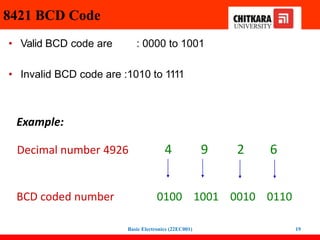
• Valid BCD code are : 0000 to 1001
• Invalid BCD code are :1010 to 1111
Example:
Decimal number 4926 4 9 2 6
BCD coded number 0100 1001 0010 0110
Basic Electronics (22EC001) 19
Contd.
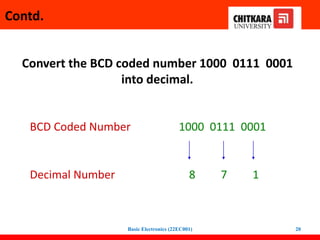
Convert the BCD coded number 1000 0111 0001
into decimal.
BCD Coded Number 1000 0111 0001
Decimal Number 8 7 1
Basic Electronics (22EC001) 20
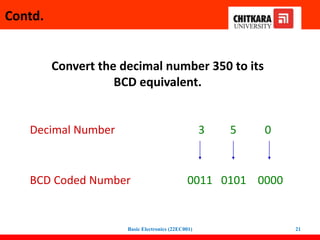
Convert the decimal number 350 to its
BCD equivalent.
Decimal Number 3 5 0
BCD Coded Number 0011 0101 0000
Contd.
Basic Electronics (22EC001) 21
Excess 3 Code
• Add 3 to each digit of decimal and convert it to 4-bit binary form.
• Valid excess-3 code : 0011 to 1100
• Invalid excess-3 code : [0000 to 0010] and [1101 to 1111]
Decimal Binary +3 Excess-3
0 0000 0011 0011
1 0001 0011 0100
2 0010 0011 0101
3 0011 0011 0110
4 0100 0011 0111
5 0101 0011 1000
6 0110 0011 1001
7 0111 0011 1010
8 1000 0011 1011
9 1001 0011 1100
Decimal 3 5 9
Sample Problem:
Excess-3 0110 1000 1100
Basic Electronics (22EC001) 22
Gray Code
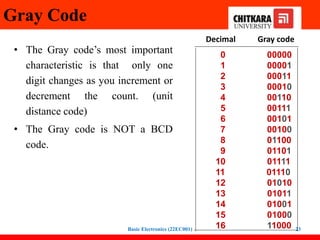
• The Gray code’s most important
characteristic is that only one
digit changes as you increment or
decrement the count. (unit
distance code)
• The Gray code is NOT a BCD
code.
Decimal Gray code
0 00000
1 00001
2 00011
3 00010
4 00110
5 00111
6 00101
7 00100
8 01100
9 01101
10 01111
11 01110
12 01010
13 01011
14 01001
15 01000
16 11000
Basic Electronics (22EC001) 23
Binary to Gray Code Conversion
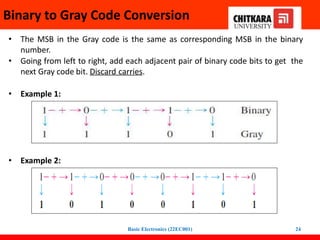
• The MSB in the Gray code is the same as corresponding MSB in the binary
number.
• Going from left to right, add each adjacent pair of binary code bits to get the
next Gray code bit. Discard carries.
• Example 1:
• Example 2:
Basic Electronics (22EC001) 24
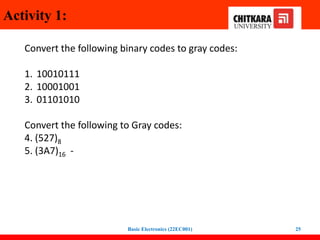
Activity 1:
Convert the following binary codes to gray codes:
1. 10010111
2. 10001001
3. 01101010
Convert the following to Gray codes:
4. (527)8 - 1111 11100
5. (3A7)16 - 0
010 0111 0100
Basic Electronics (22EC001) 25
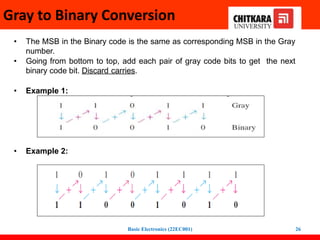
Gray to Binary Conversion
• The MSB in the Binary code is the same as corresponding MSB in the Gray
number.
• Going from bottom to top, add each pair of gray code bits to get the next
binary code bit. Discard carries.
• Example 1:
• Example 2:
Basic Electronics (22EC001) 26
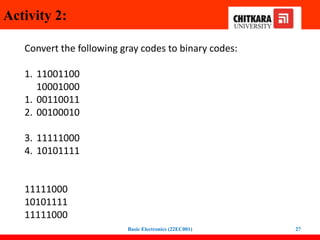
Activity 2:
Convert the following gray codes to binary codes:
1. 11001100
10001000
1. 00110011
2. 00100010
3. 11111000
4. 10101111
11111000
10101111
11111000
Basic Electronics (22EC001) 27
Thank You
Basic Electronics (22EC001) 28

12.Representation of signed binary numbers. Binary codes - BCD code, Gray code, Excess-3 code..pptx

  • 1.
    TOPIC: Representation ofbinary numbers and Binary Codes Department of Electronics and Communication Engineering Chitkara University, Punjab, India Basic Electronics (22EC001) 1
  • 2.
    Representation of binarynumbers Basic Electronics (22EC001) 2
  • 3.
    Unsigned Numbers • don’thave any sign • contain only magnitude of the number. Example-1: Represent decimal number 92 in unsigned binary number. (92)10 = (1011100)2 Basic Electronics (22EC001) 3
  • 4.
    Unsigned Numbers Example-2: Findrange of 6 bit unsigned binary numbers. Also, find minimum and maximum value in this range. Sol: Since, range of unsigned binary number is from 0 to (2n-1). Therefore, range of 6 bit unsigned binary number is from 0 to (26-1) which is equal from minimum value 0 (i.e., 000000) to maximum value 63 (i.e., 111111). Basic Electronics (22EC001) 4
  • 5.
    Signed Numbers • Unsignedrepresentation can be used for positive integers • How about negative integers? – Everything must be represented in binary numbers – Computers cannot use – or + signs Signed numbers: • contain sign flag • contains both sign bit and magnitude of a number • this representation distinguish positive and negative numbers • For negative numbers the sign bit is always 1, and for positive numbers it is 0 in these three systems Basic Electronics (22EC001) 5
  • 6.
    Representation of signednumbers There are two ways of representing negative binary numbers: 1. Sign Magnitude form 2. Complement Method - 1’s Complement form - 2’s Complement form • Advantage of using complement method for subtraction is reduction in hardware. • Instead of having separate circuits for addition and subtraction, only addition circuits are needed. Basic Electronics (22EC001) 6
  • 7.
    Sign-Magnitude form • Forn bit binary number, 1 bit is reserved for sign symbol • The leftmost bit is the sign bit (0 is + and 1 is - ) and the remaining bits hold the absolute magnitude of the number • For 8 bits, we can represent the signed integers –127 to +127 • How about for N bits? -(2n-1-1)to +(2n-1 -1) • Examples • -47 = 1 0 1 0 1 1 1 1 • 47 = 0 0 1 0 1 1 1 1 Basic Electronics (22EC001) 7
  • 8.
    1’s Complement form •Replace each 1 by 0 and each 0 by 1 • Example (-6) – First represent 6 in binary format (00000110) – Then replace (11111001) Basic Electronics (22EC001) 8
  • 9.
    2’s Complement form •Find one’s complement • Add 1 • Example (-6) – First represent 6 in binary format (00000110) – One’s complement (11111001) – Two’s complement (11111010) Basic Electronics (22EC001) 9 Handy Trick: Leave all of the least significant 0’s and first 1 unchanged, and then “flip” the bits for all other digits. Eg: 01010100100 -> 10101011100
  • 10.
    1’s and 2’scomplements • 1’s complement of 10111001 – 11111111 – 10111001 = 01000110 – Simply replace 1’s and 0’s • 1’s complement of 10100010 – 01011101 • 2’s complement of 10111001 – 01000110 + 1 = 01000111 – Add 1 to 1’s complement • 2’s complement of 10100010 – 01011101 + 1 = 01011110 Basic Electronics (22EC001) 10
  • 11.
    NOTE • “Humans” normallyuse sign-magnitude representation for signed numbers – Eg: Positive numbers: +N or N – Negative numbers: -N • “Computers” generally use two’s-complement representation for signed numbers – First bit still indicates positive or negative. – If the number is negative, take 2’s complement to determine its magnitude Basic Electronics (22EC001) 11
  • 12.
    BINARY CODES Classification ofBinary Codes: • BCD code • Excess three code • Gray code Basic Electronics (22EC001) 12
  • 13.
    Human Perception • Wenaturally live in a base 10 environment • Computer exist in a base 2 environment • So give the computer/digital system the task of doing the conversions for us. 13 Basic Electronics (22EC001)
  • 14.
    Binary Codes 14  Abinary code represents text, computer processor instructions, or any other data using a two-symbol system. The two-symbol system used is often "0" and "1" from the binary number system.  The binary code assigns a pattern of binary digits, also known as bits, to each character, instruction, etc. Basic Electronics (22EC001)
  • 15.
    Classification of BinaryCodes Basic Electronics (22EC001) 15
  • 16.
    Defination of BCD..BinaryCoded Decimal •Binary coded decimal (BCD) is a system of writing numbers that assigns a four-digit binary code to each digit 0 through 9 in a decimal (base-10) numeral. • The four-bit BCD code for any particular single base-10 digit is its representation in binary notation, as follows: 0 = 0000 1 = 0001 2 = 0010 3 = 0011 4 = 0100 5 = 0101 6 = 0110 Basic Electronics (22EC001) 16
  • 17.
     7 =0111  8 = 1000  9 = 1001 Numbers larger than 9, having two or more digits in the decimal system, are expressed digit by digit. For example, the BCD rendition of the base-10 number 1895 is 1 8 9 5 0001 1000 1001 0101 Basic Electronics (22EC001) 17
  • 18.
    Why BCD isUsed... • It is easy to encode and decode decimals into BCD and vice versa. • It is also simple to implement a hardware algorithm for the BCD converter. • It is very useful in digital systems whenever decimal information is given eitheras inputs or displayed as outputs. • Digital voltmeters, frequency converters and digital clocks all use BCD as they display output information in decimal Basic Electronics (22EC001) 18
  • 19.
    8421 BCD Code •Valid BCD code are : 0000 to 1001 • Invalid BCD code are :1010 to 1111 Example: Decimal number 4926 4 9 2 6 BCD coded number 0100 1001 0010 0110 Basic Electronics (22EC001) 19
  • 20.
    Contd. Convert the BCDcoded number 1000 0111 0001 into decimal. BCD Coded Number 1000 0111 0001 Decimal Number 8 7 1 Basic Electronics (22EC001) 20
  • 21.
    Convert the decimalnumber 350 to its BCD equivalent. Decimal Number 3 5 0 BCD Coded Number 0011 0101 0000 Contd. Basic Electronics (22EC001) 21
  • 22.
    Excess 3 Code •Add 3 to each digit of decimal and convert it to 4-bit binary form. • Valid excess-3 code : 0011 to 1100 • Invalid excess-3 code : [0000 to 0010] and [1101 to 1111] Decimal Binary +3 Excess-3 0 0000 0011 0011 1 0001 0011 0100 2 0010 0011 0101 3 0011 0011 0110 4 0100 0011 0111 5 0101 0011 1000 6 0110 0011 1001 7 0111 0011 1010 8 1000 0011 1011 9 1001 0011 1100 Decimal 3 5 9 Sample Problem: Excess-3 0110 1000 1100 Basic Electronics (22EC001) 22
  • 23.
    Gray Code • TheGray code’s most important characteristic is that only one digit changes as you increment or decrement the count. (unit distance code) • The Gray code is NOT a BCD code. Decimal Gray code 0 00000 1 00001 2 00011 3 00010 4 00110 5 00111 6 00101 7 00100 8 01100 9 01101 10 01111 11 01110 12 01010 13 01011 14 01001 15 01000 16 11000 Basic Electronics (22EC001) 23
  • 24.
    Binary to GrayCode Conversion • The MSB in the Gray code is the same as corresponding MSB in the binary number. • Going from left to right, add each adjacent pair of binary code bits to get the next Gray code bit. Discard carries. • Example 1: • Example 2: Basic Electronics (22EC001) 24
  • 25.
    Activity 1: Convert thefollowing binary codes to gray codes: 1. 10010111 2. 10001001 3. 01101010 Convert the following to Gray codes: 4. (527)8 - 1111 11100 5. (3A7)16 - 0 010 0111 0100 Basic Electronics (22EC001) 25
  • 26.
    Gray to BinaryConversion • The MSB in the Binary code is the same as corresponding MSB in the Gray number. • Going from bottom to top, add each pair of gray code bits to get the next binary code bit. Discard carries. • Example 1: • Example 2: Basic Electronics (22EC001) 26
  • 27.
    Activity 2: Convert thefollowing gray codes to binary codes: 1. 11001100 10001000 1. 00110011 2. 00100010 3. 11111000 4. 10101111 11111000 10101111 11111000 Basic Electronics (22EC001) 27
  • 28.