What is DICOM?
 The standard for Digital Imaging and Communications
in Medicine.
 Developed by the National Electrical Manufacturers
Association (NEMA) in conjunction with the American
College of Radiology (ACR).
 Covers most image formats for all of medicine.
 Specification for messaging and communication
between imaging machines.
A little history
 The first version was ACR-NEMA, released in 1985.
 Its goal in developing a standard was
• To enable users to retrieve images and associated
information from digital imaging equipment in a
standard format using point-to-point connection.
• To hide differences same across multiple image
equipment manufacturers.
 To handle developing network and image standarts,
a new standart, DICOM, was proposed in 1981.
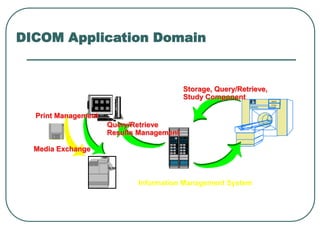
DICOM Application Domain
MAGN
ETOM
Information Management System
Storage, Query/Retrieve,
Study Component
Query/Retrieve
Results Management
Print Management
Media Exchange
LiteBox
Summary of DICOM Features
 NETWORK PROTOCOL
● DICOM incorporates negotiation to permit peers to
agree on the functions to be performed
 MESSAGE ENCODING
● DICOM defines 24 data types (V2.0 had 4)
● DICOM message encoding includes JPEG
compression (17 varients)
● DICOM supports multiple character repertoires
Summary of DICOM Features
 OBJECT DATA MODEL
● DICOM is based on a completely specified data
model
● DICOM includes a robust UID mechanism
 DATA DICTIONARY
● DICOM includes a large number of new data
elements
 SERVICE CLASSES
● DICOM defines classes of service for specific
applications (e.g. image management, printing) and
conformance levels
DICOM Objects
 Things such as images, reports, and patients are all objects
and are called information objects.
 Two kinds of objects in DICOM:
• Composite objects (Old objects inherited from NEMA).
• Normalized objects (New objects defined in DICOM).
 All objects and their format constitutes Data Dictionary.
 DICOM uses UIDs to identify information objects, such as the
images, reports, or transfer syntaxes.
 The form of the UID conforms to an international standard.
• 1.2.840.10008 is the root and the same for every DICOM UID.
• Example: UID for the DICOM explicit VR little endian transfer
syntax is 1.2.840.10008.1.2.1
DICOM Service Classes
 Composite
● Verification
● Storage
● Query/Retrieve
● Study Content Notification
 Normalized
● Patient Management
● Study Management
● Results Management
● Basic Print Management
DICOM Service Elements
 Complex services are built using service elements, called
DICOM message service elements, or DIMSEs.
 There are both composite and normalized services for
composite and normalized information objects.
 There are 5 DIMSEs that are used for composite
information objects (called DIMSE-C) and 6 that are used
for normalized information objects (called DIMSE-N).
 Two categories of DIMSEs:
• operations (such as "store")
• notifications (such as "event report”)
DIMSE-C Services
 DIMSE-C services:
• Operations:
• C-Store
• C-Get
• C-Move
• C-Find
• C-Echo
• No notification services
DIMSE-C Services
The C-STORE service is invoked by a DIMSE-service-user to
request the storage of Composite SOP Instance information by a
DIMSE-service-user.
The C-FIND service is invoked by a DIMSE-service-user to
match a series of Attribute strings against the Attributes of the set
of SOP Instances managed by a DIMSE-service-user. The C-FIND
service returns for each match a list of requested Attributes and
their values.
The C-GET service is invoked by a DIMSE-service-user to fetch
the information for one or more information objects from a DIMSE-
service-user, based upon the Attributes supplied by the invoking
DIMSE-service-user.
DIMSE-C Services
The C-MOVE service is invoked by a DIMSE-
service-user to move the information for one or more
Composite SOP Instances from a DIMSE-service-
user, to a third party DIMSE-service-user, based upon
the Attributes supplied by the invoking DIMSE-
service-user.
The C-ECHO service is invoked by a DIMSE-
service-user to verify end-to-end communications
with a DIMSE-service-user.
DIMSE-N Services
 DIMSE-N services:
• Operations:
• N-Get
• N-Set
• N-Action
• N-Create
• N-Delete
• Notifications:
• N-Event-Report
DIMSE-N Services
 N-EVENT-REPORT service is invoked by a DIMSE-
service-user to report an event about a SOP Instance to a
DIMSE-service-user.
N-GET service is invoked by a DIMSE-service-user to
request the retrieval of information from a DIMSE-service-
user.
N-SET service is invoked by a DIMSE-service-user to
request the modification of information by a DIMSE-
service-user.
DIMSE-N Services
N-ACTION service is invoked by a DIMSE-service-
user to request a DIMSE-service-user to perform an
action.
N-CREATE service is invoked by a DIMSE-service-
user to request a DIMSE-service-user to create an
instance of a information object.
N-DELETE service is invoked by a DIMSE-service-
user to request a DIMSE-service-user to delete an
instance of a information object.
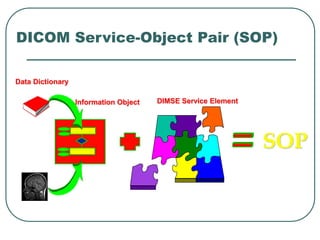
DICOM Service-Object Pair (SOP)
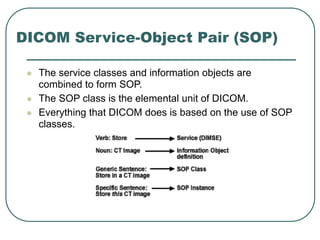
 The service classes and information objects are
combined to form SOP.
 The SOP class is the elemental unit of DICOM.
 Everything that DICOM does is based on the use of SOP
classes.
DICOM Service-Object Pair (SOP)
SOP
Data Dictionary
Information Object DIMSE Service Element
DICOM File Format (Overview)
A single DICOM file contains:
• A header (which stores information about the
patient's name, the type of scan, image
dimensions, etc)
• Image data (in compressed (bitmap) or
uncompressed form (jpeg, gif...))
DICOM File Header
 DICOM requires a 128-byte preamble
(usually set to zero).
 'D', 'I', 'C', 'M' letters comes next.
 The rest is the real header information in
groups.
• For example: group 0002hex is the file meta
information group.
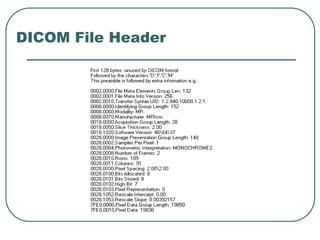
DICOM File Header
DICOM File Header
 The meaning of some fields:
• 0002:0010 --> Reports the structure of the
image data
• 0028:0002 --> Samples Per Pixel
• 0028:0004 --> Photometric Interpretation
• 0028:0100 --> Bits Allocated
• ...
Association Services
 Before everything, Association establishment
must be done.
 During Association establishment, A DIMSE-
service-user exchanges initialization information.
The initialization information includes:
• Application context
• DIMSE-specific user information
• DIMSE service information
• Presentation and session requirements
Association Services
 A-ASSOCIATE Service is invoked by a DIMSE-
service-user with related parameters to establish an
Association with another DIMSE-service-user.
 Association release is done using A-RELEASE and A-
ABORT services.

dicom.ppt

  • 1.
    What is DICOM? The standard for Digital Imaging and Communications in Medicine.  Developed by the National Electrical Manufacturers Association (NEMA) in conjunction with the American College of Radiology (ACR).  Covers most image formats for all of medicine.  Specification for messaging and communication between imaging machines.
  • 2.
    A little history The first version was ACR-NEMA, released in 1985.  Its goal in developing a standard was • To enable users to retrieve images and associated information from digital imaging equipment in a standard format using point-to-point connection. • To hide differences same across multiple image equipment manufacturers.  To handle developing network and image standarts, a new standart, DICOM, was proposed in 1981.
  • 3.
    DICOM Application Domain MAGN ETOM InformationManagement System Storage, Query/Retrieve, Study Component Query/Retrieve Results Management Print Management Media Exchange LiteBox
  • 4.
    Summary of DICOMFeatures  NETWORK PROTOCOL ● DICOM incorporates negotiation to permit peers to agree on the functions to be performed  MESSAGE ENCODING ● DICOM defines 24 data types (V2.0 had 4) ● DICOM message encoding includes JPEG compression (17 varients) ● DICOM supports multiple character repertoires
  • 5.
    Summary of DICOMFeatures  OBJECT DATA MODEL ● DICOM is based on a completely specified data model ● DICOM includes a robust UID mechanism  DATA DICTIONARY ● DICOM includes a large number of new data elements  SERVICE CLASSES ● DICOM defines classes of service for specific applications (e.g. image management, printing) and conformance levels
  • 6.
    DICOM Objects  Thingssuch as images, reports, and patients are all objects and are called information objects.  Two kinds of objects in DICOM: • Composite objects (Old objects inherited from NEMA). • Normalized objects (New objects defined in DICOM).  All objects and their format constitutes Data Dictionary.  DICOM uses UIDs to identify information objects, such as the images, reports, or transfer syntaxes.  The form of the UID conforms to an international standard. • 1.2.840.10008 is the root and the same for every DICOM UID. • Example: UID for the DICOM explicit VR little endian transfer syntax is 1.2.840.10008.1.2.1
  • 7.
    DICOM Service Classes Composite ● Verification ● Storage ● Query/Retrieve ● Study Content Notification  Normalized ● Patient Management ● Study Management ● Results Management ● Basic Print Management
  • 8.
    DICOM Service Elements Complex services are built using service elements, called DICOM message service elements, or DIMSEs.  There are both composite and normalized services for composite and normalized information objects.  There are 5 DIMSEs that are used for composite information objects (called DIMSE-C) and 6 that are used for normalized information objects (called DIMSE-N).  Two categories of DIMSEs: • operations (such as "store") • notifications (such as "event report”)
  • 9.
    DIMSE-C Services  DIMSE-Cservices: • Operations: • C-Store • C-Get • C-Move • C-Find • C-Echo • No notification services
  • 10.
    DIMSE-C Services The C-STOREservice is invoked by a DIMSE-service-user to request the storage of Composite SOP Instance information by a DIMSE-service-user. The C-FIND service is invoked by a DIMSE-service-user to match a series of Attribute strings against the Attributes of the set of SOP Instances managed by a DIMSE-service-user. The C-FIND service returns for each match a list of requested Attributes and their values. The C-GET service is invoked by a DIMSE-service-user to fetch the information for one or more information objects from a DIMSE- service-user, based upon the Attributes supplied by the invoking DIMSE-service-user.
  • 11.
    DIMSE-C Services The C-MOVEservice is invoked by a DIMSE- service-user to move the information for one or more Composite SOP Instances from a DIMSE-service- user, to a third party DIMSE-service-user, based upon the Attributes supplied by the invoking DIMSE- service-user. The C-ECHO service is invoked by a DIMSE- service-user to verify end-to-end communications with a DIMSE-service-user.
  • 12.
    DIMSE-N Services  DIMSE-Nservices: • Operations: • N-Get • N-Set • N-Action • N-Create • N-Delete • Notifications: • N-Event-Report
  • 13.
    DIMSE-N Services  N-EVENT-REPORTservice is invoked by a DIMSE- service-user to report an event about a SOP Instance to a DIMSE-service-user. N-GET service is invoked by a DIMSE-service-user to request the retrieval of information from a DIMSE-service- user. N-SET service is invoked by a DIMSE-service-user to request the modification of information by a DIMSE- service-user.
  • 14.
    DIMSE-N Services N-ACTION serviceis invoked by a DIMSE-service- user to request a DIMSE-service-user to perform an action. N-CREATE service is invoked by a DIMSE-service- user to request a DIMSE-service-user to create an instance of a information object. N-DELETE service is invoked by a DIMSE-service- user to request a DIMSE-service-user to delete an instance of a information object.
  • 15.
    DICOM Service-Object Pair(SOP)  The service classes and information objects are combined to form SOP.  The SOP class is the elemental unit of DICOM.  Everything that DICOM does is based on the use of SOP classes.
  • 16.
    DICOM Service-Object Pair(SOP) SOP Data Dictionary Information Object DIMSE Service Element
  • 17.
    DICOM File Format(Overview) A single DICOM file contains: • A header (which stores information about the patient's name, the type of scan, image dimensions, etc) • Image data (in compressed (bitmap) or uncompressed form (jpeg, gif...))
  • 18.
    DICOM File Header DICOM requires a 128-byte preamble (usually set to zero).  'D', 'I', 'C', 'M' letters comes next.  The rest is the real header information in groups. • For example: group 0002hex is the file meta information group.
  • 19.
  • 20.
    DICOM File Header The meaning of some fields: • 0002:0010 --> Reports the structure of the image data • 0028:0002 --> Samples Per Pixel • 0028:0004 --> Photometric Interpretation • 0028:0100 --> Bits Allocated • ...
  • 21.
    Association Services  Beforeeverything, Association establishment must be done.  During Association establishment, A DIMSE- service-user exchanges initialization information. The initialization information includes: • Application context • DIMSE-specific user information • DIMSE service information • Presentation and session requirements
  • 22.
    Association Services  A-ASSOCIATEService is invoked by a DIMSE- service-user with related parameters to establish an Association with another DIMSE-service-user.  Association release is done using A-RELEASE and A- ABORT services.