*For RamSoft PACS clients
Gateway Router- System
Functions and Features
'Yes our system can do that'
Page 1
*For RamSoft PACS clients
Overview
 Gateway Router Quick Overview
 What is DICOM?
 Setting up a DICOM Connection and its Terminology
 What Data Cleansing Options Are Possible?
 Facility, Issuer of Patient ID, Receive Study Status As
 DICOM Tag Mapping/Morphing
 DICOM File Format Terminology
 Scripting
 Transfer of Data
 TLS versus Replication
 What is PowerCache?
 VPN required or not
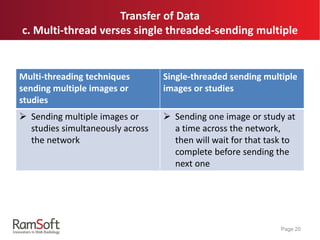
 Multi-thread verses single threaded-sending multiple
 Automated Prior Prefetching
 DICOM Q/R
 Triggered by HL7
 Product Offerings
 Gateway Router versus Advanced
 Gateway QC versus Viewer
Page 2
Gateway Router Quick Overview
 Designed for routing images
 Flexible with no limits on storage, number of studies or
number of modalities
 Robust and flexible that it can work with multiple storage
volumes, any number of hard drives, NAS or SAN, and can
even store images on a flash drive
 Full-featured online DICOM vendor neutral archive
 Ensures the patient data and study images are stored according
to industry standards so they are compatible with any number
of disparate RIS and PACS solutions
Page 3
What Is DICOM?
 DICOM stands for Digital Imaging and Communications in
Medicine
 It is a standard for handling, storing, printing, and transmitting
information in medical imaging
 It includes a file format definition and a network
communications protocol
Page 4
Setting Up A DICOM Connection
 RamSoft systems offer installation in both promiscuous
and non-promiscuous mode, however installation in non-
promiscuous mode is the best practice of choice since it
will only communicate with a DICOM station that has
explicitly identified as a safe station
 In order to identify a station you will need the AE Title,
it’s IP address, and the port that it uses for DICOM
communication
Page 5
*For RamSoft PACS clients
 AE Title
 Application Entity Title
 Uniquely identifies a DICOM Device or program
 The AE Title can be 16 alphanumeric characters or less
 IP Address
 Specifies the internet protocol address for the device
 An IP address identifies a device on a Transmission Control Protocol/Internet
Protocol (TCP/IP) network
 Port
 Identifies the port for the device's application program that you query,
retrieve, receive, and send image files
 A port is a logical connection endpoint that is the means that a program uses
to identify a specific program running on a computer on a network (such as
TCP/IP).
 DICOM’s default port is 104
Page 6
DICOM Connection Terminology
What Data Cleansing Options Are Possible?
a. Facility, Issuer of Patient ID, Receive Study As
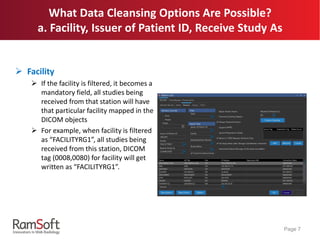
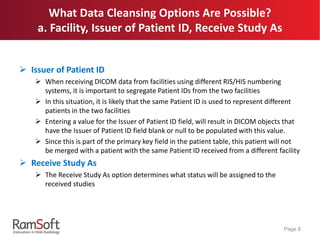
 Facility
 If the facility is filtered, it becomes a
mandatory field, all studies being
received from that station will have
that particular facility mapped in the
DICOM objects
 For example, when facility is filtered
as “FACILITYRG1”, all studies being
received from this station, DICOM
tag (0008,0080) for facility will get
written as “FACILITYRG1”.
Page 7
 Issuer of Patient ID
 When receiving DICOM data from facilities using different RIS/HIS numbering
systems, it is important to segregate Patient IDs from the two facilities
 In this situation, it is likely that the same Patient ID is used to represent different
patients in the two facilities
 Entering a value for the Issuer of Patient ID field, will result in DICOM objects that
have the Issuer of Patient ID field blank or null to be populated with this value.
 Since this is part of the primary key field in the patient table, this patient will not
be merged with a patient with the same Patient ID received from a different facility
 Receive Study As
 The Receive Study As option determines what status will be assigned to the
received studies
Page 8
What Data Cleansing Options Are Possible?
a. Facility, Issuer of Patient ID, Receive Study As
What Data Cleansing Options Are Possible?
b. DICOM Tag Mapping/Morphing
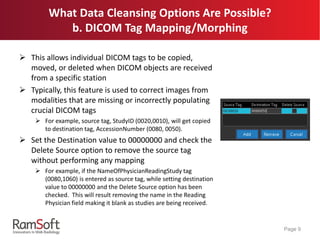
 This allows individual DICOM tags to be copied,
moved, or deleted when DICOM objects are received
from a specific station
 Typically, this feature is used to correct images from
modalities that are missing or incorrectly populating
crucial DICOM tags
 For example, source tag, StudyID (0020,0010), will get copied
to destination tag, AccessionNumber (0080, 0050).
 Set the Destination value to 00000000 and check the
Delete Source option to remove the source tag
without performing any mapping
 For example, if the NameOfPhysicianReadingStudy tag
(0080,1060) is entered as source tag, while setting destination
value to 00000000 and the Delete Source option has been
checked. This will result removing the name in the Reading
Physician field making it blank as studies are being received.
Page 9
 DICOM Header
Stores information about the patient's name, the type of
scan, image dimensions, etc., as well as all of the image
data
 DICOM Tag
The DICOM standard has a special pair of characters with
numbers of 2x4 hexadecimal digits enclosed by
parentheses and separated by the comma uniquely
identify a specific DICOM field or data
For example, (0010, 0010) will always be the tag for patient’s
name.
Page 10
DICOM File Format Terminology
What Data Cleansing Options Are Possible?
c. Scripting
 Used to modify the DICOM object being received from the
selected station
 Custom scripts are used when modifications of the DICOM
objects are more complicated that they couldn’t be achieved
by simple DICOM tag mapping/morphing
 The Script Editor utilizes Pascal scripts that will conditionally
execute a group of statements, depending on the value of an
expression
Page 11
What Data Cleansing Options Are Possible?
c. Scripting
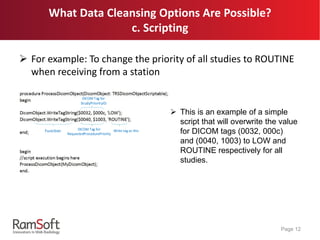
 For example: To change the priority of all studies to ROUTINE
when receiving from a station
Page 12
Function DICOM Tag for
RequestedProcedurePriority
DICOM Tag for
StudyPriorityID
Write tag as this
 This is an example of a simple
script that will overwrite the value
for DICOM tags (0032, 000c)
and (0040, 1003) to LOW and
ROUTINE respectively for all
studies.
And What Data Cleansing Options Are Possible?
c. Scripting
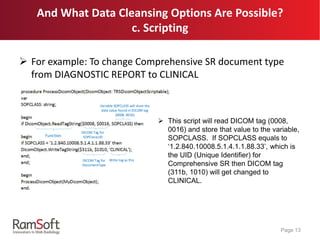
 For example: To change Comprehensive SR document type
from DIAGNOSTIC REPORT to CLINICAL
Page 13
Function
DICOM Tag for
SOPClassUID
Variable SOPCLASS will store the
data value found in DICOM tag
(0008, 0016)
DICOM Tag for
DocumentType
Write tag as this
 This script will read DICOM tag (0008,
0016) and store that value to the variable,
SOPCLASS. If SOPCLASS equals to
‘1.2.840.10008.5.1.4.1.1.88.33’, which is
the UID (Unique Identifier) for
Comprehensive SR then DICOM tag
(311b, 1010) will get changed to
CLINICAL.
Transfer Of Data
a. TLS versus Replication
 TLS (Transport Layer Security)
 Is a protocol that allows two programs to communicate with
each other in a secure way
 Provides privacy and data integrity between two communicating
computer applications
 When secured by TLS, connections between client and server
will have one or more of the following properties:
 Connection is private because symmetric cryptography is used to
encrypt the data transmitted
 Identity of the communicating parties can be authenticated using
public key cryptography
 Connection is reliable because each message transmitted includes a
message integrity check using a message authentication code to
prevent undetected loss or alteration of the data during transmission
 Default TLS port for DICOM is 2762
Page 14
Transfer Of Data
a. TLS versus Replication
 Replication
Uses a RamSoft proprietary communication protocol
Is used to send image data directly to a PowerCache or
PowerServer without the need for DICOM association or
use of the DICOM Service
Only send and receive services can be used with
Replication
Is preferred for RamSoft to RamSoft communication due to
a slight performance boost and ease of use
Is the mandatory communication protocol for
Gateway/Gateway Router to PowerCache communication
Page 15
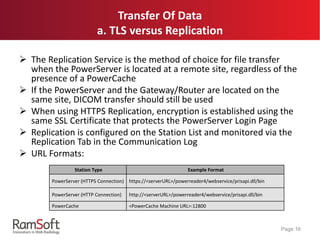
 The Replication Service is the method of choice for file transfer
when the PowerServer is located at a remote site, regardless of the
presence of a PowerCache
 If the PowerServer and the Gateway/Router are located on the
same site, DICOM transfer should still be used
 When using HTTPS Replication, encryption is established using the
same SSL Certificate that protects the PowerServer Login Page
 Replication is configured on the Station List and monitored via the
Replication Tab in the Communication Log
 URL Formats:
Page 16
Station Type Example Format
PowerServer (HTTPS Connection) https://<serverURL>/powerreader4/webservice/prisapi.dll/bin
PowerServer (HTTP Connection) http://<serverURL>/powerreader4/webservice/prisapi.dll/bin
PowerCache <PowerCache Machine URL>:12800
Transfer Of Data
a. TLS versus Replication
What is PowerCache?
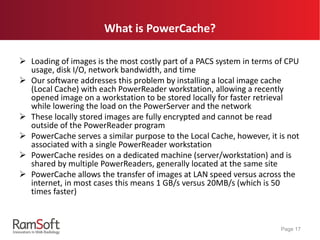
 Loading of images is the most costly part of a PACS system in terms of CPU
usage, disk I/O, network bandwidth, and time
 Our software addresses this problem by installing a local image cache
(Local Cache) with each PowerReader workstation, allowing a recently
opened image on a workstation to be stored locally for faster retrieval
while lowering the load on the PowerServer and the network
 These locally stored images are fully encrypted and cannot be read
outside of the PowerReader program
 PowerCache serves a similar purpose to the Local Cache, however, it is not
associated with a single PowerReader workstation
 PowerCache resides on a dedicated machine (server/workstation) and is
shared by multiple PowerReaders, generally located at the same site
 PowerCache allows the transfer of images at LAN speed versus across the
internet, in most cases this means 1 GB/s versus 20MB/s (which is 50
times faster)
Page 17
What is PowerCache?
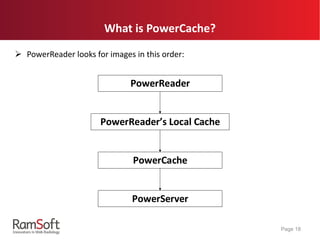
 PowerReader looks for images in this order:
Page 18
PowerReader s Local Cache
PowerReader
PowerCache
PowerServer
Transfer Of Data
b. VPN required or not
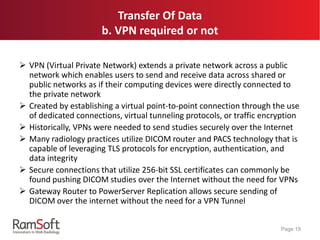
 VPN (Virtual Private Network) extends a private network across a public
network which enables users to send and receive data across shared or
public networks as if their computing devices were directly connected to
the private network
 Created by establishing a virtual point-to-point connection through the use
of dedicated connections, virtual tunneling protocols, or traffic encryption
 Historically, VPNs were needed to send studies securely over the Internet
 Many radiology practices utilize DICOM router and PACS technology that is
capable of leveraging TLS protocols for encryption, authentication, and
data integrity
 Secure connections that utilize 256-bit SSL certificates can commonly be
found pushing DICOM studies over the Internet without the need for VPNs
 Gateway Router to PowerServer Replication allows secure sending of
DICOM over the internet without the need for a VPN Tunnel
Page 19
Transfer of Data
c. Multi-thread verses single threaded-sending multiple
Multi-threading techniques
sending multiple images or
studies
Single-threaded sending multiple
images or studies
 Sending multiple images or
studies simultaneously across
the network
 Sending one image or study at
a time across the network,
then will wait for that task to
complete before sending the
next one
Page 20
Automated Prior Prefetching
a. DICOM Q/R
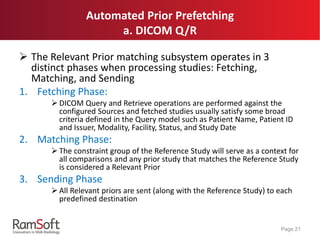
 The Relevant Prior matching subsystem operates in 3
distinct phases when processing studies: Fetching,
Matching, and Sending
1. Fetching Phase:
 DICOM Query and Retrieve operations are performed against the
configured Sources and fetched studies usually satisfy some broad
criteria defined in the Query model such as Patient Name, Patient ID
and Issuer, Modality, Facility, Status, and Study Date
2. Matching Phase:
 The constraint group of the Reference Study will serve as a context for
all comparisons and any prior study that matches the Reference Study
is considered a Relevant Prior
3. Sending Phase
 All Relevant priors are sent (along with the Reference Study) to each
predefined destination
Page 21
Automated Prior Prefetching
b. Triggered by HL7
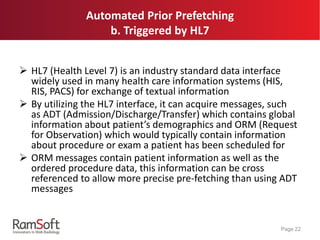
 HL7 (Health Level 7) is an industry standard data interface
widely used in many health care information systems (HIS,
RIS, PACS) for exchange of textual information
 By utilizing the HL7 interface, it can acquire messages, such
as ADT (Admission/Discharge/Transfer) which contains global
information about patient’s demographics and ORM (Request
for Observation) which would typically contain information
about procedure or exam a patient has been scheduled for
 ORM messages contain patient information as well as the
ordered procedure data, this information can be cross
referenced to allow more precise pre-fetching than using ADT
messages
Page 22
Product Offerings
a. Gateway Router verses Advanced
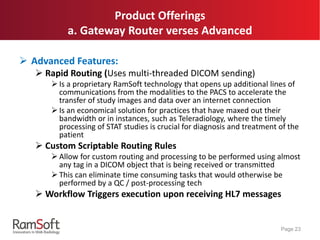
 Advanced Features:
 Rapid Routing (Uses multi-threaded DICOM sending)
 Is a proprietary RamSoft technology that opens up additional lines of
communications from the modalities to the PACS to accelerate the
transfer of study images and data over an internet connection
 Is an economical solution for practices that have maxed out their
bandwidth or in instances, such as Teleradiology, where the timely
processing of STAT studies is crucial for diagnosis and treatment of the
patient
 Custom Scriptable Routing Rules
 Allow for custom routing and processing to be performed using almost
any tag in a DICOM object that is being received or transmitted
 This can eliminate time consuming tasks that would otherwise be
performed by a QC / post-processing tech
 Workflow Triggers execution upon receiving HL7 messages
Page 23
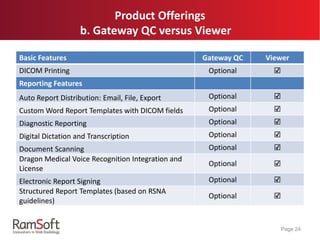
Product Offerings
b. Gateway QC versus Viewer
Basic Features Gateway QC Viewer
DICOM Printing Optional ☑
Reporting Features
Auto Report Distribution: Email, File, Export Optional ☑
Custom Word Report Templates with DICOM fields Optional ☑
Diagnostic Reporting Optional ☑
Digital Dictation and Transcription Optional ☑
Document Scanning Optional ☑
Dragon Medical Voice Recognition Integration and
License
Optional ☑
Electronic Report Signing Optional ☑
Structured Report Templates (based on RSNA
guidelines)
Optional ☑
Page 24
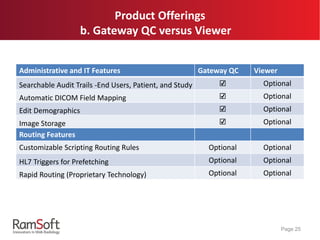
Product Offerings
b. Gateway QC versus Viewer
Page 25
Administrative and IT Features Gateway QC Viewer
Searchable Audit Trails -End Users, Patient, and Study ☑ Optional
Automatic DICOM Field Mapping ☑ Optional
Edit Demographics ☑ Optional
Image Storage ☑ Optional
Routing Features
Customizable Scripting Routing Rules Optional Optional
HL7 Triggers for Prefetching Optional Optional
Rapid Routing (Proprietary Technology) Optional Optional
Any Questions?
Page 26

Learning Series: RamSoft Gateway Router -'Yes we can do that'

  • 1.
    *For RamSoft PACSclients Gateway Router- System Functions and Features 'Yes our system can do that' Page 1
  • 2.
    *For RamSoft PACSclients Overview  Gateway Router Quick Overview  What is DICOM?  Setting up a DICOM Connection and its Terminology  What Data Cleansing Options Are Possible?  Facility, Issuer of Patient ID, Receive Study Status As  DICOM Tag Mapping/Morphing  DICOM File Format Terminology  Scripting  Transfer of Data  TLS versus Replication  What is PowerCache?  VPN required or not  Multi-thread verses single threaded-sending multiple  Automated Prior Prefetching  DICOM Q/R  Triggered by HL7  Product Offerings  Gateway Router versus Advanced  Gateway QC versus Viewer Page 2
  • 3.
    Gateway Router QuickOverview  Designed for routing images  Flexible with no limits on storage, number of studies or number of modalities  Robust and flexible that it can work with multiple storage volumes, any number of hard drives, NAS or SAN, and can even store images on a flash drive  Full-featured online DICOM vendor neutral archive  Ensures the patient data and study images are stored according to industry standards so they are compatible with any number of disparate RIS and PACS solutions Page 3
  • 4.
    What Is DICOM? DICOM stands for Digital Imaging and Communications in Medicine  It is a standard for handling, storing, printing, and transmitting information in medical imaging  It includes a file format definition and a network communications protocol Page 4
  • 5.
    Setting Up ADICOM Connection  RamSoft systems offer installation in both promiscuous and non-promiscuous mode, however installation in non- promiscuous mode is the best practice of choice since it will only communicate with a DICOM station that has explicitly identified as a safe station  In order to identify a station you will need the AE Title, it’s IP address, and the port that it uses for DICOM communication Page 5
  • 6.
    *For RamSoft PACSclients  AE Title  Application Entity Title  Uniquely identifies a DICOM Device or program  The AE Title can be 16 alphanumeric characters or less  IP Address  Specifies the internet protocol address for the device  An IP address identifies a device on a Transmission Control Protocol/Internet Protocol (TCP/IP) network  Port  Identifies the port for the device's application program that you query, retrieve, receive, and send image files  A port is a logical connection endpoint that is the means that a program uses to identify a specific program running on a computer on a network (such as TCP/IP).  DICOM’s default port is 104 Page 6 DICOM Connection Terminology
  • 7.
    What Data CleansingOptions Are Possible? a. Facility, Issuer of Patient ID, Receive Study As  Facility  If the facility is filtered, it becomes a mandatory field, all studies being received from that station will have that particular facility mapped in the DICOM objects  For example, when facility is filtered as “FACILITYRG1”, all studies being received from this station, DICOM tag (0008,0080) for facility will get written as “FACILITYRG1”. Page 7
  • 8.
     Issuer ofPatient ID  When receiving DICOM data from facilities using different RIS/HIS numbering systems, it is important to segregate Patient IDs from the two facilities  In this situation, it is likely that the same Patient ID is used to represent different patients in the two facilities  Entering a value for the Issuer of Patient ID field, will result in DICOM objects that have the Issuer of Patient ID field blank or null to be populated with this value.  Since this is part of the primary key field in the patient table, this patient will not be merged with a patient with the same Patient ID received from a different facility  Receive Study As  The Receive Study As option determines what status will be assigned to the received studies Page 8 What Data Cleansing Options Are Possible? a. Facility, Issuer of Patient ID, Receive Study As
  • 9.
    What Data CleansingOptions Are Possible? b. DICOM Tag Mapping/Morphing  This allows individual DICOM tags to be copied, moved, or deleted when DICOM objects are received from a specific station  Typically, this feature is used to correct images from modalities that are missing or incorrectly populating crucial DICOM tags  For example, source tag, StudyID (0020,0010), will get copied to destination tag, AccessionNumber (0080, 0050).  Set the Destination value to 00000000 and check the Delete Source option to remove the source tag without performing any mapping  For example, if the NameOfPhysicianReadingStudy tag (0080,1060) is entered as source tag, while setting destination value to 00000000 and the Delete Source option has been checked. This will result removing the name in the Reading Physician field making it blank as studies are being received. Page 9
  • 10.
     DICOM Header Storesinformation about the patient's name, the type of scan, image dimensions, etc., as well as all of the image data  DICOM Tag The DICOM standard has a special pair of characters with numbers of 2x4 hexadecimal digits enclosed by parentheses and separated by the comma uniquely identify a specific DICOM field or data For example, (0010, 0010) will always be the tag for patient’s name. Page 10 DICOM File Format Terminology
  • 11.
    What Data CleansingOptions Are Possible? c. Scripting  Used to modify the DICOM object being received from the selected station  Custom scripts are used when modifications of the DICOM objects are more complicated that they couldn’t be achieved by simple DICOM tag mapping/morphing  The Script Editor utilizes Pascal scripts that will conditionally execute a group of statements, depending on the value of an expression Page 11
  • 12.
    What Data CleansingOptions Are Possible? c. Scripting  For example: To change the priority of all studies to ROUTINE when receiving from a station Page 12 Function DICOM Tag for RequestedProcedurePriority DICOM Tag for StudyPriorityID Write tag as this  This is an example of a simple script that will overwrite the value for DICOM tags (0032, 000c) and (0040, 1003) to LOW and ROUTINE respectively for all studies.
  • 13.
    And What DataCleansing Options Are Possible? c. Scripting  For example: To change Comprehensive SR document type from DIAGNOSTIC REPORT to CLINICAL Page 13 Function DICOM Tag for SOPClassUID Variable SOPCLASS will store the data value found in DICOM tag (0008, 0016) DICOM Tag for DocumentType Write tag as this  This script will read DICOM tag (0008, 0016) and store that value to the variable, SOPCLASS. If SOPCLASS equals to ‘1.2.840.10008.5.1.4.1.1.88.33’, which is the UID (Unique Identifier) for Comprehensive SR then DICOM tag (311b, 1010) will get changed to CLINICAL.
  • 14.
    Transfer Of Data a.TLS versus Replication  TLS (Transport Layer Security)  Is a protocol that allows two programs to communicate with each other in a secure way  Provides privacy and data integrity between two communicating computer applications  When secured by TLS, connections between client and server will have one or more of the following properties:  Connection is private because symmetric cryptography is used to encrypt the data transmitted  Identity of the communicating parties can be authenticated using public key cryptography  Connection is reliable because each message transmitted includes a message integrity check using a message authentication code to prevent undetected loss or alteration of the data during transmission  Default TLS port for DICOM is 2762 Page 14
  • 15.
    Transfer Of Data a.TLS versus Replication  Replication Uses a RamSoft proprietary communication protocol Is used to send image data directly to a PowerCache or PowerServer without the need for DICOM association or use of the DICOM Service Only send and receive services can be used with Replication Is preferred for RamSoft to RamSoft communication due to a slight performance boost and ease of use Is the mandatory communication protocol for Gateway/Gateway Router to PowerCache communication Page 15
  • 16.
     The ReplicationService is the method of choice for file transfer when the PowerServer is located at a remote site, regardless of the presence of a PowerCache  If the PowerServer and the Gateway/Router are located on the same site, DICOM transfer should still be used  When using HTTPS Replication, encryption is established using the same SSL Certificate that protects the PowerServer Login Page  Replication is configured on the Station List and monitored via the Replication Tab in the Communication Log  URL Formats: Page 16 Station Type Example Format PowerServer (HTTPS Connection) https://<serverURL>/powerreader4/webservice/prisapi.dll/bin PowerServer (HTTP Connection) http://<serverURL>/powerreader4/webservice/prisapi.dll/bin PowerCache <PowerCache Machine URL>:12800 Transfer Of Data a. TLS versus Replication
  • 17.
    What is PowerCache? Loading of images is the most costly part of a PACS system in terms of CPU usage, disk I/O, network bandwidth, and time  Our software addresses this problem by installing a local image cache (Local Cache) with each PowerReader workstation, allowing a recently opened image on a workstation to be stored locally for faster retrieval while lowering the load on the PowerServer and the network  These locally stored images are fully encrypted and cannot be read outside of the PowerReader program  PowerCache serves a similar purpose to the Local Cache, however, it is not associated with a single PowerReader workstation  PowerCache resides on a dedicated machine (server/workstation) and is shared by multiple PowerReaders, generally located at the same site  PowerCache allows the transfer of images at LAN speed versus across the internet, in most cases this means 1 GB/s versus 20MB/s (which is 50 times faster) Page 17
  • 18.
    What is PowerCache? PowerReader looks for images in this order: Page 18 PowerReader s Local Cache PowerReader PowerCache PowerServer
  • 19.
    Transfer Of Data b.VPN required or not  VPN (Virtual Private Network) extends a private network across a public network which enables users to send and receive data across shared or public networks as if their computing devices were directly connected to the private network  Created by establishing a virtual point-to-point connection through the use of dedicated connections, virtual tunneling protocols, or traffic encryption  Historically, VPNs were needed to send studies securely over the Internet  Many radiology practices utilize DICOM router and PACS technology that is capable of leveraging TLS protocols for encryption, authentication, and data integrity  Secure connections that utilize 256-bit SSL certificates can commonly be found pushing DICOM studies over the Internet without the need for VPNs  Gateway Router to PowerServer Replication allows secure sending of DICOM over the internet without the need for a VPN Tunnel Page 19
  • 20.
    Transfer of Data c.Multi-thread verses single threaded-sending multiple Multi-threading techniques sending multiple images or studies Single-threaded sending multiple images or studies  Sending multiple images or studies simultaneously across the network  Sending one image or study at a time across the network, then will wait for that task to complete before sending the next one Page 20
  • 21.
    Automated Prior Prefetching a.DICOM Q/R  The Relevant Prior matching subsystem operates in 3 distinct phases when processing studies: Fetching, Matching, and Sending 1. Fetching Phase:  DICOM Query and Retrieve operations are performed against the configured Sources and fetched studies usually satisfy some broad criteria defined in the Query model such as Patient Name, Patient ID and Issuer, Modality, Facility, Status, and Study Date 2. Matching Phase:  The constraint group of the Reference Study will serve as a context for all comparisons and any prior study that matches the Reference Study is considered a Relevant Prior 3. Sending Phase  All Relevant priors are sent (along with the Reference Study) to each predefined destination Page 21
  • 22.
    Automated Prior Prefetching b.Triggered by HL7  HL7 (Health Level 7) is an industry standard data interface widely used in many health care information systems (HIS, RIS, PACS) for exchange of textual information  By utilizing the HL7 interface, it can acquire messages, such as ADT (Admission/Discharge/Transfer) which contains global information about patient’s demographics and ORM (Request for Observation) which would typically contain information about procedure or exam a patient has been scheduled for  ORM messages contain patient information as well as the ordered procedure data, this information can be cross referenced to allow more precise pre-fetching than using ADT messages Page 22
  • 23.
    Product Offerings a. GatewayRouter verses Advanced  Advanced Features:  Rapid Routing (Uses multi-threaded DICOM sending)  Is a proprietary RamSoft technology that opens up additional lines of communications from the modalities to the PACS to accelerate the transfer of study images and data over an internet connection  Is an economical solution for practices that have maxed out their bandwidth or in instances, such as Teleradiology, where the timely processing of STAT studies is crucial for diagnosis and treatment of the patient  Custom Scriptable Routing Rules  Allow for custom routing and processing to be performed using almost any tag in a DICOM object that is being received or transmitted  This can eliminate time consuming tasks that would otherwise be performed by a QC / post-processing tech  Workflow Triggers execution upon receiving HL7 messages Page 23
  • 24.
    Product Offerings b. GatewayQC versus Viewer Basic Features Gateway QC Viewer DICOM Printing Optional ☑ Reporting Features Auto Report Distribution: Email, File, Export Optional ☑ Custom Word Report Templates with DICOM fields Optional ☑ Diagnostic Reporting Optional ☑ Digital Dictation and Transcription Optional ☑ Document Scanning Optional ☑ Dragon Medical Voice Recognition Integration and License Optional ☑ Electronic Report Signing Optional ☑ Structured Report Templates (based on RSNA guidelines) Optional ☑ Page 24
  • 25.
    Product Offerings b. GatewayQC versus Viewer Page 25 Administrative and IT Features Gateway QC Viewer Searchable Audit Trails -End Users, Patient, and Study ☑ Optional Automatic DICOM Field Mapping ☑ Optional Edit Demographics ☑ Optional Image Storage ☑ Optional Routing Features Customizable Scripting Routing Rules Optional Optional HL7 Triggers for Prefetching Optional Optional Rapid Routing (Proprietary Technology) Optional Optional
  • 26.