

Developing
Windows 10 Hosted Web Apps
Chris Dufour, ASP .NET MVP
Software Architect
Follow me@chrduf
http://www.linkedin.com/in/cdufour
Agenda
• Windows 10
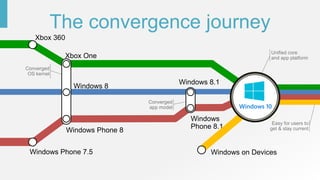
• The convergence journey
• Universal Windows Platform (UWP)
• New browser for Windows 10
• Hosted Web App
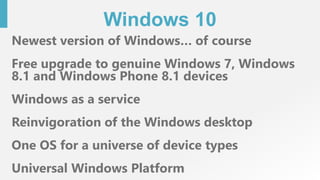
Windows 10
Newest version of Windows… of course
Free upgrade to genuine Windows 7, Windows
8.1 and Windows Phone 8.1 devices
Windows as a service
Reinvigoration of the Windows desktop
One OS for a universe of device types
Universal Windows Platform
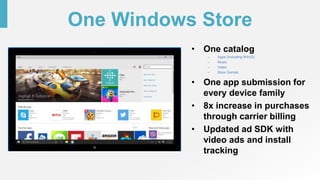
One Windows Store
• One catalog
– Apps (Including WIn32)
– Music
– Video
– Xbox Games
• One app submission for
every device family
• 8x increase in purchases
through carrier billing
• Updated ad SDK with
video ads and install
tracking
Windows 10 on
One Billion Devices
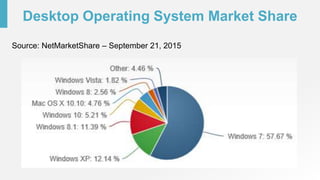
Desktop Operating System Market Share
Source: NetMarketShare – September 21, 2015
Easy for users to
get & stay current
Unified core
and app platform
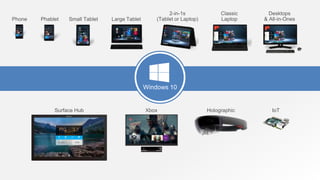
The convergence journey
Windows 10
Converged
OS kernel
Converged
app model
Phone Small Tablet
2-in-1s
(Tablet or Laptop)
Desktops
& All-in-OnesPhablet Large Tablet
Classic
Laptop
Xbox IoTSurface Hub Holographic
Windows 10
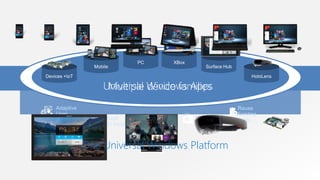
One Store +
One Dev Center
Reuse
Existing
CodeOne SDK +
Tooling
Adaptive
User
Interface Natural
User Inputs
One Universal Windows Platform
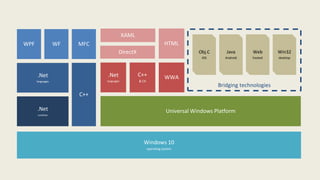
Windows 10
operating system
Bridging technologies
Win32
desktop
Web
hosted
Java
Android
Obj.C
iOS
Universal Windows Platform
WWAC++
& CX
.Net
languages
HTML
DirectX
XAML
C++
.Net
languages
MFCWFWPF
.Net
runtime
Introducing the
Universal Windows Platform (UWP)
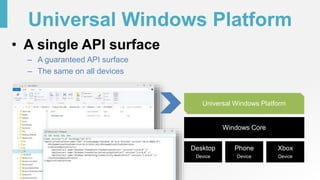
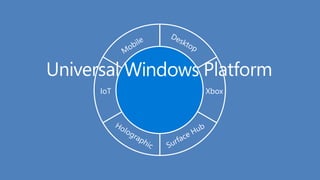
Universal Windows Platform
• A single API surface
– A guaranteed API surface
– The same on all devices
Phone
Device
Xbox
Device
Desktop
Device
Windows Core
Universal Windows Platform
XboxIoT
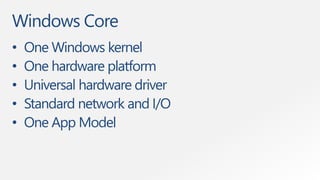
Windows Core
• One Windows kernel
• One hardware platform
• Universal hardware driver
• Standard network and I/O
• One App Model
Apps don't target Windows 10,
apps target the UWP
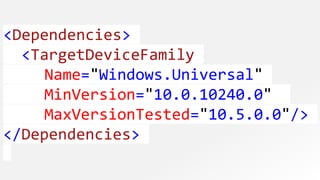
<Dependencies>
<TargetDeviceFamily
Name="Windows.Universal"
MinVersion="10.0.10240.0"
MaxVersionTested="10.5.0.0"/>
</Dependencies>
The Universal Windows Platform can
update at its own cadence
Each family of devices adds features
that are appropriate for that device
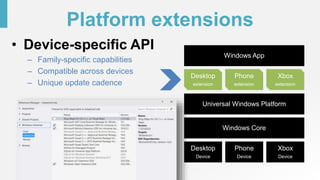
Platform extensions
• Device-specific API
– Family-specific capabilities
– Compatible across devices
– Unique update cadence
Phone
Device
Xbox
Device
Desktop
Device
Windows Core
Universal Windows Platform
Windows App
Phone
extension
Xbox
extension
Desktop
extension
Extensions don't invalidate
binaries on other devices
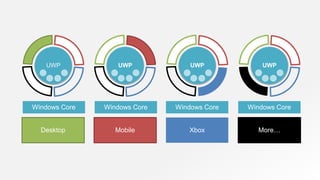
UWP
Windows Core Windows Core Windows Core Windows Core
UWP UWP UWP
Desktop Mobile Xbox More…
Universal Windows Platform
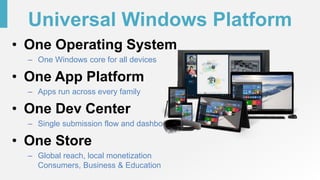
• One Operating System
– One Windows core for all devices
• One App Platform
– Apps run across every family
• One Dev Center
– Single submission flow and dashboard
• One Store
– Global reach, local monetization
Consumers, Business & Education
Microsoft Edge
New browser for Windows 10
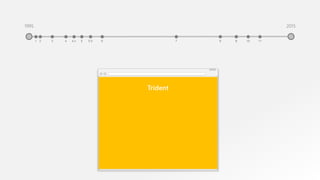
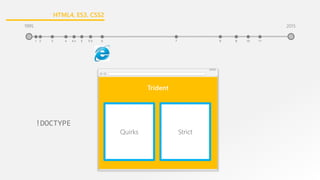
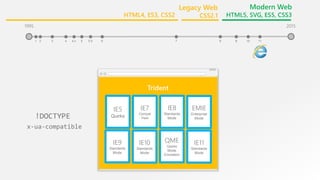
Trident
1995
3 41 2 5.5 65 7 84.x 9
2015
9 10 11
Trident
!DOCTYPE
1995
3 41 2 5.5 65 7 84.x 9
2015
9 10 11
Quirks Strict
1995
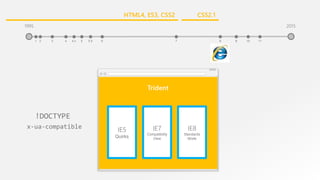
HTML4, ES3, CSS2
Trident
IE5
Quirks
IE7
Compatibility
View
IE8
Standards
Mode
x-ua-compatible
!DOCTYPE
1995
3 41 2 5.5 65 7 84.x 9
2015
9 10 11
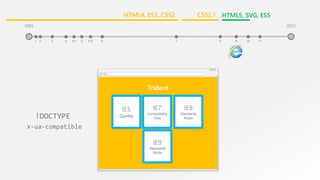
CSS2.1HTML4, ES3, CSS2
3
Trident
IE5
Quirks
IE7
Compatibility
View
IE8
Standards
Mode
IE9
Standards
Mode
x-ua-compatible
!DOCTYPE
1995
41 2 5.5 65 7 84.x 9
2015
9 10 11
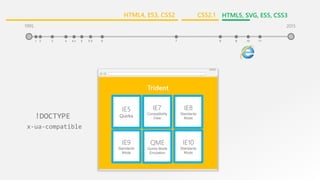
CSS2.1 HTML5, SVG, ES5HTML4, ES3, CSS2
Trident
IE5
Quirks
IE7
Compatibility
View
IE8
Standards
Mode
IE9
Standards
Mode
QME
Quirks Mode
Emulation
IE10
Standards
Mode
x-ua-compatible
!DOCTYPE
1995
3 41 2 5.5 65 7 84.x 9
2015
9 10 11
CSS2.1 HTML5, SVG, ES5, CSS3HTML4, ES3, CSS2
1995
3 41 2 5.5 65 7 84.x
Trident
IE5
Quirks
IE7
Compat
View
IE8
Standards
Mode
9
IE9
Standards
Mode
IE10
Standards
Mode
QME
Quirks
Mode
Emulation
2015
9 10 11
x-ua-compatible
!DOCTYPE
IE11
Standards
Mode
EMIE
Enterprise
Mode
Legacy Web
CSS2.1
Modern Web
HTML5, SVG, ES5, CSS3HTML4, ES3, CSS2
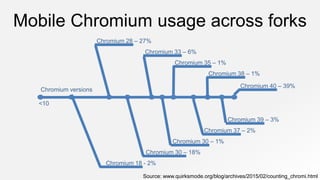
Mobile Chromium usage across forks
Chromium versions
<10
Chromium 18 - 2%
Chromium 30 – 18%
Chromium 30 – 1%
Chromium 37 – 2%
Chromium 39 – 3%
Chromium 40 – 39%
Chromium 38 – 1%
Chromium 35 – 1%
Chromium 33 – 6%
Chromium 28 – 27%
Source: www.quirksmode.org/blog/archives/2015/02/counting_chromi.html
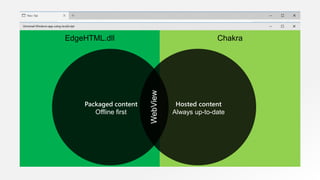
EdgeHTML.dll Chakra
WebView
What about IE?
• IE11 will still be available for those cases
where you need to access legacy web
content, or for sites that use plug-ins such
as ActiveX or Silverlight.
• But for the modern web, for the most up to
date features such as HTML5, ECMAScript
6 and CSS3 or 4, you’ll want to use Edge.
Hosted Web Apps
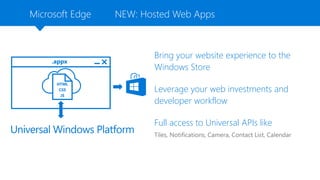
Microsoft Edge
Bring your website experience to the
Windows Store
Leverage your web investments and
developer workflow
Full access to Universal APIs like
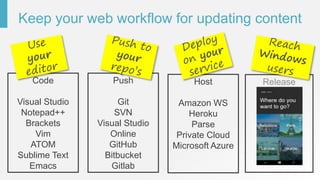
Keep your web workflow for updating content
Code
Visual Studio
Notepad++
Brackets
Vim
ATOM
Sublime Text
Emacs
Push
Git
SVN
Visual Studio
Online
GitHub
Bitbucket
Gitlab
Host
Amazon WS
Heroku
Parse
Private Cloud
Microsoft Azure
Release
Demo:
Hosted Web App
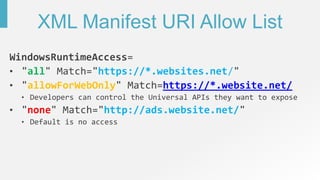
XML Manifest URI Allow List
all https://*.websites.net/
allowForWebOnly https://*.website.net/
none http://ads.website.net/
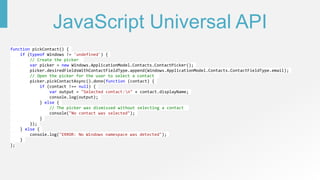
JavaScript Universal API
function pickContact() {
if (typeof Windows != 'undefined') {
// Create the picker
var picker = new Windows.ApplicationModel.Contacts.ContactPicker();
picker.desiredFieldsWithContactFieldType.append(Windows.ApplicationModel.Contacts.ContactFieldType.email);
// Open the picker for the user to select a contact
picker.pickContactAsync().done(function (contact) {
if (contact !== null) {
var output = "Selected contact:n" + contact.displayName;
console.log(output);
} else {
// The picker was dismissed without selecting a contact
console("No contact was selected");
}
});
} else {
console.log("ERROR: No Windows namespace was detected");
}
};
Demo:
Hosted Web App that uses Universal APIs
Summary
• Windows 10
• The convergence journey
• Universal Windows Platform (UWP)
• New browser for Windows 10
• Hosted Web App
Resources
• Windows Dev Center
https://dev.windows.com
• Hosted Web Apps
https://microsoftedge.github.io/WebAppsDocs/en-US/win10/HWA.htm
• Visual Studio
https://www.visualstudio.com
• Microsoft Virtual Academy
http://www.microsoftvirtualacademy.com
Thank You

Developing Windows 10 Hosted Web Apps

Editor's Notes

  • #8 Microsoft has been working to converge its client operating system and developer platforms for a long time. In Windows Phone 7, the operating system was based on Windows CE, a great operating system for small, handheld devices, but different from the OS on ‘big’ Windows. When Windows Phone 8 was launched, we swapped out Windows CE and base it on the Windows NT kernel instead, same as our PCs. We did a similar thing with Xbox One. But it wasn’t until Windows 8.1/Windows Phone 8.1 that we really delivered on a converged developer platform. You can build universal 8.1 apps that share a very high percentage of code and where you program against the same APIs. With Windows 10, we’ve taken that even further and for the first time allow developers to create a single app that can run across all devices running Windows 10. Windows 10 brings developers a unified core OS across all devices and a single app platform.
  • #11 So let’s take a look at the different ways you can build apps for Windows 10. <click> First of all there are the ‘traditional’ ways of building apps for Windows desktop, using tools such as WPF, MFC and full .NET. These are what we term ‘CWA’ (Classic Windows Apps) and are still a great way of building apps for Windows desktop. Although, note that we are working on some tools, called Project ‘Centennial’ that will allow CWAs to be packaged for distribution through the Windows Store – more on that later. <click> Then, we’ve got the new UWP, which is based on the Windows Runtime APIs that we used for building Windows Store apps in Windows 8.x and Windows Phone 8.1. Here you can use HTML and JavaScript to create universal Windows apps, or XAML and C#/VB or C++, or you can use DirectX and one of the many popular middleware packages to create games. And these all build upon the UWP APIs and can run across all Windows 10 devices. <click> Finally, we’ve got a number of bridging technologies. We want to enable developers to use whichever technologies they are comfortable with, and help them to create Windows apps. So we’ve got eh Windows Bridge for iOS, the Windows Bridge for Android, hosted Web Apps to help web sites to be discoverable through the Windows Store and to call UWP APIs, and a Bridge for classical Windows Apps. More on all of those soon.
  • #25 Before we talk some more about Microsoft Edge, let’s take a look at the history behind it. We released the first version of Internet Explorer in 1995 along with Windows 95.
  • #26 This was followed by a number of other versions until we got to IE6, which was the first version to have the dual engine, in other words the document type. At this time the goal was to maintain backwards compatibility with what we had before, and at the same time introduce new features. So this is where we introduced the DOCTYPE, which you can think of as a big IF inside your code. If you are in Quirks mode you get the new features, and if you are in Strict mode, you are compatible with what we had before.
  • #27 This was a time when the pace of change of the web was not as great as it is today. So we stuck with IE6 for quite a while, and then eventually released IE7 and then IE8. At that time it was considered OK for the browser to effectively support three different modes: the IE5 Quirks mode, IE7 mode and IE8 mode.
  • #28 With IE9, we introduced a fourth engine, supporting many new features such as HTML5, SVG, EcmaScript 5. By this time, your website code began to getting a little bit untidy, with if IE5…. If IE7… If IE8…. If IE9….
  • #29 But the approach now was the same as it had always been – provide backward compatibility with what had been before, but also introduce a new version supporting new features.
  • #30 And guess what, by the time we got to IE11, we realized that we had to do something. The approach we had been following has by now resulted in 8 engines inside IE and this approach is just not viable anymore.
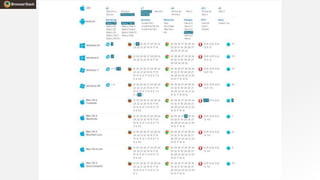
  • #31 At the same time, other approaches were being followed elsewhere in the industry. This table represents all the different browser versions, and in the same timeframe that IE went from IE 1 to IE 11, Chrome for example went through very many versions, from version 1 to version 40. The only difference is that with each new version, they removed support for the previous version. They did not support backwards compatibility, so that with the release of a new version, perhaps some feature from earlier gets removed, and some websites that used it get broken. But that’s considered OK and how the web should work with a modern browser.
  • #32 So this produced some issues as well. With IE we had problems, because the web developer had to support IE6, IE7, IE8 and so on. But with Chromium for example, a very widely used browser on the mobile side, they had their own problems. As you can see here, the number of different versions of chromium that are out there in the wild at any particular time can be high, as they could not control which versions of the browser is being used on all the different devices out there. So you get a lot of fragmentation. So this was a problem for IE, and a problem for all modern browser vendors.
  • #33 EdgeHTML – new rendering engine that’s always up to date. – we call it ‘Evergreen’. Chakra – engine for processing JavaScript Same engines used in JavaScript app Hosted web app – project Westminster Universal Windows Platform (UWP) app that packages your website for publishing to the Store
  • #36 Windows 10 provides a powerful new path for sites to become apps. With Windows 10, you can re-use your existing web site code and create an app that points directly to your URL. You don’t need to re-write your server code into packaged client code! You can access Universal Windows Platform APIs directly from the web code that came down from your server. And you can distribute the app you’ve made in the Windows Store.