xedotnet.org
How to modernise WPF and
Windows Forms applications
with Windows Apps SDK
Mirco Vanini
@MircoVanini
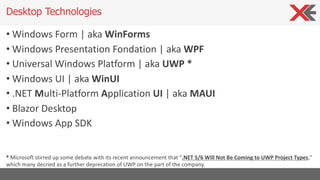
• Windows Form | aka WinForms
• Windows Presentation Fondation | aka WPF
• Universal Windows Platform | aka UWP *
• Windows UI | aka WinUI
• .NET Multi-Platform Application UI | aka MAUI
• Blazor Desktop
• Windows App SDK
Desktop Technologies
* Microsoft stirred up some debate with its recent announcement that ".NET 5/6 Will Not Be Coming to UWP Project Types,"
which many decried as a further deprecation of UWP on the part of the company.
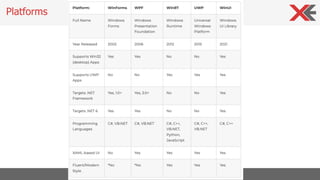
Platforms
• Support to latest tooling and C# features
• Core runtime and API improvements
• Performance
• Deploy
• Side by side
• Machine global or app local framework
• Self conteined EXEs
Desktop Application .NET 6
• WPF and Windows Forms supported as first-class citizens in .NET
• Improved Designer Support (both WinForms and XAML)
• Improved ClickOnce Support
• Improved performance and reliability
• Accessibility improvements
• Quick Actions
• XAML Hot Reload Improvements (WPF /WinUI)
• Hot Reload
• IntelliSense Improvements
Windows Development
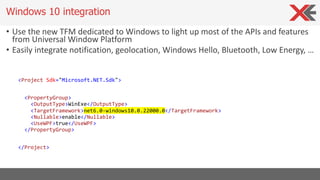
• Use the new TFM dedicated to Windows to light up most of the APIs and features
from Universal Window Platform
• Easily integrate notification, geolocation, Windows Hello, Bluetooth, Low Energy, …
<Project Sdk="Microsoft.NET.Sdk">
<PropertyGroup>
<OutputType>WinExe</OutputType>
<TargetFramework>net6.0-windows10.0.22000.0</TargetFramework>
<Nullable>enable</Nullable>
<UseWPF>true</UseWPF>
</PropertyGroup>
</Project>
Windows 10 integration
• .NET aims to re-introduce the experience of publishing small, self-contained
version of applications
• Across all .NET application formats (Windows, Web,…)
• Across all the platforms (Windows, Mac, Linux)
• Required Framework components are included in the deployment
• True xcopy-enabled, single-file executables
• Assembly Trimming
• .NET has come a long way for this
Single File Applications
• New Edge-Chromium-based HTML control
• Available in Windows Forms, WPF
• .NET Framework, .NET Core 3.x, and .NET 5/6
• Windows 7 and later
• Evergreen (updated every 6 weeks)
• WebView2 Evergreen is now a Windows component
WebView2
• .NET has many performance and size optimizations specifically driven by
support for ARM chips
• ARM chips are very popular in phones, but they are also becoming more
popular in laptops
• Surface Pro X is ARM-based
• Apple has announced that their Apple Silicon-based Macs will be ARM based
• IoT devices are often based on ARM chips
• Raspberry Pi 3 & 4 are ARM-based
ARM64
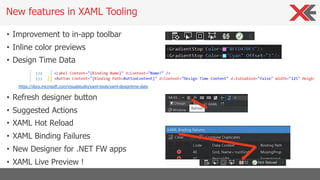
• Improvement to in-app toolbar
• Inline color previews
• Design Time Data
https://docs.microsoft.com/visualstudio/xaml-tools/xaml-designtime-data
• Refresh designer button
• Suggested Actions
• XAML Hot Reload
• XAML Binding Failures
• New Designer for .NET FW apps
• XAML Live Preview !
New features in XAML Tooling
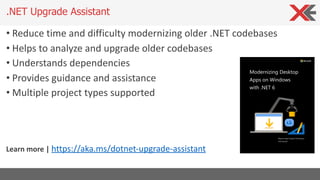
• Reduce time and difficulty modernizing older .NET codebases
• Helps to analyze and upgrade older codebases
• Understands dependencies
• Provides guidance and assistance
• Multiple project types supported
Learn more | https://aka.ms/dotnet-upgrade-assistant
.NET Upgrade Assistant
• Support new hardware
• Modern use experience
• App deploy and management
• Reliability, security, privacy
• System performance and battery life
Making app great for people who use them
… but starting where you are
• Compatibility with all you code (WinForm, WPF, UWP, MFC)
• Support for existing packaging and deployment
• Features that work across users’ version of Windows 10/11
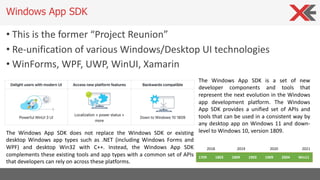
• This is the former “Project Reunion”
• Re-unification of various Windows/Desktop UI technologies
• WinForms, WPF, UWP, WinUI, Xamarin
Windows App SDK
The Windows App SDK is a set of new
developer components and tools that
represent the next evolution in the Windows
app development platform. The Windows
App SDK provides a unified set of APIs and
tools that can be used in a consistent way by
any desktop app on Windows 11 and down-
level to Windows 10, version 1809.
The Windows App SDK does not replace the Windows SDK or existing
desktop Windows app types such as .NET (including Windows Forms and
WPF) and desktop Win32 with C++. Instead, the Windows App SDK
complements these existing tools and app types with a common set of APIs
that developers can rely on across these platforms.
1709 1803 1809 1903 1909 2004 Win11
2018 2019 2020 2021
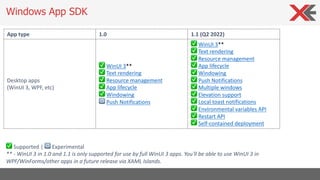
Windows App SDK
App type 1.0 1.1 (Q2 2022)
Desktop apps
(WinUI 3, WPF, etc)
✅ WinUI 3**
✅ Text rendering
✅ Resource management
✅ App lifecycle
✅ Windowing
🔁 Push Notifications
✅ WinUI 3**
✅ Text rendering
✅ Resource management
✅ App lifecycle
✅ Windowing
✅ Push Notifications
✅ Multiple windows
✅ Elevation support
✅ Local toast notifications
✅ Environmental variables API
✅ Restart API
✅ Self-contained deployment
✅ Supported | 🔁 Experimental
** - WinUI 3 in 1.0 and 1.1 is only supported for use by full WinUI 3 apps. You'll be able to use WinUI 3 in
WPF/WinForms/other apps in a future release via XAML Islands.
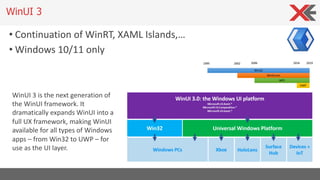
WinUI 3
• Continuation of WinRT, XAML Islands,…
• Windows 10/11 only
WinUI 3 is the next generation of
the WinUI framework. It
dramatically expands WinUI into a
full UX framework, making WinUI
available for all types of Windows
apps – from Win32 to UWP – for
use as the UI layer.
• The .NET team is working on next-generation cross-platform
framework for C# developers, called MAUI (Multi App User Interface)
• Use .NET and C# to build application for iOS, Android, MacOS and
Windows
• Share business logic and UI
• WinUI and Windows App SDK is the target framework for Windows
Windows Apps SDK and cross-platform apps
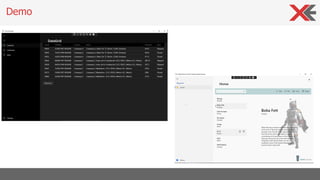
Demo
• Windows Apps SDK SDK doesn’t include only WinUI, but other
features that can be integrated in existing Win32 apps:
• Resource manager
• Activation APIs
• Windowing APIs
• Text rendering
• Push notification
Windows Apps SDK, ther is more...
• Supporto also in Win32 apps the rich activation system introduced in
the universal Windows Platofrm like file, protocol, statup task,
pickers, etc.
• Enables the usage oa the AppInstance class to manage single-
instance apps and multi-instanced apps
• It enables advanced redirection scenarios, like working in single
instance mode, but switching to multi-instance if the application is
activated from file
Windows Apps SDK – Activation APIs
• New AppWindow API which acts as a high-level implementation of
HWND
• Lot of customization options for your windows:
• Customize the title bar
• Use a custom title bar based on XAML
• Support full screen and compact overlay
Windows Apps SDK – Windows management APIs
Q&A
.NET
your platform for building anything
Mirco Vanini
Microsoft® MVP Windows Development
myContactInfo:
{
”e-mail”:“mirco.vanini@proxsoft.it”,
“web”: “www.proxsoft.it”,
“twitter”: “@MircoVanini”
}

How to modernise WPF and Windows Forms applications with Windows Apps SDK

  • 1.
    xedotnet.org How to moderniseWPF and Windows Forms applications with Windows Apps SDK Mirco Vanini @MircoVanini
  • 2.
    • Windows Form| aka WinForms • Windows Presentation Fondation | aka WPF • Universal Windows Platform | aka UWP * • Windows UI | aka WinUI • .NET Multi-Platform Application UI | aka MAUI • Blazor Desktop • Windows App SDK Desktop Technologies * Microsoft stirred up some debate with its recent announcement that ".NET 5/6 Will Not Be Coming to UWP Project Types," which many decried as a further deprecation of UWP on the part of the company.
  • 3.
  • 4.
    • Support tolatest tooling and C# features • Core runtime and API improvements • Performance • Deploy • Side by side • Machine global or app local framework • Self conteined EXEs Desktop Application .NET 6
  • 5.
    • WPF andWindows Forms supported as first-class citizens in .NET • Improved Designer Support (both WinForms and XAML) • Improved ClickOnce Support • Improved performance and reliability • Accessibility improvements • Quick Actions • XAML Hot Reload Improvements (WPF /WinUI) • Hot Reload • IntelliSense Improvements Windows Development
  • 6.
    • Use thenew TFM dedicated to Windows to light up most of the APIs and features from Universal Window Platform • Easily integrate notification, geolocation, Windows Hello, Bluetooth, Low Energy, … <Project Sdk="Microsoft.NET.Sdk"> <PropertyGroup> <OutputType>WinExe</OutputType> <TargetFramework>net6.0-windows10.0.22000.0</TargetFramework> <Nullable>enable</Nullable> <UseWPF>true</UseWPF> </PropertyGroup> </Project> Windows 10 integration
  • 7.
    • .NET aimsto re-introduce the experience of publishing small, self-contained version of applications • Across all .NET application formats (Windows, Web,…) • Across all the platforms (Windows, Mac, Linux) • Required Framework components are included in the deployment • True xcopy-enabled, single-file executables • Assembly Trimming • .NET has come a long way for this Single File Applications
  • 8.
    • New Edge-Chromium-basedHTML control • Available in Windows Forms, WPF • .NET Framework, .NET Core 3.x, and .NET 5/6 • Windows 7 and later • Evergreen (updated every 6 weeks) • WebView2 Evergreen is now a Windows component WebView2
  • 9.
    • .NET hasmany performance and size optimizations specifically driven by support for ARM chips • ARM chips are very popular in phones, but they are also becoming more popular in laptops • Surface Pro X is ARM-based • Apple has announced that their Apple Silicon-based Macs will be ARM based • IoT devices are often based on ARM chips • Raspberry Pi 3 & 4 are ARM-based ARM64
  • 10.
    • Improvement toin-app toolbar • Inline color previews • Design Time Data https://docs.microsoft.com/visualstudio/xaml-tools/xaml-designtime-data • Refresh designer button • Suggested Actions • XAML Hot Reload • XAML Binding Failures • New Designer for .NET FW apps • XAML Live Preview ! New features in XAML Tooling
  • 11.
    • Reduce timeand difficulty modernizing older .NET codebases • Helps to analyze and upgrade older codebases • Understands dependencies • Provides guidance and assistance • Multiple project types supported Learn more | https://aka.ms/dotnet-upgrade-assistant .NET Upgrade Assistant
  • 12.
    • Support newhardware • Modern use experience • App deploy and management • Reliability, security, privacy • System performance and battery life Making app great for people who use them … but starting where you are • Compatibility with all you code (WinForm, WPF, UWP, MFC) • Support for existing packaging and deployment • Features that work across users’ version of Windows 10/11
  • 13.
    • This isthe former “Project Reunion” • Re-unification of various Windows/Desktop UI technologies • WinForms, WPF, UWP, WinUI, Xamarin Windows App SDK The Windows App SDK is a set of new developer components and tools that represent the next evolution in the Windows app development platform. The Windows App SDK provides a unified set of APIs and tools that can be used in a consistent way by any desktop app on Windows 11 and down- level to Windows 10, version 1809. The Windows App SDK does not replace the Windows SDK or existing desktop Windows app types such as .NET (including Windows Forms and WPF) and desktop Win32 with C++. Instead, the Windows App SDK complements these existing tools and app types with a common set of APIs that developers can rely on across these platforms. 1709 1803 1809 1903 1909 2004 Win11 2018 2019 2020 2021
  • 14.
    Windows App SDK Apptype 1.0 1.1 (Q2 2022) Desktop apps (WinUI 3, WPF, etc) ✅ WinUI 3** ✅ Text rendering ✅ Resource management ✅ App lifecycle ✅ Windowing 🔁 Push Notifications ✅ WinUI 3** ✅ Text rendering ✅ Resource management ✅ App lifecycle ✅ Windowing ✅ Push Notifications ✅ Multiple windows ✅ Elevation support ✅ Local toast notifications ✅ Environmental variables API ✅ Restart API ✅ Self-contained deployment ✅ Supported | 🔁 Experimental ** - WinUI 3 in 1.0 and 1.1 is only supported for use by full WinUI 3 apps. You'll be able to use WinUI 3 in WPF/WinForms/other apps in a future release via XAML Islands.
  • 15.
    WinUI 3 • Continuationof WinRT, XAML Islands,… • Windows 10/11 only WinUI 3 is the next generation of the WinUI framework. It dramatically expands WinUI into a full UX framework, making WinUI available for all types of Windows apps – from Win32 to UWP – for use as the UI layer.
  • 16.
    • The .NETteam is working on next-generation cross-platform framework for C# developers, called MAUI (Multi App User Interface) • Use .NET and C# to build application for iOS, Android, MacOS and Windows • Share business logic and UI • WinUI and Windows App SDK is the target framework for Windows Windows Apps SDK and cross-platform apps
  • 17.
  • 18.
    • Windows AppsSDK SDK doesn’t include only WinUI, but other features that can be integrated in existing Win32 apps: • Resource manager • Activation APIs • Windowing APIs • Text rendering • Push notification Windows Apps SDK, ther is more...
  • 19.
    • Supporto alsoin Win32 apps the rich activation system introduced in the universal Windows Platofrm like file, protocol, statup task, pickers, etc. • Enables the usage oa the AppInstance class to manage single- instance apps and multi-instanced apps • It enables advanced redirection scenarios, like working in single instance mode, but switching to multi-instance if the application is activated from file Windows Apps SDK – Activation APIs
  • 20.
    • New AppWindowAPI which acts as a high-level implementation of HWND • Lot of customization options for your windows: • Customize the title bar • Use a custom title bar based on XAML • Support full screen and compact overlay Windows Apps SDK – Windows management APIs
  • 21.
    Q&A .NET your platform forbuilding anything Mirco Vanini Microsoft® MVP Windows Development myContactInfo: { ”e-mail”:“mirco.vanini@proxsoft.it”, “web”: “www.proxsoft.it”, “twitter”: “@MircoVanini” }