Jaime Rodriguez
Windows, PAX , Microsoft
Universal Windows Games
@jaimerodriguez
15 years at Microsoft, in Redmond, WA
3 years involved in gaming
Helps major publishers bring mobile
games to Windows
PC/ Retro gamer: Arcade, strategy
jaimer@microsoft.com, @jaimerodriguez
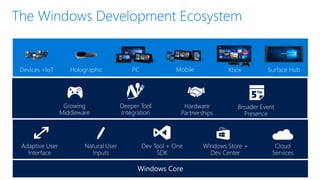
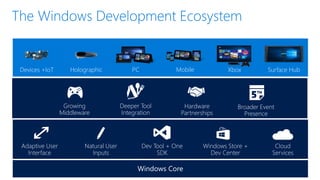
Natural User
Inputs
Dev Tool + One
SDK
Cloud
Services
Windows Store +
Dev Center
Adaptive User
Interface
Holographic XboxDevices +IoT Surface HubMobilePC
Growing
Middleware
Deeper Tool
Integration
Hardware
Partnerships
Broader Event
Presence
Services
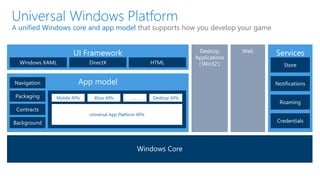
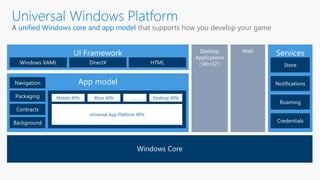
App model
UI Framework
Mobile APIs Xbox APIs Desktop APIs…
Universal App Platform APIs
unified Windows core and app model that supports how you develop your game
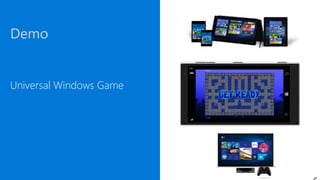
Demo
Universal Windows Game
Mobile
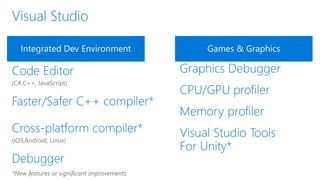
Integrated Dev Environment Games & Graphics
*New features or significant improvements
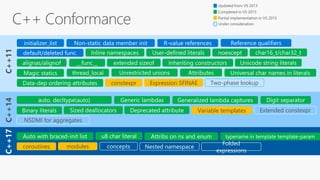
C++17
constexpr Expression SFINAE Two-phase lookup
Variable templates Extended constexpr
NSDMI for aggregates
coroutines modules concepts Nested namespace
Folded
expressions
Services
App model
UI Framework
Mobile APIs Xbox APIs Desktop APIs…
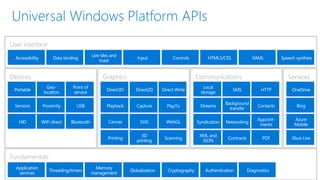
Universal App Platform APIs
unified Windows core and app model that supports how you develop your game
User interface
Fundamentals
Devices Graphics and media Communications and data Services
Geo-
location
Proximity
Direct3D Direct2D Direct Write
PlayTo
Contracts
Bing
Azure
Mobile
HTML5/CSS XAMLInput Controls
Authentication
Bluetooth
USB
HID WiFi direct
Point of
service
3D
printing
Scanning
WebGL
HTTP
Contacts
Appoint-
ments
PDF
Speech syntheis
Diagnostics
Portable
Sensors Playback Capture
Printing
SVGCanvas
Local
storage
SMS
Streams
Background
transfer
Syndication Networking
XML and
JSON
OneDrive
Live tiles and
toast
Accessibility Data binding
Application
services
Threading/timers
Memory
management
Globalization Cryptography
Xbox Live
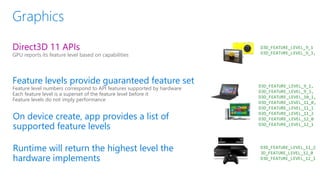
Direct3D 11 APIs
GPU reports its feature level based on capabilities
Feature levels provide guaranteed feature set
Feature level numbers correspond to API features supported by hardware
Each feature level is a superset of the feature level before it
Feature levels do not imply performance
On device create, app provides a list of
supported feature levels
Runtime will return the highest level the
hardware implements
D3D_FEATURE_LEVEL_9_1
D3D_FEATURE_LEVEL_9_3,
D3D_FEATURE_LEVEL_9_1,
D3D_FEATURE_LEVEL_9_3,
D3D_FEATURE_LEVEL_10_1,
D3D_FEATURE_LEVEL_11_0,
D3D_FEATURE_LEVEL_11_1
D3D_FEATURE_LEVEL_11_2
D3D_FEATURE_LEVEL_12_0
D3D_FEATURE_LEVEL_12_1
D3D_FEATURE_LEVEL_11_2
3D_FEATURE_LEVEL_12_0
D3D_FEATURE_LEVEL_12_1
http://msdn.microsoft.com/en-us/library/windows/desktop/ff476876(v=vs.85).aspx
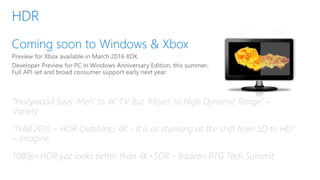
HDR SDR
“Hollywood Says ‘Meh’ to 4K TV But ‘More!’ to High Dynamic Range” –
Variety
“NAB 2015 – HDR Outshines 4K - It is as stunning as the shift from SD to HD”
– Imagine
1080p+HDR just looks better than 4K+SDR – Radeon RTG Tech Summit
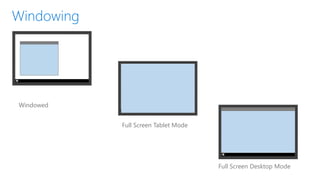
Windowed
Full Screen Tablet Mode
Full Screen Desktop Mode
Implementing Windowing
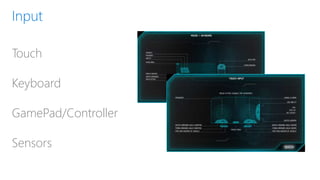
Touch
Keyboard
GamePad/Controller
Sensors
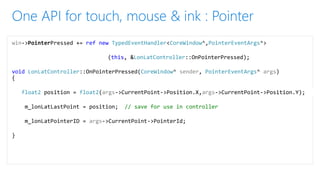
win->PointerPressed += ref new TypedEventHandler<CoreWindow^,PointerEventArgs^>
(this, &LonLatController::OnPointerPressed);
void LonLatController::OnPointerPressed(CoreWindow^ sender, PointerEventArgs^ args)
{
float2 position = float2(args->CurrentPoint->Position.X,args->CurrentPoint->Position.Y);
m_lonLatLastPoint = position; // save for use in controller
m_lonLatPointerID = args->CurrentPoint->PointerId;
}
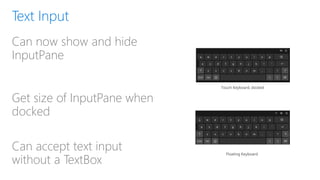
Can now show and hide
InputPane
Get size of InputPane when
docked
Can accept text input
without a TextBox
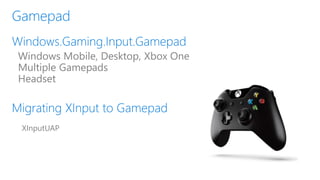
Windows Mobile, Desktop, Xbox One
Multiple Gamepads
Headset
XInputUAP
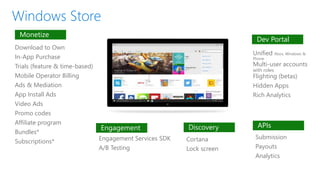
Download to Own
In-App Purchase
Trials (feature & time-based)
Mobile Operator Billing
Ads & Mediation
App Install Ads
Video Ads
Promo codes
Affiliate program
Bundles*
Subscriptions*
Unified Xbox, Windows &
Phone
Multi-user accounts
with roles
Flighting (betas)
Hidden Apps
Rich Analytics
Engagement Services SDK
A/B Testing
Submission
Payouts
Analytics
Cortana
Lock screen
Monetize
Engagement Discovery APIs
Dev Portal
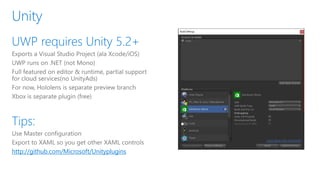
http://github.com/Microsoft/Unityplugins
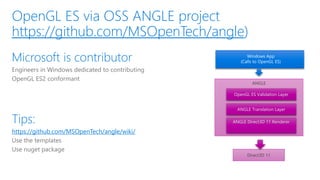
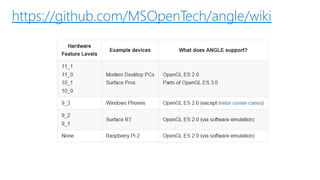
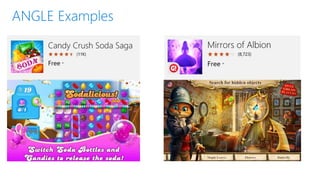
https://github.com/MSOpenTech/angle
ANGLE
OpenGL ES Validation Layer
ANGLE Translation Layer
ANGLE Direct3D 11 Renderer
Direct3D 11
https://github.com/MSOpenTech/angle/wiki/
https://github.com/MSOpenTech/angle/wiki
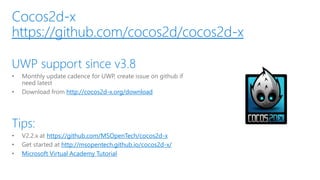
http://cocos2d-x.org/download
https://github.com/MSOpenTech/cocos2d-x
http://msopentech.github.io/cocos2d-x/
Microsoft Virtual Academy Tutorial
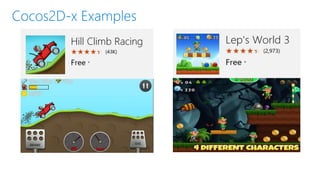
https://github.com/cocos2d/cocos2d-x
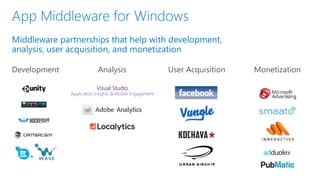
Development User Acquisition MonetizationAnalysis
Visual Studio
Application Insights & Mobile Engagement
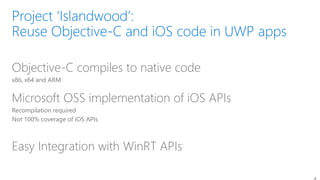
Objective-C compiles to native code
x86, x64 and ARM
Microsoft OSS implementation of iOS APIs
Recompilation required
Not 100% coverage of iOS APIs
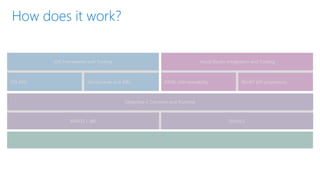
Easy Integration with WinRT APIs
WinRT API projectionsXAML interoperability
Visual Studio Integration and Tooling
UWP
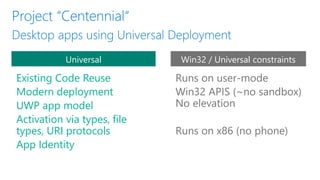
Existing Code Reuse
Modern deployment
UWP app model
Activation via types, file
types, URI protocols
App Identity
Universal Win32 / Universal constraints
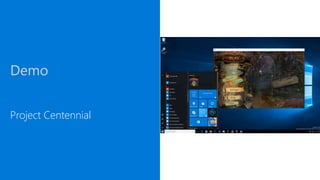
Demo
Project Centennial
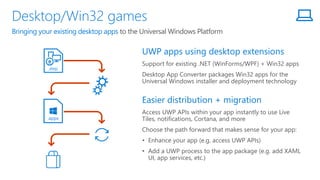
Support for existing .NET (WinForms/WPF) + Win32 apps
Desktop App Converter packages Win32 apps for the
Universal Windows installer and deployment technology
Access UWP APIs within your app instantly to use Live
Tiles, notifications, Cortana, and more
Choose the path forward that makes sense for your app:
• Enhance your app (e.g. access UWP APIs)
• Add a UWP process to the app package (e.g. add XAML
UI, app services, etc.)
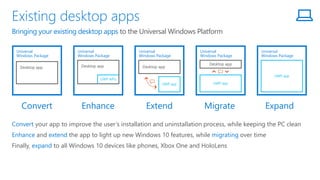
Bringing your existing desktop apps to the Universal Windows Platform
.msi
.appx
Convert your app to improve the user’s installation and uninstallation process, while keeping the PC clean
Enhance and extend the app to light up new Windows 10 features, while migrating over time
Finally, expand to all Windows 10 devices like phones, Xbox One and HoloLens
Bringing your existing desktop apps to the Universal Windows Platform
Universal
Windows Package
Desktop app
Universal
Windows Package
UWP APIs
Desktop app
Universal
Windows Package
Desktop app
UWP app
Universal
Windows Package
Desktop app
UWP app
Universal
Windows Package
UWP app
Natural User
Inputs
Dev Tool + One
SDK
Cloud
Services
Windows Store +
Dev Center
Adaptive User
Interface
Holographic XboxDevices +IoT Surface HubMobilePC
Growing
Middleware
Deeper Tool
Integration
Hardware
Partnerships
Broader Event
Presence
Спасибо!
Windows 10 UWP Development Overview

Windows 10 UWP Development Overview

  • 1.
    Jaime Rodriguez Windows, PAX, Microsoft Universal Windows Games @jaimerodriguez
  • 2.
    15 years atMicrosoft, in Redmond, WA 3 years involved in gaming Helps major publishers bring mobile games to Windows PC/ Retro gamer: Arcade, strategy jaimer@microsoft.com, @jaimerodriguez
  • 3.
    Natural User Inputs Dev Tool+ One SDK Cloud Services Windows Store + Dev Center Adaptive User Interface Holographic XboxDevices +IoT Surface HubMobilePC Growing Middleware Deeper Tool Integration Hardware Partnerships Broader Event Presence
  • 4.
    Services App model UI Framework MobileAPIs Xbox APIs Desktop APIs… Universal App Platform APIs unified Windows core and app model that supports how you develop your game
  • 5.
  • 8.
    Integrated Dev EnvironmentGames & Graphics *New features or significant improvements
  • 9.
    C++17 constexpr Expression SFINAETwo-phase lookup Variable templates Extended constexpr NSDMI for aggregates coroutines modules concepts Nested namespace Folded expressions
  • 15.
    Services App model UI Framework MobileAPIs Xbox APIs Desktop APIs… Universal App Platform APIs unified Windows core and app model that supports how you develop your game
  • 16.
    User interface Fundamentals Devices Graphicsand media Communications and data Services Geo- location Proximity Direct3D Direct2D Direct Write PlayTo Contracts Bing Azure Mobile HTML5/CSS XAMLInput Controls Authentication Bluetooth USB HID WiFi direct Point of service 3D printing Scanning WebGL HTTP Contacts Appoint- ments PDF Speech syntheis Diagnostics Portable Sensors Playback Capture Printing SVGCanvas Local storage SMS Streams Background transfer Syndication Networking XML and JSON OneDrive Live tiles and toast Accessibility Data binding Application services Threading/timers Memory management Globalization Cryptography Xbox Live
  • 18.
    Direct3D 11 APIs GPUreports its feature level based on capabilities Feature levels provide guaranteed feature set Feature level numbers correspond to API features supported by hardware Each feature level is a superset of the feature level before it Feature levels do not imply performance On device create, app provides a list of supported feature levels Runtime will return the highest level the hardware implements D3D_FEATURE_LEVEL_9_1 D3D_FEATURE_LEVEL_9_3, D3D_FEATURE_LEVEL_9_1, D3D_FEATURE_LEVEL_9_3, D3D_FEATURE_LEVEL_10_1, D3D_FEATURE_LEVEL_11_0, D3D_FEATURE_LEVEL_11_1 D3D_FEATURE_LEVEL_11_2 D3D_FEATURE_LEVEL_12_0 D3D_FEATURE_LEVEL_12_1 D3D_FEATURE_LEVEL_11_2 3D_FEATURE_LEVEL_12_0 D3D_FEATURE_LEVEL_12_1 http://msdn.microsoft.com/en-us/library/windows/desktop/ff476876(v=vs.85).aspx
  • 20.
    HDR SDR “Hollywood Says‘Meh’ to 4K TV But ‘More!’ to High Dynamic Range” – Variety “NAB 2015 – HDR Outshines 4K - It is as stunning as the shift from SD to HD” – Imagine 1080p+HDR just looks better than 4K+SDR – Radeon RTG Tech Summit
  • 21.
    Windowed Full Screen TabletMode Full Screen Desktop Mode
  • 22.
  • 23.
  • 24.
    win->PointerPressed += refnew TypedEventHandler<CoreWindow^,PointerEventArgs^> (this, &LonLatController::OnPointerPressed); void LonLatController::OnPointerPressed(CoreWindow^ sender, PointerEventArgs^ args) { float2 position = float2(args->CurrentPoint->Position.X,args->CurrentPoint->Position.Y); m_lonLatLastPoint = position; // save for use in controller m_lonLatPointerID = args->CurrentPoint->PointerId; }
  • 25.
    Can now showand hide InputPane Get size of InputPane when docked Can accept text input without a TextBox
  • 26.
    Windows Mobile, Desktop,Xbox One Multiple Gamepads Headset XInputUAP
  • 27.
    Download to Own In-AppPurchase Trials (feature & time-based) Mobile Operator Billing Ads & Mediation App Install Ads Video Ads Promo codes Affiliate program Bundles* Subscriptions* Unified Xbox, Windows & Phone Multi-user accounts with roles Flighting (betas) Hidden Apps Rich Analytics Engagement Services SDK A/B Testing Submission Payouts Analytics Cortana Lock screen Monetize Engagement Discovery APIs Dev Portal
  • 29.
  • 31.
    https://github.com/MSOpenTech/angle ANGLE OpenGL ES ValidationLayer ANGLE Translation Layer ANGLE Direct3D 11 Renderer Direct3D 11 https://github.com/MSOpenTech/angle/wiki/
  • 32.
  • 34.
  • 36.
    Development User AcquisitionMonetizationAnalysis Visual Studio Application Insights & Mobile Engagement
  • 39.
    Objective-C compiles tonative code x86, x64 and ARM Microsoft OSS implementation of iOS APIs Recompilation required Not 100% coverage of iOS APIs Easy Integration with WinRT APIs
  • 40.
    WinRT API projectionsXAMLinteroperability Visual Studio Integration and Tooling UWP
  • 41.
    Existing Code Reuse Moderndeployment UWP app model Activation via types, file types, URI protocols App Identity Universal Win32 / Universal constraints
  • 42.
  • 43.
    Support for existing.NET (WinForms/WPF) + Win32 apps Desktop App Converter packages Win32 apps for the Universal Windows installer and deployment technology Access UWP APIs within your app instantly to use Live Tiles, notifications, Cortana, and more Choose the path forward that makes sense for your app: • Enhance your app (e.g. access UWP APIs) • Add a UWP process to the app package (e.g. add XAML UI, app services, etc.) Bringing your existing desktop apps to the Universal Windows Platform .msi .appx
  • 44.
    Convert your appto improve the user’s installation and uninstallation process, while keeping the PC clean Enhance and extend the app to light up new Windows 10 features, while migrating over time Finally, expand to all Windows 10 devices like phones, Xbox One and HoloLens Bringing your existing desktop apps to the Universal Windows Platform Universal Windows Package Desktop app Universal Windows Package UWP APIs Desktop app Universal Windows Package Desktop app UWP app Universal Windows Package Desktop app UWP app Universal Windows Package UWP app
  • 45.
    Natural User Inputs Dev Tool+ One SDK Cloud Services Windows Store + Dev Center Adaptive User Interface Holographic XboxDevices +IoT Surface HubMobilePC Growing Middleware Deeper Tool Integration Hardware Partnerships Broader Event Presence
  • 47.

Editor's Notes

  • #4 Looking to improve the development ecosystem at every level Already know about improvements to the Core OS. Relased all the time. Features and tools – ongoing improvement, and large point releases. Hey, what did I say about BUILD? Really it’s all about what we’re doing to make the third level – above OS and tools, but below the devices, attractive to developers and vendors alike: focus on growing middleware partnerships; ensuring they’re tightly woven into our tooling; work closely with hardware vendors & makers to create opportunities at every level; and finally, create awareness. Used events, but really it’s shorthand for using both owned and external channels to showcase both internal and external events. New commitment to taking the gaming show on the road for more dev-centric opportunities; creation of dev-centric evidence pieces that we promote.
  • #5 Strong initial acceptance of Windows 10 has really taken over PC gaming: last survey from February, combined Win10 numbers are likely over 40% right now Xbox One as a Windows 10 device bringing UWP content to console gaming in 2016 – soon IoT Core – Raspberry Pi 3 running Windows 10 Surface Pro 4 and Surface Book. Gamers are *really* into them – dedicated GPUs for Surface Book, and SP4 offers many core gaming scenarios not possible elsewhere But what do those big numbers actually mean?
  • #6 The unified Windows core and app model powering the game experiences across these Windows devices is the Universal Windows Platform or UWP. UWP provides common APIs that can be used across all different devices powered by Windows 10. Alongside these common APIs, there are extensions available for each of the platforms that offer distinct capabilities (such as Mobile, Xbox and Desktop). These extension APIs work with our API contracts functionality to enable developers to light up features on devices that have these capabilities, but ensure the core of the app works across all devices. UWP also provides a number of UI frameworks, such as Windows XAML, DirectX and HTML to act as the user interface layer of the apps. Next to APIs, UWP also provides an app model that looks after the complete lifecycle of the games, from installation to uninstallation, providing a cleaner way for games to be installed, run, updated and uninstalled, preventing “Windows rot”. The app lifecycle also provides limited background execution of apps (only one foreground app executes at a time, with mechanisms in the OS to ask for specific background task execution (on a schedule, triggered by various events (e.g. Internet/Bluetooth connectivity, power changes, etc.) and in specific scenarios such as music playing or GPS tracking). The third part of UWP is the unification of the services, providing a single distribution and monetization mechanism through the Windows Store. The notification model has also been unified, enabling developers to send notifications in a single format to the various Windows devices. A light-weight model to roam data across devices is also provided to reduce complexity in providing settings and small amounts of data across devices. <click> Finally, we haven’t forgotten about existing developers who have invested in building desktop applications and experiences on the web. We’ll talk about these “bridges” later in this presentation and how you can re-use your existing code to accelerate bringing your game experiences to the Universal Windows Platform.
  • #17 The unified Windows core and app model powering the game experiences across these Windows devices is the Universal Windows Platform or UWP. UWP provides common APIs that can be used across all different devices powered by Windows 10. Alongside these common APIs, there are extensions available for each of the platforms that offer distinct capabilities (such as Mobile, Xbox and Desktop). These extension APIs work with our API contracts functionality to enable developers to light up features on devices that have these capabilities, but ensure the core of the app works across all devices. UWP also provides a number of UI frameworks, such as Windows XAML, DirectX and HTML to act as the user interface layer of the apps. Next to APIs, UWP also provides an app model that looks after the complete lifecycle of the games, from installation to uninstallation, providing a cleaner way for games to be installed, run, updated and uninstalled, preventing “Windows rot”. The app lifecycle also provides limited background execution of apps (only one foreground app executes at a time, with mechanisms in the OS to ask for specific background task execution (on a schedule, triggered by various events (e.g. Internet/Bluetooth connectivity, power changes, etc.) and in specific scenarios such as music playing or GPS tracking). The third part of UWP is the unification of the services, providing a single distribution and monetization mechanism through the Windows Store. The notification model has also been unified, enabling developers to send notifications in a single format to the various Windows devices. A light-weight model to roam data across devices is also provided to reduce complexity in providing settings and small amounts of data across devices. <click> Finally, we haven’t forgotten about existing developers who have invested in building desktop applications and experiences on the web. We’ll talk about these “bridges” later in this presentation and how you can re-use your existing code to accelerate bringing your game experiences to the Universal Windows Platform.
  • #21 I am sure some of you are thinking: One API, across a myriad of devices with very different hardware characteristics.. It is not doable… You are right-on… How Direct3D takes care of this is through Feature levels…
  • #23 Collaborating w/ DirectX team on HDR / Wide Color Gamut Support which is part of the REC 2020 standard. HDR is a key differentiator, ideally targeted at game scenarios, and has broad adoption across all the major TV and PC monitor manufacturers announced at CES 2016 Leveraging the expanded color space adds an additional level of clarity and image fidelity with minimal engineering and content changes HDR support will be available as a preview later this year on Windows 10 === If a game uses phisically based rendering, high dynamic range support can be added with a “very minimal engineering cost.” That’s because PBR already generates most of the data necessary for HDR. ==== We keep saying this is coming this year. How will it be rolled out? Is it in RS1? Does it have a different shipping vehicle? [For Arthur] [AY] Xbox: preview available in March 2016 XDK.  The RS1 mid-year release will officially add HDR support. PC: RS1 supports a developer preview that allows developers to output HDR.  RS2 preview is required for a full set of APIs.  RS2 is also required for consumers to get HDR as a feature.   I assume API is available to both Xbox and UWP app models, right?  [For Arthur] [AY] Yes – with the timelines in question 1).   What are the hardware requirements for HDR?  Do I need a specific graphics card? Is it a specific DX feature level?   [Claude] Arthur, correct me if I’m wrong, but as far as I know you don’t need a specific graphics card, as long as the graphics driver can send the data over HDMI correctly to the TV, it should work. I.e. it doesn’t matter what graphics card or which DX feature level you use, just have to send the data in the correct format over HDMI. You’ll need a HDR capable TV though, which could mean many things. [AY] On PC, the driver will need to support WDDM 2.1, which essentially means at least a DX12 card.   It is my understanding we are doing Rec 2020.. but not sure how that maps to Rec 709... is the latter the superset? Would we support 709 too? Or did we ‘skip it’.. [Claude] We’re supporting HDR10, which means Rec.2020 color primaries + ST.2084 transfer function. For SDR we have Rec.709 color primaries + Re.c709 gamma curve. Rec.2020 allows to represent a lot more colors than Rec.709, and ST.2084 allows to perceive actual bright values, vs. currently only perceiving up to white. For Windows, DWM will take care of legacy and new HDR content automatically. [AY] What Claude said - Rec 2020’s color space is larger than Rec 709’s.
  • #27 Very
  • #39 Main areas of middleware use in apps include products that help with development, analysis, user acquisition, and monetization. Middleware that helps develop apps takes advantage of solutions that allow a common code base to be used across platforms as well as tools to help with A/B testing, crash reporting, etc. Leading providers such as Unity, Cocos2d-x, Marmalade, Wave Engine, HockeyApp, Crittercism, BugSense support apps built on UWP Analysis of usage and behavior with apps enables developers to optimize for usability, customer satisfaction and monetization. Visual Studio Application Insights and Mobile Engagement, Adobe Analytics, and Localytics provide solutions for UWP apps User acquisition puts the ability to promote and gain users in the hands of the developers. Many different strategies can be employed such as improving attribution, retargeting, or programmatic marketing. Facebook, Vungle, Kochava, Urban Airship offer services to drive user acquisition Monetization of apps is a key aspect of a viable ecosystem. Monetization can be through direct payment using the Microsoft Store commerce capabilities for charging per download or for in app purchases. Additionally, advertising offers monetization opportunities and Microsoft Ads, Smaato, Inneractive, Pubmatic, and AdDuplex offer solutions for Windows apps.
  • #41 That’s why we’re so passionate building Universal Windows Platform Bridges that let you start with your code, no matter where it was born and bring it to the Universal Windows Platform and Store .
  • #43 Three chunks Clang/LLVM, c1/c2, CTP of arm32, build for phone Mentioned APIs, dozens more, not just that, import directly to Visual Studio, laid out in XIBs not programmatically, still preserved Not just syntax highlighting, mix and match XAML, not just UI, full access to UWP APIs Bridge is a bolt-on SDK, so you can use as much or as little as you want to, think about it, access to so much
  • #46 Previously announced as Project ‘Centennial’ and now an integral part of Windows 10 and the Universal Windows Platform is Microsoft’s bridge for existing desktop apps, like Win32 and .NET With the Desktop App Converter, package your existing desktop apps the same way as a UWP app, giving the you and the user the benefit of the streamlined (un)installation process while still delivering the full use of your existing app your users are familiar with. This is essentially a different installer technology which abstracts the app’s initial file system and registry operations so that installation and removal is an entirely discrete process and the app cannot make persistent changes to these systems during installation Additionally, the app is given an app identity after the conversion process, which is the key to accessing many of the newer UWP APIs, allowing your existing desktop application to make use of all of the new differentiated features such as Live Tiles, notifications, Cortana, and more This opens up the opportunity to either enhance your app with UWP APIs directly from your existing code or adding a UWP process to the app package, which can be used to migrate the app, add XAML UI, app services and more. Note that existing desktop apps converted this way can only run on systems on which they ran before (that is, they remain bound to desktop) until they are migrated to stop using the desktop extensions
  • #47 TODO
  • #48 Looking to improve the development ecosystem at every level Already know about improvements to the Core OS. Relased all the time. Features and tools – ongoing improvement, and large point releases. Hey, what did I say about BUILD? Really it’s all about what we’re doing to make the third level – above OS and tools, but below the devices, attractive to developers and vendors alike: focus on growing middleware partnerships; ensuring they’re tightly woven into our tooling; work closely with hardware vendors & makers to create opportunities at every level; and finally, create awareness. Used events, but really it’s shorthand for using both owned and external channels to showcase both internal and external events. New commitment to taking the gaming show on the road for more dev-centric opportunities; creation of dev-centric evidence pieces that we promote.